2A2BMTGW101Smart watch
Deepblu ApS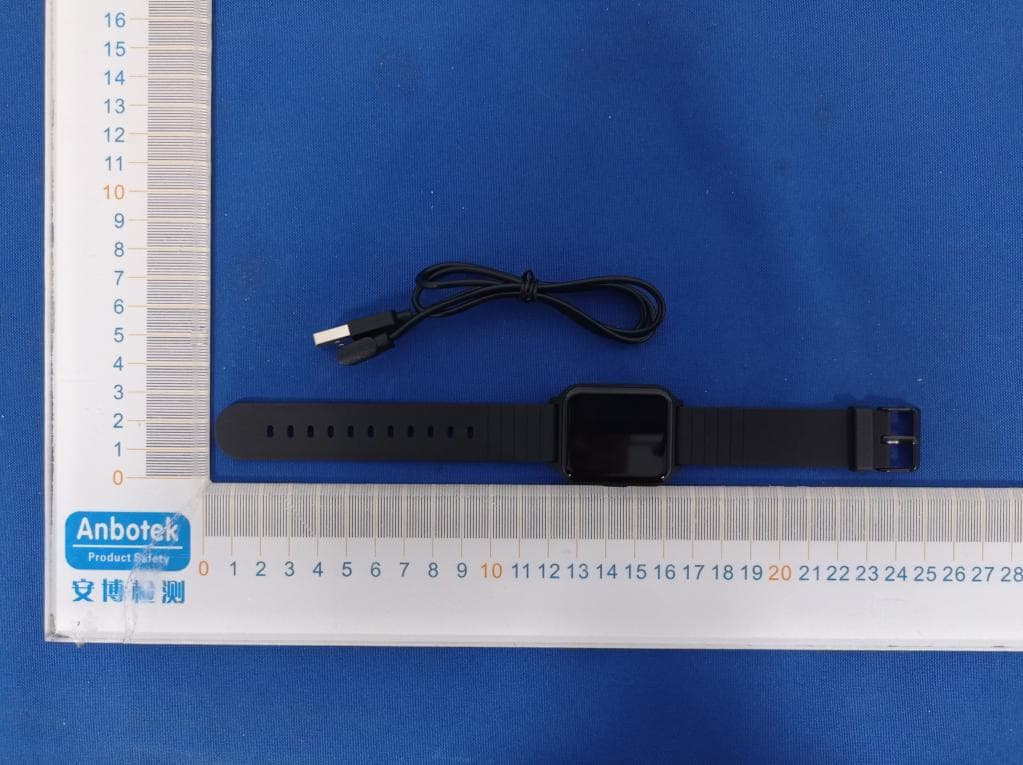
Click to zoom
Application Details
- Equipment Class
- DTS - Digital Transmission System
- Date of Grant
- Jul 08, 2021
- Application Purpose
- Original Equipment
- Date of Application
- Jul 08, 2021
- Equipment Note
- Smart watch
- Frequency Range
- 2402.00000000 - 2480.00000000
- Company
- Deepblu ApS
- Country
- Denmark
Documents & Files
Document Text
Text extracted from the exhibit documents filed with the FCC. Open a document above to read the original.
Users Manual
Front: 260x50mm Back: 260x50mm Deeprio Smart Sports Watch Heart rate monitoring zone Charging the battery ON/OFF Touch screen area The charging contact I. Quick start 1. Appearance III. Functions IV. Electrical parameters II. Downloading and pairing 5. Change the wristband 3. Button functions 4. On-screen operation 2. Turning on/off ● Short press ● Press and hold ● Turning on Automatic turning on while charging. Note: Please charge and activate the watch before first use; please use the provided charger only. Ύ Press and hold the power on button. ● Turning off Turning off procedure: Settings>>System Operation>>Shutdown Product nameDeeprio WatchScreen 1.52'’ Colored screen Battery capacity180mAhBattery life7-9 days Charging durationAbout 2 hoursWaterproof ratingIP68 Thank you for choosing this product, please read the operating instructions carefully before using the watch On the dial screen, short press the button to enter the application list Ύ In the application list, short press the button to return to the main dial Ώ When the screen goes off, short press the button to lit up the screen When the watch is off, press and hold the button to turn it on Ύ In the power-on state, press and hold the button to enter the system menu ● Slide up and down Switching among screens at the same level Ύ Review long text/detailed information ● Slide left and right Switching among screens at the same level ● Single-tap of the screen Enter the next-level screen Ύ Follow the on-screen buttons to complete the corresponding actions ● Remove a wristband 1. Turn over the watch and find the quick-release lever. 2. While pressing the quick-release lever inward, gently pull the wristband away from the watch to release it. 2. Pairing Use the "Deeprio" app on your phone to pair with your watch. 1. Multiple sports Deeprio watch has various sports modes. Tap the sports icon on the watch to enter the corresponding sports mode. In the sports mode, the watch will record your exercise time, distance, steps, heart rate and other information to help you do exercises in a better way. 2. Health monitoring Deeprio watch has various health monitoring functions such as heart rate monitoring, blood oxygen monitoring and sleep monitoring; Heart rate monitoring: slide the screen to the heart rate measurement screen and wait for a moment. Then the watch will automatically measure your heart ● Attach a wristband 1. To attach a wristband, hold the band at a 45° angle and slide the pin (the side opposite the quick-release lever) into the notch on the watch. 2. While pressing the quick-release lever inward, slide the other end of the wristband into place. 3. When both ends of the pin are inserted, release the quick-release lever. 1. Download the APP You can directly scan the QR code to download “Deeprio” App or you can search “Deeprio” in the App store for downloading and installation. rate. Please remain relatively still while measuring your heart rate so that the watch can deliver heart rate data more accurately. Blood oxygen monitoring: low blood oxygen levels can affect your health. Deeprio watch provides you with the ability to monitor your blood oxygen, simply tap the tap the blood oxygen icon in your watch to automatically start the measurement. Sleep monitoring: a good night's sleep is very important for us. Deeprio watch can record your sleep quality every night, including indicators such as deep sleep duration, light sleep duration, and awake duration; this function needs to be enabled in the corresponding part of the APP. Note: heart rate, blood oxygen and sleep monitoring data are for reference only and shall not be used as a basis for medical diagnosis. 3. Reminder function Deeprio watch provides message reminder, call reminder, alarm reminder, sedentary reminder, etc. It is a small butler of your life. After you turn on the corresponding reminder function on the APP, the watch will stay connected with your phone and vibrate to remind you when there is an incoming call or a new message to ensure you won't miss any important information. 4. Other functions Deeprio watch also offers features like weather reports and stopwatch, and it is all waiting for your to explore and discover. ● Do not place the device and its accessories where the temperature is too high or too low, as this may cause malfunction, fire or explosion. ● Protect the product from impacts or vibrations that may damage the device and its accessories or cause malfunction. ● Do not disassemble or modify the device and its accessories without permission, and call for the after-sales service in case of any malfunction. V. FAQ ● The phone can't connect to the watch 1. Update the APP to the latest version. 2. It is recommended to close all APPs, restart the Bluetooth of the phone and try connecting again. 3. Verify that the operation system of the phone is Android 6.0 or iOS 9.0 or above. ● No message or call reminder received by the watch 1. Enable the smart reminder and incoming call reminder functions in the APP and synchronize to the watch. 2. The phone shall be paired with the watch via bluetooth. 3. Keep the proper connection of the Bluetooth of the watch. ● The Bluetooth connection fails frequently 1. If the watch and the phone are too far apart from each other, the Bluetooth connection will be lost, and if the distance is more than 7 meters, the Bluetooth connection will be compromised significantly. 2. Obstruction between the watch and the phone will affect the connection, and the human body or metal jewelry will interfere with the Bluetooth connection signals. 3. Please make sure that the Bluetooth function of your phone is normal. VI. Certification FCC STATEMENT: This device complies with Part 15 of the FCC Rules. Operation is subject to the following two conditions: (1) This device may not cause harmful interference, and (2) This device must accept any interference received, including interference that may cause undesired operation. Warning:…
Text truncated - open the document above for the full version.
Users Manual
Smart Watch Front: 260x50mm Back: 260x50mm OYV Smart Sports Watch Heart rate monitoring zone ON/OFF Touch screen area The charging contac t I. Quick start 1. Appearance Thank you for choosing this product, please read the operating instructions carefully before using the watch Charging the battery 3. Button functions 4. On-screen operation 2. Turning on/off ● Short press ● Press and hold ● Turning on ① Automatic turning on while charging. Note: Please charge and activate the watch before first use; please use the provided charger only. ② Press and hold the power on button. ● Turning off Turning off procedure: Settings>>System Operation>>Shutdown ① On the dial screen, short press the button to enter the application list ② In the application list, short press the button to return to the main dial ③ When the screen goes off, short press the button to lit up the screen ① When the watch is off, press and hold the button to turn it on ② In the power-on state, press and hold the button to enter the system menu ● Slide up and down ① Switching among screens at the same level ② Review long text/detailed information ● Slide left and right ① Switching among screens at the same level ● Single-tap of the screen ① Enter the next-level screen ② Follow the on-screen buttons to complete the corresponding actions II. Downloading and pairing 5. Change the wristband ● Remove a wristband 1. Turn over the watch and fifind the quick-release lever. 2. While pressing the quick-release lever inward, gently pull the wristband away from the watch to release it. ● Attach a wristband 1. To attach a wristband, hold the band at a 45° angle and slide the pin (the side opposite the quick-release lever) into the notch on the watch. 2. While pressing the quick-release lever inward, slide the other end of the wristband into place. 3. When both ends of the pin are inserted, release the quick-release lever. 1. Download the APP You can directly scan the QR code to download “OYV Fit” App or you can search “OYV Fit” in the App store for downloading and installation. 2. Pairing Use the “OYV Fit” app on your phone to pair with your watch. 1. Multiple sports OYV Fit watch has various sports modes. Tap the sports icon on the watch to enter the corresponding sports mode. In the sports mode, the watch will record your exercise time, distance, steps, heart rate and other information to help you do exercises in a better way. 2. Health monitoring OYV Fit watch has various health monitoring functions such as heart rate monitoring, blood oxygen monitoring and sleep monitoring; Heart rate monitoring: slide the screen to the heart rate measurement screen and wait for a moment. Then the watch will automatically measure your heart rate. Please remain relatively still while measuring your heart rate so that the watch can deliver heart rate data more accurately. Blood oxygen monitoring: low blood oxygen levels can affect your health. OYV Fit watch provides you with the ability to monitor your blood oxygen, simply tap the tap the blood oxygen icon in your watch to automatically start the measurement. Sleep monitoring: a good night's sleep is very important for us. OYV Fit watch can record your sleep quality every night, including indicators such as deep sleep duration, light sleep duration, and awake duration; this function needs to be enabled in the corresponding part of the APP. Note: heart rate, blood oxygen and sleep monitoring data arefor reference only and shall not be used as a basis for medical diagnosis. 3. Reminder function OYV Fit watch provides message reminder, call reminder, alarm reminder, sedentary reminder, etc. It is a small butler of your life. After you turn on the corresponding reminder function on the APP, the watch will stay connected with your phone and vibrate to remind you when there is an incoming call or a new message to ensure you won't miss any important information. 4. Other functions OYV Fit watch also offers features like weather reports and stopwatch, and it is all waiting for your to explore and discover. III. Functions IV. Electrical parameters Product nameOYV Fit watchScreen 1.52'’ Colored screen Battery capacity180mAhBattery life7-9 days Charging durationAbout 2 hoursWaterproof ratingIP68 ● Do not place the device and its accessories where the temperature is too high or too low, as this may cause malfunction, fire or explosion. ● Protect the product from impacts or vibrations that may damage the device and its accessories or cause malfunction. ● Do not disassemble or modify the device and its accessories without permission, and call for the after-sales service in case of any malfunction. V. FAQ ● The phone can't connect to the watch 1. Update the APP to the latest version. 2. It is recommended to close all APPs, restart the Bluetooth of the phone and try connecting again. 3. Verify that the operation system of the phone is Android 6.0 or iOS 9.0 or above. ● No message or call reminder received by the watch 1. Enable the smart reminder and incoming call reminder functions in the APP and synchronize to the watch. 2. The phone shall be paired with the watch via bluetooth. 3. Keep the proper connection of the Bluetooth of the watch. ● The Bluetooth connection fails frequently 1. If the watch and the phone are too far apart from each other, the Bluetooth connection will be lost, and if the distance is more than 7 meters, the Bluetooth connection will be compromised significantly. 2. Obstruction between the watch and the phone will affect the connection, and the human body or metal jewelry will interfere with the Bluetooth connection signals. 3. Please make sure that the Bluetooth function of your phone is normal. VI. Certification FCC STATEMENT: This device complies with Part 15 of the FCC Rules. Operation is subject to the following two conditions: (1) This device may not cause harmful interference, and (2) This device must accept any interference received, including interference that may cause undesired operation…
Text truncated - open the document above for the full version.
Users Manual
Front: 260x50mm Back: 260x50mm Siruis Smart Sports Watch Heart rate monitoring zone ON/OFF Touch screen area The charging contac t I. Quick start 1. Appearance Thank you for choosing this product, please read the operating instructions carefully before using the watch Charging the battery 3. Button functions 4. On-screen operation 2. Turning on/off ● Short press ● Press and hold ● Turning on ① Automatic turning on while charging. Note: Please charge and activate the watch before first use; please use the provided charger only. ② Press and hold the power on button. ● Turning off Turning off procedure: Settings>>System Operation>>Shutdown ① On the dial screen, short press the button to enter the application list ② In the application list, short press the button to return to the main dial ③ When the screen goes off, short press the button to lit up the screen ① When the watch is off, press and hold the button to turn it on In the power-on state, press and hold the button to enter the system menu II. Downloading and pairing 5. Change the wristband ● Slide up and down ① Switching among screens at the same level ② Review long text/detailed information ● Slide left and right ① Switching among screens at the same level ● Single-tap of the screen ① Enter the next-level screen ② Follow the on-screen buttons to complete the corresponding actions ● Remove a wristband 1. Turn over the watch and find the quick-release lever. 2. While pressing the quick-release lever inward, gently pull the wristband away from the watch to release it. ● Attach a wristband 1. To attach a wristband, hold the band at a 45° angle and slide the pin (the side opposite the quick-release lever) into the notch on the watch. 2. While pressing the quick-release lever inward, slide the other end of the wristband into place. 3. When both ends of the pin are inserted, release the quick-release lever. 1. Download the APP You can directly scan the QR code to download “TouchELEX” App or you can search “TouchELEX” in the App store for downloading and installation. III. Functions 2. Pairing Use the "TouchELEX" app on your phone to pair with your watch. 1. Multiple sports Siruis watch has various sports modes. Tap the sports icon on the watch to enter the corresponding sports mode. In the sports mode, the watch will record your exercise time, distance, steps, heart rate and other information to help you do exercises in a better way. 2. Health monitoring siruis watch has various health monitoring functions such as heart rate monitoring, blood oxygen monitoring and sleep monitoring; Heart rate monitoring: slide the screen to the heart rate measurement screen and wait for a moment. Then the watch will automatically measure your heart rate. Please remain relatively still while measuring your heart rate so that the watch can deliver heart rate data more accurately. Blood oxygen monitoring: low blood oxygen levels can affect your health. Siruis watch provides you with the ability to monitor your blood oxygen, simply tap the tap the blood oxygen icon in your watch to automatically start the measurement. Sleep monitoring: a good night's sleep is very important for us. Siruis watch can record your sleep quality every night, including indicators such as deep sleep duration, light sleep duration, and awake duration; this function needs to be enabled in the corresponding part of the APP. Note: heart rate, blood oxygen and sleep monitoring data are for reference only and shall not be used as a basis for medical diagnosis. 3. Reminder function siruis watch provides message reminder, call reminder, alarm reminder, sedentary reminder, etc. It is a small butler of your life. After you turn on the corresponding reminder function on the APP, the watch will stay connected with your phone and vibrate to remind you when there is an incoming call or a new message to ensure you won't miss any important information. 4. Other functions siruis watch also offers features like weather reports and stopwatch, and it is all waiting for your to explore and discover. IV. Electrical parameters Product namesiruis WatchScreen 1.52'’ Colored screen Battery capacity180mAhBattery life7-9 days Charging durationAbout 2 hoursWaterproof ratingIP68 ● Do not place the device and its accessories where the temperature is too high or too low, as this may cause malfunction, fire or explosion. ● Protect the product from impacts or vibrations that may damage the device and its accessories or cause malfunction. ● Do not disassemble or modify the device and its accessories without permission, and call for the after-sales service in case of any malfunction. V. FAQ ● The phone can't connect to the watch 1. Update the APP to the latest version. 2. It is recommended to close all APPs, restart the Bluetooth of the phone and try connecting again. 3. Verify that the operation system of the phone is Android 6.0 or iOS 9.0 or above. ● No message or call reminder received by the watch 1. 1. Enable the smart reminder and incoming call reminder functions in the APP and synchronize to the watch. 2. The phone shall be paired with the watch via bluetooth. 3. Keep the proper connection of the Bluetooth of the watch. ● The Bluetooth connection fails frequently 1. If the watch and the phone are too far apart from each other, the Bluetooth connection will be lost, and if the distance is more than 7 meters, the Bluetooth connection will be compromised significantly. 2. Obstruction between the watch and the phone will affect the connection, and the human body or metal jewelry will interfere with the Bluetooth connection signals. 3. Please make sure that the Bluetooth function of your phone is normal. VI. Certification FCC STATEMENT: This device complies with Part 15 of the FCC Rules. Operation is subject to the following two conditions: (1) This device may not cause harmful interference, and (2) This device must accept any interference received, including interference that may cause undesired operation. Warning:…
Text truncated - open the document above for the full version.
External Photos
FCCID:2A2BMTGW101
ID Label/Location Info
LabelLocationOnEUT Label ProductName:Smartwatch ModelNo.:TGW101 FCCID:2A2BMTGW101
Internal Photos
FCCID:2A2BMTGW101 ANT
Operational Description
Deepblu ApS Declaration concerning Antenna Specification It is hereby declared that the product Model No.: TGW101, E10, E12, D27, E10- XFit 1, E12- ColorFit Maxx, LCZ01, H004, Deeprio Watch, OYV Watch Lite, Sirius FCC ID : 2A2BMTGW101 fulfills the requirement in FCC test relating to the antenna type. The device specified above confirms to the FCC recommendations for internal antenna type(s) described below: Model No. of antenna: N/A Type of antenna: PCB Antenna Gain of the antenna: -3 dBi Frequency range: 2402-2480MHz The mounting of the antenna is fixed to the radio module and no other antenna should be used. Company name: Deepblu ApS Address: Fruebjergvej 3, 2100 Copenhagen, Denmark City: Fruebjergvej ZIP / Postal code: / Country: Denmark Place: Fruebjergvej Date: 7/2/2021 Signature: version01
RF Exposure Info
RFEXPOSUREEVALUATION FCCID:2A2BMTGW101 AccordingtoFCC1.1310:Thecriterialistedinthefollowingtableshallbeused toevaluatetheenvironmentimpactofhumanexposuretoradiofrequency(RF) Radiationasspecifiedin§1.1307(b): RoutineSARevaluationreferstothatspecificallyrequiredby§2.1093,using measurementsorcomputersimulation.WhenroutineSARevaluationisnot required,portabletransmitterswithoutputpowergreaterthantheapplicable lowthresholdrequireSARevaluationtoqualifyforTCBapproval. Channel (MHz) Maximum output power (dBm) Tuneup tolerance (dBm) MaxTuneUp Power(dBm) Distance (mm) Calculation results Limit Operating Mode 2402-0.075-0.075 ±1 0.92550.3843 BLE2440 -0.575-0.575 ±1 0.425 5 0.3453 2480 -0.234-0.234 ±1 0.766 5 0.3763 TestResults:PASS.
Test Report
ReportNo.:18220WC10091201FCCID:2A2BMTGW101Page1of48 Code:AB-RF-05-a FCCTESTREPORT ClientName:DeepbluApS Address:Fruebjergvej3,2100Copenhagen,Denmark ProductName:Smartwatch Date:Jun.30,2021 ShenzhenAnbotekComplianceLaboratoryLimited ReportNo.:18220WC10091201FCCID:2A2BMTGW101Page2of48 Code:AB-RF-05-a Contents 1.GeneralInformation ............................................................................................................................................... 5 1.1.ClientInformation ....................................................................................................................................... 5 1.2.DescriptionofDevice(EUT) ..................................................................................................................... 5 1.3.AuxiliaryEquipmentUsedDuringTest ................................................................................................... 6 1.4.DescriptionofTestModes ........................................................................................................................ 6 1.5.Listofchannels ........................................................................................................................................... 6 1.6.DescriptionOfTestSetup ......................................................................................................................... 7 1.7.TestEquipmentList .................................................................................................................................... 8 1.8.MeasurementUncertainty ......................................................................................................................... 9 1.9.DescriptionofTestFacility ........................................................................................................................ 9 2.SummaryofTestResults ................................................................................................................................... 10 3.ConductedEmissionTest ................................................................................................................................... 11 3.1.TestStandardandLimit .......................................................................................................................... 11 3.2.TestSetup .................................................................................................................................................. 11 3.3.TestProcedure .......................................................................................................................................... 11 3.4.TestData .................................................................................................................................................... 11 4.RadiationSpuriousEmissionandBandEdge ................................................................................................ 16 4.1.TestStandardandLimit .......................................................................................................................... 16 4.2.TestSetup .................................................................................................................................................. 16 4.3.TestProcedure .......................................................................................................................................... 17 4.4.TestData .................................................................................................................................................... 18 5.MaximumPeakOutputPowerTest .................................................................................................................. 26 5.1.TestStandardandLimit .......................................................................................................................... 26 5.2.TestSetup .................................................................................................................................................. 26 5.3.TestProcedure .......................................................................................................................................... 26 5.4.TestData .................................................................................................................................................... 26 6.6DBOccupyBandwidthTest ............................................................................................................................. 29 6.1.TestStandardandLimit .......................................................................................................................... 29 6.2.TestSetup .................................................................................................................................................. 29 6.3.TestProcedure .......................................................................................................................................... 29 6.4.TestData .................................................................................................................................................... 29 7.PowerSpectralDensityTest .............................................................................................................................. 32 7.1.TestStandardandLimit .......................................................................................................................... 32 7.2.TestSetup .................................................................................................................................................. 32 7.3.TestProcedure .......................................................................................................................................... 32 7.4.TestData .................................................................................................................................................... 32 8.100kHzBandwidthofFrequencyBandEdgeReq…
Text truncated - open the document above for the full version.
Test Setup Photos
FCCID:2A2BMTGW101 PhotoofConductedEmissionMeasurement PhotoofRadiationEmissionTest
Contact Information
Applicant
Dragon Fu
Test Firm
Shenzhen Anbotek Compliance Laboratory LimitedJeff Zhu
Technical Specifications
| # | Rule Parts | Frequency Range | Power Output |
|---|---|---|---|
| 1 | 15C | 2.40 GHz - 2.48 GHz | 1.00 mW |