2A2J4-L1108Tablet PC
Shenzhen Pretech Industrial Co., Ltd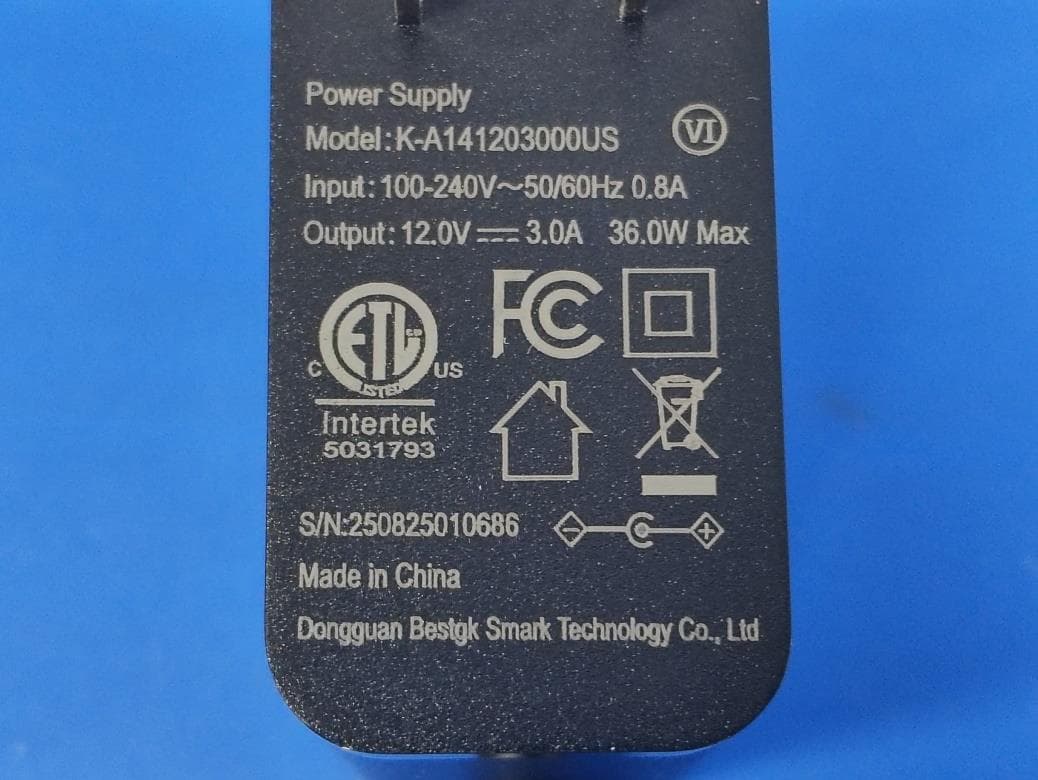
Click to zoom
Application Details
- Equipment Class
- NII - Unlicensed National Information Infrastructure TX
- Date of Grant
- Dec 08, 2025
- Application Purpose
- Original Equipment
- Equipment Note
- Tablet PC
- Frequency Range
- 5180.00000000 - 5240.00000000
- Country
- China
Documents & Files
Document Text
Text extracted from the exhibit documents filed with the FCC. Open a document above to read the original.
Users Manual
1 User'sGuide Contents GettingStarted.........................................................3 KeyExplainrd..................................................................3 Startingup......................................................................3 SwitchingYourTabletOn/Off.........................................4 Thistabletisbattery-free.PleaseconnecttheUSBcable topoweriton..................................................................4 DisconnecttheUSBcabletopoweritoff........................4 GettingAroundYourTablet............................................5 TouchInputSettings.......................................................6 GettingConnectedtotheInternet..........................6 AddingaNewNetworkConnection.......................7 TurningOnWi-Fi............................................................7 ConnectingtoaWi-FiNetwork.......................................7 CheckingtheWi-FiNetworkStatus................................7 USBtethering&portablehotspot....................................8 MakingtheMostofMultimedia...............................9 Camera...........................................................................9 2 PlayingMusic..................................................................9 SundRecorder................................................................9 SortingoutYourtabletSettings...........................10 Bluetooth.......................................................................10 SettingDateandTime..................................................10 DisplaySettings............................................................10 SoundSettings.............................................................11 LanguageSettings........................................................11 SecuritySettings...........................................................11 ManagingYourDeviceMemory....................................12 ResettoFactorySettings..............................................12 Calculator......................................................................12 Screenrecord...............................................................12 ForYourSafety......................................................13 GeneralSafety..............................................................13 Distraction.....................................................................14 ProductHandling..........................................................14 ElectricalSafety............................................................17 Interference...................................................................18 ExplosiveEnvironments................................................19 Systemupdate..............................................................20 Commonfaultdiagnosis...............................................20 3 GettingStarted Overview Productname:TabletPC Model:L1108 KeyExplainrd KeyFunction PowerKeyPresstoturnonoroff Presstorestartyourtablet PresstoScreenshot PresstoEmergency HomeKeyPresstoreturntotheHomeScreenfromany applicationorscreen. MenuKeyHoldtoseerecentlyusedapplications. BackKeyPresstogotothepreviousscreen. VolumeKeys Pressorholdtoturnthevolumeupordown. Startingup StatusandNotificationlcons Yourtabletwilltellyouexactlywhat’sgoingonbyshowingyousimple icons.Here’swhattheymean 4 USBconnectedMissedcall AirplanemodeSignalstrength BatterychargeNewmessage MeetingmodeWi-Finetwork AlarmsetEarphoneinsert SilentmodeNewWi-Finetworkdetected BluetoothiconUSBdebuggingconnected SwitchingYourTabletOn/Off Thistabletisbattery-free.PleaseconnecttheUSBcabletopoweriton. DisconnecttheUSBcabletopoweritoff. SettingUpYourtabletfortheFirstTime Whenyoufirstpoweronyourtabletafteryoupurchaseitorresetitto factorysettings(seechapterSortingoutYourSettings–Privacy:Resetto FactorySettings),youneedtodosomesettingsbeforeusingit. SwitchingtoSleepMode Tosavebatterypower,SleepModesuspendsyourdevicetoa low-power-consumptionstatewhilethedisplayisoff.Yourdevicealsogoes intoSleepModebyitselfwhenthedisplayisautomaticallyturnedoffaftera certainperiodoftime.Youcanstartsleepmodebythefollowingmethod. 5 PressPowerKeytoswitchtoSleepMode. WakingUpYourTablet PressPowerKeytoactivateyourscreendisplay. Dragtotheup. NOTE:Ifyouhavesetanunlockpattern,PINorpasswordforyour tablet(seechapterSortingoutYourSettings–SecuritySettings)you’ll needtodrawthepatternorenterthePIN/passwordtounlockyourscreen. GettingAroundYourTablet TouchControl Youcanusefingergesturestocontrolyourtablet.Thecontrolsonyour touch-screenchangedynamicallydependingonthetasksyou’re performing. Tapthebuttons,icons,orapplicationstoselectitemsortoopen applications. Flickthescreentoscrollup,down,leftorright. Point,draganddroptomoveparticularitemsacrossthescreen. Double-tapthescreentozoomin/outanimage. NOTE:Youcanviewthetabletscreeninportraitorlandscape orientationsimplybyholdingituprightorturningitonitsside.Notall screensareviewableinlandscape. HomeScreen IntheHomescreen,besidestheshortcuticonisdisplayed,youcan alsosetyourownwallpaper,addthewidgetsorapplicationshortcutsyou need,orremovethemasyoulike. 6 ChoosingYourWallpaper LongPressdesktoptoselectthewallpapers、widgets、homesettings Adding/RemovingitemstoYourHomeScreen EntertheApplicationProgramInterface Inthelistofapplications,touchandholdtheiconuntilthemainscreen appears,movetheapplicationicontotheidleposition,releasethefinger. PressHomeKeytoreturntotheHomeScreen. Tapandholdtheitemyouwanttodeleteuntiltheremoveiconappearson thetopofthescreen. Dragtheitemtotheremoveiconandreleaseyourfingerwhentheitem turnsred. TouchInputSettings ChoosethetouchinputsettingsbypressHomekey>tap >settings>Language&inputfromHomeScreen. IntheKeyboard&inputmethodssection,youcanchoosethe settingsthatyouneed. GettingConnectedtotheInternet Yourtablet’simpressivenetworkingcapabilitiesallowyoutoaccess theInternetoryourcorporatenetworkwithease. YoucanusedefaultconnectionsettingstoconnecttotheInternetvia yourmobilenetwork,orWi-Fi. Thenetworkconnectioncanbeenabled/disabled…
Text truncated - open the document above for the full version.
RF Exposure Info
The test report is effective only with both signature and specialized stamp. This report shall not be reproduced except in full without the written approval of the Laboratory. The results in this report only apply to the tested sample. Shenzhen LGT Test Service Co., Ltd. Tel: 0755-89668180 E-mail:[email protected] Web: www.lgt-cert.com Room 205, Building 13, Zone B, Zhenxiong Industrial Park, No.177, Renmin West Road, Jinsha, Kengzi Street, Pingshan District, Shenzhen, Guangdong, China Page 1 of 118 SAR TEST REPORT Product Name: Tablet PC Model Number: L1108 FCC ID: 2A2J4-L1108 Issued For : Shenzhen Pretech Industrial Co., Ltd 808,8F, Qiancheng Commercial center,5 Haicheng Road,Bao'an District, Shenzhen, China Issued By : Shenzhen LGT Test Service Co., Ltd. Room 205, Building 13, Zone B, Zhenxiong Industrial Park, No.177, Renmin West Road, Jinsha, Kengzi Street, Pingshan District, Shenzhen, Guangdong, China Report Number: LGT25J192HA01 Sample Received Date: Oct. 30, 2025 Date of Test Oct. 30, 2025 ~Nov. 24, 2025 Date of Issue Nov . 24, 2025 Max. SAR (1g) Body: 1.190 W/kg Rep rot No.: LGT25J192HA01 Page 2 of 118 Table of Contents 1. General Information 5 1.1 EUT Description 5 1.2 Test Environment 7 1.3 Test Factory 7 2. Test Standards and Limits 8 3. SAR Measurement System 9 3.1 Definition of Specific Absorption Rate (SAR) 9 3.2 SAR System 9 4. Tissue Simulating Liquids 12 4.1 Simulating Liquids Parameter Check 12 5. SAR System Validation 14 5.1 Validation System 14 5.2 Validation Result 15 6. SAR Evaluation Procedures 16 7. EUT Antenna Location Sketch 17 7.1 SAR test exclusion consider table 18 8. EUT Test Position 23 8.1 Body-worn Position Conditions 23 9. Uncertainty 24 9.1 Measurement Uncertainty 24 9.2 System validation Uncertainty 25 10. Conducted Power Measurement 26 10.1 Test Result 26 10.2 Tune up Power 61 11. EUT and Test Setup Photo 65 11 .1 EUT Photos 65 11.2 Setup Photos 68 12. SAR Result Summary 71 12.2 Body-worn and Hotspot SAR 71 12.3 Repeated SAR 74 12.4 Repeated SAR measurement 75 12.5 Simultaneous Multi-band Transmission Evaluation 77 13. Equipment List 79 Appendix A. System Validation Plots 80 Rep rot No.: LGT25J192HA01 Page 3 of 118 Appendix B. SAR Test Plots 98 Appendix C. Probe Calibration and Dipole Calibration Report 118 Revision History Rev. Issue Date Contents 00 Nov . 24, 2025 Initial Issue Rep rot No.: LGT25J192HA01 Page 4 of 118 TEST REPORT CERTIFICATION Applicant Shenzhen Pretech Industrial Co., Ltd Address 808,8F, Qiancheng Commercial center,5 Haicheng Road,Bao'an District, Shenzhen, China Manufacture Shenzhen Pretech Industrial Co., Ltd Address 808,8F, Qiancheng Commercial center,5 Haicheng Road,Bao'an District, Shenzhen, China Product Name Tablet PC Trademark Pretech Model Number L1108 Sample number LGT2510234-1 APPLICABLE STANDARDS STANDARD TEST RESULTS ANSI/IEEE Std. C95.1-2019 FCC 47 CFR Part 2 (2.1093) IEEE 1528: 2013 PASS Prepared by: Approved by: Deng Deng Engineer Vita Li Manager Rep rot No.: LGT25J192HA01 Page 5 of 118 1. General Information Environmental evaluation measurements of specific absorption rate (SAR) distributions in emulated human head and body tissues exposed to radio frequency (RF) radiation from wireless portable devices for compliance with the rules and regulations of the U.S. Federal Communications Commission (FCC). 1.1 EUT Description Product Name Tablet PC Test Model Name L1108 Series Model N/A Model Difference N/A Device Category Portable Product stage Production unit RF Exposure Environment General Population / Uncontrolled Hardware Version P301-MB-V1.0.1 Software Version N/A Frequency Range GSM 850: 824 ~ 849 MHz PCS 1900: 1850 ~ 1910 MHz WCDMA Band II: 1850 ~ 1910 MHz WCDMA Band IV:1710 ~ 1755 MHz WCDMA Band V: 824 ~ 849 MHz LTE Band 2:1850 ~1910MHz LTE Band 4:1710 ~1755MHz LTE Band 5:824 ~ 849MHz LTE Band 7:2500 ~ 2570MHz LTE Band 12:699~716MHz LTE Band 25:1850~1915MHz LTE Band 26:814~824MHz/824-849MHz LTE Band 38:2570~2620MHz LTE Band 40:2305~2315MHz/2350-2360MHz LTE Band 41:2496~2690MHz LTE Band 66:1710~1780MHz WLAN 802.11b/g/n20: 2412 MHz ~ 2462 MHz WLAN 802.11n40: 2422 MHz ~ 2452 MHz WLAN 802.11a/n20/n40/ac20/ac40/ac80: 5150 ~ 5250 MHz WLAN 802.11a/n20/n40/ac20/ac40/ac80: 5250 ~ 5350 MHz WLAN 802.11a/n20/n40/ac20/ac40/ac80: 5725 ~ 5850 MHz Bluetooth: 2402 ~ 2480 MHz NFC: 13.56MHz Max. Reported SAR(1g): (Limit:1.6W/kg) Test distance: Body:0mm Mode Body Worn and Hotspot (W/ kg) GSM 850 0.582 PCS 1900 1.161 WCDMA Band II 0.864 WCDMA Band IV 0.679 WCDMA Band V 0.785 LTE Band 2 0.908 LTE Band 4 0.216 LTE Band 5 0.850 LTE Band 7 1.095 LTE Band 12 0.477 LTE Band 25 0.820 LTE Band 26 0.656 Rep rot No.: LGT25J192HA01 Page 6 of 118 LTE Band 38 0.473 LTE Band 40 0.371 LTE Band 41 1.132 LTE Band 66 1.190 2.4G WLAN 0.391 5.2G WLAN 0.200 5.3G WLAN 0.223 5.8G WLAN 0.295 Bluetooth Note 0.167 NFC Note 0.0000005 1-g Sum SAR 1.581 Battery Rated Voltage:3.8V Capacity: 8000mAh Description test modes SIM 1 and SIM 2 is a chipset unit and tested as single chipset, SIM 1 is used to tested. Operating Mode: GSM: GSM Voice; GPRS/EGPRS Class 12 WCDMA: RMC, HSDPA, HSUPA Release 6 LTE: QPSK, 16QAM 2.4G WLAN: 802.11b(DSSS): CCK, DQPSK, DBPSK 802.11g(OFDM): BPSK, QPSK,16-QAM,64-QAM 802.11n(OFDM): BPSK, QPSK,16-QAM,64-QAM 5G WLAN: 802.11a(OFDM): BPSK, QPSK,16-QAM,64-QAM 802.11n(OFDM): BPSK, QPSK,16-QAM,64-QAM 802.11ac (OFDM): BPSK, QPSK,16-QAM,64-QAM,256-QAM Bluetooth: GFSK +π/4DQPSK+8DPSK BLE: GFSK NFC: ASK Antenna Specification GSM/WCDMA/LTE: PIFA Antenna Bluetooth: PIFA Antenna WLAN: PIFA Antenna Operating Mode Maximum continuous output SIM Card Support dual-SIM, dual standby, the multiple SIM card with two lines cannot trans mitting at the same time Hotspot Mode Support DTM Mode Not Support Note 1: The BT value was Estimated. Rep rot No.: LGT25J192HA01 Page 7 of 118 1.2 Test Environment Ambient conditions in the SAR laboratory: Items Required Temperature (°C) 18-25 Humidity (%RH) 30-70 1.3 Test Factory Company Name: Shenzhen LGT Test Service Co., L…
Text truncated - open the document above for the full version.
Test Setup Photos
Page 1 of 2 Report No.: LGT25J192 Appendix - Test Setup photos Set-up for Transmitter & Receiver Spurious Emissions, 9kHz to 30MHz Set-up for Transmitter & Receiver Spurious Emissions, 30MHz to 1000MHz Page 2 of 2 Report No.: LGT25J192 Set-up for Radiated Spurious Emission, Above 1GHz Set-up for Conducted Emission
Test Setup Photos
FCC ID_SAR Setup photos Body Back side (separation distance 0mm) Body Left side (separation distance is 0mm) Body Right side (separation distance is 0mm) Body Top side (separation distance is 0mm) Body Bottom side (separation distance is 0mm)
Test Report
The test report is effective only with both signature and specialized stamp. This report shall not be reproduced except in full without the written approval of the Laboratory. The results in this report only apply to the tested sample. Shenzhen LGT Test Service Co., Ltd. Tel: 0755-89668180 E-mail:[email protected] Web: www.lgt-cert.com Room 205, Building 13, Zone B, Zhenxiong Industrial Park, No.177, Renmin West Road, Jinsha, Kengzi Street, Pingshan District, Shenzhen, Guangdong, China Page 1 of 155 RF TEST REPORT Product Name: Tablet PC Model Number: L1108 FCC ID: 2A2J4-L1108 Issued For : Shenzhen Pretech Industrial Co., Ltd 808,8F,Qiancheng Commercial center,5 Haicheng Road,Bao’an District, Shenzhen, China Issued By : Shenzhen LGT Test Service Co., Ltd. Room 205, Building 13, Zone B, Zhenxiong Industrial Park, No.177, Renmin West Road, Jinsha, Kengzi Street, Pingshan District, Shenzhen, Guangdong, China Report Number: LGT25J192RF04 Sample Received Date: Oct. 29, 2025 Date of Test: Oct. 29, 2025 ~ Nov. 18, 2025 Date of Issue: Nov. 18, 2025 Report No.: LGT25J192RF04 Page 2 of 155 TEST REPORT CERTIFICATION Applicant: Shenzhen Pretech Industrial Co., Ltd Address: 808,8F,Qiancheng Commercial center,5 Haicheng Road,Bao’an District, Shenzhen, China Manufacturer: Shenzhen Pretech Industrial Co., Ltd Address: 808,8F,Qiancheng Commercial center,5 Haicheng Road,Bao’an District, Shenzhen, China Product Name: Tablet PC Trademark: Pretech Model Number: L1108 Sample Status: Normal APPLICABLE STANDARDS STANDARD TEST RESULTS FCC Part 15.407, Subpart E ANSI C63.10-2020 PASS Prepared by: Approved by: Zane Shan Vita Li Engineer Technical Director Report No.: LGT25J192RF04 Page 3 of 155 Table of Contents Page 1 . SUMMARY OF TEST RESULTS 6 1.1 TEST LABORATORY 7 1.2 MEASUREMENT UNCERTAINTY 7 2 . GENERAL INFORMATION 8 2.1 GENERAL DESCRIPTION OF THE EUT 8 2.2 DESCRIPTION OF TEST MODES 10 2.3 TEST SOFTWARE AND POWER LEVEL 11 2.4 DESCRIPTION OF NECESSARY ACCESSORIES AND SUPPORT UNITS 12 2.5 EQUIPMENTS LIST FOR ALL TEST ITEMS 13 3 . EMC EMISSION TEST 15 3.1 CONDUCTED EMISSION MEASUREMENT 15 3.2 RADIATED EMISSION AND ( BANDEDGE) MEASUREMENT 19 4. POWER SPECTRAL DENSITY TEST 31 4.1 LIMIT 31 4.2 TEST PROCEDURE 31 4.3 DEVIATION FROM STANDARD 31 4.4 TEST SETUP 32 4.5 EUT OPERATION CONDITIONS 32 4.6 TEST RESULTS 32 5. BANDWIDTH MEASUREMENT 33 5.1 EMISSION BANDWIDTH (EBW) 26 BANDWID PROCEDURES / LIMIT 33 5.2 OCCUPIED BANDWIDTH ( 99%) TEST APPLIED PROCEDURES / LIMIT 34 5.3 MINIMUM EMISSION BANDWIDTH(6 DB) PROCEDURES / LIMIT 35 6. MAXIMUM CONDUCTED OUTPUT POWER 36 6.1 LIMIT 36 6.2 TEST PROCEDURE 36 6.3 DEVIATION FROM STANDARD 36 6.4 TEST SETUP 36 6.5 EUT OPERATION CONDITIONS 36 6.6 TEST RESULTS 36 7. CONDUCTED BANDEDGE 37 7.1 LIMIT 37 7.2 TEST PROCEDURE 37 7.3 DEVIATION FROM STANDARD 37 Report No.: LGT25J192RF04 Page 4 of 155 Table of Contents Page 7.4 TEST SETUP 37 7.5 EUT OPERATION CONDITIONS 37 7.6 TEST RESULTS 37 8. AUTOMATICALLY DISCONTINUE TRANSMISSION 38 8.1 LIMIT OF AUTOMATICALLY DISCONTINUE TRANSMISSION 38 8.2 TEST RESULT OF AUTOMATICALLY DISCONTINUE TRANSMISSION 38 9. ANTENNA REQUIREMENT 39 9.1 STANDARD REQUIREMENT 39 9.2 EUT ANTENNA 39 APPENDIX I - TEST RESULTS 40 1. DUTY CYCLE 40 2. BANDWIDTH 56 3. MAXIMUM CONDUCTED OUTPUT POWER 89 4. MAXIMUM POWER SPECTRAL DENSITY 105 5. UNWANTED EMISSIONS IN RESTRICTED FREQUENCY BANDS 122 APPENDIX II - MEASUREMENT PHOTOS 155 Report No.: LGT25J192RF04 Page 5 of 155 Revision History Rev. Issue Date Contents 00 Nov. 18, 2025 Initial Issue Report No.: LGT25J192RF04 Page 6 of 155 1. SUMMARY OF TEST RESULTS Test procedures according to the technical standards: Part 15.407,KDB 789033 D02 General U-NII Test Procedures New Rules v02r01 FCC Part 15.407 FCC standard Test Item Results 15.207 AC Conducted Emission PASS 15.407 (a) /15.407 (e) 26dB/6dB &99% Bandwidth PASS 15.407(a) Maximum Conducted Output Power PASS 15.407(b)/15.205/15.209 Radiated Emission And (bandedge Emissions) Measurement PASS 15.407(a) Power Spectral Density PASS 15.407(c) Automatically Discontinue Transmission PASS 15.203/15.204 Antenna Requirement PASS NOTE: (1) ‘N/A’ denotes test is not applicable in this Test Report. (2) All tests are according to ANSI C63.10-2020. (3) Manufacturers of U-NII devices are responsible for ensuring frequency stability such that an emission is maintained within the band of operation under all conditions of normal operation as specified in the users manual. Report No.: LGT25J192RF04 Page 7 of 155 1.1 TEST LABORATORY Company Name: Shenzhen LGT Test Service Co., Ltd. Address: Room 205, Building 13, Zone B, Zhenxiong Industrial Park, No.177, Renmin West Road, Jinsha, Kengzi Street, Pingshan District, Shenzhen, Guangdong, China Accreditation Certificate: FCC Registration No.: 746540 CAB ID: CN0136 1.2 MEASUREMENT UNCERTAINTY The reported uncertainty of measurement y ± U, where expended uncertainty U is based on a standard uncertainty multiplied by a coverage factor of k=2, providing a level of confidence of approximately 95 %. No. Item Uncertainty 1 Occupied Channel Bandwidth ±0.46% 2 RF Output Power, Conducted ±0.71dB 3 Power Spectral Density, Conducted ±1.57dB 4 Unwanted Emission, Conducted ±0.63dB 5 Conducted emission ±2.80dB 6 All Emissions, Radiated (0.009-30MHz) ±2.16dB 7 All Emissions, Radiated (30MHz-1GHz) ±4.61dB 8 All Emissions, Radiated (1GHz-18GHz) ±5.49dB 9 Temperature ±0.5°C 10 Humidity ±2% 11 Duty Cycle ±2.3% Note: The measurement uncertainty is not included in the test result. Report No.: LGT25J192RF04 Page 8 of 155 2. GENERAL INFORMATION 2.1 GENERAL DESCRIPTION OF THE EUT Product Name: Tablet PC Test Model Number: L1108 Series Number: N/A Model Difference: N/A Product Description: Operation Frequency: IEEE 802.11a/n(HT20)/ac(VHT20): 5.180GHz- 5.240GHz IEEE 802.11n(HT40)/ac(VHT40): 5.190GHz- 5.230GHz IEEE 802.11ac(VHT80): 5.210GHz IEEE 802.11a/n(HT20)/ac(VHT20): 5.260GHz-5.320GHz IEEE 802.11 n(HT40)/ac(VHT40): 5.270GHz- 5.310GHz IEEE 802.11ac(VHT80): 5.290GHz IEEE 802.11a/n…
Text truncated - open the document above for the full version.
Test Report
The test report is effective only with both signature and specialized stamp. This report shall not be reproduced except in full without the written approval of the Laboratory. The results in this report only apply to the tested sample. Shenzhen LGT Test Service Co., Ltd. Tel: 0755-89668180 E-mail:[email protected] Web: www.lgt-cert.com Room 205, Building 13, Zone B, Zhenxiong Industrial Park, No.177, Renmin West Road, Jinsha, Kengzi Street, Pingshan District, Shenzhen, Guangdong, China Page 1 of 22 RF TEST REPORT Product Name: Tablet PC Model Number: L1108 FCC ID: 2A2J4-L1108 Issued For : Shenzhen Pretech Industrial Co., Ltd 808,8F,Qiancheng Commercial center,5 Haicheng Road,Bao’an District, Shenzhen, China Issued By : Shenzhen LGT Test Service Co., Ltd. Room 205, Building 13, Zone B, Zhenxiong Industrial Park, No.177, Renmin West Road, Jinsha, Kengzi Street, Pingshan District, Shenzhen, Guangdong, China Report Number: LGT25J192RF05 Sample Received Date: Oct. 29, 2025 Date of Test: Oct. 29, 2025 ~ Nov. 18, 2025 Date of Issue: Nov. 18, 2025 Report No.: LGT25J192RF05 Page 2 of 22 TEST REPORT CERTIFICATION Applicant: Shenzhen Pretech Industrial Co., Ltd Address: 808,8F,Qiancheng Commercial center,5 Haicheng Road,Bao’an District, Shenzhen, China Manufacturer: Shenzhen Pretech Industrial Co., Ltd Address: 808,8F,Qiancheng Commercial center,5 Haicheng Road,Bao’an District, Shenzhen, China Product Name: Tablet PC Trademark: Pretech Model Number: L1108 Sample Status: Normal APPLICABLE STANDARDS STANDARD TEST RESULTS FCC Part 15.407, KDB 789033 D02 ANSI C63.10-2020 PASS Prepared by: Approved by: Zane Shan Vita Li Engineer Technical Director Report No.: LGT25J192RF05 Page 3 of 22 Table of Contents 1. SUMMARY OF TEST RESULTS 5 1.1 TEST LABORATORY 5 1.2 MEASUREMENT UNCERTAINTY 5 2. GENERAL INFORMATION 6 2.1 GENERAL DESCRIPTION OF THE EUT 6 2.2 EQUIPMENT UNDER TEST (EUT) DETAILS 8 2.3 TEST CONDITIONS AND CHANNEL 8 2.4 DFS MEASUREMENT INSTRUMENTATION 9 2.5 EQUIPMENTS LIST FOR ALL TEST ITEMS 10 3. DFS PARAMETERS 11 3.1 DFS PARAMETERS 11 3.2 DFS–TEST RESULTS 15 Report No.: LGT25J192RF05 Page 4 of 22 Revision History Rev. Issue Date Contents 00 Nov. 18, 2025 Initial Issue Report No.: LGT25J192RF05 Page 5 of 22 1. SUMMARY OF TEST RESULTS Test procedures according to the technical standards: KDB 905462 D02 UNII DFS Compliance Procedures New Rules v02 and 905462 D03 UNII Clients Without Radar Detection New Rules v01r02 Part 15.407 Requirement Operational Mode RESULT Master Client Non-Occupancy Period Yes Yes Pass DFS Detection Threshold Yes Not required Not required Channel Availability Check Time Yes Not required Not required Channel Closing Transmission Time Yes Yes Pass Channel Move Time Yes Yes Pass U-NII Detection Bandwidth Yes Not required Not required 1.1 TEST LABORATORY Company Name: Shenzhen LGT Test Service Co., Ltd. Address: Room 205, Building 13, Zone B, Zhenxiong Industrial Park, No.177, Renmin West Road, Jinsha, Kengzi Street, Pingshan District, Shenzhen, Guangdong, China Accreditation Certificate: FCC Registration No.: 746540 CAB ID: CN0136 1.2 MEASUREMENT UNCERTAINTY The reported uncertainty of measurement y ± U, where expended uncertainty U is based on a standard uncertainty multiplied by a coverage factor of k=2, providing a level of confidence of approximately 95 %. No. Item Uncertainty 1 DFS Threshold (radiated) ±1.50dB 2 DFS Threshold (conducted) ±1.45dB 3 Temperature ±0.5°C 4 Humidity ±2% Note: The measurement uncertainty is not included in the test result. Report No.: LGT25J192RF05 Page 6 of 22 2. GENERAL INFORMATION 2.1 GENERAL DESCRIPTION OF THE EUT Product Name: Tablet PC Test Model Number: L1108 Series Number: N/A Model Difference: N/A Product Description: Operation Frequency: 802.11a/n/ac (20):5260 MHz -5320 MHz 802.11a/n/ac (40):5270 MHz -5310 MHz 802.11ac (80):5290MHz Modulation Type: 802.11a(OFDM): BPSK, QPSK,16-QAM,64-QAM 802.11n(OFDM): BPSK, QPSK,16-QAM,64-QAM 802.11ac(OFDM): BPSK, QPSK, 16-QAM, 64-QAM, 256-QAM Number Of Channel Please see Note 2. Antenna Gain (Peak) 0dBi Based on the application, features, or specification exhibited in User’s Manual, the EUT is considered as an ITE/Computing Device. More details of EUT technical specification, please refer to the User’s Manual. Channel List: Refer to below Adapter: Input: AC 100-240V 50/60Hz 0.8A Output: DC 12V 3A Battery: Capacity: 8000mAh Rated Voltage: 3.8V Hardware Version: P301-MB-V1.0.1 Software Version: N/A Note: 1. For a more detailed features description, please refer to the manufacturer’s specifications or the User Manual, the antenna information refer the manufacturer provide report, applicable only to the tested sample identified in the report. Report No.: LGT25J192RF05 Page 7 of 22 2. Operation Frequency of channel 5.260GHz-5.320GHz Channel Frequency 52 5260 54 5270 56 5280 58 5290 60 5300 62 5310 64 5320 Remark: 1. The EUT not support TPC function, Radar detection and hotspot. 2. The master device fixed the test mode and working channel on the background management page, the client device is connected to the wireless network sent by the master device, it takes 120 seconds for the master device to fully boot up, and 8.0 seconds for the client device. Report No.: LGT25J192RF05 Page 8 of 22 2.2 EQUIPMENT UNDER TEST (EUT) DETAILS The manufacturer declared values for the EUT operational characteristics that affect DFS are as follows Operating Modes (5250 – 5350 MHz) Master Device Client Device (no In Service Monitoring, no Ad-Hoc mode) Client Device with In-Service Monitoring Antenna Gains / EIRP (5250 – 5350 MHz) 5250 – 5350 MHz 5470 – 5725 MHz Lowest Antenna Gain (dBi) 0 0 Highest Antenna Gain (dBi) 0 0 DFS Detection Threshold (dBm) -62 Channel Protocol IP Based Frame Based OTHER_____________________ The EUT did not require modifications during testing in order to comply with the requirements of the standard(s) referenced in this test report. 2.3 TEST CONDITIONS AND CHANNEL Normal Test Conditions Temperature 0°C –…
Text truncated - open the document above for the full version.
Test Report
Report No.: LGT25J192RF04 Page 142 of 155 802.11ac(VHT20)_HCH_5240MHz_Ant1_NTNV 802.11ac(VHT20)_LCH_5260MHz_Ant1_NTNV 802.11ac(VHT20)_LCH_5260MHz_Ant1_NTNV Report No.: LGT25J192RF04 Page 143 of 155 802.11ac(VHT20)_MCH_5300MHz_Ant1_NTNV 802.11ac(VHT20)_HCH_5320MHz_Ant1_NTNV 802.11ac(VHT20)_HCH_5320MHz_Ant1_NTNV Report No.: LGT25J192RF04 Page 144 of 155 802.11ac(VHT20)_LCH_5745MHz_Ant1_NTNV 802.11ac(VHT20)_LCH_5745MHz_Ant1_NTNV 802.11ac(VHT20)_LCH_5745MHz_Ant1_NTNV Report No.: LGT25J192RF04 Page 145 of 155 802.11ac(VHT20)_MCH_5785MHz_Ant1_NTNV 802.11ac(VHT20)_MCH_5785MHz_Ant1_NTNV 802.11ac(VHT20)_HCH_5825MHz_Ant1_NTNV Report No.: LGT25J192RF04 Page 146 of 155 802.11ac(VHT20)_HCH_5825MHz_Ant1_NTNV 802.11ac(VHT20)_HCH_5825MHz_Ant1_NTNV 802.11ac(VHT40)_LCH_5190MHz_Ant1_NTNV Report No.: LGT25J192RF04 Page 147 of 155 802.11ac(VHT40)_LCH_5190MHz_Ant1_NTNV 802.11ac(VHT40)_HCH_5230MHz_Ant1_NTNV 802.11ac(VHT40)_HCH_5230MHz_Ant1_NTNV Report No.: LGT25J192RF04 Page 148 of 155 802.11ac(VHT40)_LCH_5270MHz_Ant1_NTNV 802.11ac(VHT40)_LCH_5270MHz_Ant1_NTNV 802.11ac(VHT40)_HCH_5310MHz_Ant1_NTNV Report No.: LGT25J192RF04 Page 149 of 155 802.11ac(VHT40)_HCH_5310MHz_Ant1_NTNV 802.11ac(VHT40)_LCH_5755MHz_Ant1_NTNV 802.11ac(VHT40)_LCH_5755MHz_Ant1_NTNV Report No.: LGT25J192RF04 Page 150 of 155 802.11ac(VHT40)_LCH_5755MHz_Ant1_NTNV 802.11ac(VHT40)_HCH_5795MHz_Ant1_NTNV 802.11ac(VHT40)_HCH_5795MHz_Ant1_NTNV Report No.: LGT25J192RF04 Page 151 of 155 802.11ac(VHT40)_HCH_5795MHz_Ant1_NTNV 802.11ac(VHT80)_MCH_5210MHz_Ant1_NTNV 802.11ac(VHT80)_MCH_5210MHz_Ant1_NTNV Report No.: LGT25J192RF04 Page 152 of 155 802.11ac(VHT80)_MCH_5210MHz_Ant1_NTNV 802.11ac(VHT80)_MCH_5290MHz_Ant1_NTNV 802.11ac(VHT80)_MCH_5290MHz_Ant1_NTNV Report No.: LGT25J192RF04 Page 153 of 155 802.11ac(VHT80)_MCH_5290MHz_Ant1_NTNV 802.11ac(VHT80)_MCH_5775MHz_Ant1_NTNV 802.11ac(VHT80)_MCH_5775MHz_Ant1_NTNV Report No.: LGT25J192RF04 Page 154 of 155 802.11ac(VHT80)_MCH_5775MHz_Ant1_NTNV 802.11ac(VHT80)_MCH_5775MHz_Ant1_NTNV Report No.: LGT25J192RF04 Page 155 of 155 APPENDIX II - MEASUREMENT PHOTOS Note: Please see the attached RF_Test Setup photos for FCC ID. ※※※※※END OF THE REPORT※※※※※
Test Report
Report No.: LGT25J192RF04 Page 118 of 155 802.11n(HT20)_LCH_5745MHz_Ant1_NTNV 802.11n(HT20)_MCH_5785MHz_Ant1_NTNV 802.11n(HT20)_HCH_5825MHz_Ant1_NTNV Report No.: LGT25J192RF04 Page 119 of 155 802.11n(HT40)_LCH_5755MHz_Ant1_NTNV 802.11n(HT40)_HCH_5795MHz_Ant1_NTNV 802.11ac(VHT20)_LCH_5745MHz_Ant1_NTNV Report No.: LGT25J192RF04 Page 120 of 155 802.11ac(VHT20)_MCH_5785MHz_Ant1_NTNV 802.11ac(VHT20)_HCH_5825MHz_Ant1_NTNV 802.11ac(VHT40)_LCH_5755MHz_Ant1_NTNV Report No.: LGT25J192RF04 Page 121 of 155 802.11ac(VHT40)_HCH_5795MHz_Ant1_NTNV 802.11ac(VHT80)_MCH_5775MHz_Ant1_NTNV Report No.: LGT25J192RF04 Page 122 of 155 5. Unwanted Emissions In Restricted Frequency Bands 5.1 Test Result 5.1.1 RSE Mode TX Type Frequency (MHz) ANT Level of Unwanted Emissions (dBm) Verdict Result Limit 802.11a SISO 5180 1 Refer To Test Graph Pass 5200 1 Refer To Test Graph Pass 5240 1 Refer To Test Graph Pass 5260 1 Refer To Test Graph Pass 5300 1 Refer To Test Graph Pass 5320 1 Refer To Test Graph Pass 5745 1 Refer To Test Graph Pass 5785 1 Refer To Test Graph Pass 5825 1 Refer To Test Graph Pass 802.11n (HT20) SISO 5180 1 Refer To Test Graph Pass 5200 1 Refer To Test Graph Pass 5240 1 Refer To Test Graph Pass 5260 1 Refer To Test Graph Pass 5300 1 Refer To Test Graph Pass 5320 1 Refer To Test Graph Pass 5745 1 Refer To Test Graph Pass 5785 1 Refer To Test Graph Pass 5825 1 Refer To Test Graph Pass 802.11n (HT40) SISO 5190 1 Refer To Test Graph Pass 5230 1 Refer To Test Graph Pass 5270 1 Refer To Test Graph Pass 5310 1 Refer To Test Graph Pass 5755 1 Refer To Test Graph Pass 5795 1 Refer To Test Graph Pass 802.11ac (VHT20) SISO 5180 1 Refer To Test Graph Pass 5200 1 Refer To Test Graph Pass 5240 1 Refer To Test Graph Pass 5260 1 Refer To Test Graph Pass 5300 1 Refer To Test Graph Pass 5320 1 Refer To Test Graph Pass 5745 1 Refer To Test Graph Pass 5785 1 Refer To Test Graph Pass 5825 1 Refer To Test Graph Pass 802.11ac (VHT40) SISO 5190 1 Refer To Test Graph Pass 5230 1 Refer To Test Graph Pass Report No.: LGT25J192RF04 Page 123 of 155 5270 1 Refer To Test Graph Pass 5310 1 Refer To Test Graph Pass 5755 1 Refer To Test Graph Pass 5795 1 Refer To Test Graph Pass 802.11ac (VHT80) SISO 5210 1 Refer To Test Graph Pass 5290 1 Refer To Test Graph Pass 5775 1 Refer To Test Graph Pass Report No.: LGT25J192RF04 Page 124 of 155 5.2 Test Graph 5.2.1 RSE 802.11a_LCH_5180MHz_Ant1_NTNV 802.11a_LCH_5180MHz_Ant1_NTNV 802.11a_MCH_5200MHz_Ant1_NTNV Report No.: LGT25J192RF04 Page 125 of 155 802.11a_HCH_5240MHz_Ant1_NTNV 802.11a_HCH_5240MHz_Ant1_NTNV 802.11a_LCH_5260MHz_Ant1_NTNV Report No.: LGT25J192RF04 Page 126 of 155 802.11a_LCH_5260MHz_Ant1_NTNV 802.11a_MCH_5300MHz_Ant1_NTNV 802.11a_HCH_5320MHz_Ant1_NTNV Report No.: LGT25J192RF04 Page 127 of 155 802.11a_HCH_5320MHz_Ant1_NTNV 802.11a_LCH_5745MHz_Ant1_NTNV 802.11a_LCH_5745MHz_Ant1_NTNV Report No.: LGT25J192RF04 Page 128 of 155 802.11a_LCH_5745MHz_Ant1_NTNV 802.11a_MCH_5785MHz_Ant1_NTNV 802.11a_MCH_5785MHz_Ant1_NTNV Report No.: LGT25J192RF04 Page 129 of 155 802.11a_HCH_5825MHz_Ant1_NTNV 802.11a_HCH_5825MHz_Ant1_NTNV 802.11a_HCH_5825MHz_Ant1_NTNV Report No.: LGT25J192RF04 Page 130 of 155 802.11n(HT20)_LCH_5180MHz_Ant1_NTNV 802.11n(HT20)_LCH_5180MHz_Ant1_NTNV 802.11n(HT20)_MCH_5200MHz_Ant1_NTNV Report No.: LGT25J192RF04 Page 1…
Text truncated - open the document above for the full version.
Contact Information
Applicant
Daisy Ding
[email protected]Fax: +86-18086525816
Test Firm
Shenzhen LGT Test Service Co., Ltd.Wen Wen
Technical Specifications
| # | Rule Parts | Frequency Range | Power Output |
|---|---|---|---|
| 1 | 15E | 5.18 GHz - 5.24 GHz | 16.50 mW |
| 2 | 15E | 5.26 GHz - 5.32 GHz | 20.70 mW |
| 3 | 15E | 5.75 GHz - 5.83 GHz | 21.50 mW |