2A39V-HF01E-BIKE
HONBIKE INC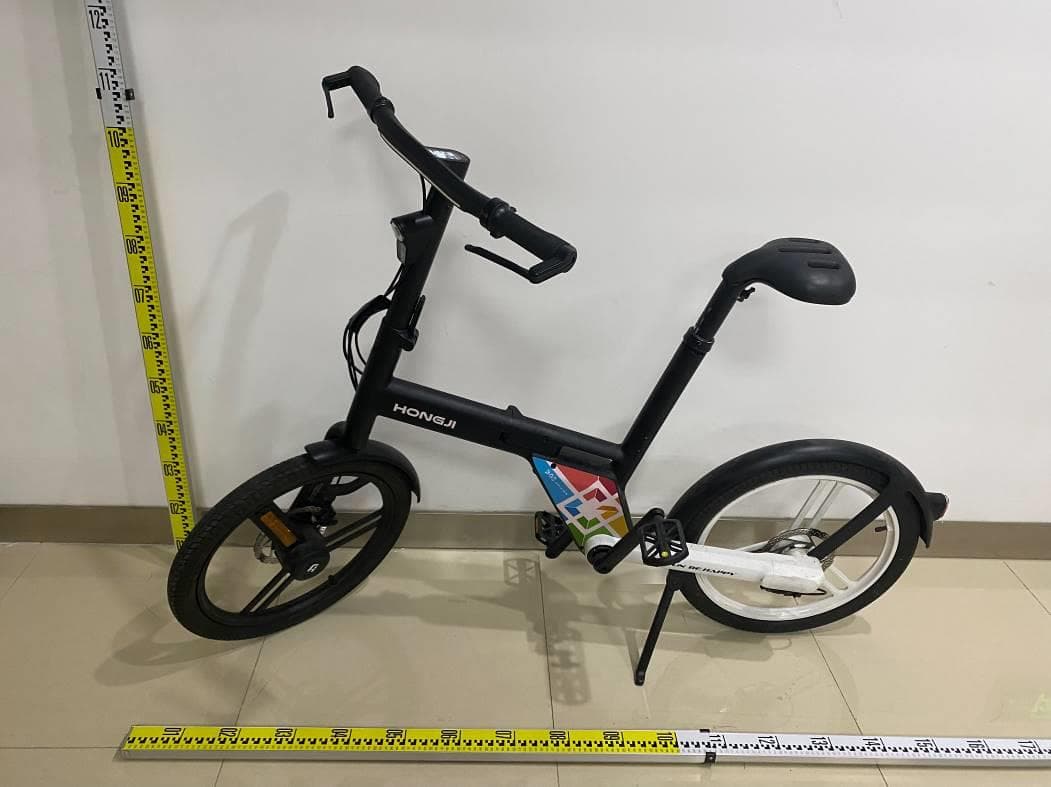
Click to zoom
Application Details
- Equipment Class
- DTS - Digital Transmission System
- Date of Grant
- Jun 06, 2022
- Application Purpose
- Original Equipment
- Date of Application
- Jun 06, 2022
- Equipment Note
- E-BIKE
- Frequency Range
- 2402.00000000 - 2480.00000000
- Company
- HONBIKE INC
- Country
- United States
Documents & Files
Document Text
Text extracted from the exhibit documents filed with the FCC. Open a document above to read the original.
Users Manual
1617 EN Install the battery 1. Insert the bulge of the battery into the battery compartment of the bicycle. 2. After the lower part of the battery is in place, push the battery toward the battery compartment until hearing a “click”, indicating that the battery is well installed. Double check the battery is installed in place, otherwise the battery may drop out while riding. click Fold your Honbike 2. Pull the folding stand release inside the folding stand up to the end, then push the folding stand down until it stops. 1. Stand on the left side of the bicycle. Lean the bicycle on the kickstand. 3. Rotate the right pedal counterclockwise to between 2 and 5 o'clock. 4. Place both thumbs on the crank with all other fingers on the end of the pedal. Press the pedal toward the frame and then fold the pedal upward. If the folding stand does not reach the correct position, the bicycle may not stand securely after it is folded. In such case, please check the folding stand is pushed into the correct position. 3 4 Pull down the folding stand before installing the battery and lift the folding stand up after the battery is well installed. 1819 EN 5. Press the button on the hinge clamp with your left thumb, and open the hinge clamp downward to the lowest point with both hands (increasing the force appropriately). 6. Fold the stem down and use your right hand to adjust the position of the brake cables to avoid interference when folding. L R 7. Use your left thumb to push the safety lock of the frame hinge toward the front of the bicycle, push it to the far-left side and keep it still, and push the frame hinge toward your body with your right hand. The bicycle may not be able to fold when the frame hinge is not fully opened. 1 2 L R 8. Hold the head tube with your left hand, and hold the seat tube with your right hand, lift the front wheel slightly and fold the frame clockwise. 2021 EN Unfolding - - - - - - - - - - - - - - - - - - - - - - - - - - - - - - - - 1. Stand on the left side of the bicycle and unfold the bicycle counterclockwise. 2. Use your palm to push the frame hinge to the bicycle frame until hearing a “click”, indicating that the frame hinge is locked. 3. Push down on the folded part of the pedal with your palm until hearing a “click”. click 4. Pull the folding stand release inside the folding stand to the end and gently lift the folding stand. 5. Flip the stem upward to the vertical position while paying attention to the brake cables to avoid interference when unfolding. Pull the hinge clamp downward to the lowest point and continue to push the stem to the vertical position. 6. Lift the hinge clamp up and firmly press it until hearing a “click”, indicating that the hinge clamp is locked in place. click 2223 EN Recommended torque values Ensure correct setup, tightening, and torquing to recommended torque values is performed on your bicycle before first using it and check the setup, tightening, and condition of components and hardware regularly. 1. Battery power 2. Speed 3. Switch between km/h and mph 4. Walk mode 5. Pedal assist level 6. Mileage/Trip distance 7. Light 8. Bluetooth 9. Error indicator 10. Power button 11. Plus button/ Light button 12. Minus button/ Walk mode Getting started The remaining battery capacity is an estimated value according to the current riding, the actual capacity is closely related to the user's riding habits, road conditions, and power-assist level selection. 1Rear fender bolts 4-6NmHex key #4 2Rear wheel bolts 13-15Nm Hex key #4 3Rear fender bolt4-6Nm Hex key #4 4Saddle kit bolts 6-8Nm Hex key #4 5Crank arm bolt 40-45Nm Hex key #8 6Front fork bolt 23-28Nm Torx key T30 7Handlebar & stem bolts 6-8Nm Hex key #3 8Head tube bolts 13-15Nm Hex key #5 9Head tube bolt 13-15Nm Hex key #4 1 3 5 6 9 8 7 2 4 10 11 12 1 2 3 56 4 7 8 9 2425 EN Display operations Display advanced settings Power on/off Press and hold the Power button until the display is on/off Power assist Short press Plus button to increase the power assist level Short press Minus button to decrease the power assist level Trip distance The display shows single trip distance by default. Short press the Power button to check total distance. Turn on/off the light Press and hold the Plus button until the lights are on/off Walk mode Press and hold the Minus button When the display is turned on, press and hold the Plus and Minus buttons at the same time to enter the advanced settings interface. Press and hold the Minus button for 2 seconds to quit the setup mode. After entering the setup mode, the interface will show P1 and the number 1 will blink. Press Plus or Minus buttons to switch between different parameter settings. P1 - Metric/English system switching; P4 - Adjust backlight brightness; P5 – Auto power-off timer; P6 – Single trip distance reset. In the advanced settings interface, if no operation is performed for more than 30 seconds, the system will automatically exit the setup mode and the current parameters will be automatically saved. MPH & KM/H (P1) When the interface displays P1, short press the Power button first, then press the Plus or Minus button to switch between mile and km. After the setting is completed, short press the Power button to save the setting. The power will automatically shut off after 5 minutes if not being used. Only activate “walk mode”feature when pushing the bicycle. Backlight brightness (P4) When the interface displays P4, short press the Power button first, then press the Plus or Minus button to set the backlight brightness. 1 stands for the lowest brightness, and 5 stands for the highest brightness. After selecting the value, short press the Power button to save the setting. Reset single trip distance (P6) When the interface shows P6, short press the Power button, then press the Plus button to switch between “y” and “n”. When the interface shows “y”, short press the Power button to reset the single trip distance. After completing the setting, short press the Power button to…
Text truncated - open the document above for the full version.
Users Manual
3637 EN • Please comply with the local road and traffic laws in your country or region. • Wear a helmet that meets the latest safety testing standards, and follows the helmet manufacturer’s instructions for use. It may help prevent injury in an accident. • Wear appropriate safety equipment according to the riding you plan to do. • Do not ride while intoxicated or while using medications that can make you drowsy or less attentive. • Refer to the previous two sections to check the bicycle before riding it. • Brake discs will become hot during use and will stay hot for a short period of time. Ensure you do not touch the discs right after use. • Do not park the bicycle in building lobbies, on evacuation stairs, fire exits or on sidewalks. • Once you have come to a stop, do not apply pressure to the pedals, this could engage the power assist function. Or you can hold the brake lever firmly to ensure that the power is cut off. • During folding and unfolding, as well as during use and maintenance, avoid putting your hands or fingers anywhere they may be caught or trapped. • It is recommended that the bicycle shall be used by users over 16 years old, younger users must use the bicycle under the guidance of an adult or guardian. • Only use the supplied charger cable and plug. Ensure the charger cable is fully inserted in the charger before connecting the charger to a power outlet. Plug the charger’s plug into an outlet (100-240V), using the appropriate plug / adaptor for the country’s standards, then connect to the charging socket on the battery. • If there is any damage to the protective layer of the wire harness of the bicycle, please contact Honbike as soon as possible to prevent injury to the user. Safety This section covers safety-related information, so please read it carefully before riding. The basics • During the ride, please stay focused, watch out for passing pedestrians and vehicles, and keep a safe distance. • During the ride, please do not hang anything on the handles to avoid losing control of the bicycle and causing an accident. • When braking, please avoid sudden braking, try to reduce speed slowly. Please use the rear brake first, and then the front brake. Do not brake too hard. Braking sharply on the front wheel may cause the bicycle and rider to loose grip and cause injury, and braking sharply on the rear wheel may cause a change of direction and injury. • Please keep a reasonable safe distance while riding between yourself and motor vehicles. Do not follow them too closely as they may slow down and turn at any time. • When riding, keep a distance from motor vehicles parked on the roadside and be aware of car doors opening suddenly to avoid crashing into them. • Please do not wear earphones or headphones that can affect your hearing during the ride. • Please ride along in a straight line in designated bicycle lanes. Please ride with the flow of traffic and do not travel against it. • It is prohibited to ride up and down stairs or jump over any obstacles on the HF01. • It is forbidden to ride without holding the handles or when holding an umbrella. Failure to keep your balance may result in an accident. • Do not use HF01 with bicycle trailers, mounts, frames or accessories that have not been tested for safety and compatibility standards by Honbike. • After any accident, you must consider that the current HF01 is unsafe. Contact Honbike for a maintenance check, and confirm that it is safe before you can ride the HF01 again. • Ride defensively. Make others aware of your presence and avoid entering any vehicle's blind spot. Remember to avoid accidents by using your bicycle bell and brakes. • Do not ride while intoxicated or while using medications that can make you drowsy or less attentive. Safe riding 3839 EN • Rain, snow, slippery roads and other conditions will affect the braking effect and increase the braking distance, so please brake early in these situations. • Riding on slippery roads can make it difficult for you and other riders to control speed, and you are more likely to slip in turns. So you need to stay alert, watch out for oncoming vehicles, reduce your speed and make sure you can brake safely. • When you are wearing a raincoat, pay close attention to avoid the raincoat being caught in the wheels or being hooked by any stationary or moving vehicles. • Try not to ride in heavy rain and standing water. If it is cold, and the temperature is near or below the freezing point, pay attention to ice on the road and avoid drain/ man hole covers. • Honbike HF01 can withstand light rain and small splashes. The electrical parts of HF01 have an Ingress Protection rating of IP65. But it does not mean that the bicycle and its mechanical and electrical components are waterproof. We do not recommend storing or using the bicycle in excessively wet conditions. The warranty for the HF01 does not cover water damage. • Riding at dusk, at night, or in any poor light conditions is much more dangerous than in daytime, please ride more cautiously, and choose appropriate products to aid your vision and make yourself more visible. • Ensure your front and rear lights are turned on and adjusted such that other people on the road can see them clearly. • Make sure both front and rear reflectors are clean, undamaged and visible before riding off. Riding in bad weather conditions Riding in low light conditions Removing lights and reflectors can reduce your visibility to others and could result in an accident that may cause injury or death. Maintaining your Honbike Compared with conventional ebikes, the Honbike HF01 is low maintenance with fewer complicated parts that require less attention for simplicity. After riding for a period of time, like any bicycle, some parts may loosen, wear or become damaged, so inspection and maintenance at regular intervals will extend the service life of your HF01 and prevent damage and potential accidents. Store your Honbike HF01 in a clean, dry place to avoid rust an…
Text truncated - open the document above for the full version.
External Photos
Report No.: S20220422226602 1 of 2 Attachment 1: External Photo of EUT Report No.: S20220422226602 2 of 2
ID Label/Location Info
Label location
Internal Photos
Report No.: S20220422226602 1 of 3 Attachment 2: Internal Photo of EUT Report No.: S20220422226602 2 of 3 Report No.: S20220422226602 3 of 3 ANT
RF Exposure Info
FangguangInspection&TestingCo.,Ltd. Phone:+86-510-68790033 Web:www.fgtest.cn PageNumber:1of5 RFExposureEvaluationDeclaration ReportNo.:S20220422226603 IssueDate:06-01-2022 Applicant:HONBIKEINC Address:16192CoastalHighway,cityofLewes,Countyof Sussex,stateofDelaware19958,UnitedStates FCCID:2A39V-HF01 ApplicationType:Certification Product:E-BIKE ModelNo.:HF01 FCCClassification:DigitalTransmissionSystem(DTS) FCCRulePart(s):Part15SubpartC(15.247) TestProcedure(s):ANSIC63.10-2013,KDB558074D01v05r02 TestDate:May01~May12,2022 CompiledBy (AmosXia) SeniorTestEngineer ApprovedBy (ZemingZhang) EngineerManager Thetestresultsrelateonlytothesamplestested. Thisequipmenthasbeenshowntobecapableofcompliancewiththeapplicabletechnicalstandardsas indicatedinthemeasurementreportandwastestedinaccordancewiththemeasurementproceduresspecified inKDB558074D01.Testresultsreportedhereinrelateonlytotheitem(s)tested. ThetestreportshallnotbereproducedexceptinfullwithoutthewrittenapprovalofFangguangInspection& TestingCo.,Ltd.WuxiBranch Thetestreportmustnotbeusedbytheclienttoclaimproductcertifications,approval,orendorsementby NVLAP,NISToranyagencyofU.S.Government. ReportNo.:S20220422226603 PageNumber:2of5 RevisionHistory ReportNo.VersionDescriptionIssueDate S20220422226603Rev.01/06-01-2022 ReportNo.:S20220422226603 PageNumber:3of5 1.PRODUCTINFORMATION 1.1.EquipmentDescription 1.2.ProductSpecificationSubjectivetothisReport ProductName:E-BIKE ModelName:HF01 AdditionalModel:/ Ratings: BikeAdapter: Input:100-240V~,50/60Hz,2A Output:DC42V,1.7A Bike:DC36V,12A,250W Wirelessmodule:DC3.3V BluetoothVersion:5.0 BluetoothFrequency2402~2480MHz BluetoothVersion5.0 TypeofmodulationGFSK DataRate1Mbps&2Mbps AntennaType:PCBAntenna AntennaGain:0dBi ReportNo.:S20220422226603 PageNumber:4of5 2.RFExposureEvaluation 2.1.Limits AccordingtoFCC1.1310:Thecriterialistedinthefollowingtableshallbeusedtoevaluatethe environmentimpactofhumanexposuretoradiofrequency(RF)radiationasspecifiedin1.1307(b) LIMITSFORMAXIMUMPERMISSIBLEEXPOSURE(MPE) FrequencyRange (MHz) ElectricField Strength(V/m) MagneticField Strength(A/m) PowerDensity (mW/cm 2 ) AverageTime (Minutes) (A)LimitsforOccupational/ControlExposures 300-1500----f/3006 1500-100,000----56 (B)LimitsforGeneralPopulation/UncontrolledExposures 300-1500----f/15006 1500-100,000----130 f=FrequencyinMHz CalculationFormula:Pd=(Pout*G)/(4*pi*r 2 ) Where Pd=powerdensityinmW/cm 2 Pout=outputpowertoantennainmW G=gainofantennainlinearscale Pi=3.1416 r=distancebetweenobservationpointandcenteroftheradiatorincm PdisthelimitofMPE,1mW/cm².Ifweknowthemaximumgainoftheantennaandthetotalpower inputtotheantenna,throughthecalculation,wewillknowthedistancerwheretheMPElimitis reached. ReportNo.:S20220422226603 PageNumber:5of5 2.2.TestResultofRFExposureEvaluation ProductE-BIKE TestItemRFExposureEvaluation TestModeFrequencyBand (MHz) MaximumPK OutputPower (dBm) PowerDensityat R=20cm (mW/cm 2 ) Limit (mW/cm 2 ) BLE2402~24804.400.000551 Note:Pd=(Pout*G)/(4*pi*r2)=(10 (4.26+0)/10 )/(4*3.1416*20 2 )=0.00055mW/cm 2 CONCULISON: TheMaxPowerDensityatR(20cm)=0.00055mW/cm 2 <1mW/cm 2 . SotheEUTcomplieswiththerequirement. TheEnd
Test Report
FangguangInspection&TestingCo.,Ltd. HeadquartersAdd.:AreaBofthe3rdfloor,XEDASci-TechPark,XiqingEconomicDevelopmentArea,Tianjin,China Tel:+86-020-66289500-8260Email:[email protected]://www.fgtest.cn TRFNo.:FG.WI-07-Part15SubpartC(15.247)ReportsInquiry:https://grgtest.com PageNumber:1of86 ReportNo.:S20220422226602 IssueDate:06-01-2022 Applicant:HONBIKEINC Address:16192CoastalHighway,cityofLewes,Countyof Sussex,stateofDelaware19958,UnitedStates FCCID:2A39V-HF01 Product:E-BIKE ModelNo.:HF01 FCCClassification:DigitalTransmissionSystem(DTS) FCCRulePart(s):Part15SubpartC(15.247) TestProcedure(s):ANSIC63.10-2013,KDB558074D01v05r02 Result:Pass TestDate:May01~May12,2022 MEASUREMENTREPORT FCCPART15.247Bluetooth-LE CompiledBy (AmosXia) SeniorTestEngineer ApprovedBy (ZemingZhang) EngineerManager Thetestresultsrelateonlytothesamplestested. Thisequipmenthasbeenshowntobecapableofcompliancewiththeapplicabletechnicalstandards asindicatedinthemeasurementreportandwastestedinaccordancewiththemeasurement proceduresspecifiedinANSIC63.4-2014.Testresultsreportedhereinrelateonlytotheitem(s)tested . ThetestreportshallnotbereproducedexceptinfullwithoutthewrittenapprovalofFangguang Inspection&TestingCo.,Ltd.WuxiBranch Thetestreportmustnotbeusedbytheclienttoclaimproductcertifications,approval,orendorsement byNVLAP,NISToranyagencyofU.S.Government. ReportNo.:S20220422226602 PageNumber: 2 of 86 RevisionHistory ReportNo.VersionDescriptionIssueDate S20220422226602Rev.01/06-01-2022 ReportNo.:S20220422226602 PageNumber: 3 of 86 CONTENTS DescriptionPage §2.1033GeneralInformation........................................................................................................................5 1.INTRODUCTION...........................................................................................................................................6 1.1.Scope...................................................................................................................................................6 1.2.FangguangTestLocation.................................................................................................................6 2.PRODUCTINFORMATION.........................................................................................................................7 2.1.EquipmentDescription......................................................................................................................7 2.2.ProductSpecificationSubjectivetothisReport............................................................................7 2.3.OperationFrequency/ChannelList...............................................................................................8 2.4.DeviceCapabilities............................................................................................................................8 2.5.DescriptionofTestSoftware............................................................................................................8 2.6.TestMode...........................................................................................................................................8 2.7.TestConfiguration.............................................................................................................................9 2.8.EMISuppressionDevice(s)/Modifications.....................................................................................9 2.9.LabelingRequirements.....................................................................................................................9 2.10.Calculationwithallconversionandcorrectionfactorsused...................................................10 3.DESCRIPTIONOFTEST..........................................................................................................................11 3.1.EvaluationProcedure......................................................................................................................11 3.2.ACLineConductedEmissions......................................................................................................11 3.3.RadiatedEmissions........................................................................................................................12 4.ANTENNAREQUIREMENTS...................................................................................................................13 5.TESTEQUIPMENTCALIBRATIONDATE............................................................................................14 6.MEASUREMENTUNCERTAINTY...........................................................................................................15 7.TESTRESULT............................................................................................................................................16 7.1.Summary...........................................................................................................................................16 7.2.6dBBandwidthMeasurement.......................................................................................................17 7.2.1.TestLimit........................................................................................................................................17 7.2.2.TestProcedureused....................................................................................................................17 7.2.3.TestSetting....................................................................................................................................17 7.2.4.TestSetup......................................................................................................................................17 7.2.5.TestResult.....................................................................................................................................18 7.3.OutputPowerMeasurement..........................................................................................................22 7.3.1.TestLimit.....................................…
Text truncated - open the document above for the full version.
Contact Information
Applicant
Ken Miner
Technical Contact
Non-Technical Contact
HONGJI INTELLIGENT BIKE CO.,LTDHaojun Wu
[email protected]15861579267
Test Firm
Fangguang Inspection & Testing Co. LtdZeming Zhang
[email protected]135-7047-5374
Technical Specifications
| # | Rule Parts | Frequency Range | Power Output |
|---|---|---|---|
| 1 | 15C | 2.40 GHz - 2.48 GHz | 2.80 mW |