2A3NOT130STour Guide System
ZHENGZHOU YSAIR TECHNOLOGY CO.,LTD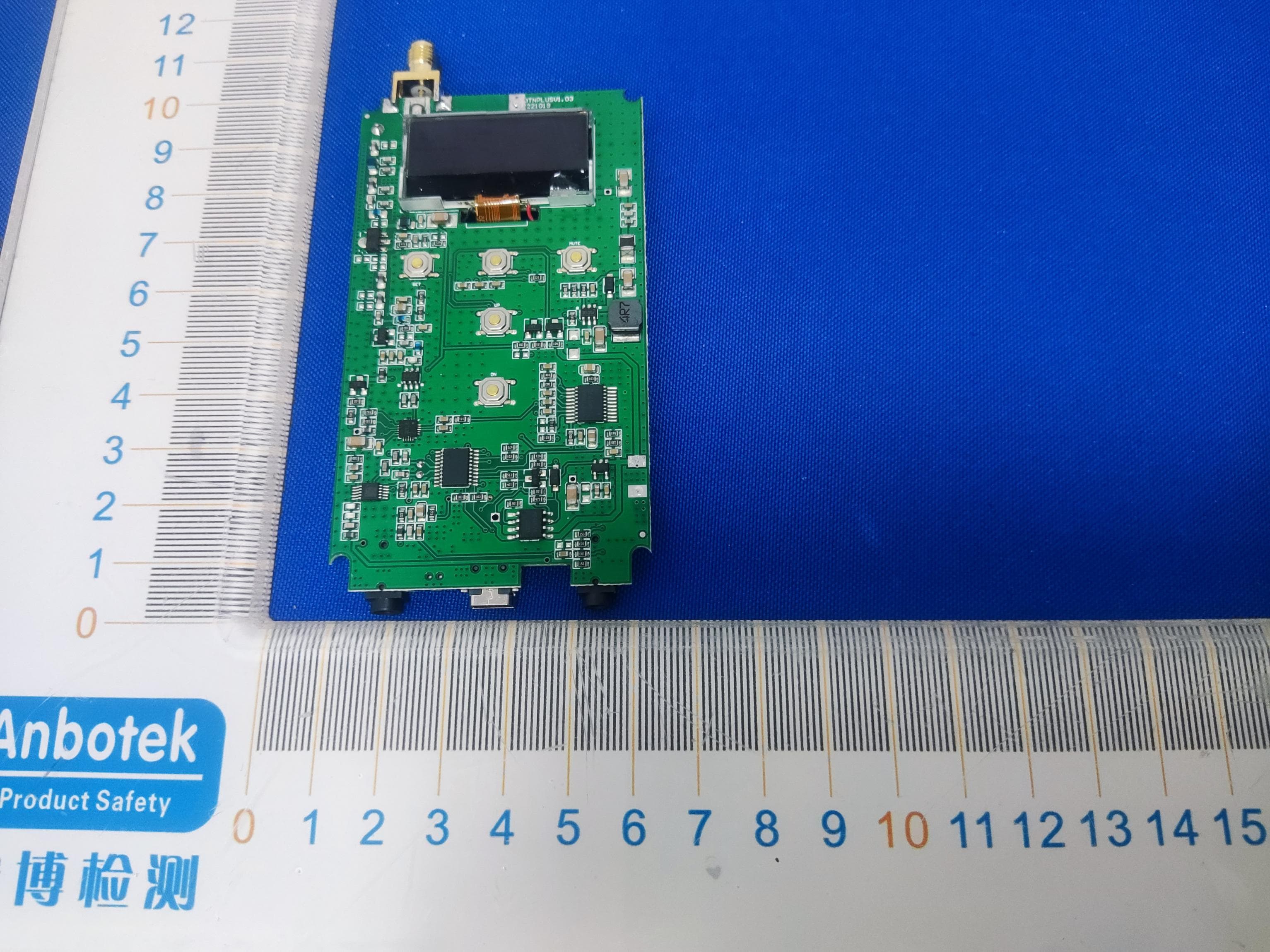
Click to zoom
Application Details
- Equipment Class
- DWM - Part 15 Wireless Microphone
- Date of Grant
- Jan 16, 2023
- Application Purpose
- Original Equipment
- Date of Application
- Jan 16, 2023
- Equipment Note
- Tour Guide System
- Frequency Range
- 195.00000000 - 216.00000000
- Country
- China
Documents & Files
Document Text
Text extracted from the exhibit documents filed with the FCC. Open a document above to read the original.
Users Manual
T130S T131S User Manual CONTENTS Transmitter Power on and power off Mute function One key shutdown function Interface description Channel Setting Receiver Power on and power off Volume setting Channel select Precautions Precautions for using the charging box Specifications Warning DE(10-18) FR(19-27) IT(28-35) ES(36-43) .............................................................................................................. 01 ......................................................................................... 01 .......................................................................................................... 01 ................................................................................... 01 ............................................................................................... 01 .......................................................................................................01 ....................................................................................................................02 ...........................................................................................02 .........................................................................................................02 .........................................................................................................02 ..............................................................................................................02 .................................................................02 ...........................................................................................................03 .....................................................................................................................06 Transmitter 1.Power on and power off Power on: Press and hold ( ) button for 1 second to power on. Power off: Press and hold ( ) for 1 second to power off. 2.Mute function In working mode, press (>) or (+) button, the transmitter enters mute mode icon appears on the transmitter screen and icon disappears. At the same time, icon appears on the receiver screen. Press (>) or (+) button again, the transmitter will return to normal working mode, icon appears on the transmitter screen and icon disappears from receiver screen at the same time. 3.One key shutdown function In working mode, press and hold (>) or (-) button for about 5 seconds until the OFF icon flashes on the transmitter screen and icon disappears, all receivers paired with this transmitter that are within the range will be powered off. Then you can short press any key of the transmitter to exit the one key shutdown mode or long press and hold the ( ) key to power off. 4.Interface description There are two jacks at the bottom of the transmitter, the MIC microphone jack on the left and the AUX audio input jack on the right. Note: Don't insert them into the wrong interface, if you plug the mic into the AUX jack, there will be no sound. 5.Channel Setting When encountering the following situations, you will need to set the channel A.If there are two or more transmitters in use, select different channel for each to avoid interference. B.When you need to add receivers for a group (transmitter and receivers channels must be the same in each group). Channel Setting Operations A.In working mode, press and hold (>) and (<) buttons at the same time until the icon disappears on the transmitter screen, t. B.Release the (>) and (<) buttons, the transmitter will enter channel setting mode C.Press (>), (<), (+) or (-) buttons to select the desired channel ( the value could be set from 01 to 49). D.Press and hold ( ) button for 3 second until the channel ID flashes on the transmitter screen and icon disappears. E.Release the ( ) button, the transmitter enters the wireless channel synchronization mode. 1 F.Put the receivers in the power-on state close to the transmitter (within about 2 meters), the receivers will receive sync signal. Once sync successfully, the receivers channel will be changed to the same channel as the transmitter G.Press the ( ) button on the transmitter to exit channel synchronization mode. Receiver 1.Power on and power off Power on: Press and hold ( ) button for 1 second to power on. Power off: Press and hold ( ) for 1 second to power off. 2.Volume Setting In working mode, press ( ) or ( ) button to adjust the volume (the value could be set from 0 to 9 level). Note: Volume cannot be adjusted while the receiver is in signal seek mode ( icon shows on the receiver screen. If you use T130s transmitter with the old version T131 receivers, you need to use the following method to set the channel ID. 1.Wireless Channel Synchronization Setting Transmitter Setting A.In the power off mode, press and hold (>) button by your left hand, then press ( ) button for about 2s to turn on the transmitter by your right hand B.Release the ( ) button when the transmitter is powered on C.Release the (>) button when the channel ID flashed on the screen, the transmitter enters channel setting mode D.Press (>) or (<) button to select the desired channel E.Press ( ) button to confirm, the transmitter enters the wireless channel synchronization mode Then Set the Receiver F.In power off mode, insert the earphone, press and hold the ( ) button with your left hand, then press the ( ) button with your right hand to turn on the receiver. G.Release the ( ) button when the receiver is powered on H.Release the ( ) button when the channel ID shows 00 in the receiver screen, the receiver will receive sync signal. Once sync successfully, the receivers channel will be changed to the same channel as the transmitter ( Note: this step must be done under the condition that the transmitter is at the wireless channel synchronization mode) I.Turn off the transmitter, then turn on it, the transmitter will work with the paired receivers. 2 2.Manual Set Receiver Channel ID A.In power off mode, press and hold ( ) button with your right hand, …
Text truncated - open the document above for the full version.
External Photos
Code:AB-RF-05-b ExternalPhotograph Code:AB-RF-05-b ANT Code:AB-RF-05-b Code:AB-RF-05-b Code:AB-RF-05-b
ID Label/Location Info
Label and Label location
Internal Photos
Code:AB-RF-05-b InternalPhotograph Code:AB-RF-05-b
Operational Description
version01 ZHENGZHOU YSAIR TECHNOLOGY CO.,LTD Declaration concerning Antenna Specification It is hereby declared that the product Model No.: T130S FCC ID : 2A3NOT130S fulfills the requirement in FCC test relating to the antenna type. The device specified above confirms to the FCC recommendations for external antenna type(s) described below: Model No. of antenna: 195-216MHz Type of antenna: External Antenna Gain of the antenna: 0.23 dBi Frequency range: 195-216MHz The mounting of the antenna is fixed to the radio module and no other antenna should be used. Company name: ZHENGZHOU YSAIR TECHNOLOGY CO.,LTD Address: ROOM 709, SANJIANG BUILDING, NO.170 NANYANG ROAD, HUIJI DISTRICT, ZHENGZHOU HENAN, 450053 CHINA City: ZHENGZHOU HENAN ZIP / Postal code: 450053 Country: CHINA Place: Date: 1/13/2023 Signature:
RF Exposure Info
RFEXPOSUREEVALUATION FCCID:2A3NOT130S AccordingtoFCC1.1310:Thecriterialistedinthefollowingtableshallbeused toevaluatetheenvironmentimpactofhumanexposuretoradiofrequency(RF) Radiationasspecifiedin§1.1307(b): RoutineSARevaluationreferstothatspecificallyrequiredby§2.1093,using measurementsorcomputersimulation.WhenroutineSARevaluationisnot required,portabletransmitterswithoutputpowergreaterthantheapplicable lowthresholdrequireSARevaluationtoqualifyforTCBapproval. Channel (MHz) Maximum EIRP (dBm) Tuneup tolerance (dBm) MaxTuneUp Power(dBm) Distance (mm) Calculation results Limit Operating Mode 1959.8069.806±110.80651.0633 FM2058.9408.940 ± 19.94050.8933 2167.2847.284 ± 18.28450.6263 Result:NoStandaloneSARtestisrequired.
Test Report
ReportNo.:18220WC20283601FCCID:2A3NOT130SPage1of29 Code:AB-RF-05-b FCCTestReport ClientName:ZHENGZHOUYSAIRTECHNOLOGYCO.,LTD ClientAddress: ROOM709,SANJIANGBUILDING,NO.170 NANYANGROAD,HUIJIDISTRICT, ZHENGZHOUHENAN,450053CHINA ProductName:TourGuideSystem ReportDate:Jan.16,2023 ShenzhenAnbotekComplianceLaboratoryLimited ReportNo.:18220WC20283601FCCID:2A3NOT130SPage2of29 Code:AB-RF-05-b Contents 1.GeneralInformation..............................................................................................................................................6 1.1.ClientInformation.......................................................................................................................................6 1.2.DescriptionofDevice(EUT)....................................................................................................................6 1.3.AuxiliaryEquipmentUsedDuringTest...................................................................................................7 1.4.DescriptionofTestConfiguration............................................................................................................7 1.5.DescriptionOfTestSetup........................................................................................................................8 1.6.TestEquipmentList...................................................................................................................................9 1.7.MeasurementUncertainty......................................................................................................................10 1.8.DescriptionofTestFacility.....................................................................................................................10 2.SummaryofTestResults...................................................................................................................................11 3.ConductedEmissionTest..................................................................................................................................12 3.1.TestStandardandLimit..........................................................................................................................12 3.2.TestSetup.................................................................................................................................................12 3.3.TestProcedure.........................................................................................................................................12 3.4.TestData...................................................................................................................................................12 4.RFOutputPowerTest........................................................................................................................................15 4.1.TestStandardandLimit..........................................................................................................................15 4.2.TestSetup.................................................................................................................................................15 4.3.TestProcedure.........................................................................................................................................15 4.4.TestData...................................................................................................................................................15 5.FrequencyStabilityTest.....................................................................................................................................16 5.1.TestStandardandLimit..........................................................................................................................16 5.2.TestSetup.................................................................................................................................................16 5.3.TestProcedure.........................................................................................................................................16 5.4.TestData...................................................................................................................................................16 6.OperatingBandwidth&EmissionMaskTest.................................................................................................18 6.1.TestStandardandLimit..........................................................................................................................18 6.2.TestSetup.................................................................................................................................................18 6.3.TestProcedure.........................................................................................................................................18 6.4.TestData...................................................................................................................................................18 7.RadiationSpuriousEmissionTest...................................................................................................................20 7.1.TestStandardandLimit..........................................................................................................................20 7.2.TestSetup.................................................................................................................................................20 7.3.TestProcedure.........................................................................................................................................21 7.4.TestData...................................................................................................................................................21 APPENDIXI--TESTSETUPPHOTOGRAPH..................................................................................................29 ReportNo.:18220WC20283601FCCID:2A3NOT130SPage3of29 Code:AB-RF-05-b…
Text truncated - open the document above for the full version.
Test Setup Photos
Code:AB-RF-05-b Test Setup Photograph Photo of Radiation Emission Test Code:AB-RF-05-b Photo of Conducted Emission Test
Contact Information
Applicant
Weidong Shen(General Manager)
Test Firm
Shenzhen Anbotek Compliance Laboratory LimitedJeff Zhu
Technical Specifications
| # | Rule Parts | Frequency Range | Power Output |
|---|---|---|---|
| 1 | 15C | 195 MHz - 216 MHz | 9.10 mW |
Other Applications from ZHENGZHOU YSAIR TECHNOLOGY CO.,LTD
2A3NOTG103
Oct 07, 2024Wireless Lavalier Microphone
Equipment Class
DXX - Part 15 Low Power Communication Device Transmitter
2A3NOTD169
Sep 18, 2024Queue Wireless Calling System
Equipment Class
DSC - Part 15 Security/Remote Control Transmitter
2A3NOTH009
Aug 20, 2024Pager
Equipment Class
DSC - Part 15 Security/Remote Control Transmitter
2A3NOTD113
Aug 16, 2024Paging Watch
Equipment Class
DSC - Part 15 Security/Remote Control Transmitter
2A3NOTR640
Jul 17, 2024Internet Radio
Equipment Class
DTS - Digital Transmission System