2A3PH-XR-636DP-99TURNTABLE
Axcel (Huizhou) Technology Co., Ltd.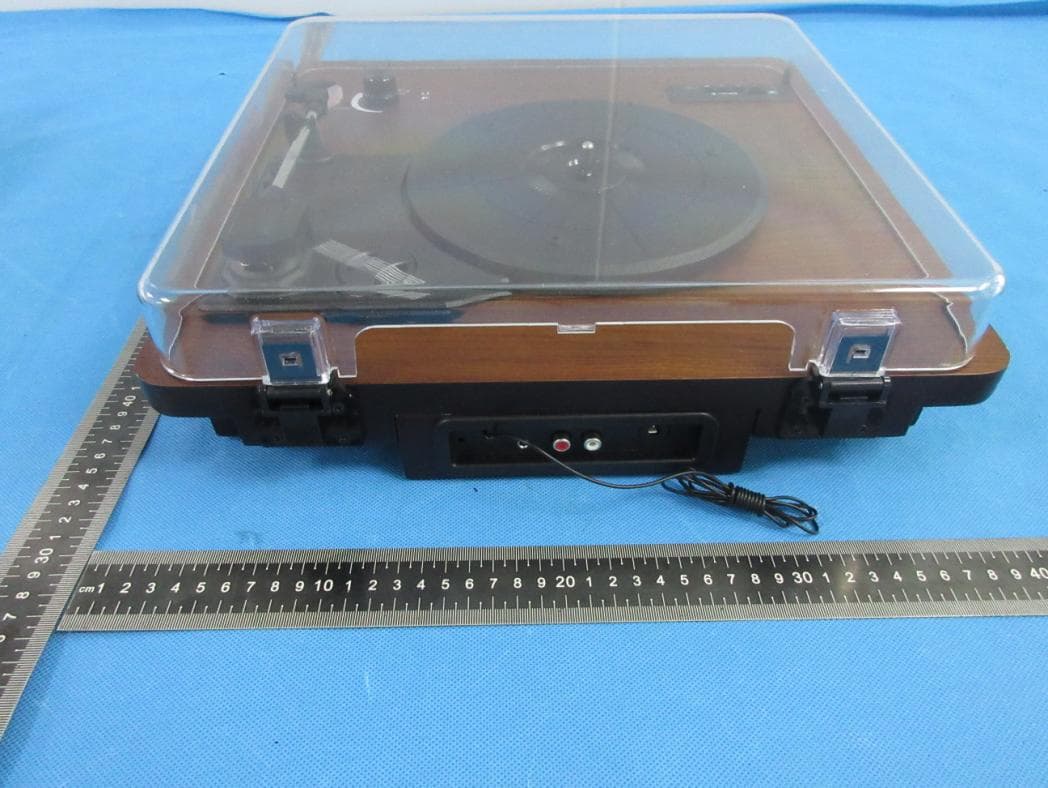
Click to zoom
Application Details
- Equipment Class
- DTS - Digital Transmission System
- Date of Grant
- Jul 18, 2022
- Application Purpose
- Original Equipment
- Date of Application
- Jul 18, 2022
- Equipment Note
- TURNTABLE
- Frequency Range
- 2402.00000000 - 2480.00000000
- Country
- China
Documents & Files
Document Text
Text extracted from the exhibit documents filed with the FCC. Open a document above to read the original.
Users Manual
1 English InstructionManual Model:XR-636DP-99 Note: pleasereadthisinstructionscarefullyandretainforfuturereference,whenyou usemeetanyproblemsanddonotknowhowtouse,pleasecontactourservice team,thiscontactinformationonthelastpageofthisusermanual. 2 HIGHTLIGHTS PACKAGECONTENTS SPECIFICATIONS ·Bluetooth®Wireless ·USBInput ·MicroSDInput ·FMRadio ·Three-SpeedRecordPlaybackMode:33/45/78 ·Portable ·3.5mmHeadphoneandRCAOutputs ·AuxInput · 1xRetroTweedSeriesTurntable · 1xPowerAdaptor · 1xInstructionManual · 1xUSBPowerCable · 1xSpareStyluses ·Bluetooth®: Version:V4.2 Chipset:AC6901 Profiles:A2DP/AVRCP Range:10m ·PowerSupply:5VDC.2A ·Sensitivity:84dB ·TotalPowerOutput:6WRMS/10WPeak ·Driver:2x40x70mm ·Max.SizeforUSBDrive:32GB ·FrequencyResponse:90Hz-18kHz ·SDCard:Upto32GB 3 IDENTIFYINGPARTS-1 1.Lid/DustCover----ifbrokencanbeexchangeforfree,contactsellerservice. 2.TurntablePlate 3.Cartridge 4.HeadphoneJack 5.Speaker 6.PowerLedIndicatorLight 7.PowerSwitch/VolumeControl 8.SpeedSwitch:33/45/78 9.AutoStopSwitch 10.CarryHandle 4 IDENTIFYINGPARTS-2 11.USBInput 12.MODEButton 13.PreviousTrackButton 14.Play/PauseButton 15.NextTrackButton 16.LEDIndicatorLight 17.SDCardInput 18.FMAntenna 19.AuxInput 20.RightRCAOutPort 21.LeftRCAOutPort 22.5VDCPowerPort 5 PPOWERINGTHETURNTABLE TURNINGONANDOFF PAIRINGWITHBLUETOOTH®DEVICES BLUETOOTH®TRANSMITTER INSTRUCTIONSFORUSE Connectthesuppliedpowercableintothe5VDCPowerPortonthebackoftheRetroTweed, thenplugtheotherendofthecableintoa5V2ApoweredUSBport Toturnon,rotatetheVolumeControlclockwiseuntilyouhearaclick.TheRetroTweedwilpoweron andgointoBluetooth®Mode,thePowerIndicatorLEDwilllightup.Toturnoff,rotatetheVolume Controlcounter-clockwiseuntilyouhearaclick. YourRetroTweedmustbepairedtoaBluetooth ® devicebeforeitcanbeused.Itisonlynecessary topairyourRetroTweedoncewitheachdevice. 1.OpentheBluetooth ® Menuonthedeviceyouwishtopair.Somedevicesrequireyouto select“SearchforDevices"or“AddNewDevice"inordertocreateaBluetooth ® pairing. 2.WiththeRetroTweedturnedoff,rotatetheVolumeControlclockwiseuntilyouhearaclick.The RetroTweedwillenterBluetooth ® Modebydefault.Ifitdoesnot,shortpresstheMODEMode ButtontonavigatetoBluetooth ® Mode,theLEDDisplaywillsay“disconnected". 3.Waituntilyousee“Retro"onyourdevice'sscreen. 4.Select“Retro”onyourdeviceandfollowanyfurtherpromptstopair.Oncepairingiscompleteand aconnectionisestablished,theRetroTweedwillchimeonceandtheLEDDisplaywillsay“BT". NOTE:IfyouareunsureonhowtoaccessyourBluetooth ® Menuonyourdevice,pleasereferto yourdevice'sinstructionmanual. 1.Turnonthe"dl"RetroTweedTurntable,doublepresstheMODEModeButton. 2.ItwillnowbeinBluetooth®TransmitterMode,withtheLEDDisplayshowing“Send". 3.MakesurethatyouravailableBluetooth®speakerisin“PairingMode”. 4.Whenthe"dl"RetroTweedTurntableandBluetooth®speakersarebothin“PairingMode",afterafew secondsyouwillhearabeepsoundindicatingasuccessfulconnection. 5.PresstheMODEModeButtontoselectPhono,USBorMicroSDCardplaybackmodes. 6.DoublepresstheMODEModeButtontodisconnectthecurrentpaireddevice. NOTE:IfyouareunsureonhowtoaccessyourBluetooth ® Menuonyourdevice,pleaserefertoyour device'sinstructionmanual. 6 CONTROLS TonavigatebetweentheUSB,MicroSDCard,Bluetooth®,FM,PhonographandAuxModesshort presstheMODEModeButton. 1.AdjustingtheVolume FunctionOperation Increase/DecreaseVolume RotatetheVolumeControl •Clockwisetoincreasethevolume •Counter-clockwisetodecreasethevolume 2.AudioControl FunctionOperation Bluetooth®USB&MicroSDCardModes NavigatetoNextTrack Shortpressthe▶▶▎NextTrackButton NavigatetoPreviousTrack Shortpressthe▎◀◀PreviousTrackButton PlayorPauseTrack Pressandholdthe ►▎▎ Play/PauseButton PhonographMode TurnAutoStopOn/Off FlicktheAutoStopSwitchtotherespectiveposition TosetthePlaybackSpeedFlicktheSpeedSwitchtotherespectiveposition PlayingAPhonographRecord 1.Lightlyplacetherecordthatyouwishtoplayonthe Turntableplate. 2.UncliptheTonearmprotectorandpushtheCueLeverback. 3. SlidetheTonearmovertherecord , atthispointtherecord willstartspinning.PulltheCueLeverforward.TheTonearm willslowlyloweritselfuntilitrestsontherecord;theRetro Tweedwillstartplayingtherecord. StopPlayingaPhonographRecord 1.PushtheCueLeverback. 2.SlidetheTonearmtoabovetheSafetyClip. 3.PulltheCueLeverforwardandallowtheTonearmtorest ontheholder. 4.CliptheTonearmProtectorintoplace. 5.RemovetherecordfromtheTurntable 3.FMControls FunctionOperation NavigatetoNextStation Shortpressthe▶▶▎NextTrackButton NavigatetoPreviousStation Shortpressthe▎◀◀PreviousTrackButton AutoSearchforFMStations Pressandholdthe ►▎▎ Play/PauseButton 7 AUXMODE RECORDINGMODE REPLACINGTHESTYLUSNEEDLE INSTALLINGANEWSTYLUSCARTRIDGE PlugthesuppliedAuxCableintotheAuxInputontheControlPaneloftheRetroTweed.Plugtheotherendof thecableintothedevicethatyouwishtoplayaudiofrom. Note:InAuxModeallaudioplayedthroughtheRetroTweed,excludingvolume,iscontrolledthroughyour device. InsertaUSBDriveorMicroSDCardintotheUSBDriveorMicroSDCardinputs.PressandholdtheMODE ModeButtonuntiltheLEDDisplaychangesto“REC”(Record). PressandholdtheMODEButtonuntiltheLEDflashing. Therecordingwillbegin. Tostoprecording,presstheMODEButtontostoptheTurntable. PushbacktheArmLocktoreleasetheTonearm. UnclipandremovetheStylusNeedlefromtheCartridgethenreplacewithanewone. Note:PleaseexerciseextremecarewhilstperformingthisoperationsoastoavoidtheTonearmandAudio Linewiresfrombeingdamaged. GentlyuncliptheCartridgefromtheTonearm. GentlypullouttheaudiowiresattachedtotheCartridge. ReplacewithanewCartridge.Ensuretheaudiowiresarefittedsecurely,thenclipbackontotheTonearm. 8 TROUBLESHOOTING CLEANINGANDCARINGINSTRUCTIONS 1.MymobilephonecannotfindanynewBluetoothdevices? ·EnsuretheDevicehasenteredthepairingmode. ·EnsuretheDeviceiswithineffectiveworkingrange. 2.Bluetoothdevicecannotpairup? ·Ensureyourmobilephoneallowsnewconnectionsandhasnot reachedthemaximumnumberofalloweddevices. 3.TheDevicedoesnotplaymusicoranswercallswhenitisconnectedtoa Bluetoothmobilephone? ·EnsureyourmobilephonesupportsA2DPandHSF(Hands-free)profiles. ·Ensureyourmobilephoneiswithineffectiveworkingrange.…
Text truncated - open the document above for the full version.
External Photos
ATTACHMENT PHOTOGRAPHS OF EUT Photo 1 Photo 2 Photo 3 Photo 4 Photo 5 Photo 6 Photo 7 Photo 8
ID Label/Location Info
Turntable Label Size: 60mm(W) x 25mm(H) Multifunctional: TURNTABLE FCC ID:2A3PH-XR-636DP-99 Model:XR-636DP-99 Intput:5V 2A Date Code:MMYY Manufacturer: Axcel(Huizhou)Technology Co., Ltd. Address:Xinsongyaoyu Industrial park,Dongming Village,516269 Shaitian Town,Huiyang District, Guangdong,China MADE IN CHIANA This device complies with part 15 of the FCC Rules. Operation is subject to the condition that this device does not cause harmful interference (1) this device may not cause harmful interference, and (2) this device must accept any interference received, including interference that may cause undesired operation.
Internal Photos
Photo 9 Photo 10 Photo 11 Photo 12 BT ANT Photo 13 Photo 14 Photo 15 Photo 16
RF Exposure Info
FCC ID: 2A3PH-XR-636DP-99 RF EXPOSURE EVALUATION According to FCC 1.1310: The criteria listed in the following table shall be used to evaluate the environment impact of human exposure to radio frequency(RF) Radiation as specified in §1.1307(b) Limits for Maximum Permissible Exposure (MPE) MPE Calculation Method E (V/m) = d GP**30 Power Density: Pd (W/m²) = 377 2 E E = Electric field (V/m) P = Average RF output power (W) G = EUT Antenna numeric gain (numeric) d = Separation distance between radiator and human body (m) The formula can be changed to Pd = 2 *377 **30 D GP From the EUT RF output power, the minimum mobile separation distance, d=0.2m, as well as the gain of the used antenna, the RF power density can be obtained. conducted pow er Evaluation result Pow er density Limits (dBm)(mW)(dBi)Numeric 24024.502 4±153.1622.001.580.00101 24406.319 6±175.0122.001.580.00161 24805.562 5±163.9812.001.580.00131 24027.07 7±186.3102.001.580.00201 24418.718 8±197.9432.001.580.00251 24806.829 6±175.0122.001.580.00161 24026.8516±17 5.0122.001.580.00161 24416.326 6±175.0122.001.580.00161 24806.625 6±175.0122.001.580.00161 24026.923 6±175.0122.001.580.00161 24415.888 6±175.0122.001.580.00161 24806.663 6±175.0122.001.580.00161 (mW/cm2) Antenna Gain Max tune-up pow er π/4-DQPSK (mW/cm2 ) GFSK 8-DPSK Channel Freq. (MHz) modulation Tune-up pow er (dBm) (dBm) BLE-GFSK Measurement Result Operation Frequency: BT: 2402-2480MHz Power density limited: 1mW/ cm 2 Antenna Type: PCB antenna Antenna gain: 2dBi, R=20cm Conclusion: For the max result : 0.0025≤ 1.0 for Max Power Density, compliance RF exposure.. Signature: Date: 2022-07-15 NAME AND TITLE (Please print or type): Alex li/Manager COMPANY (Please print or type): Shenzhen NTEK Testing Technology Co., Ltd./ 1/F, Building E, Fenda Science Park, Sanwei Community, Xixiang Street Bao’an District, Shenzhen P.R. China.
Test Report
Report No.: S22040802004002 Version.1.3 Page 1 of 48 RADIO TEST REPORT FCC ID: 2A3PH-XR-636DP-99 Product: TURNTABLE Trade Mark: Axcel, DLTIME, dl Model No.: XR-636DP-99 Family Model: XR-639P-X, XR-636DP-50, XR-636DP-51, XR-636DP-53, XR-636DP-87, XR-636DP-88 Report No.: S22040802004002 Issue Date: Jun 30. 2022 Prepared for Axcel (Huizhou) Technology Co., Ltd. Xinsongyaoyu Industrial Park, Dongming Village,516269 Shatian Town, Huiyang District, Huizhou, Guangdong, China Prepared by Shenzhen NTEK Testing Technology Co., Ltd. 1/F, Building E, Fenda Science Park, Sanwei Community, Xixiang Street Bao’an District, Shenzhen 518126 P.R. China Tel. 400-800-6106, 0755-2320 0050, 0755-2320 0090 Website: http://www.ntek.org.cn Report No.: S22040802004002 Version.1.3 Page 2 of 48 TABLE OF CONTENTS 1 TEST RESULT CERTIFICATION ...................................................................................................................... 3 2 SUMMARY OF TEST RESULTS ......................................................................................................................... 4 3 FACILITIES AND ACCREDITATIONS ............................................................................................................. 5 3.1 FACILITIES..................................................................................................................................................... 5 3.2 LABORATORY ACCREDITATIONS AND LISTINGS ................................................................................. 5 3.3 MEASUREMENT UNCERTAINTY ............................................................................................................... 5 4 GENERAL DESCRIPTION OF EUT .................................................................................................................. 6 5 DESCRIPTION OF TEST MODES ..................................................................................................................... 8 6 SETUP OF EQUIPMENT UNDER TEST ........................................................................................................... 9 6.1 BLOCK DIAGRAM CONFIGURATION OF TEST SYSTEM ....................................................................... 9 6.2 SUPPORT EQUIPMENT ............................................................................................................................... 10 6.3 EQUIPMENTS LIST FOR ALL TEST ITEMS .............................................................................................. 11 7 TEST REQUIREMENTS .................................................................................................................................... 13 7.1 CONDUCTED EMISSIONS TEST ............................................................................................................... 13 7.2 RADIATED SPURIOUS EMISSION ............................................................................................................ 16 7.3 6DB BANDWIDTH ....................................................................................................................................... 25 7.4 DUTY CYCLE ............................................................................................................................................... 26 7.5 PEAK OUTPUT POWER .............................................................................................................................. 28 7.6 POWER SPECTRAL DENSITY ................................................................................................................... 29 7.7 CONDUCTED BAND EDGE MEASUREMENT......................................................................................... 31 7.8 SPURIOUS RF CONDUCTED EMISSIONS ................................................................................................ 32 7.9 ANTENNA APPLICATION .......................................................................................................................... 33 8 TEST RESULTS ................................................................................................................................................... 34 8.1 MAXIMUM CONDUCTED OUTPUT POWER ....................................................................................................... 34 8.2 OCCUPIED CHANNEL BANDWIDTH .................................................................................................................. 36 8.3 MAXIMUM POWER SPECTRAL DENSITY LEVEL ............................................................................................... 40 8.4 BAND EDGE .................................................................................................................................................... 42 8.5 CONDUCTED RF SPURIOUS EMISSION ............................................................................................................. 45 Report No.: S22040802004002 Version.1.3 Page 3 of 48 1 TEST RESULT CERTIFICATION Applicant’s name ......................... : Axcel (Huizhou) Technology Co., Ltd. Address ....................................... : Xinsongyaoyu Industrial Park, Dongming Village,516269 Shatian Town, Huiyang District, Huizhou, Guangdong, China Manufacturer's Name .................. : Axcel (Huizhou) Technology Co., Ltd. Address ....................................... : Xinsongyaoyu Industrial Park, Dongming Village,516269 Shatian Town, Huiyang District, Huizhou, Guangdong, China Product description Product name .............................. : TURNTABLE Model and/or type reference ...... : XR-636DP-99 Family Model ............................... : XR-639P-X, XR-636DP-50, XR-636DP-51, XR-636DP-53, XR-636DP-87, XR-636DP-88 Measurement Procedure Used: APPLICABLE STANDARDS APPLICABLE STANDARD/ TEST PROCEDURE TEST RESULT FCC 47 CFR Part 2, Subpart J FCC 47 CFR Part 15, Subpart C ANSI C63.10-2013 KDB 558074 D01 15.247 Meas Guidance v05r02 Complied This device described above has been tested by Shenzhen NT…
Text truncated - open the document above for the full version.
Test Setup Photos
Radiated Measurement Photos Conducted Measurement Photos
Contact Information
Applicant
Changqing He(engineer)
Technical Contact
Non-Technical Contact
Shenzhen NTEK Testing Technology Co., Ltd.Alex Li
[email protected]86-755-6115 6588
Test Firm
Shenzhen NTEK Testing Technology Co., Ltd.Alex Li
[email protected]+86-755-6115-9384
Technical Specifications
| # | Rule Parts | Frequency Range | Power Output |
|---|---|---|---|
| 1 | 15C | 2.40 GHz - 2.48 GHz | 4.28 mW |
Other Applications from Axcel (Huizhou) Technology Co., Ltd.
2A3PH-A1-XR-179D-99
Sep 17, 2026Multifunctional audio
Equipment Class
DTS - Digital Transmission System