2A44B-ID730stylus pen
Shenzhen Ruidian Technology Co., Ltd.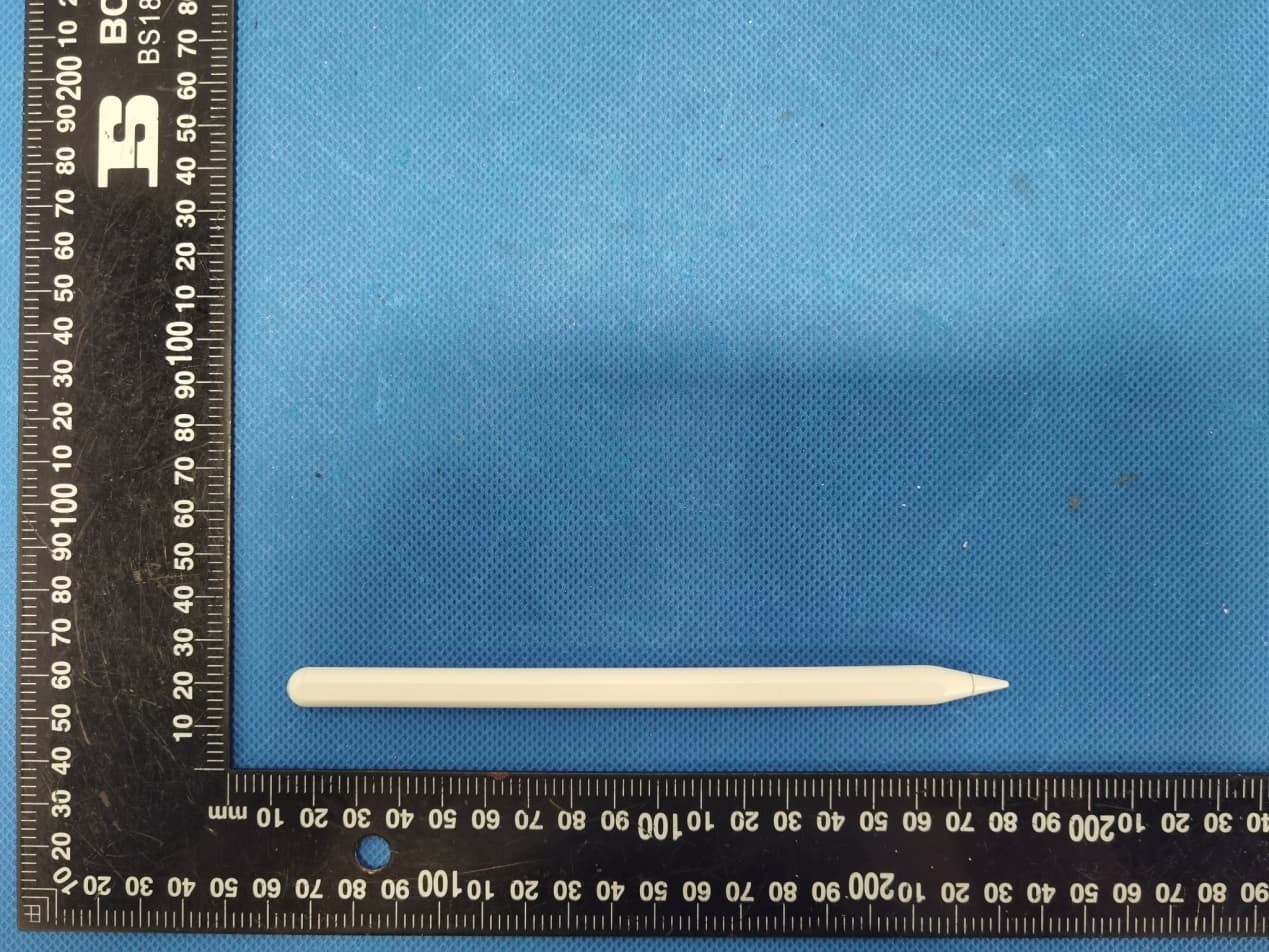
Click to zoom
Application Details
- Equipment Class
- DTS - Digital Transmission System
- Date of Grant
- Jun 09, 2022
- Application Purpose
- Original Equipment
- Date of Application
- Jun 09, 2022
- Equipment Note
- stylus pen
- Frequency Range
- 2402.00000000 - 2480.00000000
- Country
- China
Documents & Files
Document Text
Text extracted from the exhibit documents filed with the FCC. Open a document above to read the original.
Users Manual
正面 反面 User Manual Ipad Active Capacitive Pen Model NOActive capacitive pen MaterialABS Input5V-0.2A Tilt pressure feelingYes BluetoothYes Pen headReplaceable pen head Applicable model : : : : : : : ipad mini (version6) A2567/A2568/A2569 ipad Air(version4) A2316/A2324/A2325/A2072 ipad Air(version5) A2588/A2589/A2591 ipad Pro(11 inches) A1980/A2013/A1934/A1979 ipad pro11 inches(version2) A2228/A2068/A2230/A2231 ipad pro11 inches(version3) A2377/A2301/A2459/A2460 ipad Pro12.9 inches(version3) A1983/A2014/A1895/A1876 ipad pro12.9 inches(version4) A2229/A2069/A2232/A2233 ipad pro12.9 inches(version5) A2378/A2379/A2461/A2462 Adsorbed on the side of the ipad, it can charge the capacitive pen, and connect to Bluetooth to display the power in real time Replaceable pen design, no fear of wear! (Pencil pen tipcan be replaced) 1. 2. 3. 4. Products compatible with iPad 2018 after model (specific model to see product parameters) can be written, painted,recorded 5. Continuous use for up to 8-10 hours (for reference only), 5 minutes without smart sleep Fashion simple style, ABS material, calm and luxurious, new and durable Please read this instructions completely and keep it properly Note: The picture is for reference only, and the appearance is subject to the actual product Product parameter Product Features Please confirm that the above models are common, other models are invalid, you can confirm the model on the back of the IPAD device 1. Press the top of the capacitive pen to start the machine, the indicator light will be on and start to use. Press and hold the top of the capacitive pen again to turn off the machine, and the indicator light will be off top key switch 1. Open Settings-Bluetooth-Turn on, find the device named RDpen and click Connect 2. Long press the screen to add a battery widget to display the remaining power of the capacitive pen in real time 3. Capacitive stylus can be charged by attaching to the tablet, and the charged amount can be displayed in real time 3.Detachable and replaceable nib design, no need to worry about wear and tear! (Lightly twist the nib for easy removal / installation) (Disassembly) (install) The capacitive pen can be charged under the volume button on the side of the ipad Indicator light green Flashing green jobs Recharge full Battery level 100%-70% Battery level 70%-20% Battery is less than 20% Battery is less than 20% Battery level 100%-70% Battery level 70%-20% Battery level 100% Indicator light blue Indicator light Red Blue light flashing Flashing red Steady green Settings蓝牙 Airplane Mode Wi-Fi BluetoothOn Off Apple ID、iCloud、Media &... Bluetooth Now discoverable as “iPad”. MY DEVICES Connected RD pen RD pen Indicator light battery reminder Product Details Instructions for use How to Use How to Charge Adsorption charging only applies to: ipad mini (version6) ipad pro series ipad Air (version4) ipad Air (version5) 2.With magnetic adsorption function, it can be adsorbed with a single release, and the capacitive pen can be charged after adsorption ① ② ③ ④ Magnetic surface indicator light Detachable nib switch button ② ④ ③ ① FCC Warning Statement Changes or modifications not expressly approved by the party responsible for compliance could void the user’s authority to operate the equipment. This equipment has been tested and found to comply with the limits for a Class B digital device, pursuant to Part 15 of the FCC Rules. These limits are designed to provide reasonable protection against harmful interference in a residential installation. This equipment generates uses and can radiate radio frequency energy and, if not installed and used in accordance with the instructions, may cause harmful interference to radio communications. However, there is no guarantee that interference will not occur in a particular install ation. If this equipment does cause harmful interference to radio or television reception, which can be determined by turning the equipment off and on, the user is encouraged to try to correct the interference by one or more of the following measures: ‐‐ Reorient or relocate the receiving antenna. ‐‐ Increase the separation between the equipment and receiver. ‐‐Connect the equipment into an outlet on a circuit different from that to which the receiver is connected. ‐‐ Consult the dealer or an experienced radio/TV technician for help. This device complies with part 15 of the FCC Rules. Operation is subject to the following two conditions: (1) This device may not cause harmful interference, and (2) this device must accept any interference received, including interference that may cause undesired operation. The device has been evaluated to meet general RF exposure requirement.
Cover Letter(s)
Shenzhen Ruidian Technology Co., Ltd. Agent Authorization Company: Shenzhen Ruidian Technology Co., Ltd. Address: Room314-B01, Building 4, Qidi Xiexin, No.333, Longfei Avenue, Huanggekeng Community, Longcheng Street, Longgang District, Shenzhen, 518000 China Product Name: stylus pen Model Number(s): ID 730, ID 732, ID 735, ID 738 Product Description: stylus pen We authorize MiCOM Labs Inc., 575 Boulder Court, Pleasanton, California 94566, USA, to act on our behalf on all matters concerning the certification of above named equipment. We declare that MiCOM Labs Inc. is allowed to forward all information related to the approval and certification of equipment to the regulatory agencies as required and to discuss any issues concerning the approval application. Any and all acts carried out by MiCOM Labs on our behalf shall have the same effect as acts of our own. Signature: Date: Jun. 07, 2022 Name: Yu an Liang Title: Manager Company: Shenzhen Ruidian Technology Co., Ltd.
Cover Letter(s)
Shenzhen Ruidian Technology Co., Ltd. Office of Engineering Technology Federal Communications Commission 7435 Oakland Mills Road Columbia, MD 21046 USA Date: Jun. 07, 2022 Subject; Request for Confidentiality FCC ID: 2A44B-ID730 To Whom It May Concern, Pursuant to the provisions of the Commission’s rules Title 47 Sections §0.457 and §0.459, we are requesting the Commission to withhold the following attachment(s) as confidential documents from public disclosure indefinitely. These documents contain detailed system and equipment descriptions and are considered as proprietary information in operation of the equipment. The public disclosure of these documents might be harmful to our company and would give competitors an unfair advantage in the market. Schematic Diagram Block Diagram Parts List Operational Description Tune-up Procedure It is our understanding that all measurement test reports, FCC ID label format and correspondence during the certification review process cannot be granted as confidential documents and this information will be available for public review once the grant of equipment authorization is issued. Sincerely, Signature: Name: Yu an Liang Title: Manager
Cover Letter(s)
Model Difference Declaration To Whom It May Concern, We, Shenzhen Ruidian Technology Co., Ltd.(stylus pen) ; Model Number:ID 730, ID 732, ID 735, ID 738; All model’s the function, software and electric circuit are the saAll model’s the function, software and electric circuit are the same, only with a product color, appearance and model named different. Test sample model: ID 730. Please contact me if you have any question. Name: Yu an Liang Date: Jun. 07, 2022 Title: Manager Signature of applicant:
External Photos
Annex A External Photos Report No.: HK2205111962‐E Page 1 of 3 Report No.: HK2205111962‐E Page 2 of 3 Report No.: HK2205111962‐E Page 3 of 3
ID Label/Location Info
FCC ID LABEL: Ca. 5mm x 10mm Label Location FCC ID: 2A44B‐ID730
Internal Photos
Annex B Internal Photos Report No.: HK2205111962‐E Page 1 of 4 Report No.: HK2205111962‐E Page 2 of 4 Antenna Report No.: HK2205111962‐E Page 3 of 4 Report No.: HK2205111962‐E Page 4 of 4
RF Exposure Info
FCC RF Exposure EUT Description: stylus pen Model No.: ID 730, ID 732, ID 735, ID 738 FCC ID: 2A44B‐ID730 1. Limits According to KDB 447498 D01 General RF Exposure Guidance v06 The 1‐g and 10‐g SAR test exclusion thresholds for 100 MHz to 6 GHz at test separation distances ≤50 mm are determined by: [(max power of channel, including tune‐up tolerance, mW)/(min. test separation distance, mm)]·[√ f(GHz)]≤3.0 for 1‐g SAR and ≤ 7.5 for 10‐g extremity SAR, Where: Result=P/D*√F F= the RF channel transmit frequency in GHz P=Maximum turn‐up power in mw D=Min. test separation distance in mm 2. Test Result of RF Exposure Evaluation Frequency (MHz) Output power (dBm) Tune Up Power (dBm) Max Tune Up power dBm/mW Min test separati on distance mm Result Limit (mW/cm 2 ) SAR Test Exclusion 2480 ‐0.5 0±1 1/1.26 5 0.397 3.0 Pass Note: PK Output power= conducted power. Conducted power see the test report HK2205111962‐E, antenna gain=1dBi Per KDB 447498 D01, when the minimum test separation distance is < 5 mm, a distance of 5 mm is applied to determine RF Exposure test exclusion. The test exclusion threshold is 0.397 which is<= 3, RF Exposure testing is not required. Note: Exclusion Thresholds Results=[(max. power of channel, including tune-up tolerance, mW)/(min. test separation distance, mm)] ·[√f (GHz)] f(GHz) is the RF channel transmit frequency in GHz Distance=5mm
Test Setup Photos
Test Model:ID 730 Radiated Emission Conducted Emission
Contact Information
Applicant
Yu an Liang
Technical Contact
Test Firm
Shenzhen HUAK Testing Technology Co., Ltd.Jason Zhou
[email protected]86-755-23029901
Technical Specifications
| # | Rule Parts | Frequency Range | Power Output |
|---|---|---|---|
| 1 | 15C | 2.40 GHz - 2.48 GHz | 890.00 µW |