2A4CTCS322CS System 3 is a wristworn medical device that measures heart rate, Pulse Rate and detects atrial fibrillation (AFib) by reading the users PPG and ECG
CardiacSense Ltd.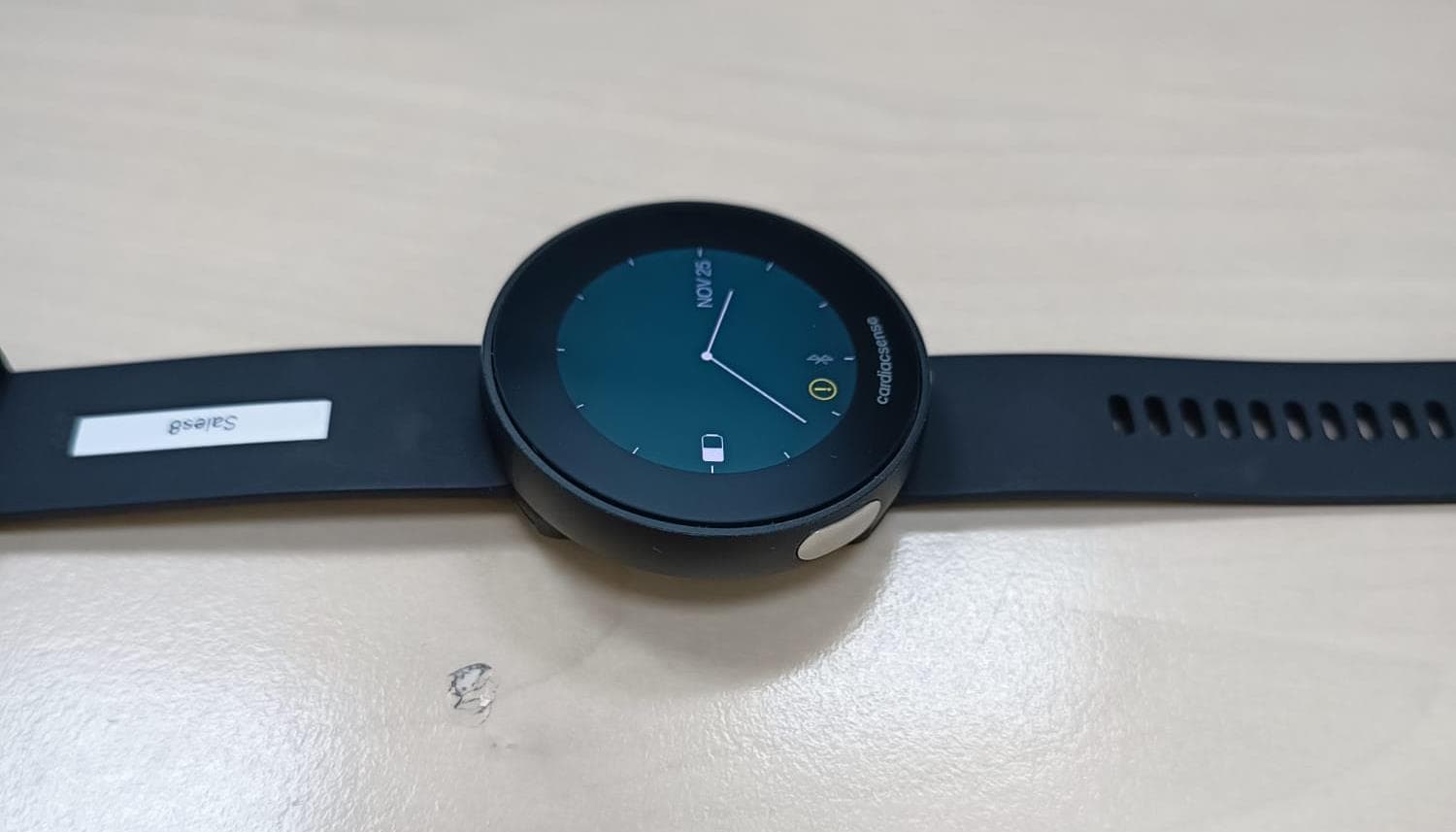
Click to zoom
Application Details
- Equipment Class
- DTS - Digital Transmission System
- Date of Grant
- Jul 17, 2023
- Application Purpose
- Original Equipment
- Date of Application
- Jul 17, 2023
- Equipment Note
- CS System 3 is a wristworn medical device that measures heart rate, Pulse Rate and detects atrial fibrillation (AFib) by reading the users PPG and ECG
- Frequency Range
- 2400.00000000 - 2483.50000000
- Company
- CardiacSense Ltd.
- Country
- Israel
Documents & Files
Document Text
Text extracted from the exhibit documents filed with the FCC. Open a document above to read the original.
Users Manual
CS System 3 User Manual ` 2 © 2022 CardiacSense Ltd., all rights reserved. No part of this manual may be reproduced in any form without the written permission of CardiacSense Ltd. CardiacSense Ltd. reserves the right to change or improve its products and any accompanying technical literature without specific notice of the changes or improvements. DMS-21987 Version B1 Date of issue: June 2022 CardiacSense Ltd. 6 Leshem St., Northern Industrial Park Caesarea 3079868 Israel M: [email protected] www.cardiacsense.com Authorized Representative in the EU MedNet EC-REP GmbH Borkstrasse 10, Münster 48163, Germany MedNet SWISS GmbH Bäderstrasse 18, 5400 Baden, CHRN -AR-20000730, Switzerland 2797 3 Table of Contents About this User Manual ............................................................... 6 1 Introduction ........................................................................... 8 1.1 Proper Use of CS System 3 ............................................................ 8 1.2 CS System 3 Overview ................................................................... 8 1.3 CS System 3 Technology ................................................................ 8 2 Intended Use .......................................................................... 9 2.1 Indications for Use .......................................................................... 9 2.2 Intended Users ................................................................................ 9 2.3 Contraindications ............................................................................ 9 2.4 Adverse Events ............................................................................... 9 3 Safety ................................................................................... 10 3.1 Data Privacy .................................................................................. 10 3.2 Warnings and Cautions ................................................................. 11 3.2.1 Warnings ............................................................................................ 11 3.2.2 Cautions ............................................................................................. 12 4 Know your CS System 3 ..................................................... 14 4.1 Package Contents ......................................................................... 14 4.1.1 CS Watch 3 ........................................................................................ 15 4.1.2 Charging Cradle ................................................................................. 15 4.2 Charging the Watch ...................................................................... 16 4.3 Turning the Watch ON and OFF ................................................... 17 5 Preparing the CS System 3 ................................................ 18 5.1 Charging the CS Watch 3 ............................................................. 18 5.2 Installing the CS3 Mobile app ....................................................... 18 5.3 Setting up your Account ................................................................ 18 5.3.1 Step 1: Registration ........................................................................... 19 5.3.2 Step 2: Creating New Account ........................................................... 21 5.3.3 Step 3: Entring Personal Information ................................................. 23 5.3.4 Step 4: Entering Medical Information ................................................. 24 5.3.5 Step 5: Setting Preferences and Terms ............................................. 27 5.3.6 Step 6: Pairing the Watch .................................................................. 28 5.4 Mobile App Screen ........................................................................ 32 5.5 Wearing the Watch........................................................................ 33 4 5.6 Replacing the Watch Strap ........................................................... 34 6 Using the CS System 3 ....................................................... 35 6.1 Watch Display ............................................................................... 35 6.1.1 Pulse Rate ......................................................................................... 36 6.1.2 Physical Activity ................................................................................. 36 6.1.3 Settings .............................................................................................. 36 6.1.4 Factory Reset ..................................................................................... 37 6.2 Continuous Monitoring .................................................................. 37 6.3 Application Screen ........................................................................ 39 6.3.1 Dashboard Tab .................................................................................. 39 6.3.2 Main Menu ......................................................................................... 40 6.4 Detected and Measured Data ....................................................... 42 6.4.1 Notifications ....................................................................................... 42 6.4.2 Adding Externally Measured Data ..................................................... 42 7 Performing an ECG Measurement ..................................... 44 7.1 ECG Measurement ....................................................................... 45 7.1.1 Non-Successful ECG Measurement .................................................. 48 8 Event and Monthly Reports ................................................ 49 8.1 Event Reports ............................................................................... 49 8.2 Monthly Reports ............................................................................ 50 9 Changing your Account Information ................................. 52 9.1 Changing your Watch ID ......…
Text truncated - open the document above for the full version.
Users Manual
CS System 3 User Manual ` 2 © 2022 CardiacSense Ltd., all rights reserved. No part of this manual may be reproduced in any form without the written permission of CardiacSense Ltd. CardiacSense Ltd. reserves the right to change or improve its products and any accompanying technical literature without specific notice of the changes or improvements. DMS-21987 Version B1 Date of issue: June 2022 CardiacSense Ltd. 6 Leshem St., Northern Industrial Park Caesarea 3079868 Israel M: [email protected] www.cardiacsense.com Authorized Representative in the EU MedNet EC-REP GmbH Borkstrasse 10, Münster 48163, Germany MedNet SWISS GmbH Bäderstrasse 18, 5400 Baden, CHRN -AR-20000730, Switzerland 2797 3 Table of Contents About this User Manual ............................................................... 6 1 Introduction ........................................................................... 8 1.1 Proper Use of CS System 3 ............................................................ 8 1.2 CS System 3 Overview ................................................................... 8 1.3 CS System 3 Technology ................................................................ 8 2 Intended Use .......................................................................... 9 2.1 Indications for Use .......................................................................... 9 2.2 Intended Users ................................................................................ 9 2.3 Contraindications ............................................................................ 9 2.4 Adverse Events ............................................................................... 9 3 Safety ................................................................................... 10 3.1 Data Privacy .................................................................................. 10 3.2 Warnings and Cautions ................................................................. 11 3.2.1 Warnings ............................................................................................ 11 3.2.2 Cautions ............................................................................................. 12 4 Know your CS System 3 ..................................................... 14 4.1 Package Contents ......................................................................... 14 4.1.1 CS Watch 3 ........................................................................................ 15 4.1.2 Charging Cradle ................................................................................. 15 4.2 Charging the Watch ...................................................................... 16 4.3 Turning the Watch ON and OFF ................................................... 17 5 Preparing the CS System 3 ................................................ 18 5.1 Charging the CS Watch 3 ............................................................. 18 5.2 Installing the CS3 Mobile app ....................................................... 18 5.3 Setting up your Account ................................................................ 18 5.3.1 Step 1: Registration ........................................................................... 19 5.3.2 Step 2: Creating New Account ........................................................... 21 5.3.3 Step 3: Entring Personal Information ................................................. 23 5.3.4 Step 4: Entering Medical Information ................................................. 24 5.3.5 Step 5: Setting Preferences and Terms ............................................. 27 5.3.6 Step 6: Pairing the Watch .................................................................. 28 5.4 Mobile App Screen ........................................................................ 32 5.5 Wearing the Watch........................................................................ 33 4 5.6 Replacing the Watch Strap ........................................................... 34 6 Using the CS System 3 ....................................................... 35 6.1 Watch Display ............................................................................... 35 6.1.1 Pulse Rate ......................................................................................... 36 6.1.2 Physical Activity ................................................................................. 36 6.1.3 Settings .............................................................................................. 36 6.1.4 Factory Reset ..................................................................................... 37 6.2 Continuous Monitoring .................................................................. 37 6.3 Application Screen ........................................................................ 39 6.3.1 Dashboard Tab .................................................................................. 39 6.3.2 Main Menu ......................................................................................... 40 6.4 Detected and Measured Data ....................................................... 42 6.4.1 Notifications ....................................................................................... 42 6.4.2 Adding Externally Measured Data ..................................................... 42 7 Performing an ECG Measurement ..................................... 44 7.1 ECG Measurement ....................................................................... 45 7.1.1 Non-Successful ECG Measurement .................................................. 48 8 Event and Monthly Reports ................................................ 49 8.1 Event Reports ............................................................................... 49 8.2 Monthly Reports ............................................................................ 50 9 Changing your Account Information ................................. 52 9.1 Changing your Watch ID ......…
Text truncated - open the document above for the full version.
Attestation Statements
6 Leshem St. Northern Industrial Park, Caesarea 3079868, Israel | [email protected] | +972 (4) 6270702 2.911 (d)(5)(i) Equipment Type Attestation v1.2 Section 2.911(d)(5)(i) Certification – Equipment Type Company name: CardiacSense Ltd Address: 6 Leshem St. Northern Industrial Park, Caesarea, Israel Product Name: CS System 3 FCC ID: 2A4CTCS322 Model(s): CS-FG0015A 2.911(d)(5)(i) Equipment Type We, CardiacSense Ltd (“the applicant”) certify that the equipment for which authorization is sought through certification is not: • Prohibited from receiving an equipment authorization pursuant to § 2.903; of the FCC rules. • Identified as an equipment type in the “Covered List” NOTE 1 Yours sincerely, Name: Asaf Omer Date: 24 March 2023 Title and Company name: , QA&RA Manager, CardiacSense Ltd NOTE 1 “Covered List”; is the List of Equipment and Services Covered By Section 2 of The Secure Networks Act, available at https://www.fcc.gov/supplychain/coveredlist References; 1) 986446 D01 Covered Equipment v01 https://apps.fcc.gov/oetcf/kdb/forms/FTSSearchResultPage.cfm?switch=P&id=325672 2) Federal Register document 2022-28263 published on 02/06/23 https://www.federalregister.gov/documents/2023/02/06/2022-28263/protecting-against-national-security-threats-to-the-com munications-supply-chain-through-the
Attestation Statements
6 Leshem St. Northern Industrial Park, Caesarea 3079868, Israel | [email protected] | +972 (4) 6270702 2.911 (d)(5)(ii) Applicant Attestation v1.3 Section 2.911(d)(5)(ii) Certification – Applicant (Covered List ) Company name: CardiacSense Ltd Address: 6 Leshem St. Northern Industrial Park, Caesarea, Israel Product Name: CS System 3 FCC ID: 2A4CTCS322 Model(s): CS-FG0015A 2.911(d)(5)(ii) Applicant filing We, CardiacSense Ltd (“the applicant”) certify that, as of the date of the filing of the application, the applicant is is not identified on the “Covered List” NOTE 2 , established pursuant to § 1.50002 of this chapter, as an entity producing covered communications equipment. Yours sincerely, Name: Asaf Omer Date: 24 March 2023 Title and Company name: QA&RA Manager, CardiacSense Ltd NOTE 2 “Covered List”; is the List of Equipment and Services Covered By Section 2 of The Secure Networks Act, available at https://www.fcc.gov/supplychain/coveredlist References; 1) 986446 D01 Covered Equipment v01 https://apps.fcc.gov/oetcf/kdb/forms/FTSSearchResultPage.cfm?switch=P&id=325672 2) Federal Register document 2022-28263 published on 02/06/23 https://www.federalregister.gov/documents/2023/02/06/2022-28263/protecting-against-national-security-threats-to-the-com munications-supply-chain-through-the
Attestation Statements
Section 2.911(d)(7) USA Agent for Service of Process Company name: CardiacSense Ltd Address: 6 Leshem St. Northern Industrial Park, Caesarea, Israel Product Name: CS System 3 FCC ID: 2A4CTCS322 Model(s): CS-FG0015A 2.911(d)(7) USA Designated Agent for Service of Process We,CardiacSense Ltd (CardiacSense Ltd) designate [Baihetian Innovative Solutions] NOTE1 for the purpose of accepting service of process on behalf of the applicant. Applicant consent:We acknowledgeour consent to accept service of process in the United States for matters related to the applicable equipment, and at the physical U.S. address and email address of the designated agent and acknowledgeour acceptance of our obligation to maintain an agent for service of process in the United States for no less than one year after either we the grantee have permanently terminated all marketing and importation of the applicable equipment within the U.S., or at the conclusion of any Commission-related administrative or judicial proceeding involving the equipment, whichever is later. Agent obligation:We acknowledgeourobligation to accept service of process in the United States for matters related to the applicable equipment at our physical U.S. address and email addressfor no less than one year after either the grantee has permanently terminated all marketing and importation of the applicable equipment within the U.S., or at the conclusion of any Commission-related administrative or judicial proceeding involving the equipment, whichever is later. USA Agent Company name: Baihetian Innovative Solutions USA Address: 6837 Chase Rd, Dearborn, MI 48126, USA FRN Number: 0033401605 Contact Name:Kenneth Young Telephone No:313-395-3113 Email: [email protected] Applicant Company name: CardiacSense Ltd Address: 6 Leshem St. Northern Industrial Park, Caesarea, Israel FCC Grantee Code:2A4CT Contact Name:Asaf Omer Telephone No:+972-54-4318812 Email:[email protected] Signature: Title: Manager Signature: Title: QA&RA Manager Date: March 31, 2023Date: 24 Mar. 2023 6 Leshem St. Northern Industrial Park, Caesarea 3079868, Israel | [email protected] | +972 (4) 6270702 NOTE 1: An applicant located in the United States may designate itself as the agent for service of process. Reference; Federal Register document 2022-28263 published on 02/06/23 https://www.federalregister.gov/documents/2023/02/06/2022-28263/protecting-against- national-security-threats-to-the-communications-supply-chain-through-the 6 Leshem St. Northern Industrial Park, Caesarea 3079868, Israel | [email protected] | +972 (4) 6270702
Attestation Statements
6 Leshem St. Northern Industrial Park, Caesarea 3079868, Israel | [email protected] | +972 (4) 6270702 2.911 (d)(5)(i) Equipment Type Attestation v1.2 Section 2.911(d)(5)(i) Certification – Equipment Type Company name: CardiacSense Ltd Address: 6 Leshem St. Northern Industrial Park, Caesarea, Israel Product Name: CS System 3 FCC ID: 2A4CTCS322 Model(s): CS-FG0015A 2.911(d)(5)(i) Equipment Type We, CardiacSense Ltd (“the applicant”) certify that the equipment for which authorization is sought through certification is not: • Prohibited from receiving an equipment authorization pursuant to § 2.903; of the FCC rules. • Identified as an equipment type in the “Covered List” NOTE 1 Yours sincerely, Name: Asaf Omer Date: 24 March 2023 Title and Company name: , QA&RA Manager, CardiacSense Ltd NOTE 1 “Covered List”; is the List of Equipment and Services Covered By Section 2 of The Secure Networks Act, available at https://www.fcc.gov/supplychain/coveredlist References; 1) 986446 D01 Covered Equipment v01 https://apps.fcc.gov/oetcf/kdb/forms/FTSSearchResultPage.cfm?switch=P&id=325672 2) Federal Register document 2022-28263 published on 02/06/23 https://www.federalregister.gov/documents/2023/02/06/2022-28263/protecting-against-national-security-threats-to-the-com munications-supply-chain-through-the
Attestation Statements
6 Leshem St. Northern Industrial Park, Caesarea 3079868, Israel | [email protected] | +972 (4) 6270702 2.911 (d)(5)(ii) Applicant Attestation v1.3 Section 2.911(d)(5)(ii) Certification – Applicant (Covered List ) Company name: CardiacSense Ltd Address: 6 Leshem St. Northern Industrial Park, Caesarea, Israel Product Name: CS System 3 FCC ID: 2A4CTCS322 Model(s): CS-FG0015A 2.911(d)(5)(ii) Applicant filing We, CardiacSense Ltd (“the applicant”) certify that, as of the date of the filing of the application, the applicant is is not identified on the “Covered List” NOTE 2 , established pursuant to § 1.50002 of this chapter, as an entity producing covered communications equipment. Yours sincerely, Name: Asaf Omer Date: 24 March 2023 Title and Company name: QA&RA Manager, CardiacSense Ltd NOTE 2 “Covered List”; is the List of Equipment and Services Covered By Section 2 of The Secure Networks Act, available at https://www.fcc.gov/supplychain/coveredlist References; 1) 986446 D01 Covered Equipment v01 https://apps.fcc.gov/oetcf/kdb/forms/FTSSearchResultPage.cfm?switch=P&id=325672 2) Federal Register document 2022-28263 published on 02/06/23 https://www.federalregister.gov/documents/2023/02/06/2022-28263/protecting-against-national-security-threats-to-the-com munications-supply-chain-through-the
Attestation Statements
Section 2.911(d)(7) USA Agent for Service of Process Company name: CardiacSense Ltd Address: 6 Leshem St. Northern Industrial Park, Caesarea, Israel Product Name: CS System 3 FCC ID: 2A4CTCS322 Model(s): CS-FG0015A 2.911(d)(7) USA Designated Agent for Service of Process We,CardiacSense Ltd (CardiacSense Ltd) designate [Baihetian Innovative Solutions] NOTE1 for the purpose of accepting service of process on behalf of the applicant. Applicant consent:We acknowledgeour consent to accept service of process in the United States for matters related to the applicable equipment, and at the physical U.S. address and email address of the designated agent and acknowledgeour acceptance of our obligation to maintain an agent for service of process in the United States for no less than one year after either we the grantee have permanently terminated all marketing and importation of the applicable equipment within the U.S., or at the conclusion of any Commission-related administrative or judicial proceeding involving the equipment, whichever is later. Agent obligation:We acknowledgeourobligation to accept service of process in the United States for matters related to the applicable equipment at our physical U.S. address and email addressfor no less than one year after either the grantee has permanently terminated all marketing and importation of the applicable equipment within the U.S., or at the conclusion of any Commission-related administrative or judicial proceeding involving the equipment, whichever is later. USA Agent Company name: Baihetian Innovative Solutions USA Address: 6837 Chase Rd, Dearborn, MI 48126, USA FRN Number: 0033401605 Contact Name:Kenneth Young Telephone No:313-395-3113 Email: [email protected] Applicant Company name: CardiacSense Ltd Address: 6 Leshem St. Northern Industrial Park, Caesarea, Israel FCC Grantee Code:2A4CT Contact Name:Asaf Omer Telephone No:+972-54-4318812 Email:[email protected] Signature: Title: Manager Signature: Title: QA&RA Manager Date: March 31, 2023Date: 24 Mar. 2023 6 Leshem St. Northern Industrial Park, Caesarea 3079868, Israel | [email protected] | +972 (4) 6270702 NOTE 1: An applicant located in the United States may designate itself as the agent for service of process. Reference; Federal Register document 2022-28263 published on 02/06/23 https://www.federalregister.gov/documents/2023/02/06/2022-28263/protecting-against- national-security-threats-to-the-communications-supply-chain-through-the 6 Leshem St. Northern Industrial Park, Caesarea 3079868, Israel | [email protected] | +972 (4) 6270702
Cover Letter(s)
6 Leshem St., Northern Industrial Park, Caesarea 3079868, Israel Telephone: 972-4-6270702 Fax: 972-4-6271070 www.cardiacsense.com Date: 10 June 2021 Office of Engineering Technology Federal Communications Commission 7435 Oakland Mills Road Columbia, MD 21046 Subject; Request for Confidentiality FCC ID: 2A4CTCS322 To Whom It May Concern, Pursuant to the provisions of Sections 0.457 and 0.459 of Commission's rules (47CFR0.457, 0.459), we are requesting the Commission to withhold the following attachment(s) as confidential document from public disclosure indefinitely. • Schematic Diagram • Block Diagram • Part List • Operational Description Above mentioned document contains detailed system and equipment description are considered as proprietary information in operation of the equipment. The public disclosure of above documents might be harmful to our company and would give competitor an unfair advantage in the market. It is our understanding that all measurement test reports, FCC ID label format and correspondent during certification review process cannot be granted as confidential documents and those information will be available for public review once the grant of equipment authorization is issued. Sincerely, Signature: Name: Asaf Omer Title: QA&RA manager
Cover Letter(s)
6 Leshem St., Northern Industrial Park, Caesarea 3079868, Israel Telephone: 972-4-6270702 Fax: 972-4-6271070 www.cardiacsense.com Letter of Authorization Company: CardiacSense Ltd. Address: 6 Leshem St., Northern Industrial Park, Caesarea 3079868, Israel Product Name: CS System 3 Model Number: CS-FG0015A FCC Identifier: 2A4CTCS322 We authorize MiCOM Labs Inc, 575 Boulder Court, Pleasanton, California 94566, USA, to act on our behalf on all matters concerning the above named equipment. Any individual within MiCOM Labs is authorized to act on our behalf and take action on the application. We declare that MiCOM Labs Inc, 575 Boulder Court, Pleasanton, California 94566, USA, is allowed to forward all information related to the approval project to the Federal Communication Commission and to discuss any issues concerning the approval application. Any and all acts carried out by MiCOM Labs on our behalf shall have the same effect as acts of our own. Name: Asaf Omer Date: 10 June 2021 Title: QA&RA manager Signature of applicant:
External Photos
CS Watch 3 Photos 25 Nov 2021 1 CS Watch 3 Photos 25 Nov 2021 2 CS Watch 3 Photos 25 Nov 2021 3 CS Watch 3 Photos 25 Nov 2021 4
ID Label/Location Info
6 Leshem St., Northern Industrial Park, Caesarea 3079868, Israel Telephone: 972-4-6270702 Fax: 972-4-6271070 www.cardiacsense.com FCC: labeling information Company: CardiacSense Ltd. Address: 6 Leshem St., Northern Industrial Park, Caesarea 3079868, Israel Product Name: CS System 3 Model Number: CS-FG0015A FCC Identifier is located both on the watch box, and on the CS System 3 Mobile app. The mobile app was chosen for the e-label display since the mobile screen is much larger than the watch screen. The watch itself cannot be operated without a paired mobile device. The Mobile app label is accessible by clicking the main menu icon ("hamburger symbol) / settings / about: CS ID - DMS-9930 A2 6 Leshem St., Northern Industrial Park, Caesarea 3079868, Israel Telephone: 972-4-6270702 Fax: 972-4-6271070 www.cardiacsense.com The watch box label, including FCC identification looks as follows: CS ID - DMS-11492 B1 Name: Asaf Omer Date: 07 July 2022 Title: QA&RA manager
Internal Photos
Internal photos FCC ID: 2A4CTCS322
RF Exposure Info
FCC Exemption Limits for Routine Evaluation FCC SAR test exclusions per KDB 447498 KDB 447498 D01 General RF Exposure Guidance v06 Section: 4.3.1. Standalone SAR test exclusion considerations states: For 100 MHz to 6 GHz and test separation distances ≤ 50 mm, the 1-g and 10-g SAR test exclusion thresholds are determined by the following: [(max. power of channel, including tune-up tolerance, mW) / (min. test separation distance, mm)] · [√f(GHz)] ≤ 3.0 for 1-g SAR, and ≤ 7.5 for 10-g extremity SAR, 30 where • f(GHz) is the RF channel transmit frequency in GHz • Power and distance are rounded to the nearest mW and mm before calculation • The result is rounded to one decimal place for comparison • The values 3.0 and 7.5 are referred to as numeric thresholds. The test exclusions are applicable only when the minimum test separation distance is ≤ 50 mm, and for transmission frequencies between 100 MHz and 6 GHz. When the minimum test separation distance is < 5 mm, a distance of 5 mm according to 4.1 f) is applied to determine SAR test exclusion. SAR Test Exclusion Threshold According report 7112322441 of SII FCC ID: 2A4CTCS322 Freq. [GHz] d [mm] Max. power [mW] Calculation result FCC Limit @ 5 mm [mW] SAR Exclusion applicable (Yes/No) 2.4 5 1.019 0.316 3.0 Yes Summary: SAR test exclusion threshold is < 3 for separation distance of 5 mm. Therefore, SAR test is not required.
Test Report
3- Jul-23 Tested by: Eng. Alexander Konkov Date 20.06.23 Test Antenna Gain measurement Temp 23° Test method Substitution Humidity 44% Project No 7112322441 Atm. pressure 1009 mbar Company CardiacSense Ltd. EUT PCB Antenna Reference Horn Antenna SII3117 s/n 139055 Freq Gain Generator Rad. Meas GHz dBi dBm dBm 2.4 5.76 0 -39.70 Double Ridged Waveguide Antenna 1-18 GHz ETS Lindgren 3115 00143138 07 /21 07 /23 MXG Analog Microwave Signal generator 100 kHz - 40 GHz Agilent N5183A MY50141773 12/22 12/23 EMI RECEIVER-MXE 3Hz-44GHz Keysight N9038B MY60180020 09/22 09/23 3- Jul-23 Tested by: Eng. Alexander Konkov Tested Antenna PCB Antenna printed Manufacturer: CardiacSense Ltd. Freq Gain Polarization Generator Rad. Meas GHz dBi - dBm dBm 2.4 -1 H 0 -46.53 Gain measurements results Antenna radiation pattern -25 -20 -15 -10 -5 0 0 10 20 30 40 50 60 70 80 90 100 110 120 130 140 150 160 170 180190 200 210 220 230 240 250 260 270 280 290 300 310 320 330 340 350 360 Chart Title 3- Jul-23 Tested by: Eng. Alexander Konkov Freq Gain Polarization Generator Rad. Meas GHz dBi - dBm dBm 2.4 -0.4 V 0 -45.89 Gain measurements results Antenna radiation pattern -20 -15 -10 -5 0 0 10 20 30 40 50 60 70 80 90 100 110 120 130 140 150 160 170 180190 200 210 220 230 240 250 260 270 280 290 300 310 320 330 340 350 360 Chart Title
Test Report
Test Report No. 7112322441 Applicant: CardiacSense Ltd. Equipment Under Test: CS System 3 Model: CS-FG0015BK FCC ID: 2A4CTCS322 Issued by: The Standards Institution of Israel Industry Division Electrical & Electronics Laboratory EMC Branch Certificate Number: AT-1359 Test Report No.: 7112322441 Page 2 of 36 Pages Titl e: Test on CS System 3; Model: CS-FG0015ABK; FCC ID: 2A4CTCS322 Applicant: CardiacSense Ltd. Address: 6 Leshem St. Northern Industrial Park, Caesarea, Israel 3088989 Sample for test selected by: The customer The date of test: October & November 2021 Description of Equipment under Test (EUT): CS System 3 Model: CS-FG0015BK Software version: SW 1.6.2 Hardware version: 12.1 Manufactured by: CardiacSense Ltd. Reference Documents: CFR 47 FCC (2020) Rules and Regulations: Part 15. Radio frequency devices, Subpart C: Intentional radiators. Section 15.247: Operation within the bands 902 - 928 MHz, 2400 - 2483.5 MHz, 5725 - 5875 MHz Test Results: The EUT was found to be in compliance with the following standard: CFR47 Part 15 Subpart C sections: 15.203, 15.205, 15.207, 15.209 and 15.247. This Test Report contains 36 pages and may be used only in its entirety. This Test Report applies only to the specimen tested and may not be applied to other specimens of the same product. Test Report No.: 7112322441 Page 3 of 36 Pages Titl e: Test on CS System 3; Model: CS-FG00…
Text truncated - open the document above for the full version.
Contact Information
Applicant
Asaf Omer
Technical Contact
Test Firm
Electrical and Electronics laboratory, SIIAlbert Herzenshtein
[email protected](972)-3-646-5069
Technical Specifications
| # | Rule Parts | Frequency Range | Power Output |
|---|---|---|---|
| 1 | 15C | 2.40 GHz - 2.48 GHz | 1.02 mW |