2A4V4-916Wireless Dog Fence
Shenzhen shi min zhi sheng mao yi you xian gong si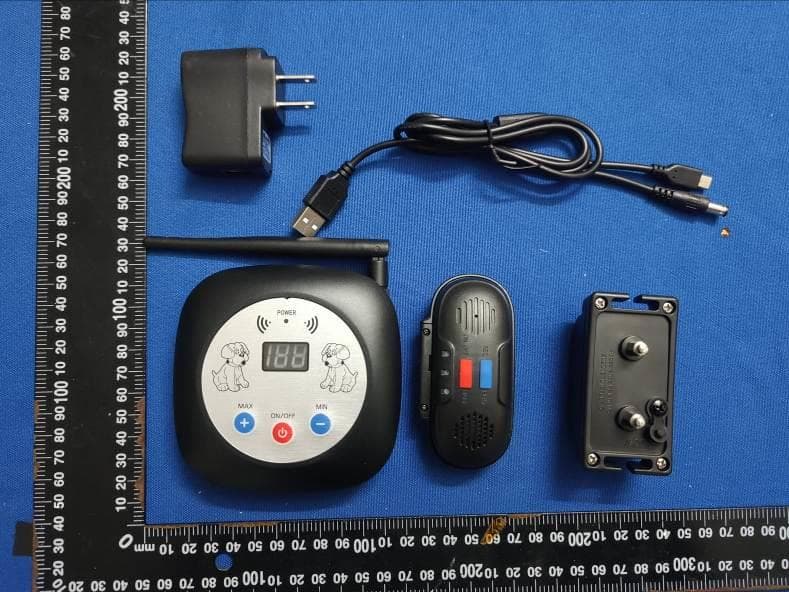
Click to zoom
Application Details
- Equipment Class
- DSC - Part 15 Security/Remote Control Transmitter
- Date of Grant
- Mar 04, 2022
- Application Purpose
- Original Equipment
- Date of Application
- Mar 04, 2022
- Equipment Note
- Wireless Dog Fence
- Frequency Range
- 433.92000000 - 433.92000000
- Country
- China
Documents & Files
Document Text
Text extracted from the exhibit documents filed with the FCC. Open a document above to read the original.
Users Manual
KEEP YOUR DOGS CONTAINED SAFE 100% NO SHOCKING PROTECT YOUR PETES Wireless Dog Fence System with Voice Control Instruction Manual Contents About the system Planning area layout Quick using guidance Step 1-Pairing Step 2-Set alert voice Step 3-Set the receiver mode of dog collar up Step 4-Install the receiver Step 5-Install the transmitter Step 6-Test the boundary Step 7-Set the training flag Training Guidance-Train your dog in 30 days Appendix A (including packaging) Safety Information Safety caution Guarantee 1 2 3 3 3 3 3 3 4 4 5 8 8 9 9 About the system Power Receiver Voice-controlled wireless pet fences are accurate, safe and effective, providing your pets with 100% accurate border protection, preventing them from wandering around. Please read the entire manual. If there are any problems, please refer to this manual. Power off: 73uA as the related value: 300mah / 0.073mA / 24 (hours) = 171 days in the power off state. Power on: minimum value 2mA, maximum value 12mA (with continuous current change) During vibration: maximum value: 150mA (with continuous current changes) Transmitter Dormant state: 63uA theoretical value: 300mah/0.063mA/24 (hours) = 198 days in the sleep state Power on: the minimum value is 5mA, the maximum value is 25mA (with continuous current change), the power ranged between the gears 10 to 110 is no significant difference. Functions Receiver Play button: press for a long time to open the recording and release the button to terminate the recording, the recording will be automatically terminated after more than 13 seconds; press for a short time to play the recording. Power button: press for a long time to power on or power off, keep pressing for a long time to switch into pairing mode in the state of power on; press for a short time to switch to working state: vibration state, voice state, vibration and voice state. Light indication: 1. When the device is charging, the red light singly blinks. 2. When the device is fully charged, the green light is always on. 3. When the battery is too low, the red light blinks twice. 4.The blue light singly blinks in the voice status. 5. The green light singly blinks in the vibration status. 6. The blue light and green light blink at the same time in the vibration and voice status. 7. The red light blinks quickly in pairing mode. 8. The blue light is always on in the recording state. 1 Planning area layout You can feel at ease about this system, which could make your dog safe and happy. 1. The wireless transmitter can be used at home or carried outdoors. After the signal is straightened, the receiving antenna can be used for better transmission. 2. After turning on the wireless transmitter, a circular area will be generated. The radius of transmitted area can be adjusted manually. The larger the gear of the devices and the farther the distance, the easier it is to be disturbed. For example, cars with metal surroundings, pedestrian flow, architectural obstacles and others will have attenuation for distance. There is also distance attenuation when the transmitter and receiver are close to the ground, and the attenuation will be greater when the transmitter is close to the ground. 3. It is recommended to place the wireless transmitter in a position with better signal reception and transmission. Table 1 20 40 60 80 100 82 164 230 328 426 20-25 50 70 100 130 Farthest distance (Unit/feet)Farthest distance (Unit/m) Human body wear test Human body wear test Gear (Digital tube display) Receiver pairing mode description In the pairing mode, the receiver will clear the record of the transmitter that has been connected. If you terminate the pairing mode (you can terminate the pairing mode and enter into the working mode by short pressing the power key), no transmitter will be connected. An alarm will occur because the signal cannot be received. Description on working mode of receiver In the working mode, if the receiver is too far from the transmitter that has been paired, an alarm will occur. Transmitter Power button: press for a long time to turn off or turn on, keep pressing for a long time to switch into pairing mode in the state of power on; press for a short time to wake up the indicator. Max button: Short press to increase the gear. Min button: Short press to decrease the gear. Light indication: 1. When the device is charg ing, the light is singly flash. 2. When the battery is fully charged or the power is sufficient, the light is always on. 3. When the power is too low, the light double blinks. 4.The light flashes quickly in pairing mode. Description on pairing mode of transmitter In pairing mode, the transmitter does not monitor other receivers, but it constantly searches for receivers that need to be paired. When the receiver and transmitter are in the pairing mode at the same time, both of them will pair successfully and automatically exit the pairing mode and enter into the working mode. The transmitter can match up to 5 receivers. Description on the working mode of transmitter In the working mode, the transmitter will monitor all the paired receivers nearby. 2 Quick using guidance Step 1-Pairing When you are ready to use voice to control the wireless fence system, you need to pair the receiver with the transmitter, and at the meanwhile, long press the play button of receiver and the power button of transmitter, the indicator can be seen to flash quickly, which is meaning that pairing is successful. Step 2-Set alert voice You need to record a warning voice for your dog (for example: come back, wiwi). Long press the button to turn on the recording and release the button to terminate the recording. The recording will automatically terminate after more than 13 seconds; you need to shout out the sensitive warning for your dog in a loud and clear manner within 13 seconds ( vivid statement that your dog dare not move when hearing it, or running back immediately). Short press to play the recording. After recording, you can check whether y…
Text truncated - open the document above for the full version.
Cover Letter(s)
CONFIDENTIALITY REQUEST for Certification Service in USA Federal Communication Commission Equipment Authorization Division, Application Processing Branch 7435 Oakland Mills Road Columbia, MD 21046 Date: 2022/03/03 TO WHOM IT MAY CONCERN Pursuant to Paragraphs §0.457 and 0.459 of the Commission’s Rules (47 C.F.R.) and Section §552(b)(4) of the Freedom of Information Act, we requests confidentiality for the following products: FCC ID Model name 2A4V4-916 916 For the product stated above, we request that the following information be held confidential; Exhibits Long-Term Confidentiality Short-Term Confidentiality Short-Term Confidentiality Days External Photos Internal Photos Block Diagram Schematics Test Setup Photos User’s Manual Parts List Tune Up Operational Descriptions The long-term confidentiality exhibits contain our trade secrets and proprietary information that could be of benefit to our competitors. The short-term confidentiality on the basis of ensuring that business sensitive information remains confidential until the actual marketing of our new device. If you have any questions, please feel free to contact me at the address shown below. Sincerely, Name: Dongjie Luo Company: Shenzhen shi min zhi sheng mao yi you xian gong si Address: 1101,East of Yihai Square, Chuangye road, Yuehai Street, Shenzhen Guangdong, 518000, China Phone: +86 13713811438 Fax: +86-0755-23214393 E-Mail: [email protected]
External Photos
FCC ID: 2A4V4-916 Antenna
ID Label/Location Info
FCC ID: 2A4V4-916
Internal Photos
FCC ID: 2A4V4-916
Test Report
Shenzhen CTA Testing Technology Co., Ltd. Room 106, Building 1, Yibaolai Industrial Park, Qiaotou Community, Fuhai Street, Bao’an District, Shenzhen, China Shenzhen CTA Testing Technology Co., Ltd. Room 106, Building 1, Yibaolai Industrial Park, Qiaotou Community, Fuhai Street, Bao’an District, Shenzhen, China Tel:+86-755 2322 5875 E-mail:[email protected] Web:http://www.cta-test.cn FCC PART 15 SUBPART C TEST REPORT FCC PART 15.231 Report Reference No. ..................... : FCC ID. ............................................ : CTA22030300901 2A4V4-916 Compiled by ( position+printed name+signature) .. : File administrators Kevin Liu Supervised by ( position+printed name+signature) .. : Project Engineer Kevin Liu Approved by ( position+printed name+signature) .. : RF Manager Eric Wang Date of issue ..................................... : Mar. 03, 2022 Testing Laboratory Name .............. : Shenzhen CTA Testing Technology Co., Ltd. Address ............................................ : Room 106, Building 1, Yibaolai Industrial Park, Qiaotou Community, Fuhai Street, Bao‘an District, Shenzhen, China Applicant’s name ............................ : Shenzhen shi min zhi sheng mao yi you xian gong si Address ............................................ : 1101,East of Yihai Square, Chuangye road, Yuehai Street, Shenzhen Guangdong, 518000, China Test specification ...........................: Standard ........................................... : FCC Part 15.231 Shenzhen CTA Testing Technology Co., Ltd. All rights reserved. This publication may be reproduced in whole or in part for non-commercial purposes as long as the Shenzhen CTA Testing Technology Co., Ltd. is acknowledged as copyright owner and source of the material. Shenzhen CTA Testing Technology Co., Ltd. takes no responsibility for and will not assume liability for damages resulting from the reader's interpretation of the reproduced material due to its placement and context. Test item description .....................: Wireless Dog Fence Trade Mark ....................................... : YQJ Manufacturer .................................... : Shenzhen Yingqiji Electronics Co., Ltd. Model/Type reference....................... : 916 Listed Models .................................. : N/A Ratings ............................................. : 5V1A Modulation ....................................... : ASK Hardware version ............................. : PT04-CONTROL-V100 Software version .............................. : V1.0 Frequency .......................................... 433.92MHz Result................................................ : PASS Report No.: CTA22030300901 Page 2 of 24 Shenzhen CTA Testing Technology Co., Ltd. Room 106, Building 1, Yibaolai Industrial Park, Qiaotou Community, Fuhai Street, Bao’an District, Shenzhen, China Tel:+86-755 2322 5875 E-mail:[email protected] Web:http://www.cta-test.cn T E S T R E P O R T Equipment under Test : Wireless Dog Fence Model /Type : 916 Listed Models : N/A Applicant : Shenzhen shi min zhi sheng mao yi you xian gong si Address : 1101, East of Yihai Square, Chuangye road, Yuehai Street, Shenzhen Guangdong, 518000, China Manufacturer : Shenzhen Yingqiji Electronics Co., Ltd. Address : Room 402, Building A, Xixiang Oyster Industrial Park, No. 162, Fengtang Avenue, Heping Community, Fuhai Street, Baoan District, Shenzhen, China Test Result: PASS The test report merely corresponds to the test sample. It is not permitted to copy extracts of these test result without the written permission of the test laboratory. Report No.: CTA22030300901 Page 3 of 24 Shenzhen CTA Testing Technology Co., Ltd. Room 106, Building 1, Yibaolai Industrial Park, Qiaotou Community, Fuhai Street, Bao’an District, Shenzhen, China Tel:+86-755 2322 5875 E-mail:[email protected] Web:http://www.cta-test.cn Contents 1 T E S T S T A N D A R D S ................................................................. 4 2 S U M M A R Y ............................................................................ 5 2.1 General Remarks 5 2.2 Product Description 5 2.3 Equipment Under Test 5 2.4 Short description of the Equipment under Test (EUT) 5 2.5 Block Diagram of Test Setup 5 2.6 Special Accessories 6 2.7 Related Submittal(s) / Grant (s) 6 2.8 Modifications 6 3 T E S T E N V I R O N M E N T .............................................................. 7 3.1 Address of the test laboratory 7 3.2 Test Facility 7 3.3 Environmental conditions 7 3.4 Summary of measurement results 8 3.5 Statement of the measurement uncertainty 8 3.6 Equipments Used during the Test 8 4 T E S T C O N D I T I O N S A N D R E S U L T S ........................................... 10 4.1 AC Power Conducted Emission 10 4.2 Radiated Emission 13 4.3 20dB Bandwidth 17 4.4 Deactivation Time 18 4.5 Antenna Requirement 19 5 T E S T S E T U P P H O T O S O F T H E E U T ......................................... 20 6 PH O T O S O F T H E E U T ........................................................... 21 Report No.: CTA22030300901 Page 4 of 24 Shenzhen CTA Testing Technology Co., Ltd. Room 106, Building 1, Yibaolai Industrial Park, Qiaotou Community, Fuhai Street, Bao’an District, Shenzhen, China Tel:+86-755 2322 5875 E-mail:[email protected] Web:http://www.cta-test.cn 1 T E S T S T A N D A R D S The tests were performed according to following standards: FCC Rules Part 15.231:Periodic operation in the band 40.66-40.70 MHz and above 70 MHz. ANSI C63.10:2013 : American National Standard for Testing Unlicensed Wireless Devices Report No.: CTA22030300901 Page 5 of 24 Shenzhen CTA Testing Technology Co., Ltd. Room 106, Building 1, Yibaolai Industrial Park, Qiaotou Community, Fuhai Street, Bao’an District, Shenzhen, China Tel:+86-755 2322 5875 E-mail:[email protected] Web:http://www.cta-test.cn 2 S U M M A R Y 2.1 General Remarks Date of receipt of test sample : Feb. 17, 2022 Testing commenced on : Feb. 18, 2022 Testing concluded on : Mar. 01, 2022 2.2 Product Description Product …
Text truncated - open the document above for the full version.
Test Setup Photos
FCC ID: 2A4V4-916
Contact Information
Applicant
Dongjie Luo(legal person)
Test Firm
SHENZHEN CTA TESTING TECHNOLOGY CO., LTD.Eric Wang
[email protected]+86 755 2322 5875
Technical Specifications
| # | Rule Parts | Frequency Range | Power Output |
|---|---|---|---|
| 1 | 15.231 | 433.92 MHz - 433.92 MHz | - |