2A5M9SXL2022RDrone Glow UFO 5inch
Sheng Xing Long Plastic & Electronic Products(Shenzhen)Co., Ltd.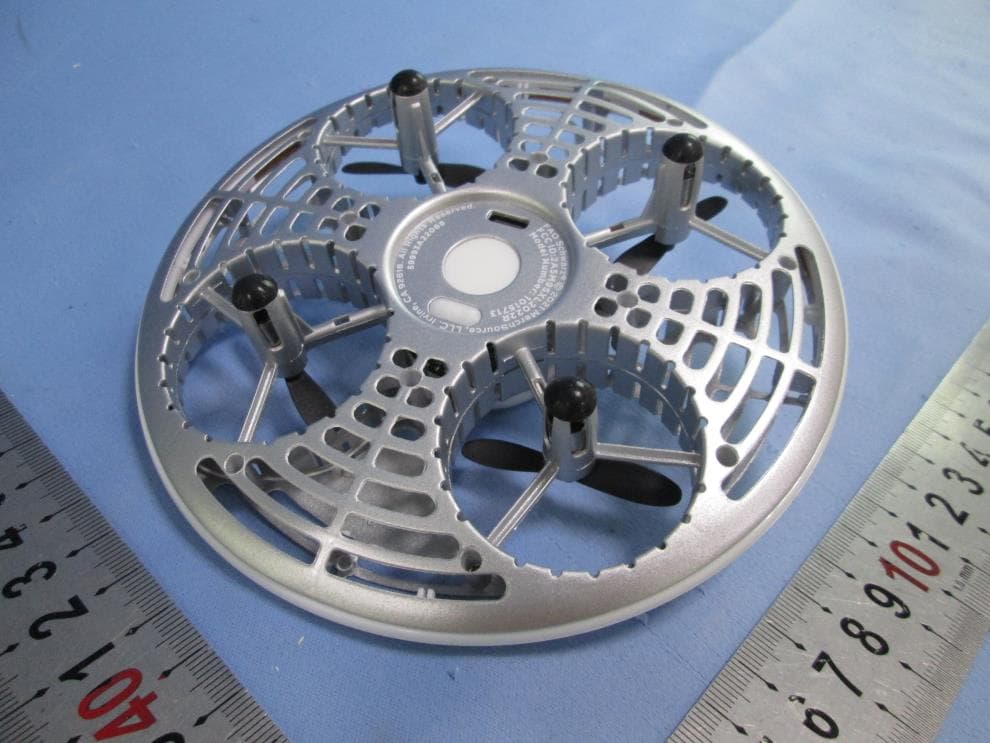
Click to zoom
Application Details
- Equipment Class
- DXX - Part 15 Low Power Communication Device Transmitter
- Date of Grant
- Jun 07, 2022
- Application Purpose
- Original Equipment
- Date of Application
- Jun 07, 2022
- Equipment Note
- Drone Glow UFO 5inch
- Frequency Range
- 2415.00000000 - 2472.00000000
- Country
- China
Documents & Files
Document Text
Text extracted from the exhibit documents filed with the FCC. Open a document above to read the original.
Users Manual
CHARGING BATTERY Step 1 - Pre ight Checklist 1. Read all warnings and instructions. 2. Install remote batteries, page 4. 3. Charge batteries, page 4. 4. Make sure that the drone and remote are powered off. Step 2 - Choosing a Location 1. Drone is designed to be flown indoors and outdoors. 2. Always make sure you have enough space to fly the drone. 3. Always follow warnings, page 2. Step 3 - Pre ight 1. Make sure the remote is off. 2. Press and hold the power button on bottom of the drone for 1 to 2 seconds until the LED lights turn on. 3. Place the drone on a flat, level surface. For ease of control, the blue lights should face towards you. 4. Turn on the controller. Push the left stick up and then down. 5. The drone’s lights will flicker during the pairing process and then remain on once paired. Step 4 - Takeo Congratulations on your purchase of the Drone Glow UFO. It’s time for fun. This drone is capable of omnidirectional flight – fly up, down, left and right, pitch forward or backward – all with 6-axis gyro stabilization. Includes remote, USB charging cable and replacement blades. Drone features auto orientation, auto takeoff and landing. TABLE OF CONTENTS General Warnings Page 2 Contents Page 3 Remote Battery Installation and Charging Battery Page 4 Replacing Propellers Page 5 Remote Overview Page 6 Operating Drone Page 7 Operating Page 8 Other Features Page 9 23 45 67 BEFORE USE, READ ALL WARNINGS AND INSTRUCTIONS IN THIS MANUAL. Printed in China BATTERY WARNINGS: ALKALINE • Do not mix old and new batteries. • Do not mix alkaline, standard (carbon-zinc), or rechargeable batteries. • Alkaline batteries are recommended. Use only the specified voltage. • Insert batteries using the correct polarity. Always use, replace, and recharge (if applicable) batteries under adult supervision. • Do not attempt to charge non-rechargeable batteries. • Do not short-circuit the battery supply terminals. • Do not dispose of batteries in fire: batteries may explode or leak. • Remove batteries before storing. • Recycle or dispose of batteries according to federal, state, and local laws. • Keep these instructions for future reference. 1. Phillips screwdriver will be required for battery installation . Remove the screw at the back of the controller and then slide open the battery compartment. 2. Install 2 AAA 1.5V batteries, ensuring the correct polarity. 3. Replace and secure the battery compartment with the screw. Drone Glow UFO BATTERY WARNINGS: LITHIUM-POLYMER: • This product contains batteries that are non-replaceable. • There is a risk of fire and personal injury if battery is punctured, damaged, or misused. • Do not dismantle, crush, incinerate or short-circuit battery. • Never expose battery to extreme temperatures or moisture. • Keep away from flammable materials and direct sunlight. • Only charge using the provided charger, cable, and/or adapters. • Rechargeable battery is only to be charged by an adult. • Adult supervision is required while charging the battery. • Allow battery to cool to room temperature before charging. • Charge on a non-flammable surface and keep away from flammable products. • Discontinue charging if battery becomes hot, swells, smokes, or gives off a strong odor. • Battery chargers used with the product are to be regularly examined for damage to the cord, plug, enclosure, and other parts. In the event of such damage, chargers must not be used until the damage has been repaired. • Recycle or dispose of battery according to federal, state, and local laws. • Keep these instructions for future reference. USB Charging Cable4 Replacement Propellers Note: The drone will light up when it is charging and turn off when the battery is fully charged. 1. Turn off the drone before charging. 2. Connect the charging cable to the charging port on the drone. 3. Connect USB connector to the power source. 1. Only an adult should replace propellers. To remove, pull up the propellers directly. 2. Replace propellers by following the diagram. 3. Each propeller spins differently. Propeller B spins counter clockwise and Propeller A spins clockwise. Drone Remote 3. Use the directional control stick to move forwards, backwards or side to side. 1. Turn off your remote. This will stop you from accidentally turning the propellers on. 2. Make sure the propellers have stopped spinning then pick up your drone. Press and hold the drone's on/off button to turn the drone off. Note: You will need to pair your drone again before your next flight, (part 1 of step 4). Tips 1. Do not crash drone into sand or dirt. Drone gears may become clogged. 2. When first learning to pilot the drone, practice lifting off and hovering indoors. 3. Stay several feet from walls and objects. 1. Prepare For Flight a. Drone must be charged before each use (cable included). b. Indicator light on Drone will turn off when fully charged. c. Install batteries in remote. 2. Pair Your Drone Before each flight pair the remote with the drone: a. Turn your drone on and place on a flat, level surface. b. Turn on the remote. c. Push the left stick up and then down. d. Repeat the above steps in order if necessary. 3. Calibrate Move both joysticks diagonally in toward the middle of the remote. 4. Remote Control Overview Practice flying your drone indoors, below 10 feet, and at low speeds until comfortable with all controls to avoid unnecessary damage or injury. a. Left joystick: Controls elevation. b. Right joystick: Controls flight direction. c. Direction Trim: Reduces drone drift. d. Press the "Take Off / Land" button to take off and land. e. To cut power to drone, press and hold red STOP button. 89 This device complies with Part 15 of the FCC Rules. Operation is subject to the following two conditions: (1) this device may not cause harmful interference, and (2) this device must accept any interference received, including interference that may cause undesired operation. 4. Stunts - Press the Stunt button then press the directional control stick…
Text truncated - open the document above for the full version.
External Photos
Page 1 of 2 EXTERNAL PHOTOS Page 2 of 2
ID Label/Location Info
Label Artwork and Location SIZE:26.5mm(W)*1.4mm(H)
Internal Photos
Page 1 of 2 INTERNAL PHOTOS Page 2 of 2
RF Exposure Info
INTERTEK TESTING SERVICES RF Exposure The equipment under test (EUT) is an Drone Glow UFO 5inch operating at 2.4G Band. The EUT can be powered by DC 3.7V (1 x 3.7V rechargeable battery). And the RF function will be shut down and it can’t transmit RF signals while charging. For more detail information pls. refer to the user manual. Antenna Type: Integral antenna Modulation Type: GFSK Antenna Gain: 0dBi The nominal conducted output power specified: -4.0 dBm (±3dB) The nominal radiated output power (e.i.r.p) specified: -4.0 dBm (±3dB) According to the KDB 447498: The Maximum peak radiated emission for the EUT is 92.1 dBμV/m at 3m in the frequency 2415MHz The EIRP = [(FS*D) ^2 / 30] mW = -3.13dBm which is within the production variation. The Minimum peak radiated emission for the EUT is 89.7 dBμV/m at 3m in the frequency 2472MHz The EIRP = [(FS*D) ^2 / 30] mW = -5.53dBm which is within the production variation. The maximum average conducted output power specified is -1.0dBm= 0.794mW The source- based time-averaging conducted output power =0.794mW The SAR Exclusion Threshold Level: 푃 th (mW) = ERP 20cm * (푑/20cm) 푥 (X= ) = 3060 * (0.5/20) 1.9 mW = 2.72 mW Since the source-based time-averaging conducted output power is well below the SAR low threshold level, so the EUT is considered to comply with SAR requirement without testing. The duty cycle is simply the on-time divided by the period: The duration of one cycle = 20.058ms Effective period of the cycle = = 7.25μs x1 +1.0435ms= 1.05075ms DC =1.05075ms / 20.058ms =0.0524 or 5.24% FCC ID: 2A5M9SXL2022R
Test Report
Sheng Xing Long Plastic & Electronic Products(Shenzhen)Co., Ltd. TEST REPORT SCOPE OF WORK FCC TESTING– MODEL: 1015713 REPORT NUMBER GZHH00446025-002 ISSUE DATE April 30, 2022 PAGES 24 DOCUMENT CONTROL NUMBER FCC ID 249_C © 2017 INTERTEK Intertek Report No.: GZHH00446025-002 This report is for the exclusive use of Intertek's Client and is provided pursuant to the agreement between Intertek and its Client. Intertek's responsibility and liability are limited to the terms and conditions of the agreement. Intertek assumes no liability to any party, other than to the Client in accordance with the agreement, for any loss, expense or damage occasioned by the use of this report. Only the Client is authorized to permit copying or distribution of this report and then only in its entirety. Any use of the Intertek name or one of its marks for the sale or advertisement of the tested material, product or service must first be approved in writing by Intertek. The observations and test results in this report are relevant only to the sample tested. This report by itself does not imply that the material, product, or service is or has ever been under an Intertek certification program. Intertek Testing Service Shenzhen Ltd. Longhua Branch 101, 201, Building B, No. 308 Wuhe Avenue, Zhangkengjing Community GuanHu Subdistrict, LongHua District, Shenzhen, People’s Republic of China Tel: (86 755) 8601 6288 Fax: (86 755) 8601 6751 Version: 01-November-2017 Page: 1 of 24 FCC ID 249_C Test Report Sheng Xing Long Plastic & Electronic Products(Shenzhen)Co., Ltd. Application for Certification FCC ID: 2A5M9SXL2022R Drone Glow UFO 5inch Model: 1015713 Additional Model: 101XXXX (where XXXX can be digits 0000-9999 which represent different customers) 2.4GHz Transceiver Report No.: GZHH00446025-002 We hereby certify that the sample of the above item is considered to comply with the requirements of FCC Part 15, Subpart C for Intentional Radiator, mention 47 CFR [10-1-20] Prepared and Checked by: Approved by: Sign on file Maura Wang Engineer Peter Kang Technical Supervisor Date: April 30, 2022 Intertek Report No.: GZHH00446025-002 Version: 01-November-2017 Page: 2 of 24 FCC ID 249_C Test Report MEASUREMENT/TECHNICAL REPORT This report concerns (check one:) Original Grant X Class II Change Equipment Type: DXX - Part 15 Low Power Communication Device Transmitter Deferred grant requested per 47 CFR 0.457(d)(1)(ii)? Yes No X If yes, defer until: date Company Name agrees to notify the Commission by: date of the intended date of announcement of the product so that the grant can be issued on that date. Transition Rules Request per 15.37? Yes No X If no, assumed Part 15, Subpart C for intentional radiator − the new 47 CFR [10-1-20 Edition] provision. Report prepared by: Maura Wang Intertek Testing Services Shenzhen Ltd. Longhua Branch 101, 201, Building B, No. 308 Wuhe Avenue, Zhangkengjing Community GuanHu Subdistrict, LongHua District, Shenzhen, People’s Republic of China Tel / Fax: 86-755-8601 6288/86-755-8601 6751 Intertek Report No.: GZHH00446025-002 Version: 01-November-2017 Page: 3 of 24 FCC ID 249_C Test Report Table of Contents 1.0 Summary of Test Result .......................................................................................... 4 2.0 General Description ................................................................................................. 5 2.1 Product Description ................................................................................................. 5 2.2 Related Submittal(s) Grants .................................................................................... 5 2.3 Test Methodology .................................................................................................... 5 2.4 Test Facility ............................................................................................................ 5 3.0 System Test Configuration ...................................................................................... 6 3.1 Justification ............................................................................................................. 6 3.2 EUT Exercising Software ......................................................................................... 6 3.3 Special Accessories ................................................................................................ 6 3.4 Equipment Modification ........................................................................................... 6 3.5 Measurement Uncertainty ....................................................................................... 6 3.6 Support Equipment List and Description .................................................................. 6 4.0 Emission Results ..................................................................................................... 7 4.1 Radiated Test Results ............................................................................................. 7 4.1.1 Field Strength Calculation ..................................................................................... 7 4.1.2 Radiated Emission Configuration Photograph ....................................................... 8 4.1.3 Radiated Emissions .............................................................................................. 8 4.1.4 Transmitter Spurious Emissions ......................................................................... 11 5.0 Equipment Photographs ........................................................................................ 15 6.0 Product Labelling ................................................................................................... 15 7.0 Technical Specifications ........................................................................................ 15 8.0 Instruction Manual ................................................................................................. 15 9.0 Miscellaneous Information .......................................…
Text truncated - open the document above for the full version.
Test Setup Photos
Page 1 of 2 RADIATED PHOTOS Up to 1GHz (EUT was placed in the centre of the turntable) Page 2 of 2 Above 1GHz (EUT was placed in the centre of the turntable)
Contact Information
Applicant
Amanda Xu(Manager)
Technical Contact
Intertek Testing Services Shenzhen Ltd. Longhua brWilliam Chen
[email protected](86-755) 8614 0627
101, 201, Building B, No. 308 Wuhe Avenue, Zhangke · Shenzhen · China
Non-Technical Contact
Intertek Testing Services Shenzhen Ltd. Longhua brWilliam Chen
[email protected](86-755) 8614 0627
Test Firm
Intertek Testing Services Shenzhen Ltd. Longhua BrHolly Ou
[email protected]+86 755 86140691
Technical Specifications
| # | Rule Parts | Frequency Range | Power Output |
|---|---|---|---|
| 1 | 15C | 2.42 GHz - 2.47 GHz | - |
Other Applications from Sheng Xing Long Plastic & Electronic Products(Shenzhen)Co., Ltd.
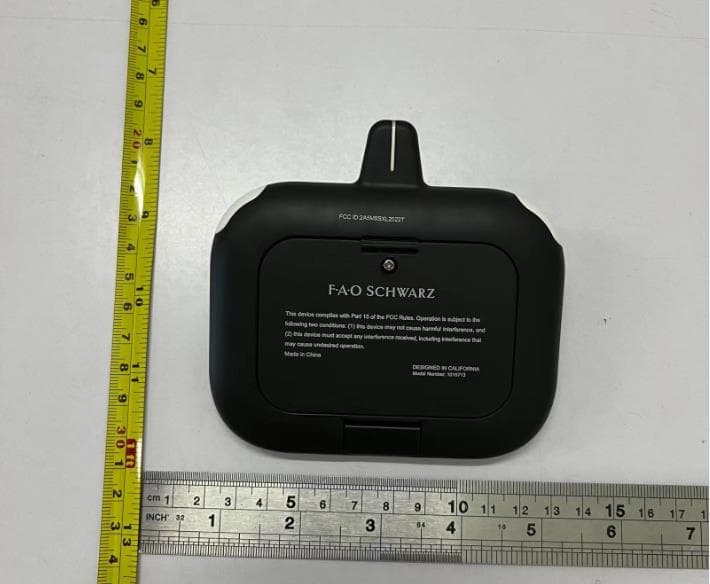
2A5M9SXL2022T
Jun 11, 2022Drone Glow UFO 5inch
Equipment Class
DXX - Part 15 Low Power Communication Device Transmitter