2A66H-ACA-I22True Wireless Bluetooth Earbuds
Shenzhen Haigechenxing Technology Co., LTD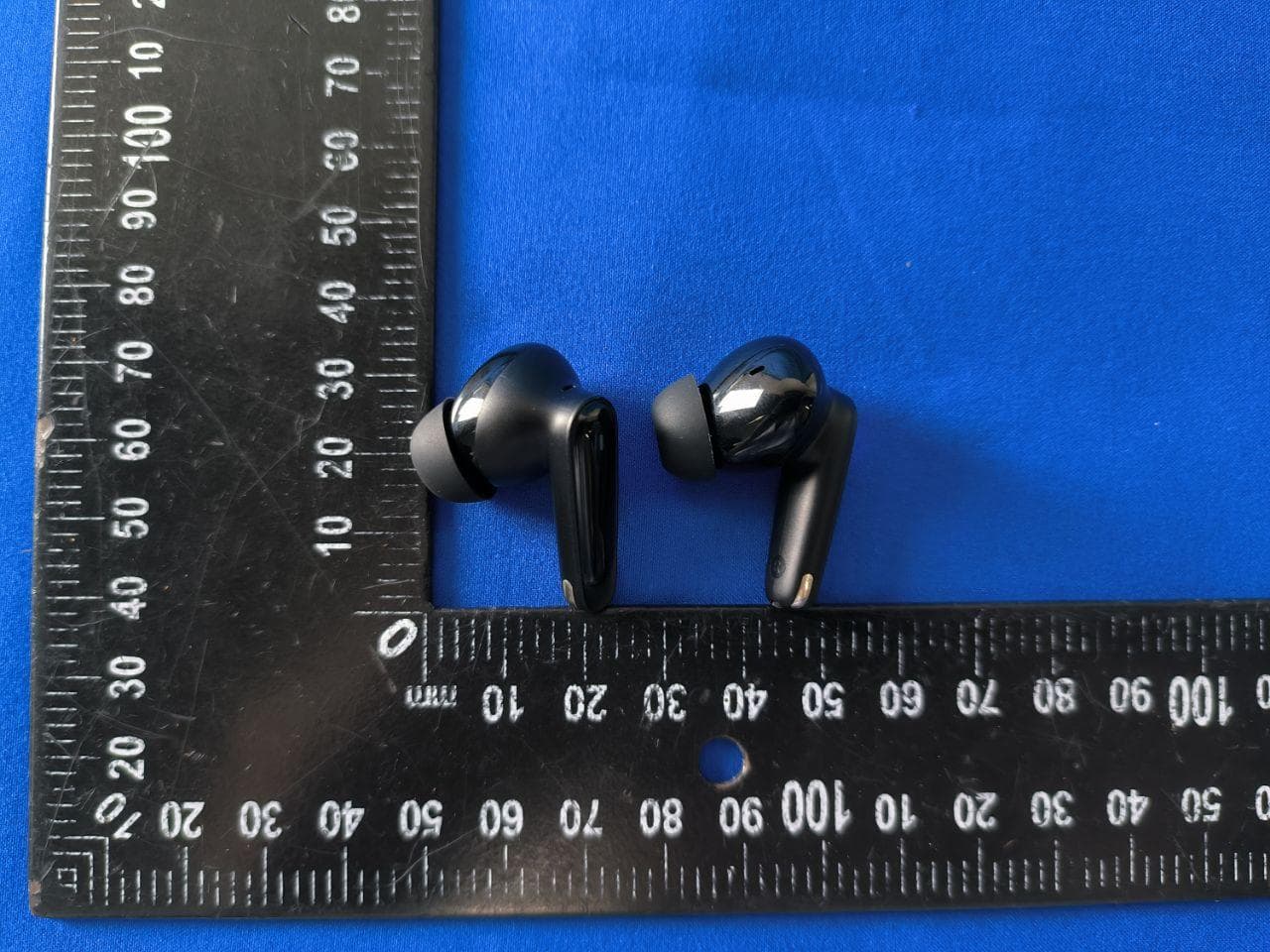
Click to zoom
Application Details
- Equipment Class
- DTS - Digital Transmission System
- Date of Grant
- Jul 02, 2022
- Application Purpose
- Original Equipment
- Date of Application
- Jul 02, 2022
- Equipment Note
- True Wireless Bluetooth Earbuds
- Frequency Range
- 2402.00000000 - 2480.00000000
- Country
- China
Documents & Files
Document Text
Text extracted from the exhibit documents filed with the FCC. Open a document above to read the original.
Users Manual
各部の名称 充電表示LEDランプ Type-C充電端子 ワイヤレスイヤホン取扱説明書 1 34 マイク内蔵 主な操作方法 電源オン: ①イヤホンをケースから取り出します ②イヤホンのタッチセンサー部を3秒間長押しします 電源オフ: ①イヤホンをケースに戻します ②電源オンの後、ペアリングやBluetooth接続が完了していない状態が約5分間続き、 イヤホンの電源は自動的に切れます ③イヤホン本体のバッテリー残量が低い状態で赤インジケーターは1秒点灯し、 イヤホンの電源は自動的に切れます 再生/再生停止:イヤホンのタッチセンサー部を2回続けて押します(両方とも操作可能) 前の曲へ:左側のイヤホンを1.5秒間長押します(左側のイヤホンを片耳イヤホン として使用すると、次の曲へ) 次の曲へ:右側のイヤホンを1.5秒間長押します 着信対応:電話がかかってきたら、イヤホンのタッチセンサー部を2回続けて押します (両方とも操作可能) 着信拒否:電話がかかってきたら、イヤホンのタッチセンサー部を3秒間長押します (両方とも操作可能) 通話終了:通話中イヤホンのタッチセンサー部を2回続けて押します(両方とも操作可能) ゲームモード:イヤホンのタッチセンサー部を4回続けて押します(両方とも操作可能) バーチャルアシスタントを起動:通常時(着信中、通話中以外)に左側もしくは 右側のイヤホンのタッチセンサー部を3回続けて押すと起動します、もう 一度3回続けて押すとオフにします。 製品仕様 モデル:ACA-i22 Bluetoothバージョン:5.2 本機の名称:ACA-i22 通信距離:約10m 連続通話時間:約3.5時間 連続音楽再生時間:約5.5時間 待機時間:約126日間 イヤホン充電時間:約40分間 サポートするプロファイル:a2dp\avctp\avdtp\avrcp\hfp 操作ボタン:タッチセンサーコントロール式 充電インターフェース:USB Type-C 電池:40mAh/3.7V 重量:約40g 防水性能:IPX4相当 サイズ:約60.7x48x25mm 充電電流電圧(左右):80mA, DC 5V 充電ボックス本体の充電時間:約1.5時間 故障かなと思ったら 音が出ない ● 正しくBluetooth接続されていますか。 ● Bluetooth機器側で再生などの操作を行いましたか。 ● Bluetooth機器の音量が最低になっていませんか。 ● Bluetooth機器との間に障害物があったり、双方の距離が外れすぎていませんか。 ペアリングができない ● Bluetooth機器の電源は入っていますか。 ● Bluetooth機器は本機のプロファイルに対応していますか。 ● Bluetooth機器が他の機器と通信していませんか。 ● Bluetooth機器との間に障害物があったり、双方の距離が外れすぎていませんか。 携帯電話に通信があっても、本機が応答しない ● 本機との接続が解除されていませんか。 ● 携帯電話の設定がサイレントモードなど、着信を知らせない設定になっていませんか。 ● 一部の携帯電話では、Bluetooth使用に際して切換操作が必要なものがあります。 携帯電話の取扱 説明書をご確認ください。 タッチセンサー部 インジケーター ACA-i22 オートペアリングと電源のオン/オフについて オートペアリング ● 充電ケースからイヤホンを2つとも取り出すと自動で電源が入り、双方がTWS接続 された後、ペアリングモードに入り、親機は高速点滅し、子機は5秒間ごとに点滅します。 ● 片方だけ取り出した場合も自動で電源が入り、シングル接続でのペアリングモード になります。 ● どちらの場合も、ペアリング済の機器が近くにあり、その機器のBluetooth機能が 有効なときは、自動でペアリングします。ただし、接続する機器の仕様により 自動でペアリングしない場合があります。その時は機器付属の取扱説明書に従い、 接続してください。 ● 使用後、充電ケースにイヤホンを戻すと自動で電源が切れます。 ※ はじめて使うときは、Bluetooth機器(相手側機器)とのペアリングが必要です。 「ペアリング(初期登録)のしかた」を参照して操作してください。 TWS(True Wireless Stereo)機能について TWSは2つのイヤホンをBluetoothによりペアリングすることで、左右独立した ステレオサウンドを実現する機能です。 本製品は、● 左右いずれかのイヤホンを単独で使う(シングル接続) ● 2つのイヤホンをステレオイヤホンとして使う(TWS接続) のいずれの使い方にも対応しています。 ペアリング(初期登録)のしかた 充電ケースからイヤホンを取り出します。 ● シングル接続で使うときは左右いずれかのイヤホンを取り出します(どちらでも可) ● TWS接続で使うときは2つとも取り出します。 ● イヤホンを充電ケースから取り出すと、自動で電源が入り、ペアリングモード (接続可能な機器を探している状態で、親機は高速点滅し、子機は5秒間ごとに 点滅します)になります。 ● 電源が入らない時は、タッチセンサー部を長押しして、手動で電源を入れてください。 相手側機器で本機の名称「ACA-i22」が表示されたら、それを選択して登録します。 本機とのペアリングが完了すると、イヤホンのインジケーターが消灯します。 ● 相手側機器でACA-i22の登録を削除します。 ● イヤホンをケースから取り出し、ペアリングモード(親機は高速点滅し、子機は 5秒間ごとに点滅します)に入ります。 ● ペアリングモードのイヤホン(どちらでも可)を5秒間長押しすると、イヤホン は次々赤インジケーターを点灯し、そしてまたペアリングモードに入りましたら、 リセット完了しました。 リセットのしかた 使用上のご注意 お問い合わせ ● イヤホンは乾燥した換気環境の下に保管し、油、水蒸気、蒸気との接触を避け、 製品の性能に影響を与えないようにします。 ● 刺激的なもの、有機溶剤、またはこれらの成分が含まれているものを使用しないで ください。 ● イヤホンは要求通りに正しく使用する必要があります。使用環境が イヤホンに 与える影響に注意してください。スムーズに接続できるように、携帯とイヤホンの 間の距離は10メートル以内であることをお勧めします。 ● イヤホンに接続できないや通信がうまくいかないなどの他の問題があれば、 イヤホン本体とその部品を無断で分解しないでください。 ● イヤホンに充電します。標準装備の車載充電器または当社指定の充電器を使って ください。 ● イヤホンを正常に使用するために、イヤホンの電気量が十分あることを確認して ください。 保証について ● 初期不良の交換はご購入されてから7日以内です。 ● 無償修理期間はご購入から6ヶ月です。 ※ バッテリー、イヤーパッド、USBケーブルは無償修理対象外です。 ● 本製品の故障、またはその使用によって生じた直接、間接の障害については当社は その責任を負わない ものとします。 ● 修理品のご持参、お持ち帰りの交通費、または送付される場合の送料、取り付け、 取り外し費用及び諸掛かりはお客様のご負担となります。 無償修理できない場合 ● 保証書がないまたは不正に書き換えられている場合 ● 保証期間を超えている場合 ● お客様の不適切なご使用、保管で故障したと弊社が判断した場合 ● 本機及び充電ケースが不正に改造、解体されている場合 ● 経年変化、摩耗 修理を依頼される場合、ご購入の販売店様に保証書をつけてご依頼ください。 ご注意 25 保証書 型番 購入時期 お名前 お電話番号 ご住所 注文番号 アマゾンの口座に登録します > お客様の注文 > 注文の問題 > 具体的な問題を 選びます > 出品者に連絡します 1.Appearance LED Indicator Type-C Charging Port TWS HEADSET 1 34 Microphone 2.Parameters Model:ACA-i22 Bluetooth Version:V5.2 Name:ACA-i22 Call Duration:About 3.5H Music Time:About 5.5H Standby Time:About 126 Day Charge Time:About 40 Minutes Case Can Recharge Earbuds: 3 Times Transmission Range:≥10 m Control Type:Touch Sensor Charging Port :USB Type-C Battery:40mAh/3.7V; 380mAh/3.7V Voltage/Current:DC 5V, 80mA; DC 5V, 300mA Case Dimension:About 60.7x48x25mm Net Weight:About 40g Water Resistant Level:IPX4 Compatibility:Bluetooth Enabled Devices Supported Profile:a2dp\avctp\avdtp\avrcp\hfp Touch Sensor Status LED ACA-i22 3.Instructions Turn On:①Open case for auto turn on. ②If case not nearby, press & hold MFB button for 3s, white LED flash 1s, you will hear voice prompt "power on". Turn Off:Put earbuds back to case, close cover. (Earbud will automatically turn off after 5 minutes if not connecting nor putting back to case, press MFB button 3s to turn it on.) Auto Paring:①Open charging case cover. ②Find and click ACA-i22 on the Bluetooth list of your device for one-step paring, then you will hear "connected". ③Next time, simply open charging case cover for auto connection to the last paired device. Play/Pause:Double click MFB button (left or right) when listening to music. Previous Track: Press and hold Left earbud 1.5s(No previous track if only use 1 earbud). Next Track:Press and hold Right Earbud 1.5s. Answer Call:Double click (left or right) MFB button. Reject Call:Press and hold MFB button(left or right)for about 3s. Hang Up:Double click (left or right)MFB button. Game Mode: Continuously click (left or right) earbud 4 times. Voice Assistant:Triple click FBM button 3 times (left or right earbud) 4.Indicator Paring Mode: Right earbud flashes white light quickly every 0.3s, left earbud flashes white light every 5s, lights out when earbuds are successfully connected to device. Charge Case: Case flashes Red light while charging. Red light stays on when fully charged. After you pull off the charging cable, White light on for 4s then out. Charge Earbud: White light on for 4s after you put earbuds into case for charging. Lights out when the earbuds are fully charged.Red light flashes every 4s if case at low power,then please charge the case ASAP. Low Power: Red light flashes every 8s, and there will be voice prompt "battery low" every 5 minutes. Warm Tip: Please fully charge the headset for first time use to prolong the lifespan. 5.Use Attention Please read all instructions and warnings before using this product. Improper use will damage the product or personal safety. 1. The product contains batteries, please do not expose it to sunlight, fire or…
Text truncated - open the document above for the full version.
Cover Letter(s)
June 28, 2022 Nemko Canada Inc 303 River Road Ottawa, Ontario, Canada K1V 1H2 Attn: Director of Certification Authority to Act as Agent On our behalf, I appoint Shenzhen Alpha Product Testing Co., Ltd. Address: Building i, No.2, Lixin Road, Fuyong Street, Bao’an District, 518103, Shenzhen, Guangdong, China Person: Mark Zhu (Name and address,person). to act as our agent in the preparation of this application for equipment certification. I certify that submitted documents properly describe the device or system for which equipment certification is sought. I also certify that each unit manufactured, imported or marketed, as defined in the Federal Communications Commission’s regulations will have affixed to it a label identical to that submitted for approval with this application. For instances where our authorized agent signs the application for certification on our behalf, I acknowledge that all responsibility for complying with the terms and conditions for certification, as specified by Nemko Canada Inc, still resides with Shenzhen Haigechenxing Technology Co., LTD Address: 205, No.43 of Lixin Road, Danzhutou Community, Nanwan Street, Longgang District, Shenzhen ( applicant name and address). Signature: Name Guang Cai Liu Position CEO Company Name Shenzhen Haigechenxing Technology Co., LTD Address 205, No.43 of Lixin Road, Danzhutou Community, Nanwan Street, Longgang District, Shenzhen Tel 13302955102 Fax / Email [email protected]
Cover Letter(s)
June 28, 2022 Equipment Autorisation Division Federal Communications Commission 7435 Oakland Mills Road Columbia, MD 21046 FCC ID: 2A66H-ACA-I22 Product Name: True Wireless Bluetooth Earbuds Request for Confidentiality Pursuant to Sections 0.457 and 0.459 of the commissions rules, we hereby request that the following documents be held confidential: Schematics Long-term confidential Block diagram Long-term confidential Operation description Long-term confidential These materials contain trade secrets and proprietary information and are not customarily released to the public. The public disclosure of this information might be harmful to the company and provide unjustified benefits to our competitors. Signature: Name Guang Cai Liu Position CEO Company Name Shenzhen Haigechenxing Technology Co., LTD Address 205, No.43 of Lixin Road, Danzhutou Community, Nanwan Street, Longgang District, Shenzhen Tel 13302955102 Fax / Email [email protected]
External Photos
FCC ID: 2A66H-ACA-I22 FCC ID: 2A66H-ACA-I22 FCC ID: 2A66H-ACA-I22 FCC ID: 2A66H-ACA-I22 FCC ID: 2A66H-ACA-I22 FCC ID: 2A66H-ACA-I22 FCC ID: 2A66H-ACA-I22 FCC ID: 2A66H-ACA-I22
ID Label/Location Info
FCC ID: 2A66H-ACA-I22
Internal Photos
FCC ID: 2A66H-ACA-I22 FCC ID: 2A66H-ACA-I22 FCC ID: 2A66H-ACA-I22 FCC ID: 2A66H-ACA-I22 FCC ID: 2A66H-ACA-I22 FCC ID: 2A66H-ACA-I22
RF Exposure Info
RF Exposure evaluation According to 447498 D04 Interim General RF Exposure Guidance v01 1-mW Test Exemption A single RF source is exempt RF device (from the requirement to show data demonstrating compliance to RF exposure limits, as previously mentioned) if the available maximum time-averaged power is no more than 1 mW, regardless of separation distance. This exemption applies to all operating configurations and exposure conditions, for the frequency range 100 kHz to 100 GHz, regardless of fixed, mobile, or portable device exposure conditions. This is a standalone exemption, and it cannot be applied in conjunction with any other test exemption. 1-mW Test Exemption for Multiple Sources The 1-mW exemption intended for single transmitters may be also applied to simultaneous transmission conditions, within the same host device, according one of the following criteria: a) When maximum available power each individual transmitting antenna within the same time averaging period is ≤ 1 mW, and the nearest parts of the antenna structures of the simultaneously operating transmitters are separated by at least 2 cm. b) When the aggregate maximum available power of all transmitting antennas is ≤ 1 mW in the same time-averaging period. This exemption may not be combined with any other exemption. SAR-Based Exemption This exemption is applicable to the frequency range between 300 MHz and 6 GHz, with test separation distances between 0.5 cm and 40 cm, and for all RF sources in fixed, mobile, and portable device exposure conditions. Accordingly, a RF source is considered an RF exempt device if its available maximum time-averaged (matched conducted) power or its effective radiated power (ERP), whichever is greater, are below a specified threshold. This exemption threshold was derived based on general population 1-g SAR requirements. This method shall only be used at separation distances from 0.5 cm to 40 cm and at frequencies from 0.3 GHz to 6 GHz (inclusive). Pth is given by follow Formulas “f” is in GHz, “d” is the separation distance (cm) Simultaneous Transmission with SAR-based Exemptions For these cases, a device with multiple RF sources transmitting simultaneously will be considered an RF exempt device if the condition of following Formula is satisfied. (1-mW Test Exemption) As this equipment: Pt = 10 (Pm/10) where: Pt = transmitter output power in milliwatts, Pm = measured transmitter output power in dBm, So Pt =10 (-0.13/10) mW =0.971 mW<1mW Then the SAR test is exempted.
Test Report
ALPHA's reports is using a digital certificate that is trusted on Adobe's official server. If there is no digital certificate or the digital certificate shows damaged in your report. Please do not accept the report. FCC TEST REPORT FCC ID: 2A66H-ACA-I22 On Behalf of Shenzhen Haigechenxing Technology Co., LTD True Wireless Bluetooth Earbuds Model No.: ACA-i22 Prepared for : Shenzhen Haigechenxing Technology Co., LTD Address : 205, No.43 of Lixin Road, Danzhutou Community, Nanwan Street, Longgang District, Shenzhen Prepared By : Shenzhen Alpha Product Testing Co., Ltd. Address : Building i, No.2, Lixin Road, Fuyong Street, Bao'an District, 518103, Shenzhen, Guangdong, China Report Number : A2205239-C02-R07 Date of Receipt : May 27, 2022 Date of Test : May 27, 2022- June 20, 2022 Date of Report : June 21, 2022 Version Number : V0 Page 2 of 37 Report No.: A2205239-C02-R07 TABLE OF CONTENTS Description Page 1. Summary Of Standards And Results -------------------------------------------------------------------------------- 5 1.1. Description of Standards and Results ------------------------------------------------------------------------ 5 2. General Information ------------------------------------------------------------------------------------------------------ 6 2.1. Description of Device (EUT) ------------------------------------------------------------------------------------ 6 2.2. Accessories of Device (EUT) ----------------------------------------------------------------------------------- 7 2.3. Tested Supporting System Details----------------------------------------------------------------------------- 7 2.4. Block Diagram of connection between EUT and simulators -------------------------------------------- 7 2.5. Test Mode Description -------------------------------------------------------------------------------------------- 7 2.6. Test Conditions ----------------------------------------------------------------------------------------------------- 7 2.7. Test Facility ---------------------------------------------------------------------------------------------------------- 8 2.8. Measurement Uncertainty --------------------------------------------------------------------------------------- 8 2.9. Test Equipment List ----------------------------------------------------------------------------------------------- 9 3. Spurious Emission ------------------------------------------------------------------------------------------------------- 11 3.1. Test Limits ---------------------------------------------------------------------------------------------------------- 11 3.2. Test Procedure ---------------------------------------------------------------------------------------------------- 12 3.3. Test Setup ---------------------------------------------------------------------------------------------------------- 12 3.4. Test Results -------------------------------------------------------------------------------------------------------- 14 4. Power Line Conducted Emission ----------------------------------------------------------------------------------- 20 4.1. Test Limits ---------------------------------------------------------------------------------------------------------- 20 4.2. Test Procedure ---------------------------------------------------------------------------------------------------- 20 4.3. Test Setup ---------------------------------------------------------------------------------------------------------- 20 4.4. Test Results -------------------------------------------------------------------------------------------------------- 21 5. Conducted Maximum Output Power ------------------------------------------------------------------------------- 23 5.1. Test limits ----------------------------------------------------------------------------------------------------------- 23 5.2. Test Procedure ---------------------------------------------------------------------------------------------------- 23 5.3. Test Setup ---------------------------------------------------------------------------------------------------------- 23 5.4. Test Results -------------------------------------------------------------------------------------------------------- 23 6. Peak Power Spectral Density ----------------------------------------------------------------------------------------- 24 6.1. Test limits ----------------------------------------------------------------------------------------------------------- 24 6.2. Test Procedure ---------------------------------------------------------------------------------------------------- 24 6.3. Test Setup ---------------------------------------------------------------------------------------------------------- 24 6.4. Test Results -------------------------------------------------------------------------------------------------------- 24 7. Bandwidth ------------------------------------------------------------------------------------------------------------------ 27 7.1. Test limits ----------------------------------------------------------------------------------------------------------- 27 7.2. Test Procedure ---------------------------------------------------------------------------------------------------- 27 7.3. Test Setup ---------------------------------------------------------------------------------------------------------- 27 7.4. Test Results -------------------------------------------------------------------------------------------------------- 27 8. Band Edge Check -------------------------------------------------------------------------------------------------------- 31 8.1. Test limits ----------------------------------------------------------------------------------------------------------- 31 8.2. Test Procedure ---------------------------------------------------------------------------------------------------- 31 8.3. Test Setup ---------------------------------------------------------------------------------------------------------- …
Text truncated - open the document above for the full version.
Test Setup Photos
FCC ID: 2A66H-ACA-I22 Radiated Emission FCC ID: 2A66H-ACA-I22 Conducted Emission
Contact Information
Applicant
Guang Cai Liu(CEO)
Test Firm
Shenzhen Alpha Product Testing Co., LTD.Real Yak
[email protected]+86 755 29766001
Technical Specifications
| # | Rule Parts | Frequency Range | Power Output |
|---|---|---|---|
| 1 | 15C | 2.40 GHz - 2.48 GHz | 590.00 µW |