2A687BEAGLECamera for 3d printer
Shenzhen Mintion Technology Co., Ltd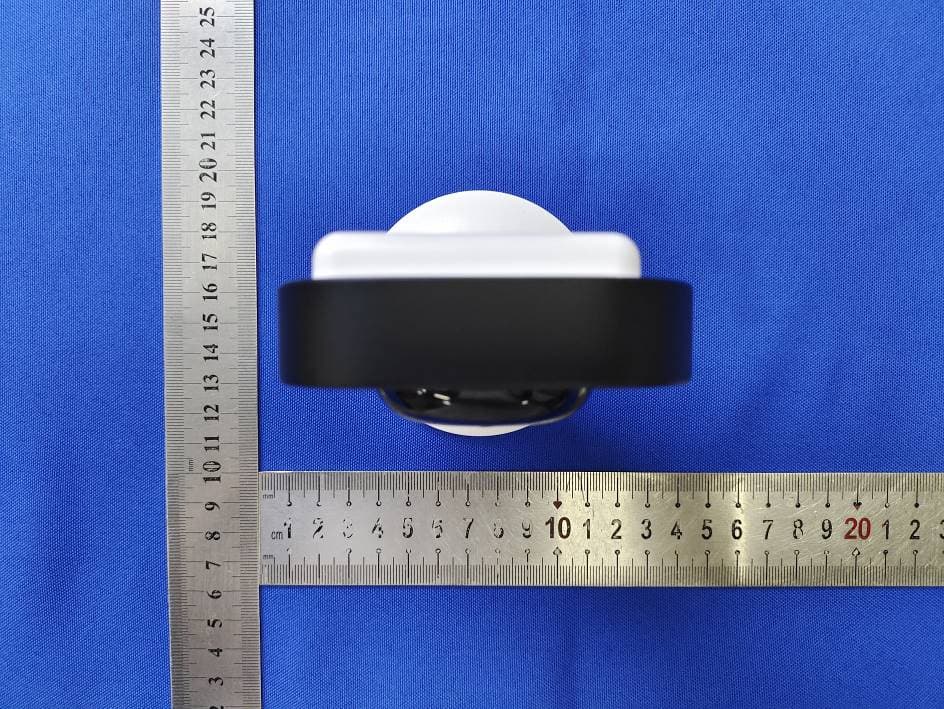
Click to zoom
Application Details
- Equipment Class
- DTS - Digital Transmission System
- Date of Grant
- Jun 19, 2022
- Application Purpose
- Original Equipment
- Date of Application
- Jun 19, 2022
- Equipment Note
- Camera for 3d printer
- Frequency Range
- 2412.00000000 - 2462.00000000
- Country
- China
Documents & Files
Document Text
Text extracted from the exhibit documents filed with the FCC. Open a document above to read the original.
Users Manual
Quick Guide Manual BEAGLE CAMERA PACKING LIST Beagle camera Power Plug x1 Type C Cable 1.5M x1 (For power) USB-Micro-B Cable 1M x1 (Connect to printer) Reset Needle x1 Micro SD Card x1 Quick Guide Manual x1 Quick Guide Manual (Insert in camera) SPECIFICATION Part Number Night Version Frame Rate Upload Printable File Compatibility of 3D Printers Videos/Printable Files Storage Connect to Printer Video Compress Camera Resolution Auto Time-lapse Video Temperature Monitor WiFi Connectivity Power Source Weight Beagle Yes Up to 25fps Yes, Only gcode files Marlin firmware Micro SD Card USB Cable H.264/H.265 Up to 1080P Yes Yes, for Hot End & Hot Bed Supports 2.4 GHz 802.11g/n Plug-in 150g CAMERA INTRODUCTION IR-Cut SensorLens MicrophoneCamera Base 1 2 3 4 1 2 3 4 WiFi Printer 1 2 3 4 1 2 3 4 Speaker WiFi IndicatorPrinter Indicator USB Socket Solid Green: WiFi connected Flashing Green: WiFi disconnected Solid Red: Printer connected Flashing Red: Printed disconnected Plug and hold for 5 seconds, and you will hear the voice of "Successfully resetting the camera", then the camera will be reset and restart. Type-C Socket (Power) Micro SD Slot 1 2 3 1 2 3 CONNECTION You could put the camera onto the box on the printer's front side, as shown below. Power outlet Plug the power cable into the camera and the power adaptor, then into a power outlet, plug the USB-Micro-B Cable into the camera and the 3d printer, as shown in the figure below. Plug the USB-Micro USB cable into the camera and the printer, as shown in the figure above. Micro USB Connect to Printer Put on Camera Connecting Cables *You need to purchase a USB 2.0 Hi-Speed cable if your printer is with Hi-Speed 2.0 slot. (The camera will take 1-2 minutes when power-up, don't cutoff the power during this period.) USE THE APP Please scan the QR Code to reach the App download page, then download from App Store, Google Play or download the APK directly. After download,Click to run the app and make the registration. Connect the Camera to WiFi Network Beagleprint Select the “AP Configuration” to add the camera. Use your phone to connect to the camera hotspot After power up the camera, click to run the “Beagleprint” app, then click “+” icon to add the camera. APP DOWNLOAD & REGISTRATION App Store Download Google Play Download APK Download Select your WiFi and then input the password to save the WiFi information in the app. XXXXXX XXXXXX Make sure the power is not being cut off during the configuration. Go to the "Setting" interface of your mobile phone to connect the camera hotspot. The camera will automatically connect to the WiFi network. Please wait for 1-2 minutes. Click the “Connect” button to connect the camera to the printer, then you can control the printer through the camera. Click the camera image to log in and then connect the camera to your printer. Please DO NOT cut off the power of the Beagle camera when it's working; DO NOT disconnect the camera from the printer when it is connected to the printer and transmit printable files through the camera for 3d printing. Otherwise, it will cause printing failure and damage the camera's firmware. In this case, the camera cannot work typically; this problem is the user problem, not a quality problem. Hence, please ensure that you cannot disconnect the camera from the power supply and the USB cable connected to the printer when the camera is working, and the 3d printer is printing. The Beagle camera only supports one printer connection for control, allowing four users to simultaneously log in and access the camera (including mobile phone and computer users). Therefore, please make sure it's securely accessing the device to prevent bad guys from accessing the camera or printer and the environment to cause damage. At the same time, we recommend that you do not let the 3d printer perform the 3d printing work completely unattended. Please come to the printer and watch the real printing progress of the printer regularly to prevent further deterioration of the situation when an abnormal condition occurs. This camera shortens the distance between the user and the printer. The user is obliged to ensure the reasonableness and legality of the use of the product and avoid infringement of third-party rights, includ- ing but not limited to publicity rights, intellectual property rights, data rights, or privacy rights. At the same time, since the customers' use and storage of this camera are beyond our control, we are not responsible for possible personal injury or property loss. This manual is for reference only. In any case, we have the right to modify and improve it without notifying users. If you want to know the latest instruction manual, you can go to the official website for more information. ATTENTION Changes or modifications not expressly approved by the party responsible for compliance could void the user’s authority to operate the equipment. This equipment has been tested and found to comply with the limits for a Class B digital device, pursuant to Part 15 of the FCC Rules. These limits are designed to provide reasonable protec- tion against harmful interference in a residential installation. This equipment generates uses and can radiate radio frequency energy and, if not installed and used in accordance with the instructions, may cause harmful interference to radio communications. However, there is no guarantee that interference will not occur in a particular installa- tion. If this equipment does cause harmful interference to radio or television reception, which can be determined by turning the equipment off and on, the user is encouraged to try to correct the interference by one or more of the following measures:ealer or an experienced radio/TV technician for help. FCC WARNING STATEMENT FCC RADIATION EXPOSURE STATEMENT The antennas used for this transmitter must be installed to provide a separation distance of at least 20 cm from all persons and must not be colocated for operating in conjunction with an…
Text truncated - open the document above for the full version.
Cover Letter(s)
< Shenzhen Mintion Technology Co., Ltd > Office of Engineering Technology Federal Communications Commission 7435 Oakland Mills Road Columbia, MD21046 Date: Jun. 06, 2022 Subject; Request for Long Term Confidentiality FCC ID: 2A687BEAGLE To Whom It May Concern, Pursuant to the provisions of the Commission’s rules Title 47 Sections §0.457 and §0.459, we are requesting the Commission to withhold the following attachment(s) as confidential documents from public disclosure indefinitely. These documents contain detailed system and equipment descriptions and are considered as proprietary information in operation of the equipment. The public disclosure of these documents might be harmful to our company and would give competitors an unfair advantage in the market. Schematic Diagram Block Diagram Parts List Operational Description Tune-up Procedure It is our understanding that all measurement test reports, FCC ID label format and correspondence during the certification review process cannot be granted as confidential documents and this information will be available for public review once the grant of equipment authorization is issued. Sincerely, Signature: Name: Jackie zhang Title: Manager
Cover Letter(s)
Shenzhen Mintion Technology Co., Ltd Letter of Authorization Company: Shenzhen Mintion Technology Co., Ltd Address: Room 605, A Block, 2nd Building, COFCO Xiangyun Plaza, Longcheng, Longgang, Shenzhen, China Product name: Camera for 3d printer Trade name: Mintion Model name: Beagle, Beagle SE, Beagle Pro FCC Identifier: 2A687BEAGLE We authorize MiCOM LabsInc, 575 Boulder Court, Pleasanton, California94566, USA, to act on our behalf on all matters concerning the above named equipment. Any individual within MiCOM Labs is authorized to act on our behalf and take action on the application. We declare that MiCOM LabsInc, 575 Boulder Court, Pleasanton, California 94566, USA, is allowed to forward all information related to the approval project to the Federal Communication Commission and to discuss any issues concerning the approval application. Any and all acts carried out by MiCOM Labs on our behalf shall have the same effect as acts of our own. Name: Jackie zhang Date: Jun. 06, 2022 Title: Manager Signature of applicant:
Cover Letter(s)
Model Difference Declaration To Whom It May Concern, We, Shenzhen Mintion Technology Co., Ltd FCC ID: 2A687BEAGLE Product: Camera for 3d printer Trade Name: Mintion Model Number: Beagle, Beagle SE, Beagle Pro All model’s the function, software and electric circuit are the same, only with a product color and model named different. Test sample model: Beagle. Please contact me if you have any question. Name: Jackie zhang Date: Jun. 06, 2022 Title : Manager Signature of applicant:
External Photos
Model: Beagle Model: Beagle Model: Beagle Model: Beagle
ID Label/Location Info
FCC ID LABEL: Label Location: FCC ID: 2A687BEAGLE Product Name: Camera for 3d printer Model Name: Beagle This device complies with Part 15 of the FCC Rules. Operation is subject to the following two conditions: (1)This device may not cause harmful interference, and (2)This device must accept any interference received, including interference that may cause undesired operation. Long: 3cm Width: 2cm
Internal Photos
Model: Beagle Model: Beagle Model: Beagle Model: Beagle Model: Beagle Model: Beagle Model: Beagle Model: Beagle BLE: PCB antenna 2.4G Wi-Fi: Internal antenna
RF Exposure Info
MPE ESTIMATION FCC ID: 2A687BEAGLE 1. Limit for General Population/Uncontrolled Exposures Frequency Power Density(mW/cm2) Averaging Time(minutes) 300MHz-1.5GHz F/1500 30 1.5GHz-100GHz 1.0 30 Note: F= Frequency in MHz 2. Estimation Result Mode Max PK Output Power(dBm) Tune Up Power(dBm) Max Tune Up Power(mW) Antenna Gain(dBi) Antenna Gain (linear) MPE (mW/cm²) 11b 8.06 8±1(9) 7.94 2.5 0.5623 0.000888 11g 7.98 8±1(9) 7.94 2.5 0.5623 0.000888 11n/HT20 7.93 8±1(9) 7.94 2.5 0.5623 0.000888 11n/HT40 7.85 8±1(9) 7.94 2.5 0.5623 0.000888 Note: Note: The estimation distance is 20cm. Note: PK Output power=conducted power. Conducted power see the test report UNIA22052024ER-62, antenna gain=2.5dBi. ------The End------
Test Report
Page 1 of 81 Report No.: UNIA22052024ER-62 FCC RADIO TEST REPORT FCC ID: 2A687BEAGLE Sample : Camera for 3d printer Trade Name : Mintion Main Model : Beagle Additional Model: Beagle SE, Beagle Pro Report No.: UNIA22052024ER-62 Prepared for Shenzhen Mintion Technology Co., Ltd Room 605, A Block, 2nd Building, COFCO Xiangyun Plaza, Longcheng, Longgang, Shenzhen, China Prepared by Shenzhen United Testing Technology Co., Ltd. 2F, Annex Bldg, Jiahuangyuan Tech Park, #365 Baotian 1 Rd, Tiegang Community, Xixiang Str, Bao'an District, Shenzhen, China Page 2 of 81 Report No.: UNIA22052024ER-62 TEST RESULT CERTIFICATION Applicant .............................. : Shenzhen Mintion Technology Co., Ltd Address ................................. : Room 605, A Block, 2nd Building, COFCO Xiangyun Plaza, Longcheng, Longgang, Shenzhen, China Manufacturer ........................ : Shenzhen Mintion Technology Co., Ltd Address ................................. : Room 605, A Block, 2nd Building, COFCO Xiangyun Plaza, Longcheng, Longgang, Shenzhen, China Product description Product ....................................... : Camera for 3d printer Trade Name ........................... : Mintion Model Name .......................... : Beagle, Beagle SE, Beagle Pro Test Methods ........................ : FCC Rules and Regulations Part 15 Subpart C Section 15.247 ANSI C63.10: 2013 This device described above has been tested by Shenzhen United Testing Technology Co., Ltd., and the test results show that the equipment under test (EUT) is in compliance with the FCC requirements. And it is applicable only to the tested sample identified in the report. This report shall not be reproduced except in full, without the written approval of UNI, this document may be altered or revised by Shenzhen United Testing Technology Co., Ltd., personnel only, and shall be noted in the revision of the document. Date of Test ............................................ : Date (s) of performance of tests ............. : May. 20, 2022 ~ Jun. 06, 2022 Date of Issue ........................................... : Jun. 06, 2022 Test Result ............................................... : Pass Prepared by: Kahn yang/Editor Reviewer: Kelly Cheng/Supervisor Approved & Authorized Signer: Liuze/Manager Page 3 of 81 Report No.: UNIA22052024ER-62 Table of Contents Page 1 TEST SUMMARY ......................................................................................................................................................... 5 2 GENERAL INFORMATION ............................................................................................................................................ 8 2.1 GENERAL DESCRIPTION OF EUT ...................................................................................................................................... 8 2.2 CARRIER FREQUENCY OF CHANNELS .............................................................................................................................. 9 2.3 TEST MODE ..................................................................................................................................................................... 9 2.4 TEST SETUP ................................................................................................................................................................... 10 2.5 DESCRIPTION TEST PERIPHERAL AND EUT PERIPHERAL ............................................................................................... 10 2.6 MEASUREMENT INSTRUMENTS LIST ............................................................................................................................ 11 3 CONDUCTED EMISSION ............................................................................................................................................ 12 3.1 TEST LIMIT .................................................................................................................................................................... 12 3.2 TEST SETUP ................................................................................................................................................................... 12 3.3 TEST PROCEDURE ......................................................................................................................................................... 13 3.4 TEST RESULT ................................................................................................................................................................. 13 4 RADIATED EMISSION ................................................................................................................................................ 16 4.1 TEST LIMIT .................................................................................................................................................................... 16 4.2 TEST SETUP ................................................................................................................................................................... 17 4.3 TEST PROCEDURE ......................................................................................................................................................... 18 4.4 TEST RESULT ................................................................................................................................................................. 18 5 OCCUPIED BANDWIDTH ........................................................................................................................................... 41 5.1 TEST LIMIT .................................................................................................................................................................... 41 5.2 TEST PROCEDURE ......................................................................................................................................................... 41 5.3 EQUIPME…
Text truncated - open the document above for the full version.
Test Setup Photos
Model: Beagle Radiated Emission test Model: Beagle Conducted Emission test
Contact Information
Applicant
Jackie zhang
Technical Contact
Test Firm
Shenzhen United Testing Technology Co., Ltd.Liu Ze
[email protected]86-755-86180996
Technical Specifications
| # | Rule Parts | Frequency Range | Power Output |
|---|---|---|---|
| 1 | 15C | 2.41 GHz - 2.46 GHz | 6.40 mW |