2A6MI-BTH30Bluetooth headset
OK BIOTECH CO., LTD.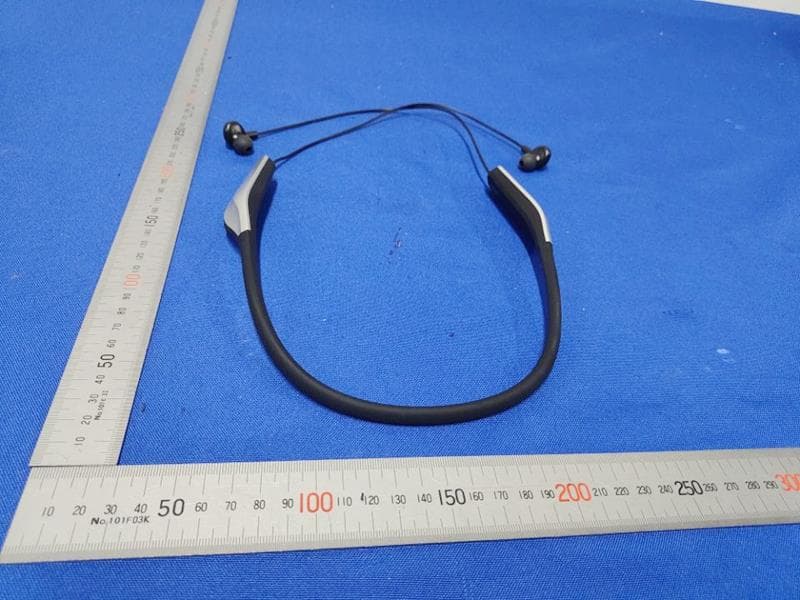
Click to zoom
Application Details
- Equipment Class
- DXX - Part 15 Low Power Communication Device Transmitter
- Date of Grant
- Jul 01, 2022
- Application Purpose
- Original Equipment
- Date of Application
- Jun 30, 2022
- Equipment Note
- Bluetooth headset
- Frequency Range
- 2402.00000000 - 2480.00000000
- Company
- OK BIOTECH CO., LTD.
- Country
- Taiwan
Documents & Files
Document Text
Text extracted from the exhibit documents filed with the FCC. Open a document above to read the original.
Users Manual
Instructions for Use OK GoodVoice Personal Sound Amplifier GV-SA03 1 Before you begin .......................2 Contents .....................................3 “OK GOOD Voice” Overview .......4 Bluetooth Earphone ...................5 Start Using ..................................6 Work with your Mobile Phone ...8 Use in everyday life ..................10 Charging the Battery ................12 Specification .............................14 Manufacturer ............................15 Warranty Card ...........................16 2 1. Thank you for choosing “OK GoodVoice”. Please read the manual before you enjoy the product 2. Please contact with your distributor If you have any questions. Modification of the device is not allowed. Otherwise, you may lose the warranty. 3. Please keep the instruction for use with you. 4. Please keep the device away from the source of electromagnetic or radiation, as these might interfere with the operation of device. 5. Do not wear the device while showering or participating in water activities. 6. Use a soft, dry cloth to clean the device. It must never be washed or immersed in water or other liquids. 7. Keep the product away from heat to avoid burning or damaging to product. 8. Avoid violent vibration or crash the product. 9. Adjust the volume from low level to an acceptable level at the first time startup. 10. The device, their parts should be kept out of reach of children and anyone who might swallow these items, or otherwise cause injury to themselves. 11. Overcharge the device might cause the deterioration of the battery. 12. Battery life may vary from the frequency of use. Before you begin 3 Contents If any contents are damaged or missing, please contact your distributor immediately. ▲Controller▲Bluetooth Earphones ▲2 in 1 USB charing cable (Type-C + Micro USB) ▲USB to Type-C charging cable▲External Microphone ▲Instruction for use (including Warranty Card) 4 “OK GOOD Voice” Overview Power Bu�on External Microphone Jack Type-C Charging Port Type-C Charging Port Power Bu�on Pairing with Earphones Indicator Ba�ery Level Indicator Volume Indicator (L/R) Noise Reduc�on OnPower Indicator Noise Reduc�on Bu�on Volume Control Bu�on Pick-up Phone Bu�on Audio Playing Bu�on 5 Bluetooth Earphone ※ The included Bluetooth earphones is exclusively designed for pairing with the controller. Power Bu�on Pairing with Controller Indicator Micro USB Charging Port on/off 6 Start Using Press for 1 sec Press once on/off Press for 3 sec 1 Turn on the Controller ◢ Press two power buttons to turn on the controller. 2 Turn on the Bluetooth earphones ◢ Press the power button of Bluetooth earphones for 3 seconds until the blue light flash to power up. ◢ , place the controll panel on your left side. 7 3 Put on the Bluetooth earphones ◢ Place the controll panel on your left side. Adjust the Volume ◢ Press “+” to volume up ◢ Press “-“ to volume down R 24 25 4 The earphones will be automatically paired with the controller −− Searching: The blue light (of the Bluetooth earphones) flashes twice at each interval. −− Connected: The blue light flashs once at each interval. The indicator will be lighting. ※ Audio Feedback can occur at any time, please keep the distance from the Controller to the earphones. 8 Connecting with Bluetooth ◢ Press on controller for 5 seconds untill flashes in the middle of screen. ◢ Turn on Bluetooth on your phone. ◢ Choose “OK GoodVoice” in Bluetooth setting of your phone. Press for 5 sec ※ When you turn off your “OK Good Voice” or mobile phone, these will no longer be connected. To connect them again, turn on your “OK Good Voice” and mobile phone. Your “OK Good Voice” will then automatically re-connect to your mobile phone. ※ If Bluetooth is disconnected from your phone, follow above steps to re-connect. Working with Mobile Phone 9 Answering Phone Calls Enjoying the audio playing on your phone ◢ Press to listen to music or video playing on your phone. Press the button again to return to normal mode. ◢ Answer directly from device: Press on the controller. ◢ Answer from your iPhone: Swipe right --> press the speaker --> choose “OK Good Voice”. ◢ Swipe your phone to answer it. ◢ *Do not answer the phone from device directly. iO S Android 10 Use in everyday life When You are in a Noisy Environment Press to the noise-reduction mode. It will reduce the ambient noise. Press again, you will return to normal mode. R L 10 25 R L 10 25 When You are Watching TV Put the controller near to TV for better hearing. 11 Daily Life Scenarios Using the external microphone or placing the controller near the sound source will help you hear better. When You are in a Meeting Put the controller on the center of conference room table, which makes following and participating in conversations easier. R L 10 25 R L 10 25 R L 10 25 R L 10 25 12 Charging the Battery Low Battery displays and flashes on the screen Charging The battery icon shows the battery level and flashes Charging Completed Battery icon stops flashing Charge with a Type-C cable Charge with a Type-C cable Low Battery Red and blue lights flashes in turns Charging Red light on (when the device is off) Red light flashes (when the device is on) Charging Completed Red light off ※ Your “OK Good Voice” is the combination of two parts, please make sure two parts are recharging separately. ※ Prepare a portable charger with you when you are going out to make sure you can recharge your “OK Good Voice” in time. 13 on/off Open the cap of the charging port, and charge with a micro USB cable. Low battery Red light flashes Charging Red light on Charging completed Red light off 14 ControllerBluetooth Version:4.0 Bluetooth Protocol:A2DP, AVRCP, HFP, HSP Operating Range:10M Bluetooth power:CLASS 2 Bandwidth of Bluetooth: 2.40 - 2.480GHz Battery capacity:1050mAh/3.7V Use of Time:more than 8 hours, rechargeable Charge of Time:2~2.5 hours Charging voltage/current:5V/400mA~650mA (Max) Maximum decibel: 120dB Bluetooth Earphone Transmitter Bluetooth Vers…
Text truncated - open the document above for the full version.
ID Label/Location Info
Label Location
ID Label/Location Info
BTH30RatingLabel
RF Exposure Info
RF Exposure evaluation According to 447498 D04 Interim General RF Exposure Guidance v01 eirp = pt x gt = (EXd) 2 /30 where: pt = transmitter output power in watts, gt = numeric gain of the transmitting antenna (unitless), E = electric field strength in V/m, --- 10 ((dBuV/m)/20) /10 6 d = measurement distance in meters (m)---3m So pt = (EXd) 2 /30 x gt Ant gain =2.1dBi so Ant numeric gain= 1.62 Field strength =86.35dBμV/m @3m@2402MHz So Pt={ [10 (8 6.35/20) /10 6 x3] 2 /(30)}x1000 mW = 0.13 mW <2.79 mW Then SAR evaluation is not required
Test Report
Report No.: TW2204230E File reference No.: 2022-04-26 Applicant: OK Biotech Co., Ltd. Product: Bluetooth headset Model No.: BTH30 Trademark: N/A Test Standards: FCC Part 15.249 Test result: It is herewith confirmed and found to comply with the requirements set up by ANSI C63.10 & FCC Part 15 Subpart C, Paragraph 15.249 regulations for the evaluation of electromagnetic compatibility Approved By Terry Tang Manager Dated: April 26, 2022 Results appearing herein relate only to the sample tested The technical reports is issued errors and omissions exempt and is subject to withdrawal at SHENZHEN TIMEWAY TESTING LABORATORIES Zone C, 1st Floor, Block B, Jun Xiang Da Building, Zhongshan Park Road West, Tong Le Village, Nanshan District, Shenzhen, China Tel (755) 83448688, Fax (755) 83442996, E-Mail:[email protected] Report No.: TW2204230E Page 2 of 47 Date: 2022-04-26 The report refers only to the sample tested and does not apply to the bulk. This report is issued in confidence to the client and it will be strictly treated as such by the SHENZHEN TIMEWAY TESTING LABORATORIES. It may not be reproduced rather in its entirety or in part and it may not be used for adverting. The client to whom the report is issued may, however, show or send it . or a certified copy there of prepared by the SHENZHEN TIMEWAY TESTING LABORATORIES. to his customer. Supplier or others persons directly concerned. SHENZHEN TIMEWAY TESTING LABORATORIES. will not, without the consent of the client enter into any discussion of correspondence with any third party concerning the contents of the report. In the event of the improper use of the report. The SHENZHEN TIMEWAY TESTING LABORATORIES. reserves the rights to withdraw it and to adopt any other remedies which may be appropriate. Special Statement: The testing quality ability of our laboratory meet with "Quality Law of People's Republic of China" Clause 19. The testing quality system of our laboratory meet with ISO/IEC-17025 requirements, which is approved by CNAS. This approval result is accepted by MRA of APLAC. Our test facility is recognized, certified, or accredited by the following organizations: CNAS-LAB Code: L2292 The EMC Laboratory has been assessed and in compliance with CNAS-CL01 accreditation criteria for testing Laboratories (identical to ISO 17025:2017 General Requirements) for the Competence of testing Laboratories. FCC-Registration No.: 744189 The EMC Laboratory has been registered and fully described in a report filed with the (FCC) Federal Communications commission. The acceptance letter from the FCC is maintained in our files. Registration No.: 744189. Industry Canada (IC) —Registration No.:5205A The EMC Laboratory has been registered by Certification and Engineering Bureau of Industry Canada for radio equipment testing with Registration No.: 5205A. A2LA (Certification Number:5013.01) The EMC Laboratory has been accredited by the American Association for Laboratory Accreditation (A2LA). Certification Number:5013.01 Report No.: TW2204230E Page 3 of 47 Date: 2022-04-26 The report refers only to the sample tested and does not apply to the bulk. This report is issued in confidence to the client and it will be strictly treated as such by the SHENZHEN TIMEWAY TESTING LABORATORIES. It may not be reproduced rather in its entirety or in part and it may not be used for adverting. The client to whom the report is issued may, however, show or send it . or a certified copy there of prepared by the SHENZHEN TIMEWAY TESTING LABORATORIES. to his customer. Supplier or others persons directly concerned. SHENZHEN TIMEWAY TESTING LABORATORIES. will not, without the consent of the client enter into any discussion of correspondence with any third party concerning the contents of the report. In the event of the improper use of the report. The SHENZHEN TIMEWAY TESTING LABORATORIES. reserves the rights to withdraw it and to adopt any other remedies which may be appropriate. Test Report Conclusion Content 1.0 General Details ............................................................................................. 4 1.1 Test Lab Details............................................................................................. 4 1.2 Applicant Details.............................................................................................. 4 1.3 Description of EUT .......................................................................................... 4 1.4 Submitted Sample............................................................................................. 4 1.5 Test Duration................................................................................................... 5 1.6 Test Uncertainty................................................................................................ 5 1.7 Test By......................................................................................................... 5 2.0 List of Measurement Equipment......................................................................... 6 3.0 Technical Details.......................................................................................... 7 3.1 Summary of Test Results.................................................................................... 7 3.2 Test Standards................................................................................................. 7 4.0 EUT Modification............................................................................................. 7 5.0 Power Line Conducted Emission Test..................................................................... 8 5.1 Schematics of the Test....................................................................................... 8 5.2 Test Method and Test Procedure............................................................................ 8 5.3 Configuration of the EUT................................................................................. 8 5.4 EUT Operating Condition........................…
Text truncated - open the document above for the full version.
Test Setup Photos
Conducted Emission Test Setup: Radiated Emission Test Setup:
Contact Information
Applicant
Eason Chiu(RD Legal Section Manager)
Test Firm
Shenzhen Timeway Testing LaboratoriesTerry Tang
[email protected]+86-755-83448688
Technical Specifications
| # | Rule Parts | Frequency Range | Power Output |
|---|---|---|---|
| 1 | 15C | 2.40 GHz - 2.48 GHz | - |
Other Applications from OK BIOTECH CO., LTD.
2A6MI-HT02
Jun 05, 2026OKB OTC Hearing aid (Good Voice Nexus)
Equipment Class
DSS - Part 15 Spread Spectrum Transmitter
2A6MI-GVNX1
May 20, 2026OKB OTC Hearing aid (Good Voice Nexus)
Equipment Class
DSS - Part 15 Spread Spectrum Transmitter