2A76QTW220Portable Computer with WiFi, Bluetooth and WPT
Shenzhen Ntmer Technology Co., Ltd.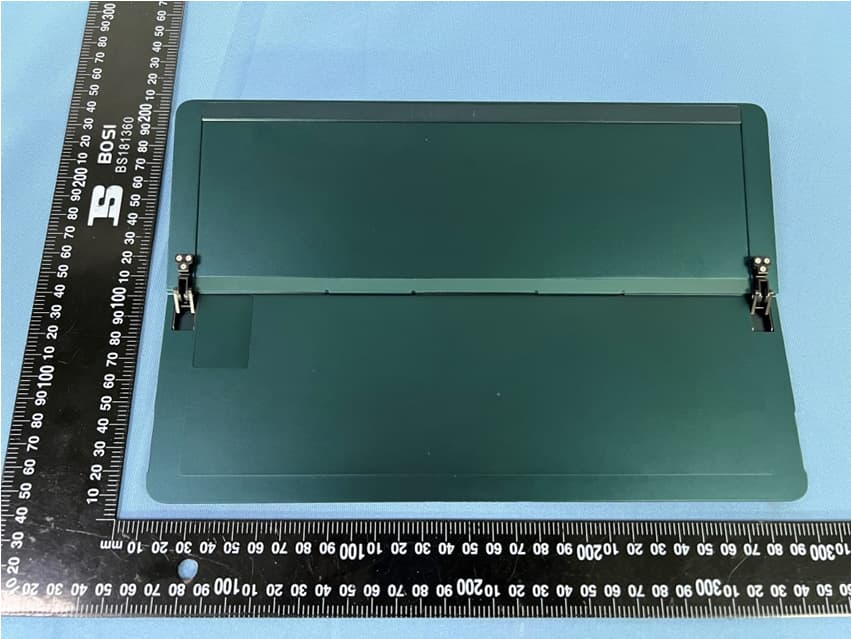
Click to zoom
Application Details
- Equipment Class
- NII - Unlicensed National Information Infrastructure TX
- Date of Grant
- Dec 08, 2022
- Application Purpose
- Original Equipment
- Date of Application
- Dec 07, 2022
- Equipment Note
- Portable Computer with WiFi, Bluetooth and WPT
- Frequency Range
- 5745.00000000 - 5825.00000000
- Country
- China
Documents & Files
Document Text
Text extracted from the exhibit documents filed with the FCC. Open a document above to read the original.
Users Manual
LED Indicator Using and Activating Activate Windows:Computer activated automatically when connected to internet for the first time. Before using the device, please read the Microsoft Software License Terms and the Robo&kala User Software License Agreement and Privacy Statement carefully. To learn how we protect your personal privacy, please visit : www.robo-kala.com/privacy-policy. More Information Please visit support.robo-kala.com. 材质:80g双铜纸+双面单色印刷+风琴折页 221009 Initial SetupOperating Instruction Adjusting the Kickstand You can adjust the tablet angle using the back kickstand.Grasp either side of the kickstand and gently open it until you reach the desired angle.The maximum opening angle of the kickstand is 165 degrees, and use beyond 165 degree angle will cause damage. Attaching Keyboard Place the keyboard on a level surface, make the pogo pin upward. Grasp either side of the tablet, and align the keyboard golden pogo-pin with the tablet central.After the pogo pin positioner enters the tablet hole, it will click, and the keyboard is successfully connected. Before using the smart pen, make sure the tablet is powered on. Once the smart pen is attached to the tablet, it will be charged automatically. The LED indicator flashes quickly, when the smart pen needs to be charged. Once it is charged, the LED indicator will stay on. The smart pen will automatically switch to power saving mode if the smart pen is not used for 1 minute. When its tip touches the tablet screen again, the smart pen will switch back to the using mode. Device OverviewAttaching Accessories(Smart Pen) Using an unapproved or incompatible power adapter or charger,may cause device damage or other safety hazards! To force your computer to power off, hold down the power button for 12 seconds at least. Note all unsaved data will be lost or damage! All illustrations in this manual are for your reference only and may differ from the final product. Please refer to the actual product and read the manual carefully before use! To prevent damage kickstand hinge, do not apply excessive pressure to the kickstand! If the tablet and keyboard exceed the maximum acceptable opening and closing angle, they will fall off automatically. Beware of falling damage! The smart pen is an optional accessory and is sold separately. It can only be charged while attached to the tablet. Please be cautious, the smart pen contains sensitive electronic components, dropping it may cause damage! N505001001 Important Safety Information To prevent possible hearing damage, do not listen at high volume levels for long periods. Ideal operating temperatures are 0 °C to 35 °C. Ideal storage temperatures are ‒10 °C to +35 °C. Extreme heat or cold may damage your device. Using an unapproved or incompatible power adapter, charger or battery may cause fire, explosion or other hazards.Please dispose of the used battery according to the instructions. To avoid personal injury, property damage, or accidental device damage, please read all the safety information in this manual before using your device. • • • Unplug the charger from electrical outlets and the device when not in use for long. Keep the device away from excessive heat and direct sunlight. Do not place it on or in heating devices, such as microwave ovens, stoves, or radiators. Batteries may explode if overheated. Dispose of the device, battery and other accessories in accordance with local regulations, and they should not be disposed of with household garbage. The device has a built-in, non-removable battery. Do not remove the battery, otherwise the device may be damaged. Take the device to an authorized service center to have the battery replaced. Keep the device and its accessories away from rain or moisture, as this may cause a fire or electric shock hazard. The radio wave may affect the performance of medical device, such as hearing aids, cochlear implant, and pacemakers. Consult your service provider for more information. Pacemaker manufacturers recommend that a minimum distance of 15 cm be maintained between a device and a pacemaker to prevent potential interference with the pacemaker. Please dispose of plastic bags carefully. Keep plastic bags away from babies and children to avoid suffocation. • • • • • • • • 122mm x 100mm 1 10 11 2 4 5 9 8 7 6 3 Power Button Volume Button Microphone *2 Front Camera / Sensor Left Speaker USB Type-C*2 Kickstand Smart Pen Charging Area Right Speaker Rear Camera/Indicator Magnetic Keyboard Contact 1 Hinge 2 Pogo-Pin Positioner 3 Pogo-Pin 4 Keypad Bluetooth Pairing / Backlight Adjustment Key / Battery Indicator 5 6 Touchpad 1 Stylus Tip 2 Erase Button 3 Right-Click Button 4 5 Magnetic Charging Area 1 10 11 7 2 4 59 8 6 3 2in1 Portable Computer Quick Start & Service Guide TW220 6 124 5 3 5 3 1 2 4 30°-165° Power on/off & Charging Instructions Power on: When using your computer for the first time, connect the included power adapter and USB Type-C cable to charge the battery,press the power button to power on your computer. Once the battery is on, press the power button for 3 seconds to power on the computer. Sleep Mode: When the computer is turned on, tap the power button or close the keyboard cover,and the computer will be in sleep mode. Power off: Click > to power off, or hold down the power button until the power-off screen is displayed, and then swipe down. 1. Exceeded the warranty period. 2. Damage caused by product dropping or liquid ingress and other human causes. 3. Failure caused by unauthorized disassembly, modification, etc. 4. Malfunctions caused by the use environment that does not meet the product requirements. 5. Failure or damage caused by force majeure factors (such as fire, earthquake, lightning strike, etc.). 6. Damage caused by use not in accordance with the instructions or operation manual. 7. The warranty card or purchase certificate does not match the product serial number, or is altered. 8. The product SN barcode is torn off or damaged, and it is blurred a…
Text truncated - open the document above for the full version.
Cover Letter(s)
Shenzhen Ntmer Technology Co., Ltd. PHOENIX TESTLAB GmbH Date: 14 November 2022 Product Certification Königswinkel 10 D 32825 Blomberg RE : LETTER OF AGENCY AUTHORIZATION To Whom It May Concern: We, the undersigned, hereby authorize (CTC Laboratories, Inc.) to act on our behalf in all matters relating to application for equipment authorization, including the signing of all documents relating to these matters. We certify that we are not subject to denial of federal benefits, that includes FCC benefits, pursuant to Section 5301 of the Anti-Drug Abuse ACT of 1988, U.S.C.862. Further, no party, as defined in 47 CFR 1.2002 (b), to the application is subject to denial of federal benefits, that includes FCC benefits. This agreement is valid for one year – 2022.10.26– until further notice. If you have any questions, please feel free to contact me Yours sincerely, Signature: Contact Name: Jack Dong Certification Manager Contact Email: [email protected] Contact Phone: +8675523946516
Cover Letter(s)
Shenzhen Ntmer Technology Co., Ltd. UNII Declaration Letter We have declared below featured for FCC equipment authorization, device FCC ID: 2A76QTW220 (1) DFS Device -- Master, Client with Radar detection capability , Client without radar detection capability, N/A (2) Active / Passive Scanning , adhoc mode access point capability Frequency Band (MHz) Active Scanning (the device can transmit a probe (beacon) passive scanning (where the device is can listen only with no probes) Ad Hoc Mode capability Access point capability 2412 – 2462 MHz Yes, No Yes, No Yes, No Yes, No 2422 – 2452 MHz Yes, No Yes, No Yes, No Yes, No 5745 – 5825 MHz Yes, No Yes, No Yes, No Yes, No 5755 – 5795 MHz Yes, No Yes, No Yes, No Yes, No 5180 – 5240 MHz Yes, No Yes, No Yes, No Yes, No 5190 – 5230 MHz Yes, No Yes, No Yes, No Yes, No 5260 – 5320 MHz Yes, No Yes, No Yes, No Yes, No 5270 – 5310 MHz Yes, No Yes, No Yes, No Yes, No 5500 – 5700 MHz Yes, No Yes, No Yes, No Yes, No 5510 – 5670 MHz Yes, No Yes, No Yes, No Yes, No (3) Country code selection ability - Yes , No If no, pls explain how was implemented : use Microsoft network utility (4) Meet 15.202 requirement - Yes , No , pls check below : A master device is defined as a device operating in a mode in which it has the capability to transmit without receiving an enabling signal. In this mode it is able to select a channel and initiate a network by sending enabling signals to other devices A client device is defined as a device operating in a mode in which the transmissions of the device are under control of the master. A device in client mode is not able to initiate a network. (5) For client devices that have software configuration control to operate in different modes (active scanning in some and passive scanning in others) in different bands (devices with multiple equipment classes or those that operate on non-DFS frequencies) or modular devices which configure the modes of operations through software, the application must provide software and operations description on how the software and / or hardware is implemented to ensure that proper operations modes can not be modified by end user or an installer. Apply , No Apply , (If apply , pls help to provide explanation on how it was implement (By hardware or software , and how software was controlled) If you have any questions, please feel free to contact me at the address shown below. Yours sincerely, Signatory Signature: Shenzhen Ntmer Technology Co., Ltd. Contact Name: Jack Dong Certification Manager Contact Email: [email protected] Contact Phone: +8675523946516
Cover Letter(s)
Shenzhen Ntmer Technology Co., Ltd. Date: 2022.10.26 FCC ID: 2A76QTW220 Dear Sir/Madam, We, Shenzhen Ntmer Technology Co., Ltd. Hereby declares the Product name: Portable Computer, Model no.: TW220, Have done SDOC certification. Sincerely, Signature: Contact Name: Jack Dong Certification Manager Contact Email: [email protected] Contact Phone: +8675523946516
Cover Letter(s)
Shenzhen Ntmer Technology Co., Ltd. Supplier’s Declaration Of Conformity for the FCC SDoC Procedure The following Equipment adapt FCC SDoC Procedure according to FCC part 2.906 : Product Name: ____ Portable Computer ________________ Brand Nam: ______ Robo&Kala ___________________ Model Number: ___ TW220 ________________ Report Number: _ CTC20221749E02, CTC20221749E03, CTC20221749E04, CTC20221749E05, CTC20221749E06, CTC20221749E07, E202209278552‐1, E202209278552‐2__________________ It’s herewith confirmed to comply with the requirements of FCC Part 15 Rules. Operation is subject to the following two conditions: (1) This device may not cause harmful interference, and (2) This device must accept any interference received, including interference that may cause undesired operation. It is understood that each unit marketed is identical to the device as tested, and any changes to the device that could adversely affect the emission characteristics will require retest. The following importer / responsible party in United States: Not Available at Certification Stage Company Name: Shenzhen Ntmer Technology Co., Ltd. Company Address: 2109, Hivac Building, NO.2, Keji South 8th Road, High Tech Zone Community, Yuehai Subdistrict, Nanshan District, Shenzhen, China Telephone: +8675523946516 Fax: +8675523946516 Person is responsible for marking this declaration: ___ Jack Dong _________________ ___Certification Manage______ Name (Full name ) Position / Title ____________________________________ _______2022.11.18__________ Legal Signature Date
Cover Letter(s)
Shenzhen Ntmer Technology Co., Ltd. Long/Short-term Confidentiality Request PHOENIX TESTLAB GmbH Date: 08 December 2022 Product Certification Königswinkel 10 D 32825 Blomberg FCC ID: 2A76QTW220 To Whom It May Concerns, Pursuant to sections 0.457(d) and 0.459 of CFR 47 and to avoid premature release of sensitive information prior to marketing or release of the product to the public, we hereby request long-term confidential treatment of information accompanying this application as outlined below: ☒ Schematics ☐ Parts List ☒ Block Diagram ☒ Tune-Up Info ☒ Operational Description In addition we hereby request the following exhibits contained in this application to be temporarily (short-term confidentiality) withheld from the public disclosure ☒ for an initial period of 180 days ☐ until: ☐ not applicable ☒ External Photos ☒ Test Setup Photos ☒ Internal Photos ☒ Users Manual The above materials contain trade secrets and proprietary information not customarily released to the public. The public disclosure of these matters might be harmful to the applicant and provide unjustified benefits to its competitors. The applicant understands that pursuant to rule 0.457(d), disclosure of this application and all accompanying documentation will not be made before the date of the GRANT for this application. If you have any questions, please feel free to contact me. Yours sincerely, Signature: Shenzhen Ntmer Technology Co., Ltd. Contact Name: Jack Dong Certification Manager Contact Email: [email protected] Contact Phone: +8675523946516
External Photos
CTC Laboratories, Inc. 1-2/F., Building 2, Jiaquan Building, Guanlan High-Tech Park, Shenzhen, Guangdong, China Tel: +86-755- 27521059 Fax: +86-755- 27521011 Http://www.sz-ctc.org.cn Page 1 of 5 External Photographs Page 2 of 5 Page 3 of 5 Page 4 of 5 Page 5 of 5
ID Label/Location Info
CTC Laboratories, Inc. 1-2/F., Building 2, Jiaquan Building, Guanlan High-Tech Park, Shenzhen, Guangdong, China Tel: +86-755- 27521059 Fax: +86-755- 27521011 Http://www.sz-ctc.org.cn Page 1 of 1 Label Label Location 1.
Internal Photos
CTC Laboratories, Inc. 1-2/F., Building 2, Jiaquan Building, Guanlan High-Tech Park, Shenzhen, Guangdong, China Tel: +86-755- 27521059 Fax: +86-755- 27521011 Http://www.sz-ctc.org.cn Page 1 of 13 Internal Photographs Page 2 of 13 Page 3 of 13 2.4GHz/ 5GHz WIFI Antenna 2 BT/ 2.4GHz/ 5GHz WIFI Antenna 1 Page 4 of 13 Page 5 of 13
Internal Photos
Page 6 of 13 Page 7 of 13 Page 8 of 13 Page 9 of 13 Page 10 of 13 Coil Antenna Page 11 of 13 Page 12 of 13 Page 13 of 13
RF Exposure Info
Antenna Parameters Intermediated Check Object D2450V2-SN:933 Calibration date April 08,2022 Frequency 2450MHz Impedance, transformed to feed point 52.0Ω-7.49jΩ Return Loss -28.4 dB Object D5GHzV2-SN:1182 Calibration date April 09,2022 Frequency 5250MHz,5600MHz, 5750MHz Impedance, transformed to feed point 5250MHz: 49.4Ω-9.90jΩ 5600MHz: 52.5Ω-5.11jΩ 5750MHz: 59.8Ω+1.27jΩ Return Loss 5250MHz: -23.9 dB 5600MHz: -29.0 dB 5750MHz: - 23.5 dB
RF Exposure Info
Page 1 of 71 Test Report Verified code: Report No.: E202209278552-1 Customer: Shenzhen Ntmer Technology Co., Ltd. Address: 2109, Hivac Building, NO.2, Keji South 8th Road, High Tech Zone Community, Yuehai Subdistrict, Nanshan District, Shenzhen, China Sample Name: Portable Computer Sample Model: TW220 Receive Sample Date: Oct.10,2022 Test Date: Oct.10,2022 ~ Oct.20,2022 Reference Document: IEC/IEEE 62209-1528:2020 47 CFR FCC Part 2.1093 IEEE Std. C95.1:2019 Test Result: Pass Prepared by: Reviewed by: Approved by: GUANGZHOU GRG METROLOGY & TEST CO., LTD Issued Date: GUANGZHOU GRG METROLOGY & TEST CO., LTD. Address: No.163, Pingyun Road, West of Huangpu Avenue, Guangzhou, Guangdong, China Tel:(+86)400-602-0999 FAX:(+86)020-38698685 Web:http://www.grgtest.com 942905 2022-12-01 Report No.: E202209278552-1 Page 2 of 71 Statement 1. The report is invalid without "special seal for inspection and testing"; some copies are invalid; The report is invalid if it is altered or missing; The report is invalid without the signature of the person who prepared, reviewed and approved it. 2. The sample information is provided by the client and responsible for its authenticity; The content of the report is only valid for the samples sent this time. 3. When there are reports in both Chinese and English, the Chinese version will prevail when the language problems are inconsistent. 4. If there is any objection concerning the report, please inform us within 15 days from the date of receiving the report. 5. Without the agreement of the laboratory, the client is not authorized to use the test results for unapproved propaganda. ------------ The following blanks ------------ Report No.: E202209278552-1 Page 3 of 71 TABLE OF CONTENTS 1. GENERAL INFORMATION ................................................................................................................................. 6 2. GENERAL INFORMATION OF EUT .................................................................................................................. 7 2.1 STATEMENT OF COMPLIANCE ........................................................................................................ 7 2.2 GENERAL DESCRIPTION ................................................................................................................... 8 2.3 LABORATORY ENVIRONMENT ....................................................................................................... 9 3. LABORATORY AND ACCREDITATIONS ...................................................................................................... 10 3.1 LABORATORY ................................................................................................................................... 10 3.2 ACCREDITATIONS ............................................................................................................................ 10 3.3 MEASUREMENT UNCERTAINTY ................................................................................................... 10 4. SAR MEASUREMENTS SYSTEM .................................................................................................................... 11 4.1 DEFINITION OF SPECIFIC ABSORPTION RATE (SAR) ............................................................... 11 4.2 SAR SYSTEM ...................................................................................................................................... 12 4.3 E-FIELD PROBE ................................................................................................................................. 13 4.4 DATA ACQUISITION ELECTRONICS (DAE) ................................................................................. 14 4.5 ROBOT ................................................................................................................................................. 15 4.6 MEASUREMENT SERVER ................................................................................................................ 16 4.7 PHANTOM ........................................................................................................................................... 17 4.8 DEVICE HOLDER ............................................................................................................................... 19 4.9 DATA STORAGE AND EVALUATION ........................................................................................... 20 5. TEST EQUIPMENT LIST ................................................................................................................................... 22 6. SYSTEM VERIFICATION PROCEDURE ......................................................................................................... 23 6.1 TISSUE VERIFICATION .................................................................................................................... 23 6.2 SYSTEM CHECK PROCEDURE........................................................................................................ 25 7. SAR MEASUREMENT VARIABILITY ............................................................................................................. 27 7.1 SAR MEASUREMENT VARIABILITY ............................................................................................. 27 8. EUT TESTING POSITION .................................................................................................................................. 28 8.1 BODY WORN POSITION ................................................................................................................... 28 9. MEASUREMENT PROCEDURES ..................................................................................................................... 29 9.1 SPATIAL PEAK SAR EVALUATION ............................................................................................... 29 9.2 POWER REFERENCE MEASUREMENT ......................................................................................... 30 9.3 AREA SCAN…
Text truncated - open the document above for the full version.
Test Report
CTC Laboratories, Inc. 1-2/F., Building 2, Jiaquan Building, Guanlan High-Tech Park, Shenzhen, Guangdong, China Tel: +86-755- 27521059 Fax: +86-755- 27521011 Http://www.sz-ctc.org.cn Appendix for 5G WIFI Applicant: Shenzhen Ntmer Technology Co., Ltd. Address: 2109, Hivac Building, NO.2, Keji South 8th Road, High Tech Zone Community, Yuehai Subdistrict, Nanshan District, Shenzhen, China Product Name: Portable Computer Model: TW220 FCC ID: 2A76QTW220 Page 2 of 380 TABLE OF CONTENTS Appendix A1: Emission Bandwidth .................................................................................................. 3 Appendix A2: Occupied channel bandwidth ................................................................................... 68 Appendix A3: Min emission bandwidth ........................................................................................ 132 Appendix B: Maximum conducted output power .......................................................................... 147 Appendix C: Maximum power spectral density ............................................................................ 160 Appendix D: Frequency Stability .................................................................................................. 305 Appendix E: Duty Cycle ............................................................................................................... 316 Page 3 of 380 Appendix A1: Emission Bandwidth Test Result Test Mode Antenna Channel RU Configuration 26db EBW [MHz] FL[MHz] FH[MHz] Verdict 802.11a Ant1 5180 / 19.240 5170.280 5189.520 PASS Ant2 5180 / 18.960 5170.440 5189.400 PASS Ant1 5200 / 19.120 5190.320 5209.440 PASS Ant2 5200 / 19.040 5190.400 5209.440 PASS Ant1 5240 / 18.840 5230.440 5249.280 PASS Ant2 5240 / 19.200 5230.400 5249.600 PASS Ant1 5260 / 19.120 5250.280 5269.400 PASS Ant2 5260 / 19.320 5250.200 5269.520 PASS Ant1 5280 / 19.000 5270.360 5289.360 PASS Ant2 5280 / 19.240 5270.200 5289.440 PASS Ant1 5320 / 19.240 5310.280 5329.520 PASS Ant2 5320 / 19.120 5310.320 5329.440 PASS Ant1 5500 / 19.120 5490.280 5509.400 PASS Ant2 5500 / 19.280 5490.240 5509.520 PASS Ant1 5580 / 18.880 5570.400 5589.280 PASS Ant2 5580 / 19.040 5570.360 5589.400 PASS Ant1 5700 / 19.080 5690.240 5709.320 PASS Ant2 5700 / 19.240 5690.320 5709.560 PASS Ant1 5745 / 19.080 5735.280 5754.360 PASS Ant2 5745 / 18.960 5735.360 5754.320 PASS Ant1 5785 / 19.200 5775.280 5794.480 PASS Ant2 5785 / 19.400 5775.280 5794.680 PASS Ant1 5825 / 19.200 5815.240 5834.440 PASS Ant2 5825 / 19.160 5815.200 5834.360 PASS 802.11n(HT20) Ant1 5180 / 20.400 5169.840 5190.240 PASS Ant2 5180 / 20.360 5169.880 5190.240 PASS Ant1 5200 / 20.480 5189.760 5210.240 PASS Ant2 5200 / 20.240 5189.800 5210.040 PASS Ant1 5240 / 20.640 5229.680 5250.320 PASS Ant2 5240 / 20.120 5229.960 5250.080 PASS Ant1 5260 / 20.320 5249.880 5270.200 PASS Ant2 5260 / 20.120 5249.840 5269.960 PASS Ant1 5280 / 20.240 5269.800 5290.040 PASS Ant2 5280 / 20.400 5269.800 5290.200 PASS Ant1 5320 / 20.120 5309.800 5329.920 PASS Ant2 5320 / 20.320 5309.840 5330.160 PASS Ant1 5500 / 20.040 5489.920 5509.960 PASS Ant2 5500 / 20.160 5489.960 5510.120 PASS Ant1 5580 / 20.480 5569.680 5590.160 PASS Ant2 5580 / 20.160 5569.840 5590.000 PASS Ant1 5700 / 20.200 5689.880 5710.080 PASS Page 4 of 380 Ant2 5700 / 20.120 5689.880 5710.000 PASS Ant1 5745 / 20.400 5734.760 5755.160 PASS Ant2 5745 / 20.280 5734.880 5755.160 PASS Ant1 5785 / 20.240 5774.840 5795.080 PASS Ant2 5785 / 20.080 5774.840 5794.920 PASS Ant1 5825 / 20.440 5814.680 5835.120 PASS Ant2 5825 / 20.040 5814.920 5834.960 PASS 802.11n(HT40) Ant1 5190 / 39.920 5170.000 5209.920 PASS Ant2 5190 / 39.280 5170.320 5209.600 PASS Ant1 5230 / 39.600 5210.080 5249.680 PASS Ant2 5230 / 39.440 5210.240 5249.680 PASS Ant1 5270 / 39.600 5250.080 5289.680 PASS Ant2 5270 / 39.760 5250.320 5290.080 PASS Ant1 5310 / 39.520 5290.240 5329.760 PASS Ant2 5310 / 39.200 5290.400 5329.600 PASS Ant1 5510 / 39.680 5490.160 5529.840 PASS Ant2 5510 / 39.360 5490.320 5529.680 PASS Ant1 5550 / 39.680 5530.160 5569.840 PASS Ant2 5550 / 39.520 5530.320 5569.840 PASS Ant1 5670 / 39.600 5650.160 5689.760 PASS Ant2 5670 / 39.680 5650.080 5689.760 PASS Ant1 5755 / 39.520 5735.240 5774.760 PASS Ant2 5755 / 39.840 5735.080 5774.920 PASS Ant1 5795 / 40.080 5775.000 5815.080 PASS Ant2 5795 / 39.360 5775.400 5814.760 PASS 802.11ac(VHT20) Ant1 5180 / 20.080 5169.920 5190.000 PASS Ant2 5180 / 20.240 5169.880 5190.120 PASS Ant1 5200 / 20.400 5189.720 5210.120 PASS Ant2 5200 / 20.280 5189.760 5210.040 PASS Ant1 5240 / 20.520 5229.640 5250.160 PASS Ant2 5240 / 19.920 5230.000 5249.920 PASS Ant1 5260 / 20.520 5249.600 5270.120 PASS Ant2 5260 / 20.200 5249.880 5270.080 PASS Ant1 5280 / 20.600 5269.600 5290.200 PASS Ant2 5280 / 19.960 5270.040 5290.000 PASS Ant1 5320 / 20.480 5309.800 5330.280 PASS Ant2 5320 / 20.080 5310.000 5330.080 PASS Ant1 5500 / 20.080 5489.920 5510.000 PASS Ant2 5500 / 20.440 5489.600 5510.040 PASS Ant1 5580 / 20.640 5569.640 5590.280 PASS Ant2 5580 / 20.080 5569.920 5590.000 PASS Ant1 5700 / 20.120 5689.920 5710.040 PASS Ant2 5700 / 20.240 5689.840 5710.080 PASS Ant1 5745 / 20.080 5734.920 5755.000 PASS Ant2 5745 / 20.000 5734.920 5754.920 PASS Ant1 5785 / 20.200 5774.800 5795.000 PASS Page 5 of 380 Ant2 5785 / 20.000 5775.000 5795.000 PASS Ant1 5825 / 20.160 5814.880 5835.040 PASS Ant2 5825 / 20.080 5815.000 5835.080 PASS 802.11ac(VHT40) Ant1 5190 / 40.400 5169.680 5210.080 PASS Ant2 5190 / 39.440 5170.320 5209.760 PASS Ant1 5230 / 39.760 5210.160 5249.920 PASS Ant2 5230 / 39.520 5210.160 5249.680 PASS Ant1 5270 / 40.160 5250.080 5290.240 PASS Ant2 5270 / 39.760 5250.080 5289.840 PASS Ant1 5310 / 39.760 5290.080 5329.840 PASS Ant2 5310 / 39.440 5290.400 5329.840 PASS Ant1 5510 / 39.840 5490.080 5529.920 PASS Ant2 5510 / 39.280 5490.320 5529.600 PASS Ant1 5550 / 40.080 5530.000 5570.080 PASS Ant2 5550 / 39.520 5530.080 5569.600 PASS Ant1 5670 / 39.760 5650.080 5689.840 PASS Ant2 5670 / 39.600 5650.160 5689.760 PASS An…
Text truncated - open the document above for the full version.
Test Report
Page 34 of 380 802.11ac(VHT20)_Ant2_5500 802.11ac(VHT20)_Ant1_5580 802.11ac(VHT20)_Ant2_5580 Page 35 of 380 802.11ac(VHT20)_Ant1_5700 802.11ac(VHT20)_Ant2_5700 802.11ac(VHT20)_Ant1_5745 Page 36 of 380 802.11ac(VHT20)_Ant2_5745 802.11ac(VHT20)_Ant1_5785 802.11ac(VHT20)_Ant2_5785 Page 37 of 380 802.11ac(VHT20)_Ant1_5825 802.11ac(VHT20)_Ant2_5825 802.11ac(VHT40)_Ant1_5190 Page 38 of 380 802.11ac(VHT40)_Ant2_5190 802.11ac(VHT40)_Ant1_5230 802.11ac(VHT40)_Ant2_5230 Page 39 of 380 802.11ac(VHT40)_Ant1_5270 802.11ac(VHT40)_Ant2_5270 802.11ac(VHT40)_Ant1_5310 Page 40 of 380 802.11ac(VHT40)_Ant2_5310 802.11ac(VHT40)_Ant1_5510 802.11ac(VHT40)_Ant2_5510 Page 41 of 380 802.11ac(VHT40)_Ant1_5550 802.11ac(VHT40)_Ant2_5550 802.11ac(VHT40)_Ant1_5670 Page 42 of 380 802.11ac(VHT40)_Ant2_5670 802.11ac(VHT40)_Ant1_5755 802.11ac(VHT40)_Ant2_5755 Page 43 of 380 802.11ac(VHT40)_Ant1_5795 802.11ac(VHT40)_Ant2_5795 802.11ac(VHT80)_Ant1_5210 Page 44 of 380 802.11ac(VHT80)_Ant2_5210 802.11ac(VHT80)_Ant1_5290 802.11ac(VHT80)_Ant2_5290 Page 45 of 380 802.11ac(VHT80)_Ant1_5530 802.11ac(VHT80)_Ant2_5530 802.11ac(VHT80)_Ant1_5610 Page 46 of 380 802.11ac(VHT80)_Ant2_5610 802.11ac(VHT80)_Ant1_5775 802.11ac(VHT80)_Ant2_5775 Page 47 of 380 802.11ac(VHT160)_Ant1_5250 802.11ac(VHT160)_Ant2_5250 802.11ac(VHT160)_Ant1_5570 Page 48 of 380 802.11ac(VHT160)_Ant2_5570 802.11ax(HE20)_Ant1_5180 242/61 802.11ax(HE20)_Ant2_5180 242/61 Page 49 of 380 802.11ax(HE20)_Ant1_5200 242/61 802.11ax(HE20)_Ant2_5200 242/61 802.11ax(HE20)_Ant1_5240 242/61 Page 50 of 380 802.11ax(HE20)_Ant2_5240 242/61 802.11ax(HE20)_Ant1_5260 242/61 802.11ax(HE20)_Ant2_5260 242/61 Page 51 of 380 802.11ax(HE20)_Ant1_5280 242/61 802.11ax(HE20)_Ant2_5280 242/61 802.11ax(HE20)_Ant1_5320 242/61 Page 52 of 380 802.11ax(HE20)_Ant2_5320 242/61 802.11ax(HE20)_Ant1_5500 242/61 802.11ax(HE20)_Ant2_5500 242/61 Page 53 of 380 802.11ax(HE20)_Ant1_5580 242/61 802.11ax(HE20)_Ant2_5580 242/61 802.11ax(HE20)_Ant1_5700 242/61 Page 54 of 380 802.11ax(HE20)_Ant2_5700 242/61 802.11ax(HE20)_Ant1_5745 242/61 802.11ax(HE20)_Ant2_5745 242/61 Page 55 of 380 802.11ax(HE20)_Ant1_5785 242/61 802.11ax(HE20)_Ant2_5785 242/61 802.11ax(HE20)_Ant1_5825 242/61 Page 56 of 380 802.11ax(HE20)_Ant2_5825 242/61 802.11ax(HE40)_Ant1_5190 484/65 802.11ax(HE40)_Ant2_5190 484/65 Page 57 of 380 802.11ax(HE40)_Ant1_5230 484/65 802.11ax(HE40)_Ant2_5230 484/65 802.11ax(HE40)_Ant1_5270 484/65 Page 58 of 380 802.11ax(HE40)_Ant2_5270 484/65 802.11ax(HE40)_Ant1_5310 484/65 802.11ax(HE40)_Ant2_5310 484/65 Page 59 of 380 802.11ax(HE40)_Ant1_5510 484/65 802.11ax(HE40)_Ant2_5510 484/65 802.11ax(HE40)_Ant1_5550 484/65 Page 60 of 380 802.11ax(HE40)_Ant2_5550 484/65 802.11ax(HE40)_Ant1_5670 484/65 802.11ax(HE40)_Ant2_5670 484/65
Test Report
Page 61 of 380 802.11ax(HE40)_Ant1_5755 484/65 802.11ax(HE40)_Ant2_5755 484/65 802.11ax(HE40)_Ant1_5795 484/65 Page 62 of 380 802.11ax(HE40)_Ant2_5795 484/65 802.11ax(HE80)_Ant1_5210 996/67 802.11ax(HE80)_Ant2_5210 996/67 Page 63 of 380 802.11ax(HE80)_Ant1_5290 996/67 802.11ax(HE80)_Ant2_5290 996/67 802.11ax(HE80)_Ant1_5530 996/67 Page 64 of 380 802.11ax(HE80)_Ant2_5530 996/67 802.11ax(HE80)_Ant1_5610 996/67 802.11ax(HE80)_Ant2_5610 996/67 Page 65 of 380 802.11ax(HE80)_Ant1_5775 996/67 802.11ax(HE80)_Ant2_5775 996/67 802.11ax(HE160)_Ant1_5250 996*2/68 Page 66 of 380 802.11ax(HE160)_Ant2_5250 996*2/68 802.11ax(HE160)_Ant1_5570 996*2/68 802.11ax(HE160)_Ant2_5570 996*2/68 Page 67 of 380 Page 68 of 380 Appendix A2: Occupied channel bandwidth Test Result Test Mode Antenna Channel RU Configuration OCB [MHz] FL [MHz] FH [MHz] Verdict 802.11a Ant1 5180 / 16.620 5171.633 5188…
Text truncated - open the document above for the full version.
Contact Information
Applicant
Jack Dong(Certification Manager)
Test Firm
CTC Laboratories, Inc.Totti Zhao
[email protected]+8675527521059
Technical Specifications
| # | Rule Parts | Frequency Range | Power Output |
|---|---|---|---|
| 4 | 15E | 5.75 GHz - 5.83 GHz | 14.30 mW |
Other Applications from Shenzhen Ntmer Technology Co., Ltd.
2A76QKB051
Dec 28, 2022Dual Mode Keyboard
Equipment Class
DTS - Digital Transmission System