2A89N-MG0301Mogemyth warrior
Shenzhen Mogemyth technology Co.,Ltd.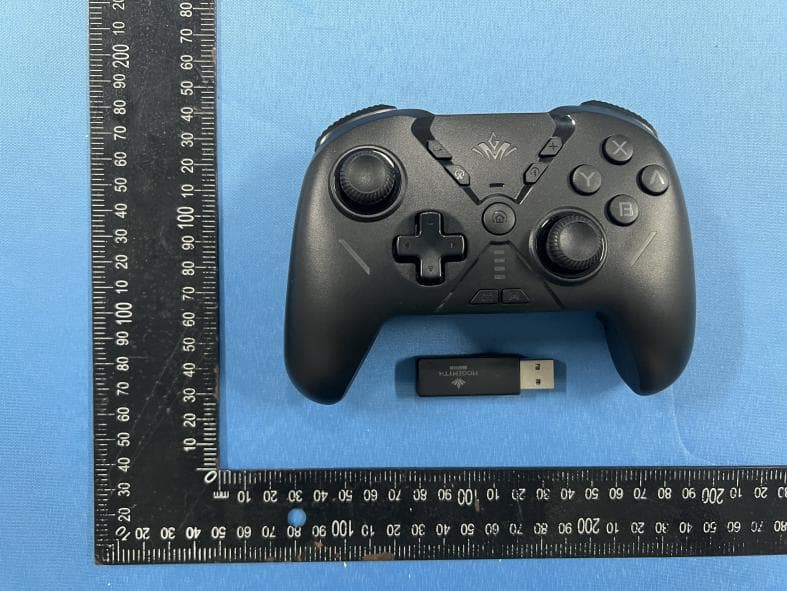
Click to zoom
Application Details
- Equipment Class
- DTS - Digital Transmission System
- Date of Grant
- Dec 10, 2022
- Application Purpose
- Original Equipment
- Date of Application
- Dec 07, 2022
- Equipment Note
- Mogemyth warrior
- Frequency Range
- 2402.00000000 - 2480.00000000
- Country
- China
Documents & Files
Document Text
Text extracted from the exhibit documents filed with the FCC. Open a document above to read the original.
Users Manual
1.Device Layout Right joystick ABXY button Minus button Left joystick D-Pad Screenshot button Home button Mode indicatorsTurbo button Plus button Macro programming button NFC Receiver pairing buttonRGB light Receiver light Compatibility:Switch Android 8.0 or above iOS 13 or above Windows 7/8/10 Asymmetrical rotor motor L1 R1 buttonType-C charging port HD vibration motor Motor turn off button L2 R2 button M1 M2 custom button Somatosensory button Reset holePairing button Trigger adjustment switch 1.Enter the Switch Home Menu, click「 」and click“change the grip/order”. Before using wired connection, please make sure the controller is in the state of boot or sleep and turn on its wired connection function. 1.Connect the controller to SWITCH via Type-C cable. 2.When the mode indicator keeps on, the controller is connected successfully. 2.Wirelessly Connect to SWITCH 3.Connect to SWITCH via Type-C Cable 4.Connect to Computer via Bluetooth Receiver 1.Plug Bluetooth receiver into the computer USB port and press the receiver pairing button, the receiver indicator will flash quickly. 2.Press the pairing button, the mode indicator blinks and enter pairing mode. 3.The indicator LED1 and LED2 keep on, receiver indicator keeps on, the controller is connected successfully. 4.Next time, when you press the HOME button, the controller will connect to the computer automatically. 5.Connect to the Computer via Type-C Cable 1.Connect the controller to the computer via Type-C cable . 2.The computer will prompt new hardware has been found and connected successfully. When the controller indicator LED1, LED2 keep on, 2.the controller is connected successfully. 2.Short press the controller「 」, mode indicators blink and enter pairing mode. 3.When the mode indicator LED1 of the controller keeps on, please press「 」 to return to the Home Menu. Reconnect and wake up the SWITCH After successful connection, the SWITCH will enter the sleep state. Please press the HOME button of the controller to reconnect and wake up the SWITCH. Click the controller icon on the Switch Home Menu Click “change the grip/order” Notes: Re-pair the Bluetooth receiver with controller Press the receiver pairing button, the receiver indicator flashes quickly which means the controller enters pairing mode. Then press the button「 」of the controller to complete the re-pairing. With a successful connection, LED1, LED2 keep on. 6.Connect to Controller via Android Device 1.When the controller is off, please press「 」the direction button right button, then press「 」button, the mode indicator LED3 will flash quickly. 2.Find the Bluetooth “ Xbox Wireless Controller” in your phone and click to connect. 3.With connection successfully, the phone will show “connected” and the controller indicator LED3 keeps on. 4.Next time, when press the HOME button, the controller will connect to the phone automatically. 5.After switching platforms, please press the combination button again to pair the phone. 2.Find the Bluetooth “ MOBAPAD M9-HD” in your phone and click to connect. 3.With successfully connection, the phone will show “connected” and the controller indicator LED2 keeps on. 4.Next time, when press the HOME button, the controller will connect to the phone automatically. 5.After switching platforms, please press the combination button again to pair the phone. 7.Connect to Controller with iOS Device Mode indicator LED2 flashes quickly. With a successful connection, LED2 keeps on. Mode indicator LED3 flashes quickly. With a successful connection, LED3 keeps on. 1.When the controller is off, please press left button of 「 」the direction button left button, then press「 」button, the mode indicator LED2 will flash quickly. ( Note: iOS version 13 or above) 8.Turbo Function The buttons that can be set as turbo function: A/B/X/Y/L1/L2/R1/R2 Manual turbo state: LOGO light +RGB light, manual click the trigger to flash Auto turbo state: LOGO light +RGB light, keep flashing automatically Manual turbo mode Auto turbo mode Cancel single key turbo mode Cancel all keys turbo mode +Function button +Function button +Function button After the third setting, the combo will not be triggered. ong press for 3 seconds All the combo setting of the function button will not be triggered. Turbo Level: High, Middle and Low Level switch + Level indicator or + + Downshift Upshift When adjust to low level, the current mode indicator will flash 1 time. When adjust to middle level, the current mode indicator will flash 2 times. When adjust to high level, t he current mode indicator will flash 3 times. 9.Somatosensory Mapping (Note: Only support PC) Somatosensory mapping doesn’t require game support. Turn on the somatosensory mapping, you can control the direction or the view angle. Turn on somatosensory function Responsive somatosensory function Clear somatosensory mapping function setting 「 」 Turn on somatosensory mapping function, LED4 keeps on Turn off somatosensory mapping function, LED4 is off. Press the two combination buttons + "L3/R3" to turn on the full-time somatosensory function. (The somatosensory simulation will replace L3/R3). The mode indicator LED4 white light lights up, which indicates the setting is successful. Repeat this operation to exit the mode, and the mode indicator LED4 will be turned off. Long press for 3 seconds to clear the somatosensory mapping function setting and restore default setting. Press M1/M2+ +R3, mode indicator LED4 white light lights up which indicates the setting is successful. Press M1/M2 to turn on responsive somatosensory mapping function, release M1/M2 to turn off responsive somatosensory mapping function. For example: Press M1+ +R3, after setting successfully, press “M1” button, the responsive somatosensory function will be turned on, release “M1” button, the responsive somatosensory function will be turned off. Repeat this operation to exit the mode, and the mode indicator LED4 will be turned off. Note: This setting needs to be pressed sequentially, and…
Text truncated - open the document above for the full version.
Attestation Statements
ShenzhenMogemythtechnologyCo.,Ltd. Modeldifferences We: ShenzhenMogemythtechnologyCo.,Ltd.StatementthatAllthemodel“MG0301,MG0301A,MG0301B, MG0301C,MG0302,MG0303”areidenticalexceptmodelname. AllabovemodelsareidenticalinthesamePCBlayout,interiorstructureandelectricalcircuits. Theonlydifferenceismodelnameforcommercialpurpose. CityandCountry:Date:Name: (thismustbeaperson) Function:Signature: (orofficialcompanystamp) Shenzhen2022.12.05LeoliuManager
Cover Letter(s)
C5266091_X8_Ed.1 1/1 LetterofAuthorization <ShenzhenMogemythtechnologyCo.,Ltd.> Company:ShenzhenMogemythtechnologyCo.,Ltd. Address:208,No.35GongheIndustrialRoad,Gonglecommunity, Xixiangstreet,Bao'anDistrict,Shenzhen ProductName:Mogemythwarrior ModelNumber:MG0301,MG0301A,MG0301B,MG0301C,MG0302, MG0303 FCCIdentifier:2A89N-MG0301 WeauthorizeLGAITechnologicalCenterS.A.,RondadelaFontdelCarme,s/n, 08193Bellaterra,Spain,toactonourbehalfonallmattersconcerningthe abovenamedequipment. AnyindividualwithinLGAITechnologicalCenterS.A.isauthorizedtoactonour behalfandtakeactionontheapplication. WedeclarethatauthorizeLGAITechnologicalCenterS.A.,RondadelaFontdel Carme,s/n,08193Bellaterra,Spain,isallowedtoforwardallinformation relatedtotheapprovalprojecttotheFederalCommunicationCommissionand todiscussanyissuesconcerningtheapprovalapplication.Anyandallacts carriedoutbyLGAITechnologicalCenterS.A.onourbehalfshallhavethe sameeffectasactsofourown. Name:LeoliuDate:2022.12.05 Title:Engineer Signatureofapplicant:
Cover Letter(s)
C5266091_X10_Ed.1 1/1 ShenzhenMogemythtechnologyCo.,Ltd. 208,No.35GongheIndustrialRoad,Gonglecommunity,Xixiangstreet,Bao'anDistrict, Shenzhen Date:2022.12.05 Subject:RequestforConfidentiality FCCID:2A89N-MG0301 ToWhomItMayConcern, PursuanttotheprovisionsofSections0.457and0.459ofCommission'srules (47CFR0.457,0.459),wearerequestingtheCommissiontowithholdthefollowing attachment(s)asconfidentialdocumentfrompublicdisclosure. ExhibitsLong-Term Confidentiality Short-Term Confidentiality IDLabel/LocationNoNo AttestationStatementNoNo ExternalPhotosNo BlockDiagram Schematics TestReportNoNo TestSetupPhotosNo User’sManual InternalPhotosNo PartsList/TuneUp RFExposureInfo OperationalDescription CoverLetter(s)NoNo SDRSoftware/SecurityInfoNo Incaseofshort-termConfidentiality,theapplicantrequeststheexhibitsselected abovearewithheldfrompublicviewforaperiodof_180_daysfromthedateofthe GrantofEquipmentAuthorizationandpriortomarketing. Abovementioneddocumentcontainsdetailedsystemandequipmentdescriptionare consideredasproprietaryinformationinoperationoftheequipment.Thepublic disclosureofabovedocumentsmightbeharmfultoourcompanyandwouldgive competitoranunfairadvantageinthemarket. Itisourunderstandingthatallmeasurementtestreports,FCCIDlabelformatand correspondentduringcertificationreviewprocesscannotbegrantedasconfidential documentsandthoseinformationwillbeavailableforpublicreviewoncethegrantof equipmentauthorizationisissued. Sincerely, Name:LeoliuDate:2022.12.05 Title:Engineer Signatureofapplicant:
External Photos
FCCID:2A89N-MG0301
ID Label/Location Info
FCCIDLABELINGANDLOCATION FCCIDLabel FCCIDLabelLocation Thelabelshownshallbepermanentlyaffixedataconspicuouslocationonthedeviceandbe readilyvisibletotheuseratthetimepurchase(Labelingrequirementsper2.925) Mogemythwarrior FCCID:2A89N-MG0301
Internal Photos
FCCID:2A89N-MG0301 PCBAntenna
RF Exposure Info
FCCID:2A89N-MG0301 RFEXPOSUREEVALUATIONMETHOD AccordingtoFCC1.1310:Thecriterialistedinthefollowingtableshallbeusedto evaluatetheenvironmentimpactofhumanexposuretoradiofrequency(RF)Radiation asspecifiedin§1.1307(b) EUTSpecification EUT Mogemythwarrior Frequencyband (Operating) WLAN:2.412GHz~2.462GHz WLAN:5.150GHz~5.250GHz WLAN:5.725GHz~5.850GHz OthersBT:2402-2480MHz DevicecategoryPortable(<20cmseparation) Mobile(>20cmseparation) Others ExposureclassificationOccupational/Controlledexposure(S=5mW/cm2) GeneralPopulation/Uncontrolledexposure (S=1mW/cm2) AntennadiversitySingleantenna Multipleantennas Txdiversity Rxdiversity Tx/Rxdiversity Max.outputpower -1.09dBm(0.00063W) Antennagain(Max) -0.58dBi EvaluationappliedMPEEvaluation SAREvaluation FCCID:2A89N-MG0301 RFEXPOSUREEVALUATIONMETHOD SARTestExclusionThresholdsfor100MHz – 6GHzand ≤ 50mm ApproximateSARTestExclusionPowerThresholdsatSelectedFrequenciesandTestSeparation DistancesareillustratedinthefollowingTable. The1-gand10-gSARtestexclusionthresholdsfor100MHzto6GHzattestseparation distances ≤ 50mmaredeterminedby: [(max.powerofchannel,includingtune-uptolerance,mW)/(min.testseparationdistance, mm)] · [ √ f(GHz)] ≤ 3.0for1-gSARand ≤ 7.5for10-gextremitySAR,where f(GHz)istheRFchanneltransmitfrequencyinGHz PoweranddistanceareroundedtothenearestmWandmmbeforecalculation Theresultisroundedtoonedecimalplaceforcomparison Thetestexclusionsareapplicableonlywhentheminimumtestseparationdistanceis ≤ 50 mmandfortransmissionfrequenciesbetween100MHzand6GHz.Whentheminimumtest separationdistanceis<5mm,adistanceof5mmisappliedtodetermineSARtest exclusion. FCCID:2A89N-MG0301 Maximummeasuredtransmitterpower. BLE Operating Mode Frequency Measur ed Power max. power Antenna Gain Antenna Gain (linear) min.test separation distance ResultLimit (MHz)(dBm)(mW)(dBi)/(mm) GFSK 2402-1.990.63-0.580.8750.19603 2440-2.460.57-0.580.8750.17733 2480-3.190.48-0.580.8750.15113 Remark:Thebestcasegainoftheantennais-0.58dBi. The1-gand10-gSARtestexclusionthresholdsfor100MHzto6GHzattest separationdistances≤50mmaredeterminedby: [(max.powerofchannel,includingtune-uptolerance,mW)/(min.testseparation distance,mm)]·[√f(GHz)] ThetestResultislessthan3.0for1-gSARand≤7.5for10-gextremitySAR. RFexposurestatement:NoSARisrequired.AccordingtoKDB447498andpart 2.1093,UnlessspecificallyrequiredbythepublishedRFexposureKDB procedures,standalone1-gheadorbodyand10-gextremitySARevaluationfor generalpopulationexposureconditions,bymeasurementornumericalsimulation, isnotrequiredwhenthecorrespondingSARTestExclusionThreshold condition(s),listedbelow,is(are)satisfied.
Test Report
test model: SP-S10BT Inverted F Antenna Specification Summary ITEM Model Name Center ANT SPEC 2.4G ANT Horizontal Vertical 2400MHz 2450MHz 2500MHz 2400MHz 2450MHz 2500MHz Frequency -1.26-0.76-0.58-5.25-2.46-1.86 MAX. Gain Polarization Azimuth Beam Pattern Impedance Antenna Length Manufacture -0.58dBi Ho rizontal and Vertical Omni-directional 5 00hm 38.20mm ZHUHAI]IELI TECHNOLOGY CO.,LTD Antenna Photo & Length (mm) 勹 二 · 充 2 T 一 一 ] , 2.吓 f 勹 勹 J2 4 工 顽 ◄,6944 dBi dBi
Test Report
ShenzhenCTATestingTechnologyCo.,Ltd. Room106,Building1,YibaolaiIndustrialPark,QiaotouCommunity,FuhaiStreet, Bao‘anDistrict,Shenzhen,China ShenzhenCTATestingTechnologyCo.,Ltd. Room106,Building1,YibaolaiIndustrialPark,QiaotouCommunity,FuhaiStreet,Bao’anDistrict,Shenzhen,China Tel:+86-75523225875E-mail:[email protected]:http://www.cta-test.cn FCCPART15SUBPARTCTESTREPORT FCCPART15.247 ReportReferenceNo........................: FCCID.................................................: CTA221128015 2A89N-MG0301 Compiledby (position+printedname+signature) .. : FileadministratorsKevinLiu Supervisedby (position+printedname+signature) .. : ProjectEngineerKevinLiu Approvedby (position+printedname+signature) .. : RFManagerEricWang Dateofissue ......................................... :Nov.30,2022 TestingLaboratoryName ................ : ShenzhenCTATestingTechnologyCo.,Ltd. Address ................................................. : Room106,Building1,YibaolaiIndustrialPark,QiaotouCommunity, FuhaiStreet,Bao‘anDistrict,Shenzhen,China Applicant’sname ............................... : ShenzhenMogemythtechnologyCo.,Ltd. Address.................................................: 208,No.35GongheIndustrialRoad,Gonglecommunity,Xixiang street,Bao'anDistrict,Shenzhen Testspecification..............................: Standard................................................: FCCPart15.247 ShenzhenCTATestingTechnologyCo.,Ltd.Allrightsreserved. Thispublicationmaybereproducedinwholeorinpartfornon-commercialpurposesaslongasthe ShenzhenCTATestingTechnologyCo.,Ltd.isacknowledgedascopyrightownerandsourceofthe material.ShenzhenCTATestingTechnologyCo.,Ltd.takesnoresponsibilityforandwillnotassume liabilityfordamagesresultingfromthereader'sinterpretationofthereproducedmaterialduetoits placementandcontext. Equipmentdescription.....................: Mogemythwarrior TradeMark............................................: N/A Manufacturer.........................................:DongguanXiechuangTechnologyCo.,Ltd Model/Typereference ......................... :MG0301 ListedModels ...................................... : MG0301A,MG0301B,MG0301C,MG0302,MG0303 Modulation...........................................:GFSK Frequency .............................................. From2402MHzto2480MHz Ratings...................................................:DC3.7VfrombatteryorDC5.0VfromUSBPort Result ..................................................... :PASS ReportNo.:CTA221128015Page 2 of 32 ShenzhenCTATestingTechnologyCo.,Ltd. Room106,Building1,YibaolaiIndustrialPark,QiaotouCommunity,FuhaiStreet,Bao’anDistrict,Shenzhen,China Tel:+86-75523225875E-mail:[email protected]:http://www.cta-test.cn TESTREPORT EquipmentunderTest:Mogemythwarrior Model/Type:MG0301 ListedModels:MG0301A,MG0301B,MG0301C,MG0302,MG0303 Applicant : ShenzhenMogemythtechnologyCo.,Ltd. Address: 208,No.35GongheIndustrialRoad,Gonglecommunity,Xixiang street,Bao'anDistrict,Shenzhen Manufacturer : DongguanXiechuangTechnologyCo.,Ltd Address: Room301Building1ShaTouHeNewStreetShaTouCommunity Chang’AnTownDongGuanGuangDong TestResult:PASS Thetestreportmerelycorrespondstothetestsample. Itisnotpermittedtocopyextractsofthesetestresultwithoutthewrittenpermissionofthetest laboratory. ReportNo.:CTA221128015Page 3 of 32 ShenzhenCTATestingTechnologyCo.,Ltd. Room106,Building1,YibaolaiIndustrialPark,QiaotouCommunity,FuhaiStreet,Bao’anDistrict,Shenzhen,China Tel:+86-75523225875E-mail:[email protected]:http://www.cta-test.cn Contents 1TESTSTANDARDS ............................................................................................................................... 4 2SUMMARY....................................................................................................................................................5 2.1GeneralRemarks5 2.2ProductDescription5 2.3EquipmentUnderTest5 2.4ShortdescriptionoftheEquipmentunderTest(EUT)5 2.5EUToperationmode6 2.6BlockDiagramofTestSetup6 2.7RelatedSubmittal(s)/Grant(s)6 2.8Modifications6 3TESTENVIRONMENT ......................................................................................................................... 7 3.1Addressofthetestlaboratory7 3.2TestFacility7 3.3Environmentalconditions7 3.4Summaryofmeasurementresults8 3.5Statementofthemeasurementuncertainty8 3.6EquipmentsUsedduringtheTest9 4TESTCONDITIONSANDRESULTS .................................................................................... 10 4.1ACPowerConductedEmission10 4.2RadiatedEmissionsandBandEdge13 4.3MaximumPeakOutputPower19 4.4PowerSpectralDensity20 4.56dBBandwidth22 4.6Out-of-bandEmissions24 4.7AntennaRequirement27 5TESTSETUPPHOTOSOFTHEEUT..................................................................................28 6PHOTOSOFTHEEUT....................................................................................................................29 ReportNo.:CTA221128015Page 4 of 32 ShenzhenCTATestingTechnologyCo.,Ltd. Room106,Building1,YibaolaiIndustrialPark,QiaotouCommunity,FuhaiStreet,Bao’anDistrict,Shenzhen,China Tel:+86-75523225875E-mail:[email protected]:http://www.cta-test.cn 1TESTSTANDARDS Thetestswereperformedaccordingtofollowingstandards: FCCRulesPart15.247:FrequencyHopping,DirectSpreadSpectrumandHybridSystemsthatarein operationwithinthebandsof902-928MHz,2400-2483.5MHz,and5725-5850MHz. ANSIC63.10-2013:AmericanNationalStandardforTestingUnlicensedWirelessDevices ReportNo.:CTA221128015Page 5 of 32 ShenzhenCTATestingTechnologyCo.,Ltd. Room106,Building1,YibaolaiIndustrialPark,QiaotouCommunity,FuhaiStreet,Bao’anDistrict,Shenzhen,China Tel:+86-75523225875E-mail:[email protected]:http://www.cta-test.cn 2SUMMARY 2.1GeneralRemarks Dateofreceiptoftestsample:Nov.07,2022 Testingcommencedon:Nov.25,2022 Testingconcludedon: Nov.30,2022 2.2ProductDescription ProductDescription:Mogemythwarrior Model/Typereference:MG0301 ListedModels:MG0301A,MG0301B,MG0301C,MG0302,MG0303 Powersupply:DC3.7VfrombatteryorDC5.0VfromUSBPort Adapterinformation (Auxiliarytestsupplied…
Text truncated - open the document above for the full version.
Test Setup Photos
FCCID:2A89N-MG0301
Contact Information
Applicant
liu leo
Technical Contact
Non-Technical Contact
Shenzhen CTA Testing Technology Co., Ltd.Eric Wang
[email protected]86 755 2322 5875
Test Firm
SHENZHEN CTA TESTING TECHNOLOGY CO., LTD.Eric Wang
[email protected]+86 755 2322 5875
Technical Specifications
| # | Rule Parts | Frequency Range | Power Output |
|---|---|---|---|
| 1 | 15C | 2.40 GHz - 2.48 GHz | 630.00 µW |