2A8CA-KH113MBluetooth headset
guangzhouminyuxingkejiyouxiangongsi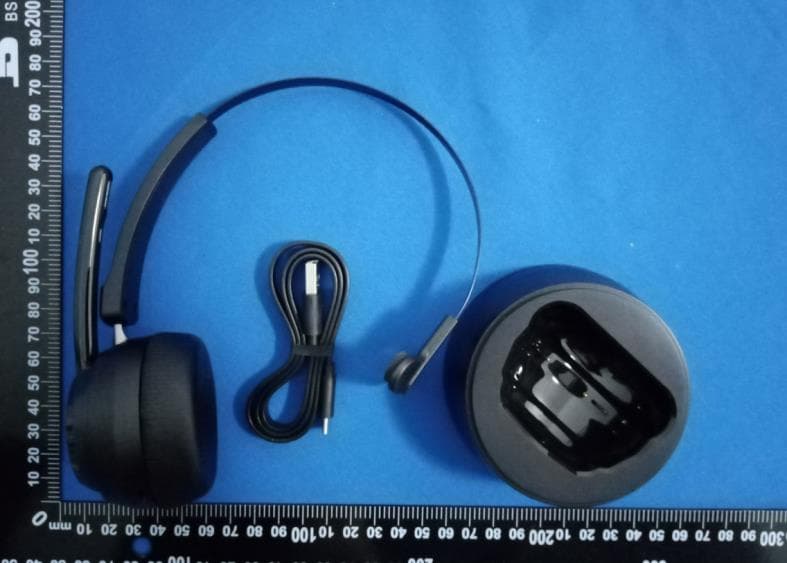
Click to zoom
Application Details
- Equipment Class
- DTS - Digital Transmission System
- Date of Grant
- Aug 15, 2022
- Application Purpose
- Original Equipment
- Date of Application
- Aug 15, 2022
- Equipment Note
- Bluetooth headset
- Frequency Range
- 2402.00000000 - 2480.00000000
- Country
- China
Documents & Files
Document Text
Text extracted from the exhibit documents filed with the FCC. Open a document above to read the original.
Users Manual
1 Mono Bluetooth Headset KH113M User Manual 2 Catalog 1.Product Overview----------------------------------------------------------1 2.Basic Operation------------------------------------------------------------2 3.Bluetooth Pairing and Connection----------------------------------------3 4.Connection with Two devices---------------------------------------------5 5.LED Indicator--------------------------------------------------------------6 6.Charging------------------------------------------------------------------ 7 7.TT Tone------------------------------------------------------------------- 8 8.Product Specification-----------------------------------------------------9 9.Attentions and Q & A-----------------------------------------------------10 3 1.Product Overview 示意图的耳挂需要修改 Volume - / Multi-Function Button (MFB) / Volume + / LED Indicator / Mute Button / Microphone / Charging contact plate / Charging pin Packing list: A. Bluetooth Headset KH113M x 1 B. Type-C USB charge cable x 1 C. User manual x 1 User manual KH113M 4 + + 2.Basic Function Button Function Operation Instruction MFB Power On In off status, press and hold the MFB for 5-6 seconds to power on Power Off 1. In on status, press and hold the MFB for 3 seconds to shut down. 2. After the headphone is put into the recharge stand, it will automatically shut down ( When the recharge stand is connected to the charger) Enter Pairing Mode 1. In off state, press and hold the MFB for 5-6 seconds to enter the pairing mode 2. In standby state, double-click the MFB button to enter the pairing mode. Voice assistant In standby state, press and hold the MFB for 1-2 seconds then release ( Your phone needs to support this feature) Audio Switch During a call, press and hold the MFB for 1-2 seconds to switch between Bluetooth headset and your mobile phone Play / Pause Single click the MFB to play/pause music Answer a call When a call incoming, single click the MFB Hang up a call When during a call, single click the MFB to hang up Reject a call When a call comes in, press and hold the MFB for 2 seconds to reject the call Volume + Next Song Press and hold the volume + button for 1-2 seconds 5 Volume Up Single click the volume + button Volume - Previous Song Press and hold the volume - button for 1-2 seconds Volume Down Single click the volume - button Microphone Mute Button Microphone Mute During a call, click the mute button to mute the call, and click again to unmute. 3.Bluetooth Pairing and Connection A. In the off state, press and hold MFB for 5-6 seconds to power on and enter pairing status, the LED flashes white and red alternately. B. Search and click to connect ”KH113M” on your phone Bluetooth lists, after connected you can play music from phone to headphone. 1. In the off state, press and hold MFB for 5-6 seconds to power on and enter pairing status, the LED flashes white and red alternately. 6 手机上加一个KH113M 2.Search and click to connect ”KH113M” on your phone Bluetooth lists, after connected you can play music from phone to headphone. 4. Connection with Two devices A. In the off state, press and hold MFB for 5-6 seconds to power on and enter pairing status. Turn on the bluetooth of the first device, search KH113M and click to connect. B. After the connection is successful, double-click the MFB of KH113M to enter pairing status (the first mobile phone that has been connected successfully will not be affected and can work normally), the LED flashes white and red alternately. C. Turn on the Bluetooth on the second device, search KH113M and click to connect. *Music only can be played from one phone under two connections, when you want to play music from another phone, you need to pause or close the music of the previous phone. The same operation during talking status. 7 Connection with Dongle 1. After the USB interface is inserted into the computer equipment for power supply, it will turn on and enter the pairing status automatically. The blue light will be on for 1-2 seconds, and then the blue light will flicker. 2. Press and hold MFB for 2-3 seconds to power on the Bluetooth headset and enter pairing status, the white LED flashes slowly. 3. Please put the Bluetooth headset close to the dongle. After connected, the LED of the dongle will be solid blue. Now you can listen to music or answer the call through Bluetooth headset. (The dongle can only be paired with KH113M Bluetooth. The Bluetooth connection will be locked after the first paired, and other headphones cannot be paired, including other KH113M headphones. ) 8 5. LED Indicator with KH113M Mode LED Indicator Power on White LED is on for 1 second Power off Red LED is on for 1 second Pairing mode Red & White LED flash alternately Microphone mute Solid Red LED Calling White LED flashes quickly Hang up a call White LED flashes one time Reject a call White LED flashes 3 times quickly Talking Solid White LED Restore factory settings Red & White LED flash 3 times quickly at the same time Connected mode White LED flashes once per 5 seconds Charging Solid White LED Full charged White LED is off Reconnect White LED flashes slowly (once per second) Low battery Red LED flashes 3 times per 3 minutes LED Indicator with Dongle Mode LED Indicator Power on Blue LED is on for 1-2 second then flashes Power off Blue LED is off Pairing mode LED flashes blue Connected standby mode Solid Blue LED 9 6.Charging Please charge KH113M at once when the Red LED flashes(Red LED flashes 3 times per 3 minutes). Charging time is about 1.5 hours. Solid White LED when charging, and White LED turns off when full charged. Charge Connections Please connect to the KH113M charging port through the Type-C end of Type-C charging cable. *Note: Please charge KH113M at least once every 2 months when don’t use it. 7.TTS Tone 10 Power on Power on Power off Power off Enter paring mode Pairing Connect successfully Your headset is connected Disconnect Your headset is disconnected Low battery Battery Low Calling Incoming call ( or“DuDu”)…
Text truncated - open the document above for the full version.
External Photos
Bluetooth headset FCC ID: 2A8CA-KH113M KH113M External Photographs
ID Label/Location Info
KH113M Label and Label Location Bluetooth headset KH113M FCC ID: 2A8CA-KH113M
Internal Photos
Bluetooth headset FCC ID: 2A8CA-KH113M KH113M Internal Photographs
RF Exposure Info
RF Exposure Requirements 1.1 Product Description for Equipment Under Test (EUT) Client Information Applicant: guangzhouminyuxingkejiyouxiangongsi Address of applicant: tianhequ shatainanlu 418hao 1 dong 302shi-C1049 guangzhoushi guangdongsheng Manufacturer: guangzhouminyuxingkejiyouxiangongsi Address of manufacturer: tianhequ shatainanlu 418hao 1 dong 302shi-C1049 guangzhoushi guangdongsheng General Description of EUT Product Name: Bluetooth headset Brand Name: Mopchnic Model No.: KH113M Adding Model(s): KH53 Rated Voltage: DC 3.7V from battery Power Adapter: / Software Version: / Hardware Version: / Serial Number: 9jji0 FCC ID: 2A8CA-KH113M Technical Characteristics of EUT Bluetooth Version: V5.0 BLE Frequency Range: 2402-2480MHz RF Output Power: -7.92dBm Data Rate: 1Mbps Modulation: GFSK Quantity of Channels: 40 Channel Separation: 2MHz Type of Antenna: PCB Antenna Gain: 1dBi 1.2 Standard Applicable According to §1.1307(b)(1) and KDB 447498 D01 General RF Exposure Guidance v06, the following RF exposure evaluation shall to demonstrate RF exposure compliance. [(max. power of channel, including tune-up tolerance, mW) / (min. test separation distance, mm)] · [√f(GHz)] ≤ 3.0 Where -f(GHz) is the RF channel transmit frequency in GHz -Power and distance are rounded to the nearest mW and mm before calculation -The test exclusions are applicable only when the minimum test separation distance is ≤ 50 mm, and for transmission frequencies between 100 MHz and 6 GHz. When the minimum test separation distance is < 5 mm, a distance of 5 mm according to 4.1 f) is applied to determine SAR test exclusion. 1.3 Calculation Method Bluetooth Tx frequency range: 2402~2480MHz Min. test separation distance: 5mm Maximum Conducted Output Power: -7.92dBm Maximum Tune-up Conducted Output Power: -7dBm RF channel transmit frequency: 2402MHz Result: 0.0618 Limit: 3.0 So the transmitter complies with the RF exposure requirements and the SAR is not required.
Test Report
Waltek Testing Group (Shenzhen) Co., Ltd. Http://www.waltek.com.cn Page 1 of 38 http://www.waltek.com.cn/ TEST REPORT Reference No. .................... : WTX22X0803016W-1 FCC ID ................................ : 2A8CA-KH113M Applicant ........................... : guangzhouminyuxingkejiyouxiangongsi Address.............................. : tianhequ shatainanlu 418hao 1 dong 302shi-C1049 guangzhoushi guangdongsheng Product Name ................... : Bluetooth headset Test Model. ........................ : KH113M Standards .......................... : FCC Part 15.247 Date of Receipt sample .... : August 1, 2022 Date of Test........................ : August 1~13, 2022 Date of Issue ..................... : August 13, 2022 Test Result ......................... : Pass Remarks: The results shown in this test report refer only to the sample(s) tested, this test report cannot be reproduced, except in full, without prior written permission of the company. The report would be invalid without specific stamp of test institute and the signatures of compiler and approver. Prepared By: Waltek Testing Group (Shenzhen) Co., Ltd. Address: 1/F., Room 101, Building 1, Hongwei Industrial Park, Liuxian 2nd Road, Block 70 Bao'an District, Shenzhen, Guangdong, China Tested by: Reviewed By: Approved & Authorized By: Tom Wang / Project Engineer Jason Su / RF Manager Silin Chen / Manager Reference No.: WTX22X0803016W-1 Page 2 of 38 Waltek Testing Group (Shenzhen) Co., Ltd. Http://www.waltek.com.cn http://www.waltek.com.cn/ TABLE OF CONTENTS 1. GENERAL INFORMATION ...................................................................................................................................4 1.1 PRODUCT DESCRIPTION FOR EQUIPMENT UNDER TEST (EUT) ...............................................................................4 1.2 TEST STANDARDS ...................................................................................................................................................5 1.3 TEST METHODOLOGY .............................................................................................................................................5 1.4 TEST FACILITY .......................................................................................................................................................5 1.5 EUT SETUP AND TEST MODE .................................................................................................................................6 1.6 MEASUREMENT UNCERTAINTY ..............................................................................................................................6 1.7 TEST EQUIPMENT LIST AND DETAILS .....................................................................................................................7 2. SUMMARY OF TEST RESULTS ...........................................................................................................................9 3. ANTENNA REQUIREMENT ................................................................................................................................ 10 3.1 STANDARD APPLICABLE ....................................................................................................................................... 10 3.2 EVALUATION INFORMATION................................................................................................................................. 10 4. POWER SPECTRAL DENSITY ........................................................................................................................... 11 4.1 STANDARD APPLICABLE ....................................................................................................................................... 11 4.2 TEST SETUP BLOCK DIAGRAM ............................................................................................................................. 11 4.3 TEST PROCEDURE ................................................................................................................................................. 11 4.4 SUMMARY OF TEST RESULTS/PLOTS .................................................................................................................... 11 5. DTS BANDWIDTH ................................................................................................................................................. 12 5.1 STANDARD APPLICABLE ....................................................................................................................................... 12 5.2 TEST SETUP BLOCK DIAGRAM ............................................................................................................................. 12 5.3 TEST PROCEDURE ................................................................................................................................................. 12 5.3 SUMMARY OF TEST RESULTS/PLOTS .................................................................................................................... 12 6. RF OUTPUT POWER ............................................................................................................................................ 13 6.1 STANDARD APPLICABLE ....................................................................................................................................... 13 6.2 TEST SETUP BLOCK DIAGRAM ............................................................................................................................. 13 6.3 TEST PROCEDURE ................................................................................................................................................. 13 6.4 SUMMARY OF TEST RESULTS/PLOTS .................................................................................................................... 13 7. FIELD STRENGTH OF SPURIOUS EMISSIONS ............................................................................................. 14 7.1 STANDARD APPLI…
Text truncated - open the document above for the full version.
Test Setup Photos
Bluetooth headset FCC ID: 2A8CA-KH113M KH113M Test Setup Photos Radiated emission 30MHz~1GHz Radiated emission above 1GHz Conducted emission
Contact Information
Applicant
shumao Yuan
Test Firm
Waltek Testing Group (Shenzhen) Co., Ltd.Jandy So
Technical Specifications
| # | Rule Parts | Frequency Range | Power Output |
|---|---|---|---|
| 1 | 15C | 2.40 GHz - 2.48 GHz | 200.00 µW |