2A8SK-MJ2840Barcode Scanner
HuiZhou Minjie Technology Co.,Ltd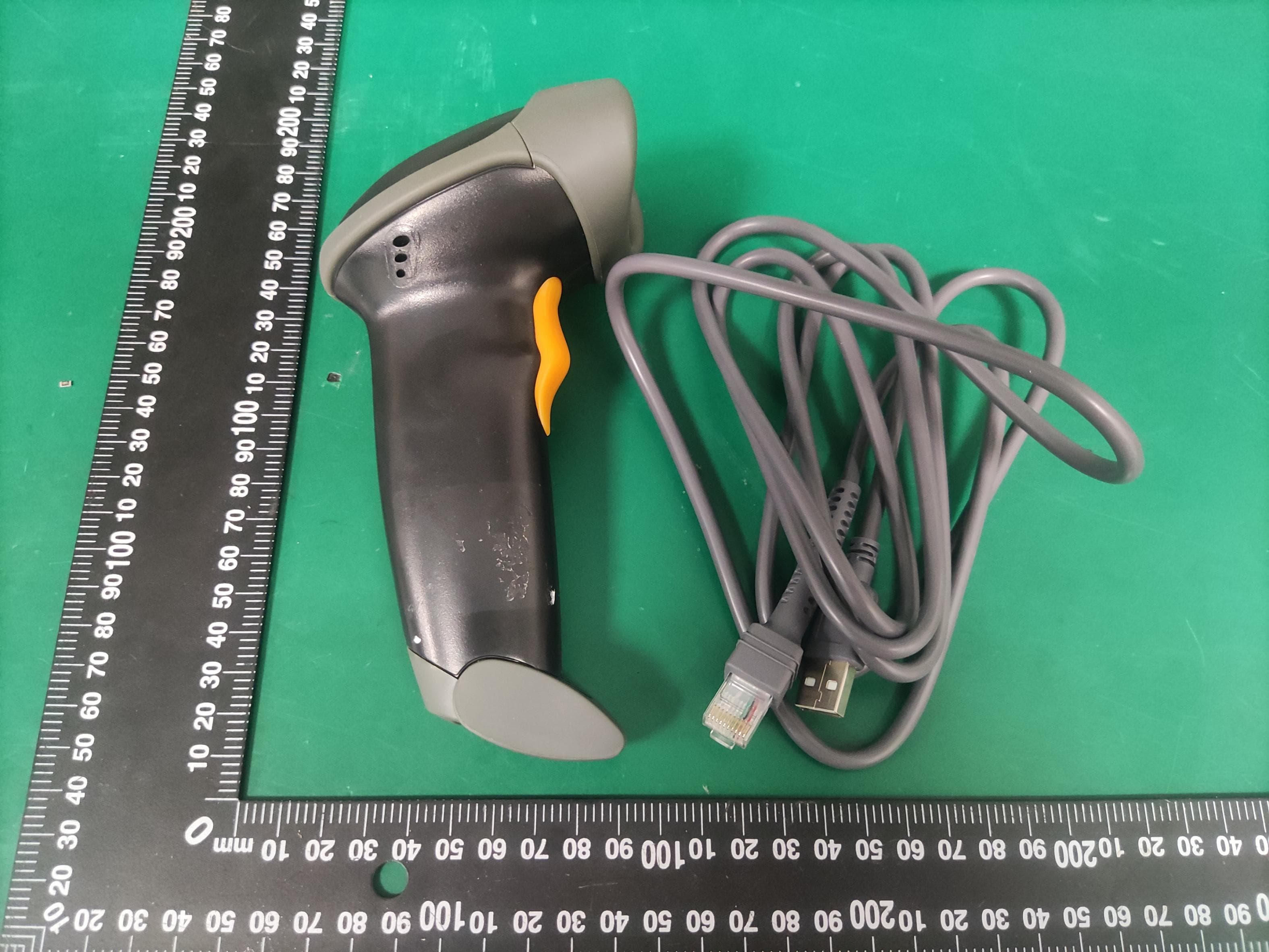
Click to zoom
Application Details
- Equipment Class
- DXX - Part 15 Low Power Communication Device Transmitter
- Date of Grant
- Oct 07, 2022
- Application Purpose
- Original Equipment
- Date of Application
- Oct 07, 2022
- Equipment Note
- Barcode Scanner
- Frequency Range
- 2402.00000000 - 2480.00000000
- Country
- China
Documents & Files
Document Text
Text extracted from the exhibit documents filed with the FCC. Open a document above to read the original.
Users Manual
MJ2840 B arcode Scanner Manual V. 1 0 E- mail: s [email protected] We b:www.minjcode.com Contents Tech nicalParameter Packing list Battery Charging Set Up Step FAQS Troubleshooting Optional Function settings 1. 2. Upload Mode Setting 1.1 Instant Upload Mode Setting 1.2 Storage Mode Setting Scanning Mode Setting 2.1 Manually Triggered Mode (Default) 2.2 Continuous Scan Mode/Sensing mode 3. Duplicated Barcode Detection 4. Beep Setting 5. Keyboard Language Setting 6. Case Sensitivity Setting(Direct Scan Code Setting) 7. Power Off Settings 8. End Character Setting 9. Barcode Types Enable/Disable 3 4 4 5 6 7 8 8 8 8 10 10 10 10 12 12 13 14 14 15 10.Data Editing 38 In order to correctly use the bar code scanner, please read the instruction carefully and do not arbitrarily scan the settings code otherwise some settings may not be available temporarily. Please keep this instruction for reference in the future. If you have any question or concern about the operation of the scanner, please contact us at following Email: [email protected] www.minjcode.cn Yo u are suggested to write down the model & the specific scenario and consult the maintenance person should you find the scanner abnormal. Technical Parameter: Mfr P /N MJ2840 Radio Frequency 2.4G Wireless wireless Range Indoor 60m, outdoor 100m Memory 100000 barcodes Battery capacity 2000mAh Charging power DC 5V 400mA Standby current 18uA-25uA Working current 15-50mA Printing Contract >25% Light source LED Light LED life 12000 hours Button life 8000,000 times Resolution ≥4 mil Scanning width 30cm CPU ARM 32-bit Cortex Bit Error rate 1/20million Decoding speed 10ms/times, Continuous static decoding without interval Scanning angle rotor angel±30°, inclination±60°, declination±60° Drop test 1.5 m Full charge on work 18 Hours Certificate CE, FCC,RoHS,IP54 Applicable 1D barcode EAN13、EAN8、UPC-A、UPC-E0、UPC-E1、 Code128、Code39、Code93、CodaBar、Interleaved 2 of 5、Industrial 2 of 5、Matrix 2 of 5、Code11、 MSI- Plessey、Standard 2 of 5、Plessey、China Post、GS1 Databar(RSS-Expand, RSS-Limited, RSS-14) Packing list: ·Barcode scanner*1 ·USB Cable*1 ·Instruction Manual*1 ·USB Wireless receiver *1 Battery & Ch arging: The scanner is powered by 2000mAh chargeable battery. Please ensure that the scanner has enough power before use. Low battery level indication: The red indicator light flashes three time, the buzzer would sounded 3 times, it indicates that the power is less than 30%. Please charge the scanner as soon as possible. The red light flashes 5 time, the buzzer would sounded 5 times and then cut down automatically, it indicates that the power is less than 20%. The scanner cannot be powered as it enter into low voltage cutoff mode. Please stop scanning and charge the scanner. Charging indicator: The red indicator light on the top of the scanner will stay on during the charging process, and it will go off when the scanner is fully charged. NOTE: 1.Please use computer USB interface or special 5V DC power adapter for charging, the abnormal power will cause permanent damage to saner and battery. The USB cable can be used for charging, as well as transmitting data. Set Up Step: The scanner has been paired with the receiver, and set up already. Step 1. Power on the scanner by pressing the button. The buzzer has a triple beeps, the blue light on the top of scanner will be on. Step 2. Insert the USB receiver into the USB port of computer. Step 3. Open notepad on computer and move cursor to the blank where scanning output should be placed. Scanning results can be displayed on computer then. If the barcode does not displayed, please set up the scanner again according to the following steps. Step 1. Unplug the USB receiver and plug it in again. Step 2. S can these codes in order. Scanner Factory Reset Pairing Step 3. Open Wo r d on computer, move cursor to the blank, scan a barcode to see if it can be uploaded. FAQs: Q1. Why does scanner not read the barcode exactly. When I use the scanner to read a barcode of an item, I get a different result from the barcode itself. Example 1.There are two separate barcodes together. It scanned the first 12 digits in the barcode but not the last five. Solution: Please scan the code" EAN13-5 enable extra code" on page 16. Example 2. The scanner is set with prefix or suffix. Solution: Please scan the code "Scanner Factory Reset" on page 5. Example 3. Set the corresponding country or region language and keyboard. Solution: Please scan the barcode of your desired language in the keyboard language setting on page 13. If that is not your case, please send us a clear picture of the barcode and the result you get, our customer service will help you to solve the problem. Q2. Some barcodes can not be read, why? Answer: A.Incomplete and unclear barcodes might not be read. B.It is possible that the setting is off by default for some barcode types which are not commonly used. Yo u need to activate a specific barcode type to get it working. Please feel free to contact our Customer Service Team for further assistance if you don't know the exact type of barcode that you are referring to. Q3. Is there any barcodes to remove auto-enter after every scanning? Answer: To remove the auto- enter, please read the code" Disable suffix" on page 14. Troubleshooting: Problem Possible Reason Solution Power on the scanner, the scanner has no reaction. The buzzer does not beep, the blue light on the top of scanner does not turn on, the red scanning laser does not show up. The battery run out. Connect the scanner to PC's USB port for charging via USB cable The scanner can not hold the charge. The PC' s USB port is out of condition. Connect the scanner to another USB port for charging. The USB cable is out of condition. Contact [email protected] for the replacement. Scanner and USB receiver are all in good condition. But the barcode can not be sent to my computer. The scanner failed to match the USB receiver. 1. Unplug the receiver and plug it in to PC' s USB port 2.Re-pair The …
Text truncated - open the document above for the full version.
External Photos
FCCID:2A8SK-MJ2840 ExternalPhotosoftheEUT Fig.1 Fig.2 FCCID:2A8SK-MJ2840 Fig.3 Fig.4 FCCID:2A8SK-MJ2840 Fig.5
ID Label/Location Info
FCCID:2A8SK-MJ2840 labelandlocation Fig.1 FCCID:2A8SK-MJ2840 BarcodeScanner Model:MJ2840 HuiZhouMinjieTechnologyCo.,Ltd.
Internal Photos
FCCID:2A8SK-MJ2840 InternalPhotosoftheEUT Fig.1 Fig.2 Antenna FCCID:2A8SK-MJ2840 Fig.3 Fig.4 FCCID:2A8SK-MJ2840 Fig.5
Test Report
AntennaSpecification ITEMSPEC. ModelNameHX-AP24 FrequencyRange2400MHz-2500MHz AntennatypeSpringantenna MAXGAIN2.52dBi 1.ReturnLossandVSWR 2.EfficiencyandGain 3.RadiationCharacteristic
Test Report
ShenzhenGUORENCertificationTechnologyServiceCo., Ltd. 101#,BuildingK & BuildingT, The SecondIndustrialZone,JiazitangCommunity, FenghuangStreet,GuangmingDistrict,Shenzhen, China FCC PART15 SUBPARTC TESTREPORT FCC PART15.249 ReportReferenceNo ........................: FCCID.................................................: GRCTR220902005-01 2A8SK-MJ2840 Compiled by ( position+printedname+signature)..: File administratorsJimmyWang Supervisedby ( position+printedname+signature)..: Test EngineerKelleyZhang Approvedby ( position+printedname+signature)..: ManagerSamWang Dateof issue.........................................:Sep.24, 2022 TestingLaboratoryName................:ShenzhenGUORENCertificationTechnologyServiceCo., Ltd. Address.................................................:101#,BuildingK & BuildingT, The SecondIndustrialZone, JiazitangCommunity,FenghuangStreet,GuangmingDistrict, Shenzhen, China Applicant’s name...............................:HuiZhouMinjieTechnologyCo.,Ltd Address.................................................: YongJun Road,ChenjiangStreet,ZhongkaiHigh-TechDistrict, Huizhou516029,China Testspecification .............................. : Standard................................................: FCCPart 15.249: Operationwithinthe bands902-928MHz, 2400-2483.5MHz,5725-5850MHz ,and24.0-24.25GHz ShenzhenGUORENCertificationTechnologyServiceCo., Ltd.All rightsreserved. This publicationmay be reproducedin wholeor in part for non-commercialpurposesas long as the ShenzhenGUORENCertificationTechnologyServiceCo., Ltd. is acknowledgedas copyrightownerand sourceof the material.ShenzhenGUORENCertificationTechnologyServiceCo., Ltd. takesno responsibilityfor and will not assumeliabilityfor damagesresultingfrom the reader'sinterpretationof the reproducedmaterialdue to its placementand context. Testitemdescription ........................ :BarcodeScanner TradeMark ............................................ :/ Manufacturer.........................................:HuiZhouMinjieTechnologyCo.,Ltd Model/Typereference.........................:MJ2840 ListedModels......................................:MJ2810,MJ2820,MJ2830,MJ2850,MJ2860,MJ2870,MJ2880, MJ2890,MJ3650,MJ3660 ModulationType .................................. :GFSK OperationFrequency .......................... :240 2MH z- 24 80 MH z EUT Type..............................................:ProductionUnit Rating.....................................................:DC 3.7VFromBatteryand USB5V from computer Result.....................................................:PASS ReportNo.: GRCTR220902005-01Page2 of 27 T E S T R E P O R T EquipmentunderTest: BarcodeScanner Model/Type: MJ2840 ListedModels: MJ2810,MJ2820,MJ2830,MJ2850,MJ2860,MJ2870, MJ2880,MJ2890,MJ3650,MJ3660 Applicant :HuiZhouMinjieTechnologyCo.,Ltd Address: YongJun Road,ChenjiangStreet,ZhongkaiHigh-TechDistrict, Huizhou516029,China Manufacturer :HuiZhouMinjieTechnologyCo.,Ltd Address: YongJun Road,ChenjiangStreet,ZhongkaiHigh-TechDistrict, Huizhou516029,China Test Result:PASS The test reportmerelycorrespondsto the test sample. It is not permittedto copyextractsof thesetest resultwithoutthe writtenpermissionof the test laboratory. ReportNo.: GRCTR220902005-01Page3 of 27 Contents 1 . T E S TS T A N D A R D S............................................................................................................................4 2 . S U M M A R Y...............................................................................................................................................5 2.1. GeneralRemarks.........................................................................................................................................5 2.2. ProductDescription....................................................................................................................................5 2.3. Shortdescriptionof the EquipmentunderTest(E UT) ............................................................................5 2.4. EUT operationmode....................................................................................................................................5 2.5. BlockDiagramof TestSetup......................................................................................................................6 2.6. EUT configuration........................................................................................................................................6 2.7. Modifications................................................................................................................................................6 3 . T E S TE N V I R O N M E N T.......................................................................................................................7 3.1. Addressof the test laboratory...................................................................................................................7 3.2. TestFacility..................................................................................................................................................7 3.3. Environmentalconditions...........................................................................................................................7 3.4. TestDescription...........................................................................................................................................7 3.5. Statementof the measurementuncertainty.............................................................................................8 3.6. EquipmentsUsedduringthe Test .............................................................................................................9 4 . T E S TC O N D I T I O N SA N DR E S U L T S.....................................................................................1 0 4.1. AC PowerConductedEmission....................................................................................................10 4.2. RadiatedEmissionsand Ban…
Text truncated - open the document above for the full version.
Test Setup Photos
FCCID:2A8SK-MJ2840 TestSetupPhotosoftheEUT TestSetupPhoto(s)ofRadiatedEmissionsMeasurement Fig.1 Fig.2 FCCID:2A8SK-MJ2840 TestSetupPhoto(s)ofConductedEmissionsMeasurement Fig.3
Contact Information
Applicant
Xiaohui Luo(Manager)
Test Firm
Shenzhen GUOREN Certification Technology Service CSam Wang
[email protected]+86 755 23408306
Technical Specifications
| # | Rule Parts | Frequency Range | Power Output |
|---|---|---|---|
| 1 | 15C | 2.40 GHz - 2.48 GHz | - |