2A8WNS5Multimedia speaker
Dongguan Maijun Electronic Technology Co., Ltd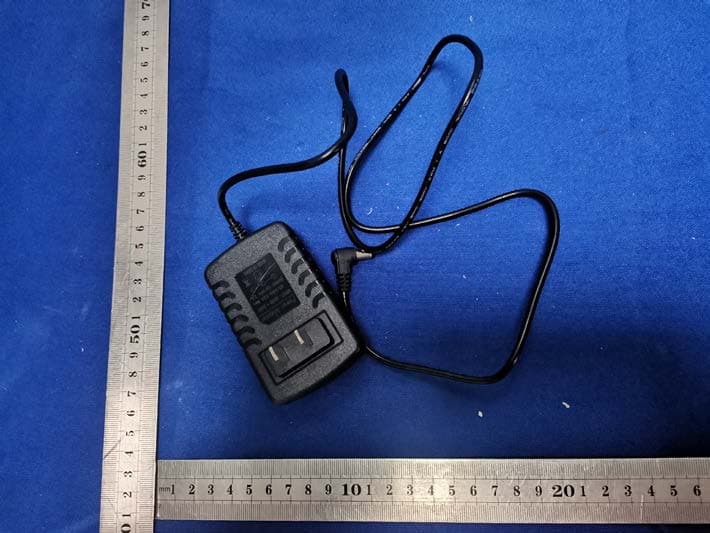
Click to zoom
Application Details
- Equipment Class
- DSS - Part 15 Spread Spectrum Transmitter
- Date of Grant
- Oct 20, 2022
- Application Purpose
- Original Equipment
- Date of Application
- Oct 20, 2022
- Equipment Note
- Multimedia speaker
- Frequency Range
- 2402.00000000 - 2480.00000000
- Country
- China
Documents & Files
Document Text
Text extracted from the exhibit documents filed with the FCC. Open a document above to read the original.
Users Manual
Multimedia speaker Note: Please use the adapter supplied with this product to charge this machine. Do not use adapters from other manufacturers to charge the machine, so as to avoid burning the machine due to inconsistent voltage! Before using this product, please read the manual carefully and keep it properly for reference Product Operation Manual General Edition Welcome to Multimedia Audio Dear user Hello! Thank you for using this product. Before you use it, please read this manual carefully so that you can use this machine better. I hope this product can bring fun to your life. Functional features Music playing:Support music format MP3 WMA APE FLAC, etc. Video playback:It supports 720P high-definition video playback in RMVB, AVI, MP4, FLV, VOB, WMV and other formats. Picture browsing:Support JPEG BMP picture browsing. E-book reading:Support text document TXT JAR reading. FM radio:Support 88M-108MHz FM stereo radio. External equipment:U disk, card reader, TF card, mobile hard disk. Lyrics synchronization:Support synchronous display and playback of LRC file lyrics. Audio input:Stereo audio input interface, mobile phone and other audio signal input. Karaoke:When playing karaoke videos, you can turn off the original singing and plug in the microphone to sing karaoke. Mic Input:This machine supports wireless and wired microphones. Android phones on the same screen Android phones on the same screen 1. Turn on Bluetooth. Connect with the same screen phone. Connect successfully and return to the main interface 2 Connect your phone to the same screen as shown below Tips for Mobile Internet 1. This machine supports the interconnection between Apple and Android phones 2. Make sure the phone is unlocked and on 3. When Android phones are connected for the first time, they will be prompted to download Android "Autolink" Apk through the network (Apple mobile phone link does not need to install software, plug and play) 4. For sound, please connect the local Bluetooth (If the installation fails, please scan the QR code to download and install) Key definition 1. Movie key: directly play movies, TV plays, dramas, karaoke, square dances, etc. on USB flash disk or TF card 2. Up curve key: short press the previous curve. 3. Play/Pause key: Press this key in play status to pause, and then press this key to continue playing. 4. Down curve key: press down a song for a short time. 5. Music key: directly play music in MP3, WMA and other formats of U disk or TF card. 6. Bluetooth key: directly enter the Bluetooth music playing status, and you can connect the Bluetooth of the mobile phone to play the music of the mobile phone. 7. Accompanying key: When singing karaoke, the original sound can be eliminated and accompanied. 8. Menu key: press the pop-up submenu briefly, then press the Up and Down button to select, and press the Play button to confirm. 9. Return key: press briefly to return to the first level menu. 10. Radio key: directly enter the radio status. 11. Number key: input numbers to click songs or programs, and select frequency rate in radio status. Definition of panel functions 1. Tweeter knob: right turn to raise the treble and left turn to lower the treble. 2. Bass knob: right turn to increase bass and left turn to decrease bass. 3. Microphone volume knob: adjust the microphone volume. 4. Microphone reverberation knob: adjust the microphone reverberation. 5. Microphone jack: wired microphone input interface. 6. USB: USB flash disk jack, which plays video or audio on the USB flash disk. 7. Audio input jack: external audio signal input. 8. Charging jack: charge the unit and input 14v adapter. 9. TF jack: insert TF card to play TF card video or audio. Music playing Insert a CD or TF card device, and the system will automatically recognize MP3 music files and play them directly. Basic operation of music playing: Play | Pause, press the "Play | Pause" key to pause playing, and press the "Play | Pause" key again to resume playing. Select the next song to play when pressing the song, and select the previous song to play when pressing the previous song. Music mode setting: In the music playing state, press the "Menu" key to pop up. Menu setting: Press the "Up" or "Down" key to select the sound effect or cycle mode, and press the "Play Pause" key to confirm the mode status. Sound effect settings: normal, bass, pop, rock, classic, jazz, dance music, a variety of sound effects. Loop setting: repeat one song, repeat all, play in sequence, and play randomly. Video playback When inserting a USB flash disk or a device to unload the card, the local system will give priority to playing and receiving video files, Play basic operations. Select the video file to play from the list, press the "Back" key to return to the video list menu, press the "Up" or "Down" key to move to the video file you want to play, and then press the "Play (Pause)" key to start playing. Play | Pause: Press the "Play Pause" key to pause playback, and then press the "Play Pause" key to resume playback. Press the "Next Song" key to select the next video file in the video list to play. Press the "Up" key to select the last video file in the video list to play. Fast forward | Fast backward operation: Long press the "Up Curve" or "Down Curve" key to fast forward and fast backward. Video mode setting: In the video playing state, press the "Menu" key to pop up the menu setting, press the "Up" or "Down" key to select the function option, and then press the "Play Pause" key to select. radio reception Press the "Radio" key to enter the radio interface. Press the "Play | Pause" key to automatically search for all 87-108mhz stations and automatically save them. Press the "Up" or "Down" key to select the previous station or the next station to play. Press the "Menu" key to switch to the radio setting interface. Picture browsing Copy JPEG or BMP pictures to the USB flash disk or TF card, insert the USB flash disk or TF card, switch to the "Photo" icon on the m…
Text truncated - open the document above for the full version.
Cover Letter(s)
Dongguan Maijun Electronic Technology Co., Ltd Agent Authorization Company: Dongguan Maijun Electronic Technology Co., Ltd Address: Building 1, No. 31, Jingang South Road, Shatian Town, Dongguan City, Guangdong Province, China Product Name: Multimedia speaker Model Number(s): S5 Product Description: Multimedia speaker We authorize MiCOM Labs Inc., 575 Boulder Court, Pleasanton, California 94566, USA, to act on our behalf on all matters concerning the certification of above named equipment. We declare that MiCOM Labs Inc. is allowed to forward all information related to the approval and certification of equipment to the regulatory agencies as required and to discuss any issues concerning the approval application. Any and all acts carried out by MiCOM Labs on our behalf shall have the same effect as acts of our own. Signature: Date: 2022-10-13 Name: Yang Linyuan Title: manager Company: Dongguan Maijun Electronic Technology Co., Ltd
Cover Letter(s)
Dongguan Maijun Electronic Technology Co., Ltd Office of Engineering Technology Federal Communications Commission 7435 Oakland Mills Road Columbia, MD 21046 USA Date: 2022/10/13 Subject; Request for Confidentiality FCC ID: 2A8WNS5 To Whom It May Concern, Pursuant to the provisions of the Commission’s rules Title 47 Sections §0.457 and §0.459, we are requesting the Commission to withhold the following attachment(s) as confidential documents from public disclosure indefinitely. These documents contain detailed system and equipment descriptions and are considered as proprietary information in operation of the equipment. The public disclosure of these documents might be harmful to our company and would give competitors an unfair advantage in the market. Schematic Diagram Block Diagram Operational Description In additional to above mentioned documents, in order to comply with the marketing regulations in Title 47 CFR §2.803 and the importation rules in Title 47 CFR §2.1204, while ensuring that business sensitive information remains confidential until the actual marketing of newly authorized devices, we request Short Term Confidentiality of the following attachment(s); User Manual For 45 days, pursuant to Public Notice DA 04-1705. OR For 180 days pursuantto KDB 726920 D01. It is our understanding that all measurement test reports, FCC ID label format and correspondence during the certification review process cannot be granted as confidential documents and this information will be available for public review once the grant of equipment authorization is issued. Sincerely, Signature: Name: Yang Linyuan Title: manager
External Photos
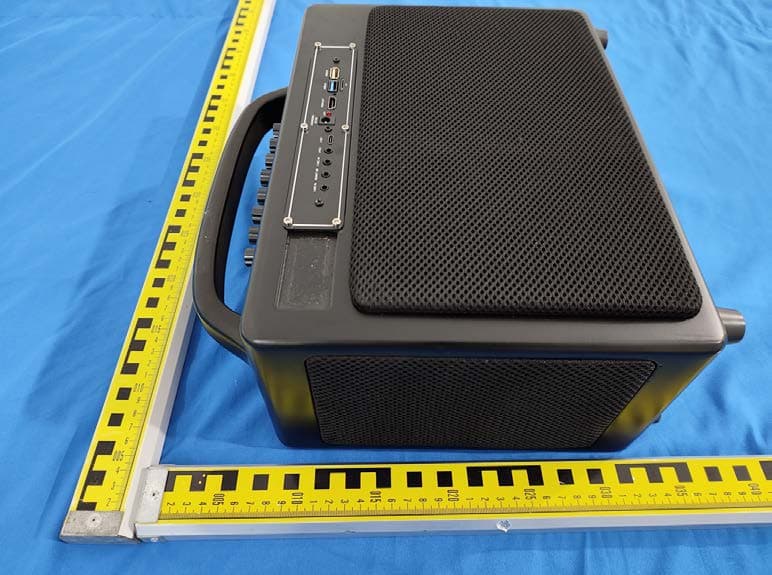
External Photos
ID Label/Location Info
Model: S5 FCC ID: 2A8WNS5 Label Location
Internal Photos
Internal Photos . ANT
RF Exposure Info
Shenzhen CTB Testing Co., Ltd. FCC ID: 2A8WNS5 Portable device According to §15.247(e)(i) and §1.1307(b)(1), systems operating under the provisions of this section shall be operated in a manner that ensures that the public is not exposed to radio frequency energy level in excess of the Commission’s guidelines. According to KDB447498 D01 General RF Exposure Guidance V06 The 1-g SAR and 10-g SAR test exclusion thresholds for 100 MHz to 6 GHz at test separation distances ≤ 50 mm are determined by: [(max. power of channel, including tune-up tolerance, mW)/(min. test separation distance, mm)]·[√f(GHZ)] ≤ 3.0 for 1-g SAR and ≤ 7.5 for 10-g extremity SAR, where: • f(GHZ) is the RF channel transmit frequency in GHz • Power and distance are rounded to the nearest mW and mm before calculation • The result is rounded to one decimal place for comparison When the minimum test separation distance is < 5 mm, a distance of 5 mm is applied to determine SAR test exclusion. EDR: Modulation Channel Freq. (GHz) Conduct ed power (dBm) Conducte d power (mW) Tune-up power (dBm) Max tune-up power (dBm) Max tune-up power (mW) Distance (mm) Result calculatio n SAR Exclusion threshold SAR test exclusion 2.402 1.532 1.421±12.001.58<50.491273.00YES 2.441 0.43 1.100±11.001.26<50.393383.00YES 2.480 -0.203 0.950±11.001.26<50.396513.00YES 2.402 2.223 1.672±13.002.00<50.618473.00YES 2.441 1.073 1.281±12.001.58<50.495243.00YES 2.480 0.448 1.110±11.001.26<50.396513.00YES 2.402 2.793 1.902±13.002.00<50.618473.00YES 2.441 1.649 1.461±12.001.58<50.495243.00YES 2.480 1.06 1.281±12.001.58<50.499183.00YES GFSK π /4DQPSK 8DQPSK Conclusion: For the max result : 0.61847≤ FCC Limit 3.0 for 1g SAR.
Test Report
Product specification Quick Reference Date Antenna module on the system board Frequency 2.45GHz *1 Ant. Port Input Pwr. (dBm) 0 (Typ. BT class 2 output power) Tot. Rad. Pwr. (dBm) -2.3 (Input pwr – loss pwr) Peak EIRP(dBm) 1.3 Directivity (dBi) 1 (all direction antenna) Efficiency (dB) -2.3 (58.5%) Gain (dBi) 1.3 (Peak Gain XY-plane) Maximum Power (dBm) 1.3 (XY-plane) Minimum Power (dBm) -4(XY-plane) Avg. Power (dBm) -0.5(XY-plane) Max/Min Ratio (dB) 5.3(XY-plane) Max/Avg Ratio (dB) 1.8(XY-plane) Min/Avg Ratio (dB) -3.5(XY-plane) Average Gain (dB) -0.5 (Avg Gain XY-plane) All the technical data and information contained herein are subject to change without prior notice Antenna Layout & module on the system board Antenna Gain Gain Table Unit in dBi @2.44GHz XY-plane XZ-plane YZ-plane Efficiency Peak Avg. Peak Avg. Peak Avg. Module Board 1.3 -0.5 1.3 -3.8 1.1 -3.0 58.5% Return Loss The Environment of Antenna Radiation Pattern 3D radiation pattern diagram XY-plane XZ-plane YZ-plane
Test Report
Shenzhen CTB Testing Technology Co., Ltd. Report No.: CTB220928015RFX Report Tel: 4008-707- 283 Web: http://www.ctb-lab.net Page 1 of 58 TEST REPORT Compiled by: Reviewed by: Approved by: Chen Zheng Arron Liu Bin Mei / Director Note: If there is any objection to the inspection results in this report, please submit a written report to the company within 15 days from the date of receiving the report. The test report is effective only with both signature and specialized stamp. This result(s) shown in this report refer only to the sample(s) tested. Without written approval of Shenzhen CTB Testing Technology Co., Ltd. this report can’t be reproduced except in full. The tested sample(s) and the sample information are provided by the client. “*” indicates the testing items were fulfilled by subcontracted lab. “#” indicates the items are not in CNAS accreditation scope. Product Name: Multimedia speaker FCC ID: 2A8WNS5 Trademark: N/A Model Number: S5 Prepared For: Dongguan Maijun Electronic Technology Co., Ltd Address: Building 1, No. 31, Jingang South Road, Shatian Town, Dongguan City, Guangdong Province Manufacturer: Dongguan Maijun Electronic Technology Co., Ltd Address: Building 1, No. 31, Jingang South Road, Shatian Town, Dongguan City, Guangdong Province Prepared By: Shenzhen CTB Testing Technology Co., Ltd. Address: Floor 1&2, Building A, No. 26 of Xinhe Road, Xinqiao Community, Xinqiao Street, Baoan District, Shenzhen, Guangdong, China. Sample Received Date: Sep. 26, 2022 Sample tested Date: Sep. 26, 2022 to Sep. 28, 2022 Issue Date: Sep. 28, 2022 Report No.: CTB220928015RFX Test Standards FCC Part15.247 ANSI C63.10:2013 Test Results PASS Remark: This is Bluetooth radio test report. Shenzhen CTB Testing Technology Co., Ltd. Report No.: CTB220928015RFX Report Tel: 4008-707- 283 Web: http://www.ctb-lab.net Page 2 of 58 TABLE OF CONTENT Test Report Declaration Page 1. VERSION .......................................................................... 4 2. TEST SUMMARY ................................................................... 5 3. MEASUREMENT UNCERTAINTY ..................................................... 6 4. PRODUCT INFORMATION AND TEST SETUP .......................................... 7 4.1 Product Information .................................................................... 7 4.2 Test Setup Configuration ............................................................... 7 4.3 Support Equipment .................................................................... 7 4.4 Channel List .......................................................................... 8 4.5 Test Mode ............................................................................ 8 4.6 Test Environment ...................................................................... 8 5. TEST FACILITY AND TEST INSTRUMENT USED ....................................... 9 5.1 Test Facility ........................................................................... 9 5.2 Test Instrument Used .................................................................. 9 6. AC POWER LINE CONDUCTED EMISSION ............................................. 11 6.1 Block Diagram Of Test Setup .......................................................... 11 6.2 Limit ................................................................................ 11 6.3 Test procedure ....................................................................... 11 6.4 Test Result .......................................................................... 13 7. RADIATED SPURIOUS EMISSION ................................................... 15 7.1 Block Diagram Of Test Setup .......................................................... 15 7.2 Limit ................................................................................ 15 7.3 Test procedure ....................................................................... 16 7.4 Test Result .......................................................................... 17 8. BAND EDGE AND RF COUNDUCTED SPURIOUS EMISSIONS .......................... 26 8.1 Block Diagram Of Test Setup .......................................................... 26 8.2 Limit ................................................................................ 26 8.3 Test procedure ....................................................................... 26 8.4 Test Result .......................................................................... 27 9. COUDUCTED PEAK OUTPUT POWER ............................................... 34 9.1 Block Diagram Of Test Setup .......................................................... 34 9.2 Limit ................................................................................ 34 9.3 Test procedure ....................................................................... 34 9.4 Test Result .......................................................................... 35 10. 20DB OCCUPIED BANDWIDTH...................................................... 39 10.1 Block Diagram Of Test Setup ......................................................... 39 10.2 Limit ............................................................................... 39 10.3 Test procedure ...................................................................... 39 10.4 Test Result ......................................................................... 39 11. CARRIERFREQUENCIES SEPARATION .............................................. 43 11.1 Block Diagram Of Test Setup ......................................................... 43 11.2 Limit ............................................................................... 43 11.3 Test procedure ...................................................................... 43 11.4 Test Result ......................................................................... 43 12. HOPPING CHANNEL NUMBER ...................................................... 47 12.1 Block Diagram Of Test Setup .....................................................…
Text truncated - open the document above for the full version.
Test Setup Photos
Radiated Emission Below 1G Above 1GHz Conducted Emission
Contact Information
Applicant
Linyuan Yang
Technical Contact
Test Firm
Shenzhen CTB Testing Technology Co., Ltd.Rita Xiao
[email protected]86-13538218145
Technical Specifications
| # | Rule Parts | Frequency Range | Power Output |
|---|---|---|---|
| 1 | 15C | 2.40 GHz - 2.48 GHz | 1.90 mW |
Other Applications from Dongguan Maijun Electronic Technology Co., Ltd
2A8WN-MJ301
Jun 26, 2023Multimedia Video Audio
Equipment Class
DSS - Part 15 Spread Spectrum Transmitter