2A98E-SH09smartwatch
Shenzhen Pucheng Technology Co., LTD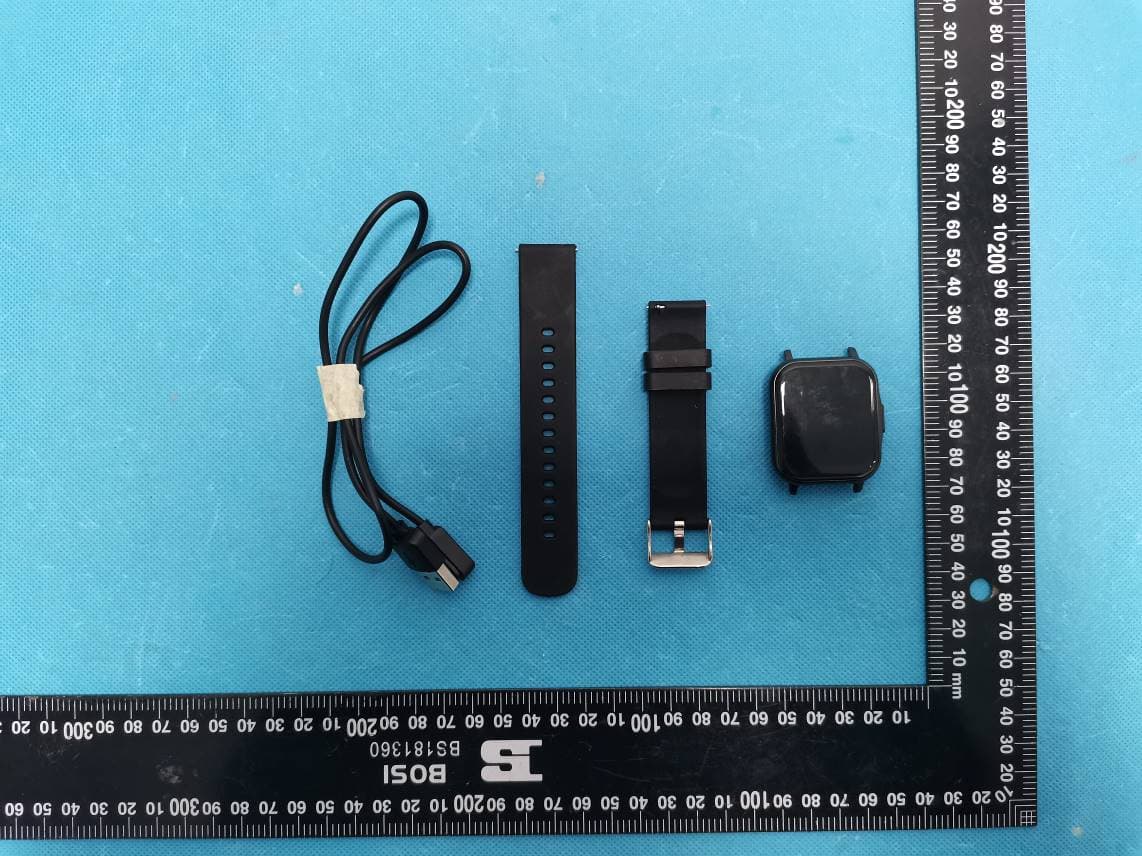
Click to zoom
Application Details
- Equipment Class
- DTS - Digital Transmission System
- Date of Grant
- Apr 17, 2023
- Application Purpose
- Original Equipment
- Date of Application
- Apr 17, 2023
- Equipment Note
- smartwatch
- Frequency Range
- 2402.00000000 - 2480.00000000
- Country
- China
Documents & Files
Document Text
Text extracted from the exhibit documents filed with the FCC. Open a document above to read the original.
Users Manual
User Guide Thank you for purchasing our company's smart health bracelet. Please read the manual carefully when you use this device for the first time, and use it according to the operation method of the manual, so as not to affect the measurement results and good experience due to improper operation! When you receive this product , first turn it on to check if there is power. Tip: If you have any questions during use, please contact the online customer service for consultation in time! ① O ff button ② he art rate sensor ③ electric shock Instructions for first use Exterior parts description PS: Instructions for the use of the power button: long press to turn on the power in the off state, long press to turn off the power in the on state, short press to return to the home page in other pages, short press to turn off the screen on the home page, and short press to turn on the screen when the screen is off. Power on: ①Long press the power button for 3 seconds and the display will light up (if it is not powered on, it means the battery is exhausted, please charge it). Shutdown: ①Long press the power button for 3 seconds -→②Click to shut down→③Confirm. ●The Apple system opens the camera and prompts to open it with the Safari browse r. After clicking, jump to the APP Store to download and install the APP. ●The Android phone scans and clicks to access the website through the browser, and then selects Chinese Android users to download to install the APP. ●System requirements: Android5.0 and above, Apple I0S10.0 and above, Bluetooth 4.0 and above can be used. Scan the QR code to download the APP Boot instructions APP download and installation connect bracelet 1.APP Bluetooth connection method Note: The mobile phone needs to turn on the Bluetooth function, otherwise it cannot be searched on the software, and the Android mobile phone does not need to be paired with the Bluetooth of the bracelet in the mobile phone Bluetooth. After the Apple mobile phone is bound, the mobile phone pairing information will pop up, please click "OK" to pair, otherwise the bracelet will not remind you of calls and messages. 2.Classic Bluetooth voice connection 3.The bracelet needs to be connected to classic Bluetooth to make calls and play music. The steps to connect to classic Bluetooth are as follows: Turn on the classic Bluetooth of the bracelet in the call center. Both Android and Apple mobile phones can enter the Bluetooth of the mobile phone, turn on the Bluetooth function of the mobile phone, find the device named "PC SH09" and click pairing. After the pairing is successful, you can play music through the bracelet to make and answer calls. . Tap the bluetooth phone icon to turn classic bluetooth on or off Open the APP to set your personal information Click "Bind Device" → "Start Search" "SH09"→Click the device to bind successfully Finish Or go to the following menu to turn classic bluetooth on or off Scroll down the quick page Swipe up to view information Swip e right Main menu Left swipe motion data information Pull up on the main interface to quickly enter the information interface, or swipe right to the menu list and click Information to enter the information interface. Information can be received: phone calls, text messages, WeChat, QQ, and more; note that you need to enable the notification usage right on the APP side, and turn on the switch to push messages. Conn ect the mobile phone to the classic Bluetooth of the bracelet, enter the number on the dial interface, and click the dial button to make a call normally. (After dialing an address book number, the call interface displays the address book remarks name, and after dialing a non- address book number, the call interface displays the call number) The br acelet is connected to the APP, and the contacts of the mobile phone address book are imported from the APP side, and they can be displayed in the address book of the bracelet synchronously. Click a contact in the address book to make a call to the contact. The name of the note inside. The call log shows received calls, missed calls, outgoing numbers, and the date and time of the incoming call. (Non- address book contacts display the calling number, and address book contacts display the name of the note in the contact's address book) Colling Swipe l eft on the main interface to quickly enter the step count data interface, or swipe right to the menu list and click Step count to enter the step count data interface. Data can be recorded: steps, distance, calories, consumed time; the menu step page slides up to display the steps interface display diagram of the past seven days and the maximum and minimum steps data. The data is updated every day, and the data can be saved synchronously when the APP has been synchronized, and the device will recalculate the data information of the new day. Swipe l eft on the main interface to enter the sleep data interface, or swipe right from the menu to the list and click Sleep to enter the sleep data interface. The sleep page displays the sleep monitoring status of the day (including sleep time, light sleep, deep sleep and other data), and the menu sleep page slides up to display the sleep data display chart and maximum and minimum sleep data for the past seven days. The data is updated every day, and the data can be saved synchronously when the APP has been synchronized, and the device will recalculate the data information of the new day. Step count sleep Swipe l eft on the main interface to enter the heart rate measurement interface, or swipe right to the menu list and click Heart Rate to enter the heart rate measurement interface. 1. Aft er entering the heart rate measurement page, clic k the m easurement button, wait for about 20 seconds to get the measurement result, the bracelet vibrates and displays the measurement result; 2. Ente r the heart rate interface on the app and click to start the measurement, the watch will automatically switch to the measurement interface…
Text truncated - open the document above for the full version.
Attestation Statements
Shenzhen Pucheng Technology Co., LTD ADD: 1203, South Block,Yuanxing Sci-tech Building,1 Songping Road, Nanshan District,Shenzhen,China TEL: +86-0755-22677492 E-mail: [email protected] Date: 2023-03-23 To whom it may concern Dear Sir/Madam, We, Shenzhen Pucheng Technology Co., LTD, hereby authorize China Certification ICT Co., Ltd (Dongguan). to act as a laboratory for testing and test report generation for the following project(s): ((Product description: smartwatch, model name: SH09, F9, C08, C12, F10, S8, Gs8, CH08, CH12, SH08, SH05, SH06, SH07, SH01, SH02, SH03), FCC ID: 2A98E-SH09) The chips BK3296 supports Bluetooth BDR(GFSK), EDR(π/4-DQPSK, 8DPSK) and BLE Mode, But for this device, only BDR(GFSK), EDR(π/4-DQPSK, 8DPSK) were active, the others were disabled by software. Sincerely, Signature: Printed Name: Ling jin Kong Title: project manager
External Photos
EXHIBIT B - EUT EXTERNAL PHOTOGRAPHS
ID Label/Location Info
FCC ID:2A98E-SH09
Internal Photos
EXHIBIT C - EUT INTERNAL PHOTOGRAPHS BT Antenna BLEAntenna
RF Exposure Info
China Certification ICT Co., Ltd (Dongguan) Report No.: CR230100834-00A Page 48 of 48 5. RF EXPOSURE EVALUATION 5.1 Applicable Standard According to§15.247(i) and §1.1310, systems operating under the provisions of this section shall be operated in a manner that ensure that the public is not exposed to radio frequency energy level in excess of the Commission’s guideline. According to KDB447498 D01 General RF Exposure Guidance v06: The 1-g and 10-g SAR test exclusion thresholds for 100 MHz to 6 GHz at test separation distances ≤ 50 mm are determined by: [(max. power of channel, including tune-up tolerance, mW)/(min. test separation distance, mm)] ꞏ [√f(GHz)] ≤ 3.0 for 1-g SAR and ≤ 7.5 for 10-g extremity SAR, where • f(GHz) is the RF channel transmit frequency in GHz • Power and distance are rounded to the nearest mW and mm before calculation • The result is rounded to one decimal place for comparison • 3.0 and 7.5 are referred to as the numeric thresholds in the step 2 below The test exclusions are applicable only when the minimum test separation distance is ≤ 50 mm and for transmission frequencies between 100 MHz and 6 GHz. When the minimum test separation distance is < 5 mm, a distance of 5 mm according to 5) in section 4.1 is applied to determine SAR test exclusion. When an antenna qualifies for the standalone SAR test exclusion of 4.3.1 and also transmits simultaneously with other antennas, the standalone SAR value must be estimated according to the following to determine the simultaneous transmission SAR test exclusion criteria:36 1) [(max. power of channel, including tune-up tolerance, mW) / (min. test separation distance, mm)]·[√ f(GHz)/x] W/kg, for test separation distances ≤ 50 mm; where x = 7.5 for 1-g SAR and x = 18.75 for 10-g SAR. 2) 0.4 W/kg for 1-g SAR and 1.0 W/kg for 10-g SAR, when the test separation distance is > 50 mm. 5.2 Measurement Result Radio Frequency (MHz) Conducted Output Power Including Tolerance Distance (mm) Calculated value Threshold (1-g) SAR Test Exclusion (dBm) (mW) BLE 2402-2480 4 2.51 5 0.79 3 Yes BDR/EDR 2402-2480 5 3.16 5 1 3 Yes Note: The max conducted power including tune-up tolerance was declared by the manufacturer. The BLE and BDR/EDR can transmits simultaneously. SAR BLE + SAR BDR/EDR = 0.79/7.5 + 1/7.5 = 0.24 < 1.6 W/kg Result: Compliant. The SAR test is not necessary. ===== END OF REPORT ====
Test Report
天线报告 Shenzhen ANWEI Wireless Technology Co., Ltd Antenna Report Antenna size Client Name: Pucheng Product model: SHO9 Antenna band: BLE2.4G/ Classic Bluetooth 2.4G BLE Antenna Classic Bluetooth antenna BLE天线驻波图 Test Data Antenna Radiation Pattern Shenzhen ANWEI Wireless Technology Co., Ltd The End All information contained in this report is copyrighted by our company. Without our permission, please do not distribute it to any third party
Test Report
TEST REPORT Applicant: Shenzhen Pucheng Technology Co., LTD Address: 1203, South Block, Yuanxing Sci-Tech Building, No. 1, Songping Road, Xili Street, Nanshan District, Shenzhen FCC ID: 2A98E-SH09 Product Name: smartwatch Standard(s): 47 CFR Part 15, Subpart C(15.247) ANSI C63.10-2013 KDB 558074 D01 15.247 Meas Guidance v05r02 The above equipment has been tested and found compliant with the requirement of the relative standards by China Certification ICT Co., Ltd (Dongguan) Report Number: CR230100834-00A Date Of Issue: 2023/3/7 Reviewed By: Sun Zhong Title: Manager Test Laboratory: China Certification ICT Co., Ltd (Dongguan) No. 113, Pingkang Road, Dalang Town, Dongguan, Guangdong, China Tel: +86-769-82016888 China Certification ICT Co., Ltd (Dongguan) Report No.: CR230100834-00A Page 2 of 48 Test Facility The Test site used by China Certification ICT Co., Ltd (Dongguan) to collect test data is located on the No. 113, Pingkang Road, Dalang Town, Dongguan, Guangdong, China. The lab has been recognized as the FCC accredited lab under the KDB 974614 D01 and is listed in the FCC Public Access Link (PAL) database, FCC Registration No. : 442868, the FCC Designation No. : CN1314. The lab has been recognized by Innovation, Science and Economic Development Canada to test to Canadian radio equipment requirements, the CAB identifier: CN0123. Declarations China Certification ICT Co., Ltd (Dongguan) is not responsible for the authenticity of any test data provided by the applicant. Data included from the applicant that may affect test results are marked with a triangle symbol “▲”. Customer model name, addresses, names, trademarks etc. are not considered data. Unless otherwise stated the results shown in this test report refer only to the sample(s) tested. This report cannot be reproduced except in full, without prior written approval of the Company. This report is valid only with a valid digital signature. The digital signature may be available only under the Adobe software above version 7.0. This report may contain data that are not covered by the accreditation scope and shall be marked with an asterisk “★”. China Certification ICT Co., Ltd (Dongguan) Report No.: CR230100834-00A Page 3 of 48 CONTENTS T EST FACILITY .......................................................................................................................................... 2 DECLARATIONS .......................................................................................................................................... 2 DOCUMENT REVISION HISTORY .......................................................................................... 5 1. GENERAL INFORMATION .................................................................................................... 6 1.1 PRODUCT DESCRIPTION FOR EQUIPMENT UNDER TEST (EUT) ....................................................... 6 1.2 DESCRIPTION OF TEST CONFIGURATION ........................................................................................... 7 1.2.1 EUT Operation Condition: ............................................................................................................................. 7 1.2.2 Support Equipment List and Details .............................................................................................................. 7 1.2.3 Support Cable List and Details ...................................................................................................................... 7 1.2.4 Block Diagram of Test Setup ......................................................................................................................... 7 1.3 MEASUREMENT UNCERTAINTY .......................................................................................................... 9 2. SUMMARY OF TEST RESULTS .......................................................................................... 10 3. REQUIREMENTS AND TEST PROCEDURES .................................................................. 11 3.1 AC LINE CONDUCTED EMISSIONS .................................................................................................... 11 3.1.1 Applicable Standard ..................................................................................................................................... 11 3.1.2 EUT Setup.................................................................................................................................................... 12 3.1.3 EMI Test Receiver Setup ............................................................................................................................. 12 3.1.4 Test Procedure ............................................................................................................................................. 13 3.1.5 Corrected Amplitude & Margin Calculation ................................................................................................ 13 3.2 RADIATION SPURIOUS EMISSIONS .................................................................................................... 14 3.2.1 Applicable Standard ..................................................................................................................................... 14 3.2.2 EUT Setup.................................................................................................................................................... 14 3.2.3 EMI Test Receiver & Spectrum Analyzer Setup ......................................................................................... 15 3.2.4 Test Procedure ............................................................................................................................................. 15 3.2.5 Corrected Amplitude & Margin Calculation ................................................................................................ 15 3.3 6 DB EMISSION BANDWIDTH: .........................................................................................…
Text truncated - open the document above for the full version.
Test Setup Photos
EXHIBIT D - TEST SETUP PHOTOGRAPHS Conducted Emissions Front View Conducted Emissions Side View Radiated Emission Below 1GHz View Radiated Emission Above 1GHz View
Contact Information
Applicant
Ling jin Kong
Test Firm
CHINA CERTIFICATION ICT CO., LTD (DONGGUAN)Tanie Ou
[email protected]0086 0769 86858888
Technical Specifications
| # | Rule Parts | Frequency Range | Power Output |
|---|---|---|---|
| 1 | 15C | 2.40 GHz - 2.48 GHz | 2.00 mW |