2A9AM-SYOZENZ2GAME CONTROLLER
SUNWAYTEK LIMITED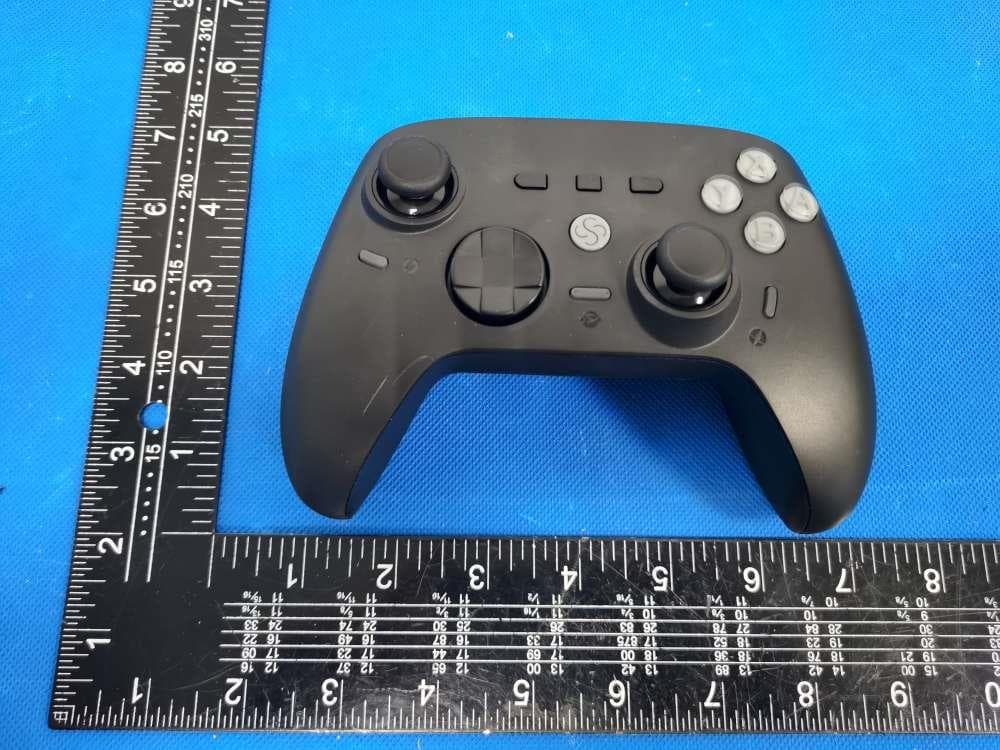
Click to zoom
Application Details
- Equipment Class
- DXX - Part 15 Low Power Communication Device Transmitter
- Date of Grant
- Nov 08, 2022
- Application Purpose
- Original Equipment
- Date of Application
- Nov 08, 2022
- Equipment Note
- GAME CONTROLLER
- Frequency Range
- 2402.00000000 - 2480.00000000
- Company
- SUNWAYTEK LIMITED
- Country
- China
Documents & Files
Document Text
Text extracted from the exhibit documents filed with the FCC. Open a document above to read the original.
Users Manual
M1 M3M4 RT R M2 L LT Z2 WIRELESS CONTROLLER Home Turbo Keymap Motion Assist M1M2 M3M4 RT ShiftLT Shift Components SWITCH Bluetooth Connection Wired Connection Bluetooth Connection Wired Connection Just connect to Switch or its dock via USB-C cable. Information: 1. Xbox mode and Switch mode also applies to Android devices. 2. Linux includes Raspberry Pi, Chrome OS and other Linux-based devices. 3. Wired mode works on Telsa car system. ANDROID LINUX Connec to the device via USB-C cable. A + Pair 1. Enable Bluetooth, select to pair new device. 2. Hold Home and A button till the light turns yellow. 3. Find the device “Gamepad”to pair. 3. Once succeed, the light stays yellow. Just press Home button to link. Link B + 1. Turn on Switch, select “Controller”, “Change Grip/Order”. 2. Hold Home and B button till the light turns red. Wait. 3. Once succeed, the light stays red. Pair Press Home button to link. In case Switch in sleep, it will be waked up automatically. Link / Wakeup Bluetooth Connection Wired Connection X + 1. Turn on Blueooth, select to add a device. 2. Hold Home and X button till the light turns blue. 3. Pair the device “Xbox Wireless Controller”. 4. Once succeed, the light stays blue. Pair (option 1) B + 1. Turn on Bluetooth, select to add a device. 2. Hold Home and B button till the light turns red. 3. Pair the device “Pro Controller”. 4. Once succeed, the light stays red. By this mode, motion control is enabled in Steam. Pair (option 2) Just press Home button to link. Link Just connect to the computer via USB-C cable. Recognized as “ Xbox 360 Controller for Windows”. WINDOWSAPPLE DEVICES Information: 1. Wired mode not supported on Apple devices. 2. Apple devices include iOS or iPadOS device, Apple TV, and Mac. 1. Pair only at the first time sync with the device. Thereafter, just link. 2. Only the latest device info be saved. If ever paired with another device thereafter, pair again. 3. Pairing lasts 30 seconds, then shut off if not succeed. 4. Linking lasts 10 seconds, then shut off if not succeed. 1. Turn on Blueooth, select to add a device. 2. Hold Home and X button till the light turns blue. 3. Pair the device “Xbox Wireless Controller”. 4. Once succeed, the light stays blue. GENERAL Pair & Link 1. Auto sleep in 5 munutes of idle time. 2. Auto sleep when disconnected. 3. Press Home button for 5 seconds to reset and force sleep. Sleep & Reset 1. When battery is low, the light turns breathing. 2. Charge via USB-C cable on DC power supplies (output Voltage 5V, current ≥ 500mA), including but not limited to: • AC adapter • Switch dock • USB port of computer • others with USB electricity output, like power bank, etc. 3. The light stays lit once full charged. 4. Support playing during charging. Battery & Charge WARNING: Battery Safety Do not connect to high voltage outlets. Use only approved charger and cord. Periodical charging is necessary when unused for long. Remove the battery if they are worn out and dispose of properly. RT/LT each has independent two-position slide switch to shift its travel. Slide towards the inside for full travel, towards the outside for short. Free to shift during gameplay. RT/LT Shift Information 1. Keys support turbo function include A/B/X/Y/L/R/LT/RT/DPAD. 2. Setting in Keylinker APP is an option. Turbo ADVANCED Setting 1. Press Turbo button, together with the chosen button to enable Turbo. Please repeat the same operation to set for more buttons. Once done, LED turns on. Press the button to activate (keep being hit at the set speed), and release to stop. 2. Press Turbo button, together with the chosen button turbo enabled at step 1, to enable Auto Turbo. Please repeat the same operation to set for more buttons. Once done, LED blinks, the button keeps being hit at the set speed automatically. Press to pause, press again to resume. 3. Press Turbo button, together with the chosen button auto turbo enabled at step 2, to turn off turbo function. Please repeat the same operation to set for more buttons. Turbo + Auto Turbo + Off + Clear Setting Hold Turbo button for 5 seconds to clear all settings at once. Once the controller is shut off, all settings will be cleared automatically. Speed Preset speed: 5 hits/s, 12 hits/s, 20 hits/s (default). Hold Turbo button, move the right thumbstick up or down, to shift the speed. + ADVANCED Keymap Information 1. Only M1-4 buttons can be assigned mapping to other buttons. 2. Only one-to-one mapping relationship allowed. Previous setting will be replaced by the new one on the same button. 3. Use Keylinker app for more advanced settings including combo and macro mappings. 1. Press Keymap button for 2 seconds, till the left light blinks red. 2. Press any of M1-4 buttons chosen to assign mapping. Once succeed, the left light stays blue, the right light starts blinking red. 3. Press any button chosen to be mapped. Once succeed, the right light stays blue. Now the mapping is established and saved. Repeat steps 1-3 to establish new mappings. Press Keymap button to quit anytime during the process. Mapping General Operation Press to activate. If mapping exists in any of M1-4 buttons, both lights stay blue, the button behaves the same as the mapped one. Press again to disable. M 1. Press Keymap button for 2 seconds, till the left light blinks red. 2. Press any of M1-4 buttons chosen to unmap. Once succeed, the left light stays blue, the right light starts blinking red. 3. Press the same button of step 2. In case there’s any other mapping relationship exists, the right light stays blue, otherwise the both lights turns red. Now the mapping to the button is removed. Repeat steps 1-3 to clear mappings for other buttons. Press Keymap button to quit anytime during the process. Clear Mapping M ADVANCED Motion Assist Press to activate. Press again to disable. Global Motion Assist When motion assist function is on, place the controller horizontally, hold A and B button together for 2 seconds. Calibration Hold Motion Assist button for 2 sec…
Text truncated - open the document above for the full version.
Cover Letter(s)
SUNWAYTEK LIMITED 1/1 Letter of Authorization Company: SUNWAYTEK LIMITED Address: RM502, B1, 82 BAONAN RD., NANLIAN, LONGGANG, SHENZHEN Product Name: GAME CONTROLLER Model Number: SYOZEN Z2 FCC Identifier: 2A9AM-SYOZENZ2 We authorize LGAI Technological Center S.A., Ronda de la Font del Carme, s/n, 08193 Bellaterra, Spain, to act on our behalf on all matters concerning the above named equipment. Any individual within LGAI Technological Center S.A. is authorized to act on our behalf and take action on the application. We declare that authorize LGAI Technological Center S.A., Ronda de la Font del Carme, s/n, 08193 Bellaterra, Spain, is allowed to forward all information related to the approval project to the Federal Communication Commission and to discuss any issues concerning the approval application. Any and all acts carried out by LGAI Technological Center S.A. on our behalf shall have the same effect as acts of our own. Name: Hu shuhui Date: 2022-11-07 Title: Manager Signature of applicant:
Cover Letter(s)
SUNWAYTEK LIMITED 1/1 Office of Engineering Technology Federal Communications Commission 7435 Oakland Mills Road Columbia, MD 21046 Date: 2022-11-07 Subject: Request for Confidentiality FCC ID: 2A9AM-SYOZENZ2 To Whom It May Concern, Pursuant to the provisions of Sections 0.457 and 0.459 of Commission's rules (47CFR0.457, 0.459), we are requesting the Commission to withhold the following attachment(s) as confidential document from public disclosure. Exhibits Long-Term Confidentiality Short-Term Confidentiality NOTE 2 ID Label/Location No No Attestation Statement No No External Photos No ☐ Block Diagram ☒ ☐ Schematics ☒ ☐ Test Report No No Test Setup Photos No ☐ User’s Manual No ☐ Internal Photos No ☐ Parts List / Tune Up ☐ ☐ RF Exposure Info No No Operational Description ☒ ☐ Cover Letter(s) No No SDR Software / Security Info ☐ No NOTE 1: Long-Term Confidentiality may be permitted under special conditions (See II. LONG-TERM CONFIDENTIALITY, Section 3 of KDB 726920, use last in force) NOTE 2: Short-Term Confidentiality can be requested for a maximum of 180 days from the date of the grant. Above mentioned document contains detailed system and equipment description are considered as proprietary information in operation of the equipment. The public disclosure of above documents might be harmful to our company and would give competitor an unfair advantage in the market. It is our understanding that all measurement test reports, FCC ID label format and correspondent during certification review process cannot be granted as confidential documents and those information will be available for public review once the grant of equipment authorization is issued. Sincerely, Signature: Name: Hu shuhui Title: Manager
ID Label/Location Info
Size:12*8mm M/N: SYOZEN Z2 FCC ID: 2A9AM-SYOZENZ2 Label location
Internal Photos
ANT
Test Report
Shenzhen DL Testing Technology Co., Ltd. Report No.: DL-20221103014E Test Report Tel: 400-688-3552 Web:www.dl-cert.com Email: [email protected] Page 1 of 34 FCC Part 15C Test Report FCC ID: 2A9AM-SYOZENZ2 Applicant: SUNWAYTEK LIMITED Address: RM502, B1, 82 BAONAN RD., NANLIAN, LONGGANG, SHENZHEN Manufacturer: SUNWAYTEK LIMITED Address: RM502, B1, 82 BAONAN RD., NANLIAN, LONGGANG, SHENZHEN EUT: GAME CONTROLLER Trade Mark: SUNWAYTEK Model Number: SYOZEN Z2 Date of Receipt: Oct. 26, 2022 Test Date: Oct. 26, 2022 - Nov. 03, 2022 Date of Report: Nov. 03, 2022 Prepared By: Shenzhen DL Testing Technology Co., Ltd. Address: 101-201, Building C, Shuanghuan, No.8, Baoqing Road, Baolong Industrial Zone, Baolong Street, Longgang District, Shenzhen, Guangdong, China Applicable Standards: FCC PART 15 C 15.249 ANSI C63.10:2013 Test Result: Pass Report Number: DL-20221103014E Prepared (Test Engineer): Pxing Huang Reviewer (Supervisor): Jack Bu Approved (Manager): Jade Yang This test report is based on a single evaluation of one sample of above mentioned products. It is not permitted to be duplicated in extracts without written approval of Shenzhen DL Testing Technology Co., Ltd. Shenzhen DL Testing Technology Co., Ltd. Report No.: DL-20221103014E Test Report Tel: 400-688-3552 Web:www.dl-cert.com Email: [email protected] Page 2 of 34 Table of Contents Page 1 . SUMMARY OF TEST RESULTS 4 1.1 MEASUREMENT UNCERTAINTY 4 2 . GENERAL INFORMATION 5 2.1 GENERAL DESCRIPTION OF EUT 5 2.2 DESCRIPTION OF TEST MODES 6 2.3 BLOCK DIGRAM SHOWING THE CONFIGURATION OF SYSTEM TESTED 7 2.4 DESCRIPTION OF SUPPORT UNITS(CONDUCTED MODE) 7 2.5 TABLE OF PARAMETERS OF TEST SOFTWARE SETTING 7 2.6 EQUIPMENTS LIST FOR ALL TEST ITEMS 8 3 . EMC EMISSION TEST 9 3.1 CONDUCTED EMISSION MEASUREMENT 9 3.1.1 POWER LINE CONDUCTED EMISSION LIMITS 9 3.1.2 TEST PROCEDURE 9 3.1.3 DEVIATION FROM TEST STANDARD 9 3.1.4 TEST SETUP 10 3.1.5 EUT OPERATING CONDITIONS 10 3.1.6 TEST RESULTS 10 3.2 RADIATED EMISSION MEASUREMENT 13 3.2.1 RADIATED EMISSION LIMITS 13 3.2.2 TEST PROCEDURE 14 3.2.3 DEVIATION FROM TEST STANDARD 14 3.2.4 TEST SETUP 14 3.2.5 EUT OPERATING CONDITIONS 15 3.2.6 TEST RESULTS (BETWEEN 9KHZ – 30 MHZ) 16 3.2.7 TEST RESULTS (BETWEEN 30MHZ – 1GHZ) 17 3.2.8 TEST RESULTS (1GHZ~25GHZ) 19 3.3 RADIATED BAND EMISSION MEASUREMENT 20 3.3.1 TEST REQUIREMENT: 20 3.3.2 TEST PROCEDURE 20 3.3.3 DEVIATION FROM TEST STANDARD 20 3.3.4 TEST SETUP 21 3.3.5 EUT OPERATING CONDITIONS 21 4 . BANDWIDTH TEST 23 4.1 APPLIED PROCEDURES / LIMIT 23 4.1.1 TEST PROCEDURE 23 4.1.2 DEVIATION FROM STANDARD 23 4.1.3 TEST SETUP 23 4.1.4 EUT OPERATION CONDITIONS 23 Shenzhen DL Testing Technology Co., Ltd. Report No.: DL-20221103014E Test Report Tel: 400-688-3552 Web:www.dl-cert.com Email: [email protected] Page 3 of 34 Table of Contents Page 4.1.5 TEST RESULTS 24 5 . ANTENNA REQUIREMENT 25 5.1 STANDARD REQUIREMENT 25 5.2 EUT ANTENNA 25 6 . TEST SEUUP PHOTO 26 7 . EUT PHOTO 28 Shenzhen DL Testing Technology Co., Ltd. Report No.: DL-20221103014E Test Report Tel: 400-688-3552 Web:www.dl-cert.com Email: [email protected] Page 4 of 34 1. SUMMARY OF TEST RESULTS Test procedures according to the technical standards: FCC Part15 (15.249) , Subpart C Standard Section Test Item Judgment Remark 15.207 Conducted Emission PASS 15.205(a), 15.209(a) 15.249(a), 15.249(c) Fundamental &Radiated Spurious Emission Measurement PASS 15.249(d) Band Edge Emission PASS 15.215(c) 20dB Bandwidth PASS 15.203 Antenna Requirement PASS NOTE: (1)” N/A” denotes test is not applicable in this Test Report 1.1 MEASUREMENT UNCERTAINTY The reported uncertainty of measurement y ± U, where expended uncertainty U is based on a standard uncertainty multiplied by a coverage factor of k=2,providing a level of confidence of approximately 95 %. No. Item Uncertainty 1 Conducted Emission Test ±2.56dB 2 RF power,conducted ±0.42dB 3 Spurious emissions,conducted ±2.76dB 4 All emissions,radiated(<1G) ±3.65dB 5 All emissions,radiated(>1G) ±4.89dB 6 Temperature ±0.5°C 7 Humidity ±2% Shenzhen DL Testing Technology Co., Ltd. Report No.: DL-20221103014E Test Report Tel: 400-688-3552 Web:www.dl-cert.com Email: [email protected] Page 5 of 34 2.GENERAL INFORMATION 2.1 GENERAL DESCRIPTION OF EUT Product Name: GAME CONTROLLER Trademark SUNWAYTEK Model No.: SYOZEN Z2 Model Difference N/A Operation Frequency: 2402~2480MHz Channel numbers: 40 Channels Channel separation: 2M Modulation technology: GFSK Antenna Type: Internal Antenna Antenna gain: -2.30 dBi Power supply: DC 3.7V from battery DC 5V from adapter Note: 1.For a more detailed features description, please refer to the manufacturer’s specifications or the User's Manual. 2.The EUT’s all information provided by client. Shenzhen DL Testing Technology Co., Ltd. Report No.: DL-20221103014E Test Report Tel: 400-688-3552 Web:www.dl-cert.com Email: [email protected] Page 6 of 34 3. Channel List Channel Frequency (MHz) Channel Frequency (MHz) Channel Frequency (MHz) 00 2402 14 2430 27 2456 01 2404 15 2432 28 2458 02 2406 16 2434 29 2460 03 2408 17 2436 30 2462 04 2410 18 2438 31 2464 05 2412 19 2440 32 2466 06 2414 20 2442 33 2468 07 2416 21 2444 34 2470 08 2418 22 2446 35 2472 09 2420 23 2448 36 2474 10 2422 24 2450 37 2476 11 2424 25 2452 38 2478 12 2426 26 2454 39 2480 13 2428 / / / / 2.2 DESCRIPTION OF TEST MODES Note: (1) The measurements are performed at the highest, middle, lowest available channels. (2) A new fully charged battery was used for testing during the test. To investigate the maximum EMI emission characteristics generates from EUT, the test system was pre-scanning tested base on the consideration of following EUT operation mode or test configuration mode which possible have effect on EMI emission level. Each of these EUT operation mode(s) or test configuration mode(s) mentioned above was evaluated respectively. Pretest Mode Description Mode 1 CH00 GFSK Mode 2 CH19 Mode 3 CH39 Mode 4 Link Mode For Conducted & Radiated Emission Final Test Mode Description Mode 1…
Text truncated - open the document above for the full version.
Test Report
Report No.: BL-SZ2290748-901 Tel: +86-755-66850100 E-mail: [email protected] Page No. 1 / 13 Web: www.titcgroup.com Template No.: TRP-Passive-EN (2022-09-07) Add: Block B, 1/F, Baisha Science and Technology Park, Shahe Xi Road, Nanshan District, Shenzhen, Guangdong Province, P. R. China TEST REPORT Applicant: Shenzhen Zhixu Technology Co., LTD Address: 1101, Building A, Guoren Building, Keji Zhongsan Road, Gaoxin Park, Nanshan District, Shenzhen City, China. Equipment Type: PCB Onboard Antenna Model Name: ZXD1888 Brand Name: Kashimura Test Standard: ANSI/IEEE Std 149-1979 Test Date: Sep. 23, 2022 Date of Issue: Sep. 27, 2022 ISSUED BY: Shenzhen BALUN Technology Co., Ltd. Tested by: Mai Jintian Checked by: Tolan Tu Approved by: Wei Yanquan (Chief Engineer) _______________ _______________ _______________ Report No.: BL-SZ2290748-901 Tel: +86-755-66850100 E-mail: [email protected] Page No. 2 / 13 Web: www.titcgroup.com Template No.: TRP-Passive-EN (2022-09-07) Add: Block B, 1/F, Baisha Science and Technology Park, Shahe Xi Road, Nanshan District, Shenzhen, Guangdong Province, P. R. China Revision History Version Issue Date Revisions Rev. 01 Sep. 27, 2022 Initial Issue TABLE OF CONTENTS 1 GENERAL INFORMATION ........................................................................................................ 3 1.1 Test Laboratory ................................................................................................................... 3 1.2 Test Location ....................................................................................................................... 3 2 PRODUCT INFORMATION ....................................................................................................... 4 2.1 Applicant Information ........................................................................................................... 4 2.2 Manufacturer Information .................................................................................................... 4 2.3 General Description for Equipment under Test (EUT) ......................................................... 4 2.4 Ancillary Equipment ............................................................................................................. 4 2.5 Technical Information .......................................................................................................... 4 3 SUMMARY OF TEST RESULTS ............................................................................................... 5 3.1 Test Standards .................................................................................................................... 5 3.2 Test Verdict ......................................................................................................................... 5 3.3 Test Uncertainty .................................................................................................................. 5 4 GENERAL TEST CONFIGURATIONS ...................................................................................... 6 4.1 Test Condition ..................................................................................................................... 6 4.2 Test Equipment List ............................................................................................................. 6 4.3 Test Setup ........................................................................................................................... 7 ANNEX A TEST RESULTS ........................................................................................................... 8 A.1 Gain and Efficiency ............................................................................................................. 8 ANNEX B RADIATION PATTERN ................................................................................................ 9 ANNEX C TEST SETUP PHOTOS ............................................................................................. 12 ANNEX D EUT PHOTO .............................................................................................................. 12 Report No.: BL-SZ2290748-901 Tel: +86-755-66850100 E-mail: [email protected] Page No. 3 / 13 Web: www.titcgroup.com Template No.: TRP-Passive-EN (2022-09-07) Add: Block B, 1/F, Baisha Science and Technology Park, Shahe Xi Road, Nanshan District, Shenzhen, Guangdong Province, P. R. China 1 GENERAL INFORMATION 1.1 Test Laboratory Name Shenzhen BALUN Technology Co., Ltd. Address Block B, 1/F, Baisha Science and Technology Park, Shahe Xi Road, Nanshan District, Shenzhen, Guangdong Province, P. R. China Phone Number +86 755 6685 0100 1.2 Test Location Name Shenzhen BALUN Technology Co., Ltd. Location Block B, 1/F, Baisha Science and Technology Park, Shahe Xi Road, Nanshan District, Shenzhen, Guangdong Province, P. R. China 1/F, Building B, Ganghongji High-tech Intelligent Industrial Park, No. 1008, Songbai Road, Yangguang Community, Xili Sub-district, Nanshan District, Shenzhen, Guangdong Province, P. R. China Report No.: BL-SZ2290748-901 Tel: +86-755-66850100 E-mail: [email protected] Page No. 4 / 13 Web: www.titcgroup.com Template No.: TRP-Passive-EN (2022-09-07) Add: Block B, 1/F, Baisha Science and Technology Park, Shahe Xi Road, Nanshan District, Shenzhen, Guangdong Province, P. R. China 2 PRODUCT INFORMATION 2.1 Applicant Information Applicant Shenzhen Zhixu Technology Co., LTD Address 1101, Building A, Guoren Building, Keji Zhongsan Road, Gaoxin Park, Nanshan District, Shenzhen City, China. 2.2 Manufacturer Information Manufacturer Shenzhen Zhixu Technology Co., LTD Address 1101, Building A, Guoren Building, Keji Zhongsan Road, Gaoxin Park, Nanshan District, Shenzhen City, China. 2.3 General Description for Equipment under Test (EUT) EUT Name PCB Onboard Antenna Model Name Under Test ZXD1888 Antenna Type PCB Antenna Dimensions 11.8*5.4 mm 2.4 Ancillary Equipment Note: Not applicable. 2.5 Technical Information Test Frequencies 2400MHz, 2410MHz, 2420MHz, 2430MHz…
Text truncated - open the document above for the full version.
Test Setup Photos
Radiated Measurement Photos Conducted Measurement Photos
Contact Information
Applicant
Hu shuhui
Technical Contact
Test Firm
Shenzhen DL Testing Technology Co., Ltd.Jade Yang
[email protected]400-688-3552
Technical Specifications
| # | Rule Parts | Frequency Range | Power Output |
|---|---|---|---|
| 1 | 15C | 2.40 GHz - 2.48 GHz | - |