2A9HF-Q3SMART WATCH
Shenzhen Hongbo Intelligent Electronics Co., Ltd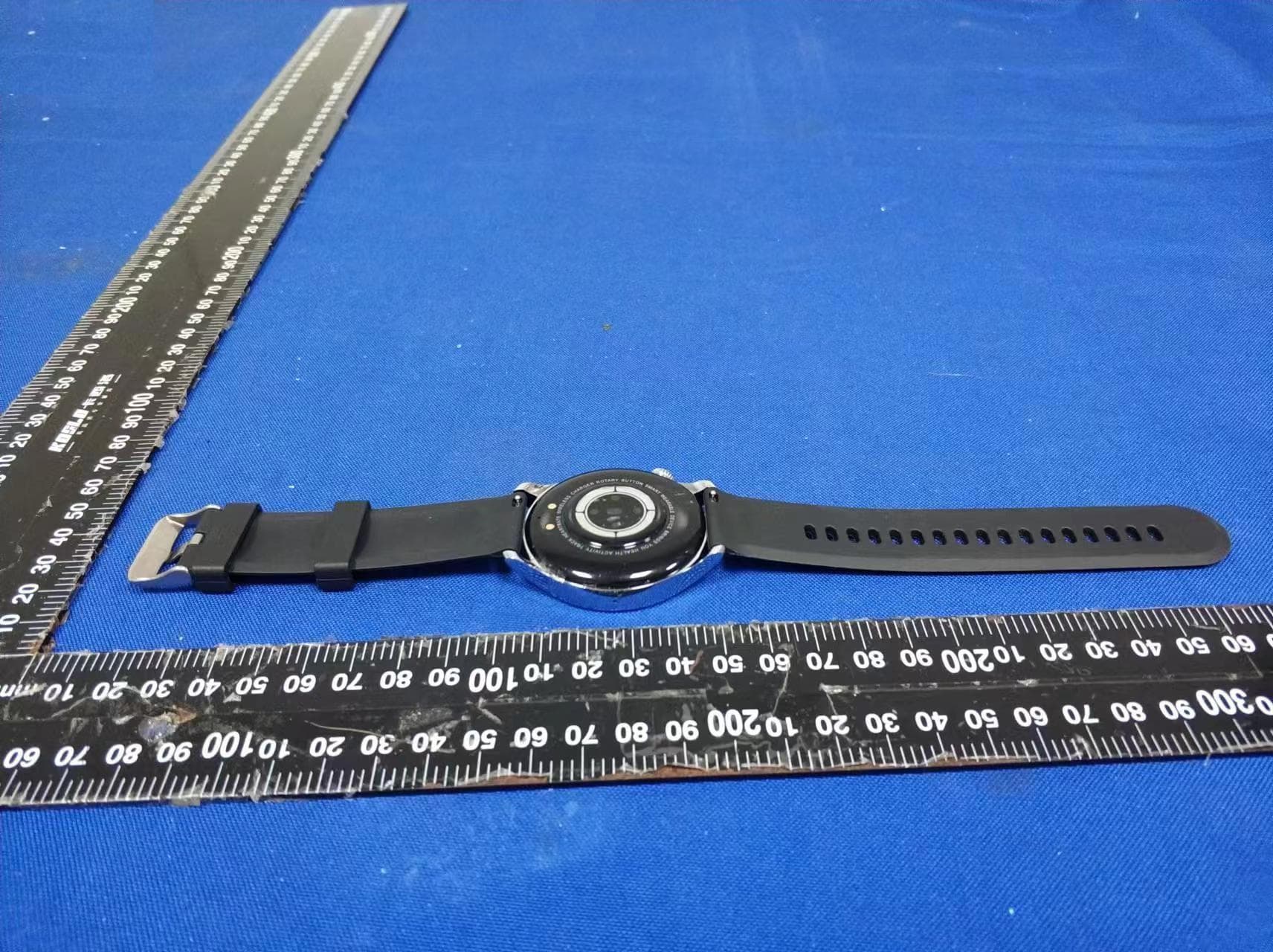
Click to zoom
Application Details
- Equipment Class
- DTS - Digital Transmission System
- Date of Grant
- Dec 03, 2022
- Application Purpose
- Original Equipment
- Date of Application
- Dec 03, 2022
- Equipment Note
- SMART WATCH
- Frequency Range
- 2402.00000000 - 2480.00000000
- Country
- China
Documents & Files
Document Text
Text extracted from the exhibit documents filed with the FCC. Open a document above to read the original.
Users Manual
SMART WATCH Quick guide Please read this manual carefully before use and keep it for future use 01 ※ If the boot fails after you press and hold the power button for 3 seconds please charge and try again. Touch and button Short press: to turn on/off the screen, enter the menu function, and return to the dial Double click: switch menu mode Short press: screen on/off Long press: turn on or off Power button Function keys Decline: control panel Swipe up: SMS notification Swipe right: shortcut sidebar Left swipe: menu functions Long press: dial switch 02 ※ Please keep the watch's battery level above 20% before pairing to avoid pairing failure due to insufficient battery. ※ During pairing and connection, make sure that the Bluetooth of the mobile phone is turned on and is within the effective connection distance with the watch. ※ This device requires Android4.4 and above system, IOS8.4 and above system. Connect to phone Pair and connect the watch download and install Check the Bluetooth name of the device in [Settings>About] Open the App on your phone, log in or register your account Select the Bluetooth name of the watch in the search results to complete the pairing Download App: IOS mobile phones can search for ‘KaFit’ in the App Store, and Android mobile phones can search for ‘KaFit’ in other app stores (such as App Store) to download and install; or scan the code to download and install. Click [Device>Add Device>Start Search] in the App 03 Function introduction Control panel ※ You can swipe down on the home screen to enter this function Sport data Dial switch Press and hold for 2 seconds on the main screen to enter the watch face switching interface, swipe left or right to switch the watch face to be selected, and click the selected watch face. You can also switch by rotating the button in the upper right corner. Function summary: Do Not Disturb mode, brightness adjustment, settings, audio call mode, my QR code. Shows the number of steps, kilometers, and calories recorded on the day, and the goal can be set in the APP. 04 Heart rate Click the icon to start the exercise. Sport 4 Sports include walking, running, mountain climbing, cycling, swimming, yoga, elliptical machine and other modes Turn on the timing detection on the App, and the interface displays the heart rate data of the day; Sleep This interface displays the sleep monitoring status of the day, the data is updated every day, and the data can be uploaded and saved synchronously by connecting to the App. 05 Blood pressure Blood oxygen When entering the blood pressure measurement interface, the green light at the bottom lights up to start the measurement, and the measurement is completed within 30 to 60 seconds. The measurement at this time is based on the PPG technology. When entering the blood oxygen measurement interface, the green light at the bottom lights up to start the measurement, and the measurement is completed within 30 to 60 seconds. The measurement at this time is based on the PPG technology. Bluetooth for calls Click on the "Control Panel" to enter the Bluetooth settings for calling; after enabling the searchable function, use the mobile phone to connect to the Bluetooth below to use the calling function. 06 Call records Frequent contacts Up to 8 call records can be kept, and the latest call record will overwrite the oldest record. It can be added through "App-Device-Frequent Contacts". Add, delete, sort, and add up to 8 frequently used contacts. Dial After using the mobile phone to connect and call Bluetooth, you can use the dialing function normally. 07 Music Weather Can control the phone's music playback. Alarm After the watch is connected to the App and the location permission is turned on, this is the case. The weather interface will display the real-time weather temperature and weather type. You can set a single alarm clock, a recurring alarm clock, and up to 5 alarm clocks. 08 Stopwatch This interface is a stopwatch function. It has start, pause and reset functions. Message Find phone ※ You can swipe up on the home screen to enter this function Turn on the push of relevant information on the App side, and the watch side can receive the corresponding message push, up to 8 messages can be saved, and the upper limit will be automatically overwritten. When the watch and the APP are connected, click to find the phone, the phone will ring and the watch will show that the search is successful; if the watch is not connected to the APP, the watch will prompt that it is not connected. 09 Settings The settings include dial switch, view, brightness adjustment, screen out time, language, QR code, system settings and other functions. 10 Sedentary reminder Alarm reminder Incoming call [Notification function] It can be enabled in App [Device>Other Settings>Sedentary reminder] to set the start time, end time and Do Not Disturb period. Remind after setting and turning on the alarm. You can answer or reject the call. Precautions Do not disassemble, repair, or modify the product without authorization. 1 Do not violently bump the product, so as not to cause damage to the product。 2 Please avoid strong magnetic field, direct light or high temperature environment. 3 This product is not used for disease diagnosis, treatment and prevention purposes. 4 The waterproof rating of this product is IP68, avoid prolonged immersion in water。 5 Please avoid wearing the watch strap too tightly and keep the place where the watch comes in contact with the skin clean. 6 Children please use this product under the guidance of their parents to avoid harm. 7 Common problem handling Watch won't turn on Please press and hold the power button for more than 3 seconds. Maybe the battery is too low, please charge it in time.· · 11 Bluetooth is not connected or unable to connect Please try to restart the watch and reconnect. Please try to restart the phone's Bluetooth and connect again. Do not connect the phone to other Bluetooth devices at the same time. Inacc…
Text truncated - open the document above for the full version.
Cover Letter(s)
ShenzhenHongboIntelligentElectronicsCo.,Ltd AgentAuthorization Company:ShenzhenHongboIntelligentElectronicsCo.,Ltd Address:2F,No.10-5,Minsheng1stRoad,BaoyuanCommunity,ShiyanStreet, Bao’anDistrict,Shenzhen ProductName:SMARTWATCH ModelNumber(s):Q3,H20,Q5,Q7,Q8,Q9,Q13,Q18,Q23,Q66.Q28,Q48,Q68, Q88,Q98,Q3PRO,Q7PRO,V3,Q15,Q20 ProductDescription:SMARTWATCH WeauthorizeMiCOMLabsInc.,575BoulderCourt,Pleasanton,California94566,USA, toactonourbehalfonallmattersconcerningthecertificationofabovenamed equipment. WedeclarethatMiCOMLabsInc.isallowedtoforwardallinformationrelatedtothe approvalandcertificationofequipmenttotheregulatoryagenciesasrequiredandto discussanyissuesconcerningtheapprovalapplication.Anyandallactscarriedoutby MiCOMLabsonourbehalfshallhavethesameeffectasactsofourown. Signature:Date:2022.11.30 Name:RuiLin Title:Manager Company:ShenzhenHongboIntelligentElectronicsCo.,Ltd
Cover Letter(s)
ShenzhenHongboIntelligentElectronicsCo.,Ltd. ModelDifferent Modelname:SMARTWATCH FCCID:2A9HF-Q3 Modelnumber:Q3,H20,Q5,Q7,Q8,Q9,Q13,Q18,Q23,Q66.Q28,Q48,Q68,Q88,Q98, Q3PRO,Q7PRO,V3,Q15,Q20 Allmodel’sthefunction,softwareandelectriccircuitarethesame,exceptthemodelnumber andthecolour. Name:RuiLin Date:2022-11-30 Title:Manage Signatureofapplicant:
Cover Letter(s)
ShenzhenHongboIntelligentElectronicsCo.,Ltd OfficeofEngineeringTechnology FederalCommunicationsCommission 7435OaklandMillsRoad Columbia,MD21046 USA Date:2022.11.30 Subject;RequestforConfidentiality FCCID:2A9HF-Q3 ToWhomItMayConcern, PursuanttotheprovisionsoftheCommission’srulesTitle47Sections§0.457and§0.459,we arerequestingtheCommissiontowithholdthefollowingattachment(s)asconfidential documentsfrompublicdisclosureindefinitely. Thesedocumentscontaindetailedsystemandequipmentdescriptionsandareconsideredas proprietaryinformationinoperationoftheequipment.Thepublicdisclosureofthesedocuments mightbeharmfultoourcompanyandwouldgivecompetitorsanunfairadvantageinthemarket. SchematicDiagram BlockDiagram PartsList OperationalDescription Tune-upProcedure Inadditionaltoabovementioneddocuments,inordertocomplywiththemarketingregulations inTitle47CFR§2.803andtheimportationrulesinTitle47CFR§2.1204,whileensuringthat businesssensitiveinformationremainsconfidentialuntiltheactualmarketingofnewly authorizeddevices,werequestShortTermConfidentialityofthefollowingattachment(s); ExternalPhotos TestSetupPhotos InternalPhotos UserManual For45days,pursuanttoPublicNoticeDA04-1705. OR For180dayspursuanttoKDB726920D01. Itisourunderstandingthatallmeasurementtestreports,FCCIDlabelformatand correspondenceduringthecertificationreviewprocesscannotbegrantedasconfidential documentsandthisinformationwillbeavailableforpublicreviewoncethegrantofequipment authorizationisissued. Sincerely, Signature: Name:RuiLin Title:Manager
External Photos
EUTPHOTO(ExternalPhotos)
ID Label/Location Info
Lable:
Internal Photos
EUTPHOTO(InternalPhotos) ANT2 ANT1
RF Exposure Info
FCCID:2A9HF-Q3 RFExposureEvaluation AccordingtoKDB447498V06andpart2.1093,Unlessspecificallyrequiredbythe publishedRFexposureKDBprocedures,standalone1-gheadorbodyand10-gextremity SARevaluationforgeneralpopulationexposureconditions,bymeasurementornumerical simulation,isnotrequiredwhenthecorrespondingSARTestExclusionThreshold condition(s),listedbelow,is(are)satisfied. For100MHzto6GHzandtestseparationdistances≤5mm,the1-gand10-gSARtest exclusionthresholdsaredeterminedbythefollowing: [(max.powerofchannel,includingtune-uptolerance,mW)/(min.testseparationdistance, mm)]·[√f (GHz) ]≤3.0for1-gSAR,and≤7.5for10-gextremitySAR,where f (GHz) istheRFchanneltransmitfrequencyinGHz PoweranddistanceareroundedtothenearestmWandmmbeforecalculation Theresultisroundedtoonedecimalplaceforcomparison Here, InthecaseofsimultaneouslaunchesforBLEandEDR: Calc.Thresholds:0.6284+0.3965=1.0249≤3(Limit) SoaSARtestisnotrequired ModeFrequency (MHz) Max Power (dBm) Targetpower W/tolerance (dBm) Maxtuneup power tolerance (dBm) Max Power (mW) Min. Distance (mm) Calc. thresholds limit BLEGFSK 2402 2.08 2±1.03 1.995350.6185 3.0 2440 2.15 2±1.03 1.995350.6233 3.0 2480 2.41 2±1.03 1.995350.6284 3.0 EDR GFSK 2402 -0.58 0±1.01 1.2589 5 0.3902 3.0 2441 -0.60 0±1.01 1.2589 5 0.3934 3.0 2480 -0.33 0±1.01 1.2589 5 0.3965 3.0 π/4-DQ PSK 2402 0.31 0±1.01 1.2589 5 0.3902 3.0 2441 0.26 0±1.01 1.2589 5 0.3934 3.0 2480 0.53 0±1.01 1.2589 5 0.3965 3.0 8-DPSK 2402 0.29 0±1.01 1.2589 5 0.3902 3.0 2441 0.26 0±1.01 1.2589 5 0.3934 3.0 2480 0.51 0±1.01 1.2589 5 0.3965 3.0
Test Report
Antenna Specification Specifications Summary ITEMSPEC. Model NameLine Antenna Center Frequency2441 MHz MAX. GAIN 0.38 dBi PolarizationHorizontal Azimuth Beam PatternOmni-directional Impedance50 Ω Test Address 16 Tzu Chiang Road, Hsinchu Industrial District Hsinchu Hsien 303, Taiwan Test Date2017-01-10 TestInstrument vector network analyzer - R&S ZVB20 1. Main antenna : 2441MHz 1.1 Horizontal Frequency(MHZ):2441Antenna Polarity:Horizontal Maximum Value(dBi): 0.38 Average Gain(dBi) : -3.44 Minimum Gain(dBi): -53.04 1.2Vertical Frequency(MHZ):2441AntennaPolarity:Vertical MaximumValue(dBi):-2.38 AverageGain(dBi):-6.64 MinimumGain(dBi):-48.4
Test Report
ProjectNo.:ZKT-221116L8507E Page 1 of 41 FCCTESTREPORT FCCID:2A9HF-Q3 ReportNumber.....................................: ZKT-221116L8507E-2 DateofTest ....................................................... : Nov.10,2022toNov.21,2022 Dateofissue ......................................... : Nov.21,2022 Totalnumberofpages .......................... 40 TestResult..........................................: PASS TestingLaboratory...............................: ShenzhenZKTTechnologyCo.,Ltd. Address...............................................: 1/F,No.101,BuildingB,No.6,TangweiCommunityIndustrial Avenue,FuhaiStreet,Bao'anDistrict,Shenzhen,China Applicant'sname................................: ShenzhenHongboIntelligentElectronicsCo.,Ltd Address...............................................: 2F,No.10-5,Minsheng1stRoad,BaoyuanCommunity,Shiyan Street,Bao’anDistrict,Shenzhen Manufacturer'sname ......................... : ShenzhenHongboIntelligentElectronicsCo.,Ltd Address ............................................... : 2F,No.10-5,Minsheng1stRoad,BaoyuanCommunity,Shiyan Street,Bao’anDistrict,Shenzhen Testspecification: Standard ................................................ : FCCCFRTitle47Part15SubpartCSection15.247 ANSIC63.10:2013 Testprocedure.....................................: / Non-standardtestmethod................:N/A TestReportFormNo........................: TRF-EL-111_V0 TestReportForm(s)Originator ..... : ZKTTesting MasterTRF ........................................ : Dated:2020-01-06 ThisdevicedescribedabovehasbeentestedbyZKT,andthetestresultsshowthattheequipmentunder test(EUT)isincompliancewiththeFCCrequirements.Anditisapplicableonlytothetestedsample identifiedinthereport. Thisreportshallnotbereproducedexceptinfull,withoutthewrittenapprovalofZKT,thisdocumentmay bealteredorrevisedbyZKT,personalonly,andshallbenotedintherevisionofthedocument. Productname.....................................:SMARTWATCH Trademark...........................................:N/A Model/Typereference ......................... :Q3,H20,Q5,Q7,Q8,Q9,Q13,Q18,Q23,Q66.Q28,Q48,Q68, Q88,Q98,Q3PRO,Q7PRO,V3,Q15,Q20 Ratings .................................................. : DC5VfromAdapterinputAC120V/60HzorDC3.7VfromBattery ProjectNo.:ZKT-221116L8507E Page 2 of 41 Testingprocedureandtestinglocation: TestingLaboratory.......................................:ShenzhenZKTTechnologyCo.,Ltd. Address............................................................:1/F,No.101,BuildingB,No.6,TangweiCommunity IndustrialAvenue,FuhaiStreet,Bao'anDistrict, Shenzhen,China AlenHe Testedby(name+signature).......................: JoeLiu Reviewer(name+signature).......................: LakeXie Approved(name+signature).......................: ProjectNo.:ZKT-221116L8507E Page 3 of 41 TableofContents Page 1.VERSION....................................................................................................................5 2.SUMMARYOFTESTRESULTS...............................................................................6 2.1TESTFACILITY.................................................................................................................7 2.2MEASUREMENTUNCERTAINTY....................................................................................7 3.GENERALINFORMATION........................................................................................8 3.1GENERALDESCRIPTIONOFEUT.................................................................................8 3.2DESCRIPTIONOFTESTMODES....................................................................................9 3.3BLOCKDIGRAMSHOWINGTHECONFIGURATIONOFSYSTEMTESTED..............9 3.4DESCRIPTIONOFSUPPORTUNITS(CONDUCTEDMODE)........................................9 3.5EQUIPMENTSLISTFORALLTESTITEMS.................................................................10 4.EMCEMISSIONTEST.............................................................................................12 4.1CONDUCTEDEMISSIONMEASUREMENT..................................................................12 4.1.1POWERLINECONDUCTEDEMISSIONLimits...................................................12 4.1.2TESTPROCEDURE...............................................................................................12 4.1.3DEVIATIONFROMTESTSTANDARD..................................................................12 4.1.4TESTSETUP...........................................................................................................13 4.1.5EUTOPERATINGCONDITIONS...........................................................................13 4.1.6TESTRESULTS:.....................................................................................................14 4.2RADIATEDEMISSIONMEASUREMENT......................................................................16 4.2.1RADIATEDEMISSIONLIMITS...............................................................................16 4.2.2TESTPROCEDURE...............................................................................................17 4.2.3DEVIATIONFROMTESTSTANDARD..................................................................17 4.2.4TESTSETUP...........................................................................................................17 4.2.5EUTOPERATINGCONDITIONS...........................................................................18 5.RADIATEDBANDEMISSIONMEASUREMENT.....................................................23 5.1TESTREQUIREMENT:..............................................................................................23 5.2TESTPROCEDURE..................................................................................................23 5.3DEVIATIONFROMTESTSTANDARD.....................................................................23 5.4TESTSETUP..............................................................................................................24 5.5EUTOPERATINGCONDITIONS.................................................…
Text truncated - open the document above for the full version.
Contact Information
Applicant
Rui Xin Lin
Technical Contact
Test Firm
Shenzhen ZKT Technology Co., Ltd.Lake Xie
[email protected]0086-13620010775
Technical Specifications
| # | Rule Parts | Frequency Range | Power Output |
|---|---|---|---|
| 1 | 15C | 2.40 GHz - 2.48 GHz | 1.74 mW |