2A9SV-S1Electronic Digital Eyepiece
Shenzhen Yiweida Technology Co., Ltd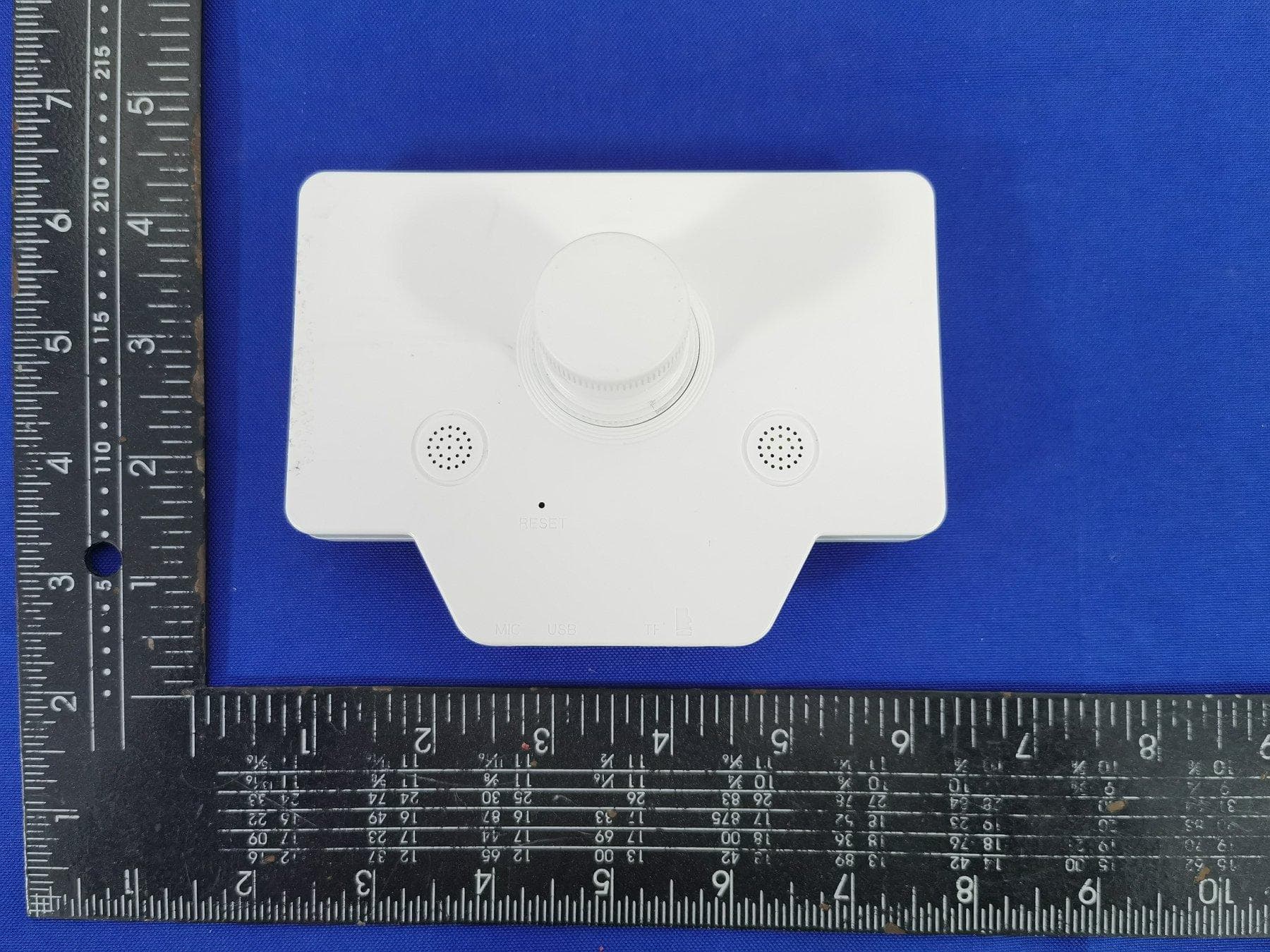
Click to zoom
Application Details
- Equipment Class
- DTS - Digital Transmission System
- Date of Grant
- Dec 21, 2022
- Application Purpose
- Original Equipment
- Date of Application
- Dec 21, 2022
- Equipment Note
- Electronic Digital Eyepiece
- Frequency Range
- 2412.00000000 - 2462.00000000
- Country
- China
Documents & Files
Document Text
Text extracted from the exhibit documents filed with the FCC. Open a document above to read the original.
Users Manual
01、产品结构02、按键功能/定义 A C B D E F F G HIJ A LCD显示屏 本机共有三个操作按键,分别为MODE,MENU,ON/OFF键; 另外还内置一个RESET孔,当不明原因死机时请用尖状物插入此孔, 轻轻一压即可进行复位关机;具体功能定义如下: ①在关机状态下长按3秒开机,再长按3秒关机 ②录像模式:按此键停止或者启动录像 左右旋转可以调整电子滤镜 (具体操作看下面描叙) ③拍照模式:按此键进行拍照 ④回放模式:按此键开始播放,再次按暂停 ⑤设置模式:按此键进行确认 ⑥菜单模式:左旋转进入上一设置项、右旋转进入下一设置项 ⑦回放模式:未播放时左旋选择上一个文件、右旋选择下一个 文件;播放文件时右旋进入快进播放 (依次右旋一次 按2X/4X/8X倍速播放) 、左旋进入快退播放 (依次左旋一 次按-2X/-4X/-8X倍速播放) 在录像待机模式下: ①点按此键切换录像/拍照/回放模式 ②长按此按键快捷开启或者关闭移动侦测 ③录像时,点按此键对当前文件加锁保护 ④播放文件时,点按此键停止播放 ①点按进入设置菜单,再次点按,退出菜单 ②在录像待机模式长按此按键可开启或关闭WiFi 不明原因死机时请将尖锐物(如取卡针、牙签等) 插入到此孔中,向孔里轻轻一压即可进行复位关机 B 开关(ON/OFF键) C MODE:模式键 D MENU:菜单键 E 0.965英寸目镜接口 F 扬声器 G 复位孔 H 麦克风 I USB接口 J TF卡插槽 正面 背面 01、Product Structure A C B D E F F G HIJ A LCD Display screen B ON/OFF C MODE D MENU E 0.965" eyepiece interface F Speaker G Reset H Microphone I USB interface J TF card slot Front Back ON/OFF 开关键 模式键 MODE 菜单键 MENU 复位孔 RESET 02、Key Functions & Definitions The machine has three operation keys, MODE, MENU and ON/OFF keys. RESET hole:please use a pointed object to insert this hole when the machine is dead for unknown reasons. ①Long press for 3 seconds to turn on the phone in the off state, and then long press for 3 seconds toturn off the phone ②Recording mode: recording and rotate left and right to adjust the electronic filter (see the following description for specific operation) ③Photo mode: press this key to take pictures ④Playback mode:press this key to start playback, press again to pause ⑤Playback and delete:In the video recording standby mode,press the MODE key 2 times in succession, the machine enters playback mode, rotate the key to select the file to be previewed, press the key to play or pause, press the MODE key to stop the operation when playing; when playing the file, rotate the key to fast forward or fast rewind operation, right rotation for fast forward, left rotation for fast rewind, rotate in turn for fast forward 2X/4X/8X or fast rewind -2X/- 4X/-8X times the speed, there is a prompt in the lower left corner of the display; if you need to delete or unlock the file, press MENU to enter the function options when you stop playing. ⑥Menu mode:Rotate left to enter the previous setting item and Rotate right to enter the next setting item ⑦Playback mode:Left to select the previous file and Rotate right to select the next file In video standby mode: ①Press this button to switch the video/photo/playback mode ②long press this button to quickly open or close the motion detection ③When recording, tap this key to lock the current file protection ON/OFF MODE 04、操作说明 1.长按开关键3秒开机 2.USB口插入5V电源,机器开机 03、安装方法 ①根据望远镜目镜接口大小,选择合适的目镜接口 (本设备自带0.965英寸目 镜接口,如望远镜目镜接口为0.965英寸,则可以直接放到望远镜原来的目镜 位置;如望眼镜目镜接口为1.25英寸,需要将包装配有的1.25英寸目镜接口顺 时针旋拧安装到设备目镜接口处) ②将望远镜上面的目镜卸掉,将本机目镜接口处防尘盖取下,将其放置到 望远镜原来目镜位置,拧紧螺丝固定,安装完成。 ③将电子目镜开机,调焦观测景物,若发现成像是倒立的,请按菜单键进入 设置菜单,选择“影像旋转”,然后设置为“开”,倒立影像则旋转为正立影像。 0.965英寸1.25英寸 ① 使用前请先按照正确的方向安装TF卡,避免损坏TF卡或设备;第一次在本机使用时, 请在菜单里面执行格式化操作 ② 0.965英寸为显示屏自带目镜接口,包装内配备1.25英寸目镜接口 ③ 产品使用完后,请盖好防尘盖,避免灰尘进入滤光片 ④ 该设备不防水,请勿将设备置于水浸场合或淋雨 注意事项 (TF卡请选用高速CLASS10或以上级别的高速卡) 03、Installation method ①According to the size of the telescope eyepiece interface, choose the appropriate eyepiece interface(the device comes with a 0.965-inch eyepiece interface, if the telescope eyepiece interface is 0.965-inch, it can be directly placed in the original eyepiece position of the telescope; if the telescope eyepiece interface is 1.25-inch, you need to install the package with 1.25-inch eyepiece interface clockwise screw installation to the equipment eyepiece interface) ②Remove the eyepiece on top of the telescope, remove the dust cover at the interface of the local eyepiece, place it to the original eyepiece position of the telescope, tighten the screws to fix it, and the installation is complete Turn on the electronic eyepiece, focus on the scene, if you find the image is upside down, please press the menu button to enter the Setup menu, select "Image Rotation", and then set to "On", the inverted image will be rotated to an upright image. 0.965-inch1.25-inch ①Please install the TF card in the correct direction before use to avoid damaging the TF card or the device.The first time you use in this machine, please perform the formatting operation inside the menu ②0.965 inches for the display comes with an eyepiece interface, the package is equipped with a 1.25-inch eyepiece interface. ③After using the product, please cover the dust cover to avoid dust into the filter ④The device is not waterproof, please do not put the device in water or rain. Cautions (please use high-speed CLASS10 or higher level of high-speed card) ①开机: ②关机: ③录像: 1.开机状态下长按开关键3秒关机 2. 当该显示器低电量时,会保存文件并自动关机 在录像待机状态下,按点开关键开启录像 绿灯闪烁 再次点按开关键停止录像 绿灯常亮 ④拍照: 在待机状态下,按MODE键机器进入拍照模式,按开关键执行拍照, 同时可听到喇叭提示音. ⑤回放和删除: 在录像待机模式下,连续按MODE键2次后机器进入回放模 式,旋转开关键选择所需预览的文件,点按开关键进行播放或暂停,播放时 按MODE键停止操作;播放文件时,旋转开关键可以进行快进或快退的操 作,右旋为快进,左旋为快退,依次旋转为快进2X/4X/8X或快退-2X/-4X/-8X 倍速,显示屏左下角有提示;如果需要对文件进行删除或解锁等操作,停止 播放时按MENU键进入功能选项进行操作. ⑥缩时录影: 在待机模式下,按MENU键进入设置功能选项,旋转开关 键选择“缩时录影”,然后选择“100ms/200ms/500ms”参数中的任一个, 开启“缩时录影”功能,按MENU退出设置功能选项 100%电量 70%电量 30%电量 低电量 屏幕电量状态 LCD屏状态栏出现 图标,此时录像按设置的拍摄时间 间隔值连续录像, 形成一帧帧连续画面形成的视频,将长时间完成的拍摄缩短,节约TF卡空间 04、Operating 1.long press the key for 3 seconds to power on 2.USB port inserted into the 5V power supply, the machine is turned on ①Power on: ②Shutdown: ③Video: 1.Power on state long press the on button for 3 seconds to shut down 2.When the display is low battery, it will save the file and automatically shut down. In the video standby state, press the on/off button to open the video Green light flashes Press the key again to stop the video green light is always on. In the standby mode, press MODE key machine into the photo mode, press the on/off button Execute the photo, while you can hear the speaker beep. ④Take pictures: In the video recording standby mode,press the MODE key 2 times in succession, the machine enters playback mode, rotate the key to select the file to be previewed, press the key to play or pause, press the MODE key to stop the operatio…
Text truncated - open the document above for the full version.
Cover Letter(s)
ShenzhenYiweidaTechnologyCo.,Ltd AgentAuthorization Company:ShenzhenYiweidaTechnologyCo.,Ltd Address:701-1,No.1138,Bao'anAvenue,Anlecommunity,Xin'anstreet,Bao'an District,ShenzhenChina ProductName:ElectronicDigitalEyepiece ModelNumber(s):S1,S1A,S1B,S1C,S1D,S1E,S1F,S1G ProductDescription:2.4GWIFI WeauthorizeMiCOMLabsInc.,575BoulderCourt,Pleasanton,California94566,USA, toactonourbehalfonallmattersconcerningthecertificationofabovenamed equipment. WedeclarethatMiCOMLabsInc.isallowedtoforwardallinformationrelatedtothe approvalandcertificationofequipmenttotheregulatoryagenciesasrequiredandto discussanyissuesconcerningtheapprovalapplication.Anyandallactscarriedoutby MiCOMLabsonourbehalfshallhavethesameeffectasactsofourown. Signature:Date:2022.12.19 Name:ShengwenKang Title:Manager Company:ShenzhenYiweidaTechnologyCo.,Ltd
Cover Letter(s)
ShenzhenYiweidaTechnologyCo.,Ltd OfficeofEngineeringTechnology FederalCommunicationsCommission 7435OaklandMillsRoad Columbia,MD21046 USA Date:2022.12.19 Subject;RequestforConfidentiality FCCID:2A9SV-S1 ToWhomItMayConcern, PursuanttotheprovisionsoftheCommission’srulesTitle47Sections§0.457and§0.459,we arerequestingtheCommissiontowithholdthefollowingattachment(s)asconfidential documentsfrompublicdisclosureindefinitely. Thesedocumentscontaindetailedsystemandequipmentdescriptionsandareconsideredas proprietaryinformationinoperationoftheequipment.Thepublicdisclosureofthesedocuments mightbeharmfultoourcompanyandwouldgivecompetitorsanunfairadvantageinthemarket. SchematicDiagram BlockDiagram PartsList OperationalDescription Tune-upProcedure Inadditionaltoabovementioneddocuments,inordertocomplywiththemarketingregulations inTitle47CFR§2.803andtheimportationrulesinTitle47CFR§2.1204,whileensuringthat businesssensitiveinformationremainsconfidentialuntiltheactualmarketingofnewly authorizeddevices,werequestShortTermConfidentialityofthefollowingattachment(s); ExternalPhotos TestSetupPhotos InternalPhotos UserManual For45days,pursuanttoPublicNoticeDA04-1705. OR For180dayspursuanttoKDB726920D01. Itisourunderstandingthatallmeasurementtestreports,FCCIDlabelformatand correspondenceduringthecertificationreviewprocesscannotbegrantedasconfidential documentsandthisinformationwillbeavailableforpublicreviewoncethegrantofequipment authorizationisissued. Sincerely, Signature: Name:ShengwenKang Title:Manager
Cover Letter(s)
ShenzhenYiweidaTechnologyCo.,Ltd Date:2022-12-22 Subject:authorizationforaddingfamilymodels TowhomitMayconcern,Statement WewouldliketoconfirmtheproductElectronicDigitalEyepiecewithmodels(S1,S1A,S1B,S1C, S1D,S1E,S1F,S1G)aresameinallrespects.Onlythemodelnamesaredifferentfordifferent marketrequirement. Yourssincerely, Signature ShengwenKang/Manager TypednameandTitle
External Photos
EUTPHOTO(ExternalPhotos)
ID Label/Location Info
FCCID:2A9SV-S1 Thisdevicecomplieswithpart15oftheFCC Rules.Operationissubjecttothefollowingtwo conditions: (1)thisdevicemaynotcauseharmful interference,and (2)Thisdevicemustacceptanyinterference received,includinginterferencethatmaycause undesiredoperation.
Internal Photos
EUTPHOTO(InternalPhotos) WIFIANT ※※※※※ENDOFREPORT※※※※※
RF Exposure Info
FCCID:2A9SV-S1 RFExposureEvaluation Limits Thecriterialistedinthefollowingtableshallbeusedtoevaluatetheenvironmentimpactofhumanexposure toradiofrequency(RF)radiationasspecifiedin1.1307(b) LimitsforMaximumPermissibleExposure(MPE) Frequencyrange (MHz) Electricfield strength (V/m) Magneticfieldstrength (A/m) Powerdensity (mW/cm 2 ) Averagingtime (minutes) (A)LimitsforOccupational/ControlledExposures 0.3–3.06141.63*(100)6 3.0–301842/f4.89/f*(900/f 2 )6 30–30061.40.1631.06 300–1500f/3006 1500–100,00056 (B)LimitsforGeneralPopulation/UncontrolledExposure 0.3–1.346141.63*(100)30 1.34–30824/f2.19/f*(180/f 2 )30 30–30027.50.0730.230 300–1500f/150030 1500–100,0001.030 f=frequencyinMHz Friistransmissionformula:Pd=(Pout*G)/(4*pi*r 2 ) Where Pd=powerdensityinmW/cm 2 ,Pout=outputpowertoantennainmW; G=gainofantennainlinearscale,Pi=3.1416; R=distancebetweenobservationpointandcenteroftheradiatorincm PdidthelimitofMPE,1mW/cm 2 .Ifweknowthemaximumgainoftheantennaandthetotalpowerinputto theantenna,throughthecalculation,wewillknowthedistancerwheretheMPElimitisreached. TestProcedure SoftwareprovidedbyclientenabledtheEUTtotransmitandreceivedataatlowest,middleandhighest channelindividually. TestResultofRFExposureEvaluation 2.4GWIFImode Channel Antenna Gain (dBi) Antenna Gain (numeric) Maximum Tune-Up outputpower (dBm) Outputpowerto antenna(mW) PowerDensity atR=20cm (mW/cm 2 ) Limit (mW/cm 2 ) Result 802.11b Middle 1.301.34926.81479.730.1287421PASS Remark:antennagain=1.3dBi
Test Report
Product specification Quick Reference Date All the technical data and information contained herein are subject to change without prior notice Antenna Layout & module on the system board Antenna Gain Gain Table Antenna module on the system board Frequency 2.45GHz *1 Ant. Port Input Pwr. (dBm) 0 (Typ. BT class 2 output power) Tot. Rad. Pwr. (dBm) -2.3 (Input pwr – loss pwr) Peak EIRP(dBm) 1.3 Directivity (dBi) 1 (all direction antenna) Efficiency (dB) -2.3 (58.5%) Gain (dBi) 1.3 (Peak Gain XY-plane) Maximum Power (dBm) 1.3 (XY-plane) Minimum Power (dBm) -4(XY-plane) Avg. Power (dBm) -0.5(XY-plane) Max/Min Ratio (dB) 5.3(XY-plane) Max/Avg Ratio (dB) 1.8(XY-plane) Min/Avg Ratio (dB) -3.5(XY-plane) Average Gain (dB) -0.5 (Avg Gain XY-plane) Unit in dBi @2.44GHz XY-plane XZ-plane YZ-plane Efficiency Peak Avg. Peak Avg. Peak Avg. Module Board 1.3 -0.5 1.3 -3.8 1.1 -3.0 58.5% Return Loss The Environment of Antenna Radiation Pattern 3D radiation pattern diagram XY-plane XZ-plane YZ-plane
Test Report
Project No.: ZKT-221213L9270E Page 1 of 56 FCC TEST REPORT FCC ID:2A9SV-S1 Report Number...................................:ZKT-221213L9270E Date of Test.......................................................Dec. 05, 2022 to Dec. 16, 2022 Date of issue.........................................: Dec. 16, 2022 Total number of pages .......................... 56 Test Result ............................................ : PASS Testing Laboratory............................: Shenzhen ZKT Technology Co., Ltd. Address...............................................: 1/F, No. 101, Building B, No. 6, Tangwei Community Industrial Avenue, Fuhai Street, Bao'an District, Shenzhen, China Applicant's name.............................: Shenzhen Yiweida Technology Co., Ltd Address...............................................: 701-1, No. 1138, Bao'an Avenue, Anle community, Xin'an street, Bao'an District, Shenzhen China Manufacturer's name......................: Shenzhen Yiweida Technology Co., Ltd Address ............................................... : 701-1, No. 1138, Bao'an Avenue, Anle community, Xin'an street, Bao'an District, Shenzhen China Test specification: Standard ................................................ : FCC CFR Title 47 Part 15 Subpart C Section 15.247 ANSI C63.10:2013 Test procedure.....................................: / Non-standard test method................: N/A Test Report Form No. ....................... : TRF-EL-110_V0 Test Report Form(s) Originator ..... : ZKT Testing Master TRF........................................: Dated: 2020-01-06 This device described above has been tested by ZKT, and the test results show that the equipment under test (EUT) is in compliance with the FCC requirements. And itis applicable only to the tested sample identified in the report. This report shall not be reproduced except in full, without the written approval of ZKT, this document may be altered or revised by ZKT, personal only, and shall be noted in the revision of the document. Product name.....................................: Electronic Digital Eyepiece Trademark...........................................: N/A Model/Type reference.........................: S1, S1A, S1B, S1C, S1D, S1E, S1F, S1G Ratings..................................................: Input: DC 5V or Battery DC 3.7V Project No.: ZKT-221213L9270E Page 2 of 56 Testing procedure and testing location: Testing Laboratory.......................................: Shenzhen ZKT Technology Co., Ltd. Address............................................................: 1/F, No. 101, Building B, No. 6, Tangwei Community Industrial Avenue, Fuhai Street, Bao'an District, Shenzhen, China Alen He Tested by (name + signature).......................: Joe Liu Reviewer (name + signature).......................: Lake Xie Approved (name + signature).......................: Project No.: ZKT-221213L9270E Page 3 of 56 Table of Contents Page 1. VERSION..................................................................................................................... 5 2. SUMMARY OF TEST RESULTS..................................................................................6 2.1 TEST FACILITY....................................................................................................................7 2.2 MEASUREMENT UNCERTAINTY.......................................................................................7 3. GENERAL INFORMATION.......................................................................................... 8 3.1 GENERAL DESCRIPTION OF EUT....................................................................................8 3.2 DESCRIPTION OF TEST MODES...................................................................................... 9 3.3 BLOCK DIGRAM SHOWING THE CONFIGURATION OF SYSTEM TESTED.................9 3.4 DESCRIPTION OF SUPPORT UNITS(CONDUCTED MODE)........................................ 10 3.5EQUIPMENTS LIST FOR ALL TEST ITEMS.....................................................................11 4. EMC EMISSION TEST...............................................................................................12 4.1 CONDUCTED EMISSION MEASUREMENT.................................................................... 12 4.1.1 POWER LINE CONDUCTED EMISSION Limits..................................................... 12 4.1.2 TEST PROCEDURE..................................................................................................12 4.1.3 DEVIATION FROM TEST STANDARD.....................................................................12 4.1.4 TEST SETUP.............................................................................................................13 4.1.5 EUT OPERATING CONDITIONS..............................................................................13 4.1.6 TEST RESULT...........................................................................................................14 4.2 RADIATED EMISSION MEASUREMENT.........................................................................16 4.2.1 RADIATED EMISSION LIMITS.................................................................................16 4.2.2 TEST PROCEDURE..................................................................................................16 4.2.3 DEVIATION FROM TEST STANDARD.....................................................................17 4.2.4 TEST SETUP.............................................................................................................17 4.2.5 EUT OPERATING CONDITIONS..............................................................................18 4.2.6 TEST RESULTS.........................................................................................................18 5.RADIATED BAND EMISSIONMEASUREMENT........................................................ 29 5.1 TEST REQUIREMENT:...................................................................................................…
Text truncated - open the document above for the full version.
Test Setup Photos
EUTTESTPHOTO ConductedEmission RadiatedEmission Highfrequencyradiation(Above1G)
Contact Information
Applicant
Shengwen Kang
Technical Contact
Test Firm
Shenzhen ZKT Technology Co., Ltd.Lake Xie
[email protected]0086-13620010775
Technical Specifications
| # | Rule Parts | Frequency Range | Power Output |
|---|---|---|---|
| 1 | 15C | 2.41 GHz - 2.46 GHz | 479.00 mW |