2A9YY-MX15Smart Watch MX15
Shenzhen Morewear Technology Co., Ltd.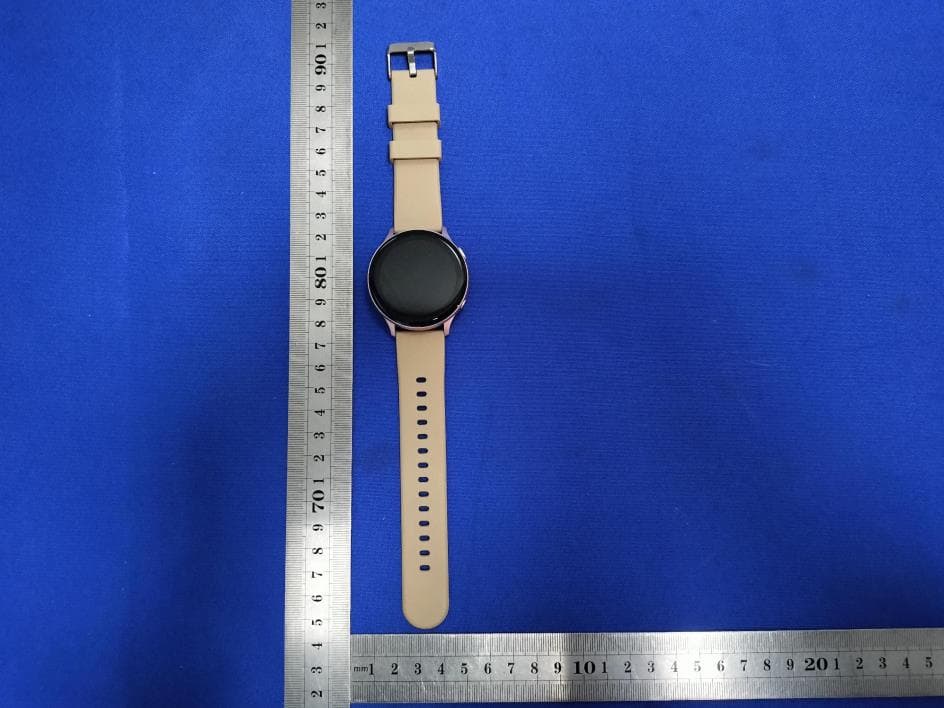
Click to zoom
Application Details
- Equipment Class
- DTS - Digital Transmission System
- Date of Grant
- Jan 11, 2023
- Application Purpose
- Original Equipment
- Date of Application
- Jan 11, 2023
- Equipment Note
- Smart Watch MX15
- Frequency Range
- 2402.00000000 - 2480.00000000
- Country
- China
Documents & Files
Document Text
Text extracted from the exhibit documents filed with the FCC. Open a document above to read the original.
Users Manual
User Manual I. NOTICE: The device requires the FitcloudPro app and connects to phone's Bluetooth through the app. 1. The device is not intended for medical use and its measurements including heart rate, blood oxygen levels, and blood pressure can not be used in diagnosis. If you feel uncomfortable, please go to hospital. 2. Charging your watch: Insert the USB plug of the charging cable into the USB port on your USB wall charger (Rated 5V 1A), and attach the other end to the charging area on the back of your device. The charging icon will appear on the screen. Please charge your watch once a month if you don't use it often. 3. Showering or bathing with your watch on can be bad for your watch. High temperatures can also damage the water protection seals of it. 4. If you forget your watch's passcode, please input the number "1819" for changing it. II. Product Introduction Touch Screen Tap to go to the function interface or return to the home screen. Press and hold for 3 seconds for powering off. Tap to go to sports mode list. Press to start exercise. Tap to exit current mode. Temperature Sensor Heart Rate, Blood Oxygen Sensor Charging Sensor III. App Installation and Device Binding 1. How to get the App: 1) Android OS: search and download "FitcloudPro" in such app stores as Huawei AppGallery and MyApp. iOS: search and download "FitcloudPro" in the App Store. 2) scan the QR codes below to download. System requirements: Android 7.0 & higher; iOS 12.0 & higher; Bluetooth 5.0 & higher. 2. Device Binding In the FitcloudPro app>Bind Bracelet>search and tap Bluetooth name "MX15" for pairing. Accept the binding request. Then the pairing request from "MX15_talk" will pop up, tap "pair". "MX15_talk" is responsible for audio, and you need to keep it in connection for using your watch to make phone calls (The following are steps). IV. Using your watch 1) Changing your watch face: press and hold the home screen for 3 seconds, and then swipe left or right to choose a design. Tap the design you want as your new watch face. 2) Press the side button or turn your wrist towards you to wake the dimmed screen. Swipe up for Notification, swipe down for Control Center, swipe left for sports data, and swipe right for function list. V. Features 1. Control Center DND mode Brightness Settings Find my phone Audio switch 2. Sports data Show today's steps, distance, calories burned. You can set goals for them in the app. 3. Heart rate Open the heart rate monitor, and the green light on the watch’s bottom will shine. Measurement will be done in roughly 40 seconds and end with vibration. If you get a reminder of "Not wearing a watch", please take off your watch and wear it again. 4. Blood pressure Enter the blood pressure function. The measurement will start with shining green light on the watch’s bottom and end with vibration. This process lasts for 30 to 60 seconds. The result can be uploaded to the app. 5. Blood oxygen Go to the blood oxygen interface. The measurement will start with shining green light on the watch’s bottom and end with vibration. This process lasts for 30 to 60 seconds. The result can be uploaded to the app. 6. Body temperature The function will be automatically enabled when you open the body temperature interface. The result can be uploaded to the app. 7. Sleep tracker Wear your watch at least one hour before going to sleep at night. It will automatically record the sleep duration, deep sleep duration, and light sleep duration, and upload the data to the app to evaluate your sleep quality. Note: Sleep tests are open from 21:30 to 12:00. 8. Bluetooth phone calls This function needs audio Bluetooth. You can dial on the watch. Press "7" and hold for 2 seconds to input "*", press "9" and hold for 2 seconds to input "#". Bluetooth for the audio needs to be enabled. Frequent contacts: add frequent contacts in the app, and they will be automatically downloaded to your watch (up to 10 contacts). 9. Voice assistant Open voice assistant interface, tap the icon, and say a command. You can use it to make a phone call, open WeChat, or get weather data. 10. Women's health Enable women's health function after connecting your watch to the app. You can read relevant information on your watch. 11. Music Connect your watch to your phone. Then you can use your watch to control music playback on the phone: play, pause, volume, and switch songs. 12. Weather: Your watch will show current temperature and other weather data after connecting with the app. 13. Alarm: Connect your watch to your phone. Then set different alarms (up to 5). 14. Stopwatch: tap start, pause and reset buttons to use it. Can store up to 99 records. 15. Timer: the system presets the common timing duration, and you can click the corresponding duration for quick timing, or click the custom button for time setting. Tap start, pause and reset buttons to use it. 16. Notification: enable notification in the app for receiving information on your watch. Can save up to 15 messages. 17. Find my phone: Keep your phone in connection with your watch. Tap "find my phone" and your phone will ring in response. 18. Sedentary reminder: enable it in the app [Device>Sedentary reminder], and set the start/end time, DND time. 19. Water reminder: enable it in the app [Device>Water reminder], and set the start/end time and reminder interval. 20. Shake to photo: enable it in the app [Device>Shake to photo], tap the camera icon on your watch, and shake your watch to take a picture. VI. FAQ 1. How to change my watch's time? Your watch will synchronize its time with your phone after paring. 2. Cannot receive notifications on my watch. Check whether your watch and the app are still in connection. Check the "Notification" switch in the app. 3. Bluetooth disconnected or failed to connect. Restart your watch and reconnect. Re-enable your phone's Bluetooth and try to reconnect. Do not connect your phone with other devices at a time. VII. Disclaimer Warning: the product is not intende…
Text truncated - open the document above for the full version.
Attestation Statements
Shenzhen Morewear Technology Co., Ltd. Model Difference Data:2023.01.09 Product description: Smart Watch MX15 Model name: MX15, MX1, MX2, MX3, MX4, MX5, MX6, MX7, MX8, MX9, MX10, MX11, MX12, MX13, MX14, MX16, MX17, MX18, MX19, MX20, MX21, MX22, MX23, MX24, MX25, MX26, MX27, MX28, MX29, MX30, CT1, CT2, CT3, CT5, CT6, CT7, CT8, CT9, CT10, CT11, CT12, CT13, CT14, CT15, CT16, CT17, CT18, CT19, CT20, NB1, NB2, NB3, NB5, NB6, NB7, NB8, NB9, NB10, NB11, NB12, NB13, NB14, NB15, NB16, NB17, NB18, NB19, NB20 Trade Name: N/A FCC ID: 2A9YY-MX15 All the model are the same circuit and RF module, except model names . Regards Sincerely Client’s signature : Client’s name / title : Guan gong(Legal person) Contact information / address:Room 509, Smart Valley Innovation Park, No. 1010 Bulong Road, Minzhi Street, Longhua District, Shenzhen,Guangdong,China
Cover Letter(s)
Shenzhen Morewear Technology Co., Ltd. (2023.01.09) Eurofins Electrical and Electronic Testing NA, Inc. 914 West Patapsco Avenue Baltimore, MD 21230 RE: CONFIDENTIALITY REQUEST FOR (Smart Watch MX15 / MX15, MX1, MX2, MX3, MX4, MX5, MX6, MX7, MX8, MX9, MX10, MX11, MX12, MX13, MX14, MX16, MX17, MX18, MX19, MX20, MX21, MX22, MX23, MX24, MX25, MX26, MX27, MX28, MX29, MX30, CT1, CT2, CT3, CT5, CT6, CT7, CT8, CT9, CT10, CT11, CT12, CT13, CT14, CT15, CT16, CT17, CT18, CT19, CT20, NB1, NB2, NB3, NB5, NB6, NB7, NB8, NB9, NB10, NB11, NB12, NB13, NB14, NB15, NB16, NB17, NB18, NB19, NB20 / FCC ID: 2A9YY-MX15) To Whom It May Concern: This letter serves as an official request for confidentiality under sections 0.457 and 0.459 of CFR 47. We have requested that the Exhibits Long-Term Confidentiality Short-Term Confidentiality NOTE 2 ID Label/Location No No Attestation Statement No No External Photos No ☐ Block Diagram ☒ ☐ Schematics ☒ ☐ Test Report No No Test Setup Photos No ☐ User’s Manual ☐ NOTE 1 ☐ Internal Photos ☐ NOTE 1 ☐ Parts List / Tune Up ☐ ☐ RF Exposure Info No No Operational Description ☒ ☐ Cover Letter(s) No No SDR Software / Security Info ☐ No required to be submitted with this application be permanently withheld from public review. Above mentioned document contains detailed system and equipment description are considered as proprietary information in operation of the equipment. The public disclosure of above documents might be harmful to our company and would give competitor an unfair advantage in the market. Please contact me if there is any information you may need. Sincerely, Signature: Name: Guan gong Title: Legal person
Cover Letter(s)
Shenzhen Morewear Technology Co., Ltd. (2023.01.09) Eurofins Electrical and Electronic Testing NA, Inc. 914 West Patapsco Avenue Baltimore, MD 21230 RE: LETTER OF AGENT AUTHORIZATION To Whom It May Concern: We, the undersigned, hereby authorize (Shenzhen CTB Testing Technology Co., Ltd.) to act on our behalf in all matters relating to application for equipment authorization, including the signing of all documents relating to these matters. We also hereby certify that no party to the application authorized hereunder is subject to the denial of benefits, including FCC benefits, pursuant to Section 5301 of the Anti-Drug Abuse Act of 1988, 21 U.S.C.853(a). This agreement expires one year from the current date. Sincerely, Signature: Name: Guan gong Title: Legal person
External Photos
External Photos
Internal Photos
Internal Photos ANT
RF Exposure Info
Shenzhen CTB Testing Co., Ltd. FCC ID: 2A9YY-MX15 Portable device According to §15.247(e)(i) and §1.1307(b)(1), systems operating under the provisions of this section shall be operated in a manner that ensures that the public is not exposed to radio frequency energy level in excess of the Commission’s guidelines. According to KDB447498 D01 General RF Exposure Guidance V06 The 1-g SAR and 10-g SAR test exclusion thresholds for 100 MHz to 6 GHz at test separation distances ≤ 50 mm are determined by: [(max. power of channel, including tune-up tolerance, mW)/(min. test separation distance, mm)]·[√f(GHZ)] ≤ 3.0 for 1-g SAR and ≤ 7.5 for 10-g extremity SAR, where: • f(GHZ) is the RF channel transmit frequency in GHz • Power and distance are rounded to the nearest mW and mm before calculation • The result is rounded to one decimal place for comparison When the minimum test separation distance is < 5 mm, a distance of 5 mm is applied to determine SAR test exclusion. BLE: Modulation Channel Freq. (GHz) Conduct ed power (dBm) Conducte d power (mW) Tune-up power (dBm) Max tune-up power (dBm) Max tune-up power (mW) Distance (mm) Result calculatio n SAR Exclusion threshold SAR test exclusion 2.402 -0.303 0.93 0±1 1.00 1.26 <5 0.39023 3.00 YES 2.44 -0.566 0.88 0±1 1.00 1.26 <5 0.39330 3.00 YES 2.480 -0.719 0.85 0±1 1.00 1.26 <5 0.39651 3.00 YES GFSK Conclusion: For the max result : 0.39651≤ FCC Limit 3.0 for 1g SAR.
Test Report
Test Equipment & Conditions 1. Network Analyzers : Agilent 8753D 5071B Communications Test Set: Agilent E5515C CMW500 2. 3D Chamber Test System antenna ANT
Test Report
Shenzhen CTB Testing Technology Co., Ltd. Report No.: CTB230103021RFX Report Tel: 4008-707-283 Web: http://www.ctb-lab.net Page 1 of 35 TEST REPORT Compiled by: Reviewed by: Approved by: Chen Zheng Arron Liu Bin Mei / Director Note: If there is any objection to the inspection results in this report, please submit a written report to the company within 15 days from the date of receiving the report. The test report is effective only with both signature and specialized stamp. This result(s) shown in this report refer only to the sample(s) tested. Without written approval of Shenzhen CTB Testing Technology Co., Ltd. this report can’t be reproduced except in full. The tested sample(s) and the sample information are provided by the client. “*” indicates the testing items were fulfilled by subcontracted lab. “#” indicates the items are not in CNAS accreditation scope. Product Name: Smart Watch MX15 FCC ID: 2A9YY-MX15 Trademark: N/A Model Number: MX15, MX1, MX2, MX3, MX4, MX5, MX6, MX7, MX8, MX9, MX10, MX11, MX12, MX13, MX14, MX16, MX17, MX18, MX19, MX20, MX21, MX22, MX23, MX24, MX25, MX26, MX27, MX28, MX29, MX30, CT1, CT2, CT3, CT5, CT6, CT7, CT8, CT9, CT10, CT11, CT12, CT13, CT14, CT15, CT16, CT17, CT18, CT19, CT20, NB1, NB2, NB3, NB5, NB6, NB7, NB8, NB9, NB10, NB11, NB12, NB13, NB14, NB15, NB16, NB17, NB18, NB19, NB20 Prepared For: Shenzhen Morewear Technology Co., Ltd. Address: Room 509, Smart Valley Innovation Park, No. 1010 Bulong Road, Minzhi Street, Longhua District, Shenzhen, Guangdong, China Manufacturer: Shenzhen Morewear Technology Co., Ltd. Address: Room 509, Smart Valley Innovation Park, No. 1010 Bulong Road, Minzhi Street, Longhua District, Shenzhen, Guangdong, China Prepared By: Shenzhen CTB Testing Technology Co., Ltd. Address: 1&2/F., Building A, No.26, Xinhe Road, Xinqiao, Xinqiao Street, Bao'an District, Shenzhen, Guangdong, China Sample Received Date: Dec. 21, 2022 Sample tested Date: Dec. 21, 2022 to Jan. 03, 2023 Issue Date: Jan. 03, 2023 Report No.: CTB230103021RFX Test Standards FCC Part15.247 ANSI C63.10:2013 Test Results PASS Remark: This is Bluetooth radio test report. Shenzhen CTB Testing Technology Co., Ltd. Report No.: CTB230103021RFX Report Tel: 4008-707-283 Web: http://www.ctb-lab.net Page 2 of 35 TABLE OF CONTENT Test Report Declaration Page 1. VERSION ........................................................................................................................................ 3 2. TEST SUMMARY ........................................................................................................................... 4 3. MEASUREMENT UNCERTAINTY ................................................................................................. 5 4. PRODUCT INFORMATION AND TEST SETUP ............................................................................ 6 4.1 PRODUCT INFORMATION ............................................................................................................. 6 4.2 TEST SETUP CONFIGURATION .................................................................................................... 6 4.3 SUPPORT EQUIPMENT .................................................................................................................. 6 4.4 CHANNEL LIST ............................................................................................................................... 7 4.5 TEST MODE .................................................................................................................................... 7 4.6 TEST ENVIRONMENT ..................................................................................................................... 7 5. TEST FACILITY AND TEST INSTRUMENT USED ....................................................................... 8 5.1 TEST FACILITY ............................................................................................................................... 8 5.2 TEST INSTRUMENT USED ............................................................................................................. 8 6. AC POWER LINE CONDUCTED EMISSION .................................................................................. 10 6.1 BLOCK DIAGRAM OF TEST SETUP ........................................................................................... 10 6.2 LIMIT .............................................................................................................................................. 10 6.3 TEST PROCEDURE ...................................................................................................................... 10 6.4 TEST RESULT ............................................................................................................................... 12 7. RADIATED SPURIOUS EMISSION ............................................................................................. 14 7.1 BLOCK DIAGRAM OF TEST SETUP ........................................................................................... 14 7.2 LIMIT .............................................................................................................................................. 14 7.3 TEST PROCEDURE ...................................................................................................................... 15 7.4 TEST RESULT ............................................................................................................................... 16 8. BAND EDGE AND RF COUNDUCTED SPURIOUS EMISSIONS ............................................... 23 8.1 BLOCK DIAGRAM OF TEST SETUP ........................................................................................... 23 8.2 LIMIT .............................................................................................................................................. 23 8.3 TEST PROCEDURE .....................................................................................................................…
Text truncated - open the document above for the full version.
Test Setup Photos
Radiated Emission Below 1G Above 1G Conducted emissions
Contact Information
Applicant
Guan gong
Technical Contact
Shenzhen Morewear Technology Co., Ltd.Guan gong
[email protected]15157357903
Room 509, Smart Valley Innovation Park, · Shenzhen,Guangdong, · China
Test Firm
Shenzhen CTB Testing Technology Co., Ltd.Rita Xiao
[email protected]86-13538218145
Technical Specifications
| # | Rule Parts | Frequency Range | Power Output |
|---|---|---|---|
| 1 | 15C | 2.40 GHz - 2.48 GHz | 930.00 µW |