2A9ZK-TSERIESTablet Smartphone
TRIPLTEK LLC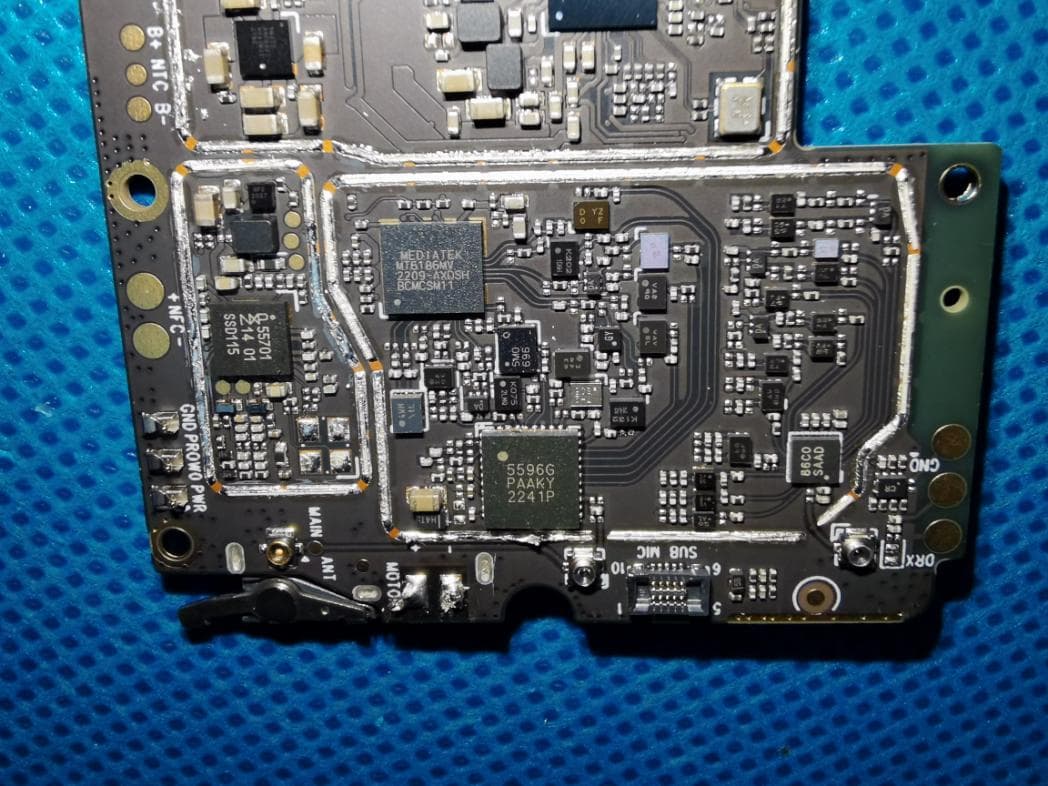
Click to zoom
Application Details
- Equipment Class
- PCE - PCS Licensed Transmitter held to ear
- Date of Grant
- Mar 22, 2023
- Application Purpose
- Original Equipment
- Date of Application
- Mar 22, 2023
- Equipment Note
- Tablet Smartphone
- Frequency Range
- 1710.70000000 - 1779.30000000
- Company
- TRIPLTEK LLC
- Country
- United States
Documents & Files
Document Text
Text extracted from the exhibit documents filed with the FCC. Open a document above to read the original.
Users Manual
MODEL T93 UNLOCKED 1www.tripltek.com TRIPLTEK 9 User Guide Content User Manual5 Read me first5 Assembling6 Unpack6 Installing a SD card7 Installing a SIM card for cellular service8 Turn on your device, reboot, and shut down8 Getting started9 Home screen9 Task bar9 Indicator icons9 Notification panel11 Auto rotation12 Lock & unlock the screen12 Customizing your device13 1. Network & Internet14 Wi-Fi14 Activate the Wi-Fi feature14 Find and connect to Wi-Fi14 2. Other Wireless Connections14 Bluetooth15 Activate the Bluetooth feature15 Connect to other Bluetooth devices15 3. Apps & Notifications15 4. Battery15 5. Display15 Screen time-out16 6. System Navigation16 7. Sound16 8. Storage16 9. Privacy16 10. Location16 11. Security17 2www.tripltek.com Set a screen lock17 12. Passwords and accounts17 13. Accessibility17 14. Managing applications in the background17 15. DuraSpeed17 16. Side Key Function18 Programming task for the Side button18 17. System18 Reset options19 Connectivity20 USB Connection20 Camera APP21 Taking a picture21 Record a video22 Screen Video Capture Function22 Play Store APP23 Phone Function23 Phone APP23 Answer a call23 Decline or end a call23 Call settings24 Ringtone & Vibration24 Dial pad touch tones24 Voicemail24 Display Options24 Quick responses24 Contacts24 Add new contact25 Edit a contact25 Search for contacts25 Text Message APP25 View messages25 Create and send SMS25 Create and send MMS26 Email APP26 Set up your email26 Web Browser27 3www.tripltek.com Browse web pages27 Set homepage27 Add bookmarks27 View bookmarks and history27 Customize browser27 Tool Apps28 Calendar28 Alarm28 File Manager29 Sound Recorder29 External Charging Port30 HARDWARE SPECIFICATIONS:31 INDUSTRIAL SPECIFICATIONS:32 NETWORKING SPECIFICATIONS:33 Safety Precautions34 Aircraft34 Vehicles34 Electronic devices34 Potentially explosive environments34 Pacemakers and other medical devices34 Operating environment35 Areas with posted regulations35 Care & Maintenance35 Warnings36 FCC STATEMENT:36 RF warning statement:36 4www.tripltek.com User Manual Read me first ●Please read this manual before operating your TRIPLTEK Tablet, and keep it for future reference. ●The descriptions in this manual are based on the default settings. ●Images and screenshots used in this manual may differ from the actual product. ●Available features and additional services may vary by device, software or cellular service provider. ●Our company is not liable for performance issues caused by third-party applications. ●The TRIPLTEK T93 is Google Play Protected Certificated from the Factory, Google APPs are pre installed. ●For more information using Android 12 OS visit www.support.google.com/android ●For more recent information about your TRIPLTEK please visitwww.tripltek.com/support 5www.tripltek.com Unpack Check your product box for the following items ●TRIPLTEK 9 ●User manual ●USB Fast Power Charger ●USB to USBc charging and data cable ●USB to USBc adapter ●Hand Strap and hardware For additional accessories. Please visit the TRIPLTEK Website. 6www.tripltek.com Installing a SD card For additional storage, you can install a SD card. 1.Press with the pin into the slot to extract the SIM card/ SD card Tray. 2.Place the SD card into the upper part of the Tray. 3.Place the Tray into the tablet all the way in. 4.Select: “Use for Portable Storage” Notice:TRIPLTEK uses approved industry standardsfor memory sd cards, but some brands may not be fully compatible with your device. 7www.tripltek.com Installing a SIM card for cellular service The TRIPLTEK 9 is an Unlocked device, which means it can be used in any cellular carrier that supports the 4G bands installed on it. You can see these bands on the NETWORKING SPECIFICATIONS page In order to use the Phone function, install a micro SIM card from your preferred carrier, follow the instructions below. 1.Press with the pin into the slot to extract the SIM card/SD card Tray. 2.Place the SIM card into the lower part of the Tray facing the back of the TRIPLTEK(see picture). 3.Place the Tray into the tablet all the way in. Turn on your device, reboot, and shut down To turn on your device, press and hold the power key. To reboot your device, press and hold the power key, select “reboot”.To turn off your device, press and holdthe power key, select“power off”. 8www.tripltek.com Getting started Home screen The home screen has multiple panels. Scroll left or right to the panels on the home screen, you can view indicator icons, widgets, shortcuts to applications, and other items. Swipe left to see other APPs installed on your device. Task bar The task bar is shown at the top of the screen. It displays commonly used option buttons, battery level indicator, current time and other indicator icons of running apps. Indicator icons Icon Icon Open Wifi NetworkAirplane Mode Wi-Fi connectedNew email Signal strengthNew SMS/MMS BT connectedCall in progress 9www.tripltek.com Uploading dataMissed call Downloading dataCall on hold USB connectionCall Forwarding Alarm SetPower level Music being playedDon't disturb Auto-rotateLocation Services Flashlight 10www.tripltek.com
Users Manual
Notification panel Pull down from the top left part of the screen to open the top of the notification bar to show the 6 commonly used settings shortcut (left picture), turn on/off clicking on the icon, and long press to enter the corresponding icon settings. Pull down from the top right of the screen to display all icons (right picture), the pencil on the upper right corner of the page will display the "Edit" button, click to add / delete custom shortcuts. Tap the icon to activate or deactivate the function. 11www.tripltek.com Wi-Fi:Activate or deactivate the Wi-Fi connection. Bluetooth:Activate or deactivate the Bluetooth connection. Notifications:Activate or deactivate the notificationfeature. Flashlight:Activate or deactivate the Flashlight. Location:Activate or deactivate access to your locationfor all APPs Battery Saver:Activate or deactivate the Battery Saver. Brightness:Adjust the basic brightness level of thedisplay to lighter or darker. NFC:Option for NFC use Settings:Access Device Settings application. Auto rotation This function changes the screen mode from portrait to landscape automatically for some Apps. Open the notifications panel and select Auto-rotate screen. To allow the Home Screen auto rotate hold press in the center of an empty space on the Home Screen and select Home settings. Lock & unlock the screen Swipe up to unlock your device's screen. To lock the screen manually, press the Power button. 12www.tripltek.com Customizing your device OpenSETTINGSfrom the APP list or from the notification panel. A list of options will be available (see picture). To search for one the options type it on the search bar. 13www.tripltek.com 1.Network & Internet This menu shows the WI-FI connection options, Mobile network if SIM card is installed, Data usage, Hotspot & tethering options, SIM cards installed, Mobile plan, Airplane mode, VPN and Private DNS. Wi-Fi With Wi-Fi, you can connect to the internet or other network devices anywhere an access point or wireless hotspot is available. Activate the Wi-Fi feature 1.From the applications list, tapSettings>Network& Internet, turn on the Wi-Fi feature. Find and connect to Wi-Fi 1.Once the Wi-Fi feature is activated, the device automatically searches for available Wi-Fi connection. 2.Select a network. 3.Enter a password for the network (if necessary). 4.Select Connect. 2.Other Wireless Connections On the Connection preferences you can select the following options: 1.Bluetooth:ON/OFF 2.Cast:To cast your screen to a wireless display 3.NFC:ON/OFF 4.Printing:Connect a printer wirelessly 5.Files Received via Bluetooth 6.Chromebook:Connect to a Chromebook 7.Nearby Share:Share files with other devices 14www.tripltek.com Bluetooth With Bluetooth, you can share music, pictures, video, contacts with another phone or Bluetooth enabled device. You can use a Bluetooth headset or listen to music. Activate the Bluetooth feature 1.From application list, tapSettings > Connecteddevices > Pair new device. Connect to other Bluetooth devices 1.The device automatically will search for other Bluetooth devices within range. 2.Select a device and pair. 3.Apps & Notifications Choose what Apps are allowed to show notifications. Permission Manager allows Apps to use your data and functions. SEE ALL APPS Uninstall and Force Stop APPs 1.To uninstall an application, select it and tapUNINSTALL. 2.To stop or change the settings of an application, select it and tap options 4.Battery Battery Saver option ON/OFF Battery Manager automatically detect when apps are draining the battery Shows Battery percentage on the notification bar. 5.Display Select the Brightness level, Night Light and Adaptive brightness based on the light conditions available 15www.tripltek.com DARK THEME option makes the system background dark and also in most of the applications. Display size and Font size will enlarge or reduce the default font and display size. Screen time-out Select Settings > Display > Advanced > Screen timeout , you can set the time before the screen times out and goes into lock mode. 6.System Navigation Allow you to choose the new Gesture Navigation or 3-button classic Android navigation. 7.Sound See all your sound options and configure them. 8.Storage To control all your files and activate the Storage manager 9.Privacy Select all your privacy options and choose the permissions your apps will be able to use. 10.Location Select the apps you want to give permission to use your location. 16www.tripltek.com 11.Security You can protect your device and data by setting screen lock or encrypting your TRIPLTEK. Set a screen lock To set a screen lock, tap Settings Security & location > Screen lock from application list. None:Deactivate the screen lock. Swipe:Swipe up to unlock the screen. Pattern:Draw a pattern to unlock. Follow the instructionsto draw your lock pattern. When prompted, draw the pattern to unlock the screen. PIN:Enter a numeric PIN to unlock. When prompted,enter the PIN to unlock the screen. Password:Enter a passcode to unlock. When prompted, enter the passcode to unlock the screen. 12.Passwords and accounts Add and manage your Google,Mail and Duo account 13.Accessibility Choose options you want to use for your convenience 14.Managing applications in the background Allow and disallow apps to keep working in the background while you are using other applications or your device is in stand by. 15.DuraSpeed A functionthat boosts the foreground app by restricting resources on background apps. 17www.tripltek.com 16.Side Key Function The SOS Button is a programmable Smart key Programming task for the Side button You can choose any operations for: 1.One click 2.Double Click 3.Long Press 17.System You can select the Languages & input options, Date & time... Gestures:Allow you to choose the new Gesture Navigation or 3-button classic Android navigation. 18www.tripltek.com Reset options If your device becomes unresponsive for any reason, press and hold the Power Button and the Volume Up…
Text truncated - open the document above for the full version.
Attestation Statements
TRIPLTEKLLC 2.911(d)(5)(i)EquipmentTypeAttestationv1.2 Section2.911(d)(5)(i)Certification–EquipmentType Companyname:TRIPLTEKLLC Address:12555BiscayneBlvd.Miami,FL33181,UnitedStates ProductName:TabletSmartphone FCCID:2A9ZK-TSERIES Model(s):T9,Tmini,T10,T11,T12 2.911(d)(5)(i)EquipmentType We,[TRIPLTEKLLC](“theapplicant”)certifythattheequipmentforwhichauthorizationissought throughcertificationisnot: Prohibitedfromreceivinganequipmentauthorizationpursuantto§2.903;oftheFCCrules. Identifiedasanequipmenttypeinthe“CoveredList” NOTE1 Yourssincerely, Name:JulioLujanDate:3/15/2023 TitleandCompanyname:Manager/TRIPLTEKLLC JulioLujan NOTE1 “CoveredList”;istheListofEquipmentandServicesCoveredBySection2ofTheSecureNetworksAct,availableat https://www.fcc.gov/supplychain/coveredlist References; 1)986446D01CoveredEquipmentv01 https://apps.fcc.gov/oetcf/kdb/forms/FTSSearchResultPage.cfm?switch=P&id=325672 2)FederalRegisterdocument2022-28263publishedon02/06/23 https://www.federalregister.gov/documents/2023/02/06/2022-28263/protecting-against-national-security-threats-to-the-com munications-supply-chain-through-the
Attestation Statements
TRIPLTEKLLC 2.911(d)(5)(ii)ApplicantAttestationv1.3 Section2.911(d)(5)(ii)Certification–Applicant(CoveredList) Companyname:TRIPLTEKLLC Address:12555BiscayneBlvd.Miami,FL33181,UnitedStates ProductName:TabletSmartphone FCCID:2A9ZK-TSERIES Model(s):T9,Tmini,T10,T11,T12 2.911(d)(5)(ii)Applicantfiling We,[TRIPLTEKLLC](“theapplicant”)certifythat,asofthedateofthefilingoftheapplication,the applicantisnotidentified NOTE1 onthe“CoveredList” NOTE2 ,establishedpursuantto§1.50002ofthis chapter,asanentityproducingcoveredcommunicationsequipment. Yourssincerely, Name:JulioLujanDate:3/15/2023 TitleandCompanyname:Manager/TRIPLTEKLLC JulioLujan NOTE1 Deleteoptionnotapplicabletothisapplication. NOTE2 “CoveredList”;istheListofEquipmentandServicesCoveredBySection2ofTheSecureNetworksAct,availableat https://www.fcc.gov/supplychain/coveredlist References; 1)986446D01CoveredEquipmentv01 https://apps.fcc.gov/oetcf/kdb/forms/FTSSearchResultPage.cfm?switch=P&id=325672 2)FederalRegisterdocument2022-28263publishedon02/06/23 https://www.federalregister.gov/documents/2023/02/06/2022-28263/protecting-against-national-security-threats-to-the-com munications-supply-chain-through-the
Attestation Statements
TRIPLTEK LLC U.S. Agent Letter of Attestation To: Federal Communications Commission 7435 Oakland Mills Road, Columbia, MD 21046, USA Date: 03-14-2023 Ref: Attestation Statement – Part2.911(d)(7) filing FCC ID:2A9ZK-TSERIES TRIPLTEK LLC (“the applicant”) certifies that, as of the date of the filing of the application, TRIPLTEK LLC (“the agent”) is our designated U.S. agent for service of process for the abovereference FCC ID. The applicant accepts to maintain an agent for service of process in the United States forno less than one year after either the grantee has permanently terminated all marketing and importation of theapplicable equipment within the U.S., or the conclusion of any Commission-related administrative or judicialproceeding involving the equipment, whichever is later. The applicant further acknowledges it is ourresponsibility to inform the FCC whenever the agent information changes. TRIPLTEK LLC ("the agent) understand it is the agent's obligation to accept service of process in the United States for matters related to the applicable equipment, and at the physical U.S. address and email address. Designated U.S. Agent Company Name: TRIPLTEK LLC FRN: 0031753924 GC: 2A9ZK Address: 12555 Biscayne Blvd. Miami , FL 33181 , United States Signature: Julio Lujan Contact Person: Julio Lujan Tel: (904) 945-7608 Email: [email protected] Applicant Company Name: TRIPLTEK LLC Address:12555 Biscayne Blvd. Miami , FL 33181 , United States Signature: Julio Lujan Contact Person: Julio Lujan Tel: (904) 945-7608 Email: [email protected]
Cover Letter(s)
TRIPLTEKLLC AgentAuthorizationLetter (2023-03-14) EurofinsElectricalandElectronicTestingNA,Inc. 914WestPatapscoAvenue Baltimore,MD21230 RE:LETTEROFAGENTAUTHORIZATION ToWhomItMayConcern: We,theundersigned,herebyauthorize ShenzhenNTEKTestingTechnologyCo.,Ltd. 1/F,BuildingE,FendaScienceParkSanwei,Xixiang,Bao'anDistrict,Shenzhen, Guangdong,China Alex.li [email protected] toactonourbehalfinallmattersrelatingtoapplicationforequipmentauthorization, includingthesigningofalldocumentsrelatingtothesematters. Wealsoherebycertifythatnopartytotheapplicationauthorizedhereunderissubjecttothe denialofbenefits,includingFCCbenefits,pursuanttoSection5301oftheAnti-DrugAbuse Actof1988,21U.S.C.853(a). Thisagreementexpiresoneyearfromthecurrentdate. Sincerely, JulioLujan/CEO Date/City:2023-03-14/Miami Phone:(904)945-7608 Fax:N/A E-mail:[email protected] JulioLujan
Cover Letter(s)
TRIPLTEKLLC Familymodelsdifferencedeclaration TabletSmartphone Model:T9,Tmini,T10,T11,T12 Differencedeclaration: AllthemodelarethesamecircuitandRFmodule,exceptthemodelname. Regards, Signature JulioLujan JulioLujan/CEO Date/City:2023-03-14/Miami Phone:(904)945-7608 Fax:N/A E-mail:[email protected]
Cover Letter(s)
TRIPLTEK LLC Long Term Confidentiality Request Letter (2023-03-14) Eurofins Electrical and Electronic Testing NA, Inc. 914 West Patapsco Avenue Baltimore, MD 21230 RE: CONFIDENTIALITY REQUEST FOR Product Name: Tablet Smartphone FCC ID: 2A9ZK-TSERIES Model(s): T9, T mini , T10, T11, T12 To Whom It May Concern: This letter serves as an official request for confidentiality under sections 0.457 and 0.459 of CFR 47. We have requested that the Schematic Diagram Block Diagram Part List / BOM List / PCB Layout Operational Description Tune-up Procedure FCC Software Security Requirements for UNII devices Required to be submitted with this application be permanently withheld from public review. Above mentioned document contains detailed system and equipment description are considered as proprietary information in operation of the equipment. The public disclosure of above documents might be harmful to our company and would give competitor an unfair advantage in the market. It is our understanding that all measurement test reports, FCC ID label format and correspondent during certification review process cannot be granted as confidential documents and those information will be available for public review once the grant of equipment authorization is issued. Please contact me if there is any information you may need. Sincerely, Julio Lujan Julio Lujan / CEO Date/City: 2023-03-14 / Miami Phone: (904) 945-7608 Fax: N/A E-mail: [email protected]
Internal Photos
ATTACHMENT PHOTOGRAPHS OF EUT Photo 1 Photo 2 Photo 3 Photo 4 Photo 5 Photo 6 Photo 7 Photo 8 Photo 9 Photo 10 Photo 11 Photo 12 Photo 13 Photo 14 Photo 15 Photo 16 Photo 17 Photo 18 NFC ANT Photo 19 Photo 20 LTE AUX ANT BT/WIFI ANT Photo 21 GSM/WCDMA/LTE Main ANT
RF Exposure Info
Page 1 of 281 Report No.: STR230109002009E FCC SAR EVALUATION REPORT In accordance with the requirements of FCC 47 CFR Part 2(2.1093), ANSI/IEEE C95.1-1992 and IEEE Std 1528-2013 Product Name: Tablet Smartphone Trademark: TRIPLTEK Model Name: T9 Family Model: T mini , T10, T11, T12 FCC ID: 2A9ZK-TSERIES Report No.: STR230109002009E Prepared for TRIPLTEK LLC 12555 Biscayne Blvd. Miami , FL 33181 , United States Prepared by Shenzhen NTEK Testing Technology Co., Ltd. 1/F, Building E, Fenda Science Park, Sanwei Community, Xixiang Street, Bao'an District, Shenzhen 518126 P.R.China. Tel. 400-800-6106, 0755-2320 0050, 0755-2320 0090 Website: http://www.ntek.org.cn Page 2 of 281 Report No.: STR230109002009E TEST RESULT CERTIFICATION Applicant’s name ................. : TRIPLTEK LLC Address .................................. : 12555 Biscayne Blvd. Miami , FL 33181 , United States Manufacturer's Name ........... : TRIPLTEK LLC Address .................................. : 12555 Biscayne Blvd. Miami , FL 33181, United States Product description Product name ......................... : Tablet Smartphone Trademark ............................ : TRIPLTEK Model Name ......................... : T9 Family Model .......................... : T mini , T10, T11, T12 Standards ............................. : FCC 47 CFR Part 2(2.1093) ANSI/IEEE C95.1-1992 IEEE Std 1528-2013 Published RF exposure KDB procedures This device described above has been tested by Shenzhen NTEK. In accordance with the measurement methods and procedures specified in IEEE Std 1528-2013 and KDB 865664 D01. Testing has shown that this device is capable of compliance with localized specific absorption rate (SAR) specified in FCC 47 CFR Part 2(2.1093) and ANSI/IEEE C95.1-1992. The test results in this report apply only to the tested sample of the stated device/equipment. Other similar device/equipment will not necessarily produce the same results due to production tolerance and measurement uncertainties. This report shall not be reproduced except in full, without the written approval of Shenzhen NTEK, this document may be altered or revised by Shenzhen NTEK, personal only, and shall be noted in the revision of the document. Test Sample Number .............................. T230109002R002 Date of Test Date (s) of performance of tests ............. : Jan. 29, 2023 ~ Feb. 10, 2023 Date of Issue .......................................... : Feb. 25, 2023 Test Result .............................................. : Pass Prepared By (Test Engineer) : (Jacob Chen) Approved By (Lab Manager) : (Alex Li) Page 3 of 281 Report No.: STR230109002009E ※ ※ Revision History ※ ※ REV. DESCRIPTION ISSUED DATE REMARK Rev.1.0 Initial Test Report Release Feb. 25, 2023 Jacob Chen Page 4 of 281 Report No.: STR230109002009E TABLE OF CONTENTS 1. General Information .......................................................................................... 6 1.1. RF exposure limits .................................................................................. 6 1.2. Statement of Compliance ....................................................................... 7 1.3. EUT Description ..................................................................................... 7 1.4. Test specification(s) .............................................................................. 10 1.5. Ambient Condition ............................................................................... 10 2. SAR Measurement System ............................................................................... 11 2.1. SATIMO SAR Measurement Set-up Diagram ......................................... 11 2.2. Robot ................................................................................................... 12 2.3. E-Field Probe ........................................................................................ 13 2.3.1. E-Field Probe Calibration ................................................................ 13 2.4. SAM phantoms .................................................................................... 14 2.4.1. Technical Data ................................................................................ 15 2.5. Device Holder ...................................................................................... 16 2.6. Test Equipment List .............................................................................. 17 3. SAR Measurement Procedures ........................................................................ 19 3.1. Power Reference.................................................................................. 19 3.2. Area scan & Zoom scan ........................................................................ 19 3.3. Description of interpolation/extrapolation scheme ............................. 21 3.4. Volumetric Scan ................................................................................... 21 3.5. Power Drift .......................................................................................... 21 4. System Verification Procedure ......................................................................... 22 4.1. Tissue Verification ................................................................................ 22 4.1.1. Tissue Dielectric Parameter Check Results ..................................... 23 4.2. System Verification Procedure ............................................................. 24 4.2.1. System Verification Results ............................................................ 25 5. SAR Measurement variability and uncertainty ................................................. 26 5.1. SAR measurement variability ............................................................... 26 5.2. SAR measurement uncertainty ............................................................. 26 6. RF Exposure Positions ...................................................................................... 27 6.1. Ear and handset reference point .....…
Text truncated - open the document above for the full version.
RF Exposure Info
Page 171 of 281 Report No.: STR230109002009E Z (mm) 0.00 4.00 9.00 14.00 19.00 24.00 29.00 SAR (W/Kg) 0.0977 0.0750 0.0539 0.0389 0.0281 0.0205 0.0148 3D screen shot Hot spot position Page 172 of 281 Report No.: STR230109002009E MEASUREMENT 28 Date of measurement: 7/2/2023 A. Experimental conditions. Area Scan dx=15mm dy=15mm, h= 5.00 mm ZoomScan 5x5x7,dx=8mm dy=8mm dz=5mm Phantom Validation plane Device Position Body Band LTE band 13 Channels Middle Signal LTE (Crest factor: 1.0) ConvF 1.49 B. SAR Measurement Results Frequency (MHz) 782.000000 Relative permittivity (real part) 40.561661 Relative permittivity (imaginary part) 20.627535 Conductivity (S/m) 0.895579 Variation (%) 0.050000 SURFACE SAR VOLUME SAR Maximum location: X=2.00, Y=-32.00 SAR Peak: 0.76 W/kg SAR 10g (W/Kg) 0.291210 SAR 1g (W/Kg) 0.491654 Page 173 of 281 Report No.: STR230109002009E Z (mm) 0.00 4.00 9.00 14.00 19.00 24.00 29.00 SAR (W/Kg) 0.7229 0.4972 0.3147 0.2101 0.1431 0.0991 0.0692 3D screen shot Hot spot position Page 174 of 281 Report No.: STR230109002009E MEASUREMENT 29 Date of measurement: 7/2/2023 A. Experimental conditions. Area Scan dx=15mm dy=15mm, h= 5.00 mm ZoomScan 5x5x7,dx=8mm dy=8mm dz=5mm Phantom Left head Device Position Cheek Band LTE band 14 Channels Middle Signal LTE (Crest factor: 1.0) ConvF 1.49 B. SAR Measurement Results Frequency (MHz) 793.000000 Relative permittivity (real part) 40.376461 Relative permittivity (imaginary part) 21.209834 Conductivity (S/m) 0.934411 Variation (%) 1.880000 SURFACE SAR VOLUME SAR Maximum location: X=-54.00, Y=-17.00 SAR Peak: 0.07 W/kg SAR 10g (W/Kg) 0.049684 SAR 1g (W/Kg) 0.061408 Page 175 of 281 Report No.: STR230109002009E Z (mm) 0.00 4.00 9.00 14.00 19.00 24.00 29.00 SAR (W/Kg) 0.0693 0.0609 0.0513 0.0450 0.0370 0.0312 0.0274 3D screen shot Hot spot position Page 176 of 281 Report No.: STR230109002009E MEASUREMENT 30 Date of measurement: 7/2/2023 A. Experimental conditions. Area Scan dx=15mm dy=15mm, h= 5.00 mm ZoomScan 5x5x7,dx=8mm dy=8mm dz=5mm Phantom Validation plane Device Position Body Band LTE band 14 Channels Middle Signal LTE (Crest factor: 1.0) ConvF 1.49 B. SAR Measurement Results Frequency (MHz) 793.000000 Relative permittivity (real part) 40.376461 Relative permittivity (imaginary part) 21.209834 Conductivity (S/m) 0.934411 Variation (%) 0.040000 SURFACE SAR VOLUME SAR Maximum location: X=3.00, Y=-8.00 SAR Peak: 0.21 W/kg SAR 10g (W/Kg) 0.080455 SAR 1g (W/Kg) 0.141568 Page 177 of 281 Report No.: STR230109002009E Z (mm) 0.00 4.00 9.00 14.00 19.00 24.00 29.00 SAR (W/Kg) 0.2052 0.1439 0.0923 0.0628 0.0453 0.0326 0.0274 3D screen shot Hot spot position Page 178 of 281 Report No.: STR230109002009E MEASUREMENT 31 Date of measurement: 7/2/2023 A. Experimental conditions. Area Scan dx=15mm dy=15mm, h= 5.00 mm ZoomScan 5x5x7,dx=8mm dy=8mm dz=5mm Phantom Left head Device Position Cheek Band LTE band 17 Channels Middle Signal LTE (Crest factor: 1.0) ConvF 1.49 B. SAR Measurement Results Frequency (MHz) 710.000000 Relative permittivity (real part) 41.380161 Relative permittivity (imaginary part) 21.775934 Conductivity (S/m) 0.858940 Variation (%) 0.120000 SURFACE SAR VOLUME SAR Maximum location: X=-54.00, Y=-49.00 SAR Peak: 0.05 W/kg SAR 10g (W/Kg) 0.027441 SAR 1g (W/Kg) 0.039682 Page 179 of 281 Report No.: STR230109002009E Z (mm) 0.00 4.00 9.00 14.00 19.00 24.00 29.00 SAR (W/Kg) 0.0529 0.0412 0.0302 0.0225 0.0167 0.0126 0.0092 3D screen shot Hot spot position Page 180 of 281 Report No.: STR230109002009E MEASUREMENT 32 Date of measurement: 7/2/2023 A. Experimental conditions. Area Scan dx=15mm dy=15mm, h= 5.00 mm ZoomScan 5x5x7,dx=8mm dy=8mm dz=5mm Phantom Validation plane Device Position Body Band LTE band 17 Channels Middle Signal LTE (Crest factor: 1.0) ConvF 1.49 B. SAR Measurement Results Frequency (MHz) 710.000000 Relative permittivity (real part) 41.380161 Relative permittivity (imaginary part) 21.775934 Conductivity (S/m) 0.858940 Variation (%) 0.130000 SURFACE SAR VOLUME SAR Maximum location: X=2.00, Y=-31.00 SAR Peak: 0.70 W/kg SAR 10g (W/Kg) 0.262629 SAR 1g (W/Kg) 0.442521 Page 181 of 281 Report No.: STR230109002009E Z (mm) 0.00 4.00 9.00 14.00 19.00 24.00 29.00 SAR (W/Kg) 0.6298 0.4400 0.2845 0.1928 0.1336 0.0945 0.0674 3D screen shot Hot spot position Page 182 of 281 Report No.: STR230109002009E MEASUREMENT 33 Date of measurement: 10/2/2023 A. Experimental conditions. Area Scan dx=15mm dy=15mm, h= 5.00 mm ZoomScan 5x5x7,dx=8mm dy=8mm dz=5mm Phantom Left head Device Position Cheek Band LTE band 25 Channels Middle Signal LTE (Crest factor: 1.0) ConvF 1.91 B. SAR Measurement Results Frequency (MHz) 1882.500000 Relative permittivity (real part) 39.079731 Relative permittivity (imaginary part) 13.711352 Conductivity (S/m) 1.433598 Variation (%) 2.630000 SURFACE SAR VOLUME SAR Maximum location: X=-50.00, Y=-50.00 SAR Peak: 0.14 W/kg SAR 10g (W/Kg) 0.057697 SAR 1g (W/Kg) 0.097074 Page 183 of 281 Report No.: STR230109002009E Z (mm) 0.00 4.00 9.00 14.00 19.00 24.00 29.00 SAR (W/Kg) 0.1356 0.0988 0.0658 0.0439 0.0288 0.0187 0.0120 3D screen shot Hot spot position Page 184 of 281 Report No.: STR230109002009E MEASUREMENT 34 Date of measurement: 10/2/2023 A. Experimental conditions. Area Scan dx=15mm dy=15mm, h= 5.00 mm ZoomScan 5x5x7,dx=8mm dy=8mm dz=5mm Phantom Validation plane Device Position Body Band LTE band 25 Channels Middle Signal LTE (Crest factor: 1.0) ConvF 1.91 B. SAR Measurement Results Frequency (MHz) 1882.500000 Relative permittivity (real part) 39.079731 Relative permittivity (imaginary part) 13.711352 Conductivity (S/m) 1.433598 Variation (%) -1.000000 SURFACE SAR VOLUME SAR Maximum location: X=-1.00, Y=-41.00 SAR Peak: 0.80 W/kg SAR 10g (W/Kg) 0.241991 SAR 1g (W/Kg) 0.485679 Page 185 of 281 Report No.: STR230109002009E Z (mm) 0.00 4.00 9.00 14.00 19.00 24.00 29.00 SAR (W/Kg) 0.8030 0.5055 0.2744 0.1521 0.0836 0.0460 0.0250 3D screen shot Hot spot position Page 186 of 281 Report No.: STR230109002009E MEASUREMENT 35 Date of measurement: 9/…
Text truncated - open the document above for the full version.
RF Exposure Info
Page 241 of 281 Report No.: STR230109002009E Page 242 of 281 Report No.: STR230109002009E Page 243 of 281 Report No.: STR230109002009E Page 244 of 281 Report No.: STR230109002009…
Text truncated - open the document above for the full version.
Contact Information
Applicant
Julio Lujan
Technical Contact
Shenzhen NTEK Testing Technology Co., Ltd.Alex li
[email protected]+86-755-6115-9384
1/F, Building E, Fenda Science Park Sanwei, · Shenzhen · China
Test Firm
Shenzhen NTEK Testing Technology Co., Ltd.Alex Li
[email protected]+86-755-6115-9384
Technical Specifications
| # | Rule Parts | Frequency Range | Power Output | Emission | Tolerance |
|---|---|---|---|---|---|
| 33 | 27 | 1.71 GHz - 1.78 GHz | 123.03 mW | 17M9W7D | 0.00764 ppm |