2AA5ECREMA0610LTABLET PC
Korea Electronic Publishing Hub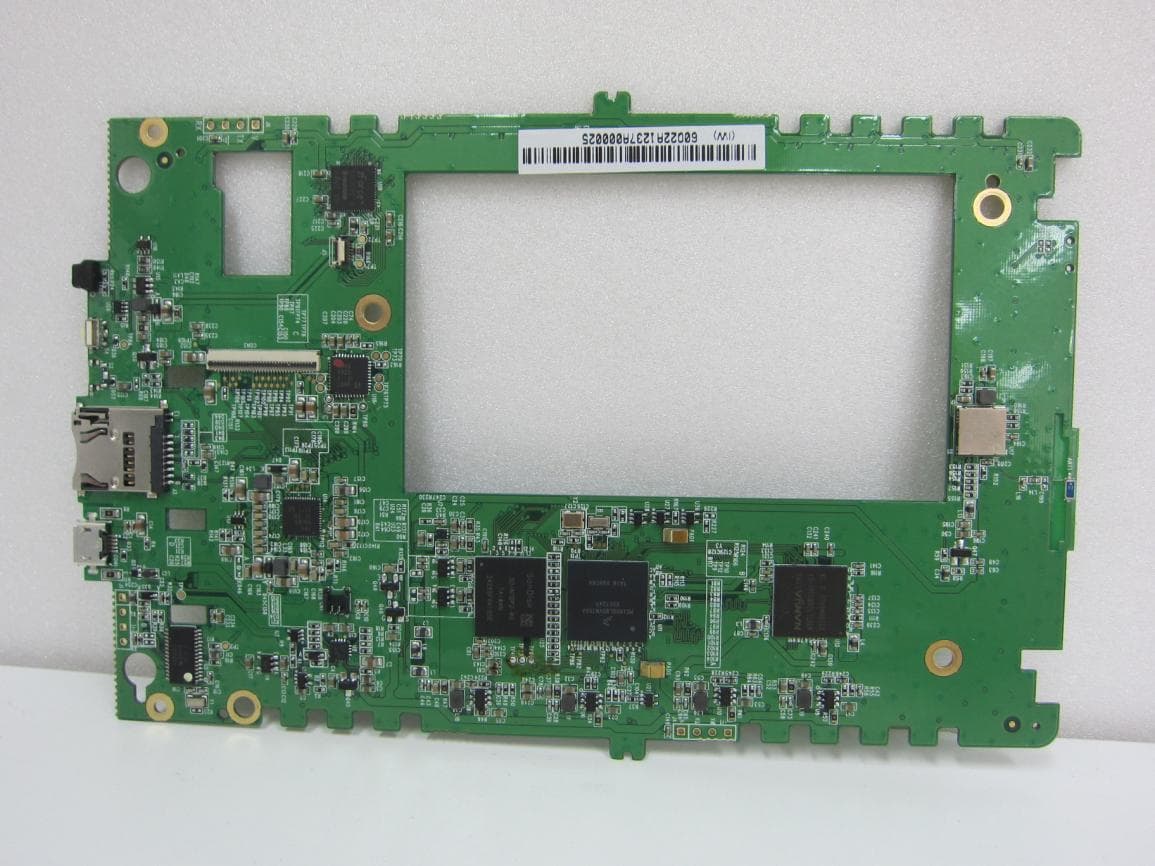
Click to zoom
Application Details
- Equipment Class
- JBC - Part 15 Class B Computing Device/Personal Computer
- Date of Grant
- Nov 07, 2013
- Application Purpose
- Original Equipment
- Date of Application
- Nov 07, 2013
- Equipment Note
- TABLET PC
- Country
- South Korea
Documents & Files
Document Text
Text extracted from the exhibit documents filed with the FCC. Open a document above to read the original.
Users Manual
TABLET COMPUTER User Guide KEPH Contents 01 Get started WiFi connection Brightness adjustment Screensaver & Charging 02 How to use content 03 Setting 04 Warranty 05 A/S WiFi connection ▶ Press ‘Start’ at Welcome screen Device is turned off. Press power button for 2 second to turn on. Press ‘start’ at welcome screen to move to the next. ▶ WiFi connection Find available WiFi access point and connect the device with password. WiFi icon shows up in status bar. After WiFi connection, the device is allowed to be registered and used. Brightness adjustment ▶ Brightness adjustment Light is turn on/off at ‘조명 설정’. Brightness is adjusted from 0% to 100%. Light is also turned on/off with pressing home button for 2~3 sec. ▶ Quick setting Quick setting is available when status bar get pressed at viewer or shelf screen. WiFi and light is turned on/off with Quick setting. Using light gets battery life shorter. Screensaver & Charging ▶ Sleep mode The device goes into sleep mode when it has not been used for 5 minutes. Press power button shortly to wake the device up. Time period for entering sleep mode is selected at '설정>스크린세 이버 설정' after pressing home button. ▶ Battery charging When battery is less than 20%, screen of charging notice pops up. When it is less than 7%, the device stops working and needs charging. Battery lasts longer when WiFi and light are disable. How to use content ▶ Downloading Press 'download' while WiFi connected. The first page appears after completing download. Contents downloaded on the device are always available regardless of WiFi connection. ▶ Setting Press '설정' on top and move to setting menu. According to user account of designated bookstore, 5 devices are managed and SNS is available. When authentication of the device is cancelled, all contents downloaded are deleted. Content mangement ▶ Copy/Delete Press ‘편집’ on top to delete downloaded content. Delete is available only for downloaded contents. Downloaded content is moveable to user made folder. Viewer ▶ Viewer guide page When viewer is executed for the first time, viewer opens the viewer guide page. The viewer guide page provides explanation on functions and touch area of viewer. Choose ‘다음부터 보지 않기’ if the viewer guide page is not needed any more. ▶ Page turn Touch right/left area or using slide bar. Choose menu bar on top and then press slide on bottom and move right/left. Use content list icon of menu bar on top to move required page. Viewer ▶ Font The viewer provides customized reading environment with various options for font size, font type, line interval, space. Choose ‘원본 스타일 유지’ to return to default setting values. Values except font size are not changeable. ▶ Selecting hand to use Choose preferred touch frame according to using hand at '터치 영 역 설정‘. Default is ‘기본’. Touch right side to move to the next page or touch left side to move to the previous page. Choose '왼손잡이용‘ for left handed user. Viewer ▶ Dictionary Press word for long and then searching result pops up on top. In case of a homonym or long result, touch pop-up to see more. Click icon( ) to look up word. ▶ Highlight/Memo/Share Press central page area for a long to get high-light/memo enable. Set or not set to see stored high-light/memo list. Setting ▶ User is allowed to set customized reading environment with setting. Press setting menu( ) to enter setting menu list. 와이파이 설정 : connect or disconnect WiFi. 언어 설정 : choose out of Korean / English. 스크린세이버설정 : choose time interval to enter sleep mode. 초기 화면 설정 : choose the first screen out '내서재' or '전자도서관'. 잔상 제거 설정 : choose interval of refresh by page. 조명 설정 : adjust brightness of light. 단말기 관리 : The device is allowed to be upgraded with the latest FW. Warranty KEPH provides one-year limited warranty according to the notice of Fair Trade Commission, under the law of Korea government. To make a warranty claim, please contact your original point of purchase or call Customer Service at +82-2-6271-7791. Your claim gets approved within 7 days and customer service proceeds within 14 days. If device is not defective and you wish return it within 7 days, return device must be approved as new with no scratch or damage and it must include all packing items. If return device is not in that condition, it may be refused to accept and further charged for delivery and stocking fee. ▶ Coverage of limited warranty Within one year from retail purchase, limited warranty service is provided and covers defects under normal consumer use except damage or malfunctions caused by misuse, commercial use, negligence or other external causes. In case of commercial use, the device gets warranty for a half year. The warranty terms were in effect as of the date of your purchase. In case of no proof of retail purchase, actual term were in effect, 3 months after your device was manufactured. Battery part is particularly warranted for a half year. ▶ Exception to limited warranty If device is not defective, it may occur any expense regardless of warranty terms. Please refer to user's manual prior to your claim. 1. Cases of defects and malfunctions caused by misuse. Caused by unauthorized tampering, modification and negligent use Caused by unauthorized access to device's SW and attempt on rooting Attempted to repair by unqualified personnel. Being used unauthorized consumable items, accessories, such as non certificated cheap charger, or quick charger, battery and charging cable, etc. 2. Else cases Caused by natural disaster such as fire, flood and lightning etc. Caused by dead of consumable parts such as battery, memory card, connectors and attached items etc. CE NOTICE TO USERS: Hereby, Korea Electronic Publishing Hub. declares that this CREMA-0610L-B is in compliance with the essential requirements and other relevant provisions of directive 1999/5/EC. FCC NOTICE TO USERS: This device complies with part 15 of the FCC rules. Operation is subject to the following two conditions: (…
Text truncated - open the document above for the full version.
Cover Letter(s)
Korea Electronic Publishing Hub 3F, Hanju Bldg, 76-1, Dongmak-ro, Mapo-gu, Seoul, Korea 121-829 Date: November 05, 2013 Timco Engineering, Inc. 849 N.W. State Road 45 P.O. Box 370 Newberry, Florida 32669 USA LETTER OF AUTHORIZATION We, the undersigned, hereby authorize Harvey Sung of Digital EMC Co., Ltd. to act on our behalf in all manners relating to application for equipment authorization for FCC ID: 2AA5ECREMA0610L including signing of all documents relating to these matters. Any and all acts carried out by Harvey Sung of Digital EMC Co., Ltd. on our behalf shall have the same affect as acts of our own. This authorization is valid until further written notice from Korea Electronic Publishing Hub “I, the undersigned, hereby certify that we are not subject to a denial of federal benefits, that includes FCC benefits, pursuant to Section 5301 of the Anti-Drug Abuse Act of 1988, 21 U.S.C. 853(a).” Sincerely, Youngshin You Team Manager
Cover Letter(s)
Korea Electronic Publishing Hub 3F, Hanju Bldg, 76-1, Dongmak-ro, Mapo-gu, Seoul, Korea 121-829 Date: November 05, 2013 Timco Engineering, Inc. 849 N.W. State Road 45 P.O. Box 370 Newberry, Florida 32669 USA RE: Request of Confidentiality for FCCID: 2AA5ECREMA0610L To Whom It may Concern: Pursuant to Sections 0.457 and 0.459 of the Commission`s Rules(CFR 47), and Section 552 (b) (4) of the Freedom of Information Act, Korea Electronic Publishing Hub hereby requests confidentiality and treatment of certain information accompanying this application. The materials contain trade secrets and proprietary information not customarily released to the public. The public disclosure of these matters might be harmful to the Applicant and provide unjustified benefits to its competitors. We are also hereby request Short-Term Confidentiality for 180 days after the grant as outlined in Public Notice DA 04-1705. This provision will give Korea Electronic Publishing Hub temporary confidentiality of commercially sensitive information prior to product release. The requested permanent and Short-Term Confidential exhibits are listed as follows: PERMANENT & SHORT-TERM CONFIDENTIAL LIST Exhibit Description PERMANENT 1 Block Diagram 2 Operational Description 3 Schematics 4 Part Lists SHORT-TERM 5 External Photos 6 Internal Photos 7 Test-Setup Photos 8 Users Manual The Applicant understands that pursuant to Rule 0.457, disclosure of this application and all accompanying documentations, where applicable, will not be public before the date of the Grant for this application. Sincerely, Youngshin You Team Manager
External Photos
FCCID: 2AA5ECREMA0610L Copyright Ⓒ 2013, Digital EMC Co., Ltd. View 1 FCCID: 2AA5ECREMA0610L Copyright Ⓒ 2013, Digital EMC Co., Ltd. View 2 FCCID: 2AA5ECREMA0610L Copyright Ⓒ 2013, Digital EMC Co., Ltd. View 3 FCCID: 2AA5ECREMA0610L Copyright Ⓒ 2013, Digital EMC Co., Ltd. View 4
ID Label/Location Info
FCC ID: 2AA5ECREMA0610L Copyright Ⓒ 2013, Digital EMC Co., Ltd. FCC ID SAMPLE LABEL & LOCATION LABELLING REQUIREMENTS PER §2.925 The Label shown shall be permanently affixed at a conspicuous location on the device and be readily visible to the user at the time of purchase Label locate rear side - The FCC label shown is representative of the label that will appear on the radio when in production. Other information may also be included on this label.
Internal Photos
FCCID: 2AA5ECREMA0610L Copyright Ⓒ 2013, Digital EMC Co., Ltd. Page 1 / 5 View 1 FCCID: 2AA5ECREMA0610L Copyright Ⓒ 2013, Digital EMC Co., Ltd. Page 2 / 5 View 2 FCCID: 2AA5ECREMA0610L Copyright Ⓒ 2013, Digital EMC Co., Ltd. Page 3 / 5 View 3 FCCID: 2AA5ECREMA0610L Copyright Ⓒ 2013, Digital EMC Co., Ltd. Page 4 / 5 View 4 FCCID: 2AA5ECREMA0610L Copyright Ⓒ 2013, Digital EMC Co., Ltd. Page 5 / 5 View 5
Test Report
TRF-EM-003(00)081218 Copyright ○ c 2013, DIGITAL EMC CO., LTD. Page 2 of 28 FCC ID: 2AA5ECREMA0610L Report No.: DREFCC1310-0292 To t a l 2 8 pages CONTENTS 1. General Remarks ........................................................................................................................ 3 2. Test Laboratory ........................................................................................................................... 3 3. General Information of EUT ....................................................................................................... 4 4. Test Summary ............................................................................................................................. 5 4.1 Applied standards and test results ........................................................................................... 5 4.2 Test environment and conditions ............................................................................................. 5 4.3 Test result Summary ................................................................................................................ 5 5. Test Set-up and operation mode ............................................................................................... 6 5.1 Principle of Configuration Selection ......................................................................................... 6 5.2 Test Operation Mode ............................................................................................................... 6 5.3 Support Equipment Used ......................................................................................................... 6 6. Test Results : Emission .............................................................................................................. 7 6.1 Conducted Disturbance ........................................................................................................... 7 6.2 Radiated Disturbance ............................................................................................................ 12 Appendix 1 ..................................................................................................................................... 26 List of Test and Measurement Instruments ............................................................................. 26 Appendix 2 ..................................................................................................................................... 28 Report Revision History ............................................................................................................ 28 TRF-EM-003(00)081218 Copyright ○ c 2013, DIGITAL EMC CO., LTD. Page 3 of 28 FCC ID: 2AA5ECREMA0610L Report No.: DREFCC1310-0292 To t a l 2 8 pages 1. General Remarks This report contains the result of tests performed by: DIGITAL EMC CO., LTD. Address : 683-3, Yubang-Dong, Cheoin-Gu, Yongin-Si, Gyeonggi-Do, 449-080, Korea http://www.digitalemc.com Tel: +82-31-321-2664 Fax: +82-31-321-1664 2. Test Laboratory Digital EMC Co., Ltd. has been accredited / filed / authorized by the agencies listed in the following table; Certificate Nation Agency Code Mark Accreditation Korea KOLAS 393 ISO/IEC 17025 Site Filing USA FCC 101842 678747 Test Facility list & NSA Data Canada IC 5740A-1 5740A-2 Test Facility list & NSA Data Japan VCCI C-1427 R-1364, R-3385 T-1442, G-338 Test Facility list & NSA Data Certification Korea KC KR0034 Test Facility list & NSA Data Germany TUV ROK1221C ISO/IEC 17025 Quality control in the testing laboratory is implemented as per ISO/IEC 17025 which is the “General requirements for the competent of calibration and testing laboratory”. TRF-EM-003(00)081218 Copyright ○ c 2013, DIGITAL EMC CO., LTD. Page 4 of 28 FCC ID: 2AA5ECREMA0610L Report No.: DREFCC1310-0292 To t a l 2 8 pages 3. General Information of EUT Kind of Equipment Tablet PC Model Name CREMA-0610L-B Add Model Name CREMA-0610L-W Serial No. NONE Type of Sample Tested Pre-Production Clock Frequency 1 GHz Wifi 802.11 b/g/n SIP module Supplied Power for Test 120 V, 60 Hz Applicant Korea Electronic Publishing Hub 3F, Hanju Bldg, 76-1, Dongmak-ro, Mapo-gu, Seoul, Korea 121-829 Manufacturer NETRONIX,INC No 945, Boai St, Jubei City, Hsinchu, Taiwan, 30265 R.O.C Related Submittal(s) / Grant(s) Original submittal only. TRF-EM-003(00)081218 Copyright ○ c 2013, DIGITAL EMC CO., LTD. Page 5 of 28 FCC ID: 2AA5ECREMA0610L Report No.: DREFCC1310-0292 To t a l 2 8 pages 4. Test Summary 4.1 Applied standards and test results Test Items Applied Standards Results Conducted Disturbance ANSI C63.4:2003 C Radiated Disturbance ANSI C63.4:2003 C C=Comply N/C=Not Comply N/T=Not Tested N/A=Not Applicable The data in this test report are traceable to the national or international standards. 4.2 Test environment and conditions Test Items Test date (MM-DD) Temp ()°C Humidity (% R.H.) Conducted Disturbance 09-11 25 44 Radiated Disturbance 09-09 24 55 4.3 Test result Summary (1) Conducted Emission Frequency [MHz] Phase Result [dBμV] Detector Limit [dBμV] Margin [dB] 0.15555 L1 54.5 Quasi-Peak 65.7 11.2 (2) Radiated Emission Frequency [MHz] Pol. Result [dB(μV/m)] Detector Limit [dB(μV/m)] Margin [dB] 5544.881 V 40.4 Average-Peak 54.0 13.6 TRF-EM-003(00)081218 Copyright ○ c 2013, DIGITAL EMC CO., LTD. Page 6 of 28 FCC ID: 2AA5ECREMA0610L Report No.: DREFCC1310-0292 To t a l 2 8 pages 5. Test Set-up and operation mode 5.1 Principle of Configuration Selection Emission : The equipment under test (EUT) was configured to measure its highest possible radiation level. The test modes were adapted accordingly in reference to the instructions for use. 5.2 Test Operation Mode - CHARGING + PLAY MODE - PC LINK MODE 5.3 Support Equipment Used Unit Model No. Serial No. Manufacturer CABLE BackshellFCC ID Connect type Length (m) shield NOTE BOOK 110-4103TU 5CD2090V98 HP DC IN USB 1.4 1.8 Non-shield Non-shield Plastic Metal DOC ADAPTOR HSTNN-CA18 F13761206288812HP POWER 1.6 Non-shield P…
Text truncated - open the document above for the full version.
Test Setup Photos
FCC ID : 2AA5ECREMA0610L Copyright © 2013, DIGITAL EMC Co., Ltd. CE TEST PICTURE FCC ID : 2AA5ECREMA0610L Copyright © 2013, DIGITAL EMC Co., Ltd. RE TEST PICTURE < 30 MHz ~ 1 GHz > FCC ID : 2AA5ECREMA0610L Copyright © 2013, DIGITAL EMC Co., Ltd. < (1 ~ 6) GHz >
Contact Information
Applicant
Youngshin You(Team Manager)
Test Firm
DT&C Co.,Changho Lee
Technical Specifications
| # | Rule Parts | Frequency Range | Power Output |
|---|---|---|---|
| 1 | 15B | - | - |