Text extracted from the exhibit documents filed with the FCC. Open a document above to read the original.
User Manual Thismanualcontainsimportantsafetyprecautionsandinformationofcorrectuse.Pleasebesuretoreadthismanualcarefullybeforeusesoastoavoidanyaccidents. Donotplacetheproductinhot,wetordustyenvironment,especiallyinsummer,donotleavetheproductinsideacarwithallwindowsclosed.Avoiddropping,impactingorshakingtheproductviolently,otherwiseitmaycausedamagesormalfunctions.Selectapropervolumetoavoidearproblemwhenusingearphones.Besuretousetheprovidedchargersandaccessoriesinthepackage.Besuretochargetheproductwhenthefollowingsituationstakeplace,-Thebatteryiconshowslowe r o r empty. -Operationke y sdonotrespondproperl y . -Thedeviceshows onthetoprightcorner. 1. Power On/Off2 . Desktop After turning on the device, desktop displays with shortcut icons and arrow panel at the right side 3 . Standby mode(Screen off mode) / Unlock the screen After standby mode o , slide the lock icon in order to unlock the screen. 4 . System settings On the desktop, press menu button and select system settings. Press System Settings 1.Wireless &networks Set up each setting as you like. Wi-Fi settings - Press Wi-Fi settings, then the device will automatically search the available Wi-Fi signals. Select the networkyou want to connect with. 2.Data usagePageSlide mobile data switch to select open or closethe flow usage. 3. Sound 4. Display 5. Storage Set up each setting as you like. Check device memory and microSD card status.Unmount SD card – Unmount the SD card forsafe removal. 6. Battery 7. Apps Check battery usage status. Manage downloaded or running applications. DownloadedAll installed application are listing. Page 11 8. Account&syncCreate your account. After connecting Wi-Fi network, the e-mailing system synchronizesyour account with the device. Emails are automatically downloaded into the device.9. Location servicesGoogle’s location service - Let apps use data from sources such as WiFi and mobile networksto determine your approximate location 10. SecurityScreen lock – Protect your device from unauthorized use by creating a personal screenunlock pattern. Make passwords visible – Show password as you type. Unknown sources - If you want to allow installation of non-Market Applications, Press Unknown sources and presses OK. nstall from SD card – Install encrypted certi cates from SD card. 11. Language &inputLanguage – Choose your preferable language.Keyboard & input method – Change keyboard & keyboard settings.On Language & input settings, if you need other languages besides English on keyboard,press the relevant keyboard and enter the chosen Keyboard settings, select Keyboards,press the language you need. 12. Backup &Reset13. Date&timeSet date & time and format14. AccessibilitySet date & time and format15. Developer optionsSet options for application development16. AbouttabletSee status, legal information, ETC Page 16 How to install Applications(.apk file) into the device Method1.1. Connect the device with internet. See above [1.Wireless & networks] in orde r to connect internet. 2. Run “Get j a r ” and search the applications y ou want to install. 3. Follow the instruction on the screen fo r installation. Method2.3. Connect the device with you r computer. See above [How to connect/disconnect the device with/from the computer.] 5. Run “File browse r ” and nd .apk le that was copied into the device. NoteYou may only download adult applications if you are at least 18 years of age, or at least the age of majority in the jurisdiction where you reside or from whichyou download adult applications. If you do not meet these requirements, then you do not have permission to download adult applications.In case of any problems including legal issues from the breach by end-user’s own decision, the manufacturer shall not be responsible. How to make desktop icons Press the upper right side icon of desktop, the pop-up displays. ShortcutsLong press your desired APK icon andput it on the desktop. WidgetsPress Widgets and press your desired icon toput it on the desktop.WallpaperLong press the desktop, press Wallpapers andselect one of categories of wallpaper.Select one you desire and press Set wallpaper Specification os Android 4.2 ICS CPU Dual Cortex-A7 Core SDRAM DDR3 1G ( 3D accelerato r possible fo r 4D g ames ) Displa y 9" TFT 800*480 Capacitive touch panel Multi-touchscreen Yes : 5 point multi-touch 4 GB IO PORTS A udio port 3.5ø earphones USB port 1 x 5pin micro USB port (support USB host andOTG) DC port 5V, 2 A Micro SD Micro SD card HDMI port OTG port Same with USB portButton Power, VOL-, VOL+, reset, Speaker 1.5W, Frequency response : 20Hz – 20k Hz, N/S :>85% G-senso r Yes Camera 0.3M pixel ( front ) +0.3M pixel ( back ) Wi-Fi 802.11b/ g /n Powe r A dapto r 5V -2 A Batter y 3.7V Li-Pol y me r Charging time bycharge r approx. 4~8hours Page 25 FCCSTATEMENT:This device complies with Part 15 of the FCC Rules. Operation is subject to the following twoconditions:(1) This device may not cause harmful interference, and(2) This device must accept any interference received, including interference that may causeundesired operation.Warning : Changes or modifications not expressly approved by the party responsible for compliance could void the user's authority to operate the equipment. NOTE: This equipment has been tested and found to comply with the limits for a Class B digitaldevice, pursuant to Part 15 of the FCC Rules. These limits are designed to provide reasonableprotection against harmful interference in a residential installation.This equipment generates uses and can radiate radio frequency energy and, if not installed andused in accordance with the instructions, may cause harmful interference to radio communications.However, there is no guarantee that interference will not occur in a particular installation. If thisequipment does cause harmful interference to radio or television reception, which can bedetermined by turning the equipment off and on, the user is encouraged to try to correct theinterference by one or more of the following m…
Text truncated - open the document above for the full version.
ASA P&E(Shenzhen) Co.,Ltd. FCC Declaration of Conformity Number: CF302 Version: V01 Date: 01-02-2010 DoC We, (legal entity within the US, such as importer or manufacturer) Company Name: ASA P&E(Shenzhen) Co.,Ltd. Address: Honghu Road, Yanchuan, Song gang, Bao'an District,Shenzhen City,China Postal/Zip:City: ShenZhen State/Province:Country: China Contact Person:Mr.Ms. Name: Tianling Xie Function: R&D Manger Email: [email protected] Web:Phone: 0755- 26718388- 621 Fax : 0755- 26718538 declare for the equipment identified by: Product Description Tablet PC Type or Model(s) QD0904 Tradename or Brand(s)N/A that: This device complies with Part 15 of the FCC Rules. Operation is subject to the following two conditions: (1) this device may not cause harmful interference, and (2) this device must accept any interference received, including interference that may cause undesired operation. The following documents are subject to this declaration: Test Firm or Laboratory:Test Report Number:Date of issue: Interocean EMC Technology Corp. TBDTBD No. 5-2, Lin 1, Tin-Fu, Lin-Kou Dist., New Taipei, Taiwan Designation No. TW1020 Attestation: City and Country:Date:Name: (this must be a person) Function:Signature: (or official company stamp) Shenzhen, China2013-09-03 Tianling XieR&D Manger
ASA P&E(Shenzhen) Co.,Ltd. FCC Confidentiality Request Number: CF303 Version: V05 Date: 21-05-2012 (Permanent or also called long term confidentiality is the normal method to keep certain docuements confidential, and may apply to schematics, block diagrams, operational description and bill of materials.) To: Federal Communications Commission Equipment Authorization Branch 7435 Oakland Mills Road Columbia, MD 21046 Pursuant to 47 CFR Section 0.459(a) & (b), we, (the applicant / grantee) Company name ASA P&E(Shenzhen) Co.,Ltd. Address Honghu Road, Yanchuan, Song gang, Bao'an District City Shenzhen, Guangdong CountryChina request for this certification filing under: Grantee CodeProduct Number FCC ID:2AAXI-QD0904 to maintain permanent confidentiality for the following documents submitted within this application: (please cross what is applicable, or add other documents, provide the file name and description) ExhibitFile NameDescription √ Operational DescriptionOperational Description.pdfexplaining the functioning of the block diagram √ Block DiagramsBlock Diagram.pdfshowing the systematic building blocks of the EUT √ Schematics DiagramsSchematics.pdfshowing components, their values and interconnection Bill of MaterialsList of components used on the PCB’s of the EUT Above materials crossed contain secrets, proprietary and technical information, which would customarily be guarded from competitors under 47 CFR, section 0.457(d)(2). Disclosure or publication or any portion of this company confidential material to other parties could cause substantial competitive harm and provide unjustified benefits for competitors. We understand that pursuant to 47 CFR section 0.457(d)(1)(ii) disclosure of the applicant and all accompanying documentation will not be made before the date of the grant. The documents indicated as confidential above, are not publicly available elsewhere. Attestation: City and Country:Date:Name: (this must be a person) Function:Signature: (or official company stamp) Shenzhen, China2013-09-03Tianling XieR&D Manager
ASA P&E(Shenzhen) Co.,Ltd. FCC Authorization Letter Number: CF304 Version: V03 Date: 01-08-2011 We, (the approval holder) Company name ASA P&E(Shenzhen) Co.,Ltd. Address Honghu Road, Yanchuan, Song gang, Bao'an District City Shenzhen, Guangdong CountryChina declare that the following representative (agent): Name (person)Ouyang Haibao Company nameCoffee-T Electronics Technology Co Ltd AddressUnit 12, 8F Honghai Building, Qianhai Road, Nanshan CityShenzhen CountryChina is hereby authorized to apply the following equipment for certification on our behalf: Product DescriptionTablet PC Type or Model(s)QD0904 Tradename or Brand(s)N.A. We also authorize Teleconformity (Mr. M. Koop, Manager Certification, Address: Rietven 31, 7534NH Enschede, the Netherlands) to apply and sign this application for certification, registration or filing on our behalf (as representative agent or certifier). Attestation: City and Country:Date:Name: (this must be a person) Function:Signature: (or official company stamp) Shenzhen, China2013-09-03Tianling XieR&D Manager
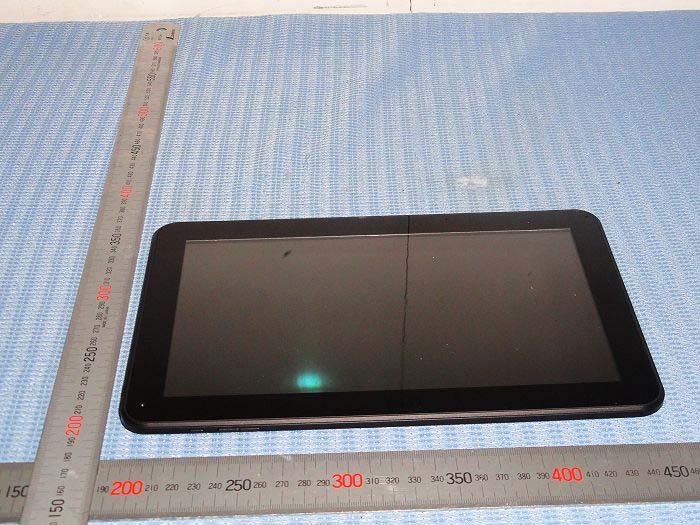
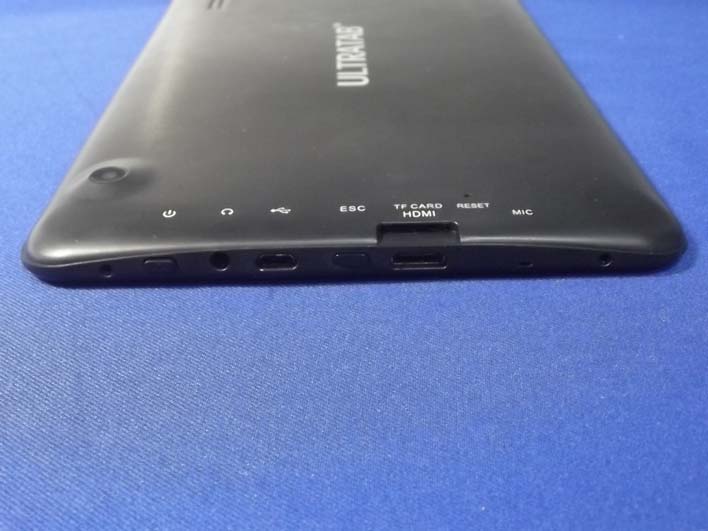
Figure 1 The EUT-Front View Figure 2 The EUT-Back View Figure 3 The EUT-Flank View
Label Location On EUT
Model Name:Tablet PC Model No.:QD0904 FCC ID:2AAXI-QD0904 This device complies with Part 15 of the FCC Rules. Operation is subject to the following two conditions: (1) This device may not cause harmful interference, and (2) This device must accept any interference received, including interference that may cause undesired operation.
Figure 4 The EUT-Inside View Figure 5 The EUT-Inside View Figure 6 PCB of the EUT Figure 7 WIFI Module Figure 8 WIFIantenna
FCC RF Exposure FCC ID: 2AAXI-QD0904 Frequency: 2412-2462 MHz / 2422-2452 MHz Modulation: DSSS/OFDM Mid-Channel: 2.437 GHz Mid-Channel Peak Power, Conducted, highest valud measured: 9.47 dBm == 8.85 mW Antenna Gain: G = 0 dBi Peak, Radiated = 9.47 dBm + 0 dBi = 9.47 dBm = 8.85 mW SAR Test Exclusion Thresholds specified in KDB447498 Appendix A: Evaluation: The Calculated Radiated Peak output power is taken as worst case, and this emission level is 4.19 mW which is under the maximum allowed emission level at even the closest distance for 2.4G device specified in this table. Conclusion: The emitted power appears to be below the required limit, so PASS.
FCC ID: 2AAXI-QD0904 Page 1 of 53 Report No. CTE13IR-018F Unit 12, 8F Honghai Building,Qianhai Road,Nanshan,Shenzhen,China Tel:+86-755-86622903(50 Lines) Fax:+86-755-86622819 Http://www.szkht.com.cn FCC TEST REPORT for ASA P&E(Shenzhen) Co.,Ltd. Tablet PC Model No.:QD0904 Report Number : CTE13IR-018F Date of Test:Aug.28~Sep 03, 2013 Date of Report:Sep 03, 2013 Prepare dfor: Shenzhen Peilin Sports Technology Company Ltd. Address: No.28, Industrial Northdistrict of XinHe Community, Fuyong Town, BaoAn District, Shenzhen, China. 518103 PreparedBy: Coffee-T Electronics Technology Co Ltd Address: Unit 12, 8F Honghai Building,Qianhai Road,Nanshan,Shenzhen,China +86-755-86622903 +86-755-86622819 FCC ID: 2AAXI-QD0904 Page 2 of 53 Report No. CTE13IR-018F Unit 12, 8F Honghai Building,Qianhai Road,Nanshan,Shenzhen,China Tel:+86-755-86622903(50 Lines) Fax:+86-755-86622819 Http://www.szkht.com.cn TABLE OF CONTENT Description Page Test Report 1. GENERAL INFORMATION..........................................................................................................4 1.1. Description of Device (EUT).................................................................................................................... 4 1.2. Description of Test Facility.......................................................................................................................5 1.3. Measurement Uncertainty......................................................................................................................... 5 3. TEST METHODOLOGY................................................................................................................6 3.1. Summary of Test Results.......................................................................................................................... 6 3.2. Description of Test Modes........................................................................................................................6 3.3. List of channels:........................................................................................................................................ 7 4. CONDUCTED EMISSION TEST.................................................................................................. 8 4.1. Block Diagram of Test Setup....................................................................................................................8 4.2. Power Line Conducted Emission Measurement Limits (15.207)............................................................. 8 4.3. Configuration of EUT on Measurement....................................................................................................8 4.4. Operating Condition of EUT.....................................................................................................................8 4.5. Test Procedure...........................................................................................................................................9 4.6. Test equipment..........................................................................................................................................9 4.7. Power Line Conducted Emission Measurement Results...........................................................................9 5. FCC PART 15.247 REQUIREMENTS FOR DSSS & OFDM MODULATION..................... 12 5.1 Test Setup.................................................................................................................................................12 5.2 6dB Bandwidth.........................................................................................................................................12 5.3 Maximum Peak output power test............................................................................................................20 5.4 Band Edges Measurement........................................................................................................................28 5.5 Peak Power Spectral Density................................................................................................................... 37 5.6 Radiated Emissions.................................................................................................................................. 45 6. PHOTOGRAPH............................................................................................................................. 52 6.1. Photo of Conducted Emission Measurement.......................................................................................... 52 6.2. Photo of Radiation Emission Test...........................................................................................................52 AppendixI(2Pages) AppendixII(3 Pages) FCC ID: 2AAXI-QD0904 Page 3 of 53 Report No. CTE13IR-018F Unit 12, 8F Honghai Building,Qianhai Road,Nanshan,Shenzhen,China Tel:+86-755-86622903(50 Lines) Fax:+86-755-86622819 Http://www.szkht.com.cn TEST REPORT Applicant: ASA P&E(Shenzhen) Co.,Ltd. Manufacturer: ASA P&E(Shenzhen) Co.,Ltd. EUT: Tablet PC Model No.: QD0904 Serial No.: N/A Rating: DC 5V Trade Mark: N/A Measurement Procedure Used: FCC Part15 Subpart C, Paragraph 15.247: 2011 The device described above is tested by Coffee-T Electronics Technology Co Ltd to determine the maximum emission levels emanating from the device and the severe levels of the device can endure and its performance criterion. The measurement results are contained in this test report and Coffee-T Electronics Technology Co Ltd is assumed full of responsibility for the accuracy and completeness of these measurements. Also, this report shows that the EUT (Equipment Under Test) is technically compliant with the FCC Part 15 Subpart C requirements. This report applies to above tested sample only and shall not be reproduced in part without written approval of Coffee-T Electronics Technology Co Ltd. Date of Test :Au g.28~Sep 03, 2013 Preparedby: (Tested Engineer / Angel wu) Reviewer: (Project Manager /Jason Chen ) App…
Text truncated - open the document above for the full version.
1. Photo of Radiated Emission Test 2. Photo of Conduction Test
| # | Rule Parts | Frequency Range | Power Output |
|---|---|---|---|
| 1 | 15C | 2.41 GHz - 2.46 GHz | 8.90 mW |

Tablet PC
Equipment Class
DTS - Digital Transmission System