2AB9F-ID2WIFI SPEAKER
AIDE INTERNATIONAL LIMITED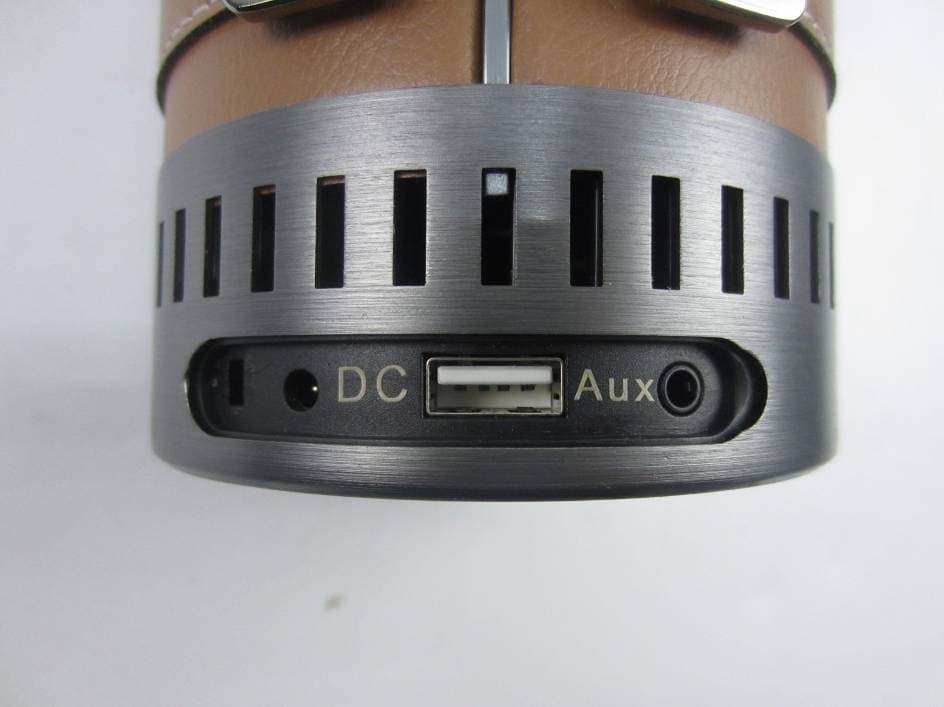
Click to zoom
Application Details
- Equipment Class
- DXX - Part 15 Low Power Communication Device Transmitter
- Date of Grant
- Jan 15, 2015
- Application Purpose
- Original Equipment
- Date of Application
- Jan 15, 2015
- Equipment Note
- WIFI SPEAKER
- Frequency Range
- 2402.00000000 - 2480.00000000
- Company
- AIDE INTERNATIONAL LIMITED
- Country
- China
Documents & Files
Document Text
Text extracted from the exhibit documents filed with the FCC. Open a document above to read the original.
Users Manual
1 产品清单 ID2 + 电源适配器 + AUX音频线 + 说明书 + 保修卡+肩带 按钮: ① 电话免提或暂停(仅限于蓝牙模式) ; 长按 Reset功能 ② 长按3秒开关机;短按电池容量检测 ③ 音量+ ④ 音量- ⑤ 电源充电端口 ⑥ USB端口 ⑦ AUX端口 指示灯: 模式灯 WI-FI模式 蓝色闪烁:WI- FI直连模式 蓝色常亮:WI- FI路由模式 红色闪烁:WI- FI故障 蓝牙模式 白色快闪:蓝 牙自动匹配模 式 白色慢闪:蓝 牙搜索状态 白色常亮:蓝 牙连接成功 AUX模式 绿色常亮 2 使用方法 第一步:取出ID2及其配件。长按3秒开机,如果发现电量不足,请先使用电源适配器连接使用 第二步:使用ID2,按MODE键选择音源输入Wi-Fi->蓝牙->AUX模式,连接后播放音乐。 选择WI- FI模式 按MODE按钮,MODE灯显示红灯闪烁3-5秒后,变成蓝灯闪烁,进入WI-FI模式 提示:请避免在比较复杂的公共Wi-Fi网络环境下使用(如办公室,机场,酒店等),将可能会导 致连接不稳定(播放卡顿,连接失败等) ID2无线WI-FI播放音乐,共有2种模式:路由模式(标准模式)和直连模式(可选模式)。 路由模式(标准模式):该模式下MODE灯显示为蓝色常亮,在有Wi- Fi路由网络环境下推荐使用 路由模式,此模式下既可播放本地音乐也可播放互联网在线音乐。路由模式设置成功后,同一个 Wi- Fi网络下的设备(如智能手机、平板电脑,PC,Mac等)可以直接使用,无需重复设置。 直连模式(可选模式):该模式下MODE灯显示为蓝色闪烁 ,在没有Wi-Fi路由环境下请使用直连模式,点对点连接成功后可直接无线播放音乐(播放互联网 在线音乐需要使用蜂窝移动网络数据流量) 使用路由模式(标准模式) 1. 下载ID MUSIC音乐操作软件. iOS用户:在App Store搜索“ID MUSIC” 并下载; Android用户:在Google play搜索“ID MUSIC”并下载; 3 Mac OS 用户: 可以在通过手机设置成功的路由模式下使用,或者到网站www.idoove.com下载操 作指南,设置成功以后,可通过AirPlay操作实现无线播放音乐。 Windows PC用户:请前往网站www.idoove.com下载专用软件进行音乐播放 1. 根据软件提示或者操作指南,一步步完成设置。 使用直连模式(可选模式) 打开设备(如智能手机,平板电脑,PC, Mac等)进入Wi-Fi设置选项,开启Wi-Fi并连接Wi-Fi 信号“ ID MUSIC-XXXX”. 连接成功后,不同操作系统用户按以下步骤操作: 备注:iOS设备连接成功后,在Wi-Fi信号图标前有“√”符号,在状态栏上不会有Wi- Fi图标 显示 iOS用户:直接使用AirPlay@操作 iOS 7.0以上用户:用手指从下往上轻滑屏幕,打开 AirPlay, 选择ID MUSIC即可实现无线播放音乐。 OS 7.0以下用户:双击home键,在多任务栏里面最左边找到 AirPlay图标,选择ID MUSIC即可实现无线播放音乐。 提示:在无线播放音乐的过程中,请优先调节手机或者平板音量至 较大 iOS 7.0以上用戶:用手指從下往上輕滑螢幕,打開AirPlay, 選擇ID MUSIC即可實現無線播放音樂。 4 苹果用户推荐使用APP: 百度音乐,QQ音乐,豆瓣FM,酷狗音乐,虾米音乐,多米音乐,酷我音乐,虾米音乐,多米音 乐,音悦台,天天动听等。 Android用户:请使用手机或平板自带的音乐播放软件中的推送按钮即可实现无线播放音乐 也可以使用第三方DLNA@音乐播放软件,推荐软件如下图,请在Google play商店或者其他 Android应用市场搜索下载 5 提示:因不同手机和软件版本差异,若自带的播放软件无法使用,请选择第三方DLNA音乐播放软 件 Mac OS 用户: For Mac OS users: 使用iTunes推送音乐, 使用其他音乐播放软件时,可通过AirPlay操作实现无线播放音乐。 Windows PC用户: For Windows PC users: 请到IDOOVE官方网站 www.idoove.com下载专用软件进行音乐播放。 选择蓝牙模式 按MODE按键,MODE灯显示白色快闪,进入蓝牙连 接模式 打开设备的蓝牙设置,连接到IDOOVE- MUSIC成功后,打开播放器播放音乐 (iPhone为例) 选择AUX模式 按MODE按键,MODE灯显示绿色常亮, 进入AUX模式 设备(如智能手机,平板电脑,PC, Mac 等)通过AUX线连接到音箱,打开设备播放器播放 音乐 6 备注:关于ID2更多产品信息及相关问题,请登陆www.idoove.com了解 AirPlay@:请到apple 官网http://www.apple.com/airplay/进行了解 DLNA@:请到http://en.wikipedia.org/wiki/DLNA进行了解 充电功能:使用USB输出端口可以给您的平板或手机充电 感谢您选择我们的ID 2 WIFI音箱。 美好生活,美妙音乐,为您所享。 7 Product list ID2 + power adaptor + AUX audio cable+ setup guide + warranty card+ leather PU strap Button Functions: ① Answer phone call or Pause ( Only in Bluetooth mode) & RESET ② Press and hold down for 3 seconds to power ON/OFF. ③ Volume + ④ Volume - ⑤ Adapter charging interface ⑥ USB interface ⑦ AUX interface LED: MODE LED Wi-Fi Mode Blue flashing: Wi-Fi Direct Mode Blue On:Wi- Fi Router Mode Red flashing: Failed connection Bluetooth Mode White On: Bluetooth connection OK White slow flashing: Bluetooth waiting searching White quick flashing: Bluetooth auto pair the latest device AUX Mode Green On: Aux on 8 Setup Guide Step 1: Take out ID2 and accessories, press and hold down the power button for 3 seconds to turn the speaker on. The LED light will be blue ( Default as W i-Fi mode) Step 2: Connection Wi-Fi Mode Press Power button - the LED light will be BLUE flashing; it is now in Wi-Fi Mode. Please Note: Avoid using the speaker in a complicated public Wi-Fi network environment (e.g., office, airport and hotel), as this may lead to an unstable connection (play buffer, connection failure, etc.) Router Mode (Standard Mode).Router Mode is recommended in a Wi-Fi environment, in which both local and online music can be played. Once Router Mode is successfully set, all devices (e.g., your smart phone, tablet PC, PC, MAC, etc.) within the same Wi-Fi network can directly share the network without having to repeatedly log in and out. 1. Download the ID Music app. For iOS users: Search ID Music in App Store. For Android users: Search ID Music in Google Play. 9 For Mac OS and Windows PC users: Please visit www.idoove.com to download setup instructions. 2. Complete Router Mode setup by following the step-by-step prompts in ID Music App Direct Mode (Optional Mode): Boot your device (smart phone, tablet PC, PC, MAC, etc.) and then enter W i-Fi settings. Enable Wi-Fi and connect to the network marked as "ID MUSIC". After connection, users with different operating systems may operate according to the steps below: Please note: After the successful connection of iOS device, a symbol “√” will appear in front of Wi-Fi signal icon and Wi-Fi icon will no longer appear on the status bar. For iOS users: You can operate directly with AirPlay For users with system version above iOS 7.0: To play music wirelessly, slide the screen from bottom to top with your finger to enable AirPlay and then select ID MUSIC. For users with system version below iOS 7.0: To play music wirelessly, double click Home button and find the AirPlay icon in the leftmost multitask bar, and then select ID MUSIC. Please note: Turn up the mobile phone or tablet PC in priority when wirelessly playing music. 10 For Android users: Please use the „Cast‟ button in the built-in music jukebox of your smart phone or tablet to wirelessly play your music. You may also use a third party DLNA music player. The following recommended players can be downloaded in the Google Play store or other Android application markets. Please note: If the built-in media player doesn't work due to the difference in phones or application versions, please use a third party DLNA music player. For Mac OS users: Use iTunes to push music, When using other music players, you may use AirPlay to wireleslly play your music. 11 For Windows PC users:Please go to IDOOVE‟s official website www.idoove.comto download a dedicated music player. Bluetooth Mode: Press power button-the Led will be W hite and Bluetooth Mode is now on. In your device settings, turn Bluetooth ON. Connect to „ID MUSIC‟ open your music player and press play. (iPhone as example) AUX Mode: Connect your device to the speaker with the aux cable, open your player and play your music. AirPlay@: Please go to Apple‟s official website http://www.apple.com/airplay for more informatio…
Text truncated - open the document above for the full version.
Cover Letter(s)
Agent Authorization Letter 2014-12-29 MET Laboratories, Inc. 914 West Patapsco Avenue Baltimore, MD 21230 RE: LETTER OF AGENT AUTHORIZATION To Whom It May Concern: We, the undersigned, hereby authorize Most Technology Service Co., Ltd. to act on our behalf in all matters relating to application for equipment authorization, including the signing of all documents relating to these matters. We also hereby certify that no party to the application authorized hereunder is subject to the denial of benefits, including FCC benefits, pursuant to Section 5301 of the Anti-Drug Abuse Act of 1988, 21 U.S.C.853(a). This agreement expires one year from the current date. Sincerely, Name: Jessica Xiao Position: Manager Company Name: AIDE INTERNATIONAL LIMITED Address: 8J,Block B, Central Avenue Building, Bao Yuan Rd, Bao an District, Shenzhen E-Mail: [email protected]
Cover Letter(s)
Long Term Confidentiality Request Letter 2014-12-29 MET Laboratories, Inc. 914 West Patapsco Avenue Baltimore, MD 21230 RE: CONFIDENTIALITY REQUEST FOR (WIFI SPEAKER / ID2, IDX(X=1~9)) To Whom It May Concern: This letter serves as an official request for confidentiality under sections 0.457 and 0.459 of CFR 47. We have requested that the - e.g. Block diagram - e.g. SCH - e.g. Operational Description required to be submitted with this application be permanently withheld from public review. SPECIFY REASON FOR REQUEST (i.e. the above documents are company proprietary information that could never get into the possession of your competition). Please contact me if there is any information you may need. Sincerely, Name: Jessica Xiao Position: Manager Company Name: AIDE INTERNATIONAL LIMITED Address: 8J,Block B, Central Avenue Building, Bao Yuan Rd, Bao an District, Shenzhen E-Mail: [email protected]
Cover Letter(s)
Model difference letter Dec. 24, 2014 Dear MET Reviewer, This is a new Application from AIDE INTERNATIONAL LIMITED ID2 and IDX(X=1~9) are identical in interior structure, electrical circuits and components, Only different in appearance colour. Thank you for your cooperation! Yours sincerely, Signatory: Name: Jessica Xiao Position: Manager Company Name: AIDE INTERNATIONAL LIMITED Address: 8J,Block B, Central Avenue Building, Bao Yuan Rd, Bao an District, Shenzhen E-Mail: [email protected]
External Photos
Model No.: ID2 FRONT VIEW OF SAMPLE BACK VIEW OF SAMPLE Model No.: ID2 UP VIEW OF SAMPLE DOWN VIEW OF SAMPLE Model No.: ID2 LEFT VIEW OF SAMPLE RIGHT VIEW OF SAMPLE Model No.: ID2 EXTERIOR VIEW OF SAMPLE PORT VIEW OF SAMPLE
ID Label/Location Info
FCC Label Location
Internal Photos
Model No: ID2 Page 1 of 9 INTERNAL PHOTO OF SAMPLE – 1 INTERNAL PHOTO OF SAMPLE – 2 Model No: ID2 Page 2 of 9 INTERNAL PHOTO OF SAMPLE – 3 INTERNAL PHOTO OF SAMPLE – 4 Model No: ID2 Page 3 of 9 INTERNAL PHOTO OF SAMPLE – 5 INTERNAL PHOTO OF SAMPLE – 6 Model No: ID2 Page 4 of 9 INTERNAL PHOTO OF SAMPLE – 7 INTERNAL PHOTO OF SAMPLE – 8 Model No: ID2 Page 5 of 9 INTERNAL PHOTO OF SAMPLE – 9 INTERNAL PHOTO OF SAMPLE – 10 Model No: ID2 Page 6 of 9 INTERNAL PHOTO OF SAMPLE – 11 INTERNAL PHOTO OF SAMPLE – 12 Model No: ID2 Page 7 of 9 INTERNAL PHOTO OF SAMPLE – 13 INTERNAL PHOTO OF SAMPLE – 14 Model No: ID2 Page 8 of 9 INTERNAL PHOTO OF SAMPLE – 15 INTERNAL PHOTO OF SAMPLE – 16 Model No: ID2 Page 9 of 9 INTERNAL PHOTO OF SAMPLE – 17
RF Exposure Info
FCC ID : 2AB9F-ID2 WLAN(Portable device) According to FCC§2.1093 and§1.1307(b)(1),systems operating under the provisions of this section shall be operated in a manner that ensures that the public is not exposed to radio frequency energy level in excess of the Commission’s guidelines. According to KDB 447498D01 General RF Exposure Guidance v05 Appendix A: (1) Clause 4.3: General SAR test reduction and exclusion guidance Sub clause 4.3.1. Standalone SAR test exclusion considerations 1) The 1-g and 10-g SAR test exclusion thresholds for 100 MHz to 6 GHz at test separation distances ≤ 50 mm are determined by: [(max. power of channel, including tune-up tolerance, mW)/(min. test separation distance, mm)] * [√f(GHz)] ≤ 3.0 for 1-g SAR [(max. power of channel, including tune-up tolerance, mW)/(min. test separation distance, mm)] *≤ 7.5 for 10-g SAR Calculation: The maximum power is 9.46dBm (8.831mW) @2.412GHz Separation Distance: 5mm For 1-g SAR Result: (8.831mW / 5mm)*[ √2.412GHz]=2.743 ≤ 3.0 So standalone SAR measurements are not required
Test Report
FCC 47 CFR PART 15 SUBPART C TEST REPORT For Applicant: AIDE INTERNATIONAL LIMITED Address: 8J,Block B, Central Avenue Building, Bao Yuan Rd, Bao an District, Shenzhen Product Name: WIFI SPEAKER Model Name: ID2, IDX(X=1~9) Brand Name: idoove FCC ID: 2AB9F-ID2 Report No.: MTE/SAL/F14121749 Date of Issue: Dec. 25, 2014 Issued by : Most Technology Service Co., Ltd. Address : No.5, Langshan 2nd Road, North District, Hi-tech Industrial Park, Nanshan, Shenzhen, Guangdong, China Tel : 86-755-8602 6850 Fax : 86-755-2601 3350 The report consists 53 pages in total. It may be duplicated completely for legal use with the approval of the applicant. It should not be reproduced except in full, without the written approval of our laboratory. The client should not use it to claim product endorsement by MOST. The test results in the report only apply to the tested sample. The test report shall be invalid without all the signatures of testing engineers, reviewer and approver. FCC ID: 2AB9F-ID2 Report No.: MTE/SAL/F14121749 Page 2 of 36 TABLE OF CONTENTS 1. VERIFICATION OF CONFORMITY.......................................................................................... 4 2. GENERAL INFORMATION....................................................................................................... 5 2.1 Product Information ................................................................................................................ 5 2.2 Objective ................................................................................................................................ 6 2.3 Test Standards and Results .................................................................................................... 6 2.4 Environmental Conditions....................................................................................................... 6 2.5 MEASUREMENT UNCERTAINTY ......................................................................................... 6 3. TEST FACILITY........................................................................................................................ 7 3.1TEST FACILITY....................................................................................................................... 7 3.2 Test Conditions ....................................................................................................................... 7 3.3 Channel List ........................................................................................................................... 8 3.4 Description of Test Modes ...................................................................................................... 8 3.5 Table of Parameters of Text Software Setting......................................................................... 9 3.6 FCC PART 15.205 RESTRICTED BANDS OF OPERATIONS............................................. 10 4. SETUP OF EQUIPMENT UNDER TEST.................................................................................11 4.1 SUPPORT EQUIPMENT .......................................................................................................11 4.2 TEST EQUIPMENT LIST...................................................................................................... 12 5. 47 CFR Part 15C 15.249 Requirements................................................................................. 13 5.1 Spurious Emission Test ........................................................................................................ 13 5.1.1 Requirement...................................................................................................................... 13 5.1.2 Test Description ................................................................................................................. 14 5.1.3 Test Description ................................................................................................................. 15 4.1.4 Test Result .....................................................................................................................16 5.2 Band Edge............................................................................................................................ 22 5.2.1 Requirement...................................................................................................................... 22 5.2.2 Test Description ................................................................................................................. 22 5.2.3 Test Result......................................................................................................................... 22 5.3 LINE CONDUCTED EMISSION TEST................................................................................. 27 5.3.1. LIMITS OF LINE CONDUCTED EMISSION TEST........................................................... 27 5.3.2. BLOCK DIAGRAM OF TEST SETUP............................................................................... 27 5.3.3. PRELIMINARY PROCEDURE OF LINE CONDUCTED EMISSION TEST ...................... 28 5.3.4. FINAL PROCEDURE OF LINE CONDUCTED EMISSION TEST .................................... 28 5.3.5. Test result ......................................................................................................................... 28 5.3.5. TEST RESULT OF LINE CONDUCTED EMISSION TEST .............................................. 29 5.4 20 dB Bandwidth .................................................................................................................. 31 5.4.1 Definition ........................................................................................................................... 31 FCC ID: 2AB9F-ID2 Report No.: MTE/SAL/F14121749 Page 3 of 36 5.4.2 Block Diagram Of Test Setup ............................................................................................ 31 5.4.3 Test Result..................................................................................................…
Text truncated - open the document above for the full version.
Test Setup Photos
Model No.: ID2 CE TEST SETUP RE TEST SETUP Model No.: ID2 CONDUCTED TEST SETUP
Contact Information
Applicant
Xiaolong guo(Deputy General Manager)
Technical Contact
Most Technology Service Co.,Ltd.Mark Wen
[email protected]86-755-86170306
No.5, 2nd Langshan Road, North District, · Shenzhen, Guangdong · China
Test Firm
Most Technology Service Co., Ltd.Mark Wen
Technical Specifications
| # | Rule Parts | Frequency Range | Power Output |
|---|---|---|---|
| 1 | 15C | 2.40 GHz - 2.48 GHz | - |
Other Applications from AIDE INTERNATIONAL LIMITED
2AB9F-IDL-K01
May 15, 2014Bluetooth Keyboard
Equipment Class
DXX - Part 15 Low Power Communication Device Transmitter