2ABFTBELUVVGUARDIANGuardian
Winzz Inc.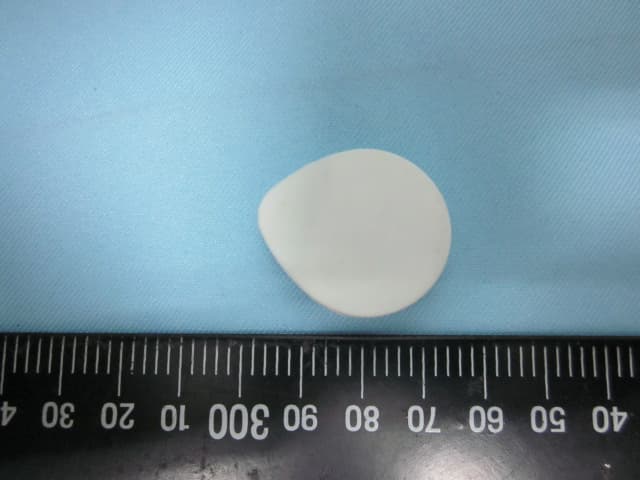
Click to zoom
Application Details
- Equipment Class
- DXX - Part 15 Low Power Communication Device Transmitter
- Date of Grant
- Oct 27, 2014
- Application Purpose
- Original Equipment
- Date of Application
- Oct 27, 2014
- Equipment Note
- Guardian
- Frequency Range
- 2402.00000000 - 2480.00000000
- Company
- Winzz Inc.
- Country
- Taiwan
Documents & Files
Document Text
Text extracted from the exhibit documents filed with the FCC. Open a document above to read the original.
Users Manual
Design & Quality BeLuvv of Taiwan For Children www.beluvv.com/setup In the bag you will find: 1. A Guardian 2. A Bracelet 3. A Buckle 4. Button cell battery CR2032 5. Mini screwdriver 1 3 4 5 2 Safety Information: Please read the following before using BeLuvv device and APP service. 1. Only use the device according to its intended use. 2. Only use clean water to wash the device if needed. 3. If you feel uncomfortable while using the device, please stop using it immediately. 4. DO NOT use the device while swimming or diving. 5. DO NOT use the device on swollen, inflamed, or injured area of the body. 6. DO NOT use the device under high temperature. 7. DO NOT use cleaners that contains alcohol, gasoline or acetone. 8. DO NOT throw the device. 9. Avoid dropping the device from a high position. Hardware Introduction: Thank you for choosing BeLuvv Guardian. Here we are going to show you the instruction of using Guardian. Guardian - Core Specification: Materials: PP Finish: PP Size: L 31.5 x W27 x H8.7mm Weight: 6 grams Battery: CR2032 - Button cell lithium battery Data Transfer: Wireless data transfer Guardian- Bracelet Specification: Materials: Silicone, Aluminium Finish: Silicone, Aluminium Size: L 225 x W35 x H12mm Weight: 12 grams Guardian- Buckle Specification: Materials: Silicone, Stainless Steel Finish: Silicone, Stainless Steel Size: L 35x W31.5 x H12mm Weight: 7 grams Before using the device, you will need to download Guardian app from App Store. Guardian App supports iOS 7 & iPhone 4S, iPhone 5, iPhone 5C, iPhone 5S, iPad Mini, iPad 3,4,air and iPod 5th Gen. How to set up a Guardian ? Sign Up Guardian App: 1. Download Guardian app from App Store, search on App Store for "Guardian". 2. Sign up new account by your email . Add new device which you buy from BeLuvv: 1. Please make sure the device is close to you within 1ft. 2. Tap “ + “ at the upper right corner to add new device. 3. Choose the device you buy to add, give it a name, a photo and hit “Done”. 4. Go back to On Watch list to make sure the device is added, and it will presents as red text. 5. You can also choose to turn off the device, and it will be shown in the Off Watch list. Add your friendsʼ device into your guard list: 1. Tap “ + “ at the upper right corner to add new device. 2. Choose the device you would like to add. 3. Tap “ x “ back to previous page. 4. Tap “ V “ to co-guard the device and the kid, and wait for the device ownerʼs approval. 5. When co-guard request is approved, the device will be shown in your On Watch list and presents as gray text. 6. You can also choose to turn off the device, and it will be shown in the Off Watch list. Set my own secured distance for each device: 1. Choose the device you would like to set the new distance. 2. The final location of the device will be shown on the Google map. 3. Move the screen to the bottom, use the slide bar to set your new distance for each device. 4. You can also remove the device from this page. Emergency Search: When a kid is missing and the emergency search has been activated, anyone who has installed the app can help assisting you locating your kid. But only . Settings: Change your password from settings. How to change the battery for a Guardian? When the battery is low, please replace a new battery for your Guardian. 1. Each Guardian screws up with three mini screws. 2. Please use the mini screwdriver to unscrew up Guardian, and open the button cover. 3. Replace a new CR2032 - Button cell lithium battery. Make sure the positive faces to the button cover. 4. Put back the button cover and screw it up with the mini screws. 5. Open Guardian app, and make sure the device is detected by the app. Warranty When used as intended, we grant a 12-month warranty from the date of purchase for the material and manufacturing defects. A detailed warranty description can be found at www.beluvv.com Please visit our Support page on www.beluvv.com for tutorials on how to set up your device. Changes or modifications not expressly approved by the party responsible for compliance could void the user's authority to operate the equipment. Note: This equipment has been tested and found to comply with the limits for a Class B digital device, pursuant to part 15 of the FCC Rules. These limits are designed to provide reasonable protection against harmful interference in a residential installation. This equipment generates, uses and can radiate radio frequency energy and, if not installed and used in accordance with the instructions, may cause harmful interference to radio communications. However, there is no guarantee that interference will not occur in a particular installation. If this equipment does cause harmful interference to radio or television reception, which can be determined by turning the equipment off and on, the user is encouraged to try to correct the interference by one or more of the following measures: —Reorient or relocate the receiving antenna. —Increase the separation between the equipment and receiver. —Connect the equipment into an outlet on a circuit different from that to which the receiver is connected. —Consult the dealer or an experienced radio/TV technician for help.
External Photos
ETC Report No. : 13-11-RBF-008-01 Sheet 1 of 6 Sheets FCC ID: 2ABFTBELUVVGUARDIAN CONSTRUCTION PHOTOS OF EUT (A) EUT 1. 2. ETC Report No. : 13-11-RBF-008-01 Sheet 2 of 6 Sheets FCC ID: 2ABFTBELUVVGUARDIAN CONSTRUCTION PHOTOS OF EUT 3. 4. ETC Report No. : 13-11-RBF-008-01 Sheet 3 of 6 Sheets FCC ID: 2ABFTBELUVVGUARDIAN CONSTRUCTION PHOTOS OF EUT 5. 6. ETC Report No. : 13-11-RBF-008-01 Sheet 4 of 6 Sheets FCC ID: 2ABFTBELUVVGUARDIAN CONSTRUCTION PHOTOS OF EUT 7. 8.
Internal Photos
ETC Report No. : 13-11-RBF-008-01 Sheet 5 of 6 Sheets FCC ID: 2ABFTBELUVVGUARDIAN CONSTRUCTION PHOTOS OF EUT 9. 10. ETC Report No. : 13-11-RBF-008-01 Sheet 6 of 6 Sheets FCC ID: 2ABFTBELUVVGUARDIAN CONSTRUCTION PHOTOS OF EUT 11.
Test Report
I FCC Part 15 EMI TEST REPORT of E.U.T. : Guardian MODEL : Beluvv_Guardian V10 FCC ID. : 2ABFTBELUVVGUARDIAN Frequency Range : 2402MHz~2480MHz for APPLICANT : Winzz Inc. ADDRESS : 2F., No.45, Sec. 1, Minquan E. Rd., Zhongshan Dist., Taipei City 104, Taiwan (R.O.C.) Test Performed by ELECTRONICS TESTING CENTER, TAIWAN NO. 34. LIN 5, DINGFU VIL., LINKOU DIST., NEW TAIPEI CITY, TAIWAN, 24442, R.O.C. TEL : (02)26023052 FAX: (02)26010910 http : // www.etc.org.tw; e-mail : [email protected] Report Number : 13-11-RBF-008-01 . ETC Report No. : 13-11-RBF-008-01 FCC ID : 2ABFTBELUVVGUARDIAN II TEST REPORT CERTIFICATION Applicant : Winzz Inc. 2F., No.45, Sec. 1, Minquan E. Rd., Zhongshan Dist., Taipei City 104, Taiwan (R.O.C.) Manufacturer : Winzz Inc. 2F., No.45, Sec. 1, Minquan E. Rd., Zhongshan Dist., Taipei City 104, Taiwan (R.O.C.) Description of EUT a) Type of EUT : Guardian b) Trade Name : Beluvv c) Model No. : Beluvv_Guardian V10 d) Power Supply : DC 3.0V f) Frequency Range : 2402MHz~2480MHz; Regulation Applied : FCC Rules and Regulations Part 15 Subpart C I HEREBY CERTIFY THAT: The data shown in this report were made in accordance with the procedures given in ANSI C63.4, and the energy emitted by the device was founded to be within the limits applicable. I assume full responsibility for accuracy and completeness of these data. Note: 1. The result of the testing report relate only to the item tested. 2. The testing report shall not be reproduced expect in full, without the written approval of ETC. Summary of Tests Test Results Radiated Emission Pass Conducted Emission N/A Band Edge Requirement Pass ETC Report No. : 13-11-RBF-008-01 FCC ID : 2ABFTBELUVVGUARDIAN III Date Test Item Received : Nov. 11, 2013 Date Test Campaign Completed : Dec. 05, 2013 Date of Issue : Feb. 11, 2013 Test Engineer : ( Jiapeng Chen, Engineer ) Approve & Authorized Signer : S. S. Liou, Section Manager EMC Dept. II of ELECTRONICS TESTING CENTER, TAIWAN ETC Report No. : 13-11-RBF-008-01 FCC ID : 2ABFTBELUVVGUARDIAN IV Table of Contents Page Cover Page........................................................................................................I TEST REPORT CERTIFICATION...........................................................................II Table of Contents...............................................................................................IV 1 GENERAL INFORMATION ...................................................................................................... 1 1.1 Product Description...................................................................................................................... 1 1.2 Characteristics of Device ............................................................................................................. 1 1.3 Test Methodology ........................................................................................................................ 1 1.4 Test Facility.................................................................................................................................. 1 2 PROVISIONS APPLICABLE ..................................................................................................... 2 2.1 Definition ..................................................................................................................................... 2 2.2 Requirement for Compliance ....................................................................................................... 3 2.3 Restricted Bands of Operation ..................................................................................................... 5 2.4 Labeling Requirement .................................................................................................................. 5 2.5 User Information .......................................................................................................................... 6 3. SYSTEM TEST CONFIGURATION ......................................................................................... 7 3.1 Justification .................................................................................................................................. 7 3.2 Devices for Tested System........................................................................................................... 7 4 RADIATED EMISSION MEASUREMENT.............................................................................. 8 4.1 Applicable Standard ..................................................................................................................... 8 4.2 Measurement Procedure............................................................................................................... 8 4.3 Measuring Instrument ................................................................................................................ 10 4.4 Radiated Emission Data ............................................................................................................. 11 4.4.1 RF Portion ......................................................................................................................................... 11 4.4.2 Other Emissions ................................................................................................................................. 17 4.5 Field Strength Calculation ......................................................................................................... 19 4.6 Photos of Radiation Measuring Setup........................................................................................ 20 5 CONDUCTED EMISSION MEASUREMENT ....................................................................... 21 5.1 Description ................................................................................................................................. 21 6 ANTENNA REQUIREMENT ................................................................................................... 22 6.1 Standard Applicab…
Text truncated - open the document above for the full version.
Test Setup Photos
ETC Report No. : 13-11-RBF-008-01 Sheet 20 of 26 Sheets FCC ID: 2ABFTBELUVVGUARDIAN 4.6 Photos of Radiation Measuring Setup
Contact Information
Applicant
Johnny Fang(CEO)
Test Firm
Electronics Testing Center, TaiwanWill Yauo
Technical Specifications
| # | Rule Parts | Frequency Range | Power Output |
|---|---|---|---|
| 1 | 15C | 2.40 GHz - 2.48 GHz | - |