2ABY2BT10Bluetooth Wireless Barcode Scanner
Suntop Computer Systems Corp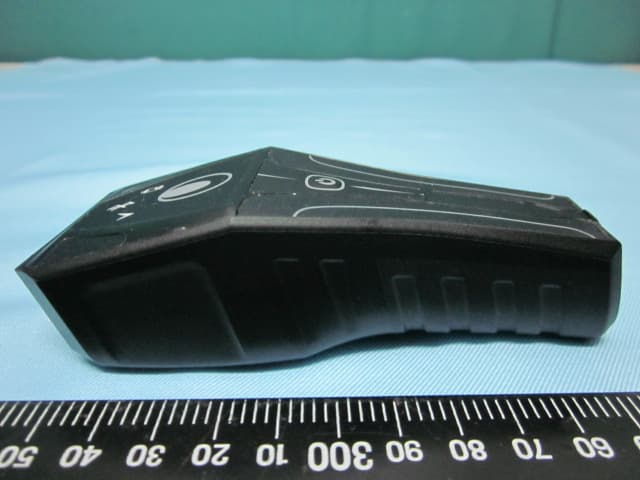
Click to zoom
Application Details
- Equipment Class
- DXT - Part 15 Low Power Transceiver, Rx Verified
- Date of Grant
- May 25, 2014
- Application Purpose
- Original Equipment
- Date of Application
- May 25, 2014
- Equipment Note
- Bluetooth Wireless Barcode Scanner
- Frequency Range
- 2402.00000000 - 2480.00000000
- Company
- Suntop Computer Systems Corp
- Country
- Taiwan
Documents & Files
Document Text
Text extracted from the exhibit documents filed with the FCC. Open a document above to read the original.
Users Manual
認識 BT-10 系列條碼掃描器BT-10系列條碼掃描器為一款掌上型機器,耗電低、待機時間長,並且攜帶非常方便,最重要的是具有防塵、防震以及防水IP工業等級,便利於各式行動的運用。BT-10系列條碼讀取速度技術更為精準、攜帶方便可提升龐大的生產效能並且跟智慧型手機和含有藍牙HID相互搭配,優雅的外型、工業的防護等級大大降低各公司採購成本,適合擺在口袋、掛在身上,保持最佳連結狀態、超長續電能耐讓您不漏接任何資料。 ◎ Do not dismantle the machine, improper use, damage, or allow foreign obje cts to contact or placed next to the machine caused damage.◎ Do not contact the machines and related accessories or near a fire source. ◎ The machine can use damp cloth or alcohol wipe to clean.◎ If machine failures to be found, please note the fault information and usi ng environment to inform maintenance personnel in order to achieve the fastest speed to repair. 藍牙條碼掃描器設定書 INDEX 目次 → ← INDEX 目次 讀碼和開關鍵同時按1/2秒,可以將掃描器和藍牙裝置暫時斷開藍牙指示燈會慢閃黃燈,這時您可以用來做設定,大約5秒左右,又會恢復連結變成長亮藍燈。 電源鍵持續按3秒後,機器即開啟 / 關閉。您會看見前方黃燈閃一下,隨即跟著機器會長嗶1聲並且電池圖案的LED燈會閃動1下,之後前方藍牙標誌會持續閃黃燈代表開機完成,可以隨時配對。關閉時,機器會長嗶1聲並且電池圖案的LED燈會閃動1下隨即關閉。 掃描鍵和電源鍵同時持續按壓3秒鐘,即可與藍牙裝置斷開。 讀取「開始設定」這個條碼會有5聲短嗶聲,之後設定條碼都是長嗶1聲,最後讀取「設定結束」會有長嗶1聲。若是設定錯誤、或是機器尚未準備好就讀取設定碼,讀取到條碼時會出現短嗶2聲。 Using instruction, Caution 使用須知、注意事項 -1 Bluetooth Parameters back to Default藍牙參數回歸預設值 STARTSET BT-10 series barcode scannerThe BT-10 series handheld barcode scanner from Suntop is a port able device that offers high performance scanning at a moderate price point. From backroom i nventory management to logistics and package tracking to point-of-sale scanning, the B T-10L provides fast reliable scanning, increasing productivity and efficiency while reducing your total cost With aggressive scanning capabilities and the ability to read a wide range of barcode formats, the BT-10L accurately captures data fast, helping employees work qu ickly and efficiently. Users will be up and running fast, because the BT-10L is easy to deploy, t hanks to its advanced blue tooth connectivity technology and user-friendly design. It provides r apid data transmission capacity. Also, special features such as the ability to pair with smart d evices help eliminate the possibility of data loss while transmitting. The scanner read " START", it will respond with five beeps. Reads each setti ng barcode, the scanner will respond each 1 long beep and finally reads "END", it also have 1 long beep. If the setting is wrong or reading codes before the scanner ready, The scann er will have 2 short beeps as responds. 注意事項◎請勿擅自拆裝機器,不當使用毀損、或將異物接觸或是放置到機器造成損壞。◎請勿將機器、以及相關配件產品接觸或是靠近火源。◎本機器可以使用乾淨的濕布,或是酒精來消毒擦拭。◎若發現機器故障,請詳細記下故障的訊息以及環境,告知維修人員以便於達到最快的維修速度。 Hold Power trigger 3 seconds, the scanner will turn ON/OFF, the yellow LED on and off quickly and after buzzer have One Long beep with Yellow LED flashing, i t means the scanner has already turn on could pair with device anytime, vise versa, Buzzer beep s One long beep and off immediately, it means the scanner turning off. Hold Scan and Power trigger 3 seconds, the scanner could discon nect with bluetooth device. Hold both Scan and Power trigger 1/2 seconds, the scanner could disconnect with bluetooth device temporary, the Blue LED off and Yellow flashing, user can use t his moment to set, around 5 seconds, the scanner will pair back with bluetooth device again , Blue LED will on. Instruction Caution 6 - SPP Interface Set/ SPP介面設定7 - Pairing Set/ Power set after disconnect/ 配對設定、藍牙斷線後關機設定 4 - BT Scanner configuration procedures 配對流程指引 5 - HID Interface Set/Pairing Set/ HID Character Transmit Mode HID介面設定、配對設定、字元傳送速度設定 Trigger, LED Indi cator 按鍵、LED顯示器指引, Scan Setting 掃描設定-2 3 - SetUp PIN code PIN碼、Barcode Reading Parameters back to defa ult 條碼識讀參數恢復預設值 Using instructi on, Caution 使用須知、注意事項 -1 Bluetooth Barcode Scanner Setting Manual 搜尋顯示連線顯示 充電顯示 讀碼鍵 開關機鍵 黃燈閃爍,表示未連線。藍燈長亮,表示配對連線時。讀碼觸發。 讀碼時點觸一下。如同使用滑鼠長按3秒鐘開/關。 掃描槍後面 低電顯示讀碼顯示 Mini USB插孔 繫繩孔 充電/更新數據。 紅燈,平時滅、充電時長亮,充電完成時滅。紅燈,平時滅、快沒電時快閃。綠燈,平時滅,讀碼成功時亮一下。 Trigger, LED Indicator 按鍵、LED顯示器指引, Scan Setting 掃描設定-2 Searching Yellow LED flashing, indicates the scannerhasn't pair with any bluetooth device.Blue LED lighting, indicates the scanner haspair with bluetooth device.Red LED, when the scanner charing, Red LED willkeep lighting, when Red led off, it indicates thescanner has completed the charging.Red LED, usually off, when the scanner out ofbattery, Red LED flashing quickly.Green LED, usually off, when the scanner readsbarcode successfully Green led flashing once.Touch sense trigger. When user readsbarcodes, just use finger touch it once(likeusing computer mouse).Hold trigger for 3 seconds to ON/OFF thescanner. PairingChargingLow PowerGood ReadTouch TriggerPowerMini USB plug Hand strap spot To charge the battery power. The back side of scanner 碼確定 ENTER PIN Code PIN 1 0 2 4 6 8 9 7 5 3 SetUp PIN code PIN碼、Barcode Read ing Parameters back to default 條碼識讀參數恢復預設值 - 3 Barcode Reading Parameters back to default 條碼識讀參數恢復預設值 請按照 順序讀取。 Please scan following a.b.c. a.b.c. a.b.c. 掃完數字後必須掃「 碼確定」 (Must scan “Enter PIN Code” afte r scanning all the numbers PIN ) Pairing random PIN code 配對動態PIN碼 所有設置必須在掃描器沒有和藍牙裝置配對的情況下才可以完成。All settings must be done in the scanner and Bluetooth device i s NOT paired. All settings must be done in the scanner and Bluetooth device i s NOT paired. 所有設置必須在掃描器沒有和藍牙裝置配對的情況下才可以完成。 Mode 2 Disable 不進入省電 ※ 進入省電 Mode 1: Enable 掃描設定 停止掃描一分鐘後 模式設定 Scan Setting After 1min stop scanning Power Save Mode 開始設定 START / 設定結束 END / 藍牙 介面設定 Setting HID/ HID 開始 START/ HID 結束 END/ HID Interface Set/Pairing Set/ HID Character Transmit Mode/HID介面設定、配對設定、字元傳送速度設定 - 5 開始設定 START / ※ 快速配對 免配對碼 Auto Authentication(No PIN) ( ) 不快速配對 Disable Authentication ※動態碼 Random PIN code PIN 固定 碼 Fixed PIN code PIN ( 0000) 請刷下面數字欄的數字條碼設定配對碼,並刷「確認送出」 () 請刷下面數字欄的數字條碼設定配對碼,並刷「確認送出」 () ※快速 Normal Speed 慢速 Low Speed 字元傳送速度 HID 所有設置必須在掃描器沒有和藍牙裝置配對的情況下才可以完成。All settings must be done in the scanner and Bluetooth device i s NOT paired. (Scan the Pin number as below and scan "Enter PIN code" to complete pairing.) (Please scan the number barcodes on the number chart to set pairing code. Then,scan “Enter PIN code”.) HID Character Transmit Mode 設定結束 END / 手機、電腦螢幕會顯示您要輸入的 PIN 碼。 請拿隨機附上的設定小卡,使用 BT-10 按讀碼鍵做…
Text truncated - open the document above for the full version.
External Photos
ETC Report No. : 14-01-RBF-024-03 Sheet 1 of 1 Sheets FCC ID. : 2ABY2BT10 CONSTRUCTED PHOTOS of EUT 1. 2. ETC Report No. : 14-01-RBF-024-03 Sheet 2 of 2 Sheets FCC ID. : 2ABY2BT10 CONSTRUCTED PHOTOS of EUT 3. 4. ETC Report No. : 14-01-RBF-024-03 Sheet 3 of 3 Sheets FCC ID. : 2ABY2BT10 CONSTRUCTED PHOTOS of EUT 5. 6.
ID Label/Location Info
FCC ID label 5mm x 20mm FCC ID: 2ABY2BT10
Internal Photos
ETC Report No. : 14-01-RBF-024-03 Sheet 4 of 8 Sheets FCC ID. : 2ABY2BT10 CONSTRUCTED PHOTOS of EUT 7. 8. ETC Report No. : 14-01-RBF-024-03 Sheet 5 of 8 Sheets FCC ID. : 2ABY2BT10 CONSTRUCTED PHOTOS of EUT 9. 10. ETC Report No. : 14-01-RBF-024-03 Sheet 6 of 8 Sheets FCC ID. : 2ABY2BT10 CONSTRUCTED PHOTOS of EUT 11. 12. ETC Report No. : 14-01-RBF-024-03 Sheet 7 of 8 Sheets FCC ID. : 2ABY2BT10 CONSTRUCTED PHOTOS of EUT 13. 14. ETC Report No. : 14-01-RBF-024-03 Sheet 8 of 8 Sheets FCC ID. : 2ABY2BT10 CONSTRUCTED PHOTOS of EUT 15. 16.
Test Report
I FCC Part 15 EMI TEST REPORT of E.U.T. : Bluetooth Wireless Barcode Scanner MODEL : BT10 FCC ID. : 2ABY2BT10 Frequency Range : 2402MHz~2480MHz for APPLICANT : Suntop Computer Systems Corp ADDRESS : 9F., No.11, Lane. 13, Shuangcheng St., Zhongshan Dist., Taipei 104-53, Taiwan R.O.C. Test Performed by ELECTRONICS TESTING CENTER, TAIWAN NO. 34. LIN 5, DINGFU VIL., LINKOU DIST., NEW TAIPEI CITY, TAIWAN, 24442, R.O.C. TEL : (02)26023052 FAX: (02)26010910 http : // www.etc.org.tw; e-mail : [email protected] Report Number : 14-01-RBF-024-03 . ETC Report No. : 14-01-RBF-024-03 FCC ID. : 2ABY2BT10 II TEST REPORT CERTIFICATION Applicant : Suntop Computer Systems Corp 9F., No.11, Lane. 13, Shuangcheng St., Zhongshan Dist., Taipei 104- 53, Taiwan R.O.C. Manufacturer : Suntop Computer Systems Corp 9F., No.11, Lane. 13, Shuangcheng St., Zhongshan Dist., Taipei 104- 53, Taiwan R.O.C. Description of EUT a) Type of EUT : Bluetooth Wireless Barcode Scanner b) Trade Name : N/A c) Model No. : BT10; BT10R; BT10L; BT10P; PX0100; MD900BT d) Power Supply : USB DC 5V f) Frequency Range : 2402MHz~2480MHz; Regulation Applied : FCC Rules and Regulations Part 15 Subpart C I HEREBY CERTIFY THAT: The data shown in this report were made in accordance with the procedures given in ANSI C63.4, and the energy emitted by the device was founded to be within the limits applicable. I assume full responsibility for accuracy and completeness of these data. Note: 1. The result of the testing report relate only to the item tested. 2. The testing report shall not be reproduced expect in full, without the written approval of ETC. Summary of Tests Test Results Radiated Emission Pass Conducted Emission N/A Band Edge Requirement Pass ETC Report No. : 14-01-RBF-024-03 FCC ID. : 2ABY2BT10 III Date Test Item Received : Jan. 20, 2014 Date Test Campaign Completed : Feb. 12, 2014 Date of Issue : Mar. 07, 2014 Test Engineer : ( Jiapeng Chen, Engineer ) Approve & Authorized Signer : S. S. Liou, Section Manager EMC Dept. II of ELECTRONICS TESTING CENTER, TAIWAN ETC Report No. : 14-01-RBF-024-03 FCC ID. : 2ABY2BT10 IV Table of Contents Page Cover Page........................................................................................................I TEST REPORT CERTIFICATION...........................................................................II Table of Contents...............................................................................................IV 1 GENERAL INFORMATION ...................................................................................................... 1 1.1 Product Description...................................................................................................................... 1 1.2 Characteristics of Device ............................................................................................................. 1 1.3 Test Methodology ........................................................................................................................ 1 1.4 Test Facility.................................................................................................................................. 1 2 PROVISIONS APPLICABLE ..................................................................................................... 2 2.1 Definition ..................................................................................................................................... 2 2.2 Requirement for Compliance ....................................................................................................... 3 2.3 Restricted Bands of Operation ..................................................................................................... 5 2.4 Labeling Requirement .................................................................................................................. 5 2.5 User Information .......................................................................................................................... 6 3. SYSTEM TEST CONFIGURATION ......................................................................................... 7 3.1 Justification .................................................................................................................................. 7 3.2 Devices for Tested System........................................................................................................... 7 4 RADIATED EMISSION MEASUREMENT.............................................................................. 8 4.1 Applicable Standard ..................................................................................................................... 8 4.2 Measurement Procedure............................................................................................................... 8 4.3 Measuring Instrument ................................................................................................................ 10 4.4 Radiated Emission Data ............................................................................................................. 11 4.4.1 RF Portion ......................................................................................................................................... 11 4.4.2 Other Emissions ................................................................................................................................. 17 4.5 Field Strength Calculation ......................................................................................................... 19 4.6 Photos of Radiation Measuring Setup........................................................................................ 20 5 CONDUCTED EMISSION MEASUREMENT ....................................................................... 21 5.1 Standard Applicable ................................................................................................................... 21 5.2 Measurement Procedure....................................................…
Text truncated - open the document above for the full version.
Test Setup Photos
ETC Report No. : 14-01-RBF-024-03 Sheet 20 of 30 Sheets FCC ID. : 2ABY2BT10 4.6 Photos of Radiation Measuring Setup ETC Report No. : 14-01-RBF-024-03 Sheet 25 of 30 Sheets FCC ID. : 2ABY2BT10 5.6 Photos of Conduction Measuring Setup
Contact Information
Applicant
I-Chung Huang
Test Firm
Taiwan Testing and Certification CenterAnderson Ku
Technical Specifications
| # | Rule Parts | Frequency Range | Power Output |
|---|---|---|---|
| 1 | 15C | 2.40 GHz - 2.48 GHz | - |