2ABZ7-915HELP PERS (915)
Life Alert Emergency Response, Inc.
Click to zoom
Application Details
- Equipment Class
- PCB - PCS Licensed Transmitter
- Date of Grant
- Jun 02, 2015
- Application Purpose
- Original Equipment
- Date of Application
- Jun 02, 2015
- Equipment Note
- HELP PERS (915)
- Frequency Range
- 1852.40000000 - 1907.60000000
- Country
- United States
Documents & Files
Document Text
Text extracted from the exhibit documents filed with the FCC. Open a document above to read the original.
Users Manual
I’ve fallen and I can’t get up! ® ® User’s Manual Life Alert HELP PERS Cellular Wireless Emergency Response System Important! Please test your system at least once a month (See Page 5). System Components ........................................................2 Installation....................................................................... 3 Affects on Signal Range...................................................3 In Case of Emergency. .....................................................4 Testing ............................................................................. 5 Testing Log....................................................................... 6 Cellular Communications.................................................7 Warranty & Liability Information......................................7 Important Information......................................................8 Life Alert ® National Headquarters 16027 Ventura Boulevard Encino, California 91436 (800) 451-7858 TABLE OF CONTENTS Life Alert HELP Pers_v3.indd 15/1/14 1:24 PM System Components Your system may contain these or additional components. 2 Pendant (Comes with optional wrist band.) Carbon Monoxide Detector Smoke Detector OPTIONAL ACCESSORIESINCLUDED ACCESSORIES MICROPHONE SPEAKER CANCEL BUTTON • Cancels a pending alarm. Also: • Press to clear alarm and silence announcements. • Flashing YELLOW light indicates the console is contacting Life Alert’s Monitoring Center . • When Life Alert’s Monitoring Center answers the call, the flashing YELLOW light will become solid. • Flashing RED light is the trouble indicator. Please contact Life Alert’s Monitoring Center immediately. • & Flashing RED & GREEN lights indicates a battery problem. • Solid GREEN light indicat es console is powered and battery is connected. INDICATOR LIGHTS HELP BUTTON Press HELP to activate the emergency alarm. A A A B B C C B C Life Alert HELP Pers_v3.indd 25/1/14 1:24 PM 3 Installation REAR OF CONSOLE 2 3 2 CONNECT THE POWER SUPPLY INTO AN UN-SWITCHED AC OUTLET ON OFF Place the console in a CENTRAL location in your home. Be sure it is on a flat, stable surface away from other electrical devices (i.e. cordless phones, fans, radios, fluorescent lamps, etc.). AFFECTS ON TRANSMITTER SIGNAL RANGE It’s important to properly position your console within your home. Since console is wireless communication based, the console relies solely on adequate cellular reception within the installation area in order to function. Plug the power supply into an un-switched 120 VAC power outlet (an outlet that is not controlled by a wall switch). Turn unit ON. 2 3 1 LIGHT CONCRETE OR BRICK 65% - 95% OF FULL POWER 10% - 70% OF FULL POWER SCONCRETE WITH TEEL REINFORCEMENT OR METAL LATH AND PLASTER WALLBOARD AND WOOD STUDS 90% - 100% OF FULL POWER CONSTRUCTION MATERIALS WILL AFFECT SIGNAL RANGE WRONG! RIGHT CENTRALLY LOCATE CONSOLE TRANSMITTERS AT THE OTHER END OF THE HOUSE MIGHT BE TOO FAR AWAY CONSOLE LOCATION WILL AFFECT SIGNAL RANGE Life Alert HELP Pers_v3.indd 35/1/14 1:24 PM In Case of Emergency A call for help can be made with the Pendant or Console. 2 3 4 1 CALLING FOR HELP WITH THE PENDANT ORCALLING FOR HELP WITH THE CONSOLE IF YOU NEED HELP, PRESS THE BUTTON ON THE CONSOLE OR YOUR PENDANT FOR AT LEAST TWO SECONDS. Do not press the HELP button more than once per emergency. (Note: The pendant must be within approximately 600 feet of the console. Distance will vary with installation and environment.) You will hear “EMERGENCY CALL BEING PLACED” from the console’s speaker. Wait to hear the operator’s voice from the console (the average wait should be less than two minutes). Follow the instructions from the operator. DO NOT PRESS CANCEL BEFORE TALKING TO THE OPERATOR OR YOUR CALL WILL NOT BE SUCCESSFULLY PLACED. 4 Life Alert HELP Pers_v3.indd 45/1/14 1:24 PM 5 Testing It’s important to test your Pendants and Console at least once a month. TESTING FROM THE PENDANT* 2 2 3 3 1 1 TESTING FROM THE CONSOLE Press the button on the pendant until the console announces “Emergency call being placed”. The HELP button will blink red and the console will repeat the announcement every 30 seconds until the message is reported to Life Alert’s Monitoring Center. The console will then announce, “Emergency reported, please stand by”. BEFORE TESTING, PLEASE CALL THE LIFE ALERT MONITORING CENTER AT 1-800-638-8222 TO NOTIFY THEM THAT YOU WILL BE TESTING. A TEST MUST BE MADE FROM ALL PENDANTS AND THE CONSOLE. Follow the instructions from the operator. * If you have more than one pendant, repeat steps 1-3 for each pendant you have. The HELP button will blink red and the console will repeat the announcement every 30 seconds until the message is reported to Life Alert’s Monitoring Center. The console will then announce, “Emergency reported, please stand by”. Follow the instructions from the operator. IF YOUR SYSTEM DOES NOT TEST OR REPORT SUCCESSFULLY, CONTACT LIFE ALERT IMMEDIATELY: 1-800-638-8222 Press the HELP button on the console until the console announces, “Emergency call being placed”. Life Alert HELP Pers_v3.indd 55/1/14 1:24 PM _____________ ____________ ____________ _____________ ____________ ____________ _____________ ____________ ____________ _____________ ____________ ____________ _______________ _______________ ______________ _____________ ____________ ____________ _____________ ____________ ____________ _____________ ____________ ____________ _____________ ____________ ____________ _______________ _______________ ______________ _____________ ____________ ____________ _____________ ____________ ____________ _____________ ____________ ____________ _____________ ____________ ____________ _______________ _______________ ______________ _____________ ____________ ____________ _____________ ____________ ____________ _____________ ____________ ____________ _____________ ____________ ____________ _______________ _______________ ______________ 6 Testing Log Use this log to document your s…
Text truncated - open the document above for the full version.
External Photos
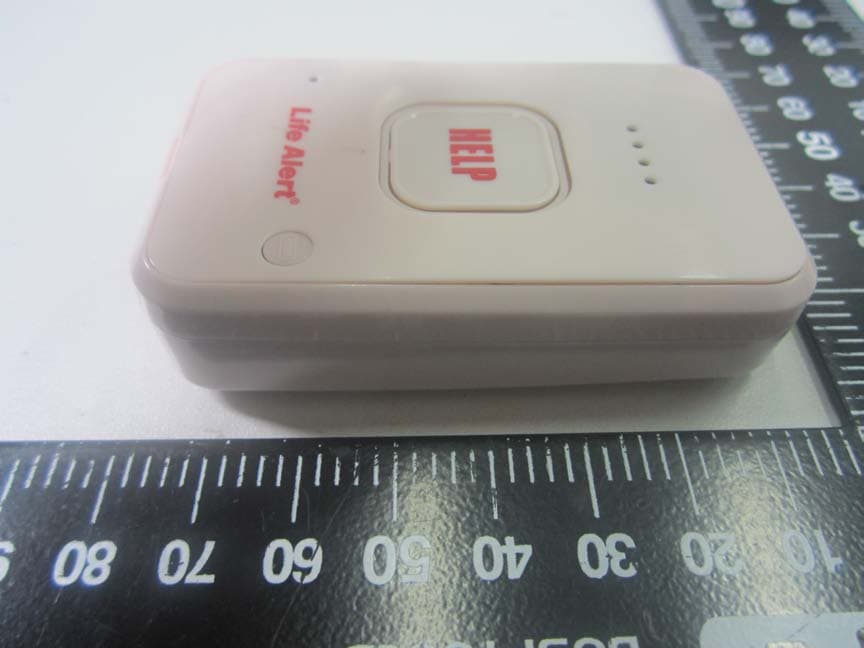
Product Name: EUT Photos Model Name: HELP PERS (915) Report Number: UL15820150518FCC042-6 Page 1 of 4 EUT EXTERNAL PHOTOS View of EUT-1 View of EUT-2 HELP PERS (915) Product Name: Life Alert HELP PERS (915) EUT Photos Model Name: Life Alert HELP PERS (915) Report Number: UL15820150518FCC042-6 Page 2 of 4 View of EUT-3 View of EUT-4 Product Name: Life Alert HELP PERS (915) EUT Photos Model Name: Life Alert HELP PERS (915) Report Number: UL15820150518FCC042-6 Page 3 of 4 View of EUT-5 Product Name: Life Alert HELP PERS (915) EUT Photos Model Name: Life Alert HELP PERS (915) Report Number: UL15820150518FCC042-6 Page 4 of 4 View of EUT-6
ID Label/Location Info
Label and Label Location for 2ABZ7‐915
Contact Information
Applicant
Ofer Shepher
Test Firm
UniLab (Shanghai) Co., Ltd.Wang Rong
Technical Specifications
| # | Rule Parts | Frequency Range | Power Output | Emission | Tolerance |
|---|---|---|---|---|---|
| 2 | 24E | 1.85 GHz - 1.91 GHz | 290.00 mW | 4M18F9W | 29.38 Hz |
Other Applications from Life Alert Emergency Response, Inc.
2ABZ7-913
Oct 23, 2014Mobile/Feature Phone
Equipment Class
PCB - PCS Licensed Transmitter