2AC6XPLT8967Tablet PC
ULTRA SUCCESS INTERNATIONAL LIMITED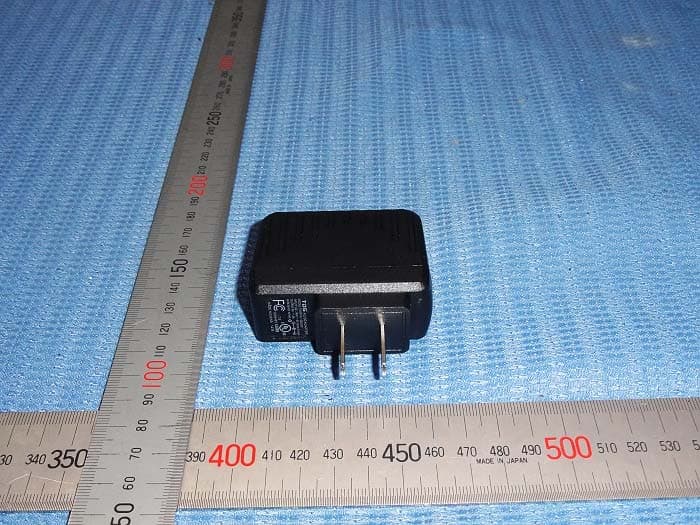
Click to zoom
Application Details
- Equipment Class
- DSS - Part 15 Spread Spectrum Transmitter
- Date of Grant
- Jan 24, 2015
- Application Purpose
- Original Equipment
- Date of Application
- Jan 24, 2015
- Equipment Note
- Tablet PC
- Frequency Range
- 2402.00000000 - 2480.00000000
- Country
- China
Documents & Files
Document Text
Text extracted from the exhibit documents filed with the FCC. Open a document above to read the original.
Users Manual
14 WARRANTY TERMS This warranty does not cover any defect for bad use or natural wear, or even IF it is not used according to our guidelines. This warranty does not cover any defect caused by use of non original or non compatible peripherals and third party software installation. In case this product has a factory defect, since you can prove it, Multilaser is compromises to fix it or replace your product. The below cases are not covered by this warranty: . Natural use . Damages caused by liquids, high temperature (Hot or cold) . Oxidation or fungus . Shocks . Impacts . Damages caused t LCD because of bad use, pressing, shock or humidity This product is warranty covered for the period of 12 months and the accessories that are included in this kit are covered for 3 months from the acquisition day on. This certified is only valid under the presentation of the purchase receipt. 15 1. Usage Tips For your safety and better conservation of the product, do not let your device take rain, humidity, sunlight, excessive heat. Do not disassemble the device, it will result in loss of warranty and can also affect your safety. 2. Cleaning your product In order to clean the screen or other parts, always use soft cloth, avoid the use of gauze or rough cloth and other rough papers, this can scratch your device. 3. Turning your Tablet In order to power on your tablet, press the POWER button for 3 Seconds. To turn it off, press the POWER button for 3 seconds, select OK in the screen that appears next.. 4. Starting to use As soon as you power on the device, the screen below will be displayed. This is the home screen lock, to unlock, tap and drag the center of the circle to the corner where the icon is , then release it, now the screen is unlocked. 16 5. Touch Screen In order to select any object on the screen, tap the screen softly. Pressing and holding the objects on screen enables them to be moved, create shortcuts and delete the desired application. 6. Data Transfer You can transfer files, music, videos, photos and applications from your PC to your tablet, or vice versa. This can be done by using an USB cable. Plug the cable into the tablet and the computer, click on the status bar at the right bottom of the screen of the tablet, click on “Turn on USB storage”, as shown below, then you can navigate between folders of files. 7. Micro SD Card This device is compatible with Micro SD card to store music, files, videos, photos and applications. You can use it as an extension of internal memory. To have access to the contents in the card, insert it into the card input, identified on your tablet, go to the app menu and select the “Explorer” or “File Manager”, on the next screen, select the “SD Card” option In order to remove the SD card, tap the icon > Storage > Dismount SD card. 17 8. Charging battery Battery model: BT482113 Prefer to use only the adaptor included in the kit, other adaptors voltages maybe be different and this can damage your tablet. In order to charge it, connect the Adaptor and the tablet and plug it into a socket. The icon indicates that the battary is being recharged, and the icon indicates that the battery is fully charged. To preserve the battery life, use the device at least once a week, and regularly gives a full charge to the battery. When using your device for the first time, make sure the battery is fully charged. If you need to recharge it, connect the adapter included in the kit and plug into a 110V or 220V socket. Let it recharge for about 4 hours or until the device indicates that the battery is fully charged. If the device is not working at all, connect the charger, plug it into the socket and restart your Tablet using the RESET button. The device can be up to 3 hours without showing any signs on the screen or even a noise, after that period, it should be ready to be powered on. 9. Wi-Fi Settings Tap the icon > select Wi-Fi option on the left side bar on the screen. The available networks Will appear on the right side of the screen, Select the desired network. In case the network has the symbol , ,you Will need to have a network password to have access. To return to desktop, tap the button on the right bottom side of the screen. 18 1 Search 2 Voice search function 3 Aplication menu 4 Back 5 Home 6 Running applications 7 Volume control - 8 Volume control + 9 Notification bar 10 Wi-Fi status 11 Battery status 11. Installing Applications Go to the apps menu and tap the icon . As soon as the app is open, you need to login with a Google account, that can be created on Google 10. Desktop 1 2 3 47568 91011 19 website or even through the application. Follow the instructions on screen to proceed. When you finish the operation, you Will have Access to all the available application for your device on Play Store,you can download free and paid applications. For the paid applications you will need to insert a credit card number on account settings. 12. Uninstalling Applications The applications can be removed from your tablet in two different ways: 1. Touch and hold the application, then slide it and release on the “X” that Will appear on the upper central side of the screen. 2. Go to the Settings menu > Apps > Select the application > Uninstall > Ok. 13. Sound Record Select the icon , tap on to start recording, then tap on to stop. The recorded files can be heard on . 14. Camera Go to the application’s menu and tap the icon , you will can be able to make photos and videos. Tap on to take the photos. The photos Will appear on the upper right side of the sreen, touch the photo for a preview nas then touch to return to camera function. To start vídeo recording, select the option next, select the recorder mode. The button starts and the button stop the record. 20 The icon on top right corner of screen access the settings camera’s menu for adjust the light’s mode, brightness and storage’s place. The camera’s zoom can be done with a motion of tweezers over the screen, using only two fingers for inc…
Text truncated - open the document above for the full version.
Cover Letter(s)
Statement We ULTRA SUCCESS INTERNATIONAL LIMITED Are applying for FCC DOC for Tablet PC with model number: PLT8967-BTK FCC DOC is doing at FCC Authorized and Recognized lab. The FCC DOC application will be completed before sell. Your assistance on this matter is highly appreciated. Dated this Jan 13, 2015 Agency agreement expiration date: Usually Give 8 - 12 Months By: Lijun Zhu Signature Printed Title: Manager On behalf of : ULTRA SUCCESS INTERNATIONAL LIMITED Telephone: (852)2528-0269
External Photos
Outside view Outside view Outside view Outside view Outside view
ID Label/Location Info
PLT8967-BTK 2AC6XPLT8967
Internal Photos
Inside view Inside view Inside view Inside view Inside view Inside view
RF Exposure Info
RF Exposure Applicable Standard According to §1.1307(b)(5), systems operating under the provisions of this section shall be operated in a manner that ensure that the public is not exposed to radio frequency energy level in excess of the Commission’s guideline. This is a Portable device. The Section 4.3.1 and Appendix A of KDB447498 D01 V05 was used as the guidance. Calculation Result (Worse Case): WIFI Mode: [(max. power of channel, including tune-up tolerance, mW)/(min. test separation distance, mm)] · [√f(GHz)] =9.27/5 * 1.57= 2.91, this value is less than 3.0 for 1-g SAR and ≤ 7.5 for 10-g extremity SAR. Bluetooth Mode [(max. power of channel, including tune-up tolerance, mW)/(min. test separation distance, mm)] · [√f(GHz)] =3.16/5 * 1.57= 0.99this value is less than 3.0 for 1-g SAR and ≤ 7.5 for 10-g extremity SAR. WIFI and BT can not transmit at the same time. The SAR measurement is not necessary.
Test Report
ISO/IEC17025Accredited Lab. Report No.: FCC 1412202-03 File reference No.: 2015-01-12 Applicant: ULTRA SUCCESS INTERNATIONAL LIMITED Product: TABLET PC Model No.: PLT8967-BTK Trademark: PROSCAN Test Standards: FCC Part 15 Subpart C, Paragraph 15.247 Test result: It is herewith confirmed and found to comply with the requirements set up by ANSI C63.4&FCC Part 15 Subpart C, Paragraph 15.247 regulations for the evaluation of electromagnetic compatibility Approved By Jack Chung Manager Dated: January 12, 2015 Results appearing herein relate only to the sample tested The technical reports is issued errors and omissions exempt and is subject to withdrawal at SHENZHEN TIMEWAY TECHNOLOGY CONSULTING CO LTD 5/F,Block 4, Anhua Industrial Zone.,No.8 TaiRan Rd.CheGongMiao,FuTian District, Shenzhen,CHINA. Tel (+86 755)8344 8688 Fax (+86 755)8344 2996 Email:[email protected] Report No: FCC1412202-03 Page 2 of 85 Date: 2015-01-12 The report refers only to the sample tested and does not apply to the bulk. This report is issued in confidence to the client and it will be strictly treated as such by the Shenzhen Timeway Technology Consulting Co .,Ltd. It may not be reproduced rather in its entirety or in part and it may not be used for adverting. The client to whom the report is issued may, however, show or send it . or a certified copy there of prepared by the Shenzhen Timeway Technology Consulting co .,Ltd to his customer. Supplier or others persons directly concerned. Shenzhen Timeway Technology Consulting co .,Ltd will not, without the consent of the client enter into any discussion of correspondence with any third party concerning the contents of the report. In the event of the improper use of the report. The Shenzhen Timeway Technology Consulting co .,Ltd reserves the rights to withdraw it and to adopt any other remedies which may be appropriate. Special Statement: The testing quality ability of our laboratory meet with "Quality Law of People's Republic of China" Clause 19. The testing quality system of our laboratory meets with ISO/IEC-17025 requirements, which is approved by CNAS. This approval result is accepted by MRA of APLAC. Our test facility is recognized, certified, or accredited by the following organizations: CNAS-LAB Code: L2292 The EMC Laboratory has been assessed and in compliance with CNAS-CL01 accreditation criteria for testing Laboratories (identical to ISO/IEC 17025:1999 General Requirements) for the Competence of testing Laboratories. FCC-Registration No.: 899988 The EMC Laboratory has been registered and fully described in a report filed with the (FCC) Federal Communications commission. The acceptance letter from the FCC is maintained in our files. Registration No.:899988. IC- Registration No.: IC5205A-02 The EMC Laboratory has been registered and fully described in a report filed with the (IC) Industry Canada. The acceptance letter from the IC is maintained in our files. Registration No.: IC 5205A-02. Report No: FCC1412202-03 Page 3 of 85 Date: 2015-01-12 The report refers only to the sample tested and does not apply to the bulk. This report is issued in confidence to the client and it will be strictly treated as such by the Shenzhen Timeway Technology Consulting Co .,Ltd. It may not be reproduced rather in its entirety or in part and it may not be used for adverting. The client to whom the report is issued may, however, show or send it . or a certified copy there of prepared by the Shenzhen Timeway Technology Consulting co .,Ltd to his customer. Supplier or others persons directly concerned. Shenzhen Timeway Technology Consulting co .,Ltd will not, without the consent of the client enter into any discussion of correspondence with any third party concerning the contents of the report. In the event of the improper use of the report. The Shenzhen Timeway Technology Consulting co .,Ltd reserves the rights to withdraw it and to adopt any other remedies which may be appropriate. Test Report Conclusion Content 1.0 General Details ................................................................................................ 4 1.1 Test Lab Details................................................................................................ 4 1.2 Applicant Details.............................................................................................. 4 1.3 Description of EUT .......................................................................................... 4 1.4 Submitted Sample............................................................................................. 5 1.5 Test Duration.................................................................................................... 5 1.6 Test Uncertainty.................................................................................................5 1.7 Test By.......................................................................................................... 5 2.0 List of Measurement Equipment......................................................................... 6 3.0 Technical Details............................................................................................. 7 3.1 Summary of Test Results..................................................................................... 7 3.2 Test Standards.................................................................................................. 7 4.0 EUT Modification............................................................................................. 7 5.0 Power Line Conducted Emission Test...................................................................... 8 5.1 Schematics of the Test........................................................................................ 8 5.2 Test Method and Test Procedure............................................................................ 8 5.3 Configuration of the EUT.................................................................................... 8 5.4 EUT Operating Condition.......…
Text truncated - open the document above for the full version.
Test Setup Photos
Conducted Emission Test Setup: Radiated Emission Test Setup:
Contact Information
Applicant
Lijun Zhu
Test Firm
Shenzhen Timeway Testing LaboratoriesJack Chung
Technical Specifications
| # | Rule Parts | Frequency Range | Power Output |
|---|---|---|---|
| 1 | 15C | 2.40 GHz - 2.48 GHz | 3.16 mW |
Other Applications from ULTRA SUCCESS INTERNATIONAL LIMITED
Oct 18, 2014
Equipment Class
DTS - Digital Transmission System
2AC6XPLT1052
Oct 12, 2014MID
Equipment Class
DTS - Digital Transmission System
Sep 28, 2014
Equipment Class
DTS - Digital Transmission System
Sep 27, 2014
Equipment Class
DTS - Digital Transmission System