2ACAZQD-701BT-WTTablet PC
KBX GROUP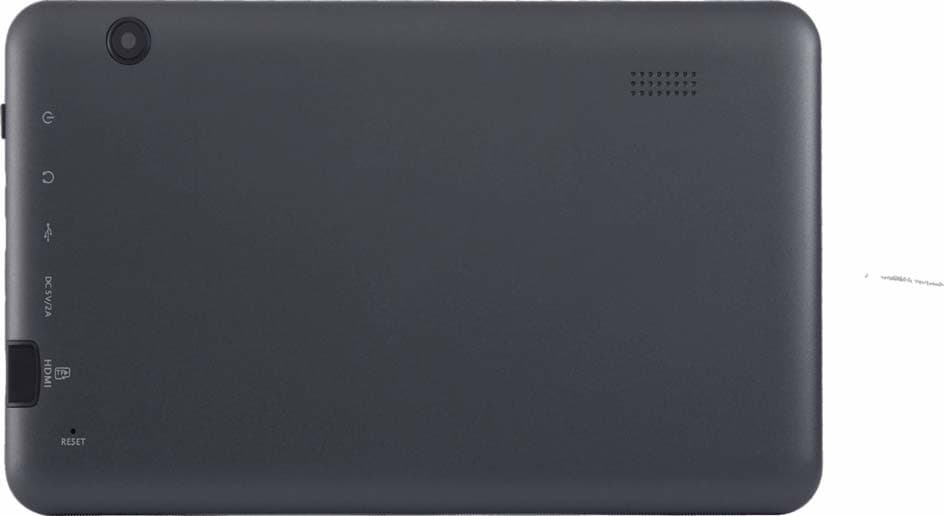
Click to zoom
Application Details
- Equipment Class
- DTS - Digital Transmission System
- Date of Grant
- Apr 27, 2014
- Application Purpose
- Original Equipment
- Date of Application
- Apr 27, 2014
- Equipment Note
- Tablet PC
- Frequency Range
- 2412.00000000 - 2462.00000000
- Company
- KBX GROUP
- Country
- Panama
Documents & Files
Document Text
Text extracted from the exhibit documents filed with the FCC. Open a document above to read the original.
Users Manual
1. Introducing the Device Congratulations on your purchase of this 7” tablet. This tablet creates a great experience surfing the web and provides a wide variety of mobile computing at your fingertips. Built around the Google Android 4.2 operating system, gives you access to thousands of applications to enhance your mobile experience. With integrated wireless access and a highly responsive touchscreen, you can read books and newspapers on the go; access the latest news, sports, and weather; manage your 1 multimedia and business files; browse the web, and lots more. 2. Introducing the Device This user manual contains important safety instructions and information for proper use of the device. Please follow the instructions in this manual carefully. It using this product in the following environments: high and low temperatures, humid environments, dusty environments, areas with strong magnetic fields and prevent long‐term exposure to the sun. In particular please it leaving the device in the car during summer if the doors are closed. Please don’t be in high temperature, especially in summer don't put the device in the car when Windows are closed. It shocks and do not let the device fall, as otherwise it may cause damage to the device. To clean the product, gently wipe the product using a moist cotton cloth; the use of other chemical cleaning is prohibited unless they are specifically designed for this purpose. This product should be kept away from water droplets splashes, so cups filled with liquids should not be placed near the product. Do no t use alcohol, thinners or petrol to clean the display. If using the headset for a long time, high volume may cause permanent damage to hearing. 2 When using the touch screen the following conditions must be followed: 9 For optimal use of the touch screen, remove the screen protection film before using your device. 9 To avoid scratching the touch screen, do not use sharp tools. 9 Do not allow the touch screen to come into contact with other electrical devices. Electrostatic discharges can cause the touch screen to malfunction. 9 Do not allow the touch screen to come into contact with water. The touch screen may malfunction in humid conditions or when exposed to water. 9 Your touch screen has a layer that detects small electrical charges emitted by the human body. For best performance, tap the touch screen with your fingertip. The touch screen will not react to touches of sharp tools, such as a stylus or pen which could damage and mark the screen. When charging the tablet the following conditions should be adhered to: 9 Please use only the supplied battery, charger and accessories, the use of any other type of product would be a breach of warranty regulations, and may be dangerous. 3 9 Do not drop or cause an impact to the charger or the battery. 9 Do not handle a damaged or leaking Lithium Ion (Li‐Ion) battery. For safe disposal of your Li‐Ion batteries, contact your nearest authorised recycling centre. 9 Handle and dispose of batteries and chargers with care. Ne ver dispose of batteries or devices in a fire. Follow all local regulations when disposing of used batteries or devices. 9 Never place batteries or devices on or in heating devices, such as microwave ovens, cookers, or radiators. Batteries may explode when overheated. 9 Never crush or puncture the battery. Avoid exposing the battery to high external pressure, which can lead to an internal short circuit and overheating. 9 USB is only for use of transferring of data and not recharging the device. 4 3. Boxed Contents 1. 7”Tablet 2. 5V 1.5A Power Adapter 3. User Manual 4. USB Cable (for connecting to a PC) 5. USB Adapter Cable (for connecting external USB devices) 4. Hardware Specifications CPU Rockchip 3028Dual-core 1.2 GHZ Operating System Google Android 4.2 Memory 1GB Storage 8GB Display 7'' TFT Touch Panel (16:9; Resolution 1024*600 ) Audio Devices Built‐in speaker & microphone Battery 2300mAh/3 .7V Power Adapter DC Output 5V/1.5A 5 G‐ Sensor Automatic steering display screen Wi‐Fi 802.11 b/g /n supported Camera 0.3 Mega Pixel ( front )Postposition 2M MicroSD Maximum 32GB supported I/0 Micro SD card slot, Earphone jack, Reset, DC in, Mini USB Multimedia Video RM, RMVB, MKV, FLV, MPG, MP4, 3GP, DAT, MOV, H.264 Audio WMA, WAV, AAC, OGG, APE, FLAC, AC3 The company reserves the right to improve the product, product specification and design. The information given is subject to change without prior notice. 【Remark】All pictures in this manual is just for your reference only. 6 5. Overview 1. Speaker 2. Power Button 3. Headphones 4. Mini USB 5. Power In 6. Micro SD Slot 7. Reset Button 5.1 POWER 7 Startup: Long Press and hold the power button, the system will enter the main interface. Shutdown: In the main menu interface, Press the power button about 5 seconds to shutdown, the system can hint "power off" option, Click "ok". You can safely shut down. Lock screen: Short press Power button to lock scr een or unlock screen. 【Remark】When power is empty, system will shut down automatically. 5.2 Illegal turn off the device, restart will scan and restore the disk, it may take longer time to enter into system 5.3 Earphone jack: 3.5 mm standard earphone jack 5.4 TF card: TF‐CARD slot: external T‐FLASH card 5.5 Mini USB: Mini USB jack: you can use it to connect the computer for data transmission, and external connection USB flash drive 5.6 Reset: When the Tablet is under the condition of the crash, use a small objects to short press RESET button, Tablet wi ll be forced to shut down. 8 6. First Use 6.1 Battery management and charge Before first use, please check the device's battery is fully charged. If not connect the adaptor and apply power. The first two occasion’s full charge may take approximately 6 hours, after that it will reduce to around 4 hours to charge. 【Remark】: This tablet uses a Built‐in type polymer battery, Charge must be via standard adaptor (Input: AC110~240V 50/60Hz Max:180MA. Output: DC5V/1.5…
Text truncated - open the document above for the full version.
Cover Letter(s)
KBX GROUP Avenida 1ra. Calle B y C manzana 58, France Field Colon Panama Date: Mar. 29, 2014 FCC ID: 2ACAZQD-701BT-WT Subject: Ad Hoc Mode Function Declaration To Whom it may concern, This device is acting as slave and operating in the 2.4 GHz (2412 – 2462 MHz) band.Ad Hoc function is supported but not able to operate on non-US frequencies.Please contact the one signed below or the authorized agent for this filing. Regards, Yours sincerely, Signatory Signature Name: Yosef Kroitoro Title: Manager Tel: 786-325-0505
Cover Letter(s)
FCC Confidentiality Request To the FCC and FCC TCB handling this application for certification Pursuant to 47 CFR Section 0.459(a) & (b), we, (the applicant / grantee) Company name KBX GROUP Addresss Avenida 1ra. Calle B y C manzana 58, France Field Colon Panama City France Field Colon Country Panama request non-disclosure and confidential treatment for our certification under: Grantee Code Product Number FCC ID: 2ACAZ QD-701BT-WT of the following materials submitted within this certification application: (please cross what is applicable, or add other documents) x Operational Description x Block Diagrams x Schematics Diagrams x Turn up produrce Bill of Materials Above materials contain secrets, proprietary and technical information, which would customarily be guarded from competitors under 47 CFR, section 0.457(d)(2). Disclosure or publication or any portion of this company confidential material to other parties could cause substantial competitive harm and provide unjustified benefits for competitors. We understand that pursuant to 47 CFR section 0.457(d)(1)(ii) disclosure of the applicant and all accompanying documentation will not be made before the date of the grant. Attestation: City and Country: Date: Name: (this must be a person) Function: Signature: (or official company stamp) Panama 2014 -03-29 Yosef Kroitoro Manager
External Photos
APPENDIX-PHOTOGRAPHS OF EUT CONSTRUCTIONAL DETAILS Photo 1 Photo 2 Photo 3 Photo 4 Photo 5 Photo 6 Photo 7 Photo 8
ID Label/Location Info
Tablet PC M/N: QD-701BT-WT FCC ID: 2ACAZQD-701BT-WT KBX GROUP
Internal Photos
Photo 9 Photo 10 WIFI ANT Photo 11 Photo 12 Photo 13
RF Exposure Info
FCC ID: 2ACAZQD-701BT-WT RF EXP OSURE EVALUATION METHOD SAR Test Exclusion Thresholds for 100 MHz – 6 GHz and ≤ 50 mm Approximate SAR Test Exclusion Power Thresholds at Selected Frequencies and Test Separation Distances are illustrated in the following Table. Maximum measured transmitter power TX 802.11b Mode Frequency Maximum Peak Conducted Output Power(PK) Maximum Peak Conducted Output Power(AV) Maximum Peak Conducted Output Power (AV) Te s t Channe (MHz) (dBm) (dBm) mW CH01 2412 12.37 9.12 8.166 CH06 2437 12.98 9.46 8.83 CH11 2462 12.77 9.37 8.65 TX 802.11g Mode CH01 2412 11.76 8.47 7.030 CH06 2437 11.56 8.34 6.823 CH11 2462 11.46 8.26 6.699 TX 802.11n(20) Mode CH01 2412 10.33 8.33 6.808 CH06 2437 10.46 8.45 6.998 CH11 2462 10.57 8.58 7.211 Remark: The best case gain of the antenna is 0dBi. 0 dBi logarithmic terms convert to numeric result is nearly 1 The 1-g and 10-g SAR test exclusion thresholds for 100 MHz to 6 GHz at test separation distances ≤ 50 mm are determined by: [(max. power of channel, including tune-up tolerance, mW)/(min. test separation distance,mm)] · [√f(GHz)] WIFI: Mode [(max. power of channel, including tune-up tolerance, mW) (min. test separation distance,mm)] [√f(GHz)] Result Limit 802.11b CH01 8.912 5 2.412 2.77 3 CH06 8.912 5 2.437 2.78 3 CH11 8.912 5 2.462 2.80 3 802.11g CH01 7.943 5 2.412 2.47 3 CH06 7.943 5 2.437 2.48 3 CH11 7.943 5 2.462 2.49 3 802.11n(20) CH01 7.943 5 2.412 2.47 3 CH06 7.943 5 2.437 2.48 3 CH11 7.943 5 2.462 2.49 3 The test Result is less than 3.0 for 1-g SAR and ≤ 7.5 for 10-g extremity SAR. Conclusion: No SAR is required.
Test Report
FCC RADIO TEST REPORT FCC ID: 2ACAZQD-701BT-WT Product: Tablet PC Trade Name: QUO Model Name: QD-701BT-WT Serial Model: QD-701BT-GR QD-701-GR QD-701-WT Prepared for KBX GROUP Avenida 1ra. Calle B y C manzana 58, France Field Colon Panama Prepared by DongGuan Precise Testing Service Co.,Ltd. Room 203-204, 2F, Xinye Building, No.67 Shijing, Guanzhang Road, Dongguan, China Page 2 of 57 Report No.: PT1401106003F1 TEST RESULT CERTIFICATION Applicant’s name........ KBX GROUP Address ........................ Avenida 1ra. Calle B y C manzana 58, France Field Colon Panama Manufacture's Name... KBX GROUP Address ........................ Avenida 1ra. Calle B y C manzana 58, France Field Colon Panama Product description Product name .................Tablet PC Model and/or type reference ..................... QD-701BT-WT Serial Model .................... QD-701BT-GR QD-701-GR QD-701-WT Standards.................... FCC Part15.247 Test procedure ................ ANSI C63.4-2003 This device described above has been tested by PTS, and the test results show that the equipment under test (EUT) is in compliance with the FCC requirements. And it is applicable only to the tested sample identified in the report. This report shall not be reproduced except in full, without the written approval of PTS, this document may be altered or revised by PTS, personal only, and shall be noted in the revision of the document. Date of Test...................................... Date (s) of performance of tests ....... 18 Mar. 2014 ~31 Mar. 2014 Date of Issue..................................... 31 Mar. 2014 Test Result......................................... Pass Testing Engineer : Assistant Technical Manager : Supervisor Authorized Signatory : Jacky Ou / Manager Page 3 of 57 Report No.: PT1401106003F1 Table of Contents Page 1 . SUMMARY OF TEST RESULTS 5 1.1 TEST FACILITY 6 1.2 MEASUREMENT UNCERTAINTY 6 2 . GENERAL INFORMATION 7 2.1 GENERAL DESCRIPTION OF EUT 7 2.2 DESCRIPTION OF TEST MODES 9 2.3 BLOCK DIGRAM SHOWING THE CONFIGURATION OF SYSTEM TESTED 10 2.4 DESCRIPTION OF SUPPORT UNITS(CONDUCTED MODE) 11 2.5 EQUIPMENTS LIST FOR ALL TEST ITEMS 12 3 . EMC EMISSION TEST 13 3.1 CONDUCTED EMISSION MEASUREMENT 13 3.1.1 POWER LINE CONDUCTED EMISSION LIMITS 13 3.1.2 TEST PROCEDURE 14 3.1.3 DEVIATION FROM TEST STANDARD 14 3.1.4 TEST SETUP 14 3.1.5 EUT OPERATING CONDITIONS 14 3.1.6 TEST RESULTS 15 3.2 RADIATED EMISSION MEASUREMENT 17 3.2.1 RADIATED EMISSION LIMITS 17 3.2.2 TEST PROCEDURE 18 3.2.3 DEVIATION FROM TEST STANDARD 18 3.2.4 TEST SETUP 19 3.2.5 EUT OPERATING CONDITIONS 20 3.2.6 TEST RESULTS (BETWEEN 9KHZ – 30 MHZ) 21 3.2.7 TEST RESULTS (BETWEEN 30MHZ – 1GHZ) 22 3.2.8 TEST RESULTS (ABOVE 1000 MHZ) 23 4 . POWER SPECTRAL DENSITY TEST 33 4.1 APPLIED PROCEDURES / LIMIT 33 4.1.1 TEST PROCEDURE 33 4.1.2 DEVIATION FROM STANDARD 33 4.1.3 TEST SETUP 33 4.1.4 EUT OPERATION CONDITIONS 33 4.1.5 TEST RESULTS 34 5 . BANDWIDTH TEST 40 5.1 APPLIED PROCEDURES / LIMIT 40 5.1.1 TEST PROCEDURE 40 Page 4 of 57 Report No.: PT1401106003F1 Table of Contents Page 5.1.2 EUT OPERATION CONDITIONS 40 5.1.3 TEST RESULTS 41 6 . PEAK OUTPUT POWER TEST 47 6.1 APPLIED PROCEDURES / LIMIT 47 6.1.1 TEST PROCEDURE 47 6.1.2 DEVIATION FROM STANDARD 47 6.1.3 TEST SETUP 47 6.1.4 EUT OPERATION CONDITIONS 47 6.1.5 TEST RESULTS 48 7 . 100 KHZ BANDWIDTH OF FREQUENCY BAND EDGE 49 7.1 DEVIATION FROM STANDARD 49 7.2 TEST SETUP 49 7.3 EUT OPERATION CONDITIONS 49 7.4 TEST RESULTS 50 8 . ANTENNA REQUIREMENT 55 8.1 STANDARD REQUIREMENT 55 8.2 EUT ANTENNA 55 9 . EUT TEST PHOTO 56 APPENDIX-PHOTOGRAPHS OF EUT CONSTRUCTIONAL DETAILS Page 5 of 57 Report No.: PT1401106003F1 1. SUMMARY OF TEST RESULTS Test procedures according to the technical standards: FCC Part15 (15.247) , Subpart C Standard Section Test Item Judgment Remark 15.207 Conducted Emission PASS 15.247 (a)(2) 6dB Bandwidth PASS 15.247 (b) Peak Output Power PASS 15.247 (c) Radiated Spurious Emission PASS 15.247 (d) Power Spectral Density PASS 15.205 Band Edge Emission PASS 15.203 Antenna Requirement PASS NOTE: (1)” N/A” denotes test is not applicable in this Test Report Page 6 of 57 Report No.: PT1401106003F1 1.1 TEST FACILITY NTEK Testing Technology Co., Ltd Add. : 1/F, Building E, Fenda Science Park, Sanwei Community, Xixiang Street, Bao’an District, Shenzhen P.R. China. FCC Registration No.:238937; IC Registration No.:9270A-1 1.2 MEASUREMENT UNCERTAINTY The reported uncertainty of measurement y ± U,where expended uncertainty U is based on a standard uncertainty multiplied by a coverage factor of k=2,providing a level of confidence of approximately 95 %。 No. Item Uncertainty 1 Conducted Emission Test ±1.38dB 2 RF power,conducted ±0.16dB 3 Spurious emissions,conducted ±0.21dB 4 All emissions,radiated(<1G) ±4.68dB 5 All emissions,radiated(>1G) ±4.89dB 6 Temperature ±0.5°C 7 Humidity ±2% Page 7 of 57 Report No.: PT1401106003F1 2. GENERAL INFORMATION 2.1 GENERAL DESCRIPTION OF EUT Equipment Tablet PC Trade Name QUO Model Name QD-701BT-WT Serial Model QD-701BT-GR QD-701-GR QD-701-WT Model Difference All the names are the same circuit and RF module, except the model names and colors. QD-701-WT: white QD-701BT-WT: white QD-701-GR: gray . QD-701BT-GR: gray . Product Description The EUT is a Tablet PC Operation Frequency: 802.11b/g/n(20MHz): 2412~2462MHz Modulation Type: CCK/OFDM/DBPSK Bit Rate of Transmitter 802.11b:11/5.5/2/1 Mbps 802.11g:54/48/36/24/18/12/9/6Mbps 802.11n(20MHz):150/144.44/130/117/ 115.56/104/86.67/78/52/6.5Mbps Number Of Channel 802.11b/g/n20MHz:11CH Antenna Designation: Please see Note 3. Output Power(Conducted): 802.11b: 12.98 dBm (Max.PK) 802.11g: 11.76 dBm (Max.PK) 802.11n(20M): 10.57 dBm (Max.PK) Antenna Gain (dBi) 0dbi Based on the application, features, or specification exhibited in User's Manual, the EUT is considered as an ITE/Computing Device. More details of EUT technical specification, please refer to the User's Manual. Channel List Please refer to the Note 2. Ratings DC 3.7V Adapter Model:MTP121U…
Text truncated - open the document above for the full version.
Test Setup Photos
Page 73 of 74 Report No.: PT1401106003F2 11. EUT TEST PHOTO Radiated Measurement Photos Page 74 of 74 Report No.: PT1401106003F2 CONDUCTED EMISSION Photo
Contact Information
Applicant
Yosef Kroitoro
Test Firm
Shenzhen NTEK Testing Technology Co., Ltd.Jason Chen
Technical Specifications
| # | Rule Parts | Frequency Range | Power Output |
|---|---|---|---|
| 1 | 15C | 2.41 GHz - 2.46 GHz | 20.00 mW |
Other Applications from KBX GROUP

2ACAZQSW-508-BKSL
Sep 25, 2014Smart watch
Equipment Class
DTS - Digital Transmission System
2ACAZQD-100BT-WT
Sep 01, 2014Tablet PC
Equipment Class
DSS - Part 15 Spread Spectrum Transmitter
2ACAZQD-710GR-TV
Aug 20, 2014Tablet PC
Equipment Class
DTS - Digital Transmission System
2ACAZQD-701ME-GR
Aug 20, 2014Tablet PC
Equipment Class
DTS - Digital Transmission System