2ACCJB127MOVETIME FAMILY WATCH
TCL Communication Ltd.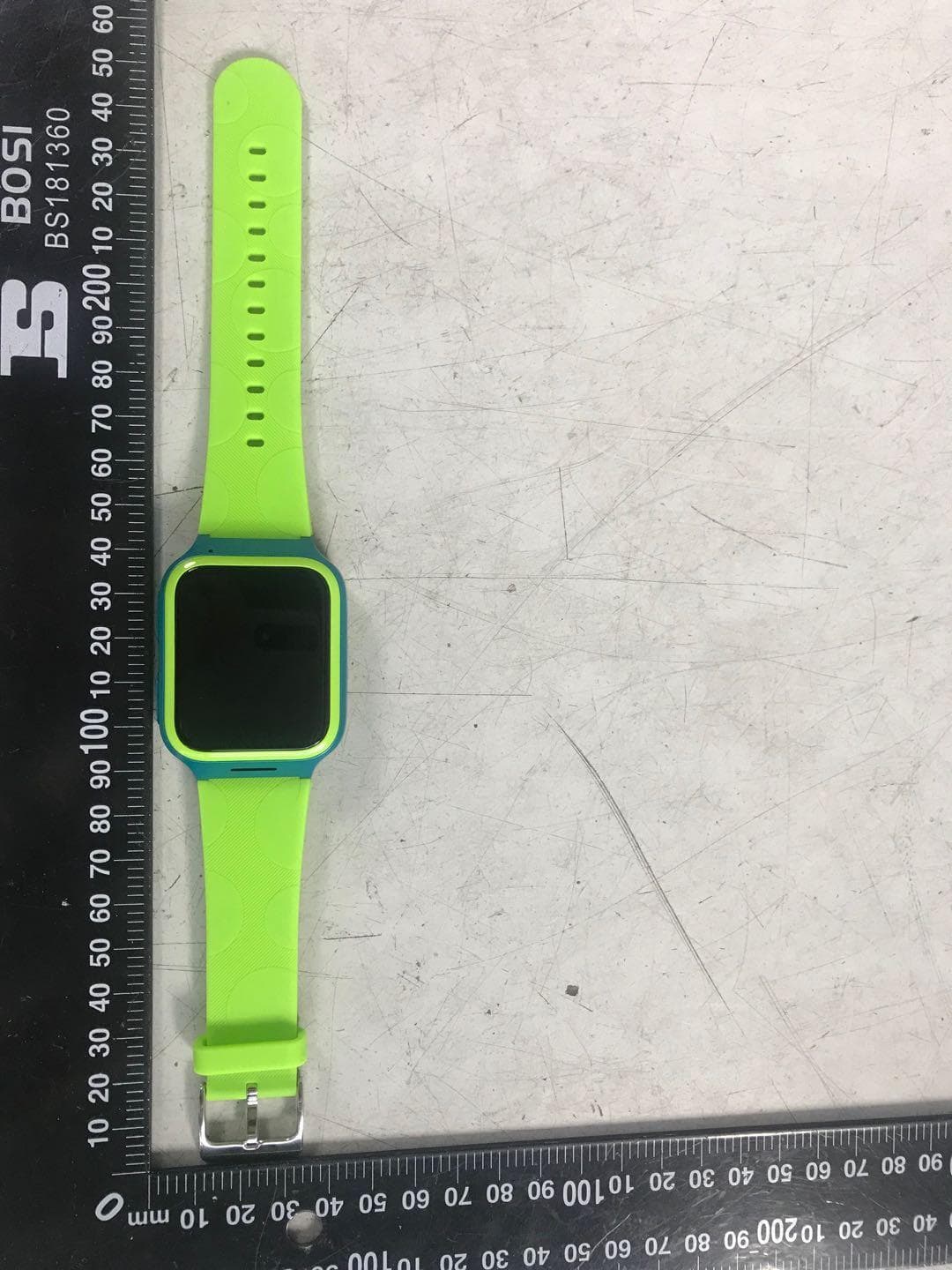
Click to zoom
Application Details
- Equipment Class
- DTS - Digital Transmission System
- Date of Grant
- Jul 23, 2020
- Application Purpose
- Original Equipment
- Date of Application
- Jul 23, 2020
- Equipment Note
- MOVETIME FAMILY WATCH
- Frequency Range
- 2402.00000000 - 2480.00000000
- Company
- TCL Communication Ltd.
- Country
- China
Documents & Files
Document Text
Text extracted from the exhibit documents filed with the FCC. Open a document above to read the original.
Users Manual
Family Watch Quick Start Guide 2 Getting to know your watch Speaker Power key SOS key Microphone SIM card slot 23 Power key • Long press for 3 seconds to power off when the SIM card is inserted and paired with your smartphone. In other case, long press for 3 seconds to restart except you have an incoming call. • Press to increase the volume when you have an incoming call. • Short press to wake up the device. • Short press to go back to Home screen when the current screen is not the Home page. Press again to turn off the screen. SOS key • Long press for 3 seconds to call SOS, but continuously reduce volume when you have an incoming call. • Press twice to reduce the volume when you have an incoming call. • Press twice to start the voice assistant when you’re on the home page. Press twice again to back. 4 Setting up your watch Getting a SIM card A nano-SIM (not included) is required in order to set up and use your watch. Contact your network operator to request a nano-SIM with a voice and data plan. StandardMicroNano Note: Use standard nano-SIM card (0.6~0.7mm thickness), the normal SIM or Micro SIM card may cause abnormal operation due to different thickness after card cutting. 45 Inserting the SIM card 1. Push the SIM card tray to eject it. 2. Place the SIM card on the SIM card tray correctly. 3. Push the SIM card tray to close it. 1 2 3 6 Charging your watch Ensure that the pins in the charging dock are aligned with the pins in the back cover of your Watch. Connect the USB port with a computer to begin charging via the USB cable. 1 2 Note: When charging port is corroded or covers dirt, it will seriously affect the charging, which need to keep clean. Wipe sweat on your band after sporting before charging. Powering on your watch Long press the Power key for 3 seconds to power on your watch. 67 Language You will be asked to select the system language when powering on your watch for the first time. To change the system language when the watch is unpaired, swipe right twice from the Home screen and then go to Settings > Language to select a language. 8 Download and install the app on your smartphone To download the app you can: • Search for “TCL Connect” in the Google Play store (Android 5.0 and above), or App store (iOS 10.0 and above). • Scan the following QR code. Create an account 1. Touch Create Account to create your TCL Connect account. 2. Enter your name, email address and set a password for your account. (1) 3. Enter the verification code sent to your email address. This email address will be used to help you reset your password should you forget it. 4. Touch Confirm email in the verification email. 5. Touch Done. (1) Read the “Terms of use” and “Privacy and security” and check the box. 89 Log in to your account Enter your email address and password to log in. Pairing Make sure the SIM card is correctly inserted and you are able to connect to the internet before pairing your watch with your phone. The connected network icon will appear at the top left of your watch’s Home screen once connected to the internet. 4G network 3G network 2G network Data roaming network No network but can make calls No network and can’t make calls 1. Touch Add Watch on the home page of the TCL Connect app. 2. Follow the instructions to complete your child’s personal information (profile picture, SOS number, name and gender) and touch NEXT. 10 3. There are two ways to pair your watch with your phone: • Scan the QR code to pair your watch Swipe left from the Home screen of your watch to obtain the QR code when pairing the watch for the first time. Scan the QR code. • Enter the mobile number of your watch to pair Check the SIM card packaging or contact the SIM card operator of your watch to know the mobile number. Enter the number on your TCL Connect app. 4. The server will send a random code to your watch and the information displayed on the screen should be noted at this time. Enter the verification code and touch Next to pair your watch with your phone. Once the MOVETIME Family Watch has been successfully paired with your phone, you will be brought to the application main screen. The location of the watch will be displayed here on the map. 1011 Using your watch Screen Press the Power key to wake up the Home screen. Mon, 03/12/2018 Touch To select an application or confirm an action, use your finger to touch it. 12 Touch and hold Long press the Home screen, swipe left to view different options, and touch a watch face to select it. Swipe left/right Swipe left/right to view applications, settings, and functions. Swipe right to return to the previous page after you have entered any application. Swipe up/down Swipe up from the Home screen to view notifications. Swipe down from the Home screen for volume and brightness controls and to turn on/off the wireless connection. 1213 Call Phone call 1. Swipe left from the Home screen and touch Contacts. 2. Touch the contact and choose to place a phone call. Touch to end the call. Message Voice message Touch Chat to select a contact or a group. Hold to record, and release it to send the message. Emoji Touch Chat to select a contact or a group. Touch to select and send an emoji. Note: If the message fails to send, will appear next to the message. Touch the icon to resend the message. 14 Friends Adding new friends Swipe left from the Home screen and touch Contacts > + Friend. Keep both watches in close proximity, shake them, and touch OK. Deleting a friend In the contact list, swipe left on the name of the friend. Touch the Delete icon that then appears on screen. Touch to confirm, or touch to cancel. Group chat Add friends first before you create a group. Swipe left twice from the Home screen and touch Chat > Create a group. Choose a group picture and invite friends. Touch to create a group, or touch to cancel. Sports Swipe left/right from the Home screen to select the application. Touch Sports to view your sports statistics including steps, distances and calories burned. …
Text truncated - open the document above for the full version.
Users Manual
www.sar-tick.com This device meets applicable national SAR limits of 1.6 W/kg for head and body, and 4.0 W/kg for Limbs. Safety and warranty information 2 Safety and use We recommend that you read this chapter carefully before using your device. The manufacturer disclaims any liability for damage, which may result as a consequence of improper use or use contrary to the instructions contained herein. Traffic safety Given that studies show that using a device while driving a vehicle constitutes a real risk, drivers are requested to refrain from using their device when the vehicle is not parked. When switched on, MOVETIME Family Watch emits electromagnetic waves that can interfere with the vehicle’s electronic systems such as ABS anti-lock brakes or airbags. To ensure that there is no problem: -Do not place MOVETIME Family Watch on top of the dashboard or within an airbag deployment area. -Check with your car dealer or the car manufacturer to make sure that the dashboard is adequately shielded from RF energy. CONDITIONS OF USE: You are advised to switch off MOVETIME Family Watch from time to time to optimise its performance. Switch MOVETIME Family Watch off before boarding an aircraft. Switch MOVETIME Family Watch off when you are in health care facilities, except in designated areas. As with many other types of equipment now in regular use, mobile devices can interfere with other electrical or electronic devices, or equipment using radio frequency. 3 Switch MOVETIME Family Watch off when you are near gas or flammable liquids. Strictly obey all signs and instructions posted in a fuel depot, petrol station, or chemical plant, or in any potentially explosive atmosphere. When MOVETIME Family Watch is switched on, it should be kept at least 15 cm from any medical device such as a pacemaker, a hearing aid or insulin pump, etc. Please note that MOVETIME Family Watch is a unibody device, the battery is not removable. Do not attempt to disassemble MOVETIME Family Watch. If you disassemble your device the warranty will not apply. Also disassembling the device may damage the battery, and may cause leakage of substances that could create an allergic reaction. Always handle your MOVETIME Family Watch with care and keep it in a clean and dust-free place. Do not allow MOVETIME Family Watch to be exposed to adverse weather or environmental conditions (moisture, humidity, rain, infiltration of liquids, dust, sea air, etc.). The manufacturer’s recommended operating temperature range is -10°C to +45°C. At over 55°C the legibility of the device’s display may be impaired, though this is temporary and not serious. Do not open, dismantle or attempt to repair your MOVETIME Family Watch yourself. Do not drop, throw or bend your MOVETIME Family Watch. Do not use MOVETIME Family Watch if the glass made screen, is damaged, cracked or broken to avoid any injury. Do not paint it. Use only accessories which are recommended by TCL Communication Ltd. and its affiliates and are compatible with your device model. 45 Pay attention to any warnings. Do not attempt to open or disassemble MOVETIME Family Watch. Under inappropriate operation, the device and battery can be damaged and be hazardous to the human body and the environment. Do not clean MOVETIME Family Watch with corrosive cleaning products. Do not place MOVETIME Family Watch in dishwashers, washing machines or dryers. Do not place MOVETIME Family Watch on or in heating devices, such as microwave ovens, stoves, or radiators. Do not expose MOVETIME Family Watch to extreme temperatures. The recommended temperature ranges from -10°C to 55°C. Do not place MOVETIME Family Watch close to fire. Do not dispose of MOVETIME Family Watch in a fire. This may cause the device to explode. Prevent the USB connector from contacting water to avoid rust. Do not crush, drop, or puncture your MOVETIME Family Watch. Use a suitable plastic strap, do not use a metal strap. Medical devices Please consult your doctor and the device manufacturer to determine if operation of your watch may interfere with the operation of your medical device. Warning This watch is intended as a communication device between children and their parents, with location capabilities. It should be used only by children over 3 years and worn on the wrist. 5 Warning! CHOCKING HAZARD – small parts. Not suitable for use by children under 3 years. Blasting Caps and Areas Turn off your device when in a blasting area or in areas posted turn off “two- way radios” or “electronic devices” to avoid interfering with blasting operations. IP (Ingress Protection) Rating Your device has been tested in a controlled environment and certified to be water- and dust-resistant in specific situations (meets requirements of classification IP67 as described by the international standard IEC 60529 - Degrees of Protection provided by Enclosures [IP Code]; test conditions: 15 - 35 °C, 86 - 106 kPa, 1 metre, 30 minutes). Despite this classification, your device is not impervious to water damage in any situation. You may, for example, wear and use the device during exercise (exposure to sweat is OK), in the rain, and while washing your hands with fresh water. But submerging your device is not recommended and the device is only protected against water splashes. Therefore, it’s not recommended to wear your device while swimming or taking a shower. When using your device, note that: If the device is exposed to fresh water, dry it thoroughly with a clean, soft cloth. If the device is exposed to any liquid other than fresh water, such as salt water, liquid chemicals, vinegar, alcohol, and liquid detergent, rinse the device with fresh water immediately and dry it thoroughly with a clean, soft cloth. Failure to rinse the device in fresh water and dry it as instructed may cause it to suffer 67 from operability or cosmetic issues. Dry your device before charging. Do not submerge the device. Do not expose the device to pressurized water or high velocity water…
Text truncated - open the document above for the full version.
Cover Letter(s)
C:\Users\qiu-liang\Desktop\MT43KW FCC资料\DECLARATION (002).docx TCL Communication Ltd. 5/F, Building 22E, 22 Science Park East Avenue, Hong Kong Science Park, Shatin, NT, Hong Kong FCC Application for FCC ID: 2ACCJB127 DECLARATION The Family Watch MT43KW only has WIFI reception function and no circuit and IC with transmitting function. Although the BT chip supports BLE, BR/EDR, the product only supports BLE. The BR/EDR function has been turned off by software. Regards, Zhizhou Gong / Product Certification Manager TCL Communication Ltd. Tel: +86 21 51798260 E-mail: [email protected]
Cover Letter(s)
Rev 11/20/07 TCL Communication Ltd. 5/F, Building 22E, 22 Science Park East Avenue, Hong Kong Science Park, Shatin, NT, Hong Kong Federal Communications Commission Authorization and Evaluation Division Confidentiality Request regarding application for certification of FCC ID: 2ACCJB127. Pursuant to Sections 0.457 and 0.459 of the Commission’s Rules, we hereby request confidential treatment of information accompanying this application as outlined below: Exhibit Type File Name Schematic Diagram Block Diagram Parts List Operational Description Tune up procedure Schematics.PDF Block Diagram.PDF Parts List.PDF Operational Description.PDF Tune up procedure.PDF The above materials contain trade secrets and proprietary information not customarily released to the public. The public disclosure of these materials may be harmful to the applicant and provide unjustified benefits to its competitors. The applicant understands that pursuant to Section 0.457 of the Rules, disclosure of this application and all accompanying documentation will not be made before the date of the Grant for this application. Pursuant to DA04-1705 June 15, 2004 of the Commission’s public notice, we also request temporary confidential treatment of information accompanying this application, the confidentiality period is 180 days. As outlined below: Exhibit Type File Name External Photos Internal Photos Test Setup Photos Users Manual External Photos.PDF Internal Photos.PDF Test Setup Photos.PDF Users Manual.PDF Sincerely, Rev 11/20/07 Zhizhou Gong / Product Certification Manager TCL Communication Ltd. Tel: +86 21 51798260 E-mail: [email protected]
Cover Letter(s)
C:\Users\qiu-liang\Desktop\MT43KW FCC资料\签署文件\MT43KW_POA_Letter_140225 (002).docx TCL Communication Ltd. 5/F, Building 22E, 22 Science Park East Avenue, Hong Kong Science Park, Shatin, NT, Hong Kong Federal Communications Commission Authorization and Evaluation Division 1435 Oakland Mills Road Columbia, MD 21046 Date: 7/15/2020 SUBJECT: FCC Application for 2ACCJB127 To Whom It May Concern: We, the undersigned, hereby authorize Zhou Fangai at Shenzhen Academy of Metrology and Quality Inspection on our behalf, to apply to the Federal Communications Commission on our equipment. Any and all acts carried out by Shenzhen Academy of Metrology and Quality Inspection on our behalf shall have the same effect as acts of our own. This is to advise that we are in full compliance with the Anti- Drug Abuse Act. We, the applicant, are not subject to a denial of federal benefits pursuant to Section 5301 of the Anti-Drug Act of 1988, 21 USC853a, and no party to the application is subject to a denial of federal benefits pursuant to that section. Regards, Zhizhou Gong / Product Certification Manager TCL Communication Ltd. Tel: +86 21 51798260 E-mail: [email protected]
External Photos
Photo 1 Appearance of EUT Photo 2 Appearance of EUT Photo 3 Appearance of EUT Photo 4 Appearance of EUT Photo 5 Appearance of EUT Photo 6 Appearance of EUT
ID Label/Location Info
MT43KW_NA_2D(V1.6c) _20200629 Printing (Color refer to sample)
Internal Photos
Photo 1 Inside of EUT Photo 2 Inside of EUT Photo 3 Inside of EUT Photo 4 Inside of EUT Photo 5 Inside of EUT Photo 6 Inside of EUT
RF Exposure Info
Report No.: WT208001199 Page 1 of 6 APPENDIX A: SYSTEM CHECKING SCANS Report No.: WT208001199 Page 2 of 6 Date of measurement: 07/7/2020 A. Experimental conditions. Area Scan surf_sam_plan.txt, h= 5.00 mm ZoomScan 5x5x7,dx=8mm dy=8mm dz=5mm,Complete/nsurf_sam_plan.txt, h= 5.00 mm Phantom Validation plane Device Position Dipole Band CW750 Channels Middle Signal CW (Crest factor: 1.0) C. SAR Measurement Results Middle Band SAR (Channel -1): Frequency (MHz) 750.000000 Relative permittivity (real part) 41.411211 Relative permittivity (imaginary part) 19.564401 Conductivity (S/m) 0.889429 Variation (%) -0.810000 SURFACE SAR VOLUME SAR Maximum location: X=-2.00, Y=0.00 SAR Peak: 1.30 W/kg SAR 10g (W/Kg) 0.532245 SAR 1g (W/Kg) 0.910991 Report No.: WT208001199 Page 3 of 6 Date of measurement: 09/7/2020 A. Experimental conditions. Area Scan surf_sam_plan.txt, h= 5.00 mm ZoomScan 5x5x7,dx=8mm dy=8mm dz=5mm,Complete/nsurf_sam_plan.txt, h= 5.00 mm Phantom Validation plane Device Position Dipole Band CW835 Channels Middle Signal CW (Crest factor: 1.0) C. SAR Measurement Results Middle Band SAR (Channel -1): Frequency (MHz) 835.000000 Relative permittivity (real part) 42.811211 Relative permittivity (imaginary part) 19.364401 Conductivity (S/m) 0.922429 Variation (%) -0.820000 SURFACE SAR VOLUME SAR Maximum location: X=0.00, Y=0.00 SAR Peak: 1.49 W/kg SAR 10g (W/Kg) 0.612241 SAR 1g (W/Kg) 1.032047 Report No.: WT208001199 Page 4 of 6 Date of measurement: 11/7/2020 A. Experimental conditions. Area Scan surf_sam_plan.txt, h= 5.00 mm ZoomScan 5x5x7,dx=8mm dy=8mm dz=5mm,Complete/nsurf_sam_plan.txt, h= 5.00 mm Phantom Validation plane Device Position Dipole Band CW1750 Channels Middle Signal CW (Crest factor: 1.0) C. SAR Measurement Results Middle Band SAR (Channel -1): Frequency (MHz) 1750.000000 Relative permittivity (real part) 40.109789 Relative permittivity (imaginary part) 14.439212 Conductivity (S/m) 1.413610 Variation (%) 0.230000 SURFACE SAR VOLUME SAR Maximum location: X=0.00, Y=0.00 SAR Peak: 7.82 W/kg SAR 10g (W/Kg) 1.880042 SAR 1g (W/Kg) 3.604163 Report No.: WT208001199 Page 5 of 6 Date of measurement: 12/7/2020 A. Experimental conditions. Area Scan surf_sam_plan.txt, h= 5.00 mm ZoomScan 5x5x7,dx=8mm dy=8mm dz=5mm,Complete/nsurf_sam_plan.txt, h= 5.00 mm Phantom Validation plane Device Position Dipole Band CW1900 Channels Middle Signal CW (Crest factor: 1.0) C. SAR Measurement Results Middle Band SAR (Channel -1): Frequency (MHz) 1900.000000 Relative permittivity (real part) 39.752101 Relative permittivity (imaginary part) 19.284800 Conductivity (S/m) 1.454896 Variation (%) -0.420000 SURFACE SAR VOLUME SAR Maximum location: X=0.00, Y=1.00 SAR Peak: 7.19 W/kg SAR 10g (W/Kg) 1.928042 SAR 1g (W/Kg) 3.692301 Report No.: WT208001199 Page 6 of 6 Date of measurement: 15/7/2020 A. Experimental conditions. Area Scan surf_sam_plan.txt, h= 5.00 mm ZoomScan 5x5x7,dx=8mm dy=8mm dz=5mm,Complete/nsurf_sam_plan.txt, h= 5.00 mm Phantom Validation plane Device Position Dipole Band CW2450 Channels Middle Signal CW (Crest factor: 1.0) C. SAR Measurement Results Middle Band SAR (Channel -1): Frequency (MHz) 2450.000000 Relative permittivity (real part) 37.966698 Relative permittivity (imaginary part) 13.518400 Conductivity (S/m) 1.750004 Variation (%) -1.140000 SURFACE SAR VOLUME SAR Maximum location: X=0.00, Y=-1.00 SAR Peak: 10.14 W/kg SAR 10g (W/Kg) 2.448055 SAR 1g (W/Kg) 4.920273
RF Exposure Info
Report No.: WT208001199 Page 1 of 29 Appendix B. MEASUREMENT SCANS Report No.: WT208001199 Page 2 of 29 Date of measurement: 09/7/2020 Next to the mouth Test data (Separation Distance is 10 mm) A. Experimental conditions. Area Scan surf_sam_plan.txt, h= 5.00 mm ZoomScan 5x5x7,dx=8mm dy=8mm dz=5mm,Complete/nsurf_sam_plan.txt, h= 5.00 mm Phantom Validation plane Device Position Body Band GSM850 Channels Middle Signal TDMA (Crest factor: 4.1) C. SAR Measurement Results Middle Band SAR (Channel 189): Frequency (MHz) 836.400024 Relative permittivity (real part) 40.415878 Relative permittivity (imaginary part) 19.257500 Conductivity (S/m) 0.894832 Variation (%) 4.650000 SURFACE SAR VOLUME SAR Maximum location: X=-1.00, Y=-21.00 SAR Peak: 1.15 W/kg SAR 10g (W/Kg) 0.199417 SAR 1g (W/Kg) 0.489451 Report No.: WT208001199 Page 3 of 29 Date of measurement: 09/7/2020 Next to the mouth Test data (Separation Distance is 10 mm) A. Experimental conditions. Area Scan surf_sam_plan.txt, h= 5.00 mm ZoomScan 5x5x7,dx=8mm dy=8mm dz=5mm,Complete/nsurf_sam_plan.txt, h= 5.00 mm Phantom Validation plane Device Position Body Band GSM850 Channels Middle Signal TDMA (Crest factor: 4.1) C. SAR Measurement Results Middle Band SAR (Channel 189): Frequency (MHz) 836.400024 Relative permittivity (real part) 40.415878 Relative permittivity (imaginary part) 19.257500 Conductivity (S/m) 0.894832 Variation (%) -3.200000 SURFACE SAR VOLUME SAR Maximum location: X=-14.00, Y=23.00 SAR Peak: 1.05 W/kg SAR 10g (W/Kg) 0.352047 SAR 1g (W/Kg) 0.628056 Report No.: WT208001199 Page 4 of 29 Date of measurement: 09/7/2020 Extremity Test data (Separation Distance is 0 cm) A. Experimental conditions. Area Scan surf_sam_plan.txt, h= 5.00 mm ZoomScan 5x5x7,dx=8mm dy=8mm dz=5mm,Complete/nsurf_sam_plan.txt, h= 5.00 mm Phantom Validation plane Device Position Body Band GSM850 Channels Middle Signal TDMA (Crest factor: 4.1) C. SAR Measurement Results Middle Band SAR (Channel 189): Frequency (MHz) 836.400024 Relative permittivity (real part) 40.415878 Relative permittivity (imaginary part) 19.257500 Conductivity (S/m) 0.894832 Variation (%) -6.740000 SURFACE SAR VOLUME SAR Maximum location: X=2.00, Y=-7.00 SAR Peak: 0.68 W/kg SAR 10g (W/Kg) 0.120465 SAR 1g (W/Kg) 0.289855 Report No.: WT208001199 Page 5 of 29 Date of measurement: 09/7/2020 Extremity Test data (Separation Distance is 0 cm) A. Experimental conditions. Area Scan surf_sam_plan.txt, h= 5.00 mm ZoomScan 5x5x7,dx=8mm dy=8mm dz=5mm,Complete/nsurf_sam_plan.txt, h= 5.00 mm Phantom Validation plane Device Position Body Band GSM850 Channels Middle Signal TDMA (Crest factor: 4.1) C. SAR Measurement Results Middle Band SAR (Channel 189): Frequency (MHz) 836.400024 Relative permittivity (real part) 40.415878 Relative permittivity (imaginary part) 19.257500 Conductivity (S/m) 0.894832 Variation (%) -2.140000 SURFACE SAR VOLUME SAR Maximum location: X=0.00, Y=1.00 SAR Peak: 1.08 W/kg SAR 10g (W/Kg) 0.367334 SAR 1g (W/Kg) 0.673008 Report No.: WT208001199 Page 6 of 29 Date of measurement: 12/7/2020 Next to the mouth Test data (Separation Distance is 10 mm) A. Experimental conditions. Area Scan surf_sam_plan.txt, h= 5.00 mm ZoomScan 5x5x7,dx=8mm dy=8mm dz=5mm,Complete/nsurf_sam_plan.txt, h= 5.00 mm Phantom Validation plane Device Position Body Band GSM1900 Channels Middle Signal TDMA (Crest factor: 8.3) C. SAR Measurement Results Middle Band SAR (Channel 661): Frequency (MHz) 1880.000000 Relative permittivity (real part) 38.433399 Relative permittivity (imaginary part) 13.200500 Conductivity (S/m) 1.378719 Variation (%) -16.040001 SURFACE SAR VOLUME SAR Maximum location: X=10.00, Y=14.00 SAR Peak: 1.26 W/kg SAR 10g (W/Kg) 0.402935 SAR 1g (W/Kg) 0.742917 Report No.: WT208001199 Page 7 of 29 Date of measurement: 12/7/2020 Next to the mouth Test data (Separation Distance is 10 mm) A. Experimental conditions. Area Scan surf_sam_plan.txt, h= 5.00 mm ZoomScan 5x5x7,dx=8mm dy=8mm dz=5mm,Complete/nsurf_sam_plan.txt, h= 5.00 mm Phantom Validation plane Device Position Body Band GSM1900 Channels Middle Signal TDMA (Crest factor: 8.3) C. SAR Measurement Results Middle Band SAR (Channel 661): Frequency (MHz) 1880.000000 Relative permittivity (real part) 38.433399 Relative permittivity (imaginary part) 13.200500 Conductivity (S/m) 1.378719 Variation (%) -1.920000 SURFACE SAR VOLUME SAR Maximum location: X=-8.00, Y=23.00 SAR Peak: 0.59 W/kg SAR 10g (W/Kg) 0.185964 SAR 1g (W/Kg) 0.355115 Report No.: WT208001199 Page 8 of 29 Date of measurement: 12/7/2020 Extremity Test data (Separation Distance is 0 cm) A. Experimental conditions. Area Scan surf_sam_plan.txt, h= 5.00 mm ZoomScan 5x5x7,dx=8mm dy=8mm dz=5mm,Complete/nsurf_sam_plan.txt, h= 5.00 mm Phantom Validation plane Device Position Body Band GSM1900 Channels Middle Signal TDMA (Crest factor: 8.3) C. SAR Measurement Results Middle Band SAR (Channel 661): Frequency (MHz) 1880.000000 Relative permittivity (real part) 38.433399 Relative permittivity (imaginary part) 13.200500 Conductivity (S/m) 1.378719 Variation (%) -2.820000 SURFACE SAR VOLUME SAR Maximum location: X=5.00, Y=12.00 SAR Peak: 2.31 W/kg SAR 10g (W/Kg) 0.709869 SAR 1g (W/Kg) 1.348161 Report No.: WT208001199 Page 9 of 29 Date of measurement: 12/7/2020 Extremity Test data (Separation Distance is 0 cm) A. Experimental conditions. Area Scan surf_sam_plan.txt, h= 5.00 mm ZoomScan 5x5x7,dx=8mm dy=8mm dz=5mm,Complete/nsurf_sam_plan.txt, h= 5.00 mm Phantom Validation plane Device Position Body Band GSM1900 Channels Middle Signal TDMA (Crest factor: 8.3) C. SAR Measurement Results Middle Band SAR (Channel 661): Frequency (MHz) 1880.000000 Relative permittivity (real part) 38.433399 Relative permittivity (imaginary part) 13.200500 Conductivity (S/m) 1.378719 Variation (%) -1.830000 SURFACE SAR VOLUME SAR Maximum location: X=-5.00, Y=7.00 SAR Peak: 1.16 W/kg SAR 10g (W/Kg) 0.360401 SAR 1g (W/Kg) 0.694037 Report No.: WT208001199 Page 10 of 29 Date of measurement: 12/7/2020 Next to the mouth Test data (Separation…
Text truncated - open the document above for the full version.
RF Exposure Info
Report No.: WT208001199 Page 1 of 11 APPENDIX C: RELEVANT PAGES FROM PROBE CALIBRATION REPORT(S) Report No.: WT208001199 Page 2 of 11 Report No.: WT208001199 Page 3 of 11 Report No.: WT208001199 Page 4 of 11 Report No.: WT208001199 Page 5 of 11 Report No.: WT208001199 Page 6 of 11 Report No.: WT208001199 Page 7 of 11 Report No.: WT208001199 Page 8 of 11 Report No.: WT208001199 Page 9 of 11 Report No.: WT208001199 Page 10 of 11 Report No.: WT208001199 Page 11 of 11
RF Exposure Info
Report No.: WT208001199 Page 1 of 92 APPENDIX D: RELEVANT PAGES FROM DAE& DIPOLE VALIDATION KIT REPORT(S) Report No.: WT208001199 Page 2 of 92 Report No.: WT208001199 Page 3 of 92 Report No.: WT208001199 Page 4 of 92 Report No.: WT208001199 Page 5 of 92 Report No.: WT208001199 Page 6 of 92 Report No.: WT208001199 Page 7 of 92 Report No.: WT208001199 Page 8 of 92 Report No.: WT208001199 Page 9 of 92 Report No.: WT208001199 Page 10 of 92 Report No.: WT208001199 Page 11 of 92 Report No.: WT208001199 Page 12 of 92 Report No.: WT208001199 Page 13 of 92 Report No.: WT208001199 Page 14 of 92 Report No.: WT208001199 Page 15 of 92 Report No.: WT208001199 Page 16 of 92 Report No.: WT208001199 Page 17 of 92 Report No.: WT208001199 Page 18 of 92 Report No.: WT208001199 Page 19 of 92 Report No.: WT208001199 Page 20 of 92 Report No.: WT208001199 Page 21 of 92 Report No.: WT208001199 Page 22 of 92 Report No.: WT208001199 Page 23 of 92 Report No.: WT208001199 Page 24 of 92 Report No.: WT208001199 Page 25 of 92 Report No.: WT208001199 Page 26 of 92 Report No.: WT208001199 Page 27 of 92 Report No.: WT208001199 Page 28 of 92 Report No.: WT208001199 Page 29 of 92 Report No.: WT208001199 Page 30 of 92 Report No.: WT208001199 Page 31 of 92 Report No.: WT208001199 Page 32 of 92 Report No.: WT208001199 Page 33 of 92 Report No.: WT208001199 Page 34 of 92 Report No.: WT208001199 Page 35 of 92 Report No.: WT208001199 Page 36 of 92 Report No.: WT208001199 Page 37 of 92 Report No.: WT208001199 Page 38 of 92 Report No.: WT208001199 Page 39 of 92 Report No.: WT208001199 Page 40 of 92 Report No.: WT208001199 Page 41 of 92 Report No.: WT208001199 Page 42 of 92 Report No.: WT208001199 Page 43 of 92 Report No.: WT208001199 Page 44 of 92 Report No.: WT208001199 Page 45 of 92 Report No.: WT208001199 Page 46 of 92 Report No.: WT208001199 Page 47 of 92 Report No.: WT208001199 Page 48 of 92 Report No.: WT208001199 Page 49 of 92 Report No.: WT208001199 Page 50 of 92
RF Exposure Info
Report No.: WT208001199 Page 1 of 92 SAR TEST REPORT For MOVETIME FAMILY WATCH Model Number: MT43KW FCC ID:2ACCJB127 Report Number : WT208001199 Test Laboratory : ShenzhenAcademy of Metrology and Quality Inspection National Digital Electronic Product Testing Center Site Location : NETCBuilding, No.4 Tongfa Road, XiliTown, Nanshan District, Shenzhen, Guangdong, China Tel : 0086-755-86928965 Fax : 0086-755-86009898-31396 Web : www.smq.com.cn Email : [email protected] Report No.: WT208001199 Page 2 of 92 Test report declaration Applicant : TCL Communication Ltd. Address : 5/F, Building 22E, 22 Science Park East Avenue, Hong Kong Science Park, Shatin, NT, Hong Kong Manufacturer : TCL Communication Ltd. Address : 5/F, Building 22E, 22 Science Park East Avenue, Hong Kong Science Park, Shatin, NT, Hong Kong EUTDescription : MOVETIME FAMILY WATCH Model No : MT43KW Trade mark : TCL FCC ID : 2ACCJB127 Test Standards: FCC 47CFR§2.1093,ANSI/IEEE Std C95.1-1992,IEEE Std 1528-2013, KDB941225 D01, KDB941225 D05, KDB447498 D01,KDB 865664 D01,KDB865664 D02, KDB690783 D01 The EUT described above is tested by Shenzhen Academy of Metrology and Quality Inspection EMC Laboratory to determine the compliance of the applicable standards stated above. Shenzhen Academy of Metrology and Quality Inspection EMC Laboratory is assumed full responsibility for the accuracy of the test results. The results documented in this report only apply to the tested sample, under the conditions andmodes of operation as described herein. The test report shall not be reproduced in part without written approval of the laboratory. Project Engineer: Date: Jul.15,2020 (Zhang Qiang) Checked by: Date: Jul.15,2020 (Lin Yixiang) Approved by: Date: Jul.15,2020 (Lin Bin) Report No.: WT208001199 Page 3 of 92 TABLE OF CONTENTS 1. REPORTED SAR SUMMARY .................................................................................................. 5 1.1. Statement of Compliance .............................................................................................. 5 1.2. RF exposure limits ......................................................................................................... 6 1.3. Ratings and System Details ......................................................................................... 6 1.4. Product Function and Intended Use ......................................................................…
Text truncated - open the document above for the full version.
Contact Information
Applicant
Annie Jiang
Test Firm
Shenzhen Academy of Metrology and Quality InspecMs. Alice Hou
[email protected]86 755 86928932
Technical Specifications
| # | Rule Parts | Frequency Range | Power Output |
|---|---|---|---|
| 1 | 15C | 2.40 GHz - 2.48 GHz | 400.00 µW |
Other Applications from TCL Communication Ltd.
2ACCJSCD002
Sep 10, 2024USB Connect 5G (NA)
Equipment Class
CXX - Communications Rcvr for use w/ licensed Tx and CBs2ACCJB227
Aug 21, 2024Smart phone
Equipment Class
DTS - Digital Transmission System2ACCJSCD005
Aug 07, 2024TCL LINKPORT IK511
Equipment Class
CXX - Communications Rcvr for use w/ licensed Tx and CBs2ACCJB224
Jul 31, 2024Tablet PC
Equipment Class
DSS - Part 15 Spread Spectrum Transmitter2ACCJB223
Jun 27, 2024Tablet PC
Equipment Class
NII - Unlicensed National Information Infrastructure TX