2ACCJB128TIMEX FamilyConnect SENIOR
TCL Communication Ltd.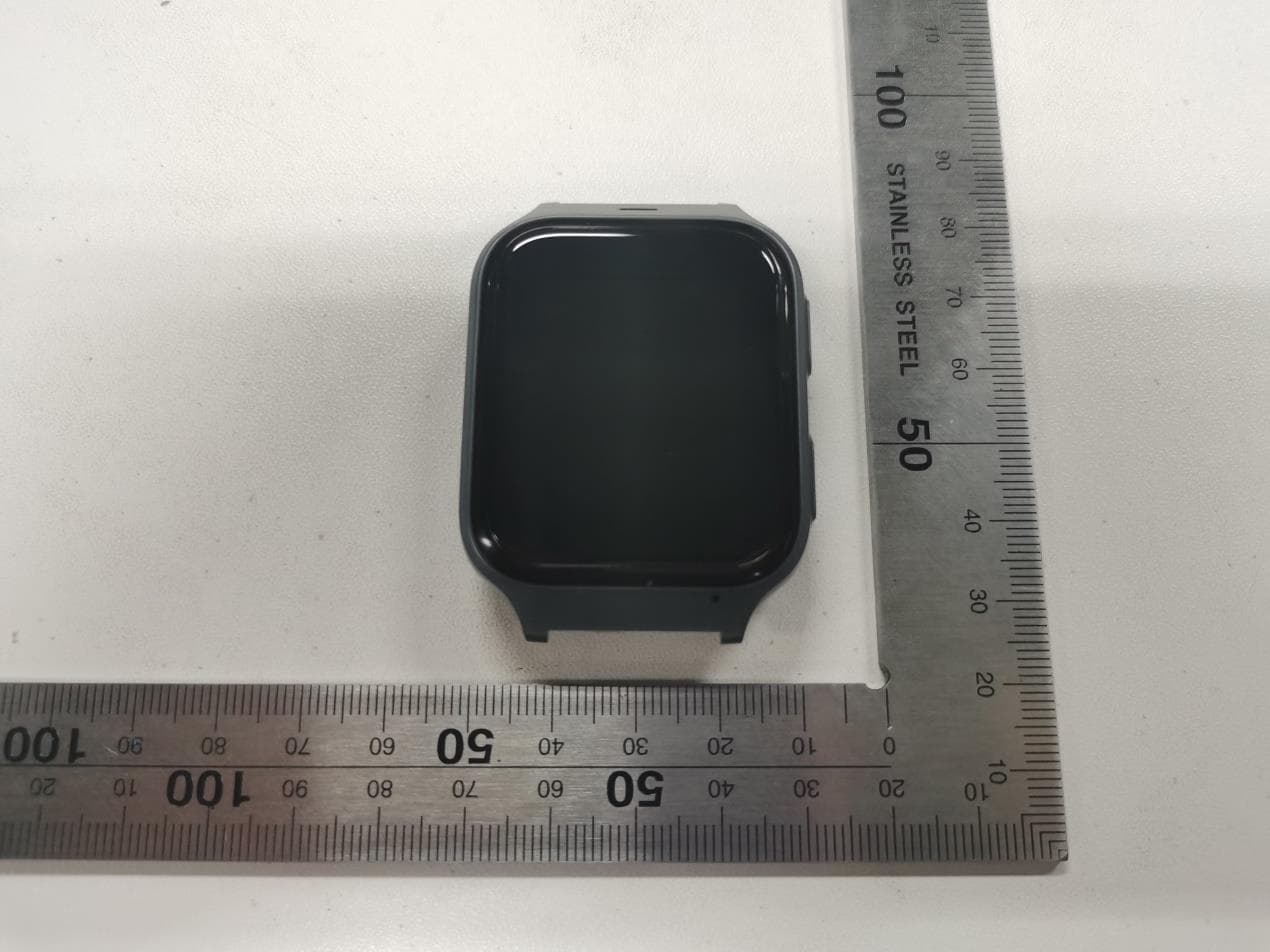
Click to zoom
Application Details
- Equipment Class
- CXX - Communications Rcvr for use w/ licensed Tx and CBs
- Date of Grant
- Jun 26, 2021
- Application Purpose
- Original Equipment
- Date of Application
- Jun 26, 2021
- Equipment Note
- TIMEX FamilyConnect SENIOR
- Frequency Range
- 617.00000000 - 652.00000000
- Company
- TCL Communication Ltd.
- Country
- China
Documents & Files
Document Text
Text extracted from the exhibit documents filed with the FCC. Open a document above to read the original.
Users Manual
1 Quick Start Guide CJB1R61TBAAA 2 What’s in the box TIMEX FamilyConnect™ SENIOR Watch Charging Dock SIM Card Tool USB Type-C Cable Printed Materials 3 Getting to know your watch Speaker Power key SOS key Microphone SIM card slot 4 Charging your watch Please fully charge your watch before using it for the first time. Ensure that the pins in the charging dock are aligned with the pins on the back cover of your Watch. Place your watch on the charging dock as shown in the illustration. Connect the USB type-C cable to charge your watch. Use of a 5V/1A charger is recommended. Note: If the charging port is corroded or dirty, it may affect charging. Please keep the port clear by cleaning it periodically. 5 Download and install the app on your smartphone The account holder, also known as the Primary contact, should download the app to his or her phone, so that they can enter all Primary contact information and customize the watch and app experience. The Primary contact can be the watch wearer or a caregiver (relative or child) who looks after the watch wearer. To download the app you can: • Search for “TIMEX FamilyConnect™” in the Google Play store (Android 6.0 and 6 above), or App store (iOS 10.0 and above). • Scan the following QR code. AndroidiOS Powering on your watch Long press the Power key for 3 seconds to power on your watch. 7 00:03 Language You will be asked to select the system language when powering on your watch for the first time. Select the language you want and go to next. 8 QR code Your watch will now show a QR code on the display. You need this to connect to the smartphone app. This will be described in the following pages. 9 Create an account 1. Touch CREATE ACCOUNT to create your TIMEX FamilyConnect™ account. 2. Enter your name, email address and set a password for your account. (1) Verify your email address (on your phone) and accept the Privacy Policy and Terms of Service to create the account. 3. Enter the verification code sent to your email address. This email address will be used to help you reset your password should you forget it. 4. Touch Done. (1) Read the “Terms of Service” and “Privacy Policy” and check the box. 10 Adding Watch to Account Make sure you are able to connect to the internet before pairing your watch with your phone. The connected network icon will appear at the top left of your watch’s Home screen once connected to the internet. LTE network 3G network Data roaming network No data connection; calls are possible No network and can’t make calls 11 1. Touch ADD WATCH on the Home page of the TIMEX FamilyConnect™ app. 2. Select SENIOR WATCH OVERVIEW and ADD WATCH. 12 3. If you’re the user of this watch, choose FOR ME, otherwise choose FOR FAMILY MEMBER. 4. Follow the initial instructions to enter the basic user data of the watch user, such as their name, sex, birthday, weight and height. Press NEXT after each step. 13 Then enter your the watch user’s daily activity goals, including the steps, distance and calories. User can override each setting by manually entering total. 14 5. Scan the QR code to pair your watch The QR code will appear after you enter the PIN code (see page 9). If the QR code is not displayed, open the Pedometer application. The QR code will display again. The server will send a random code to your watch and the 15 information displayed on the screen should be noted at this time. Input the random code to the application information bar and confirm. Once the watch has been successfully paired with your phone, you will be brought to the application main screen. The location of the watch will be displayed here on the map. Add contacts Add phone contacts 1. Touch on the left screen. 2. Touch All Contacts. 3. Touch + on the lower right of this page. 16 4. Enter the name, a phone number and email address. You can also upload a photo (optional). There are two identities you can choose from: Contact and Guardian. A Contact is only allowed to make and receive calls and texts from the watch. A Guardian must 17 download the app to be able to locate the watch and send and receive in-app messages (text and voice) from the watch, in addition to be able to make and receive calls and texts from the watch. 18 5. Touch SAVE. The contact will appear in the contact list. Set emergency contacts When the watch is successfully added to the app, user is required to enter an emergency contact. 1. Touch +. 2. Add a contact manually (enter the name, phone number and email address) or touch contacts icon to search for and select an existing Contact. 19 3. Touch SAVE. 20 SOS function Press and hold the SOS key for 3 seconds to make an SOS call to the pre-defined emergency contact. When an SOS is sent, the Primary contact and each Guardian will receive an app notification and an SMS informing them that an SOS alert has been issued. These messages will contain a link to the location of the watch. 21 Using your watch Screen Press the Power key to wake up the Home screen. Select and exit applications From the home screen, swipe left to view the various applications on the watch. Touch an 22 application to select it. Touch to exit. Weather display and notifications To get to the weather view, swipe down on the home screen. The weather is displayed in this view. You also have the option of adjusting the screen brightness and volume and activating flight mode or switching off the device. Swipe up from the home screen to go to the notifications view. 23 Applications Phone Select Phone to bring up the Phone menu. Touch a contact or enter the desired number and then press the yellow button to start the call. Contacts Touch a contact and choose to start a call. Touch to end the call. Contacts can be added via the paired app. 24 Messages Recent Messages: Touch a contact to read the recent messages. Send Message: Choose a contact to send a message, touch App to send to your TIMEX FamilyConnect™ app and touch Te x t to send to your phone. Health Health is created for health-relat…
Text truncated - open the document above for the full version.
Users Manual
1 Safety and Regulatory Information CQF1R61TBAAA 2 Safety and Use We recommend that you read this chapter carefully before using your device. The manufacturer disclaims any liability for damage, which may result as a consequence of improper use or use contrary to the instructions contained herein. Use of connected devices subject to T-Mobile’s Terms and Conditions. Traffic Safety Always obey the local laws and regulations addressing the use of wireless mobile devices and their accessories in the areas where you drive. The use of mobile devices while driving may be prohibited or restricted in certain areas. Conditions of Use You are advised to switch off your device from time to time to optimize its performance. 3 Operational Warnings: Only use your device in accordance with local laws and regulations and obey all posted notices in public areas. Do not attempt to disassemble your device. If you disassemble your device, the warranty will not apply. Always handle your device with care and keep it in a clean and dust-free place. Do not allow your device to be exposed to adverse weather or environmental conditions (moisture, humidity, rain, infiltration of liquids, dust, sea air, etc.). The manufacturer’s recommended operating temperature range is -10°C (14°F) to +45°C (113°F) Use only batteries, battery chargers, and accessories which are recommended by Device manufacturer and its affiliates and are compatible with your device. Device manufacturer and its affiliates disclaim any liability for damage caused by the use of other chargers or batteries. 4 Use a suitable plastic strap, do not use a metal strap. Please check local laws and regulations in your jurisdiction to learn how to best dispose of your device. PROTECT YOUR HEARING To prevent possible hearing damage, do not listen at high volume levels for long periods. Exercise caution when holding your device near your ear while the loudspeaker is in use. Privacy Please note that you must respect the laws and regulations of your jurisdiction or other jurisdiction(s) where you will use your device regarding recording sounds with your device. Pursuant to such laws and regulations, it may be strictly forbidden to record the voices of other people or any of 5 their personal attributes, and reproduce or distribute them, as this may be considered to be an invasion of privacy. It is the user’s sole responsibility to ensure that prior authorization be obtained, if necessary, in order to record private or confidential conversations; the manufacturer, the seller or vendor of your device (including the operator) disclaim any liability which may result from the improper use of the device. FCC Compliance Any changes or modifications not expressly approved by the party responsible for compliance of this device voids the user's authority to operate this device. This device complies with Part 15 of the FCC Rules. Operation is subject to the following two conditions: (1) This device may not cause harmful 6 interference (2) This device must accept any interference received, including interference that may cause undesired operation. This equipment has been tested and found to comply with the limits for a Class B digital device, pursuant to Part 15 of the FCC Rules. These limits are designed to provide reasonable protection against harmful interference in a residential installation. This equipment generates, uses and can radiate radio frequency energy and, if not installed and used in accordance with the instructions, may cause harmful interference to radio communications. However, there is no guarantee that interference will not occur in a particular installation. If this equipment does cause harmful interference to radio or television reception, which can be determined by turning the equipment off and on, the user is encouraged to try to 7 correct the interference by one or more of the following measures: • Reorient or relocate the receiving antenna. • Increase the separation between the equipment and receiver. • Connect the equipment into an outlet on a circuit different from that to which the receiver is connected. • Consult the dealer or an experienced radio/TV technician for help. Radio Waves THIS DEVICE MEETS GOVERNMENT REQUIREMENTS FOR EXPOSURE TO 8 RADIO WAVES. Your device is a radio transmitter and receiver. It is designed and manufactured not to exceed the emission limits for exposure to radiofrequency (RF) energy. These limits are part of comprehensive guidelines and establish permitted levels of RF energy for the general population. The guidelines are based on standards that were developed by independent scientific organizations through periodic and thorough evaluation of scientific studies. These guidelines include a substantial safety margin designed to ensure the safety of all persons, regardless of age and health. The exposure standard for watches employs a unit of measurement known as the Specific Absorption Rate, or SAR. The SAR limit set by public authorities such as the Federal Communications Commission of the US Government (FCC), or by Innovation, Science and Economic 9 Development Canada (ISED), is 1.6 W/ kg averaged over 1 gram of body tissue, and Limbs is 4.0 W/Kg averaged over 10 grams. Tests for SAR are conducted using standard operating positions with the device transmitting at its highest certified power level in all tested frequency bands. Although the SAR is determined at the highest certified power level, the actual SAR level of the device while operating can be well below the maximum value. This is because the device is designed to operate at multiple power levels so as to use only the power required to reach the network. In general, the closer you are to a wireless base station antenna, the lower the power output of the device. Before a device model is available for sale to the public, compliance with national regulations and standards must be shown. The highest SAR value for this model device when tested is 1.36 W/Kg for use c…
Text truncated - open the document above for the full version.
Cover Letter(s)
Rev 11/20/07 TCL Communication Ltd. 5/F, Building 22E, 22 Science Park East Avenue, Hong Kong Science Park, Shatin, NT, Hong Kong Federal Communications Commission Authorization and Evaluation Division Confidentiality Request regarding application for certification of FCC ID: 2ACCJB128. Pursuant to Sections 0.457 and 0.459 of the Commission’s Rules, we hereby request confidential treatment of information accompanying this application as outlined below: Exhibit Type File Name Schematic Diagram Block Diagram Parts List Operational Description Tune up procedure Schematics.PDF Block Diagram.PDF Parts List.PDF Operational Description.PDF Tune up procedure.PDF The above materials contain trade secrets and proprietary information not customarily released to the public. The public disclosure of these materials may be harmful to the applicant and provide unjustified benefits to its competitors. The applicant understands that pursuant to Section 0.457 of the Rules, disclosure of this application and all accompanying documentation will not be made before the date of the Grant for this application. Pursuant to DA04-1705 June 15, 2004 of the Commission’s public notice, we also request temporary confidential treatment of information accompanying this application, the confidentiality period is 180 days. As outlined below: Exhibit Type File Name External Photos Internal Photos Test Setup Photos User Manual External Photos.PDF Internal Photos.PDF Test Setup Photos.PDF Users Manual.PDF Sincerely, Rev 11/20/07 Zhizhou Gong / Product Certification Manager TCL Communication Ltd. E-mail: [email protected]
Cover Letter(s)
\\10.129.72.131\r&d\Tech&Inno\PCM\Team Member\梁秋\SCD Project\MT43AY\FCC 递交资料\DECLARATION (002).docx TCL Communication Ltd. 5/F, Building 22E, 22 Science Park East Avenue, Hong Kong Science Park, Shatin, NT, Hong Kong FCC Application for FCC ID: 2ACCJB128 DECLARATION The Family Watch MT43AY only has WIFI reception function and no circuit and IC with transmitting function. Although the BT chip supports BLE, BR/EDR, the product only supports BLE. The BR/EDR function has been turned off by software. Regards, Zhizhou Gong / Product Certification Manager TCL Communication Ltd. E-mail: [email protected]
Cover Letter(s)
\\10.129.72.131\r&d\Tech&Inno\PCM\Team Member\梁秋\SCD Project\MT43AY\FCC 递交资料\6.MT43AY_POA_Letter_140225 (002).docx TCL Communication Ltd. 5/F, Building 22E, 22 Science Park East Avenue, Hong Kong Science Park, Shatin, NT, Hong Kong Federal Communications Commission Authorization and Evaluation Division 1435 Oakland Mills Road Columbia, MD 21046 Date: 6/11/2021 SUBJECT: FCC Application for 2ACCJB128 To Whom It May Concern: We, the undersigned, hereby authorize Zhou Fangai at Shenzhen Academy of Metrology and Quality Inspection on our behalf, to apply to the Federal Communications Commission on our equipment. Any and all acts carried out by Shenzhen Academy of Metrology and Quality Inspection on our behalf shall have the same effect as acts of our own. This is to advise that we are in full compliance with the Anti- Drug Abuse Act. We, the applicant, are not subject to a denial of federal benefits pursuant to Section 5301 of the Anti-Drug Act of 1988, 21 USC853a, and no party to the application is subject to a denial of federal benefits pursuant to that section. Regards, Zhizhou Gong / Product Certification Manager TCL Communication Ltd. E-mail: [email protected]
External Photos
Photo 1 Appearance of EUT Photo 2 Appearance of EUT Photo 3 Appearance of EUT Photo 4 Appearance of EUT Photo 5 Appearance of EUT Photo 6 Appearance of EUT Photo 7 Appearance of EUT Photo 8 Appearance of EUT Photo 9 Appearance of EUT Photo 10 Appearance of EUT Photo 11 Appearance of USB Cable Photo 12 Appearance of Charging Dock
ID Label/Location Info
MT43AY_NA_2D(V2.0f) _20210324 Laser cut (Color refer to sample)
Internal Photos
Photo 1 Inside of EUT Main Antenna GPS&WIFI& Bluetooth Diversity Antenna Photo 2 Inside of EUT Photo 3 Inside of EUT Photo 4 Inside of EUT Photo 5 Inside of EUT Photo 6 Inside of EUT Photo 7 Inside of EUT Photo 8 Inside of EUT
Test Report
Report No.: WT218001355 Page 1/18 FCC TEST REPORT For TIMEX FamilyConnect SENIOR Model Number: MT43AY FCC ID: 2ACCJB128 Report Number : WT218001355 Test Laboratory : Shenzhen Academy of Metrology and Quality Inspection Site Location : NETC Building, No.4 Tongfa Rd., Xili, Nanshan, Shenzhen, China Tel : 0086-755-86928965 Fax : 0086-755-86009898-31396 Web : www.smq.com.cn E-mail [email protected] Report No.: WT218001355 Page 2/18 TEST REPORT DECLARATION Applicant : TCL Communication Ltd. Address : 5/F, Building 22E, 22 Science Park East Avenue, Hong Kong Science Park, Shatin, NT, Hong Kong Manufacturer : TCL Communication Ltd. Address : 5/F, Building 22E, 22 Science Park East Avenue, Hong Kong Science Park, Shatin, NT, Hong Kong EUT Description : TIMEX FamilyConnect SENIOR Model No. : MT43AY Trade mark : TIMEX Serial Number : / FCC ID : 2ACCJB128 Test Standards: FCC Part 15 Subpart B (2019) The EUT described above is tested by Shenzhen Academy of Metrology and Quality Inspection EMC Laboratory to determine the maximum emissions from the EUT. Shenzhen Academy of Metrology and Quality Inspection EMC Laboratory is assumed full responsibility for the accuracy of the test results. The test report is valid for above tested sample only and shall not be reproduced in part without written approval of the laboratory. Project Engineer: Date: Jun.15, 2021 (Zhou Fangai 周芳嫒) Jun.15, 2021 Checked by: Date: (Shi Changda 施昌达) Jun.15, 2021 Approved by: Date: (Lin Yixiang 林奕翔) Report No.: WT218001355 Page 3/18 TABLE OF CONTENTS TEST REPORT DECLARATION ........................................................................................................ 2 1. TEST RESULTS SUMMARY ................................................................................................... 4 2. GENERAL INFORMATION ...................................................................................................... 5 2.1. Report information .......................................................................................................... 5 2.2. Laboratory Accreditation and Relationship to Customer ......................................... 5 2.3. Measurement Uncertainty ............................................................................................. 5 3. PRODUCT DESCRIPTION ....................................................................................................... 7 3.1. EUT Description.............................................................................................................. 7 3.2. Block Diagram of EUT Configuration .......................................................................... 8 3.3. Operating Condition of EUT ......................................................................................... 8 3.4. Support Equipment List ................................................................................................. 8 3.5. Test Conditions ............................................................................................................... 8 3.6. Modifications ................................................................................................................... 9 4. TEST EQUIPMENT USED ..................................................................................................... 10 4.1. Test Equipment Used to Measure Conducted Emission ....................................... 10 4.2. Test Equipment Used to Measure Radiated Emission ........................................... 10 5. CONDUCTED EMISSION TEST ........................................................................................... 11 5.1. Test Standard and Limit .............................................................................................. 11 5.2. Test Procedure ............................................................................................................. 11 5.3. Test Arrangement ......................................................................................................... 11 5.4. Test Data ....................................................................................................................... 11 6. RADIATION EMISSION TEST ............................................................................................... 14 6.1. Test Standard and Limit .............................................................................................. 14 6.2. Test Procedure ............................................................................................................. 14 6.3. Test Arrangement ......................................................................................................... 15 6.4. Test Data ....................................................................................................................... 15 Report No.: WT218001355 Page 4/18 1. TEST RESULTS SUMMARY Table 1 Test Results Summary Test Items FCC Rules Test Results Conducted Emission 15.107 Pass Radiation Emission 15.109 Pass Remark: “N/A” means “Not applicable.” Report No.: WT218001355 Page 5/18 2. GENERAL INFORMATION 2.1. Report information This report is not a certificate of quality; it only applies to the sample of the specific product/equipment given at the time of its testing. The results are not used to indicate or imply that they are application to the similar items. In addition, such results must not be used to indicate or imply that SMQ approves recommends or endorses the manufacture, supplier or use of such product/equipment, or that SMQ in any way guarantees the later performance of the product/equipment. The sample/s mentioned in this report is/are supplied by Applicant, SMQ therefore assumes no responsibility for the accuracy of information on the brand name, model number, origin of manufacture or any information supplied. Additional copies of the report are available to the Applicant at an additional fee. No third part can obtain a copy of this report through SMQ, unless the applicant has author…
Text truncated - open the document above for the full version.
Test Setup Photos
FCC Part15B Radiated Emission below 1GHz -Front -Rear FCC Part15B Radiated Emission above 1GHz -Front -Rear AC Conducted Emission Test Setup -Front -Rear
Contact Information
Applicant
Ting Wang
Test Firm
Shenzhen Academy of Metrology and Quality InspecMs. Alice Hou
[email protected]86 755 86928932
Technical Specifications
| # | Rule Parts | Frequency Range | Power Output |
|---|---|---|---|
| 5 | 15B | 617 MHz - 652 MHz | - |
Other Applications from TCL Communication Ltd.
2ACCJSCD002
Sep 10, 2024USB Connect 5G (NA)
Equipment Class
CXX - Communications Rcvr for use w/ licensed Tx and CBs2ACCJB227
Aug 21, 2024Smart phone
Equipment Class
DTS - Digital Transmission System2ACCJSCD005
Aug 07, 2024TCL LINKPORT IK511
Equipment Class
CXX - Communications Rcvr for use w/ licensed Tx and CBs2ACCJB224
Jul 31, 2024Tablet PC
Equipment Class
DSS - Part 15 Spread Spectrum Transmitter2ACCJB223
Jun 27, 2024Tablet PC
Equipment Class
NII - Unlicensed National Information Infrastructure TX