2ACCJN002GSM Quad-band / UMTS Quad-band / LTE 6 band mobile phone
TCL Communication Ltd.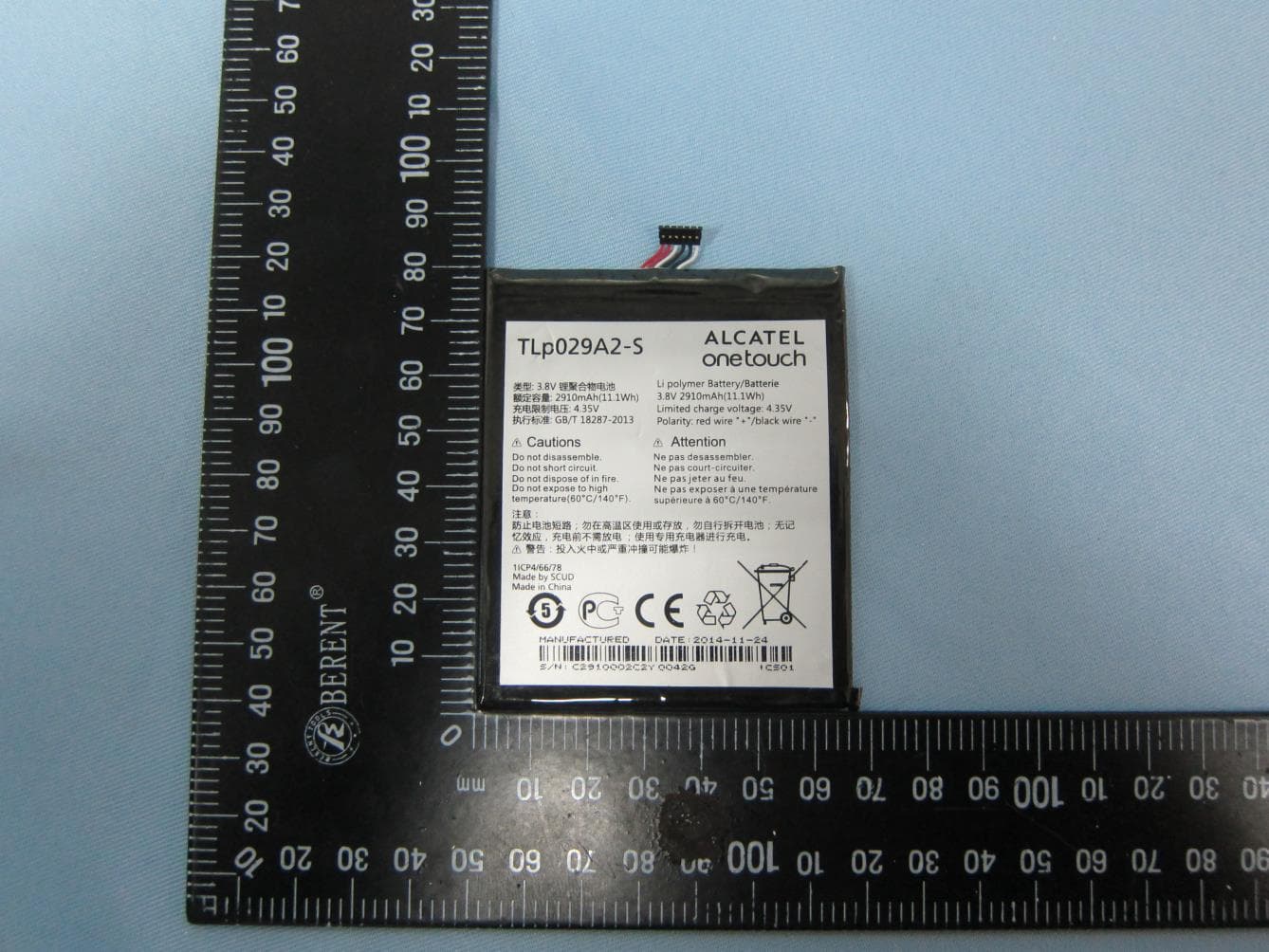
Click to zoom
Application Details
- Equipment Class
- DTS - Digital Transmission System
- Date of Grant
- Apr 20, 2015
- Application Purpose
- Original Equipment
- Date of Application
- Apr 20, 2015
- Equipment Note
- GSM Quad-band / UMTS Quad-band / LTE 6 band mobile phone
- Frequency Range
- 2402.00000000 - 2480.00000000
- Company
- TCL Communication Ltd.
- Country
- China
Documents & Files
Document Text
Text extracted from the exhibit documents filed with the FCC. Open a document above to read the original.
Users Manual
English - CJB61B3OFAAA Quick Start Guide Important: Your phone is a unibody device, so the back cover and battery are not removable. Unauthorized personnel are strictly prohibited from disassembling the phone. If your phone isn’t working normally, try to restart it by pressing and holding the Power key for at least 10 seconds until the startup screen appears. If your phone develops a serious error and can’t be restored by restarting it, you may need to restore factory settings by pressing and holding the Power key and Volume up key until the startup screen appears. Then select "reboot system now" and press the Power key to confirm. Note: Please take care when performing such operations because they will erase personalized settings and data saved in your phone, such as SMS, Contacts, Music, etc. For more information about how to use your device please visit www.alcatelonetouch.us to download the complete user manual. From the website, you can consult the FAQ, perform software upgrades, etc. Thank you for buying ALCATEL ONETOUCH 6045I. We hope you will enjoy your high-quality mobile communication experience. BC 1 1 Your mobile ������������������ 1�1 Keys and connectors Micro-USB Connector Front camera Headset connector LED indicator Home key Touch screen Back key Recents key Table of contents 1 Your mobile ���������������������������������������������������������������������1 2 Text input ����������������������������������������������������������������������11 3 Phone call ����������������������������������������������������������������������12 4 Contacts ������������������������������������������������������������������������15 5 Messaging�����������������������������������������������������������������������16 6 Email ������������������������������������������������������������������������������18 7 Getting connected ��������������������������������������������������������19 8 Find my location using GPS satellites ������������������������21 9 Data backup ������������������������������������������������������������������22 10 Factory data reset ��������������������������������������������������������22 11 Applications & Internal storage ����������������������������������23 12 Upgrade �������������������������������������������������������������������������24 Safety and use �������������������������������������������������������������������������25 General information ��������������������������������������������������������������34 Warranty ���������������������������������������������������������������������������������35 Troubleshooting����������������������������������������������������������������������37 PROTECT YOUR HEARING To prevent possible hearing damage, do not listen at high volume levels for long periods. Exercise caution when holding your device near your ear while the loudspeaker is in use. www.sar-tick.com This product meets applicable national SAR limits of 1.6 W/kg. The specific maximum SAR values can be found on page 30 of this user guide. When carrying the product or using it while worn on your body, either use an approved accessory such as a holster or otherwise maintain a distance of 1.0 cm from the body to ensure compliance with RF exposure requirements. Note that the product may be transmitting even if you are not making a phone call. 23 Camera Camera Flash/Flashlight Power key SIM card slot Volume key Recents key • Touch to view recently used applications. Home key • From any application or screen, touch to return to the Home screen. • Touch and hold to pop up Google search icon. Slide your finger to the icon to open Google search. Back key • Touch to go back to the previous screen, or to close a dialog box, options menu, the notification panel, etc. These keys are visible when the phone is unlocked. Power key • Press: Lock the screen/Light up the screen. • Press and hold: Shows the pop-up menu to select from Power off/Restart/Airplane mode. • Press and hold the Power key and Volume up key to reset. • Press and hold the Power key and Volume down key to capture a screenshot. • Press and hold the Power key for at least 10 seconds to force reboot or hold it longer to power off. Volume Keys • In call mode, adjusts the earpiece or headset volume. • In Music/Video/Streaming mode, adjusts the media volume. • In general mode, adjusts the ringtone volume. • Mutes the ringtone of an incoming call. • In camera preview mode, press Volume up or down key to enter burst shoot. 1�2 Getting started 1�2�1 Set up Inserting or removing the SIM/microSD card You must insert your SIM card to make phone calls. You do not need to power off your phone before inserting or removing the SIM card as this phone can support hot swap. 45 Before you install/remove the SIM card or microSD card, insert the SIM card tool provided into the small opening on the side of the device. The SIM/microSD card tray will pop out. Your phone only supports micro-SIM cards. Do not attempt to insert other SIM types like mini and nano cards; otherwise this may cause damage to your phone. To avoid data loss and SD card damage, before removing the SD card, please ensure that the SD card is unmounted (Settings\Storage\Unmount SD card). Charging the battery Connect USB cable provided to your phone and charger. Then, connect charger to electrical outlet. The LED indicator will light while charging. To reduce power consumption and energy waste, when the battery is fully charged, disconnect your charger; switch off Wi-Fi, GPS, Bluetooth or background-running applications when not in use; reduce the backlight time, etc. 1�2�2 Power on your phone Hold down the Power key until the phone powers on. It will take a few seconds before the screen lights up. Set up your phone for the first time The first time you power on the phone, you should set the following options: Language, Google account, etc. Even if no SIM card is installed, your phone will still power on and you will be able to connect to a Wi-Fi network, sign into your Goo…
Text truncated - open the document above for the full version.
Users Manual
Français - CJB61B3OFAAA Guide de démarrage rapide Important : Votre téléphone est un appareil monobloc. Son couvercle et sa batterie ne sont donc pas amovibles. Il est interdit au personnel non autorisé de désassembler le téléphone. Si votre téléphone ne fonctionne pas normalement, essayez de le redémarrer en appuyant sur la touche Marche-arrêt pendant au moins 10 secondes jusqu'à ce que l'écran de démarrage apparaisse. Si une erreur grave apparaît sur votre téléphone et qu'il ne peut être restauré en le redémarrant, vous pourriez devoir restaurer les paramètres d'usine en appuyant longuement sur les touches Marche-arrêt et pour Augmenter le volume, jusqu’à ce que l'écran de démarrage s'affiche. Appuyez ensuite sur l'option Redémarrer le système maintenant, puis sur la touche Marche-arrêt pour confirmer. Remarque : veuillez faire attention lorsque vous effectuez de telles opérations, car elles effaceront les paramètres personnalisés et les données enregistrées dans votre téléphone, comme les messages texte/SMS, Contacts, Musique, etc. Pour en savoir plus sur les façons d'utiliser cet appareil, veuillez consulter le site www.alcatelonetouch.com/ca-fr/ pour télécharger le guide de l'utilisateur complet. Dans le site Web, vous pouvez également consulter la Foire aux questions, effectuer des mises à niveau logicielles, etc. Merci d'avoir acheté l’appareil ALCATEL ONETOUCH 6045I. Nous espérons que vous aimerez votre expérience de communication de haute qualité. BC 1 1 Présentation de l’appareil ������������������������ 1�1 Touches et connecteurs Connecteur micro-USB Appareil photo/ vidéo frontal Connecteur pour écouteurs Indicateur à DEL Touche Accueil Écran tactile Touche Retour Touche applications récentes Table des matières 1 Présentation de l’appareil ����������������������������������������������1 2 Saisie de texte ���������������������������������������������������������������11 3 Appel téléphonique ������������������������������������������������������12 4 Contacts ������������������������������������������������������������������������15 5 Messagerie ���������������������������������������������������������������������16 6 Envoyer un courriel ������������������������������������������������������17 7 Connexion aux réseaux������������������������������������������������18 8 Géolocalisation par satellite GPS �������������������������������21 9 Sauvegarde des données ����������������������������������������������21 10 Restaurer valeurs d’usine ��������������������������������������������22 11 Applications et stockage interne���������������������������������22 12 Mise à jour ���������������������������������������������������������������������23 Précautions d’emploi �������������������������������������������������������������24 Renseignements d’ordre général������������������������������������������34 Garantie ����������������������������������������������������������������������������������35 Dépannage ������������������������������������������������������������������������������37 PROTÉGEZ VOTRE OUÏE Pour prévenir toute lésion de l’appareil auditif, évitez d'utiliser l’appareil à un volume élevé pendant de longues périodes. Si vous utilisez le haut-parleur, soyez prudent quand vous tenez l’appareil près de l’oreille. www.sar-tick.com Ce produit respecte les limites nationales applicables de débit d’absorption spécifique (DAS) de l’ordre de 1,6 W/kg. Pour déterminer les valeurs maximales exactes du DAS, reportez- vous à la page 30 du présent guide de l’utilisateur. Lorsque vous portez le produit ou que vous l’utilisez contre votre corps, mettez-le dans un accessoire agréé comme un étui ou tenez-le éloigné à une distance d’au moins 1,0 cm de votre corps pour garantir le respect des exigences en matière d’exposition aux radiofréquences. Remarquez que ce produit peut émettre même lorsque vous ne faites aucun appel téléphonique. 23 Appareil photo Flash pour l'appreil photo/lampe de poche Touche Marche-arrêt Emplacement de carte SIM Touche Volume Touche applications récentes • Appuyez sur cette touche pour voir les applications récemment utilisées. Touche Accueil • Appuyez sur cette touche pour revenir à l’écran d’accueil, quel que soit l'écran ou l'application dans lequel vous vous trouvez. • Appuyez longuement pour que l'icône de Recherche Google ouvre une fenêtre contextuelle. Glissez votre doigt jusqu'à l'icône permettant d'ouvrir la Recherche Google. Touche Retour • Appuyez sur cette touche pour revenir à l’écran précédent ou pour fermer une boîte de dialogue, le menu des options, le Panneau des notifications, etc. Ces touches sont visibles quand le téléphone est déverrouillé. Touche Marche-arrêt • Appui bref : verrouillage ou allumage de l’écran. • Appui prolongé : affiche le menu contextuel pour que vous puissiez faire votre choix parmi les options Éteindre/Redémarrer/Mode avion. • Appuyez longuement sur les touches Marche-arrêt et pour Augmenter le volume pour réinitialiser l'appareil. • Appuyez longuement sur les touches Marche-arrêt et pour Réduire le volume pour obtenir une capture d'écran. • Appuyez sur la touche Marche-arrêt pendant au moins 10 secondes pour forcer le redémarrage ou maintenez-la enfoncée encore plus longtemps pour éteindre le téléphone. Touche Volume • Pour régler le volume dans les écouteurs ou le casque d’écoute pendant un appel • Pour régler le volume en mode Musique, Vidéo ou Diffusion en continu • Appuyez sur cette touche pour régler le volume de la sonnerie en mode d’utilisation standard. • Coupe la sonnerie déclenchée normalement par les appels entrants. • En mode de prévisualisation avec la caméra, appuyez sur la touche pour Augmenter ou Réduire le volume pour entrer en mode rafale. 1�2 Premiers pas 1�2�1 Configurer Insertion ou retrait de la carte SIM/microSD Pour pouvoir effectuer des appels, vous devez avoir inséré une carte SIM. Grâce à la capacité de remplacement à chaud de votre appareil, il n'est pas nécessaire de mettre celui-ci hors tension lors…
Text truncated - open the document above for the full version.
Attestation Statements
TCL Communication Ltd. 5F, C-Tower, No.232, Liangjing Road, Zhangjiang High-tech Park, Pudong, Shanghai, China Tel: +86 21 51798260 ; Fax: +86 21 61460602 Date: April 17, 2015 Federal Communications Commission Office of Engineering and Technology Laboratory Division Subject: Reverse call feature of FCC ID: 2ACCJN002 To whom it may concern: This device employs a “reverse calling” feature based on the orientation of the device such that a call can be made or taken in either portrait orientation (“Normal” and “Upside Down”). The maximum output power is reduced for a number of wireless technologies, as specified in the parts list/tune-up info exhibit, for the reverse calling mode. When a user accepts or initiates a voice call, the normal or reverse calling mode is determined by the device according to the fixed set of rules described in the operational description exhibit. Once a call is connected, the device will lock that orientation state for the duration of the call, such that the user will not be able to rotate the device during a live call and continue the call in the reversed orientation. The feature is disabled by default and must be user activated in the device Settings menu. Detailed instructions on its proper use will be included in the User Manual of the device. After the user activates the reverse calling feature, a pop-up message is displayed to alert the user of this feature and proper use conditions. The details are also included in the User Manual of this device in the User Manual Exhibit The device has been tested in voice mode for head SAR exposure compliance in both normal and reverse calling mode according to the maximum output power specified in the parts list/tune-up info exhibit. Body-worn accessory and hotspot mode SAR compliance are tested at normal mode maximum output power without power reduction Should you have any question, please contact the undersigned. Sincerely,
Attestation Statements
TCL Communication Ltd. 5F, C‐Tower, No.232, Liangjing Road, Zhangjiang High‐tech Park, Pudong, Shanghai, China Tel: +86 21 51798260 ; Fax: +86 21 61460602 Date: April 17, 2015 Variation Attestation To whom it may concern: We hereby declares Model: 6045I, FCC ID: 2ACCJN002 Use the exact same Bluetooth/Wi‐Fi/NFC hardware and software solution as Model: 6045B, FCC ID: 2ACCJN001 Based on the similarities between these devices, FCC Part 15C and 15E reports issued by Sporton International Inc. for model: 6045B, FCC ID: 2ACCJN001 also applies for model: 6045I, FCC ID: 2ACCJN002. Should you have any question, please contact the undersigned. Sincerely, Zhizhou GONG Product Certification Manager TCL Communication Ltd.
Cover Letter(s)
Rev. 1/1/03 TCL Communication Ltd. 5F, C-Tower, No.232, Liangjing Road, Zhangjiang High-tech Park, Pudong, Shanghai, China Tel: +86 21 51798260 ; Fax: +86 21 61460600 Date: April 16, 2015 Federal Communications Commission Authorization and Evaluation Division Confidentiality Request regarding application for certification of FCC ID: 2ACCJN002 Pursuant to Sections 0.457 and 0.459 of the Commission’s Rules, we hereby request confidential treatment of information accompanying this application as outlined below: Schematics Block Diagram Parts List Operation Description Tune up Procedure The above materials contain trade secrets and proprietary information not customarily released to the public. The public disclosure of these materials may be harmful to the applicant and provide unjustified benefits to its competitors. The applicant understands that pursuant to Section 0.457 of the Rules, disclosure of this application and all accompanying documentation will not be made before the date of the Grant for this application. Sincerely, ____________________ Zhizhou Gong
Cover Letter(s)
TCL Communication Ltd. 5F, C-Tower, No.232, Liangjing Road, Zhangjiang High-tech Park, Pudong, Shanghai, China Tel: +86 21 51798260 ; Fax: +86 21 61460600 Date: April 16, 2015 Power of Attorney To whom it may concern, Please be notified that I, Zhizhou Gong, have designated Michael Lin in Sporton International Inc. as the persons being responsible for this project and to sign the form 731 and other documentation. Any and all acts carried out by Michael Lin in Sporton International Inc. on the matters of relating to all processes required in the FCC approval and any communication needed with the national authority, shall have the same legal authority as acts on our own behalf. We further certifies that neither the applicant nor any party to this application, as defined in 47 CFR Ch. 1.2002 (b), is subject to a denial to Federal benefits, that include FCC benefits, pursuant to section 5301 of the Anti-Drug Abuse Act of 1998, 21 U.S.C. 835(a). This authorization is limited to the product of as following: FCC ID: 2ACCJN002 If you have any acknowledgement and response, please send it to Sporton International Inc. directly. Should you have any questions or comments regarding this matter, please have my best attention. Sincerely yours, _____________________ Contact Person: Zhizhou Gong Company: TCL Communication Ltd. TEL: +86 21 51798260 FAX: +86 21 61460600 E-mail: [email protected]
Cover Letter(s)
1/2 TCL Communication Ltd. Date: April 16, 2015 Federal Communications Commission Authorization and Evaluation Division RE : Certification Application FCC ID : 2ACCJN002 To Whom It May Concern, Pursuant to sections 0.457 and 0.459 of CFR 47, Public Notice DA 04-1705 of the Commission’s policy and to avoid premature release of sensitive information prior to marketing or release of the product to the public, the applicant requests the following documents contained in this certification application be temporarily withheld from public disclosure for an initial period of 180 days: External Photos Internal Photos Test set-up photos Users Manual The application contains technical information, which TCL Communication Ltd. deems to be trade secrets and proprietary. If made public, the information might be used to the disadvantage of the applicant in the market place. The Applicant understands that pursuant to Rule 0.457, disclosure of this Application and all accompanying documentation will not be made before the date of the Grant for this application Sincerely, _______________________ Contact Person: Zhizhou Gong Company: TCL Communication Ltd. TEL: +86 21 51798260 FAX: +86 21 61460600 E-mail: [email protected] 2/2
External Photos
Photographs of EUT Report No.: EP511301-03 Brand Name: ALCATEL ONETOUCH; Model Name: 6045I SPORTON INTERNATIONAL (KUNSHAN) INC. Page Number : 1 of 33 TEL : 86-0512-5790-0158 Report Issued Date : Apr. 17, 2015 FAX : 86-0512-5790-0958 Report Version : Rev. 01 FCC ID: 2ACCJN002 1. External Photograph of EUT Photographs of EUT Report No.: EP511301-03 Brand Name: ALCATEL ONETOUCH; Model Name: 6045I SPORTON INTERNATIONAL (KUNSHAN) INC. Page Number : 2 of 33 TEL : 86-0512-5790-0158 Report Issued Date : Apr. 17, 2015 FAX : 86-0512-5790-0958 Report Version : Rev. 01 FCC ID: 2ACCJN002 Photographs of EUT Report No.: EP511301-03 Brand Name: ALCATEL ONETOUCH; Model Name: 6045I SPORTON INTERNATIONAL (KUNSHAN) INC. Page Number : 3 of 33 TEL : 86-0512-5790-0158 Report Issued Date : Apr. 17, 2015 FAX : 86-0512-5790-0958 Report Version : Rev. 01 FCC ID: 2ACCJN002 Photographs of EUT Report No.: EP511301-03 Brand Name: ALCATEL ONETOUCH; Model Name: 6045I SPORTON INTERNATIONAL (KUNSHAN) INC. Page Number : 4 of 33 TEL : 86-0512-5790-0158 Report Issued Date : Apr. 17, 2015 FAX : 86-0512-5790-0958 Report Version : Rev. 01 FCC ID: 2ACCJN002 Photographs of EUT Report No.: EP511301-03 Brand Name: ALCATEL ONETOUCH; Model Name: 6045I SPORTON INTERNATIONAL (KUNSHAN) INC. Page Number : 5 of 33 TEL : 86-0512-5790-0158 Report Issued Date : Apr. 17, 2015 FAX : 86-0512-5790-0958 Report Version : Rev. 01 FCC ID: 2ACCJN002 Photographs of EUT Report No.: EP511301-03 Brand Name: ALCATEL ONETOUCH; Model Name: 6045I SPORTON INTERNATIONAL (KUNSHAN) INC. Page Number : 6 of 33 TEL : 86-0512-5790-0158 Report Issued Date : Apr. 17, 2015 FAX : 86-0512-5790-0958 Report Version : Rev. 01 FCC ID: 2ACCJN002 Photographs of EUT Report No.: EP511301-03 Brand Name: ALCATEL ONETOUCH; Model Name: 6045I SPORTON INTERNATIONAL (KUNSHAN) INC. Page Number : 7 of 33 TEL : 86-0512-5790-0158 Report Issued Date : Apr. 17, 2015 FAX : 86-0512-5790-0958 Report Version : Rev. 01 FCC ID: 2ACCJN002 List of Accessory: Remark: For accessories equipped with this EUT, please refer to the following photos. Specification of Accessory AC Adapter Brand Name ALCATEL ONETOUCH Model Name UC13US Power Rating I/P: 100-240Vac, 500mA, O/P: 5Vdc, 2000mA P/N CBA0059AG0C1 Battery Brand Name ALCATEL onetouch Model Name TLp029A2-S Power Rating 3.8Vdc, 2910mAh(11.1Wh)4.35V USB Cable Brand Name ALCATEL ONETOUCH Model Name CDA0000043C2 Signal Line Type 1.10m shielded without core Earphone 1 Brand Name ALCATEL ONETOUCH Model Name CCA0001A10C9 Signal Line Type 1.16m non-shielded without core Earphone 2 Brand Name JBL Model Name CCB0029A10CC Signal Line Type 1.38m non-shielded without core 2. Photograph of Accessory Photographs of EUT Report No.: EP511301-03 Brand Name: ALCATEL ONETOUCH; Model Name: 6045I SPORTON INTERNATIONAL (KUNSHAN) INC. Page Number : 8 of 33 TEL : 86-0512-5790-0158 Report Issued Date : Apr. 17, 2015 FAX : 86-0512-5790-0958 Report Version : Rev. 01 FCC ID: 2ACCJN002 Photographs of EUT Report No.: EP511301-03 Brand Name: ALCATEL ONETOUCH; Model Name: 6045I SPORTON INTERNATIONAL (KUNSHAN) INC. Page Number : 9 of 33 TEL : 86-0512-5790-0158 Report Issued Date : Apr. 17, 2015 FAX : 86-0512-5790-0958 Report Version : Rev. 01 FCC ID: 2ACCJN002 AC Adapter Photographs of EUT Report No.: EP511301-03 Brand Name: ALCATEL ONETOUCH; Model Name: 6045I SPORTON INTERNATIONAL (KUNSHAN) INC. Page Number : 10 of 33 TEL : 86-0512-5790-0158 Report Issued Date : Apr. 17, 2015 FAX : 86-0512-5790-0958 Report Version : Rev. 01 FCC ID: 2ACCJN002 Battery Photographs of EUT Report No.: EP511301-03 Brand Name: ALCATEL ONETOUCH; Model Name: 6045I SPORTON INTERNATIONAL (KUNSHAN) INC. Page Number : 11 of 33 TEL : 86-0512-5790-0158 Report Issued Date : Apr. 17, 2015 FAX : 86-0512-5790-0958 Report Version : Rev. 01 FCC ID: 2ACCJN002
Internal Photos
Photographs of EUT Report No.: EP511301-03 Brand Name: ALCATEL ONETOUCH; Model Name: 6045I SPORTON INTERNATIONAL (KUNSHAN) INC. Page Number : 12 of 33 TEL : 86-0512-5790-0158 Report Issued Date : Apr. 17, 2015 FAX : 86-0512-5790-0958 Report Version : Rev. 01 FCC ID: 2ACCJN002 720510 3. Internal Photograph of EUT Bluetooth & WLAN Antenna <Tx/Rx> GPS/Glonass Antenna <Rx> WWAN Diversity Antenna <Rx> WWAN Main Antenna <Tx / Rx> NFC Antenna <Tx/Rx> Photographs of EUT Report No.: EP511301-03 Brand Name: ALCATEL ONETOUCH; Model Name: 6045I SPORTON INTERNATIONAL (KUNSHAN) INC. Page Number : 13 of 33 TEL : 86-0512-5790-0158 Report Issued Date : Apr. 17, 2015 FAX : 86-0512-5790-0958 Report Version : Rev. 01 FCC ID: 2ACCJN002 Photographs of EUT Report No.: EP511301-03 Brand Name: ALCATEL ONETOUCH; Model Name: 6045I SPORTON INTERNATIONAL (KUNSHAN) INC. Page Number : 14 of 33 TEL : 86-0512-5790-0158 Report Issued Date : Apr. 17, 2015 FAX : 86-0512-5790-0958 Report Version : Rev. 01 FCC ID: 2ACCJN002 Photographs of EUT Report No.: EP511301-03 Brand Name: ALCATEL ONETOUCH; Model Name: 6045I SPORTON INTERNATIONAL (KUNSHAN) INC. Page Number : 15 of 33 TEL : 86-0512-5790-0158 Report Issued Date : Apr. 17, 2015 FAX : 86-0512-5790-0958 Report Version : Rev. 01 FCC ID: 2ACCJN002 Photographs of EUT Report No.: EP511301-03 Brand Name: ALCATEL ONETOUCH; Model Name: 6045I SPORTON INTERNATIONAL (KUNSHAN) INC. Page Number : 16 of 33 TEL : 86-0512-5790-0158 Report Issued Date : Apr. 17, 2015 FAX : 86-0512-5790-0958 Report Version : Rev. 01 FCC ID: 2ACCJN002 Photographs of EUT Report No.: EP511301-03 Brand Name: ALCATEL ONETOUCH; Model Name: 6045I SPORTON INTERNATIONAL (KUNSHAN) INC. Page Number : 17 of 33 TEL : 86-0512-5790-0158 Report Issued Date : Apr. 17, 2015 FAX : 86-0512-5790-0958 Report Version : Rev. 01 FCC ID: 2ACCJN002 Photographs of EUT Report No.: EP511301-03 Brand Name: ALCATEL ONETOUCH; Model Name: 6045I SPORTON INTERNATIONAL (KUNSHAN) INC. Page Number : 18 of 33 TEL : 86-0512-5790-0158 Report Issued Date : Apr. 17, 2015 FAX : 86-0512-5790-0958 Report Version : Rev. 01 FCC ID: 2ACCJN002 Photographs of EUT Report No.: EP511301-03 Brand Name: ALCATEL ONETOUCH; Model Name: 6045I SPORTON INTERNATIONAL (KUNSHAN) INC. Page Number : 19 of 33 TEL : 86-0512-5790-0158 Report Issued Date : Apr. 17, 2015 FAX : 86-0512-5790-0958 Report Version : Rev. 01 FCC ID: 2ACCJN002 Photographs of EUT Report No.: EP511301-03 Brand Name: ALCATEL ONETOUCH; Model Name: 6045I SPORTON INTERNATIONAL (KUNSHAN) INC. Page Number : 20 of 33 TEL : 86-0512-5790-0158 Report Issued Date : Apr. 17, 2015 FAX : 86-0512-5790-0958 Report Version : Rev. 01 FCC ID: 2ACCJN002 Photographs of EUT Report No.: EP511301-03 Brand Name: ALCATEL ONETOUCH; Model Name: 6045I SPORTON INTERNATIONAL (KUNSHAN) INC. Page Number : 21 of 33 TEL : 86-0512-5790-0158 Report Issued Date : Apr. 17, 2015 FAX : 86-0512-5790-0958 Report Version : Rev. 01 FCC ID: 2ACCJN002 Photographs of EUT Report No.: EP511301-03 Brand Name: ALCATEL ONETOUCH; Model Name: 6045I SPORTON INTERNATIONAL (KUNSHAN) INC. Page Number : 22 of 33 TEL : 86-0512-5790-0158 Report Issued Date : Apr. 17, 2015 FAX : 86-0512-5790-0958 Report Version : Rev. 01 FCC ID: 2ACCJN002 Photographs of EUT Report No.: EP511301-03 Brand Name: ALCATEL ONETOUCH; Model Name: 6045I SPORTON INTERNATIONAL (KUNSHAN) INC. Page Number : 23 of 33 TEL : 86-0512-5790-0158 Report Issued Date : Apr. 17, 2015 FAX : 86-0512-5790-0958 Report Version : Rev. 01 FCC ID: 2ACCJN002 Photographs of EUT Report No.: EP511301-03 Brand Name: ALCATEL ONETOUCH; Model Name: 6045I SPORTON INTERNATIONAL (KUNSHAN) INC. Page Number : 24 of 33 TEL : 86-0512-5790-0158 Report Issued Date : Apr. 17, 2015 FAX : 86-0512-5790-0958 Report Version : Rev. 01 FCC ID: 2ACCJN002 Photographs of EUT Report No.: EP511301-03 Brand Name: ALCATEL ONETOUCH; Model Name: 6045I SPORTON INTERNATIONAL (KUNSHAN) INC. Page Number : 25 of 33 TEL : 86-0512-5790-0158 Report Issued Date : Apr. 17, 2015 FAX : 86-0512-5790-0958 Report Version : Rev. 01 FCC ID: 2ACCJN002 Photographs of EUT Report No.: EP511301-03 Brand Name: ALCATEL ONETOUCH; Model Name: 6045I SPORTON INTERNATIONAL (KUNSHAN) INC. Page Number : 26 of 33 TEL : 86-0512-5790-0158 Report Issued Date : Apr. 17, 2015 FAX : 86-0512-5790-0958 Report Version : Rev. 01 FCC ID: 2ACCJN002 Photographs of EUT Report No.: EP511301-03 Brand Name: ALCATEL ONETOUCH; Model Name: 6045I SPORTON INTERNATIONAL (KUNSHAN) INC. Page Number : 27 of 33 TEL : 86-0512-5790-0158 Report Issued Date : Apr. 17, 2015 FAX : 86-0512-5790-0958 Report Version : Rev. 01 FCC ID: 2ACCJN002 Photographs of EUT Report No.: EP511301-03 Brand Name: ALCATEL ONETOUCH; Model Name: 6045I SPORTON INTERNATIONAL (KUNSHAN) INC. Page Number : 28 of 33 TEL : 86-0512-5790-0158 Report Issued Date : Apr. 17, 2015 FAX : 86-0512-5790-0958 Report Version : Rev. 01 FCC ID: 2ACCJN002 Photographs of EUT Report No.: EP511301-03 Brand Name: ALCATEL ONETOUCH; Model Name: 6045I SPORTON INTERNATIONAL (KUNSHAN) INC. Page Number : 29 of 33 TEL : 86-0512-5790-0158 Report Issued Date : Apr. 17, 2015 FAX : 86-0512-5790-0958 Report Version : Rev. 01 FCC ID: 2ACCJN002 Photographs of EUT Report No.: EP511301-03 Brand Name: ALCATEL ONETOUCH; Model Name: 6045I SPORTON INTERNATIONAL (KUNSHAN) INC. Page Number : 30 of 33 TEL : 86-0512-5790-0158 Report Issued Date : Apr. 17, 2015 FAX : 86-0512-5790-0958 Report Version : Rev. 01 FCC ID: 2ACCJN002 WWAN Main Antenna <Tx/Rx> Photographs of EUT Report No.: EP511301-03 Brand Name: ALCATEL ONETOUCH; Model Name: 6045I SPORTON INTERNATIONAL (KUNSHAN) INC. Page Number : 31 of 33 TEL : 86-0512-5790-0158 Report Issued Date : Apr. 17, 2015 FAX : 86-0512-5790-0958 Report Version : Rev. 01 FCC ID: 2ACCJN002 Bluetooth & WLAN Antenna <Tx/Rx> Photographs of EUT Report No.: EP511301-03 Brand Name: ALCATEL ONETOUCH; Model Name: 6045I SPORTON INTERNATIONAL (KUNSHAN) INC. Page Number : 32 of 33 TEL : 86-0512-5790-0158 Report Issued Date : Apr. 17, 2015 FAX : 86-0512-5790-0…
Text truncated - open the document above for the full version.
RF Exposure Info
SPORTON INT TEL : 86-0512- FCC ID : 2ACC FC We, S samp with t The t writte be rep A Revie TERNATIONAL -5790-0158 / FA CJN002 CC SAR Te APPL EQUI BRA N MOD MAR K FCC STA N SPORTON I ple has been the applicab test results en approval produced ex SP No. 3-2, pproved by ewed by: Eri L (KUNSHAN) I AX : 86-0512-57 est Repor FCC LICANT PMENT ND NAME EL NAME KETING NA ID NDARD NTERNATIO n evaluated i ble technica in this re p of SPORTO xcept in full PORTON PingXiang : Jones Tsa ic Huang / D NC. 790-0958 rt C SAR :TC :GS LT :AL :60 AME :AL :2A :FC AN IE ONAL (KUN in accordan l standards port apply e ON INTERNA . N INTERN g Road, Ku ai / Manager Deputy Mana Page 1 of 1 R Tes CL Commu SM Quad-b TE 6 band m LCATEL ON 045I LCATEL ON ACCJN002 CC 47 CFR NSI/IEEE C EEE 1528-20 SHAN) INC nce with the . exclusively ATIONAL (K NATIONA Kunshan, J ager 103 st Re unication L band / UMT mobile pho NETOUCH NETOUCH R Part 2 (2.1 C95.1-1992 003 ., would lik procedures to the test KUNSHAN) I AL (KUNS Jiangsu Pr Iss Form Re eport td TS Quad-ba one IDOL 3 (5. 5 093) ke to declar s and had be ed model / NC., the te s SHAN) IN rovince, P sued Date : Ap m version. : 14 eport No. : F t and / 5) re that the een in comp / sample. W st report sh NC. P. R. China pr. 17, 2015 1020 A511301-03 tested pliance Without all not a 3 SPORTON INTERNATIONAL (KUNSHAN) INC. TEL : 86-0512-5790-0158 / FAX : 86-0512-5790-0958 Issued Date : Apr. 17, 2015 FCC ID : 2ACCJN002 Page 2 of 103 Form version. : 141020 FCC SAR Test Report Report No. : FA511301-03 Table of Contents 1. Statement of Compliance ..............................................................................................................................................4 2. Administration Data ...................................................................................................................…
Text truncated - open the document above for the full version.
Contact Information
Applicant
Annie Jiang
Test Firm
Sporton International Inc.Alex Chen
Technical Specifications
| # | Rule Parts | Frequency Range | Power Output |
|---|---|---|---|
| 2 | 15C | 2.40 GHz - 2.48 GHz | 1.26 mW |
Other Applications from TCL Communication Ltd.
2ACCJSCD002
Sep 10, 2024USB Connect 5G (NA)
Equipment Class
CXX - Communications Rcvr for use w/ licensed Tx and CBs2ACCJB227
Aug 21, 2024Smart phone
Equipment Class
DTS - Digital Transmission System2ACCJSCD005
Aug 07, 2024TCL LINKPORT IK511
Equipment Class
CXX - Communications Rcvr for use w/ licensed Tx and CBs2ACCJB224
Jul 31, 2024Tablet PC
Equipment Class
DSS - Part 15 Spread Spectrum Transmitter2ACCJB223
Jun 27, 2024Tablet PC
Equipment Class
NII - Unlicensed National Information Infrastructure TX