2ACCJN041HSUPA/HSDPA/UMTS Tri Bands / GSM Quad Bands / LTE 10 bands mobile phone
TCL Communication Ltd.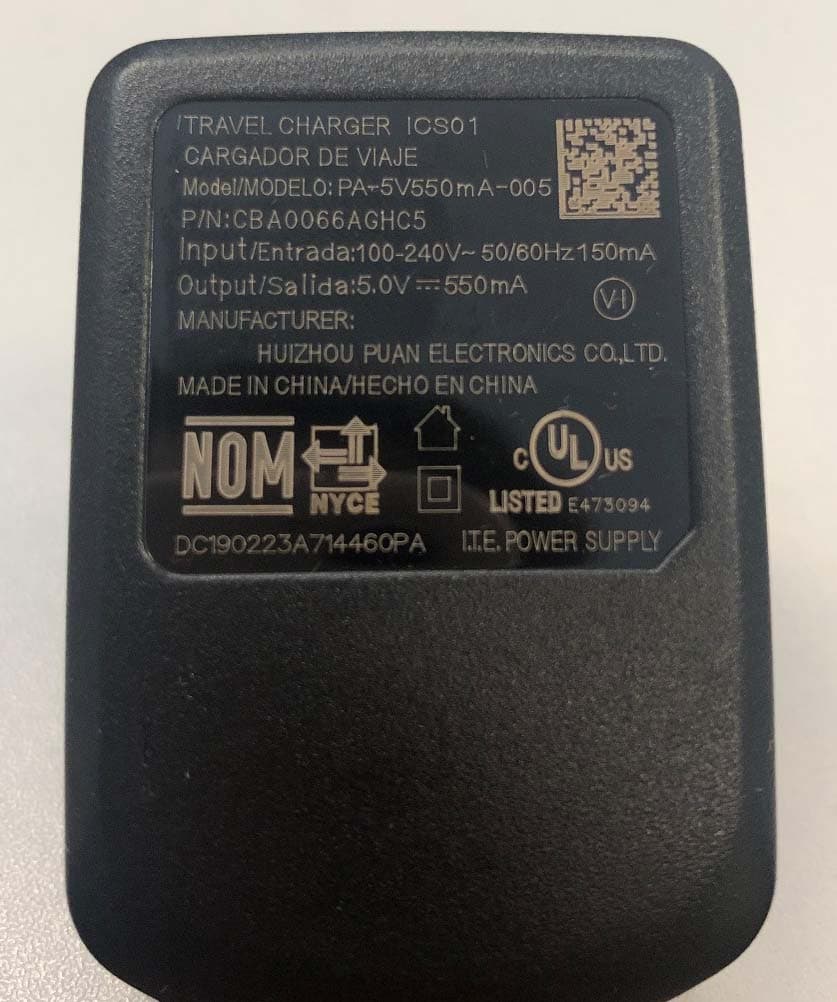
Click to zoom
Application Details
- Equipment Class
- DTS - Digital Transmission System
- Date of Grant
- Jun 22, 2020
- Application Purpose
- Original Equipment
- Date of Application
- Jun 21, 2020
- Equipment Note
- HSUPA/HSDPA/UMTS Tri Bands / GSM Quad Bands / LTE 10 bands mobile phone
- Frequency Range
- 2412.00000000 - 2462.00000000
- Company
- TCL Communication Ltd.
- Country
- China
Documents & Files
Document Text
Text extracted from the exhibit documents filed with the FCC. Open a document above to read the original.
Users Manual
English - CJB675001AAA Made and Printed in China Quick Start Guide A406DL Thank you for choosing Alcatel. This booklet helps you get started with your new Alcatel GO FLIP 3. For more information about your phone or to download the complete user manual version, please visit https://us.alcatelmobile.com. Accessories • Battery • Charger • Quick Start Guide • Product Safety Information Booklet Phone Setup Charging Battery Insert the small end of the charging cable into the charge port as shown and connect the charger to a power outlet. Turning phone on/off Power on your phone Press and hold the End/Power Key until the phone powers on. Setup your phone for the first time The first time you power on the phone, you will be guided through the following steps: • Select the phone's language, then press the Right Soft Key to go to the next step. • Select an available Wi-Fi network, then press the Right Soft Key to go to the next step. • Learn more about Wi-Fi Calling and then press the Right Soft Key to go to the next step. • Create or sign in to your KaiOS Account if necessary, then press the Right Soft Key to go to the next step. • Read the KaiOS License Terms, then press the Right Soft Key to go to the next step. Even if no SIM card is installed, your phone will still power on and you will be able to connect to a Wi-Fi network and use some of the phone's features. Power off your phone Press and hold the End/Power Key until the phone displays: Lock, Clean Up Memory, Restart, and Power off. Use the Navigation Key to select Power off, then press the Center Soft Key . Set up your KaiOS Account To create a KaiOS account. Go to Settings > Account > KaiOS Account. Press to create a new account or sign in to an existing account. • Login/Creating a new account • Adding accounts • Accessing Google Account • Settings and notifications Use Your Google Assistant Need to get something done? Just press a button and ask! Launch your Google Assistant 1. From the Home screen, press and hold the Center Soft Key to launch your Google Assistant, or press the Navigate Left Key to access your Google Assistant. 2. Once the “Listening...” screen appears, say your voice command out loud. Your Google Assistant will speak back to you and walk you through the next steps. Use Google Assistant to Make a Call • Call a contact: Press and hold the Center Soft Key , then say “Call Katie.” Your phone will call Katie from your Contacts. • Call a number: Press and hold the Center Soft Key , then say “Call 998-321-1234.” Your phone will dial the number. What else can your Google Assistant do? • Open an app: “Open E-Mail.” • Get the weather: “What’s the weather in Miami today?” • Send a text: “Send a text to Katie.” • Find a local business: “Find a pizza place.” • Find out what else your Google Assistant can do: “What can you do?” Contacts View Contacts Contacts enables quick and easy access to the contact you want to reach. • Press the Center Soft Key from the Home screen and select Contacts. • Press the Left Soft Key in the contact list to create a new contact. • Press the Center Soft Key to access contact details. • Press the Right Soft Key to access more options. Adding a Contact On the contacts list screen, press the Left Soft Key to access New Contact and input the contact information. When finished, press the Center Soft Key to save. Editing a Contact On the contacts list screen, press the Right Soft Key to access Options, select Edit contact and press the Center Soft Key to edit. When finished, press the Center Soft Key to save. Deleting a Contact On the contacts list screen, press the Right Soft Key to access Options, select Delete contacts, press the Navigation Key and the Center Soft Key to select, and then press the Right Soft Key to delete. Sharing a Contact You can share a single contact with others by sending the contact's vCard to them via Email, Messages, or Bluetooth. Select a contact you want to share, press the Right Soft Key to access Options, and then select Share. Import/Export Contacts On the contacts list screen, press the Right Soft Key to access Options, select Settings > Import contacts/ Export contacts to import/export contacts from/to memory card, Gmail, Outlook, or Bluetooth. Messages Use the messaging feature to send and receive text (SMS) and multimedia (MMS) messages. Sending a Text Message • From the Home screen, press the Center Soft Key and select Messages. • Press the Left Soft Key to write a new message. • Enter the phone number of the recipient in the To bar or press the Right Soft Key to add recipients. • Press the Navigation Key to go to the SMS bar to enter the text of the message. • Press the Left Soft Key to send text messages. Sending a Multimedia Message MMS enables you to send video clips, images, photos, contacts and sounds to other compatible phones and email addresses by pressing the Right Soft Key from the text messages screen and then selecting Add attachment. An SMS will be converted to MMS automatically when media files (image, video, audio, etc.) are attached or email addresses are added. Tip: An SMS of more than 160 characters will be charged as several SMS. Specific letters (accent) will also increase the size of the SMS. This may cause multiple SMS to be sent to your recipient. Using Navigation key Navigation key is located above the number pad that frames the Center Soft Key . Shortcuts accessible from the Home screen: • Navigate up: Access Quick Settings, such as Camera, Bluetooth, Wi-Fi, and more. • Navigate down: Access Camera and quickly capture photos and videos. • Navigate left: Access the Apps on the Home screen (Store, your Google Assistant, Google Maps, and YouTube). • Navigate right: Access Messages and quickly send and read text messages. • Center Soft Key: Access the App tray. Press and hold the Center Soft Key to launch your Google Assistant. Security Settings Lock/Unlock your screen To protect your phone and privacy, you can lock the phone screen by creating a p…
Text truncated - open the document above for the full version.
Users Manual
Safety and Regulatory Information A406DL English - CQF675001AAA Made and Printed in China 1 Safety and use We recommend that you read this chapter carefully before using your mobile device. The manufacturer disclaims any liability for damage, which may result as a consequence of improper use or use contrary to the instructions contained herein. Use of connected devices subject to Alcatel’s Terms and Conditions. Traffic Safety Always obey the local laws and regulations addressing the use of wireless mobile devices and their accessories in the areas where you drive. The use of mobile devices while driving may be prohibited or restricted in certain areas. Conditions of Use You are advised to switch off your mobile device from time to time to optimize its performance. Operational Warnings: Only use your mobile device in accordance with local laws and regulations and obey all posted notices in public areas. Do not attempt to disassemble your mobile device. If you disassemble your mobile device, the warranty will not apply. Always handle your mobile device with care and keep it in a clean and dust-free place. Do not allow your mobile device to be exposed to adverse weather or environmental conditions (moisture, humidity, rain, infiltration of liquids, dust, sea air, etc.). The manufacturer’s recommended operating temperature range is 0°C (32°F) to +50°C (122°F). Use only batteries, battery chargers, and accessories which are recommended by Device manufacturer and its affiliates and are compatible with your mobile device model. Device manufacturer and its affiliates disclaim any liability for damage caused by the use of other chargers or batteries. Please check local laws and regulations in your jurisdiction to learn how to best dispose of your mobile device. PROTECT YOUR HEARING To prevent possible hearing damage, do not listen at high volume levels for long periods. Exercise caution when holding your device near your ear while the loudspeaker is in use. Privacy Please note that you must respect the laws and regulations of your jurisdiction or other jurisdiction(s) where you will use your mobile device regarding taking photographs and recording sounds with your mobile device. Pursuant to such laws and regulations, it may be strictly forbidden to take photographs and/or to record the voices of other people or any of their personal attributes, and reproduce or distribute them, as this may be considered to be an invasion of privacy. It is the user’s sole responsibility to ensure that prior authorization be obtained, if necessary, in order to record private or confidential conversations or take a photograph of another person; the manufacturer, the seller or vendor of your mobile device (including the operator) disclaim any liability which may result from the improper use of the mobile device. 2 Legal Information In order to provide you with better access to this important information, we've made the materials accessible from the phone's Settings menu. Review these materials prior to using your mobile device. To access the materials on your mobile device, swipe up from the home screen, and tap Settings > Device > Regulatory & Safety, and select a topic. Battery and Accessories Observe the following precautions for battery use: • Do not attempt to open the battery (due to the risk of toxic fumes and burns). • Do not puncture, disassemble or cause a short-circuit in a battery. • Do not burn or dispose of a used battery in household rubbish or store it at temperatures above 60ºC. • Do not disassemble or open crush, bend or deform, puncture or shred. • Do not modify or remanufacture, attempt to insert foreign objects into the battery, immerse or expose to water or other liquids, expose to fire, explosion or other hazard Products that have the below symbol must be taken to collection points at the end of their life: • Municipal waste disposal centers with specific bins for these items of equipment. • Collection bins at points of sale. You can learn more about how to recycle your mobile device by visiting the CTIA website at www.ctia.org/news/how- to-recycle-your-mobile-device CAUTION: IF BATTERY IS REPLACED BY AN INCORRECT TYPE, DEVICE MIGHT EXPLODE. DISPOSE OF USED BATTERIES ACCORDING TO THE INSTRUCTION. WARNING: Cancer and Reproductive Harm - www.P65Warnings.ca.gov Chargers Home A.C./Travel chargers will operate within the temperature range of: 0°C (32°F) to 45°C (113°F). The chargers designed for your mobile device meet with the standard for safety of information technology equipment and office equipment use. Due to different applicable electrical specifications, a charger you purchased in one jurisdiction may not work in another jurisdiction. 3 Regulatory Information (e-label) Your mobile device uses an electronic label (e-label) that provides regulatory information about your device. To view the regulatory information (such as FCC ID) for this device, on the device, swipe up from the home screen, then tap Settings > Device > Regulatory & Safety. FCC Compliance Any changes or modifications not expressly approved by the party responsible for compliance of this device voids the user's authority to operate this device. This device complies with Part 15 of the FCC Rules. Operation is subject to the following two conditions: (1) This device may not cause harmful interference (2) This device must accept any interference received, including interference that may cause undesired operation. This equipment has been tested and found to comply with the limits for a Class B digital device, pursuant to Part 15 of the FCC Rules. These limits are designed to provide reasonable protection against harmful interference in a residential installation. This equipment generates, uses and can radiate radio frequency energy and, if not installed and used in accordance with the instructions, may cause harmful interference to radio communications. However, there is no guarantee that interference will not occur in a particular…
Text truncated - open the document above for the full version.
Cover Letter(s)
TCL Communication Ltd. 5F, C building, No. 232, Liang Jing Road, ZhangJiang High-Tech Park, Pudong Shanghai, P.R. China. 201203 Tel: +86 21 6146 0666 Fax: +86 21 6146 0602 http://tclcom.tcl.com Date 2020-06-15 To: Federal Communications Commission, Authorization & Evaluation Division, 7345 Oakland Mills Road Columbia, MD 21046 And American Certification Body, Inc. 6731 Whittier Avenue Suite C110 McLean, VA 22101 To Whom It May Concern: CTTL-Terminals Test Lab of China Academy of Telecommunication Research of MIIT is authorized to act on our behalf, until otherwise notified, for applications to American Certification Body, Inc. (ACB). We certify that we are not subject to denial of federal benefits, which includes FCC benefits, pursuant to Section 5301 of the Anti-Drug Abuse Act of 1988, U.S.C. 862. Further, no party, as defined in 47 CFR1.2002 (b) to the application is subject to denial of federal benefits, that includes FCC benefits. Thank you. Regards, Zhizhou GONG Product Certification Manager TCL Communication Ltd.
Cover Letter(s)
TCL Communication Ltd. 5F, C building, No. 232, Liang Jing Road, ZhangJiang High-Tech Park, Pudong Shanghai, P.R. China. 201203 Tel: +86 21 6146 0666 Fax: +86 21 6146 0602 http://tclcom.tcl.com 2020-06-15 Federal Communications Commission Office of Engineering and Technology Equipment Authorization Division 7345 Oakland Mills Road Columbia, Maryland 21046 Subject: Permanent Confidentiality request for FCC ID: 2ACCJN041 To Whom It May Concern, Pursuant to sections 0.457 and 0.459 of CFR 47, the applicant requests permanent confidential treatment of the following information accompanying this application: - Block Diagram - Schematics - Operational Description - BOM list/Tune-Up-Procedure The above materials contain trade secrets and proprietary information not customarily released to the public. The public disclosure of these matters might be harmful to the applicant and provide unjustified benefits to its competitors. Yours Sincerely, Zhizhou GONG Product Certification Manager TCL Communication Ltd.
Cover Letter(s)
TCL Communication Ltd. 5F, C building, No. 232, Liang Jing Road, ZhangJiang High-Tech Park, Pudong Shanghai, P.R. China. 201203 Tel: +86 21 6146 0666 Fax: +86 21 6146 0602 http://tclcom.tcl.com 2020-06-15 Federal Communications Commission Office of Engineering and Technology Equipment Authorization Division 7345 Oakland Mills Road Columbia, Maryland 21046 Subject: SHORT-TERM Confidentiality request for FCC ID: 2ACCJN041 To Whom It May Concern, Pursuant to sections 0.457 and 0.459 of CFR 47 and to avoid premature release of sensitive information prior to marketing or release of the product to the public, the applicant requests the following documents contained in this certification application be temporarily withheld from public disclosure for an initial period of 180 days: - External Photos - Internal Photos - Test Setup Photos - User manual The applicant also acknowledges that they will also provide appropriate notice to ACB should either of the following occur: a) if the applicant requires additional 45 days extension periods they will notify ACB with a new request letter at least 7 days prior to the short-term confidentiality expiration date – [Note: up to a maximum of 3 extensions only are allowed], or b) Immediately notify ACB in the event the information regarding the product or the product is made available to the public. ACB will then release the documents listed above for public disclosure pursuant to FCC Public Notice DA 04-1705. Yours Sincerely, Zhizhou GONG Product Certification Manager TCL Communication Ltd.
Cover Letter(s)
April 30,2020 Declaration – MIF for HAC RF Interference Evaluation To Whom It May Concern, This device, with FCC ID: 2ACCJN041 , Hearing Aid Compatibility Requirement is going to be certified under ANSI C63.19-2011 version per Part 20.19. The M rating was determined by measuring the maximum steady state average E-field values in dB (V/m) as documented in the HAC report and adding the MIF value in dB (V/m) using pre-determined values provided by Speag under the below table: Typical MIF levels in ANSI C63.19-2011 Transmission protocol Modulation interference factor GSM-FDD (TDMA, GMSK) +3.63 dB EDGE-FDD (TDMA, 8PSK, TN 0-1) +1.23dB EDGE-FDD (TDMA, 8PSK, TN 0-1-2) -0.52dB EDGE-FDD (TDMA, 8PSK, TN 0-1-2-3) -1.82dB UMTS-FDD(WCDMA, AMR) -25.43dB UMTS-FDD (HSPA) -20.75dB LTE-FDD (SC-FDMA, 1RB, 20MHz, QPSK) -15.63 dB LTE-FDD (SC-FDMA, 1RB, 20MHz, 16QAM) -9.76 dB LTE-FDD (SC-FDMA, 1RB, 20MHz, 64QAM) -9.93 dB LTE-TDD (SC-FDMA, 1RB, 20MHz, QPSK) -1.62 dB LTE-TDD (SC-FDMA, 1RB, 20MHz, 16QAM) -1.44 dB LTE-TDD (SC-FDMA, 1RB, 20MHz, 64QAM) -1.54 dB IEEE 802.11b WiFi 2.4 GHz (DSSS, 1 Mbps) -5.90 dB IEEE 802.11b WiFi 2.4 GHz (DSSS, 2 Mbps) -5.17 dB IEEE 802.11b WiFi 2.4 GHz (DSSS, 5.5 Mbps) -3.37 dB IEEE 802.11b WiFi 2.4 GHz (DSSS, 11 Mbps) -2.02 dB IEEE 802.11g WiFi 2.4 GHz (DSSS-OFDM, 6 Mbps) -0.36dB IEEE 802.11n (HT Greenfield, 6.5 Mbps, BPSK) -15.80 dB The Speag-reference documentation for supporting the pre-determined MIF value is Schmid &Partner Engineering AG, UID SUMMARY (Communication Systems for Calibration, Issued Date 07/03/2018). We confirm that the Speag simulation provided represents all the air interface modes applicable for a HAC rating for this handset. Sincerely Yours. Signature: GONG Zhizhou Product Certification Manager/ TCL Communication Ltd.
External Photos
TLi013C1‐1 TLi013C1‐2 PA‐5V550mA‐005 PA‐5V550mA‐005 label
RF Exposure Info
©Copyright. All rights reserved by CTTL. SAR TEST REPORT No. I20Z60293-SEM05 For TCL Communication Ltd. HSUPA/HSDPA/UMTS Tri Bands / GSM Quad Bands / LTE 10 bands mobile phone Model name: A406DL With Hardware Version: 04 Software Version: YXAG FCC ID: 2ACCJN041 Issued Date: 2020-6-11 Note: The test results in this test report relate only to the devices specified in this report. This report shall not be reproduced except in full without the written approval of CTTL. The report must not be used by the client to claim product certification, approval, or endorsement by NVLAP, NIST, or any agency of the U.S.Government. Test Laboratory: CTTL, Telecommunication Technology Labs, CAICT No. 51, Xueyuan Road, Haidian District, Beijing, P. R. China 100191. Tel:+86(0)10-62304633-2512, Fax:+86(0)10-62304633-2504 Email: [email protected], website: www.caict.ac.cn No.I20Z60293-SEM05 ©Copyright. All rights reserved by CTTL. Page 2 of 192 REPORT HISTORY Report Number Revision Issue Date Description I20Z60293-SEM05 Rev.0 2020-6-11 Initial creation of test report No.I20Z60293-SEM05 ©Copyright. All rights reserved by CTTL. Page 3 of 192 TABLE OF CONTENT 1 TEST LABORATORY .................................................................................................................... 5 1.1 TESTING LOCATION ........................................................................................................................................ 5 1.2 TESTING ENVIRONMENT................................................................................................................................. 5 1.3 PROJECT DATA ............................................................................................................................................... 5 1.4 SIGNATURE ..................................................................................................................................................... 5 2 STATEMENT OF COMPLIANCE .................................................................................................. 6 3 CLIENT INFORMATION ................................................................................................................ 8 3.1 APPLICANT INFORMATION .............................................................................................................................. 8 3.2 MANUFACTURER INFORMATION ..................................................................................................................... 8 4 EQUIPMENT UNDER TEST (EUT) AND ANCILLARY EQUIPMENT (AE) ................................. 9 4.1 ABOUT EUT ................................................................................................................................................... 9 4.2 INTERNAL IDENTIFICATION OF EUT USED DURING THE TEST .......................................................................... 9 4.3 INTERNAL IDENTIFICATION OF AE USED DURING THE TEST ............................................................................ 9 5 TEST METHODOLOGY .............................................................................................................. 10 5.1 APPLICABLE LIMIT REGULATIONS ................................................................................................................ 10 5.2 APPLICABLE MEASUREMENT STANDARDS ................................................................................................... 10 6 SPECIFIC ABSORPTION RATE (SAR) ...................................................................................... 11 6.1 INTRODUCTION ............................................................................................................................................. 11 6.2 SAR DEFINITION .......................................................................................................................................... 11 7 TISSUE SIMULATING LIQUIDS ................................................................................................. 12 7.1 TARGETS FOR TISSUE SIMULATING LIQUID .................................................................................................... 12 7.2 DIELECTRIC PERFORMANCE ......................................................................................................................... 12 8 SYSTEM VERIFICATION ............................................................................................................ 16 8.1 SYSTEM SETUP ............................................................................................................................................. 16 8.2 SYSTEM VERIFICATION ................................................................................................................................. 17 9 MEASUREMENT PROCEDURES .............................................................................................. 18 9.1 TESTS TO BE PERFORMED ............................................................................................................................. 18 9.2 GENERAL MEASUREMENT PROCEDURE ........................................................................................................ 20 9.3 WCDMA MEASUREMENT PROCEDURES FOR SAR ...................................................................................... 21 9.4 SAR MEASUREMENT FOR LTE ..................................................................................................................... 22 9.5 BLUETOOTH & WI-FI MEASUREMENT PROCEDURES FOR SAR .................................................................... 22 9.6 POWER DRIFT ............................................................................................................................................... 23 10 AREA SCAN BASED 1-G SAR ................................................................................................. 24 10.1 REQUIREMENT OF KDB ................................................................................…
Text truncated - open the document above for the full version.
RF Exposure Info
No.I20Z60293-SEM05 ©Copyright. All rights reserved by CTTL. Page 128 of 192 No.I20Z60293-SEM05 ©Copyright. All rights reserved by CTTL. Page 129 of 192 No.I20Z60293-SEM05 ©Copyright. All rights reserved by CTTL. Page 130 of 192 No.I20Z60293-SEM05 ©Copyright. All rights reserved by CTTL. Page 131 of 192 No.I20Z60293-SEM05 ©Copyright. All rights reserved by CTTL. Page 132 of 192 No.I20Z60293-SEM05 ©Copyright. All rights reserved by CTTL. Page 133 of 192 No.I20Z60293-SEM05 ©Copyright. All rights reserved by CTTL. Page 134 of 192 No.I20Z60293-SEM05 ©Copyright. All rights reserved by CTTL. Page 135 of 192 No.I20Z60293-SEM05 ©Copyright. All rights reserved by CTTL. Page 136 of 192 No.I20Z60293-SEM05 ©Copyright. All rights reserved by CTTL. Page 137 of 192 No.I20Z60293-SEM05 ©Copyright. All rights reserved by CTTL. Page 138 of 192
RF Exposure Info
No.I20Z60293-SEM05 ©Copyright. All rights reserved by CTTL. Page 139 of 192 No.I20Z60293-SEM05 ©Copyright. All rights reserved by CTTL. Page 140 of 192 No.I20Z60293-SEM05 ©Copyright. All rights reserved by CTTL. Page 141 of 192 No.I20Z60293-SEM05 ©Copyright. All rights reserved by CTTL. Page 142 of 192 No.I20Z60293-SEM05 ©Copyright. All rights reserved by CTTL. Page 143 of 192 No.I20Z60293-SEM05 ©Copyright. All rights reserved by CTTL. Page 144 of 192 ANNEX H Dipole Calibration Certificate 750 MHz Dipole Calibration Certificate No.I20Z60293-SEM05 ©Copyright. All rights reserved by CTTL. Page 145 of 192 No.I20Z60293-SEM05 ©Copyright. All rights reserved by CTTL. Page 146 of 192 No.I20Z60293-SEM05 ©Copyright. All rights reserved by CTTL. Page 147 of 192 No.I20Z60293-SEM05 ©Copyright. All rights reserved by CTTL. Page 148 of 192 No.I20Z60293-SEM05 ©Copyright. All rights reserved by CTTL. Page 149 of 192 No.I20Z60293-SEM05 ©Copyright. All rights reserved by CTTL. Page 150 of 192
RF Exposure Info
No.I20Z60293-SEM05 ©Copyright. All rights reserved by CTTL. Page 151 of 192 No.I20Z60293-SEM05 ©Copyright. All rights reserved by CTTL. Page 152 of 192 835 MHz Dipole Calibration Certificate No.I20Z60293-SEM05 ©Copyright. All rights reserved by CTTL. Page 153 of 192 No.I20Z60293-SEM05 ©Copyright. All rights reserved by CTTL. Page 154 of 192 No.I20Z60293-SEM05 ©Copyright. All rights reserved by CTTL. Page 155 of 192 No.I20Z60293-SEM05 ©Copyright. All rights reserved by CTTL. Page 156 of 192 No.I20Z60293-SEM05 ©Copyright. All rights reserved by CTTL. Page 157 of 192 No.I20Z60293-SEM05 ©Copyright. All rights reserved by CTTL. Page 158 of 192 No.I20Z60293-SEM05 ©Copyright. All rights reserved by CTTL. Page 159 of 192 No.I20Z60293-SEM05 ©Copyright. All rights reserved by CTTL. Page 160 of 192 1750 MHz Dipole Calibration Certificate No.I20Z60293-SEM05 ©Copyright. All rights reserved by CTTL. Page 161 of 192 No.I20Z60293-SEM05 ©Copyright. All rights reserved by CTTL. Page 162 of 192 No.I20Z60293-SEM05 ©Copyright. All rights reserved by CTTL. Page 163 of 192 No.I20Z60293-SEM05 ©Copyright. All rights reserved by CTTL. Page 164 of 192 No.I20Z60293-SEM05 ©Copyright. All rights reserved by CTTL. Page 165 of 192 No.I20Z60293-SEM05 ©Copyright. All rights reserved by CTTL. Page 166 of 192 No.I20Z60293-SEM05 ©Copyright. All rights reserved by CTTL. Page 167 of 192
RF Exposure Info
No.I20Z60293-SEM05 ©Copyright. All rights reserved by CTTL. Page 168 of 192 1900 MHz Dipole Calibration Certificate No.I20Z60293-SEM05 ©Copyright. All rights reserved by CTTL. Page 169 of 192 No.I20Z60293-SEM05 ©Copyright. All rights reserved by CTTL. Page 170 of 192 No.I20Z60293-SEM05 ©Copyright. All rights reserved by CTTL. Page 171 of 192 No.I20Z60293-SEM05 ©Copyright. All rights reserved by CTTL. Page 172 of 192 No.I20Z60293-SEM05 ©Copyright. All rights reserved by CTTL. Page 173 of 192 No.I20Z60293-SEM05 ©Copyright. All rights reserved by CTTL. Page 174 of 192 No.I20Z60293-SEM05 ©Copyright. All rights reserved by CTTL. Page 175 of 192 No.I20Z60293-SEM05 ©Copyright. All rights reserved by CTTL. Page 176 of 192 2450 MHz Dipole Calibration Certificate No.I20Z60293-SEM05 ©Copyright. All rights reserved by CTTL. Page 177 of 192 No.I20Z60293-SEM05 ©Copyright. All rights reserved by CTTL. Page 178 of 192 No.I20Z60293-SEM05 ©Copyright. All rights reserved by CTTL. Page 179 of 192 No.I20Z60293-SEM05 ©Copyright. All rights reserved by CTTL. Page 180 of 192 No.I20Z60293-SEM05 ©Copyright. All rights reserved by CTTL. Page 181 of 192 No.I20Z60293-SEM05 ©Copyright. All rights reserved by CTTL. Page 182 of 192 No.I20Z60293-SEM05 ©Copyright. All rights reserved by CTTL. Page 183 of 192 No.I20Z60293-SEM05 ©Copyright. All rights reserved by CTTL. Page 184 of 192 2600 MHz Dipole Calibration Certificate
RF Exposure Info
No.I20Z60293-SEM05 ©Copyright. All rights reserved by CTTL. Page 185 of 192 No.I20Z60293-SEM05 ©Copyright. All rights reserved by CTTL. Page 186 of 192 No.I20Z60293-SEM05 ©Copyright. All rights reserved by CTTL. Page 187 of 192 No.I20Z60293-SEM05 ©Copyright. All rights reserved by CTTL. Page 188 of 192 No.I20Z60293-SEM05 ©Copyright. All rights reserved by CTTL. Page 189 of 192 No.I20Z60293-SEM05 ©Copyright. All rights reserved by CTTL. Page 190 of 192 No.I20Z60293-SEM05 ©Copyright. All rights reserved by CTTL. Page 191 of 192 No.I20Z60293-SEM05 ©Copyright. All rights reserved by CTTL. Page 192 of 192 ANNEX I Accreditation Certificate
Test Report
©Copyright.AllrightsreservedbyCTTL. FCCPART15C TESTREPORT BLUETOOTHLOWENERGY(BLE)PART No.I20Z60293-IOT02 for TCLCommunicationLtd. HSUPA/HSDPA/UMTSTriBands/GSMQuadBands/LTE10bands mobilephone ModelName:A406DL FCCID:2ACCJN041 with HardwareVersion:04 SoftwareVersion:YXAG IssuedDate:2020-6-10 Note: Thetestresultsinthistestreportrelateonlytothedevicesspecifiedinthisreport.Thisreportshallnotbe reproducedexceptinfullwithoutthewrittenapprovalofCTTL. Thereportmustnotbeusedbytheclienttoclaimproductcertification,approval,orendorsementbyNVLAP,NIST, oranyagencyoftheU.S.Government. TestLaboratory: CTTL,TelecommunicationTechnologyLabs,CAICT No.52,HuayuanNorthRoad,HaidianDistrict,Beijing,P.R.China100191. Tel:+86(0)10-62304633-2512,Fax:+86(0)10-62304633-2504 Email:[email protected],website:www.chinattl.com No.I20Z60293-IOT02 ©Copyright.AllrightsreservedbyCTTL. Page2of46 . REPORTHISTORY ReportNumberRevisionDescriptionIssueDate I20Z60293-IOT02Rev.01stedition2020-6-10 No.I20Z60293-IOT02 ©Copyright.AllrightsreservedbyCTTL. Page3of46 . CONTENTS 1.TESTLABORATORY.................................................................................................................................5 1.1.INTRODUCTION&ACCREDITATION......................................................................................................…
Text truncated - open the document above for the full version.
Contact Information
Applicant
Annie Jiang
Technical Contact
CTTL-Terminals Test Lab of China Academy of TelecoXue Zhen
[email protected]86-10-62304633
No. 52, Huayuan Bei Road, Haidian District, · Beijing · China
Test Firm
Telecommunication Technology Labs, CAICTYaqin Shen
Technical Specifications
| # | Rule Parts | Frequency Range | Power Output |
|---|---|---|---|
| 2 | 15C | 2.41 GHz - 2.46 GHz | 267.90 mW |
Other Applications from TCL Communication Ltd.
2ACCJSCD002
Sep 10, 2024USB Connect 5G (NA)
Equipment Class
CXX - Communications Rcvr for use w/ licensed Tx and CBs2ACCJB227
Aug 21, 2024Smart phone
Equipment Class
DTS - Digital Transmission System2ACCJSCD005
Aug 07, 2024TCL LINKPORT IK511
Equipment Class
CXX - Communications Rcvr for use w/ licensed Tx and CBs2ACCJB224
Jul 31, 2024Tablet PC
Equipment Class
DSS - Part 15 Spread Spectrum Transmitter2ACCJB223
Jun 27, 2024Tablet PC
Equipment Class
NII - Unlicensed National Information Infrastructure TX