2ACK2-LS-4060B-Trek S2 Bluetooth Speaker
Sentey, Inc.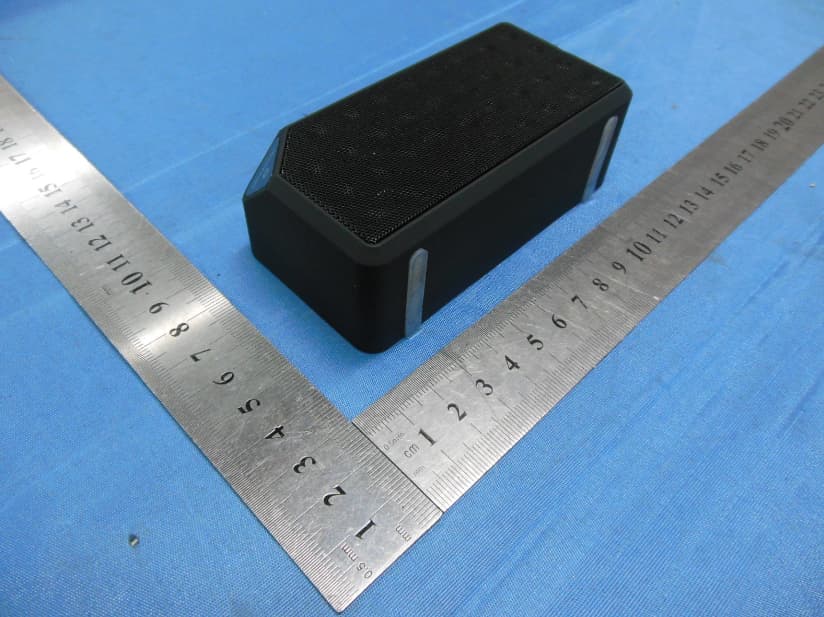
Click to zoom
Application Details
- Equipment Class
- DSS - Part 15 Spread Spectrum Transmitter
- Date of Grant
- Jun 25, 2014
- Application Purpose
- Original Equipment
- Date of Application
- Jun 25, 2014
- Equipment Note
- B-Trek S2 Bluetooth Speaker
- Frequency Range
- 2402.00000000 - 2480.00000000
- Company
- Sentey, Inc.
- Country
- United States
Documents & Files
Document Text
Text extracted from the exhibit documents filed with the FCC. Open a document above to read the original.
Users Manual
. B-TREK S2 Wireless Bluetooth Sp eak er User M anual Read all safety and operation instructions before using the speaker . Important Safety Instructions 1. Do not expose the speaker to liquid , moisture or areas of high humidit y . 2. Do not use abrasive cleaners to clean the speaker’s case as they may damage the unit . Always unplug and power off the unit before cleaning . 3. D o not e xpose the speaker to e x tr emely high or lo w t emper a tur es . 4. Keep the unit away from direct sunligh t . 5. Use only accessories and attachments as supplied and desig na t ed in the instruction manual . 6. Do not attempt to open or modify the speaker in any w a y . 7. S t or e the speaker in a cool dry plac e . 8. The B-TREK S2 speaker contains a lithium ion ba tt er y . Lithium ion batteries are flammable and can cause fire if misused or def ec tiv e . 9. Always dispose of the packaging and unit in accordance with the local regulations and in a responsible manner . Package C on t en ts B-TREK S2 Speaker User Manual 3.5mm Audio C able Micro USB Charging C able Features Built-in Passive subwoofer for crisp Bass . S eamlessly stream music from any Bluetooth (A2DP) capable devic e . Built-in microphone for Hands free calling via Bluetooth. R echar geable battery allows up to 4-5 hours of wireless music . Supporting Bluetooth protocol v2.1+EDR and A2DP 1.2 audio streaming pr ofile . C onnec t an iPod or other non-Bluetooth devices via 3.5mm por t . Multi-point A2DP Bluetooth support; connect to up to t w o Bluetooth devices at the same time . iPhone and iPad battery meter suppor t . Bass boost and built-in music enhancing equaliz er . Operation 1. Turn Unit On/Off Toggle the power switch to turn the speaker on or off . 2. Adjust Volume Press the VOL+ or VOL– button to increase or decrease v olume . 3. Bluetooth P airing The speaker needs to be paired to a Bluetooth device before using . Power on the speaker then press and hold the Play ( ) button on the speaker for 3 to 4 sec onds . The speaker will play an audible “Pairing” sound and the blue and red LEDs will start flashing alt erna tiv ely . Activate the Bluetooth function on your device that you wish t o connect to and search for and pair to the B-TREK S2. If prompted for a passkey or PIN, enter 0000. The speaker will automatically connect with your device once the pairing is c omplet e . For iPad, iPhone, iP o d T ouch Na viga t e to S ettings > Bluetooth (On), then selec t the B-TREK S2 to pair the speaker (The sequence might be S ettings > General > Bluetooth (On) for older iOS v ersions) For Android smartphones and tablets Na viga t e to S ettings > Wireless & networks > Bluetooth settings while Bluetooth is enabled , then selec t Scan for devic es . S elec t the B-TREK S2 to pair the speaker . For all other de vic es Please follow your devic es ’ instructions on how to perform Bluetooth pair ing . 4. Bluetooth Multi-point Pairing Bluetooth multi-point pairing allows you to connect up to t w o Bluetooth capable devices without losing pair ing . a. F ollo w the instructions in Bluetooth pairing steps to pair the speaker with the first Bluetooth devic e . b. R epea t the same pairing procedure for the second Bluetooth devic e . c. The second Bluetooth device should now be c onnec t ed . In the first Bluetooth device’s menu , connect to the B-TREK S2. B oth devices should now be c onnec t ed . 5. Adjusting the E qualizer Press and hold the Next / EQ button for 3 seconds to toggle between modes . The three modes are: Normal (default), Bass and T r eble . 6. Auxiliary Input Use a 3.5mm audio cable to connect the speaker to another audio sour c e . While the 3.5mm audio cable is c onnec t ed , Bluetooth audio output is disabled . 7. Charging B-TREK S2 sp eak er To charge the B-TREK S2 speaker , connect the micro USB cable to the B-TREK S2 and plug the speaker into a USB power sour c e . USB power sources include c omput ers , lapt ops , USB hubs , USB AC adapters and USB car char gers . When the B-TREK S2 is char g ing , the red light will be lit . When the battery is fully char ged , the light will turn blue . The charging pr oc ess can take 5 to 6 hours to charge the battery c omplet ely . When the B-TREK S2 has a low battery and it is powered on, the red ligh t will blink once every ten sec onds . 8. LED Indication S ta tus LED Indicator Powered off Off Bluetooth Pairing mode Blinking blue and red Powered on and not connected Blinks blue twice every five seconds Powered on and connected Blinks blue once every five seconds Playing from Aux input S t eady blue Low battery Blinks red once every ten seconds Ba tt er y charging S t eady red 9. Button Functions Function Operation Toggle unit on / off Toggle the power switch Bluetooth pairing mode When the speaker is on, press and hold Play button for 3 to 4 seconds Refuse incoming call Push and hold the Play button for 2 seconds S wit ch call between phone and B-TREK Push and hold the Play button for 2 seconds Answer call / End call Press and release Play button quickly R edial last number Press and release Play button twice (double click) Toggle microphone mute (during a call) Press the VOL+ and VOL– button at the same time Increase volume Press the VOL+ button, you will hear a beep when at the maximum level Decrease volume Press the VOL– button, you will hear a beep when at the minimum level Play music Pause music Press the Play butt on Ne x t song Press the Next / EQ butt on Previous song Press the Previous butt on Toggle E qualiz er mode Press and hold the Next / EQ button for 3 seconds T r oublesho oting 1. Unable to pair to smartphone or tablet Ensure that the speaker is in pairing mode (see Bluetooth P air ing section). Now open the Bluetooth configuration on your smartphone or tablet and scan for Bluetooth devic es . You should see the B-TREK S2 speaker - proceed to pair and connect the speaker . 2. Speaker no longer connects to my device To ensure the B-TREK S2 speaker is in working or der , d…
Text truncated - open the document above for the full version.
Cover Letter(s)
Sentey, Inc. FCC Confidentiality Request Number: CF303 Version: V05 Date: 21-05-2012 (Permanent or also called long term confidentiality is the normal method to keep certain docuements confidential, and may apply to schematics, block diagrams, operational description and bill of materials.) To: Federal Communications Commission Equipment Authorization Branch 7435 Oakland Mills Road Columbia, MD 21046 Pursuant to 47 CFR Section 0.459(a) & (b), we, (the applicant / grantee) Company nameSentey, Inc. Address11005 NW 33RD ST CityMiami CountryUSA request for this certification filing under: Grantee CodeProduct Number FCC ID:2ACK2-LS-4060 to maintain permanent confidentiality for the following documents submitted within this application: (please cross what is applicable, or add other documents, provide the file name and description) ExhibitFile NameDescription XOperational Descriptionexplaining the functioning of the block diagram XBlock Diagramsshowing the systematic building blocks of the EUT XSchematics Diagramsshowing components, their values and interconnection Above materials crossed contain secrets, proprietary and technical information, which would customarily be guarded from competitors under 47 CFR, section 0.457(d)(2). Disclosure or publication or any portion of this company confidential material to other parties could cause substantial competitive harm and provide unjustified benefits for competitors. We understand that pursuant to 47 CFR section 0.457(d)(1)(ii) disclosure of the applicant and all accompanying documentation will not be made before the date of the grant. The documents indicated as confidential above, are not publicly available elsewhere. Attestation: City and Country:Date:Name: (this must be a person) Function:Signature: (or official company stamp) Enschede, The Netherlands 2014-06-24M. Koop (authorized) Manager
Cover Letter(s)
Sentey, Inc.
External Photos
EUT EXTERNAL PHOTOGRAPHS EUT – Whole View EUT-Front View EUT-Rear View EUT-Side View EUT-Side View
ID Label/Location Info
2ACK2‐LS‐4060 FCC ID Label sample Sentey, Inc. Model: LS‐4060 FCC ID: 2ACK2‐LS‐4060
ID Label/Location Info
FCC ID Location FCC ID Location
Internal Photos
EUT INTERNAL PHOTOGRAPHS EUT –Uncovered View EUT– PCB View EUT–Battery View
RF Exposure Info
FCC RF Exposure FCC ID: 2ACK2-LS-4060 Frequency: 2402-2480 MHz Mid-Channel Peak Power, Conducted, highest valud measured among modes: 1.25 dBm == 1.33 mW Peak Antenna Gain (chip antenna): G = 0 dBi Peak, Radiated = 1.25 dBm + 0 dBi = 1.25 dBm = 1.33 mW SAR Test Exclusion Thresholds specified in KDB447498 Appendix A: Evaluation: The Calculated Radiated Peak output power is taken as worst case, and this emission level is far under the maximum allowed emission level at even the closest distance for 2.4G device specified in this table. Conclusion: The emitted power appears to be below the required limit, so PASS.
Test Report
Test Report of FCC CFR 47 Part 15 Subpart C On Behalf of Sentey, Inc. FCC ID: 2AAUS-LS-4060 Product Description: B-Trek S2 bluetooth speaker Model No.: LS-4060 Supplementary Model: LS-4061, LS-4062, LS-4063, LS-4064, LS-4065 Brand Name: Prepared for: Sentey, Inc. 11005 NW 33RD ST, Miami, FL 33172 USA Prepared by: Bontek Compliance Testing Laboratory Co., Ltd 1/F, Block East H-3, OCT Eastern Ind. Zone, Qiaocheng East Road, Nanshan, Shenzhen, China Tel: 86-755-86337020 Fax: 86-755-86337028 Report No.: BCT14FR229E Issue Date: June11-18, 2014 Test Date: June11-18, 2014 Tested by: Reviewed by: Jiankuai. Li Owen. Yang Approved by: Kendy Wang Report No.: BCT14FR229E Page 2 of 68 FCC ID: 2ACK2-LS-4060 TABLE OF CONTENTS 1. GENERAL INFORMATION........................................................................................................................ 4 1.1 PRODUCT DESCRIPTION FOR EQUIPMENT UNDER TEST (EUT) .................................................................. 4 1.2 TEST STANDARDS ................................................................................................................................... 5 1.3 TEST FACILITY ........................................................................................................................................ 5 2. SYSTEM TEST CONFIGURATION ........................................................................................................... 6 2.1 EUT CONFIGURATION ............................................................................................................................. 6 2.2 SUPPORT EQUIPMENT ............................................................................................................................. 6 2.3 GENERAL TEST PROCEDURES ................................................................................................................. 6 2.4 MEASUREMENT UNCERTAINTY ................................................................................................................. 6 2.5 LIST OF MEASURING EQUIPMENTS USED .................................................................................................. 7 3. SUMMARY OF TEST RESULTS ............................................................................................................... 9 4. TEST OF AC POWER LINE CONDUCTED EMISSION ......................................................................... 10 4.1 APPLICABLE STANDARD ......................................................................................................................... 10 4.2 TEST SETUP DIAGRAM .......................................................................................................................... 10 4.3 TEST RESULT ....................................................................................................................................... 10 5. TEST OF HOPPING CHANNEL BANDWIDTH ....................................................................................... 11 5.1 APPLICABLE STANDARD ......................................................................................................................... 11 5.2 EUT SETUP .......................................................................................................................................... 11 5.3 TEST EQUIPMENT LIST AND DETAILS ...................................................................................................... 11 5.4 TEST PROCEDURE ................................................................................................................................ 11 5.5 TEST RESULT ....................................................................................................................................... 11 6. TEST OF HOPPING CHANNEL SEPARATION ..................................................................................... 17 6.1 APPLICABLE STANDARD ......................................................................................................................... 17 6.2 EUT SETUP .......................................................................................................................................... 17 6.3 TEST EQUIPMENT LIST AND DETAILS ...................................................................................................... 17 6.4 TEST PROCEDURE ................................................................................................................................ 17 6.5 TEST RESULT ....................................................................................................................................... 17 7. TEST OF NUMBER OF HOPPING FREQUENCY .................................................................................. 24 7.1 APPLICABLE STANDARD ......................................................................................................................... 24 7.2 EUT SETUP .......................................................................................................................................... 24 7.3 TEST EQUIPMENT LIST AND DETAILS ...................................................................................................... 24 7.4 TEST PROCEDURE ................................................................................................................................ 24 7.5 TEST RESULT ....................................................................................................................................... 24 8. TEST OF DWELL TIME OF EACH FREQUENCY .................................................................................. 27 8.1 APPLICABLE STANDARD ......................................................................................................................... 27 8.2 EUT SETUP .......................................................................................................................................... 27 8.3 TEST EQUIPMENT LIST AND DETAILS .............…
Text truncated - open the document above for the full version.
Test Setup Photos
TEST SETUP PHOTOGRAPHS Radiated Emission 0.15M- 30M Hz Radiated Emission 30MHz To 1G Radiated Emission Above 1GHz
Contact Information
Applicant
Eduardo Prieto(Product Manager)
Technical Contact
Test Firm
Shenzhen STONE Testing Technology Co.,Ltd.Ethan Chen
[email protected]8607552658
Technical Specifications
| # | Rule Parts | Frequency Range | Power Output |
|---|---|---|---|
| 1 | 15C | 2.40 GHz - 2.48 GHz | 1.33 mW |
Other Applications from Sentey, Inc.

2ACK2-LS-4560
Aug 29, 2014B-Trek H9
Equipment Class
DXX - Part 15 Low Power Communication Device Transmitter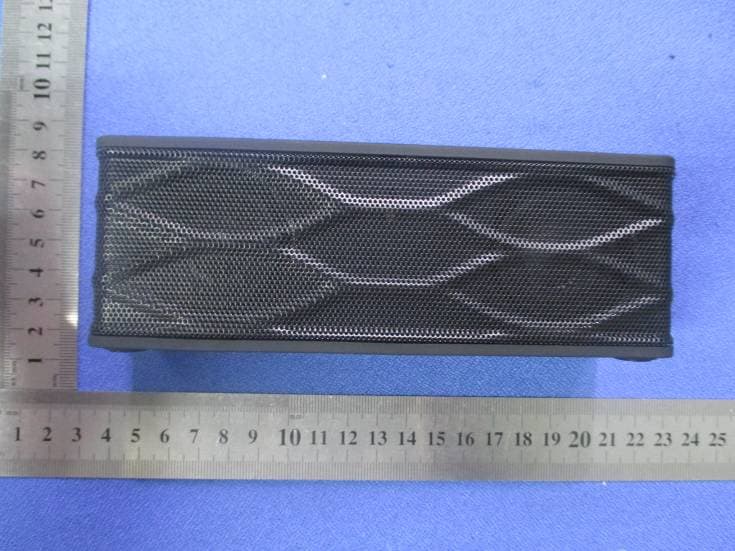
2ACK2-LS-4160
Jul 28, 2014B-Trek S4 bluetooth speaker
Equipment Class
DXX - Part 15 Low Power Communication Device Transmitter