2ACQW-PFS-200FACESTAMP
Pravis Systems Co., Ltd.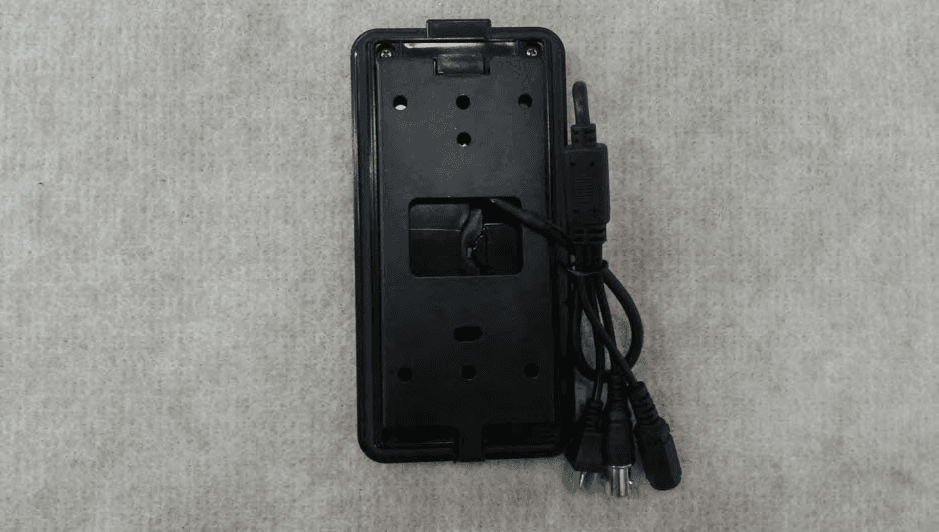
Click to zoom
Application Details
- Equipment Class
- DXX - Part 15 Low Power Communication Device Transmitter
- Date of Grant
- Aug 26, 2014
- Application Purpose
- Original Equipment
- Date of Application
- Aug 26, 2014
- Equipment Note
- FACESTAMP
- Frequency Range
- 13.56000000 - 13.56000000
- Company
- Pravis Systems Co., Ltd.
- Country
- South Korea
Documents & Files
Document Text
Text extracted from the exhibit documents filed with the FCC. Open a document above to read the original.
Users Manual
http://www.emc2000.co.kr FCC TEST REPORT Report No.: EMC-FCC-R0171 EMC compliance Lt d. 65, Sinwon-ro, Yeongtong-gu, Suwon-si, Gyeonggi-do, 44 3- 390, Kor ea 82-31 -336-9919 (Main) 82-505-299-8311 (Fax) This test report shall not be reproduced, except in full, Without the written approval. User Manual FaceStamp QSG Please note that the accessory kit and shipping box contain the following items FRONT / REAR PANEL The FaceStamp employee management solution is supported by PVS and QVS models. <PVS> <QVS> 1. Connect the FaceStamp's RS485 connector to the DVR's keyboard port. 2. Connect the FaceStamp's video Output BNC to any of the DVR's video Input channels. 3. Connect the FaceStamp to an adequate power supply (see specifications table on the back for more information). FaceStamp FaceStamp QSG Power Adaptor 1Display PanelDisplay ID Input, Date and Time Information 2CameraCamera Lens 3 4 5 6 7 Number Touch Pad Keypad to input ID 1 2 3 Mount HolesMount Holes Video Output Connect the FaceStamp's video output to any of the PVS RS-485 Connect the FaceStamp to any PVS DVR via RS485 cables PowerPower Input, DC12V, 1A 567 4 INSTALLATION MADE IN KOREA Tel. 82-2-576-2205 / Fax. 82-2-576-2204www.pravis.co.kr DIMENSION(mm) 74mm(2.91”)24mm(0.95") 147mm(5.8”) 36mm (1.4") 36mm (1.4") 20 (0.8") 16 (0.63") 20 (0.8") 16 (0.63") 30 (1.2") 12 (0.5") 12 (0.5") 28 (1.1") OPERATION Clock In / Out 1. Press the 'Enter' button to light up the touch pad. 2. Press the * button, followed by your Employee ID 3. Press 'Enter'. The system will notify you if the login was successful. - Using RF card Add RF Card 1. Press #1 to assign an RF card to an employee. 2. Enter the Employee's ID and press 'Enter' 3. Scan the RF card in front of the FaceStamp hardware until the system beeps and notifies you that the RF card as been assigned to the Employee ID. 4. An RF card can be assigned only to one employee at a time. Remove RF Card 1. Press #2 to delete an RF card. 2. Enter the Employee's ID and press 'Enter' 3. The system will notify you that the RF card as been deleted. Change RF Card 1. Press #3 to change an RF card. 2. Enter the Employee's ID and press 'Enter' 3. Scan the RF card in front of the FaceStamp hardware until the system beeps and notifies you that the RF card as been assigned to the Employee ID. Please note that users must be setup via the DVR or the FaceStamp remote management software prior to operation. CARD SET-UP (DVR) FaceStamp is supported by the PVS and QVS DVRs. To setup the FaceStamp FACESTAMP SOFTWARE FaceStamp E-mail Setup Notifications To Add a FaceStamp User To setup FaceStamp on the DVR 1. In the DVR, go to Setup Menu > System > System Info. 2. Select 'FaceStamp' from the Keyboard drop-down options. 3. Set the keyboard ID to '252'. 4. Set the baud rate to '38400'. NOTE: These are the FaceStamp's default settings and cannot be changed. 5. Press 'Save' to save the changes. 1. In the DVR, go to Setup Menu > System > FaceStamp. 2. Select the FaceStamp's channel from the drop down list. 3. Press 'Add' to register a new employee. 4. Enter the employee's name and USER ID. The USER ID can be up to 12 digits, and will be the code your employee uses to clock in or out. 1. In the DVR, go to System Setup > Record > Schedule. 2. Select the FaceStamp's camera channel. 3. Select FaceStamp recording mode and apply to the camera's schedule. The FaceStamp recording schedule operates as an event triggered recording schedule, with pre and post recording based on when an employee clocks in or out. 4. Press 'Save' to save all changes. 5. Press 'Save' to save all changes. NOTE: For simple employee entry, it is recommended to add one employee via the DVR (to create the database), and add all remaining employees via the FaceStamp software. See the back side of the QSG for more information. When you connect to the FaceStamp software for the first time, you will be asked to add your DVR's information. To do so: 1. The DVR Login page will appear automatically. You can also access it by clicking on the 'Login' button at the top right-hand corner of the screen. 2. To add a new DVR: a. Press 'Add' b. Enter the DVR's name, IP Address, The FaceStamp comes with an advanced employee management FaceStamp software. The software can be downloaded from CD supported with 960H DVR. Port, and username and passowrd information. c. Press 'OK' to save. 3. To edit a DVR's information: a. Select the DVR from the drop-down list and Press 'Edit' b. Edit all necessary information. c. Press 'OK' to save. 4. To delete a DVR's information: a. Select the DVR from the drop-down list and Press 'Delete'. 5. To connect to a DVR, select the DVR from the drop-down list and press 'Connect'. The system will start downloading all FaceStamp data from the DVR. This may take up to a few minutes. To receive e-mail notifications when your employees clock in or out: 1. In the DVR, go to System Setup > Network > Notifications 2. Press 'Add' 3. Enter an e-mail address to receive notifications. 4. From the Event list, select 'FaceStamp' 5. You can also select additional information to be included in the e-mail. 6. Press 'Save' to save all changes. Once installed on a proper computer, you can use the software to manage your employee's database, search and create reports that can be exported to popular payroll software for salaries and payment. To launch the FaceStamp Software: 1. Make sure the software is properly installed on your PC. 2. Double-click on the FaceStamp desktop icon or locate the installation location to launch the software. 3. Enter the software username and password. By default, the username and password are: admin/ no password. 4. Press 'Login' to launch the program. Once installed on a proper computer, Using the FaceSTamp's keypad NOTE: RF cards not included. NOTE: For more information on setting the DVR's E-mail notifications, please see the DVR's full manual. Setup the FaceStamp for recording NOTE: If you have already downloaded data from the DVR, you…
Text truncated - open the document above for the full version.
Cover Letter(s)
Pravis Systems Co., Ltd. 10, Baumoe-ro 21-gil Seocho-gu, Seoul, Korea Tel. +82-2-576-2205 / Fax. +82-2-576-2204 Date: July 30, 2014 To: SIEMIC, INC. 775 Montague Expressway, Milpitas, CA 95035 USA Dear Sir/Madam, Re: Project and Product Certification Representative Authorization Letter We, Pravis Systems Co., Ltd., hereby authorize SIEMIC, INC. to act as a Certification Body for certifying for the following project : - Product: FACESTAMP - Model name: PFS-200 - FCC ID: 2ACQW-PFS-200 We affirm that between SIEMIC and Pravis Systems Co., Ltd., any difference in understanding, including test plan, measurement methods, applicable standards and relevant procedures and processes have been resolved prior to commencement of testing activities. I, the undersigned, hereby certify that we are not subject to a denial of federal benefits, that includes FCC benefits, pursuant to Section 5301 of the Anti-Drug Abuse Act of 1988, 21 U.S.C. 853(a). This authorization is valid until further written notice from the applicant. Sincerely Yours, ______________________________________ / Jimann Kim / Director / Pravis Systems Co., Ltd.
Cover Letter(s)
Pravis Systems Co., Ltd. 10, Baumoe-ro 21-gil Seocho-gu, Seoul, Korea Tel. +82-2-576-2205 / Fax. +82-2-576-2204 FCC Confidentiality Request Letter Date: July 30, 2014 Federal Communications Commission Authorization and Evaluation Division 7435 Oakland Mills Road Columbia MD 21046 Subject: Permanent Confidentiality Request for FCC ID: 2ACQW-PFS-200 We hereby request confidential treatment of information accompanying this application as outlined below: • Block diagram • Schematics • Operation Description The above materials contain trade secrets and proprietary information not customarily released to the public. The public disclosure of these materials may be harmful to the applicant and provide unjustified benefits to its competitors. The applicant understands that pursuant to Section 0.457 & 0.459 of the Rules, disclosure of this application and all accompanying documentation will not be made before the date of the Grant for this application. Sincerely Yours, ______________________________________ / Jimann Kim / Director / Pravis Systems Co., Ltd.
External Photos
http://www.emc2000.co.kr FCC TEST REPORT Report No.: EMC-FCC-R0171 EMC compliance Lt d. 65, Sinwon-ro, Yeongtong-gu, Suwon-si, Gyeonggi-do, 44 3- 390, Kor ea 82-31 -336-9919 (Main) 82-505-299-8311 (Fax) This test report shall not be reproduced, except in full, Without the written approval. External photos of EUT - Front - Rear http://www.emc2000.co.kr FCC TEST REPORT Report No.: EMC-FCC-R0171 EMC compliance Lt d. 65, Sinwon-ro, Yeongtong-gu, Suwon-si, Gyeonggi-do, 44 3- 390, Kor ea 82-31 -336-9919 (Main) 82-505-299-8311 (Fax) This test report shall not be reproduced, except in full, Without the written approval. - To p - Bottom http://www.emc2000.co.kr FCC TEST REPORT Report No.: EMC-FCC-R0171 EMC compliance Lt d. 65, Sinwon-ro, Yeongtong-gu, Suwon-si, Gyeonggi-do, 44 3- 390, Kor ea 82-31 -336-9919 (Main) 82-505-299-8311 (Fax) This test report shall not be reproduced, except in full, Without the written approval. - Left - Right
ID Label/Location Info
http://www.emc2000.co.kr FCC TEST REPORT Report No.: EMC-FCC-R0171 EMC compliance Lt d. 65, Sinwon-ro, Yeongtong-gu, Suwon-si, Gyeonggi-do, 44 3- 390, Kor ea 82-31 -336-9919 (Main) 82-505-299-8311 (Fax) This test report shall not be reproduced, except in full, Without the written approval. FCC ID Label info
Internal Photos
http://www.emc2000.co.kr FCC TEST REPORT Report No.: EMC-FCC-R0171 EMC compliance Lt d. 65, Sinwon-ro, Yeongtong-gu, Suwon-si, Gyeonggi-do, 44 3- 390, Kor ea 82-31-336-9919 (Main) 82-505-299-8311 (Fax) This test report shall not be reproduced except in full, Without the written approval. Internal photos of EUT - Main board Top - Main board Bottom http://www.emc2000.co.kr FCC TEST REPORT Report No.: EMC-FCC-R0171 EMC compliance Lt d. 65, Sinwon-ro, Yeongtong-gu, Suwon-si, Gyeonggi-do, 44 3- 390, Kor ea 82-31-336-9919 (Main) 82-505-299-8311 (Fax) This test report shall not be reproduced except in full, Without the written approval. - Camera board Top - Camera board Bottom http://www.emc2000.co.kr FCC TEST REPORT Report No.: EMC-FCC-R0171 EMC compliance Lt d. 65, Sinwon-ro, Yeongtong-gu, Suwon-si, Gyeonggi-do, 44 3- 390, Kor ea 82-31-336-9919 (Main) 82-505-299-8311 (Fax) This test report shall not be reproduced except in full, Without the written approval. - Module Location - Antenna Location Loop Antenna
Test Report
http://www.emc2000.co.kr RF TEST REPORT Report No.: EMC-FCC-R0171 EMC compliance Ltd. Page: 2 of 15 480-5 Shin-dong, Yeongtong-gu, Suwon-city, Gyunggi-do, 443-390, Korea, 82 31 336 9919 (Main) 82 31 336 4767 (Fax) This test report shall not be reproduced except in full, Without the written approval. [ Contents ] 1. Client information ............................................................................................................................................. 3 2. Laboratory information .................................................................................................................................... 4 3. Description of E.U.T. ......................................................................................................................................... 5 3.1 Basic description ........................................................................................................................................... 5 3.2 General description ....................................................................................................................................... 5 3.3 Test frequency ............................................................................................................................................... 5 4. Summary of test results ..................................................................................................................................... 6 4.1 Standards & results ....................................................................................................................................... 6 4.2 Uncertainty ................................................................................................................................................... 6 5. Test results .......................................................................................................................................................... 7 5.1 In-band Fundamental Emission .................................................................................................................... 7 5.2 In-band Spurious Emission .......................................................................................................................... 9 5.3 Out-of-band Emission ................................................................................................................................ 10 5.4 Frequency Stability tolerance .................................................................................................................... 12 5.5 Conducted Emission ................................................................................................................................... 13 6. Test equipment used for test ........................................................................................................................... 15 http://www.emc2000.co.kr RF TEST REPORT Report No.: EMC-FCC-R0171 EMC compliance Ltd. Page: 3 of 15 480-5 Shin-dong, Yeongtong-gu, Suwon-city, Gyunggi-do, 443-390, Korea, 82 31 336 9919 (Main) 82 31 336 4767 (Fax) This test report shall not be reproduced except in full, Without the written approval. 1. Client information Applicant: Pravis Systems Co., Ltd. Address: 10, Baumoe-ro 21-gil Seocho-gu, Seoul, Korea Telephone number: +82-2-576-2205 Facsimile number: +82-2-576-2204 Contact person: Ji-mann Kim / [email protected] Manufacturer: Pravis Systems Co., Ltd. Address: 10, Baumoe-ro 21-gil Seocho-gu, Seoul, Korea http://www.emc2000.co.kr RF TEST REPORT Report No.: EMC-FCC-R0171 EMC compliance Ltd. Page: 4 of 15 480-5 Shin-dong, Yeongtong-gu, Suwon-city, Gyunggi-do, 443-390, Korea, 82 31 336 9919 (Main) 82 31 336 4767 (Fax) This test report shall not be reproduced except in full, Without the written approval. 2. Laboratory information Address EMC compliance Ltd. 65, Sinwon-ro, Yeongtong-gu, Suwon- si, Gyeonggi-do, 443-390, Korea Telephone Number: 82-31-336-9919 Facsimile Number: 82-505-299-8311 Certificate KOLAS No.: 231 FCC Site Registration No.: 687132 VCCI Site Registration No.: R-3327, G-198, C-3706, T-1849 IC Site Registration No.:8035A-2 SITE MAP SUWON-CITY EMC Compliance Ltd. http://www.emc2000.co.kr RF TEST REPORT Report No.: EMC-FCC-R0171 EMC compliance Ltd. Page: 5 of 15 480-5 Shin-dong, Yeongtong-gu, Suwon-city, Gyunggi-do, 443-390, Korea, 82 31 336 9919 (Main) 82 31 336 4767 (Fax) This test report shall not be reproduced except in full, Without the written approval. 3. Description of E.U.T. 3.1 Basic description Applicant : Pravis Systems Co., Ltd. Address of Applicant : 10, Baumoe-ro 21-gil Seocho-gu, Seoul, Korea Manufacturer : Pravis Systems Co., Ltd. Address of Manufacturer : 10, Baumoe-ro 21-gil Seocho-gu, Seoul, Korea Type of equipmen : FACESTAMP Basic Model : PFS-200 Variant Model* : DW-FACESTMP Serial number : Engineering Sample * Variant model names are different only for the marketing area, and all model names are electrically identical in construction, radio characteristics, and features. 3.2 General description Operating Frequency 13.564 ㎒ Freqyency Range 13.533 ㎒ ~ 13.567 ㎒ Type of Modulation ASK Number of Channels 1 channel Type of Antenna Integral Type Power supply DC 12 V Operating temperature -20°C ~ 50 °C Dimension 80 X 120 X 11.4 ㎜ 3.3 Test frequency frequency 13.564 ㎒ http://www.emc2000.co.kr RF TEST REPORT Report No.: EMC-FCC-R0171 EMC compliance Ltd. Page: 6 of 15 480-5 Shin-dong, Yeongtong-gu, Suwon-city, Gyunggi-do, 443-390, Korea, 82 31 336 9919 (Main) 82 31 336 4767 (Fax) This test report shall not be reproduced except in full, Without the written approval. 4. Summary of test results 4.1 Standards & results Rule Reference Parameter Status 15.225 (a) In-band Fundamental Emission C 15.225 (b), (c) In-band Spurious Emission C 15.225 (d) 15.209 Out-of –band Emission C 15.225 (e) Frequency Stability Tolerance C 15.207 Conducted Emissions C Note: C=complies NC= Not complies NT=Not tested NA=Not Applicable 4.2 Uncert…
Text truncated - open the document above for the full version.
Test Setup Photos
http://www.emc2000.co.kr FCC TEST REPORT Report No.: EMC-FCC-R0171 EMC compliance Ltd. Page: 1 of 2 65, Sinwon-ro, Yeongtong-gu, Suwon- si, Gyeonggi-do, 443-390, Korea 82-31-336-9919 (Main) 82-505-299-8311 (Fax) This test report shall not be reproduced except in full, Without the written approval. Te s t setup photos * 9 ㎑ ~ 30 ㎒ * 30 ㎒ ~ 1 ㎓ http://www.emc2000.co.kr FCC TEST REPORT Report No.: EMC-FCC-R0171 EMC compliance Ltd. Page: 2 of 2 65, Sinwon-ro, Yeongtong-gu, Suwon- si, Gyeonggi-do, 443-390, Korea 82-31-336-9919 (Main) 82-505-299-8311 (Fax) This test report shall not be reproduced except in full, Without the written approval. *Conducted Emission
Contact Information
Applicant
Jimann Kim(Director)
Test Firm
EMC Compliance Ltdchangmin kim
Technical Specifications
| # | Rule Parts | Frequency Range | Power Output |
|---|---|---|---|
| 1 | 15C | 13.56 MHz - 13.56 MHz | - |