FCCID.CO- FCC ID Database
HomeCompaniesEquipment ClassesSearch

© 2026 FCC ID Database. All rights reserved.

AboutContactData sourced from FCC public records
  1. Home/
  2. Hi-P (SINGAPORE) TECHNOLOGY PTE LTD/
  3. 2ACUZH375I

2ACUZH375IiDEN Transciever with Bluetooth

Hi-P (SINGAPORE) TECHNOLOGY PTE LTD
iDEN Transciever with Bluetooth - FCC ID 2ACUZH375I - Hi-P (SINGAPORE) TECHNOLOGY PTE LTD
Click to zoom

Application Details

Equipment Class
DSS - Part 15 Spread Spectrum Transmitter
Date of Grant
Jul 15, 2015
Application Purpose
Original Equipment
Date of Application
Jul 15, 2015
Equipment Note
iDEN Transciever with Bluetooth
Frequency Range
902.52500000 - 927.47500000
Company
Hi-P (SINGAPORE) TECHNOLOGY PTE LTD
Country
Singapore

Documents & Files

Select a file to view
Users Manual

↗

Cover Letter(s)

↗
↗
↗

External Photos

↗

ID Label/Location Info

↗

Internal Photos

↗

Test Report

↗
↗

Test Setup Photos

↗

Document Text

Text extracted from the exhibit documents filed with the FCC. Open a document above to read the original.

Users Manual

OTOROLA i375 Augusta H375i EN CONGRATULATIONS Augusta H375i Get the convenience of push-to-talk calls together with a sleek design in an affordable package. • Private Calls: Stay in touch with your family, friends, and colleagues with the simple touch of a button. • My Phone, My Way: It's your phone - make it that way. Customize your home screen with personal pictures, and change wallpapers and ringtones. Caution: Before assembling, charging, or using your phone for the first time, please read the important safety, regulatory and legal information provided with your product. This product m e e t s the applicable SAR limits of 1.6 W/kg (FCC & IC) and 2.0 W/kg(ICNIRP). The limits and guidelines include a substantial safety margin designed to assure the safety of all persons, regardless of age and health. The highest SAR values measured for this device are listed in the regulatory information packaged with your product. 1 YOUR PHONE The important keys & connectors Note: Your phone might look a little different. 2 Micro USB Connector Power/End Key Right Soft Key Speaker Key OK Key Navigation Key Talk Key Menu Key Left Soft Key Volume Keys PTT Button 2.5 mm Headset Jack Contents MENU MAP ................................................................... 4 LET'S GO ........................................................................ 5 BASICS ........................................................................... 7 CALLS ........................................................................... 11 PUSH-TO-TALK ........................................................... 13 SDG CALLS .................................................................... 15 WEB .............................................................................. 16 TEXT ENTRY ............................................................... 17 CONTACTS ................................................................... 18 MESSAGING ................................................................. 19 PERSONALIZE ............................................................ 22 MULTIMEDIA .............................................................. 24 BLUETOOTH TM WIRELESS ........................................ 27 TOOLS .......................................................................... 29 SECURITY .................................................................... 33 SAFETY, REGULATORY & LEGAL .................................... 35 LIMITED GLOBAL WARRANTY MOBILE PHONES............50 3 MENU MAP MAIN MENU Recent Calls Contact  [New Contact]  [New SDG List]  [New Msg Group] Messages  [Create Message]  Voice Mail  Inbox  Drafts  Outbox  Sent Items  Net Alert Web  Net Multimedia  Media Center  My Images  My Music  My Video  Ring Tones  Voice Record 4 Push To Talk  Call Alert  PT Manager  Quick PTT  PTT Options  PTT Help Games and Apps  Buy More  Alarm Clock Plus  My Images  My Music  My Video  Java Systems Tools  My Info  Profiles  Alarm Clock Plus  Bluetooth  GPS  Datebook  Call Timers  Memo Settings  (See Settings menu) LET'S GO Let’s get you up and running ASSEMBLE & CHARGE Caution: Please read “BATTERY USE & SAFETY” 5 TURN IT ON & OFF To turn on your phone, press and hold Power/End for a few seconds or until the display turns on. If prompted, enter your four-digit unlocks code. Note: If you press Power/End for more than four seconds, the phone will turn on in Transmitters Off mode. To turn off your phone, press and hold Power/End· ENABLE SECURITY You will need to enable security the first time you turn on your phone or within 10 days of using your phone. 1 Press Ok. 2 You are prompted to enable security. Press Yes and follow the on-screen instructions. 3 Press Power/End to return to the home screen. 6 BASICS ABOUT THIS GUIDE This guide shows how to locate a menu feature as follows: Find it: Menu > Settings > Phone Calls This means that, from the home screen: 1 Press the Menu key to open the main menu. 2 Press the navigation keys to scroll to the Settings menu option, and press OK to select it. 3 Press the navigation keys to scroll to Phone Calls, and press OK to select it. HOME SCREEN Your phone shows the home screen when you are not on a call or using the menu. 7 Right Softkey Left Softkey Left Softkey Label Right Softkey Label Status Indicators Note: Your home screen might look different from the one shown, depending on your service provider. Soft key labels in the home screen show the current soft key functions. Indicators at the top of your phone's display provide important status information. CAROUSEL MENU Get quick access to your favorite applications, right on your home screen. OPEN APPLICATIONS 1 Press the Navigation Key left or right until you highlight the desired application. 2 Press OK to launch the Application Note: Availability of the Carousel is dependent on your service provider. 8 CHOOSE APPLICATIONS Customize the Carousel with your most often used applications Find it: Menu > Settings> Personalize> Carousel AUTO HIDE To set the Carousel to hide when not in use, press Menu > Setting> Personalize> Carousel> Auto Hide ADJUST VOLUME Press the volume keys up or down to: • change the earpiece volume during calls • change the ringer volume from the home screen • turn off a call alert before answering the call Tip: While on the home screen, press and hold the volume key down until your phone vibrates to set your ringer to vibrate all. NAVIGATION KEY Press the navigation key up, down, left, or right to scroll to items in the display. When you highlight an item, press OK to select it. 9 TRANSMITTERS Consult airline staff about the use of the Transmitters Off feature during a flight. Turn off your phone whenever instructed to do so by airline staff. Find it: Menu > Settings>Advanced>Transmitters> off Transmitters Off turns off your phone's calling and Bluetooth features in situations where wireless phone use is prohibited. You can use the phone's other Non-callin…

Text truncated - open the document above for the full version.

Cover Letter(s)

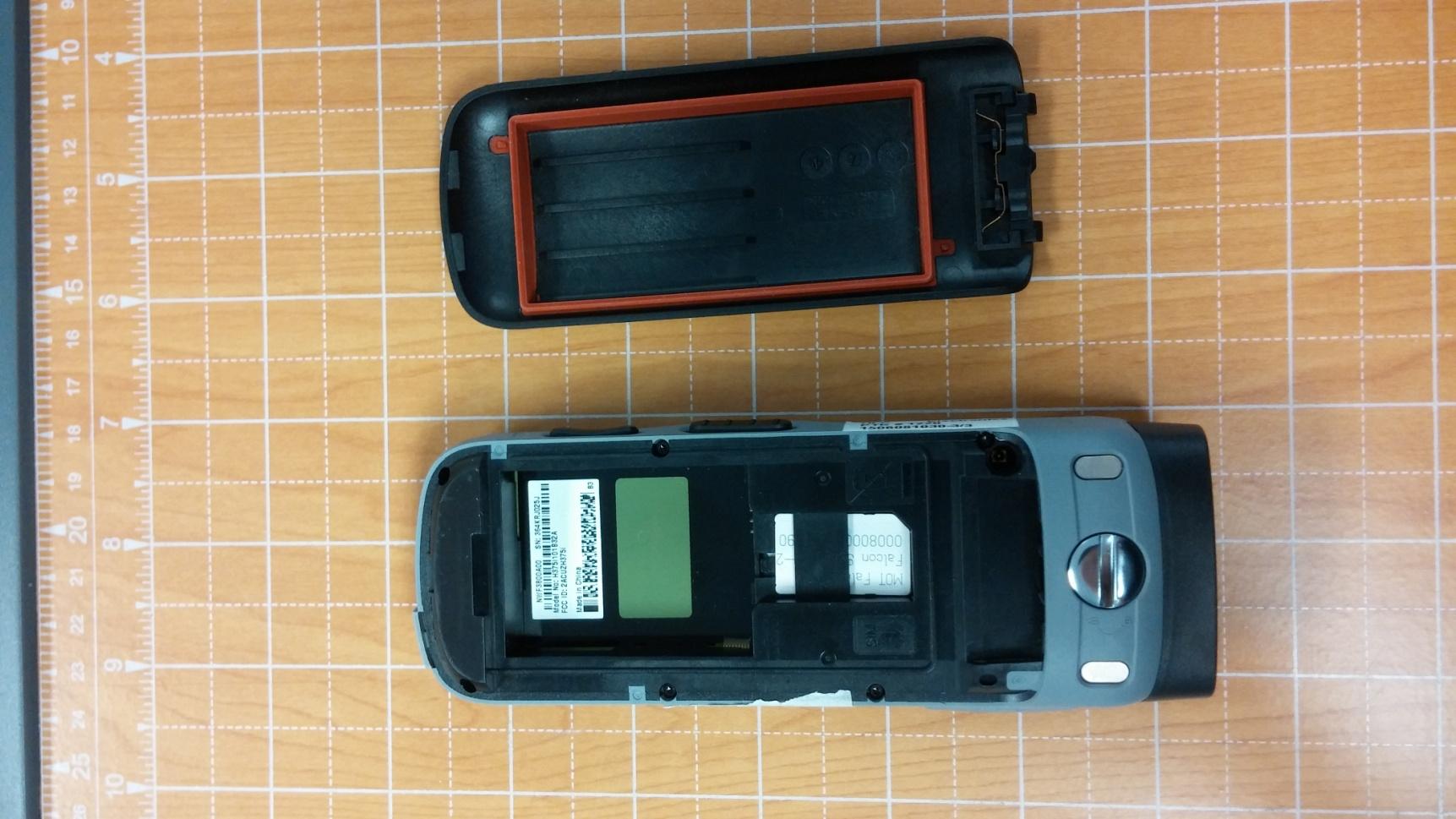
Hi-P Electronics PTE LTD 12 ANG MO KIO STREET 64, #03-02, UE BIZHUB CENTRAL (BLK A), Singapore Tel: (65)66435267; Fax: (65)68533909 Date: July 13, 2015 Statement We, Hi-P Electronics PTE LTD, states that our device with FCC ID: 2ACUZH375I, the label with the FCC ID info will be pasted inside the battery compartment (under the battery), and it is visible to the users as they purchase the products and install the battery. Sincerely yours, _______________ CHIN SEN CHAN

Cover Letter(s)

SGS North America Inc. Consumer Testing Services 291 Fairfield Avenue, Fairfield, NJ 07004 t (973) 575-5252 f (973) 575-7175 www.us.sgs.com/cts Member of the SGS Group (SGS SA) Federal Communications Commission Authorization and Evaluation Division Confidentiality Request regarding application for certification of FCC ID: 2ACUZH375I. Pursuant to Sections 0.457 and 0.459 of the Commission’s Rules, we hereby request confidential treatment of information accompanying this application as outlined below: Exhibit Type File Name Schematics (H375i)_Schem Block Diagrams (H375i)_Blk Theory of Operation (H375i)_OpDesc Tune-up information (H375i)_TuneUp Parts List (H375i)_Plist The above materials contain trade secrets and proprietary information not customarily released to the public. The public disclosure of these materials may be harmful to the applicant and provide unjustified benefits to its competitors. The applicant understands that pursuant to Section 0.457 of the Rules, disclosure of this application and all accompanying documentation will not be made before the date of the Grant for this application. Sincerely, David Schramm, EMC/RF/SAR/HAC Manager Agent for Hi-P (SINGAPORE) TECHNOLOGY PTE LTD

External Photos

FCC ID: 2ACUZH375I External Photographs 2 3 4 5 6 7 8

ID Label/Location Info

Label and Label Placement

Internal Photos

Hi-P Electronics Pte. Ltd. H375i Temporary Confidentiality Requested 12 Ang Mo Kio Street 64, #03-02 UE Biz Hub Central (Blk A), Singapore 569088 Tel: (65) 6643 5200 Fax: (65) 6853 3909 (Co. Reg. No. 200008125D) Page 9 - 1 Internal Photographs -- Pursuant to 47 CFR 2.1033(c)(12) Hi-P Electronics Pte. Ltd. H375i Temporary Confidentiality Requested 12 Ang Mo Kio Street 64, #03-02 UE Biz Hub Central (Blk A), Singapore 569088 Tel: (65) 6643 5200 Fax: (65) 6853 3909 (Co. Reg. No. 200008125D) Page 9 - 2 Photograph 9-1: Front side view of the device’s PC Board, Keypad Features. Photograph 9-2: Back side view of the device’s PC Board, Shields in place. Hi-P Electronics Pte. Ltd. H375i Temporary Confidentiality Requested 12 Ang Mo Kio Street 64, #03-02 UE Biz Hub Central (Blk A), Singapore 569088 Tel: (65) 6643 5200 Fax: (65) 6853 3909 (Co. Reg. No. 200008125D) Page 9 - 3 Photograph 9-3: Back side view of the device’s PC Board Photograph 9-4: Front side view of the device’s PC Board

Test Report

Test Report Number: 3775885EMC01 Rev: 0 Hi-P / H375i Mototalk Page: 1 of 46 Remarks: This report details the results of the testing carried out on one sample, the results contained in this test report do not relate to other samples of the same product. The manufacturer should ensure that all products in series production are in conformity with the product sample detailed in this report. This report may only be reproduced and distributed in full. If the product in this report is used in any configuration other than that detailed in the report, the manufacturer must ensure the new system complies with all relevant standards. Any mention of SGS International Electrical Approvals or Testing done by SGS International Electrical Approvals in connection with distribution or use of the product described in this report must be approved by SGS international Electrical Approvals in writing. EMC Test Report Project Number: 3775885 Report Number: 3775885EMC01 Revision Level: 0 Client: Hi-P (SINGAPORE) TECHNOLOGY PTE LTD Equipment Under Test: iDEN Phone with Mototalk Model: H375i FCC ID: 2ACUZH375I Applicable Standards: FCC Part 15 Subpart C, § 15.247 ANSI C63.10: 2009 Report issued on: 24 Jun 2015 Test Result: Compliant Tested by: Fendy Liauw, Engineering Technician Reviewed by: David Schramm, EMC/RF/SAR/HAC Manager Test Report Number: 3775885EMC01 Rev: 0 Hi-P / H375i Mototalk Page: 2 of 46 SGS North America Inc. Consumer Testing Services 620 Old Peachtree Road NW, Suite 100, Suwanee, GA 30024 t (770) 570-1800 www.us.sgs.com/cts Member of the SGS Group (SGS SA) Table of Contents 1 SUMMARY OF TEST RESULTS ..................................................................................................................................... 4 1.1 MODIFICATIONS REQUIRED FOR COMPLIANCE .............................................................................................................. 4 2 GENERAL INFORMATION ............................................................................................................................................. 5 2.1 CLIENT INFORMATION ................................................................................................................................................... 5 2.2 TEST LABORATORY ....................................................................................................................................................... 5 2.3 GENERAL INFORMATION OF EUT .................................................................................................................................. 5 2.4 EUT CONNECTION BLOCK DIAGRAM ............................................................................................................................ 6 2.5 SYSTEM CONFIGURATIONS ............................................................................................................................................ 6 2.6 CABLE LIST ................................................................................................................................................................... 6 3 OCCUPIED BANDWIDTH ............................................................................................................................................... 7 3.1 TEST RESULT ................................................................................................................................................................. 7 3.2 TEST METHOD ............................................................................................................................................................... 7 3.3 TEST SITE ...................................................................................................................................................................... 7 3.4 TEST EQUIPMENT .......................................................................................................................................................... 7 3.5 TEST DATA .................................................................................................................................................................... 7 4 PEAK OUTPUT POWER ................................................................................................................................................ 11 4.1 TEST RESULT ............................................................................................................................................................... 11 4.2 TEST METHOD ............................................................................................................................................................. 11 4.3 TEST SITE .................................................................................................................................................................... 11 4.4 TEST EQUIPMENT ........................................................................................................................................................ 11 4.5 TEST DATA .................................................................................................................................................................. 12 5 CONDUCTED SPURIOUS EMISSIONS ....................................................................................................................... 13 5.1 TEST RESULT ............................................................................................................................................................... 13 5.2 TEST METHOD ............................................................................................................................................................. 13 5.3 TEST SITE .................................................................................................................................................................... 13 5.4 TEST EQUIPMENT ..................................................................…

Text truncated - open the document above for the full version.

Test Report

Test Report Number: 3720850EMC04 Rev: 0 Hi-P / H375i Page: 1 of 32 Remarks: This report details the results of the testing carried out on one sample, the results contained in this test report do not relate to other samples of the same product. The manufacturer should ensure that all products in series production are in conformity with the product sample detailed in this report. This report may only be reproduced and distributed in full. If the product in this report is used in any configuration other than that detailed in the report, the manufacturer must ensure the new system complies with all relevant standards. Any mention of SGS International Electrical Approvals or Testing done by SGS International Electrical Approvals in connection with distribution or use of the product described in this report must be approved by SGS international Electrical Approvals in writing. EMC Test Report Project Number: 3720850 Report Number: 3720850EMC04 Revision Level: 0 Client: Hi-P (SINGAPORE) TECHNOLOGY PTE LTD Equipment Under Test: iDEN Phone with Bluetooth Model: H375i FCC ID: 2ACUZH375I Applicable Standards: FCC Part 15 Subpart C, § 15.247 ANSI C63.10: 2009 Report issued on: 13 May 2015 Test Result: Compliant Tested by: Fendy Liauw, Engineering Technician Reviewed by: David Schramm, EMC/RF/SAR/HAC Manager Test Report Number: 3720850EMC04 Rev: 0 Hi-P / H375i Page: 2 of 32 SGS North America Inc. Consumer Testing Services 620 Old Peachtree Road NW, Suite 100, Suwanee, GA 30024 t (770) 570-1800 www.us.sgs.com/cts Member of the SGS Group (SGS SA) Table of Contents 1 SUMMARY OF TEST RESULTS ..................................................................................................................................... 4 1.1 MODIFICATIONS REQUIRED FOR COMPLIANCE .............................................................................................................. 4 2 GENERAL INFORMATION ............................................................................................................................................. 5 2.1 CLIENT INFORMATION ................................................................................................................................................... 5 2.2 TEST LABORATORY ....................................................................................................................................................... 5 2.3 GENERAL INFORMATION OF EUT .................................................................................................................................. 5 2.4 EUT CONNECTION BLOCK DIAGRAM ............................................................................................................................ 6 2.5 SYSTEM CONFIGURATIONS ............................................................................................................................................ 6 3 OCCUPIED BANDWIDTH ............................................................................................................................................... 7 3.1 TEST RESULT ................................................................................................................................................................. 7 3.2 TEST METHOD ............................................................................................................................................................... 7 3.3 TEST SITE ...................................................................................................................................................................... 7 3.4 TEST EQUIPMENT .......................................................................................................................................................... 7 3.5 TEST DATA .................................................................................................................................................................... 7 4 PEAK OUTPUT POWER ................................................................................................................................................ 11 4.1 TEST RESULT ............................................................................................................................................................... 11 4.2 TEST METHOD ............................................................................................................................................................. 11 4.3 TEST SITE .................................................................................................................................................................... 11 4.4 TEST EQUIPMENT ........................................................................................................................................................ 11 4.5 TEST DATA .................................................................................................................................................................. 12 5 CONDUCTED SPURIOUS EMISSIONS AND BAND EDGE MEASUREMENTS .................................................. 16 5.1 TEST RESULT ............................................................................................................................................................... 16 5.2 TEST METHOD ............................................................................................................................................................. 16 5.3 TEST SITE .................................................................................................................................................................... 16 5.4 TEST EQUIPMENT ........................................................................................................................................................ 16 5.5 TEST DATA ........................................................................................................................................…

Text truncated - open the document above for the full version.

Test Setup Photos

FCC ID: 2ACUZH375I Test setup photos 2 3 4 5 6 7 8 9

Contact Information

Applicant

CHIN SEN CHAN(SENIOR MANAGER)
[email protected](65)66435267Fax: (65)68533909

Test Firm

SGS North America, Inc.David Schramm
[email protected]973-461-7914Fax: 973 575 7175

Technical Specifications

#Rule PartsFrequency RangePower Output
215C902.525 MHz - 927.475 MHz800.00 mW
Confidentiality
Long Term
Grant Notes
Power listed is conducted. For body-worn operation, this phone has been tested and meets the FCC RF exposure guidelines when used with an accessory that contains no metal and that positions the handset a minimum of 2.5cm from the users body. End-users must be informed of the body-worn operating requirements for satisfying RF exposure compliance. The highest reported SAR value for head PTT transmission conditions for a 50% duty cycle is 0.66W/kg.

Other Applications from Hi-P (SINGAPORE) TECHNOLOGY PTE LTD

Mobile Phone - FCC ID 2ACUZH450R - Hi-P (SINGAPORE) TECHNOLOGY PTE LTD
2ACUZH450R

Mobile Phone

Jul 29, 2015

Equipment Class

DTS - Digital Transmission System