2ACWUEW01E-Watch
ShenZhen Eyang Technology Co., Ltd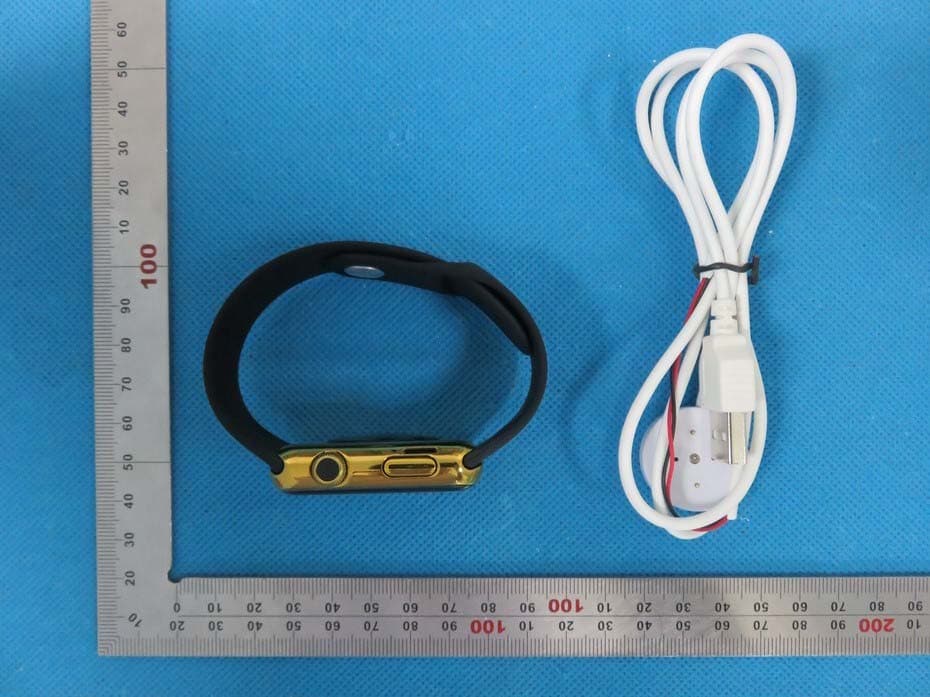
Click to zoom
Application Details
- Equipment Class
- DXX - Part 15 Low Power Communication Device Transmitter
- Date of Grant
- Jul 25, 2015
- Application Purpose
- Original Equipment
- Date of Application
- Jul 25, 2015
- Equipment Note
- E-Watch
- Frequency Range
- 2402.00000000 - 2480.00000000
- Country
- China
Documents & Files
Document Text
Text extracted from the exhibit documents filed with the FCC. Open a document above to read the original.
Users Manual
Bluetooth Watch Instructions Thank you for choosing our watch devices. You can completely understand the method of using it and realize its perfect function and concise operating methods by reading this manual. This device is used to adapate to the brand of intelligent machines,which can synchronize phonebook and provide a variety of useful features and services to facilitate operating the smart machine in your work and leisure activities. The Company reserves the right to amend this manual in the case of any prior notice ,and without further notice. IPHONE USER: When you get the watch,and instal“”in you phone, And the watch can display the message and other capion which pisplay on the top of your phone's.screen. E-Watch ANDRIOD USER: When you get the watch , and install “ E-Watch.apk” program on the smart phone, realize SMS, LINE, Facebook, Instugrate,Facebook Message, QQ, weather forecasts and other instant messaging reminders. APK Access mode 1:Download by using Smart phone to scan the two-dimensional code below . ※ Method of operations Right side of the key: Press to switch, short press to return to the standby screen. TP gestures: left to right for the return slip, slide from right to left for confirmation. TP: Tap the screen to confirm(in the ringing vibration, sleep monitoring, the remote notification interface for the next turn key). ※ Introduce the main menuAccording to watch the main function is divided into 4 page. First page: Bluetooth, Phonebook, Dialer,Messaging; Second page: Call log, Notifier, Music, Camera; Third page: Settings,Anti lost,menuStyle,Ringtone; Fourth page: Sleep monitor, Language, Pedometer, Stopwatch. : User's Manual Confirm button Speaker Touch screen MIC Snapper After installing “E-Watch.apk”, and smart phone connect to watch ,First open Bluetooth function of your smart phone and watch , phone will search watch Equipment name and initiate a connection,next smart phone will send "Bluetooth pairing request" and then you press "confirm" for pairing ,After pairing watch will prompt "**(Connected)" ,About 5 seconds later the watch will prompt "sync date&time with remote"(functions of synchronousing date and time required to install " E-Watch.apk" in the smart phone ),while there is a " " icon in the standby interface ,which indicates a successful connection between your smartphone and watch, After a successful connection you can operate watch according to the following steps. Fifth page: TimeDate,, FindPhone,Clocktype, Sedentar reminder. Function information: ● Bluetooth: Open this function will see the following menu. 1) Bluetooth dialer ~ search and a matching connection with bluetooth devices. 2) Bluetooth settings ~ Bluetooth can be turned on and off set and the machine equipment name display. 3) Disconnect alert ~ Open this function when watch and mobile phone is disconnected then the watch will sound prompting the user. ● Phonebook: The watch is connected with the mobile phone will display mobile phone contacts in the machine (can display 1000). ● Dialer: Watch is connected to the phone can dial. ● Messaging: Open this function will see the following menu,This function needs to install the " E-Watch.apk" application for use in mobile phone terminal. 1) Inbox: Show a mobile phone short message. 2) Sent messages: Show a mobile phone sent message. ● Call log: Open this function will see the following menu. 1) Missed calls ~ Display the missed call ,At the same time can call the corresponding contact. 2) Dialed calls ~ Display the dialed call,At the same time can call the corresponding contact. 3) Received calls ~ Display the received call,At the same time can call the corresponding contact. 4) All calls ~ Display mobile phone calls all phone records. application for use in mobile phone terminal. ● Music: Can control the music playing in the mobile phone. ● Camera: Remote on/off mobile phone camera press confirm to complete pictures(iphone disable). ● Settings: Open this function will see the following menu 1) language ~ Can choose language. 2) powersave~ Open this function the use of the time of the watch will be more durable. 3) Alarm~customize 5 alarms. 4) LCD backlight~ Optional backlight standby time. 5) Units Setup~ Can set the pedometer units to metric units or imperial units. 6) About watch ~ Display mobile phone software version information. ● Anti lost: Watch wil send alarm after leaving the mobile phone a certain distance,Open this function will see the following menu. 1) Enable 2) Disable ● Menustyle: Host built two styles and can switch themes. ● Ringtone: For different state set ringtones,Open this function will see the following menu. 1) Mute 2) Vibration 3) Ring1 4) Ring2 5) Ring3 ● Sleep Monitor: Open this operation to monitor the quality of sleep. ● Language: Can change the language of the watch. ● Pedometer: Calculation of the walking distance of time (time, minutes, seconds) and the number of kilometers (km),Open this function will see the following menu. 1) Pedometer ~ In the menu and press the left software trigger start step-by-step, the total distance (km), Kaluri (kcal) calculation. 2) Step Setting(CM) ~ According to height ratio setting step distance. 3) Weight setting(KG) ~ According to its own weight set. 4) Clear History~Clear records of history. 1) Sleepswitch~ON or Off 2) Sleepmonitor~ Sleep data display ● Stopwatch: Open this function can be timing. ● Time Date ~ Can set up time and date. 1) Set Time ~ Can set up time. 2) Set Date ~ Can set up date. 3) Time Format~ Can set the 12-hour and 24-hour clock. ● Find phone: click it to find the phone connected, This function needs to install the " Smartwatch.apk" application for use in mobile phone terminal. ● Clock type ~ For analog and digital clock selection. ● Sedentary reminder: You can choose to turn this feature on or close to sedentary reminder and can set how long a reminder. ● Notifier: Can query the QQ/ Wechat and other timely news,This function needs to install the " E-W…
Text truncated - open the document above for the full version.
Cover Letter(s)
ShenZhen Eyang Technology Co., Ltd NO.10, 2nd Industrial Area, ShaPuWei,SongGang Town, ShenZhen,Republic of China TEL: 86-0755-29714969 FAX: 86-0755-29714980 Email:[email protected] Date (21/07/2015) TUV SUD BABT TCB Octagon House, Segensworth Road, Fareham, Hampshire, PO15 5RL Confidentiality Request FCC ID: 2ACWUEW01 Pursuant to Sections 0.457(d)(1)(ii) and 0.459 of the Commission’s Rules, ShenZhen Eyang Technology Co., Ltd hereby requests permanent confidential treatment of information accompanying this application as outlined below: 1.Schematics 2.Bill of Materials/Parts List 3.Block Diagrams 4.Theory of Operation The above materials contain trade secrets and proprietary information not customarily released to the public. The public disclosure of these matters might be harmful to the Applicant and provide unjustified benefits to its competitors. The Applicant understands that pursuant to Rule 0.457(d)(1)(ii), disclosure of this Application and all accompanying materials will not be made before the date of the Grant for this Application. Yours sincerely, Company Officer: Xiaomeng Xie Telephone Number: 86-0755-29714969 Email: [email protected]
External Photos
External Photos TOTAL VIEW OF EUT TOP VIEW OF EUT BOTTOM VIEW OF EUT FRONT VIEW OF EUT BACK VIEW OF EUT LEFT VIEW OF EUT RIGHT VIEW OF EUT
ID Label/Location Info
FCC ID Label Location E-Watch FCC ID: 2ACWUEW01 E-Watch FCC ID:2ACWUEW01
Internal Photos
Internal Photos OPEN VIEW OF EUT-1 OPEN VIEW OF EUT-2 INTERNAL VIEW OF EUT-1 Antenna INTERNAL VIEW OF EUT-2 INTERNAL VIEW OF EUT-3
RF Exposure Info
RF Exposure evaluation Product Description:E-Watch Model Number: EW01 FCC ID: 2ACWUEW01 According to 447498 D01 General RF Exposure Guidance v05 The 1-g and 10-g SAR test exclusion thresholds for 100 MHz to 6 GHz at test separation distances ≤ 50 mm are determined by: [(max. power of channel, including tune-up tolerance, mW)/(min. test separation distance, mm)] ·[√f(GHz)] ≤ 3.0 for 1-g SAR and ≤ 7.5 for 10-g extremity SAR, where f(GHz) is the RF channel transmit frequency in GHz Power and distance are rounded to the nearest mW and mm before calculation According to the follow transmitter output power(P t )formula: P t =(E x d) 2 /(30 x g t ) P t =transmitter output power in watts g t =numeric gain of the transmitting antenna (unitess) E=electric field strength in V/m d=measurement distance in meters (m) According to the above test data, Emax=99.76dBuv/m=0.097V/m,d=3m,g t =1 P t =(E x d) 2 /(30 x g t )=(0.097x3) 2 /(30x1)=0.002823W=2.82mW The result is rounded to one decimal place for comparison Worse case is as below: [2480MHz -2.82mW output power] (2.82mW /5mm) .[√2.480(GHz)]= 0.888<3.0 for 1-g SAR Then SAR evaluation is not required NOTE: For the maximum power, you can refer FCC test report.
Test Report
Page 1 of 72 FCC Test Report Report No.: AGC04700150501FE03 FCC ID : 2ACWUEW01 APPLICATION PURPOSE : Original Equipment PRODUCT DESIGNATION : E‐Watch BRAND NAME : N/A MODEL NAME : EW01 CLIENT : SHENZHEN EYANG TECHNOLOGY CO.,LTD DATE OF ISSUE : June 30,2015 STANDARD(S) TEST PROCEDURE(S) : FCC Part 15 Rules REPORT VERSION : V1.0 Attestation of Global Compliance (Shenzhen) Co., Ltd CAUTION: This report shall not be reproduced except in full without the written permission of the test laboratory and shall not be quoted out of context. Report No.: AGC04700150501FE03 Page 2 of 72 Report Revise Record Report Version Revise Time Issued Date Valid VersionNotes V1.0 / June 30,2015Valid Original Report Report No.: AGC04700150501FE03 Page 3 of 72 TABLE OF CONTENTS 1. VERIFICATION OF CONFORMITY ...................................................................................... 4 2. GENERAL INFORMATION .................................................................................................. 5 2.1. PRODUCT DESCRIPTION ........................................................................................................... 5 2.2. TABLE OF CARRIER FREQUENCYS .......................................................................................... 5 3. MEASUREMENT UNCERTAINTY........................................................................................ 7 4. DESCRIPTION OF TEST MODES ........................................................................................ 7 5. SYSTEM TEST CONFIGURATION ...................................................................................... 8 5.1. CONFIGURATION OF EUT SYSTEM .......................................................................................... 8 5.2. EQUIPMENT USED IN EUT SYSTEM ......................................................................................... 8 5.3. SUMMARY OF TEST RESULTS .................................................................................................. 8 6. TEST FACILITY .................................................................................................................... 9 7 ALL TEST EQUIPMENT LIST ............................................................................................... 9 8. RADIATED EMISSION ....................................................................................................... 10 8.1TEST LIMIT ................................................................................................................................... 10 8.2. MEASUREMENT PROCEDURE ................................................................................................ 11 8.3. TEST SETUP .............................................................................................................................. 13 8.4. TEST RESULT(Worst modulation:GFSK) ................................................................................... 15 9. BAND EDGE EMISSION .................................................................................................... 41 9.1. MEASUREMENT PROCEDURE ................................................................................................ 41 9.2 TEST SETUP ............................................................................................................................... 41 9.3 RADIATED TEST RESULT(Worst modulation:GFSK) ................................................................. 42 10. 20DB BANDWIDTH .......................................................................................................... 50 10.1. MEASUREMENT PROCEDURE .............................................................................................. 50 10.2. TEST SET-UP (BLOCK DIAGRAM OF CONFIGURATION) ..................................................... 50 10.3. LIMITS AND MEASUREMENT RESULTS ................................................................................ 50 11. FCC LINE CONDUCTED EMISSION TEST ..................................................................... 59 11.1. LIMITS OF LINE CONDUCTED EMISSION TEST ................................................................... 59 11.2. BLOCK DIAGRAM OF LINE CONDUCTED EMISSION TEST ................................................. 59 11.3. PRELIMINARY PROCEDURE OF LINE CONDUCTED EMISSION TEST .............................. 60 11.4. FINAL PROCEDURE OF LINE CONDUCTED EMISSION TEST ............................................. 60 11.5. TEST RESULT OF LINE CONDUCTED EMISSION TEST ....................................................... 61 APPENDIX A: PHOTOGRAPHS OF TEST SETUP ............................................................... 65 APPENDIX B: PHOTOGRAPHS OF EUT .............................................................................. 67 Report No.: AGC04700150501FE03 Page 4 of 72 1. VERIFICATION OF CONFORMITY Applicant SHENZHEN EYANG TECHNOLOGY CO.,LTD Address NO.10, 2nd Industrial Area, ShaPuWei SongGang Town, ShenZhen, Republic of China Manufacturer SHENZHEN EYANG TECHNOLOGY CO.,LTD Address NO.10, 2nd Industrial Area, ShaPuWei SongGang Town, ShenZhen, Republic of China Product Designation E-Watch Brand Name N/A Test Model EW01 Date of test June 25,2015 to June 26,2015 Deviation None Condition of Test Sample Normal Report Template AGCRT-US-BR/RF We hereby certify that: The above equipment was tested by Compliance Certification Service(Shenzhen) Inc. The test data, data evaluation, test procedures, and equipment configurations shown in this report were made in accordance with the procedures given in ANSI C63.4 (2009) and the energy emitted by the sample EUT tested as described in this report is in compliance with radiated emission limits of FCC Rules Part 15.249. Prepared By Time Huang June 30,2015 Checked By Forrest Lei June 30,2015 Authorized By Solger Zhang June 30,2015 Report No.: AGC04700150501FE03 Page 5 of 72 2. GENERAL INFORMATION 2.1. PRODUCT DESCRIPTION A major technical description of EUT is described as fol…
Text truncated - open the document above for the full version.
Test Setup Photos
APPENDIX IV PHOTOGRAPHS OF TEST SETUP FCC LINE CONDUCTED EMISSION TEST SETUP FCC RADIATED EMISSION TEST SETUP
Contact Information
Applicant
Xiaomeng Xie
Test Firm
Compliance Certification Services (Shenzhen) Inc.Harry Li
Technical Specifications
| # | Rule Parts | Frequency Range | Power Output |
|---|---|---|---|
| 1 | 15C | 2.40 GHz - 2.48 GHz | - |
Other Applications from ShenZhen Eyang Technology Co., Ltd

2ACWUS55
Sep 09, 2014Bluetooth bracelet
Equipment Class
DTS - Digital Transmission System