2ADFS-EZCASTMINIWireless Display Receiver
Winner Wave Limited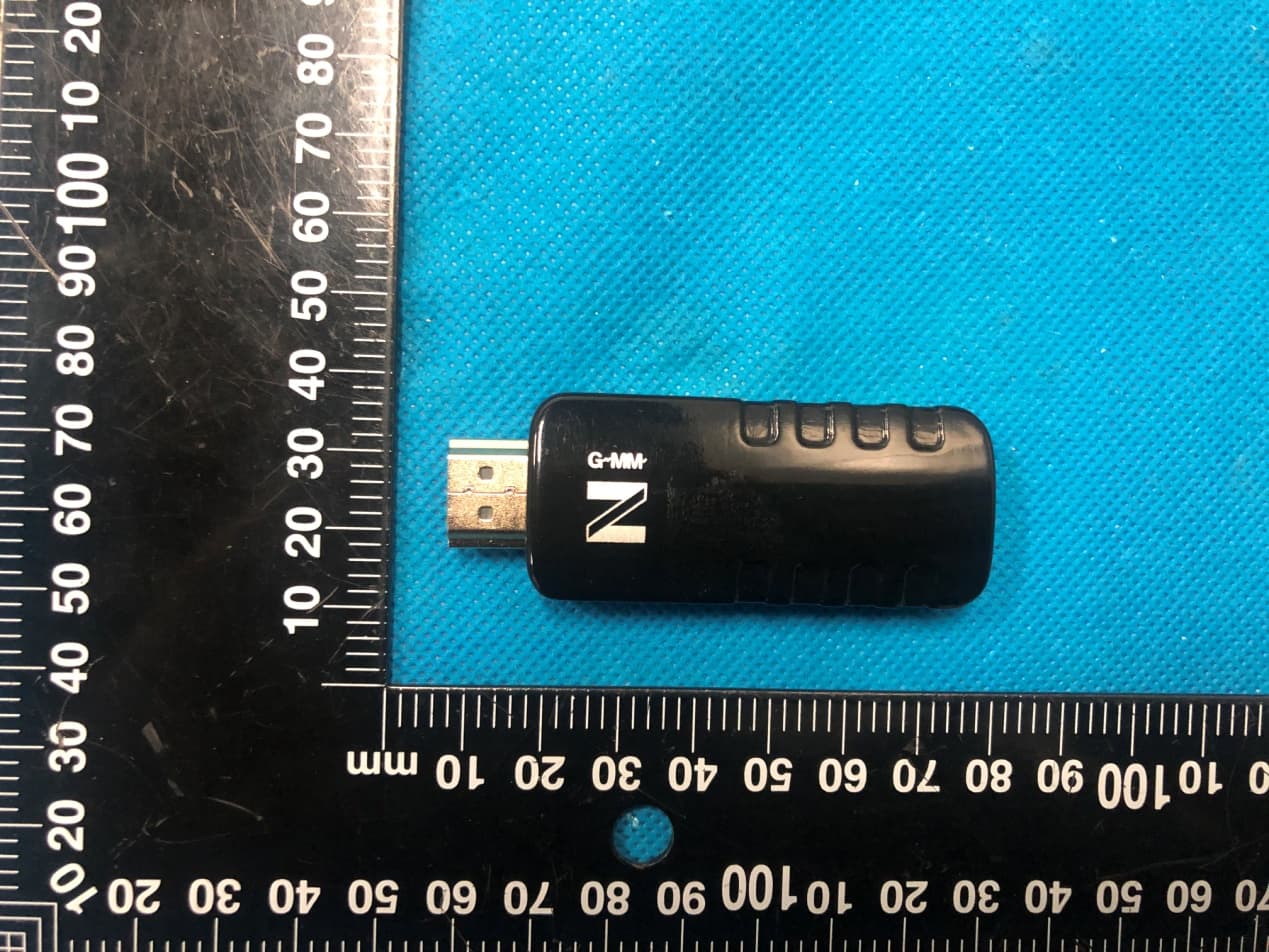
Click to zoom
Application Details
- Equipment Class
- DTS - Digital Transmission System
- Date of Grant
- Apr 28, 2021
- Application Purpose
- Original Equipment
- Date of Application
- Apr 28, 2021
- Equipment Note
- Wireless Display Receiver
- Frequency Range
- 2412.00000000 - 2462.00000000
- Company
- Winner Wave Limited
- Country
- Hong Kong
Documents & Files
Document Text
Text extracted from the exhibit documents filed with the FCC. Open a document above to read the original.
Users Manual
EZCast supports multiple wireless display standards, including EZCast, Miracast, DLNA and EZAir (compatible with iOS and macOS). Ongoing firmware upgrades are provided to support latest operating systems. Please read this guide to install and setup your EZCast. Happy Casting! Visit https://www.EZCast.com for more information. Visit https://www.YouTube.com/EZCast for video tutorials. Visit https://www.EZCast.com/app to download platform-specific applications and User Manual. Scan the QRCode below to download EZCast mobile App. Introduction [email protected] Learn More Software Installation Quick Start Guide rev 1.0 Wireless Display Receiver EZCast to power: Turn on your TV and power up EZCast dongle by connecting the USB cable to an adapter (5V1A). EZCast to TV: Plug EZCast dongle into a HDMI port on TV. Select source: Set your TV’s source/input selection to HDMI port connected to the EZCast dongle. Connect successfully: Your TV screen shall display the instructions once EZCast is connected successfully. Please follow the instructions to complete setup. Hardware Installation 1 2 3 4 5V/1A USB HDMI 1 2 3 4 HDMI 1 HDMI 2 Download EZCast app: Scan QRCode on TV screen or search “EZCast” on Google Play/App Store. Connect WiFi: (1) Launch EZCast App and click Searching Device icon. (2) Click “Scan QRCode to connect WiFi” to scan QRcode on TV screen. (3) Setting shall pop out (or click Side-bar Menu to find). Click Internet and connect to your WiFi. Connect to EZCast: Searching Device shall pop out when WiFi is connected. Find and click EZCastCS_xxxxxxxx in the list below). Setup for smart device (Android/ iOS) 1 2 3 Searching Device Side-bar Menu 1 Your Smart Device EZCastCS_XXXXXXXX 2 3 Screen Mirroring for Android Google Home You may download Google Home App from Google Play. Launch the Google Home App, login with Google account. Then you may mirror to EZCast using Google Home. Note: Make sure that EZCast and your Android device are both connected to same WiFi. Steps: Account > Mirror Device > Cast Screen/Audio > Cast to > EZCasCSt_xxxxxxxx EZCast/ Mirror Click the Mirror icon on the top bar. Note: For EZCast/ Mirror, it only captures the screen without sound due to limitations in Android. To mirror the sound to your TV, please use EZMirror instead. Account Mirror Device Additional CAST SCREEN/AUDIO Cast to EZCastCS_xxxxxxxx Screen Mirroring for iOS Airplay Screen mirroring may be done by Airplay on iOS smart devices. Swipe to show Airplay, click Screen Mirroring, and choose EZCastCS_xxxxxxxx. Screen Mirroring Screen Mirroring EZCastCS_xxxxxxxx Mirror to EZCast using Miracast if your Android devices support Smart View on Samsung, Multi-screen on Huawei, or etc. Miracast Cast to EZCastCS_xxxxxxxx Vivo Smart Screening OPPO Multi-screen Interaction Samsung Smart View Huawei Multi-screen Setup for laptop (Windows/ MacOS) Download and install EZCast application: Download at https://www.ezcast.com/app Connect to WiFi: (1) Click WiFi list from your laptop and connect to your EZCastCS_xxxxxxxx by entering PSK password on TV screen. (2) Launch EZCast application, with your EZCast device connected automatically which shows at upper right, Setting shall pop out (or find from side bar). Click Internet and connect to your WiFi. Connect to EZCast: Click Searching Device to find and select your EZCastCS_xxxxxxxx. Screen Mirroring: Click Mirroring in EZCast application. 1 2 3 4 Setting Mirroring Searching Device 2 4 3 EZCastCS_xxxxxxxx Download and install EZCast application: Download at https://www.ezcast.com/app Connect to WiFi: (1) Click WiFi list from your laptop and connect to your EZCastCS_xxxxxxxx by entering PSK password on TV screen. (2) Launch EZCast application, with your EZCast device connected automatically which shows at upper right, Setting shall pop out (or find from side bar). Click Internet and connect to your WiFi. Connect to EZCast: Click Searching Device to find and select your EZCastCS_xxxxxxxx. Screen Mirroring: Click Mirroring in EZCast application. Internet: Connect EZCast to WiFi. Device Name: Change device name of EZCast. WIFI Password: Change password of EZCast hotspot. Display: Set display mode to game and video. Resolution: Change output resolution. Language: Change language preference. EZAir Mode (only for iOS): Switch mirroring mode of EZCast between “mirror only” and “mirror + streaming” for iOS devices. Auto play: Automatically start video streaming from Internet once your EZCast dongle is connected to WiFi. Upgrade: Connect EZCast to home router in advance, and the latest version of EZCast firmware shall be downloaded. Please do NOT turn off the Wifi and the power of EZCast during firmware upgrading. Reset to default: Reset EZCast to default settings. EZCast Settings EZChannel: Create an EZCast account and bind with EZCast to have best experiences. (1) Discover and personalize your video channels. (2) Search videos across different sites. (3) Auto-play: Automatically start video streaming from Internet once your EZCast dongle is connected to WiFi. Video/ Photo/ Music: Stream and playback local media files from Android/ iOS/ Windows/ MacOs to EZCast dongle wirelessly. Live Camera: Capture videos from local camera to EZCast dongle. DLNA: Stream multimedia files via DLNA protocol. Cloud Storage: Access data from Cloud server (Dropbox, Google drive, or etc.). Voice Control: Pair EZCastCS with any Google Home device/ Amazon Echo Dot, and stream entertainment just by asking orally. (1) Google Home/ Assistant: e.g. Say,“Hey Google, ask EZCast to play holiday video.” to control. User Manual please refers to website as below. https://support.google.com/assistant/answer/7394306?co=GE- NIE.Platform%3DAndroid&hl=en (2) Amazon Echo Dot: e.g. Say, “Alexa, play holiday video.” to control. More info see: https://www.amazon.com/gp/help/customer/display.html?no- deId=201994280) Features of EZCast EZChannel: Create an EZCast account and bind with EZCast to have best experiences. (1) Discover…
Text truncated - open the document above for the full version.
Cover Letter(s)
Winner Wave Limited Agent Authorization Company: Winner Wave Limited Address: Unit 1615 Peninsula Tower,538 Castle Peak Road, Lai Chi Kok Kowloon, Hong Kong Product Name: Wireless Display Receiver Model Number(s): EZCast Mini Product Description: Wireless Display Receiver We authorize MiCOM Labs Inc., 575 Boulder Court, Pleasanton, California 94566, USA, to act on our behalf on all matters concerning the certification of above named equipment. We declare that MiCOM Labs Inc. is allowed to forward all information related to the approval and certification of equipment to the regulatory agencies as required and to discuss any issues concerning the approval application. Any and all acts carried out by MiCOM Labs on our behalf shall have the same effect as acts of our own. Signature: Date: Apr. 26, 2021 Name: Stan Chen Title: Product Director Company: Winner Wave Limited
Cover Letter(s)
Winner Wave Limited Office of Engineering Technology Federal Communications Commission 7435 Oakland Mills Road Columbia, MD 21046 USA Date: Apr. 26, 2021 Subject; Request for Confidentiality FCC ID: 2ADFS-EZCASTMINI To Whom It May Concern, Pursuant to the provisions of the Commission’s rules Title 47 Sections §0.457 and §0.459, we are requesting the Commission to withhold the following attachment(s) as confidential documents from public disclosure indefinitely. These documents contain detailed system and equipment descriptions and are considered as proprietary information in operation of the equipment. The public disclosure of these documents might be harmful to our company and would give competitors an unfair advantage in the market. Schematic Diagram Block Diagram Parts List Operational Description Tune-up Procedure Software Security Requirement It is our understanding that all measurement test reports, FCC ID label format and correspondence during the certification review process cannot be granted as confidential documents and this information will be available for public review once the grant of equipment authorization is issued. Sincerely, Signature: Name: Stan Chen Title: Product Director
External Photos
Annex A External Photos Model: EZCast Mini Page 1 of 4 Model: EZCast Mini Page 2 of 4 Model: EZCast Mini Page 3 of 4 Model: EZCast Mini Page 4 of 4
ID Label/Location Info
FCC ID LABEL: Ca. 5mm x 10mm Label Location FCC ID: 2ADFS-EZCASTMINI
Internal Photos
Annex B Internal Photo Model: EZCast Mini Page 1 of 2 Antenna Model: EZCast Mini Page 2 of 2
RF Exposure Info
FCC RF Exposure EUT Description: Wireless Display Receiver Model No.: EZCast Mini FCC ID : 2ADFS‐EZCASTMINI 1. Limits According to KDB 447498 D01 General RF Exposure Guidance v06 The 1‐g and 10‐g SAR test exclusion thresholds for 100 MHz to 6 GHz at test separation distances ≤50 mm are determined by: [(max power of channel, including tune‐up tolerance, mW)/(min. test separation distance, mm)]· [√ f(GHz)]≤3.0 for 1‐g SAR and ≤ 7.5 for 10‐g extremity SAR, Where: Result=P/D*√F F= the RF channel transmit frequency in GHz P=Maximum turn‐up power in mw D=Min. test separation distance in mm 2. Test Result of RF Exposure Evaluation Output power (dBm) Tune Up Power (dBm) Max Tune Up power dBm/mW Min test separatio n distance mm Result Limit SAR Test Exclusion 2.4GWIFI 8.51 8±1 9/ 7.94 5 2.46616 3.0 Pass 5.2GWIFI 5.93 5±1 6/ 3.98 5 1.8117 3.0 Pass 5.8GWIFI 5.77 5±1 6/ 3.98 5 1.91289 3.0 Pass Note: PK Output power= conducted power. Conducted power see the test report HK2104020944‐1E/HK2104020944‐2E/HK2104020944‐3E. 2.4G WIFI Gantenna gain=1.68dBi, 5G WIFI Gantenna gain=1.52dBi Per KDB 447498 D01, when the minimum test separation distance is < 5 mm, a distance of 5 mm is applied to determine RF Exposure test exclusion. The test exclusion threshold is 2.46616 which is<= 3, RF Exposure testing is not required. Note: Exclusion Thresholds Results=[(max. power of channel, including tune-up tolerance, mW)/(min. test separation distance, mm)] ·[√f(GHz)] f(GHz) is the RF channel transmit frequency in GHz Distance=5mm Note: the device could not transmit simultaneously in 2.4G and 5G.
Test Report
Report No.: HK2104020944-1E FCC TEST REPORT Test report On Behalf of Winner Wave Limited For Wireless Display Receiver Model No.: EZCast Mini FCC ID: 2ADFS-EZCASTMINI Prepared for : Winner Wave Limited Unit 1615 Peninsula Tower,538 Castle Peak Road, Lai Chi Kok Kowloon, Hong Kong Prepared By : Shenzhen HUAK Testing Technology Co., Ltd. 1F, B2 Building, Junfeng Zhongcheng Zhizao Innovation Park, Fuhai Street, Bao'an District, Shenzhen City, China Date of Test: Apr. 02, 2021 ~ Apr. 21, 2021 Date of Report: Apr. 21, 2021 Report Number: HK2104020944-1E Report No.: HK2104020944-1E Page 2 of 69 TEST RESULT CERTIFICATION Applicant’s name .................. : Winner Wave Limited Address .................................. : Unit 1615 Peninsula Tower,538 Castle Peak Road, Lai Chi Kok Kowloon, Hong Kong Manufacture's Name ............. : Shenz hen Actions Microelectronics Co., Ltd. Address .................................. : 201, No.9 Building, Software Park, KeJiZhong Er Road, Gao XinQu, NanShan, Shenzhen, China Product description Trade Mark: EZCast Product name ............................ : Wireless Display Receiver Model and/or type reference . : EZCast Mini Standards .............................. : FCC Rules and Regulations Part 15 Subpart C Section 15.247 ANSI C63.10: 2013 This publication may be reproduced in whole or in part for non-commercial purposes as long as the Shenzhen HUAK Testing Technology Co., Ltd. is acknowledged as copyright owner and source of the material. Shenzhen HUAK Testing Technology Co., Ltd. takes no responsibility for and will not assume liability for damages resulting from the reader's interpretation of the reproduced material due to its placement and context. Date of Test ............................................ : Date (s) of performance of tests ............. : Apr. 02, 2021 ~ Apr. 21, 2021 Date of Issue ........................................... : Apr. 21, 2021 Test Result ............................................... : Pass T esting Engineer : (Gary Qian) Technical Manager : (Eden Hu) Authorized Signatory : (Jason Zhou) Report No.: HK2104020944-1E Page 3 of 69 TABLE OF CONTENTS 1. Test Result Summary ............................................................................... 5 1.1. TEST PROCEDURES AND RESULTS ............................................................................................... 5 1.2. TEST FACILITY .................................................................................................................................. 5 1.3. MEASUREMENT UNCERTAINTY ............................................................................................................... 6 2. EUT Description ........................................................................................ 7 2.1. GENERAL DESCRIPTION OF EUT ................................................................................................... 7 2.2. OPERATION OF EUT DURING TESTING .................................................................................................... 8 2.3. DESCRIPTION OF TEST SETUP ....................................................................................................... 9 3. General Information ................................................................................ 10 3.1. TEST ENVIRONMENT AND MODE ............................................................................................................ 10 3.2. DESCRIPTION OF SUPPORT UNITS ........................................................................................................ 11 4. Test Results and Measurement Data .................................................... 12 4.1. CONDUCTED EMISSION ........................................................................................................................ 12 4.2. MAXIMUM CONDUCTED OUTPUT POWER .............................................................................................. 16 4.3. EMISSION BANDWIDTH ......................................................................................................................... 18 4.4. POWER SPECTRAL DENSITY ................................................................................................................ 24 4.5. CONDUCTED BAND EDGE AND SPURIOUS EMISSION MEASUREMENT ..................................................... 30 4.6. RADIATED SPURIOUS EMISSION MEASUREMENT ................................................................................... 40 4.7. ANTENNA REQUIREMENT ............................................................................................................. 66 4.8. PHOTOGRAPH OF TEST ................................................................................................................. 67 4.9. PHOTOS OF THE EUT ..................................................................................................................... 69 Report No.: HK2104020944-1E Page 4 of 69 ** Modifited History ** Revison Description Issued Data Remark Revsion 1.0 Initial Test Report Release Apr. 21, 2021 Jason Zhou Report No.: HK2104020944-1E Page 5 of 69 1. Test Result Summary 1.1. TEST PROCEDURES AND RESULTS Requirement CFR 47 Section Result Antenna requirement §15.203/§15.247 (c) PASS AC Power Line Conducted Emission §15.207 PASS Conducted Peak Output Power §15.247 (b)(3) PASS 6dB Emission Bandwidth §15.247 (a)(2) PASS Power Spectral Density §15.247 (e) PASS Band Edge 1§5.247(d) PASS Spurious Emission §15.205/§15.209 PASS Note: 1. PASS: Test item meets the requirement. 2. Fail: Test item does not meet the requirement. 3. N/A: Test case does not apply to the test object. 4. The test result judgment is decided by the limit of test standard. 1.2. TEST FACILITY Test Firm : Shenzhen HUAK Testing Technology Co., Ltd. Address 1F, B2 Building, Junfeng Zhongcheng Zhizao Innovation Park, Fuhai Street, Bao'an District, Shenzhen City, China Report No.: HK2104020944-1E Page 6 of 69 1.3. Measurement Uncertai…
Text truncated - open the document above for the full version.
Test Setup Photos
Test Model:EZCast Mini Radiated Emission Conducted Emission
Contact Information
Applicant
Rock Huang(Technical Manager)
Technical Contact
Test Firm
Shenzhen HUAK Testing Technology Co., Ltd.Jason Zhou
[email protected]+86-755-23029901
Technical Specifications
| # | Rule Parts | Frequency Range | Power Output |
|---|---|---|---|
| 1 | 15C | 2.41 GHz - 2.46 GHz | 7.10 mW |
Other Applications from Winner Wave Limited
2ADFS-POCKET-R-1DPocket
Jan 28, 2026Equipment Class
NII - Unlicensed National Information Infrastructure TX2ADFS-CAMCAST-CT1
Dec 23, 2025CamCast
Equipment Class
NII - Unlicensed National Information Infrastructure TX2ADFS-MINIPOCKET-H1
Dec 02, 2024Mini Pocket
Equipment Class
NII - Unlicensed National Information Infrastructure TX2ADFS-ULTRA-U2
Oct 10, 2024Ultra
Equipment Class
DTS - Digital Transmission System2ADFS-POCKET-RC-1Pocket
Sep 05, 2024Equipment Class
NII - Unlicensed National Information Infrastructure TX