2ADMX-HH1NYHammerhead One Navigation System
Hammerhead Navigation Inc.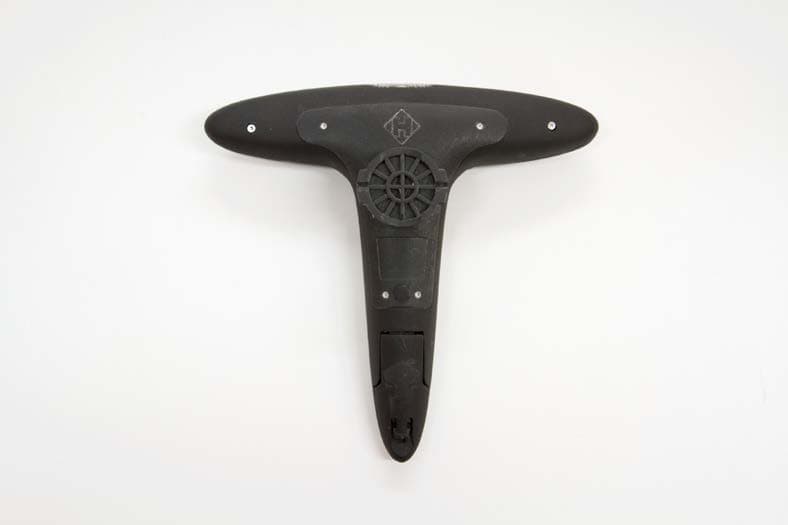
Click to zoom
Application Details
- Equipment Class
- DXT - Part 15 Low Power Transceiver, Rx Verified
- Date of Grant
- Jan 04, 2015
- Application Purpose
- Original Equipment
- Date of Application
- Jan 04, 2015
- Equipment Note
- Hammerhead One Navigation System
- Frequency Range
- 2457.00000000 - 2457.00000000
- Company
- Hammerhead Navigation Inc.
- Country
- United States
Documents & Files
Document Text
Text extracted from the exhibit documents filed with the FCC. Open a document above to read the original.
Users Manual
Owner’s Manual November 2014 All rights reserved. Under the copyright laws, this manual may not be copied, in whole or in part, without the written consent of Hammerhead Navigation Inc (“Hammerhead”). Hammerhead reserves the right to change or improve its products and to make changes in the content of this manual without obligation to notify any person or organization of such changes or improvements. Go to www.hammerhead.io for current updates and supplemental information concerning the use of this product. The Bluetooth ® word mark and logos are owned by the Bluetooth SIG, Inc. and any use of such marks by Hammerhead is under license. Mac ® is a registered trademark of Apple Computer, Inc. microSDTM is a trademark of SD-3C, LLC. Windows ® is a registered trademark of Microsoft Corporation in the United States and other countries. Wi-Fi ® is a registered trademark of Wi-Fi Alliance Corporation. Other trademarks and trade names are those of their respective owners. Introduction WARNING Always consult your physician before you begin or modify any exercise program. Getting Started When using your device for the first time, you should complete these tasks to set it up and learn about its basic features. • 1 Charge your device. • 2 Install your device using the mount. • 3 Turn on your device. • 4 Pair it with your smartphone. • 5 Go for a ride. Charging the Device NOTICE To prevent corrosion, thoroughly dry the USB port, the weather cap, and the surrounding area before charging or connecting to a computer. The device is powered by a built-in lithium-polymer battery that can be charged using a standard wall outlet or computer USB port. NOTE: The device will not charge when outside the temperature range of 32° to 104°F (0° to 40°C). • 1 Pull up the weather cap A from the USB port B. • 2 Plug the small end of the USB cable into the USB port on the device. • 3 Plug the large end of the USB cable into an AC adapter or a computer USB port. • 4 Plug the AC adapter into a standard wall outlet. • 5 Charge the device completely. About the Battery WARNING This device contains a lithium-polymer battery. Installing the Out Front Mount • 1 Select a secure location to mount the Hammerhead One device where it will not interfere with the safe operation of your bike. • 2 Use the hex key to remove the screw X from the handlebar connector X. • 4 Place the rubber pad around the handlebar: • If the handlebar diameter is 25.4 mm, use the thicker pad. • If the handlebar diameter is 31.8 mm, use the thinner pad. • 5 Place the handlebar connector around the rubber pad. • 6 Replace and tighten the screw. NOTE: Hammerhead recommends a torque specification of 7 lbf-in. (0.8 N-m). You should check the tightness of the screw periodically. • 7 Align the tabs on the back of the Hammerhead One device with the bike mount notches. • 8 Press down slightly and turn the Hammerhead One device clockwise until it locks into place. Releasing the Hammerhead One. • 1 Turn the Hammerhead One clockwise to unlock the device. • 2 Lift the Hammerhead One off the mount. Turning On the Device The first time you turn on the device, you will need to pair it with your smartphone. • 1 Hold the home button X. • 2 Open the Bluetooth Settings page on your smartphone. • 3 Ensure that Bluetooth is turned on. • 4 Select the Hammerhead One device from the list of bluetooth devices shown Using the Headlight At any time, you can turn on the headlight using the button X. • 1 Press the button X a second time to enter blinking mode. NOTE: recommends using it on a blinking mode to conserve battery. The Headlight is intended to aid in nighttime visibility. It is not intended to replace a dedicated headlight for nighttime riding. Going for a Ride • 1 Open the Hammerhead App on your smartphone. • 2 Follow the on screen instructions. Device Information Specifications Hammerhead One Specifications NOTE: device withstands incidental exposure to water of up to 1 meter for up to 30 minutes. Device Care NOTICE Do not store the device where prolonged exposure to extreme temperatures can occur, because it can cause permanent damage. Never use a hard or sharp object to operate the touch screen, or damage may result. Avoid chemical cleaners and solvents that can damage plastic components. Secure the weather cap tightly to prevent damage to the USB port. Cleaning the Device • 1 Wipe the device using a cloth dampened with a mild detergent solution. • 2 Wipe it dry. Troubleshooting Resetting the Device If the device stops responding, you may need to reset it. This does not erase any of your data or settings. Hold for 10 seconds. The device resets and turns on. Improving GPS Satellite Reception on the smartphone Ensure that your smartphone has wifi turned on. This improves its ability to determine and track your position. • Take your smartphone outside to an open area away from tall buildings and trees. • Remain stationary for several minutes. Updating the Software Before you can update your device software, you must have the Hammerhead app on your smartphone and the smartphone pared with the Hammerhead One device. • 1 Open the Hammerhead App • 2 Follow the on-screen instructions. • 3 Do not disconnect your device from the computer during the update process. Regulatory This device complies with part 15 of the FCC Rules. Operation is subject to the following two conditions: (1) This device may not cause harmful interference, and (2) this device must accept any interference received, including interference that may cause undesired operation. This device complies with Industry Canada licence-exempt RSS standard(s). Operation is subject to the following two conditions: (1) this device may not cause interference, and (2) this device must accept any interference, including interference that may cause undesired operation of the device. FR: Cet appareil est conforme avec Industrie Canada exempts de licence standard RSS (s). Son fonctionnement est soumis aux deux conditions suivantes: …
Text truncated - open the document above for the full version.
Cover Letter(s)
262 W 38 th St. Rm. 1003 New York, NY 10018 +1(646)926-7335 21 November 2014 Federal Communications Commission 445 12 th Street SW Washington, DC 20554 Subject: Limited Agency Agreement Re: We, Hammerhead Navigation Inc., hereby authorized Intertek Testing Services to act as our agent for the purpose of preparing application for FCC ID number 2ADMX-HH1NY under all applicable parts of the FCC rules and regulations. The effective date of this limited agency agreement is 21 November 2014. The limited agency agreement expires on 30 January 2015 unless sooner terminated or extended by written notice to Intertek Testing Services and the Federal Communications Commission. This is to advise that we are in full compliance with the Anti-Drug Abuse Act. The applicant is not subject to a denial of federal benefits pursuant to Section 5301 of the Anti-Drug Act of 1988, 21 U.S.C. 862, and no party to the application is subject to a denial of federal benefits pursuant to that section. If you have any questions or comments, please do not hesitate to contact me. Sincerely, Laurence Wattrus [email protected] +1(310)795-6494
Cover Letter(s)
1(1) 262 W 38 th St. Rm. 1003 New York, NY 10018 +1(646)926-7335 21 November 2014 Attention: Application Examiner Re: Request for confidentiality Applicant: Hammerhead Navigation Inc. FCC ID: 2ADMX-HH1NY To whom it may concern, Permanent Confidentiality Request is hereby submitted by Hammerhead Navigation Inc. to withhold permanently from public review certain portions of the application for equipment certification for the referenced FCC identifiers. This request for confidentiality is made pursuant to 47 CFR 0.457(d) and 0.459 of the FCC Rules. In particular, the following sections of the application are to be kept permanently confidential: • Schematics • Detailed Block diagrams • Detailed Operational/Functional Description • Parts list. Rationale for request for confidentiality: Hammerhead Navigation Inc. has invested considerable time and materials in research and development to produce the referenced product. Permanent confidentiality: Di sclosure of the permanently confidential portions of this application to competitors would not only give them significant competitive advantages in de veloping similar products, but would also disclose successful implementation of unpublished, leading edge technology developed by us The fee for confidentiality has been submitted along with the fee for certification. If you have questions or need further information, please contact the undersigned. Sincerely, Laurence Wattrus CTO - Hardware [email protected] Hammerhead Naviation Inc.
External Photos
External Photographs
ID Label/Location Info
S/N: FCC ID: 2ADMX-HH1NY IC: 12534A-HH1NY Model Number: HH1 Hammerhead Navigation Inc. Designed in NYC, Assembled in China HH Label Artwork Rev1.0 Hammerhead One - Label Artwork Location Bottom View 15mm 13mm 13.5mm Hammerhead One - Label Artwork Details Bottom View S/N: FCC ID: 2ADMX-HH1NY IC: 12534A-HH1NY Model Number: HH1 Hammerhead Navigation Inc. Designed in NYC, Assembled in China FCC ID: 2ADMX-HH1NY IC: 12534A-HH1NY Model Number: HH1 Hammerhead Navigation Inc. Designed in NYC, Assembled in China
Internal Photos
Internal Photographs
Test Report
EMC Report for Hammerhead Navigation, Inc. on the Hammerhead One File: 101812308MPK-002 Page 1 of 30 TEST REPORT Report Number: 101812308MPK-002 Project Number: G101812308 December 09, 2014 Testing performed on the Hammerhead One Model: HH1 FCC ID: 2ADMXHH1NY IC: 12534A-HH1NY to FCC Part 15.249 RSS-210, Annex 2.9 FCC Part 15, Subpart B Industry Canada ICES-003 for Hammerhead Navigation, Inc. Test Performed by: Test Authorized by: Intertek 1365 Adams Court Menlo Park, CA 94025 USA Hammerhead Navigation, Inc. 353 West 39th Street, 3rd Floor New York, NY 10018 USA Prepared by: Date: December 09, 2014 Anderson Soungpanya Reviewed by: Date: December 09, 2014 Krishna K Vemuri This report is for the exclusive use of Intertek's Client and is provided pursuant to the agreement between Intertek and its Client. Intertek's responsibility and liability are limited to the terms and conditions of the agreement. Intertek assumes no liability to any party, other than to the Client in accordance with the agreement, for any loss, expense or damage occasioned by the use of this report. Only the Client is authorized to copy or distribute this report and then only in its entirety. Any use of the Intertek name or one of its marks for the sale or advertisement of the tested material, product or service must first be approved in writing by Intertek. The observations and test results in this report are relevant only to the sample tested. This report by itself does not imply that the material, product, or service is or has ever been under an Intertek certification program. This report must not be used to claim product endorsement by A2LA, NIST nor any other agency of the U.S. Government. EMC Report for Hammerhead Navigation, Inc. on the Hammerhead One File: 101812308MPK-002 Page 2 of 30 Report No. 101812308MPK-002 Equipment Under Test: Hammerhead One Trade Name: Hammerhead Navigation, Inc. Model Number: HH1 Serial Number: HH1_01NY-R0002 Applicant: Hammerhead Navigation, Inc. Contact: Laurence Wattrus Address: Hammerhead Navigation, Inc. 353 West 39th Street, 3rd Floor New York, NY 10018 Country USA Tel. Number: (646) 926-7335 Email: [email protected] Applicable Regulation: FCC Part 15.249 RSS-210, Annex 2.9 FCC Part 15, Subpart B Industry Canada ICES-003 Test Site Location: ITS – Site 1 1365 Adams Drive Menlo Park, CA 94025 Date of Test: November 4 to 24, 2014 We attest to the accuracy of this report: Anderson Soungpanya Project Engineer Krishna K Vemuri EMC Senior Staff Engineer EMC Report for Hammerhead Navigation, Inc. on the Hammerhead One File: 101812308MPK-002 Page 3 of 30 TABLE OF CONTENTS 1.0 Summary of Tests .......................................................................................................................... 4 2.0 General Description ....................................................................................................................... 5 2.1 Product Description ............................................................................................................ 5 2.2 Related Submittal(s) Grants ................................................................................................ 6 2.3 Test Methodology ............................................................................................................... 6 2.4 Test Facility ........................................................................................................................ 6 2.5 Measurement Uncertainty ................................................................................................... 6 3.0 System Test Configuration ............................................................................................................ 7 3.1 Support Equipment and description .................................................................................... 7 3.2 Block Diagram of Test Setup .............................................................................................. 7 3.3 Justification ......................................................................................................................... 8 3.4 Software Exercise Program................................................................................................. 8 3.5 Mode of operation during test ............................................................................................. 8 3.6 Modifications required for Compliance .............................................................................. 8 3.7 Additions, deviations and exclusions from standards ......................................................... 8 4.0 Measurement Results ..................................................................................................................... 9 4.1 Transmitter Radiated Emissions ......................................................................................... 9 4.2 Occupied Bandwidth ......................................................................................................... 17 4.3 Radiated Emissions from Digital Parts ............................................................................. 20 4.4 Line Conducted Emissions ............................................................................................... 24 5.0 List of Test Equipment ................................................................................................................ 29 6.0 Document History ........................................................................................................................ 30 EMC Report for Hammerhead Navigation, Inc. on the Hammerhead One File: 101812308MPK-002 Page 4 of 30 1.0 Summary of Tests Equipment under Test (EUT) is the Hammerhead One, Model HH1. As described by the manufacturer, Hammerhead One is designed to be used on a bicycle. EUT consists of one Bluetooth 4.0, Low Energy radio and one ANT+ 2457MHz standard radio. The device never communicates over both protocols simultaneously. This report c…
Text truncated - open the document above for the full version.
Test Setup Photos
Setup Photographs FCC ID: 2ADMX-HH1NY IC: 12534A-HH1NY Radiated Emissions Radiated Emissions
Contact Information
Applicant
Laurence Wattrus(Manager)
Technical Contact
Intertek Testing ServicesKrishna Vemuri
[email protected]6504632900
1365 Adams Court · Menlo Park, California · United States
Non-Technical Contact
Intertek Testing ServicesKrishna Vemuri
[email protected]6504632900
Test Firm
Intertek Testing Services NA Inc.John Quigley
Technical Specifications
| # | Rule Parts | Frequency Range | Power Output |
|---|---|---|---|
| 1 | 15C | 2.46 GHz - 2.46 GHz | - |
Other Applications from Hammerhead Navigation Inc.

2ADMX-HK2
Oct 28, 2020KAROO 2
Equipment Class
DSS - Part 15 Spread Spectrum Transmitter