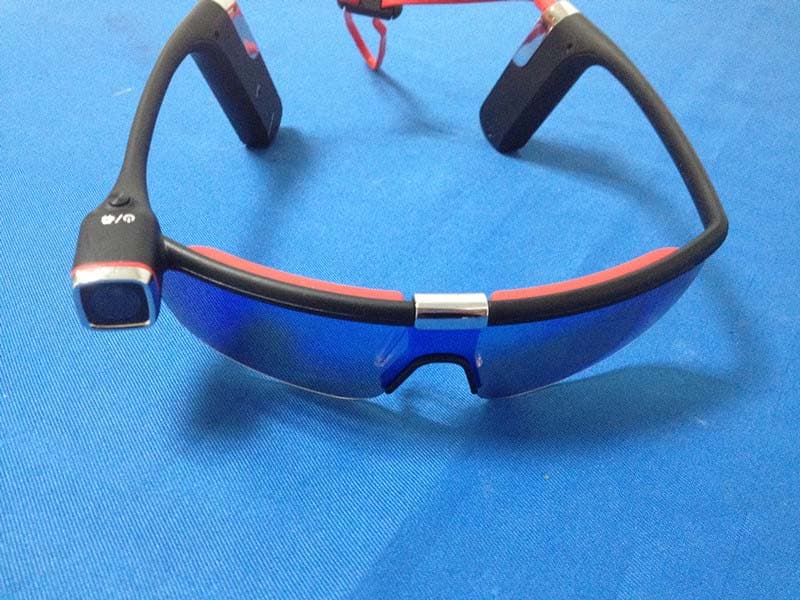
2ADOARCSports Sunglasses Camera (watch)
Shenghong Electronic Science & Technology Co., Ltd.
Click to zoom
Application Details
- Equipment Class
- DXX - Part 15 Low Power Communication Device Transmitter
- Date of Grant
- Dec 07, 2014
- Application Purpose
- Original Equipment
- Date of Application
- Dec 07, 2014
- Equipment Note
- Sports Sunglasses Camera (watch)
- Frequency Range
- 2408.00000000 - 2408.00000000
- Country
- China
Documents & Files
Document Text
Text extracted from the exhibit documents filed with the FCC. Open a document above to read the original.
Users Manual
户外运动摄像眼镜 HD Sport Sunglasses Camera 使用说明书 在使用本产品前,请务必先仔细阅读使用说明书并妥善保管。 在充分理解内容的基础上,正确使用。 以下设计及规格如有变更恕不另行通知。 Please read through this user manual before using the product and keep the manual for future use. This manual is for reference, any later alteration of technical specification and product appearance are without further notice. 目录 安全注意事项.............................................................................. 产品附件..................................................................................... 外观功能介绍............................................................................. 眼镜片的安装说明....................................................................... 眼镜摄像机的佩戴说明................................................................. 电池充电说明................................................................................ 插入和取出存储卡............................................................................. 时间设置....................................................................................... 录像操作....................................................................................... 拍照操作........................................................................................ 格式化操作..................................................................................... 无线遥控功能................................................................................. 遥控器说明.................................................................................... WIFI 功能.................................................................................... 使用电脑查看文件..................................................................... 技术参数..................................................................................... Contents Camera Precaution............................................................... Accessories........................................................................ Operation Interface Introduction .......................................... Installation of Eyeglasses......................................................... Sunglass camera wearing adjustment Battery charging introduction Insert and Take out Storage Card...... Time Setting Video operation Photo operation Format operation RF remote control Remote Controller Instruction............... WIFI functions Connect to PC to browse files ................... Technical Specification........................ 一、安全注意事项 使用摄像眼镜前,请仔细阅读以下安全注意事项: z 请按照说明书指示正确操作摄像眼镜;如非法操作可能会导致内部元件损坏。 z 请勿摔落或撞击本产品,否则容易导致内部组件损坏。 z 为了安全考虑,此产品及其附件尽量远离孩童或动物可及之处,以避免意外发生。 z 请勿将本摄像眼镜长时间置于潮湿或多尘的环境中,可能会导致漏电引起火灾。 z 请勿将本摄像眼镜长时间置于高温状态,如暴晒,可能会导致摄像眼镜外壳和内部 元件受损。 z 为发挥电池最大功效,我们建议您在 0-40 度温度下使用。 z 插拔内存卡前请确保摄像眼镜处于关机状态,以免导致卡或存储数据被损坏。 z 摄像眼镜在使用一段时间后温度升高,属于正常现象。 z 在使用时请勿摸镜头,以免影响拍摄效果。 z 请用吹风机(专门的镜头吹风设备)清洁镜头或使用专门的擦镜布旋转擦拭镜头, 清洁表面指印或灰尘。 I, Precaution Pls be well noted with the following guidelines before you use this camera, * Pls refer to manual instruction and operate the camera correctly. Illegal operation may cause damage to camera internal components. * Do not fall or hit the camera, it may damage the internal components. * For your safety, please keep the camera from the children and animals, in order to avoid accident * Do not place the camera in a damp or dusty location for extended periods of time. This may cause a fire or an electrical shock. * Do not leave the camera in places exposed to extremely high temperatures, such as under direct sunlight for extended periods of time. This may affect the camera housing and internal components *We recommend using batteries in temperatures between 0 to 40 .°C°C Turn off the camera before removing the memory card, in case of the damage of card or storage data. * The temperature rise is normal after using the digital cameras for a long time *Do not touch the lens during using the camera, so as not to influence the photography effect * Please use the air blower (special lens blowing equipment) to clean lens or use special lens-cleaning cloth to clean fingerprint or dust on the surface. 二、产品附件 说明书 USB线 充电器 遥控器 眼镜片 镜片布袋 皮包 II, Accessories User manual USB cable AC charger Remote controller Eyeglasses Cloth Bags Carry case 三、外观功能介绍 1、各部件介绍 III, Operation Interface Introduction 1. Interface introduction 功能键Function key MIC Microphone 镜头 Lens 夹片快拆支架 Quick release holder 镜片 Eyeglass 鼻托 Nose support 弹力扣 Elastic clasp USB接口USB socket TF卡槽TF card slot 拨动开关Slide switch key 复位键Reset key 电量提示灯Battery indicator 工作指示灯 拨动开关 USB接口 TF卡槽 电量提示灯 复位键 WIFI指示灯 功能键 镜头 夹片快拆支架 MIC 镜片 弹力扣 鼻托 工作指示灯Working indicator WIFI指示灯WIFI indicator 2、按键功能介绍 功能键:开/关机、格式化、遥控配对、摄影。 拨动开关 1.打开WIFI功能 2.关闭WIFI和遥控功能 3.打开遥控器功能 4.打开WIFI和遥控功能 温馨提示:当拨动开关在1档时,工作指示灯为绿色长亮,WIFI指示灯为红色长亮。 当拨动开关在2档时,工作指示灯为绿色长亮,WIFI指示灯熄灭。 当拨动开关在3档时,工作指示灯为绿色长亮,WIFI指示灯熄灭。 当拨动开关在4档时,工作指示灯为绿色长亮,WIFI指示灯为红色长亮。 2. Function keys introduction: Function key: Power on/off、Format、Remote control pairing、Record Slide switch key: Switch 1. WIFI Mode (Open WIFI function) Switch 2. OFF Mode (Shut All functions) Switch 3. Remote mode (Open remote control function) Switch 4. WIFI and Remote mode (Open both WIFI & remote control function) Memo: Slide to Switch 1: Green working indicator keeps on, WIFI Red indicator keeps on. Slide to Switch 2: Green working indicator keeps on, WIFI Red indicator is off. Slide to Switch 3: Green working indicator keeps on, WIFI Red indicator is off. Slide to Switch 4: Green working indicator keeps on, WIFI Red indicator keeps on. 3、开/关机 1. 开机:按住功能键3秒,工作指示灯为绿色长亮,马达震动一次,此时摄像机开启并进入 待机状态。 2. 关机:在开机状态下按住电源键3秒,马达震动一次后工作指示灯熄灭,此时摄像 机进入关机状态。 3. Turn on/off the camera (1), Turn on Long press the function key for about 3 seconds, camera vibrates once and turns on, the working indicator gree light keeps on. (2), Turn off Long press the function key for about 3 seconds, camera vibrates once and turns off, the working indicator gree light is off. 四、眼镜片的安装说明 眼镜片的安装:先拉下夹片快拆支架把镜片的中端放入固定,再把靠眼侧的一端放进去,再把另一端 靠眼侧的一端放进去卡住完成镜片的安装;如图所示。 IV. Installation of Eyeglasses As shown in below image, Pull down the quick release hold…
Text truncated - open the document above for the full version.
Cover Letter(s)
2ADOARC
External Photos
External photo
ID Label/Location Info
LABEL ARTWORK AND LOCATION FCC ID: 2ADOARC FCC ID Location
Internal Photos
1 Internal photo 2
Test Report
FCC ID TEST REPORT for Sports Sunglasses Camera Model: S62 FCC ID: 2ADOARC Prepared for: Shenghong Electronic Science & Technology Co., Ltd. Earnway Star Sakta Industrial Building, North Dawugang, Shiwan, Foshan, Guangdong, China. Prepared by: Shenzhen TCT Testing Technology Co.,Ltd 1F, Building 1, Yibaolai Industrial Park, Qiaotou Village, Fuyong Town, Baoan District, Shenzhen, Guangdong, China TEL: +86-0755-27673339 FAX: +86-0755-27673332 Report Number:TCT141029E008 Date of Test: Oct. 29-Dec. 02, 2014 Date of Report: Dec. 02, 2014 The results detailed in this test report relate only to the specific sample(s) tested. It is the Application’s responsibility to ensure that all production units are manufactured with equivalent EMC characteristics. This report is not to be reproduced except in full, without written approval from TCT Testing Technology. FCC ID: 2ADOARC Report Number: TCT141029E008 Page 2 of 20 Table of Contents 1.0 General Details................................................................................................................................................... 3 1.1 Test Lab Details ........................................................................................................................................... 3 1.2 Applicant Details ......................................................................................................................................... 3 1.3 Description of EUT...................................................................................................................................... 4 1.4 Statement ..................................................................................................................................................... 4 1.5 Test Engineer ............................................................................................................................................... 4 2.0 Test equipments and Associated Equipment used during the test................................................................. 5 2.1 Test Equipments........................................................................................................................................... 5 2.2 AE used during the test ................................................................................................................................ 5 3.0 Technical Details................................................................................................................................................ 6 3.1 Summary of test results ............................................................................................................................... 6 3.2 Test Standards .............................................................................................................................................. 6 4.0 EUT Modification.............................................................................................................................................. 6 5.0 Measurement Uncertainty................................................................................................................................6 6.0 Power Line Conducted Emission Test.............................................................................................................. 7 6.1 Schematics of the test .................................................................................................................................. 7 6.2 Test Method and test Procedure ................................................................................................................... 7 6.3 EUT Operating Condition............................................................................................................................ 7 6.4 Test Equipment ............................................................................................................................................ 7 6.5 Conducted Emission Limit .......................................................................................................................... 8 6.7 Test result..................................................................................................................................................... 8 7.0 Radiated Emission Test................................................................................................................................... 10 7.1 Test Method and test Procedure:................................................................................................................ 10 7.2 Block diagram of Test setup ...................................................................................................................... 10 7.3 Limit .......................................................................................................................................................... 12 7.4 Test Equipment .......................................................................................................................................... 13 7.5 Test specification: ...................................................................................................................................... 13 8. Band Edge.......................................................................................................................................................... 18 8.1 Band Edge Limit........................................................................................................................................ 18 8.2 Test Equipment .......................................................................................................................................... 18 9.0 Occupied Bandwidth....................................................................................................................................... 19 9.1 Test Equipment .......................................................................................…
Text truncated - open the document above for the full version.
Test Setup Photos
Radiation Emission
Contact Information
Applicant
Kent Tang(Manager)
Technical Contact
Shenzhen Tongce Testing LabAlan Gang
[email protected](86)13410377511
1F, Leinuo Watch Building, Fuyong Town · Shenzhen · China
Test Firm
Shenzhen Tongce Testing LabJoe Zhou
[email protected]860755-36638142
Technical Specifications
| # | Rule Parts | Frequency Range | Power Output |
|---|---|---|---|
| 1 | 15C | 2.41 GHz - 2.41 GHz | - |
Other Applications from Shenghong Electronic Science & Technology Co., Ltd.
2ADOAS62
Dec 04, 2014Sports Sunglasses Camera
Equipment Class
DTS - Digital Transmission System