2ADOS-DU-TOUCHDigital Wireless Musical Instrument
Dualo SAS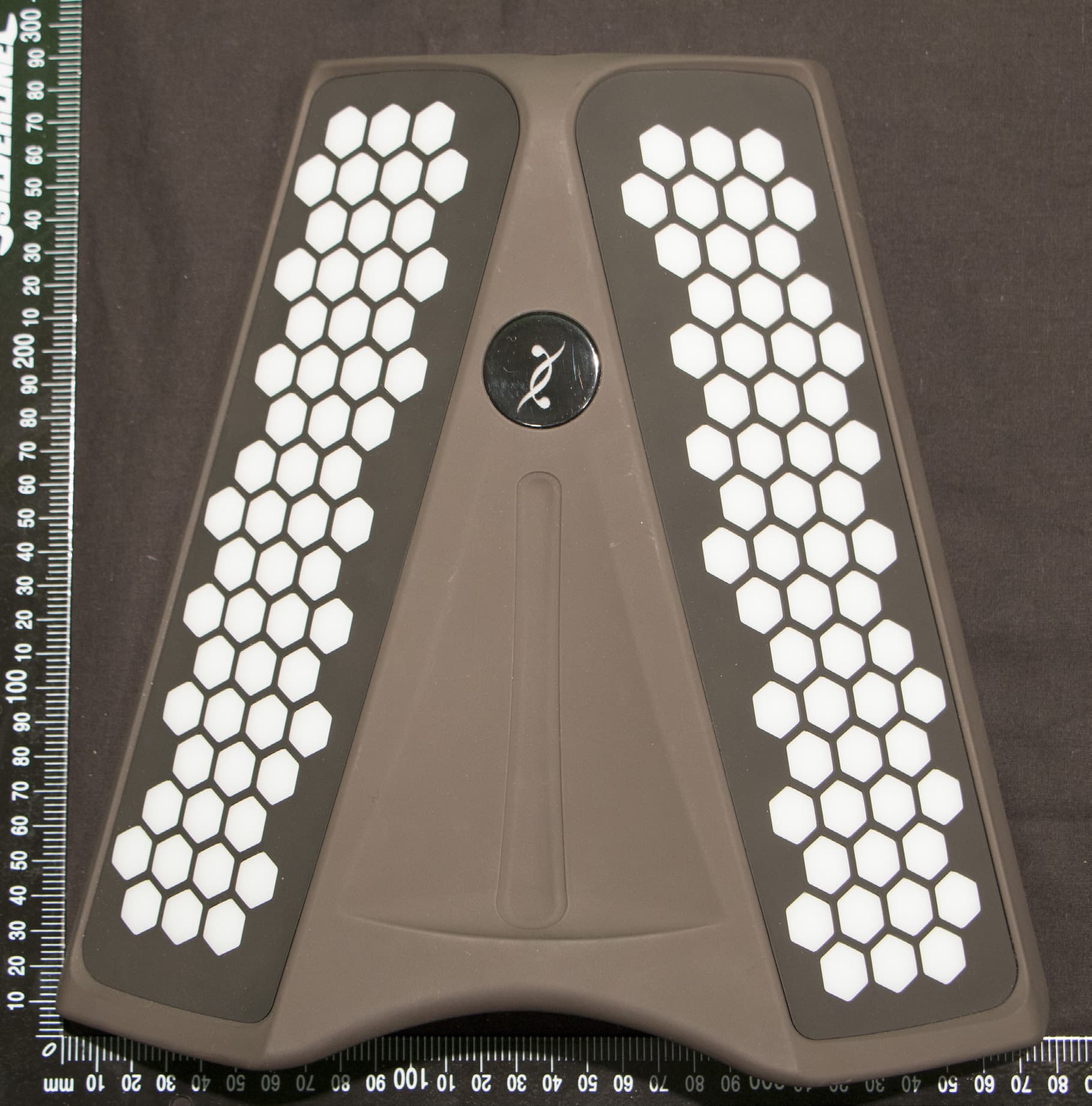
Click to zoom
Application Details
- Equipment Class
- DXX - Part 15 Low Power Communication Device Transmitter
- Date of Grant
- Mar 02, 2015
- Application Purpose
- Original Equipment
- Date of Application
- Mar 02, 2015
- Equipment Note
- Digital Wireless Musical Instrument
- Frequency Range
- 2401.00000000 - 2481.00000000
- Company
- Dualo SAS
- Country
- France
Documents & Files
Document Text
Text extracted from the exhibit documents filed with the FCC. Open a document above to read the original.
Users Manual
dualo du-touch user guide Welcome to the dualo community. You are among the first-ever players of the dualo, and we congratulate you on your choice. The du-touch is still under development, as is its user guide. As such, we welcome any comments you may have on how the du-touch works, which you can submit via the page dualo.org/en/support. We regularly produce updates. So, before anything else, make sure that the sofware version of your du-touch corresponds to the version of this user guide, also available from dualo.org/en/support. The du-touch is a musical instrument, and as such no user guide teaches you how to play it. The purpose of this guide is to answer questions you may have, but it does not constitute a method. You'll be able to find du-lessons on the dualo YouTube channel and on the dualo.org/en/media page, with a series of tutorials for learning how to handle the du-touch. Have a great time getting down with your du-touch. from the du-team dualo du-touch user guide Version 01 - 0021 © Dualo, december 2014 A word from the instrument maker 3 Contents of the pack USB cable + international AC adaptator quickstart paper du-touch cotton protective cover 4 The musical instrument The du-touch is a new musical instrument with its own special way of being played. It’s a complete instrument, in the sense that it’s a controller, a synthe- sizer and a sequencer all at the same time. So, in order to understand how it works, here are five elements which, when combined, make it possible to play and share music: play: it's the du-touch as a machine which captures the gestures of the musician. (Don't look for the button, this is the du-touch itself) sound: everything involving the timbre in the broad sense, choos- ing a sound, adding effects, etc. music: in the sense of musical text, recording or playing a piece of music, tracks, or anything that might be found in music notation. settings: for adjusting the various parameters of the first three elements. connection: everything to do with links and sharing with the out- side world, other machines or other members of the community and, of course, the du-station software. 5 play The du-touch The du-touch is a controller, in other words a machine that captures the gestures of the musician to transmit them to the internal synthesizer or to a MIDI interface. It does not have speakers, so you need to connect it to an amp or a headset, or use it as a MIDI controller. 6 7 8 Connecting to a headset or an amp Plug in your headset or headphones to the headset mini-jack socket. If you are using an amp, plug your jack into the audio line-out. Make your connections before turning the equipment on. The du-touch produces bass sounds, so you're advised to use a bass or keyboard amp, or even better a sound system, rather than a guitar amp. The du-touch is stereo but works very well in mono. Take care however not to use a stereo jack on a balanced mono input. If in doubt, use a mono jack. Turning the du-touch on or off Briefly press the standby button beneath the du- touch to turn it on. The music button and screen light up after several seconds, and the instrument is ready to play. Press the same standby button to turn the du- touch off. 9 Adjusting the general volume Adjust the volume by stroking the touch strip on the front of the du-touch. The vol- ume value appears on the screen. Touch the bottom of the strip to turn the volume to zero (mute). Touch the top of the strip to return the volume to what it was before being zeroed (unmute). There are other volumes for sounds, pieces of music, loops and metronome. Positioning the instru- ment Place your du-touch on your lap and let it rest against your midriff. It stays in place without needing to be held. Your hands (including your thumbs) are over the keyboards, for maximum freedom of movement. For greater stability we recommend the use of the du-belt*, the Dualo carry strap. * available as an option from dualo. org touch strip 10 Playing notes To play notes, hit the keys with your fingertips. Simply pressing isn't effective, you need to move your fingers rapidly. The harder you hit, the louder the sound. It is possible to adjust the sensitivity of the keys, display a scale on the keyboard or display the names of the notes on the screen. . Holding a note For playing a sustained note without keeping the key depressed, play and hold the music or sound button before releasing the note or chord. To re- lease the sustained note, play the same notes again or double-click the sound button. Layout of the notes On the Dualo, as one goes away from the head, the notes jump up in thirds, both major thirds (inward) and minor thirds (outward). So two hands must co-operate to play all the notes needed: one hand must play the first (root), third, fifth and seventh, etc. notes, while the other hand plays the second, forth, sixth, eighth (octave), etc. notes. To play a chord you just need to play three successive keys. See the dualo principle, to find out more. It is possible to display the notes on the screen. 11 12 MIDI You can connect the du-touch to a hardware synthesizer via the MIDI OUT jack underneath the du-touch. You can also control virtual synthesizers via USB. The du-touch is recognized as a MIDI controller, with no drivers to be installed, whether on Mac or PC. The MIDI notes are sent as soon as the du-touch is turned on, connected and played. The MIDI notes sent are the same as those sent to the internal synthesizer. Note that the layout of the notes will differ depending on wheth- er it concerns an harmonic or a percussive instrument. To choose the output channel, hold down the music button and select one of the 7 keys at the bottom of the right keyboard. The notes played are then sent as MIDI over the chosen channel. If you save a loop, it is also output as MIDI with the channel on which it was recorded. This means that it is possible to use the du-touch as a controller-sequencer with an external synthesizer. Updati…
Text truncated - open the document above for the full version.
Cover Letter(s)
Dualo SAS 1 centre commercial La Tour, 93120 La Courneuve France December, 4th,2014 Federal Commu nications Commission Authorization and Evaluation Division 7435 Oakland Mills Road Columbia, Maryland 21046 Subject: Confidentiality request regarding application for certification of FCC lD: ZADOS-DU- TOUCH TO WHOM IT MAY CONCERN Pursuant to sections 0.457 and 0.459 of the Commission's Rules, the Applicant herby requests confidential treatment of information accompanying this Application as outlined below: Block Diagram (BlkDla.pdfl Schematics (Schem.pdf) Operational Description (OpDes.pdfl Bill of Materials (PartsLst.pdfl The above materials contain trade secrets and proprietary information not customarily released to the public. The public disclosure of these matters might be harmful to the Applicant and provide unjustified benefits to its competitors. The Applicant understands that pursuant to Rule 0.457, disclosure of this Application and all accompanying documentation will not be made beforethe date of the Grantforthis application. Sincerelv, Michaël Mardinian - Dualo R&D Manager +33 (0)9s0 s26232 +33 (0)607 49 2290 [email protected] o a a a dualo SAS - +33 (0) 9 50 52 62 32 Pépinière de la Courneuve - l, Ccial la Tour, 93 120 La Courneuve - France Caoital social : 66 634 € - R.C.S. BOBIGNY - 529 634 586 dualo.org
ID Label/Location Info
Label location
ID Label/Location Info
du-touch made in Francewww.dualo.org warranty void if seal broken FCC ID: 2ADOS-DU-TOUCH This device complies with part 15 of the fcc rules. Operation is subject to the following two conditions: (1) this device may not cause harmful interference, and (2) this device must accept any interference received, including interference that may cause undesired operation.
Test Report
RR-030-GTE-14-105103-1-A (01) Page 2 out of 38 TEST CERTIFICATION FOR: FCC Certification NAME OF THE EQUIPMENT UNDER TEST: Musical instrument DU-TOUCH Serial number (S/N): Prototype NAME OF THE MANUFACTURER: DUALO ADDRESS OF THE APPLICANT: Company: DUALO Address: Centre Commercial La Tour 93120 LA COURNEUVE FRANCE Person in charge: Mr. MARDINIAN DATES OF TESTS: 2014, the 20 th and the 21 th of November TESTS LOCATION: EMITECH Laboratory in Montigny – le- Bretonneux (78) - FRANCE TESTS OPERATORS: F. LHEUREUX and F. ROHRI RR-030-GTE-14-105103-1-A (01) Page 3 out of 38 TABLE OF CONTENTS 1. INTRODUCTION ____________________________________________________________________ 4 2. REFERENCE DOCUMENT ____________________________________________________________ 4 3. PRODUCT DESCRIPTION ____________________________________________________________ 5 4. TESTS AND CONCLUSION ___________________________________________________________ 6 5. CONDUCTED EMISSION _____________________________________________________________ 8 6. INTENTIONAL RADIATED EMISSIONS _________________________________________________ 11 7. ADDITIONAL PROVISIONS TO THE GENERAL RADIATED EMISSIONS LIMITATION ___________ 14 8. UNINTENTIONAL RADIATED EMISSIONS AND TRANSMITTER UNWANTED EMISSION IN THE BAND 9 KHz – 9.5 GHz _______________________________________________________ 16 ANNEX 1: ANTENNA FACTORS, INSERTION LOSSES AND AMPLIFIER VALUES ANNEX 2: EXTERNAL PHOTOGRAPHIES ANNEX 3: TEST SETUP PHOTOGRAPHIES ANNEX 4: BAND EDGE ANNEX 5: CALIBRATION DATE RR-030-GTE-14-105103-1-A (01) Page 4 out of 38 1. INTRODUCTION This document presents the results of Electromagnetic Compatibility tests performed on the equipment «Musical instrument DU-TOUCH» according to reference documents listed below. 2. REFERENCE DOCUMENTS FCC 47 CFR Part 15: 2014 Code of Federal Regulations Title 47- Telecommunication Chapter 1- Federal Communication Commission Part 15- Radio frequency devices ANSI C63.4: 2003 Methods of Measurement of Radio-Noise Emissions from Low Voltage Electrical and Electronics Equipment in the range of 9 kHz to 40 GHz. RR-030-GTE-14-105103-1-A (01) Page 5 out of 38 3. PRODUCT DESCRIPTION Class: B (residential environment) Utilization: Musical instrument in a plastic shell, it is composed of 2 keyboard parts. During testing, the following cables are installed: - USB cable on charger AC/DC (120Vac/60Hz) - Line oout Jack 6.35 cable - Headphone jack 3.5 cable - MiDi DIN out cable Antenna type and gain: Integral antenna: Not communicated. Type of modulation: F.S.K. Operating frequency range: from 2401 MHz to 2481 MHz Choice of frequency: 2401 MHz Full tests (channel 1) 2441 MHz Limited tests (channel 41) 2481 MHz Full tests (channel 81) Number of channels: 80 (802.15.4) Channel spacing: 1 MHz Power source: 120 Vac / 60 Hz Firmware application: - Modification of the equipment during the tests: No. RR-030-GTE-14-105103-1-A (01) Page 6 out of 38 4. TESTS AND CONCLUSION The following table summarizes test results of the EUT. Subpart B of the standard FCC 47 CFR part 15 – Unintentional radiators Test procedure Designation of test Test results Comments Pass Fail N.A. N.P. 15.107 Measurement of conducted emission on AC mains ports X 15.109 Radiated emission limits X 15.111 Antenna power conduction limits for receivers X Subpart C of the standard FCC 47 CFR part 15 – Intentional radiators Test procedure Designation of test Test results Comments Pass Fail N.A. N.P. 15.203 Antenna requirement X 15.205 Restricted bands of operation X 15.207 Measurement of conducted emission on AC mains ports X 15.209 Radiated emission limits; general requirements X 15.212 Modular transmitters X 15.215 Additional provisions to the general radiated emission limitations (a) Alternative to general radiated emission limits X (b) Unwanted emissions outside of § 15.249 frequency bands X (c) 20 dB bandwidth and band-edge compliance X 15.249 Intentional radiated emissions a) Field strength fundamental + harmonics in the bands 902-928 MHz, 2400-2483.5 MHz, 5725-5875 MHz, and 24.0-24.25 GHz X b) Fixed point to point operation in the band 24.0- 24.25 GHz X b) (1) Field strength X b) (2) Frequency tolerance for temperature variation and for variation voltage X b) (3) Gain antenna X c) Test at 3 m X d) Outside bands (spurious 50 dB or 15.209) X e) Possibility measurement in peak detector (> 1 GHz) X N.A.: Not Applicable N.P.: Not Performed RR-030-GTE-14-105103-1-A (01) Page 7 out of 38 Conclusion: The tested sample "Musical instrument DU-TOUCH" submitted to the tests complies with the requirements of the standard: FCC 47 CFR PART 15: 2014 according to the limits specified in this report. RR-030-GTE-14-105103-1-A (01) Page 8 out of 38 5. CONDUCTED EMISSION Standard: FCC 47 CFR Part 15: 2014 Section: 15.107 and 15.207 Test configuration: Tested cable Measure with E.U.T. height Power supply 120Vac/60Hz L.I.S.N. 80 cm Frequency band Tested cables Resolution bandwidth Video bandwidth Detection mode 150 kHz - 30 MHz Power supply 120Vac/60Hz (Stand by mode) 10 kHz 30 kHz Peak 150 kHz - 30 MHz Power supply 120Vac/60Hz (Transmitter mode) 10 kHz 30 kHz Peak 150 kHz - 30 MHz Power supply 120Vac/60Hz (Transmitter mode) 9 kHz 30 kHz Average Test method deviation: No Test equipment list: CATEGORY BRAND TYPE N r EMITECH AC power source CHROMA 6415 5331 Cable - N-2m 2812 Cable - N-2m 2813 Limiter Hewlett Packard 11947A 1094 LISN Rohde & Schwarz ESH2-Z5 0326 Receiver Rohde & Schwarz FSP40 (V 4.00SP1-V3.0-10-2) 5175 Software Nexio BAT EMC v3.6.0.32 0000 Tests enclosure Emitech JD1 1804 Results: See curves hereafter. Limits and detections on the curves are peak (red), average (green) and quasi-peak (blue). RR-030-GTE-14-105103-1-A (01) Page 9 out of 38 Curves 1 and 2 Conducted voltage emission (measurement): Power supply 120Vac/60Hz (Stand by mode) in Peak detection. 21/11/2014 150kHz 30MHz1M10M Fréquence (MHz)Ligne: Neutre 0 80 dBμV 70 60 50 40 30 20 10 150kHz30MHz1M10M Fréquence (MHz…
Text truncated - open the document above for the full version.
Contact Information
Applicant
Michael Mardinian
Test Firm
EMITECH MontignyMaxime Michau
Technical Specifications
| # | Rule Parts | Frequency Range | Power Output |
|---|---|---|---|
| 1 | 15C | 2.40 GHz - 2.48 GHz | - |