2ADQV-GC300747APP DUCK
Together Plus, Ltd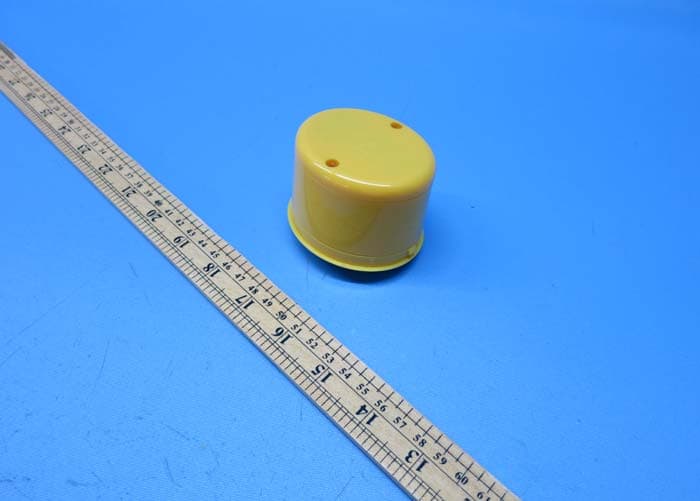
Click to zoom
Application Details
- Equipment Class
- DXX - Part 15 Low Power Communication Device Transmitter
- Date of Grant
- Mar 02, 2015
- Application Purpose
- Original Equipment
- Date of Application
- Mar 02, 2015
- Equipment Note
- APP DUCK
- Frequency Range
- 2402.00000000 - 2480.00000000
- Company
- Together Plus, Ltd
- Country
- United Kingdom
Documents & Files
Document Text
Text extracted from the exhibit documents filed with the FCC. Open a document above to read the original.
Users Manual
iDuck Bluetooth Speaker Model no. AD001 General Specifications ‧ Bluetooth includes profiles: A2DP, AVRCP, HFP, HSP ‧ Advanced Audio Distribution Profile (A2DP) for wireless music streaming ‧ Audio Video Remote Control Profile (AVRCP) for wireless audio and video playback control ‧ Hands-free Audio (HFP) and Headset Profiles (HSP) for hands-free calling capability ‧ Range up to 33FT (10M) ‧ Waterproof IPX-6 LED Indicator There is an LED light iDuck Bluetooth Speaker. Below is what the LED’s various displays indicate. LED Off – Power OFF BLUE – Power ON Flashing BLUE/RED – Pairing mode Installing battery 1. Unscrew two battery door screws. 2. Install 3 x AAA battery (Not included) in correct polarity. 3. Replace the battery door. Pairing with Bluetooth Device (iPhone, iPad or Android Phone) iDuck Bluetooth Speaker can be connected wirelessly via Bluetooth to your Bluetooth Device (iPhone or Android Phone). It features a built-in mic for hands-free calling and can be used for playback of your music library. 1. Put iDuck Bluetooth Speaker into pairing mode .Press and hold down the “MODE” button of Iduck Bluetooth Speaker for 6 seconds until the LED light starts blinking red and blue. This indicates that it is in pairing mode. 2. Turn on the Bluetooth function of your device or phone. 3. Select “APPDUCK” on your phone for pairing 4. You will see “connected” on your device or phone. Note: After pairing, iDuck Bluetooth Speaker will also“auto-connect” with compatible devices that auto-search and re-connect with their last connecting device if disconnection should occur. Note: iDuck Bluetooth Speaker will auto off automatically after 5 minutes when it does not detect any paired device. Reconnection in Event of Bluetooth Disconnection If by any reason your device and iDuck Bluetooth Speaker are disconnected, such as out of connection distance or powering off, they can be re-connected by: 1. Turn the power on of iDuck Bluetooth Speaker by hold the MODE button for 3 seconds. The LED will stay blinking on blue. 2. Short pressing the MODE button on iDuck Bluetooth Speaker. 2. Select “ST-1306” from your device or phone for reconnection. Note: After pairing, iDuck Bluetooth Speaker will also “auto-connect” with compatible devices that auto-search and re-connect with their last connecting device if disconnection should occur. Note: You can turn off the iDuck Bluetooth Speaker anytime by pressing and hold the MODE button for 3 seconds. The LED will turn off. Controlling music phone’s music playback using iDuck Bluetooth Speaker In addition to using the playback control on your music phone as you normally would, you can control music playback from iDuck Bluetooth Speaker using the buttons. Play/Pause: Press once MODE button to play/pause during music playback. Skip to the next or previous track: Press once on ` button to skip to the next track or _ button to skip back to the previous track. Volume control: Press and hold ` button to increase the music volume or _ button to decrease the music volume. Taking Calls on phone Connected to iDuck Bluetooth Speaker When you receive an incoming call, if you are listening to music through your phone, the music will automatically pause. To accept a call: You can accept a call as you usually do, using your phone controls or press MODE button of iDuck Bluetooth Speaker. Speak normally to iDuck. Your call will come through the speakers and your voice picked up through the built-in mic of iDuck. To end a call: Use your phone controls or press MODE button of iDuck Bluetooth Speaker Warning: Changes or modifications to this unit not expressly approved by the party responsible for compliance could void the user’s authority to operate the equipment. NOTE: This equipment has been tested and found to comply with the limits for a class B digital device, pursuant to Part 15 of the FCC Rules. These limits are designed to provide reasonable protection against harmful interference in a residential installation. This equipment generates, uses and can radiate radio frequency energy and, if not installed and used in accordance with the instructions, may cause harmful interference to radio communications. However, there is no guarantee that interference will not occur in a particular installation. If this equipment does cause harmful interference to radio or television reception, which can be determined by return the equipment off and on, the user is encouraged to try to correct the interference by one or more of the following measures: o Reorient or relocate the receiving antenna. o Increase the separation between the equipment and receiver. o Connect the equipment into an outlet on a circuit different from that to which the receiver in connected. o Consult the dealer or an experienced radio/TV technician for help.
External Photos
INTERTEK TESTING SERVICE Report: 14100562HKG-001 FCC ID: 2ADQV-GC300747 Equipment Photographs Model: AD001 (External)
Internal Photos
INTERTEK TESTING SERVICE Report: 14100562HKG-001 Equipment Photographs Model : AD001 (Internal) FCC ID: 2ADQA-GC300747 INTERTEK TESTING SERVICE Report: 14100562HKG-001 Equipment Photographs Model : AD001 (Internal) FCC ID: 2ADQA-GC300747 INTERTEK TESTING SERVICE Report: 14100562HKG-001 Equipment Photographs Model : AD001 (Internal) FCC ID: 2ADQA-GC300747 INTERTEK TESTING SERVICE Report: 14100562HKG-001 Equipment Photographs Model : AD001 (Internal) FCC ID: 2ADQA-GC300747 INTERTEK TESTING SERVICE Report: 14100562HKG-001 Equipment Photographs Model : AD001 (Internal) FCC ID: 2ADQA-GC300747
Operational Description
Technical Description The brief circuit description is listed as below: 1) U2 acts as 2.4GHz RF Module (SPK-8610-A). 2) U1 acts as Voltage Regulator (MD71-33). 3) U3 acts as Audio Amplifier (HT6871). 4) X1 acts as a crystal for U2 Antenna Type: Internal antenna Antenna Gain: 0dBi Nominal rated field strength: 100.7 dBμV/m at 3m Maximum allowed field strength of production tolerance: +/- 3dB
RF Exposure Info
Analysis Report The Equipment Under Test (EUT) is a 2.4GHz Bluetooth 3.0 speaker. The EUT is powered by 3 x 1.5V AAA batteries. The Bluetooth module in the EUT is operating in the frequency range from 2402MHz to 2480MHz (79 channels with 1MHz channel spacing). After pairing with Bluetooth Device (iPhone, iPad or Android Phone), the audio signal can be fed to the speaker. Also there is a build- in mic for hands-free calling Antenna Type: Internal antenna Antenna Gain: 0dBi Nominal rated field strength: 100.7 dBμV/m at 3m Maximum allowed field strength of production tolerance: +/- 3dB According to the KDB 447498: Based on the Maximum allowed field strength of production tolerance was 103.7dBμV/m at 3m in frequency 2.4GHz, thus; The EIRP = [(FS*D) ^2*1000 / 30] = 7.033mW Conducted power = Radiated Power (EIRP) – Antenna Gain So; Conducted Power =7.033mW. The SAR Exclusion Threshold Level: = 3.0 * (min. test separation distance, mm) / sqrt(freq. in GHz) = 3.0 * 5 / sqrt (2.480) mW = 9.53 mW Since the above conducted output power is well below the SAR Exclusion threshold level, so the EUT is considered to comply with SAR requirement without testing.
Schematics
1 2 34 ABCD 4 3 2 1 D CBA DWG NAMEDWG NO. ITEM NO. ITEM NAME SIZE PAGE OF DRAWN/DATECHK / DATEAPP / DATE REVISIONS DASH NO. REV ECO DESCRIPTION DATE BY CHECKED B1AAAx3 C111uFR512K R3330 ohmR4330 ohm K2 Vol- / Next LED_0LED_1 3.3V U1MD71-33 R10.47ohm C3100nF C11uF 3.3V 12345678 39404135363738 AIO_0PIO_15PIO_4PIO_16PIO_2PIO_5PIO_14LED_1 SPK_LN SPK_RP SPK_LP MIC_R SPK_RN AGND MIC_L 9 101112 131415 PIO_17LED_0RSTBSPI_PCMPIO_3VRGEGND 3132333427282930 LED_2PIO_20 PIO_8 PIO_21 USB_DN PIO_1PIO_7 USB_DP 16 CHG_EXT 17 VCHG 18 VBAT_SEN 19 3V3_USB 20 1V8 21 VBAT 22 PIO_9 23 PIO_0 24 PIO_6 25 PIO_18 26 PIO_19 U2BLK-MD-BC08-A C21uF L11UH MIC L21UH C1215pFMIC_L MIC_L R612K C61uFC71uFC81uFC91uF SPK_LPSPK_RPSPK_LNSPK_RN 1234 5678 CTRLBYPASSIN-IN+ OUT-GNDOUT+VDD U3HT6871 SPK4ohm/1W C54.7uF R7 12K C101uF R8 68K CTRL K1 Vol+ / Back K3 Mode LED1ARed LED1BBule LED_1LED_0 3.3V C4100nF B+ B+ CTRL Smart-Tech Buletooth Duck ST-1304 A4 1 1 ST-1304-V1.SCHRivers / 03-05-2013 SPK_LNSPK_LPSPK_RPSPK_RN
Test Report
Issuing Laboratory: Intertek Testing Services Hong Kong Limited HKAS has accredited this laboratory (HOKLAS 005 – TEST) under HOKLAS for specific laboratory activities as listed in the HOKLAS directory of accredited laboratories. Report No.: 14100562HKG-001 i FCC ID: 2ADQV-GC300747 Intertek Testing Services Hong Kong Ltd. 2/F., Garment Centre, 576 Castle Peak Road, Kowloon, Hong Kong. Tel: (852) 2173 8888 Fax: (852) 2785 5487 Website: www.hk.intertek-etlsemko.com GENERAL INFORMATION Grantee: Together Plus, Ltd. Grantee Address: 145-157 St. John Street, London, United Kingdom EC1V 4PY Contact Person: Mark Norman Tel: +44 7887 800 225 Fax: N/A e-mail: [email protected] Manufacturer: Smartron (HK) Limited Manufacturer Address: Flat B, 10/F, Capital Trade Centre, 62 Tsun Yip Street, Kwun Tong, Kowloon, Hong Kong. Brand Name: APP DUCK Model: AD001 Type of EUT: Transceiver Description of EUT: Bluetooth Duck Serial Number: N/A FCC ID: 2ADQV-GC300747 Date of Sample Submitted: October 15, 2014 Date of Test: October 15, 2014 to November 24, 2014 Report No.: 14100562HKG-001 Report Date: February 11, 2015 Environmental Conditions: Temperature: +10 to 40°C Humidity: 10 to 90% Issuing Laboratory: Intertek Testing Services Hong Kong Limited HKAS has accredited this laboratory (HOKLAS 005 – TEST) under HOKLAS for specific laboratory activities as listed in the HOKLAS directory of accredited laboratories. Report No.: 14100562HKG-001 ii FCC ID: 2ADQV-GC300747 Intertek Testing Services Hong Kong Ltd. 2/F., Garment Centre, 576 Castle Peak Road, Kowloon, Hong Kong. Tel: (852) 2173 8888 Fax: (852) 2785 5487 Website: www.hk.intertek-etlsemko.com SUMMARY OF TEST RESULT TEST SPECIFICATION REFERENCE RESULTS Restricted bands of operation 15.205 Pass Radiated Emission Radiated Emission on the Bandedge 15.249 Pass The equipment under test is found to be complying with the following standards: FCC Part 15, October 1, 2013 Edition Note: 1. The EUT uses a permanently attached antenna which, in accordance to section 15.203, is considered sufficient to comply with the pervisions of this section. 2. Pursuant to FCC part 15 Section 15.215(c), the 20 dB bandwidth of the emission was contained within the frequency band designated (mentioned as above) which the EUT operated. The effects, if any, from frequency sweeping, frequency hopping, other modulation techniques and frequency stability over excepted variations in temperature and supply voltage were considered. Issuing Laboratory: Intertek Testing Services Hong Kong Limited HKAS has accredited this laboratory (HOKLAS 005 – TEST) under HOKLAS for specific laboratory activities as listed in the HOKLAS directory of accredited laboratories. Report No.: 14100562HKG-001 iii FCC ID: 2ADQV-GC300747 Intertek Testing Services Hong Kong Ltd. 2/F., Garment Centre, 576 Castle Peak Road, Kowloon, Hong Kong. Tel: (852) 2173 8888 Fax: (852) 2785 5487 Website: www.hk.intertek-etlsemko.com Table of Contents 1.0 General Description.............................................................................................. 1 1.1 Product Description ............................................................................................. 1 1.2 Related Submittal(s) Grants................................................................................. 1 1.3 Test Methodology ................................................................................................ 1 1.4 Test Facility ......................................................................................................... 1 2.0 System Test Configuration ................................................................................... 2 2.1 Justification.......................................................................................................... 2 2.2 EUT Exercising Software..................................................................................... 2 2.3 Special Accessories ............................................................................................ 2 2.4 Measurement Uncertainty.................................................................................... 2 2.5 Support Equipment List and Description.............................................................. 2 3.0 Emission Results .................................................................................................. 3 3.1 Field Strength Calculation.................................................................................... 3 3.2 Radiated Emission Configuration Photograph ..................................................... 4 3.3 Radiated Emission Data ...................................................................................... 4 4.0 Equipment Photographs ....................................................................................... 8 5.0 Product Labelling .................................................................................................. 8 6.0 Technical Specifications ...................................................................................... 8 7.0 Instruction Manual ................................................................................................ 8 8.0 Miscellaneous Information ................................................................................... 9 8.2 Discussion of Pulse Desensitization .................................................................. 12 8.3 Calculation of Average Factor............................................................................ 12 8.4 Emissions Test Procedures ............................................................................... 13 9.0 Equipment List .................................................................................................... 16 Issuing Laboratory: Intertek Testing Services Hong Kong Limited HKAS has accredited this laboratory (HOKLAS 005 – TEST) under HOKLAS for specific laboratory activities as listed in the HOKLAS directory of accredited laboratori…
Text truncated - open the document above for the full version.
Test Setup Photos
INTERTEK TESTING SERVICE Report No: 14100562HKG-001 Configuration Photographs Worst-Case Radiated Emissions (Front View) Model : AD001 FCC ID: 2ADQV-GC300747 INTERTEK TESTING SERVICE Report No: 14100562HKG-001 Configuration Photographs Worst-Case Radiated Emissions (Back View) Model : AD001 FCC ID: 2ADQV-GC300747
Contact Information
Applicant
Mark Norman(Director)
Technical Contact
Intertek Testing Services Hong Kong LtdTerry Chan
[email protected]852 2173 8888
2/F., Garment Centre, · Hong Kong
Non-Technical Contact
Intertek Testing Services Hong Kong LtdTerry Chan
[email protected]852 2173 8888
Test Firm
Intertek Testing Services Hong Kong Ltd.Billy Chow
Technical Specifications
| # | Rule Parts | Frequency Range | Power Output |
|---|---|---|---|
| 1 | 15C | 2.40 GHz - 2.48 GHz | - |