2AE3J-SHD-ITR2BTAM/FM HD Radio with Bluetooth
Nicetex Electronics Limited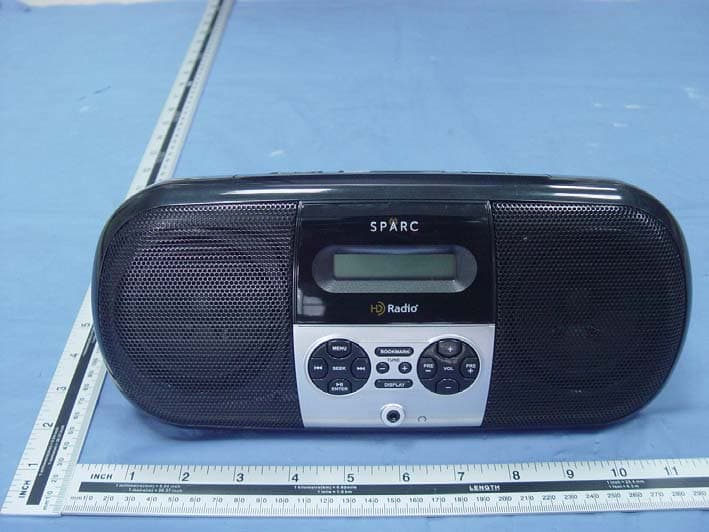
Click to zoom
Application Details
- Equipment Class
- DSS - Part 15 Spread Spectrum Transmitter
- Date of Grant
- Jul 08, 2015
- Application Purpose
- Original Equipment
- Date of Application
- Jul 07, 2015
- Equipment Note
- AM/FM HD Radio with Bluetooth
- Frequency Range
- 2402.00000000 - 2480.00000000
- Company
- Nicetex Electronics Limited
- Country
- Hong Kong
Documents & Files
Document Text
Text extracted from the exhibit documents filed with the FCC. Open a document above to read the original.
Users Manual
DUDE | SPARC SHD-ITR2BT OM | V002.35 1 1 SPARC SHD-ITR2BT Owner’s Manual The SHD-ITR2BT is a high-quality tabletop and transportable radio offering the most advanced radio reception technology—HD Radio™ Technology. HD Radio Technology The SHD-ITR2BT tunes both traditional analog AM/FM and new HD Radio digital broadcasts. In digital mode, sound quality is improved, new broadcast streams (stations) not available in analog are available, and advanced programming information such as Artist and Song Title can be displayed. To find new digital stations, go to www.hdradio.com/stations. Primary (HD1) signals are received in both analog and digital. If the digital signal is lost, the radio will automatically blend to the analog signal and continue to play. However, when receiving the new additional signals (HD2/HD3), there is no analog component: if the signal is lost, the radio will mute to silence. If this happens, you can wait for the signal to return or simply tune the radio to another station. SHD-ITR2BT Features New broadcast channels and content, not available on a traditional AM/FM radio Advanced programming information, such as Artist and Song Title Advanced features, such as Emergency Alerts for weather, civil, and police warnings and Voice Assist for confirmation of button control Digital Sound / HD2/HD3 / Program Info / Bookmark Sleep Timer Audio Streaming via Bluetooth Audio Equalizers (EQs) for the Bluetooth Audio Stream AUX Audio Input Dual Alarms (Wake to an HD Radio program or wake to a tone) AC or Battery Operation (batteries not included) USB Charging Please read this owner’s manual. To learn more about SPARC Radios, go to www.sparcradio.com. To learn more about HD Radio Technology, go to www.hdradio.com. The SHD-ITR2BT is a high-quality tabletop and transportable radio offering the most advanced radio reception technology—HD Radio™ Technology. SPARC SHD-ITR2BT Controls and Connections on the Radio Go ahead and get started. SPARC SHD-ITR2BT Buttons on the Radio’s Front Panel Go ahead and get started. DUDE | SPARC SHD-ITR2BT OM | V002.35 2 2 How to use the Radio Go ahead and get started. Controlling the Radio with the Buttons Various buttons are available for controlling the radio’s array of functions. POWER Press the POWER button to “Power On” / “Power Off” the radio. “Power Off” with Emergency Alerts On: allows background scanning for alerts. “Power Off” with Emergency Alerts Off: extends battery life. SOURCE Press SOURCE to change radio modes: AM HD Radio Mode or FM HD Radio Mode. Press SOURCE to access Bluetooth Mode or to access AUX Audio Input Mode. For more information on Bluetooth or AUX Audio, look at the relevant sections. Play / Pause and ENTER In Radio mode, press to select a choice from a list of options: press to save the settings and exit the screen. In Bluetooth mode, press to play or pause the audio stream. MENU Press the MENU button to access and view the various screens with their options and settings: press MENU to exit the screen without saving the settings. While in any screen or menu, press-and-hold the MENU button to exit. SNOOZE Press SNOOZE to answer or end a phone call in Bluetooth Mode, to snooze an alarm, or to snooze/ignore an Emergency Alert. With voice prompts enabled, press SNOOZE to announce the time. SEEK DOWN and SEEK UP Press to find the previous or next “strong signal” station. (for SEEK DOWN) and (for SEEK UP) While navigating the options in one of the menus/screens, press to move the highlight to another option. TUNE+ and TUNE− Press to tune up and to tune down the broadcast band: stops at each station possibility. PRE+ and PRE− (Preset Stations) Press-and-hold PRE+ to save the current station as a preset. Press-and-hold PRE− to delete a previously stored preset. Quick press PRE+ or PRE− to scroll through to the next or previous preset. In Bluetooth Mode, quick press PRE+ or PRE- to scroll through the EQ presets. VOL+ and VOL− Quick press to adjust the volume in increments. Press-and-hold to adjust the volume continuously. While considering a highlighted option in one of the menus/screens, press to change the setting/value for the highlighted option. BOOKMARK Press-and-hold BOOKMARK to save the Program Info (Artist and Song Title). NOTE: Artist and Song Title may only be saved while listening to an HD Radio program. Quick Press BOOKMARK to recall the saved Program Info. NOTE: User can save up to 16 different Artist and Song Title combinations (bookmarks). DISPLAY Press the DISPLAY button for Radio Display Mode, Clock Display Mode, or Emergency Alerts History (if alerts have occurred). If the radio is tuned to an HD Radio station, press the DISPLAY button to view the HD Radio Station Guide. The HD Radio Station Guide showcases the HD Radio programs that the station is playing. Press-and-hold the DISPLAY button to change the brightness of the backlight. DUDE | SPARC SHD-ITR2BT OM | V002.35 3 3 How to View the Menu Screens Go ahead and get started. Change Clock Screen Press MENU to access and view the “Change Clock” screen. Press (SEEK DOWN) or (SEEK UP) to move the highlight to one of the options: HOURS, MINUTES, AM or PM, MONTH, DAY, and YEAR. Press VOL+ or VOL− to change the option’s setting. Move the highlight to the “Save” or “Cancel” option: press ENTER to save (or cancel) settings. Sleep Timer Screen The Sleep Timer can be set to power off the radio after a certain interval of time. Press MENU to access and view the “Sleep Timer” screen. Observe the following options: Off, 15 minutes, 30 minutes, 45 minutes, or 60 minutes. Use SEEK to cycle through the options, ENTER to confirm the setting, and MENU to cancel. Emergency Alerts Screen Press MENU to access the “Emergency Alerts” screen. Look to the section named “Emergency Alerts” for more information. Tuning Region Screen Press MENU to access and view the “Tuning Region” screen. Press VOL+ or VOL− to change the tuning region setting. Press ENTER to save Tuning Region setting. Factory de…
Text truncated - open the document above for the full version.
Cover Letter(s)
SCS-F18: Project and Product Certification Representative Authorization Letter Page 1 of 2 Rev 5.0 775 Montague Expressway Milpitas, CA 95035 Tel: 408-526-1188 Fax: 408-526-1088 Email: [email protected] Project and Product Certification Representative Authorization Letter Revision History Reason for Amendment (current / obsolete) From To Approved Date Initial Release (obsolete) 1.0 1.0 Nov-14-2006 Revised wording (obsolete) 1.0 2.0 Sept–25-2007 Updated company template (obsolete) 2.0 3.0 Jan-31-2012 Updated letter information (obsolete) 3.0 4.0 May-23-2014 Added FCC ID field (current) 4.0 5.0 Sept 16 2014 SCS-F18: Project and Product Certification Representative Authorization Letter Page 2 of 2 Rev 5.0 NICETEX Electronics Limited. 2015-06-13 To: SIEMIC, INC. 775 Montague Expressway, Milpitas, CA 95035 USA Dear Sir/Madam, Re: Product Certification Representative Authorization Letter We, NICETEX Electronics Limited. hereby authorize SIEMIC, Inc. to act as a Certification Body for certifying for the following project(s): Product Description: AM/FM HD Radio with Bluetooth Model name: SHD-ITR2BT FCC ID: 2AE3J-SHD-ITR2BT Sincerely, Client’s signature: Client’s name / title: Ricky Chan / Director Contact information / address: RM 20-21, 14/F., BLK A, Hi-Tech Industrial Centre, 5-21 Pak Tin Par St., Tsuen Wan, N.T., Hong Kong.
Cover Letter(s)
SCS-F19: Confidentiality Request Letter Page 1 of 2 Rev 4.0 775 Montague Expressway Milpitas, CA 95035 Tel: 408-526-1188 Fax: 408-526-1088 Email: [email protected] Confidentiality Request Letter Revision History Reason for Amendment (current / obsolete) From To Approved Date Initial Release (obsolete) 1.0 1.0 Nov-14-2006 Adding CFR 2.459 (obsolete) 1.0 2.0 August – 11 - 2008 Updated company template & Added text box (obsolete) 2.0 3.0 Jan-31-2012 Added IC confidentiality letter form (current) 3.0 4.0 March-26-2015 SCS-F19: Confidentiality Request Letter Page 2 of 2 Rev 4.0 Nicetex Electronics Limited 2015-06-13 To: Federal Communications Commission Authorization and Evaluation Division 7435 Oakland Mills Road Columbia, MD Subject: Permanent Confidentiality Request for FCC ID: 2AE3J-SHD-ITR2BT We hereby request confidential treatment of information accompanying this application as outlined below: - Block Diagram - Schematics - Operational Description The above materials contain trade secrets and proprietary information not customarily released to the public. The public disclosure of these materials may be harmful to the applicant and provide unjustified benefits to its competitors. The applicant understands that pursuant to Section 0.457 & 0.459 of the Rules, disclosure of this application and all accompanying documentation will not be made before the date of the Grant for this application. Sincerely, Client’s signature: Client’s name / title: Ricky Chan / Director Contact information / address: RM 20-21, 14/F., BLK A, Hi-Tech Industrial Centre, 5-21 Pak Tin Par St., Tsuen Wan, N.T., Hong Kong.
Internal Photos
BT Antenna
RF Exposure Info
FCC ID : 2AE3J-SHD-ITR2BT Portable device According to §15.247(e)(i) and §1.1307(b)(1), systems operating under the provisions of this section shall be operated in a manner that ensures that the public is not exposed to radio frequency energy level in excess of the Commission’s guidelines. According to KDB 447498 D01 General RF Exposure Guidance v05, section 4.3.1 The 1-g and 10-g SAR test exclusion thresholds for 100 MHz to 6 GHz at test separation distances ≤ 50 mm are determined by: [(max. power of channel, including tune-up tolerance, mW)/(min. test separation distance, mm)] · [√f(GHz)] ≤ 3.0 for 1-g SAR and ≤ 7.5 for 10-g extremity SAR, 16 where f(GHz) is the RF channel transmit frequency in GHz Power and distance are rounded to the nearest mW and mm before calculation 17 The result is rounded to one decimal place for comparison The test exclusions are applicable only when the minimum test separation distance is ≤ 50 mm and for transmission frequencies between 100 MHz and 6 GHz. When the minimum test separation distance is < 5 mm, a distance of 5 mm is applied to determine SAR test exclusion. GFSK Frequency (MHz) Output Power(dBm) Output Power(mW) Target power (mW) Calculation Value Threshold Value 2402 -0.82 0.83 0.8 ± 0.1 0.28 3.0 2441 -1.15 0.77 0.8 ± 0.1 0.28 3.0 2480 -1.28 0.74 0.8 ±0.1 0.28 3.0 ∏/4-DQPSK Frequency (MHz) Output Power(dBm) Output Power(mW) Target power (dBm) Calculation Value Threshold Value 2402 -2.24 0.60 0.65 ± 0.10.23 3.0 2441 -1.59 0.69 0.65 ± 0.10.23 3.0 2480 -1.66 0.68 0.65 ± 0.10.24 3.0 8DPSK Frequency (MHz) Output Power(dBm) Output Power(mW) Target power (dBm) Calculation Value Threshold Value 2402 -3.18 0.48 0.4 ± 0.1 0.15 3.0 2441 -3.59 0.44 0.4 ± 0.1 0.16 3.0 2480 -3.72 0.42 0.4 ± 0.1 0.16 3.0 Threshold at which no SAR required is ≤ 3.0 for 1-g SAR, Separation distance is 5mm. SIMULTANEOUS TRANSMISSION EVALUATION N/A
Test Report
REPORT NO. ATE20150823 Page 1 of 93 FCC ID: 2AE3J-SHD-ITR2BT ACCURATE TECHNOLOGY CO. LTD APPLICATION CERTIFICATION On Behalf of Nicetex Electronics Limited AM/FM HD Radio with Bluetooth Model No.: SHD-ITR2BT FCC ID: 2AE3J-SHD-ITR2BT Prepared for : Nicetex Electronics Limited Address : RM 20-21, 14/F., BLK A, Hi-Tech Industrial Centre, 5-21 Pak Tin Par St., Tsuen Wan, N.T., Hong Kong. Prepared by : ACCURATE TECHNOLOGY CO. LTD Address : F1, Bldg. A, Changyuan New Material Port, Keyuan Rd. Science & Industry Park, Nanshan, Shenzhen, Guangdong P.R. China Tel: (0755) 26503290 Fax: (0755) 26503396 Report Number : ATE20150823 Date of Test : Apr 22-May 06,2015 Date of Report : May 07,2015 REPORT NO. ATE20150823 Page 2 of 93 FCC ID: 2AE3J-SHD-ITR2BT ACCURATE TECHNOLOGY CO. LTD TABLE OF CONTENTS Description Page Test Report Certification 1. GENERAL INFORMATION .......................................................................................................... 5 1.1. Description of Device (EUT)....................................................................................................................5 1.2. Description of Test Facility ......................................................................................................................6 1.3. Measurement Uncertainty.........................................................................................................................6 2. MEASURING DEVICE AND TEST EQUIPMENT ..................................................................... 7 3. OPERATION OF EUT DURING TESTING ................................................................................. 8 3.1. Operating Mode ........................................................................................................................................8 3.2. Configuration and peripherals ..................................................................................................................8 4. TEST PROCEDURES AND RESULTS ......................................................................................... 9 5. 20DB BANDWIDTH TEST............................................................................................................10 5.1. Block Diagram of Test Setup..................................................................................................................10 5.2. The Requirement For Section 15.247(a)(1) ............................................................................................10 5.3. EUT Configuration on Measurement .....................................................................................................10 5.4. Operating Condition of EUT ..................................................................................................................10 5.5. Test Procedure ........................................................................................................................................11 5.6. Test Result ..............................................................................................................................................11 6. CARRIER FREQUENCY SEPARATION TEST........................................................................ 12 6.1. Block Diagram of Test Setup..................................................................................................................17 6.2. The Requirement For Section 15.247(a)(1) ............................................................................................17 6.3. EUT Configuration on Measurement .....................................................................................................17 6.4. Operating Condition of EUT ..................................................................................................................17 6.5. Test Procedure ........................................................................................................................................18 6.6. Test Result ..............................................................................................................................................18 7. NUMBER OF HOPPING FREQUENCY TEST ......................................................................... 24 7.1. Block Diagram of Test Setup..................................................................................................................24 7.2. The Requirement For Section 15.247(a)(1)(iii) ......................................................................................24 7.3. EUT Configuration on Measurement .....................................................................................................24 7.4. Operating Condition of EUT ..................................................................................................................24 7.5. Test Procedure ........................................................................................................................................25 7.6. Test Result ..............................................................................................................................................25 8. DWELL TIME TEST ..................................................................................................................... 27 8.1. Block Diagram of Test Setup..................................................................................................................27 8.2. The Requirement For Section 15.247(a)(1)(iii) ......................................................................................27 8.3. EUT Configuration on Measurement .....................................................................................................27 8.4. Operating Condition of EUT ..................................................................................................................27 8.5. Test Procedure ............................................................................................................…
Text truncated - open the document above for the full version.
Contact Information
Applicant
Ricky Chan(Director)
Test Firm
Accurate Technology Co., Ltd.Sean Liu
Technical Specifications
| # | Rule Parts | Frequency Range | Power Output |
|---|---|---|---|
| 1 | 15C | 2.40 GHz - 2.48 GHz | 830.00 µW |
Other Applications from Nicetex Electronics Limited
2AE3J-MP-830
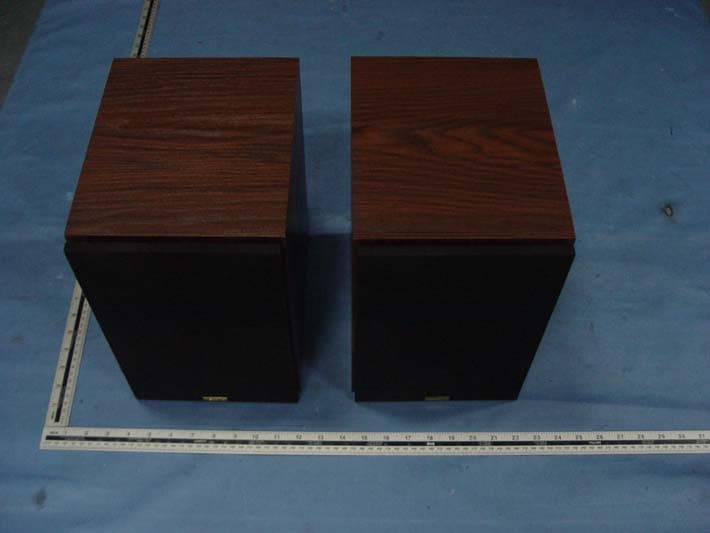
Jul 20, 2015Bluetooth Bookshelf Speakers with USB
Equipment Class
DSS - Part 15 Spread Spectrum Transmitter2AE3J-JILS-525IB
Jul 16, 2015Power listed is the maximum conducted output power.
Equipment Class
DSS - Part 15 Spread Spectrum Transmitter