2AEIABTS06Bluetooth Speaker
Shenzhen Zhongdianwei Technology Co., Ltd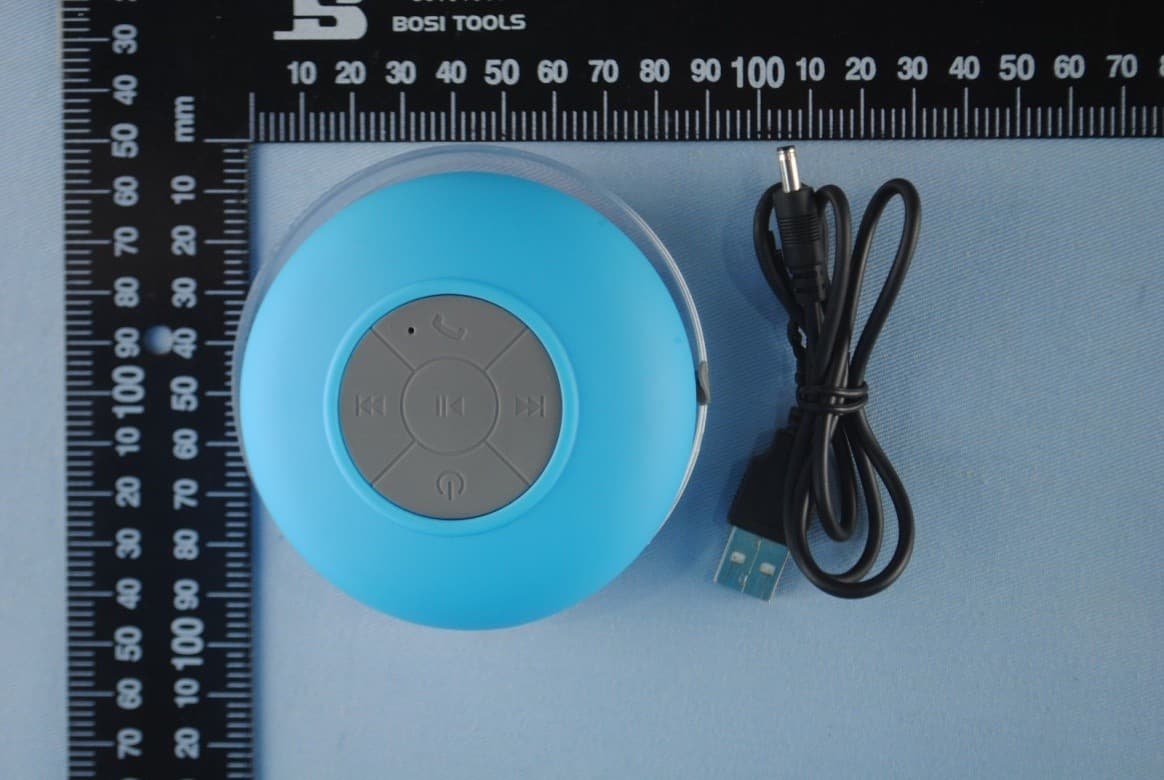
Click to zoom
Application Details
- Equipment Class
- DXX - Part 15 Low Power Communication Device Transmitter
- Date of Grant
- Apr 29, 2015
- Application Purpose
- Original Equipment
- Date of Application
- Apr 29, 2015
- Equipment Note
- Bluetooth Speaker
- Frequency Range
- 2402.00000000 - 2480.00000000
- Country
- China
Documents & Files
Document Text
Text extracted from the exhibit documents filed with the FCC. Open a document above to read the original.
Users Manual
l pc USB charging cable This Bluetooth speaker is powered by integrated rechargeable lithium battery. Charge the battery as follows: 1 Insert the chargirig cable into the DC SV socket on the unit. Connect the USB plug into a PC or AC /DC adaptor. The LED indicator turns red and the battery is being charged. WATERPROOF BLUETOOTH SHOWER SPEAKER Bluetooth® USER MANAL Thank you for choosing our product. We hope you will enjoy it very much. Product Overview DC5V Accessories included Charge Integrated Battery Safety instructions Read this manual carefully before putting the appliance into operation and keep this manual for future refere nce. 1 Turn on your mobile phone and activate the Bluetooth function. 2 Search for Bluetooth devices. BTS-06 will show up. 3 Pair your device with BTS-06. If password is needed, type in“0000", After BTS-06 is paired with your device, connect it to your device. Once this speaker is paired and connected tc) your mobile phone, next time when you switch on this speaker, it will connect to your mobile phone automatically as long as the Bluetooth in your mobile phone is on Pairing BTS-06 to mobile phone or other device 2:' When the battery is fully charged, the red LED indicator goes out. Activate the Bluetooth speaker's pairing mode by when in power off mode, press and hold the on/off button for about 6 seconds until the red LED and blue LED are flashing alternatively. Now the speaker is ready for pairing. Please make sure the speaker is in power off mode When trying to activate the pairing mode. Tips: Tips: Button description On/Off: To switch on or off the unit Short press for the previous song,long press for turning down the volume. Short press for the next song, long press for turning up the volume. Phone: To pick up or hang up a phone call Play/Pause the music Notes & tips: DC5V Merci d’avoir choisi notre produit. Nous espérons qu’il vous offrira des années d’écoute. Lire attentivement ce mode d’em ploi avant d’utiliser cet appareil et le conserver pour toute référence ultérieure Troubleshooting Technical Specifications 1. You can press Phone button twice quickly to redial the last phon'e cal Refer to the section of "Pairing BTS-06 to mobile phone or other device" Symptoms Causes Solutions Can not switch the speaker on Battery empty Charge the battery Unable to pair the speaker Speaker is already switched on, and it is not in pairing mode. Bluetooth support: Range: Transmitting frequency: Power supply: Battery: Charging time: Operating time: lP grade: Unit weight: 3.0+EDR 10 meters 2.4G Hz DC5V/100-120mA 3.7V 400mAh lithium approx. 3 hours approx. 6 hour IPx4 approx. 0.1kg HAUT-PARLEUR ETANCHE BLUETOOTH® DE DOUCHE Ce produit fonctionne Avec Ia technologie Bluetooth® Vue Produit Consignes de sécurité Tenir l’appareil loin de la chaleur, soleil et des bords coupants. Tenir l’appareil loin des flammes nues. Ne pas introduire d’objet métallique dans Risque de court-circuit! Pour éviter une décharge statique, ne pas utiliser L’appareil dans un climat très sec. Ne pas réparer l’appareil vous-même mais contacter un spécialiste agréé. Keep the device away from heat. direct sunlight and sharp edges. Keep the device away from naked flames. Do not insert any metal object into the device. Risk of short circuit! To avoid a static charge, do not use the device in an extremely dry climate. Do not repair the unit yourself but contact an authorised specialist. . . . . . . . . . Accesorios incluidos Recarga integrada : Sintonizar BTS-06 al movil i otros equipos lpc Cable USB Este altavoz contiene una bateria recargabie de litio. Recargar la bateria según se explica: 2. Cuando la bateria esté cargada completamente, el piloto LED de color rojo se apagará Activar en modo Bluetooth del altavoz y mantener apretado la tecla ON/OFF durante 6 segundos hasta que los pilotos LED de color rojo y azul hagan intermitencias. El aparato está listo para la sincronización. Consejo: Le recomendamos que ei altavoz esté apagado. 1. Introducir el cable en la toma DC de SV del aparato. Conectar la clavia USB en un PC o un adaptador de corriente eléctrica . El indicador LED se pondrá de color rojo, la bateria se está cargando. Descrición del botón l. Conecte el teléfono y active la función Bluetooth 2.Buscar los aparatos Bluetooth., BTS-06 aparecerá. 3. Aparecerá el aparato en el BTS-06.Si una contraseña fuera necesaria,introduzca«0000 », una vez aparezca, conectar el BTS-06 a su aparat Consejos : Una vez este altavoz esté conectado a su teléfono, la próxima vez que lo conecte,se conectará de manera automática cuando la función Bluetooh está activada. l. Presione 2 veces en la tecla Phone para volver a marcar la última llamada Altavoz estanco para ducha Este producto Se suministra con I tecnología Bluetooth® MODO DE EMPLEO Reparación Ver sección Sincronizar BTS-06 al móvil u otros equipos» Especificaciones técnicas Soporte Bluetooth: Alcanze : Frecuencia de transmisión: Alimentación energia: Batetía; Tiempo de carga: Funcionamiento : Grade IP: Peso: 3.0+EDR 10 metros 2.4G Hz DC5V/100-120mA 3.7V 400mAh litio Aprox: 3 h Aprox: 6 h lpx4 Aprox : 0,lkg Síntomas Causas Soluciones Encendido imposible del alyavoz Sincronizació n imposible del altavoz Bateria vacía Altavoz ya activo, no en modo aparejar/ sincronizac ión Cargar la batería DC5V 3.0+EDR 10 mètres 2.4G Hz DC5V/100-120mA 3.7V 400m Ah lithium environ. 3 h environ. 6 h IPx4 environ. 0,lkg Consignas de seguridad Vista del producto Accessoires inclus Agradecer la elección de nuestro producto. Esperamos le proporcione años de buena escucha. Lea atentamente este modo de empleo antes de utilizar . Mantener lejos de fuentes de calor, . Mantener lejos del fuego. No introducir objetos . Para evitar una descarga estática No utilizar en un clima muy seco. Conectar la clavija en un PC o adaptador. No intente reparar ustde mismo en caso de averia Batterie de chargement intégrée Appairer BTS-06 au portable ou autre équipeinent lpc Câble de chargementUSB Ce haut-p…
Text truncated - open the document above for the full version.
Cover Letter(s)
Shenzhen Zhongdianwei Technology Co., Ltd East Site of 8th Floor, F Building, Nanchang First Industry Park, Gushu, Xixiang, Bao’an District, Shenzhen, China Office of Engineering Technology Federal Communications Commission 7435 Oakland Mills Road Columbia, MD 21046 Date: April 30, 2015 To whom it may concern: The testing model of our Shenzhen Zhongdianwei Technology Co., Ltd brand of FCC approval is BTS-06 and we have models or brands for listed. We hereby certify that the interior structure, electrical circuit and schematics of the listed models are the same as the testing model except the below list. And just for the marketing requirement. Our listed models is as follows: Product name: Bluetooth speaker Brand: N/A Model: BTS-08, BTS-09, BTS-10, BTS-11, BTS-12, BTS-13, BTS-15, BTS-16, BTS-17, BTS-18, BTS-19, BTS-20, BTS-21, BTS-22,BTS-23, BTS-26, BTS-27, BTS-28 FCC ID: 2AEIABTS06 Your assistance on this mater is highly appreciated. Company Officer: Easy Zhongfu
Cover Letter(s)
Shenzhen Zhongdianwei Technology Co., Ltd. East Site of 8th Floor, F Building, Nanchang First Industry Park, Gushu, Xixiang, Bao’an District, Shenzhen, China Letter of Authorization Company: Shenzhen Zhongdianwei Technology Co., Ltd Address: East Site of 8th Floor, F Building, Nanchang First Industry Park, Gushu, Xixiang, Bao’an District, Shenzhen, China Product Name: Bluetooth speaker Model Number: BTS-08, BTS-09, BTS-10, BTS-11, BTS-12, BTS-13, BTS-15, BTS-16, BTS-17, BTS-18, BTS-19, BTS-20, BTS-21, BTS-22,BTS-23, BTS-26, BTS-27, BTS-28 FCC ID: 2AEIABTS06 We authorize MiCOM Labs Inc, 575 Boulder Court, Pleasanton, California 94566, USA, to act on our behalf on all matters concerning the above named equipment. Any individual within MiCOM Labs is authorized to act on our behalf and take action on the application. This shall include the following: Testing Approval applications (includes complete product documentation package, including Confidential information) and procedures Payment of approval fees We declare that MiCOM Labs Inc, 575 Boulder Court, Pleasanton, California 94566, USA, is allowed to forward all information related to the approval project to the applied notified body and to the notification entities and to discuss any issues concerning the approval application. Any and all acts carried out by MiCOM Labs on our behalf shall have the same effect as acts of our own. Name: Easy Zhongfu Date: April 30, 2015 Title: Manager Signature of applicant:
Cover Letter(s)
Shenzhen Zhongdianwei Technology Co., Ltd East Site of 8th Floor, F Building, Nanchang First Industry Park, Gushu, Xixiang, Bao’an District, Shenzhen, China Office of Engineering Technology Federal Communications Commission 7435 Oakland Mills Road Columbia, MD 21046 Date: April 30, 2015 Subject; Request for Confidentiality FCC ID: 2AEIABTS06 To Whom It May Concern, Pursuant to the provisions of Sections 0.457 and 0.459 of Commission's rules (47CFR0.457, 0.459), we are requesting the Commission to withhold the following attachment(s) as confidential document from public disclosure indefinitely. Schematic Diagram Block Diagram Operational Description Above mentioned document contains detailed system and equipment description are considered as proprietary information in operation of the equipment. The public disclosure of above documents might be harmful to our company and would give competitor an unfair advantage in the market. It is our understanding that all measurement test reports, FCC ID label format and correspondent during certification review process cannot be granted as confidential documents and those information will be available for public review once the grant of equipment authorization is issued. Sincerely, Signature: Name: Easy Zhongfu Title: Manager
External Photos
EUT top view EUT bottom view
ID Label/Location Info
This device complies with Part 15 of the FCC Rules. Operation is subject to the following two conditions: (1) this device may not cause harmful interference, and (2) this device must accept any interference received, including interference that may cause undesired operation. The Label must not be a stick-on paper label. The Label on these products must be permanently affixed to the product and readily visible at the time of purchase and must last the expected lifetime of the equipment not be readily detachable. Proposed Label Location on EUT FCC ID: 2AEIABTS06
Internal Photos
EUT inside whole view Main board component side Main board solder side
Test Report
The test report consists 29 pages in total. It may be duplicated completely for legal use with the allowance of the applicant. It shall not be reproduced except in full, without the written approval of Ke Mei Ou Laboratory Corporation. The test result in the report only applied to the tested sample. FCC TEST REPORT Under FCC 15 Subpart C, Paragraph 15.249 Prepared For : Shenzhen Zhongdianwei Technology Co., Ltd. East Site of 8th Floor, F Building, Nanchang First Industry Park, Gushu, Xixiang, Bao’an District, Shenzhen, China FCC ID: 2AEIABTS06 EUT: Bluetooth Speaker Model: BTS-06 April 30, 2015 Issue Date: Original Report Report Type: Test Engineer: Eric Guo Review By: Apollo Liu / Manager E506, 5th Floor, No.39 Keji Middle 2nd Rd, Science & Technology Park, Nanshan District, Shenzhen, P. R. China Tel: + 86 755 83642690 Fax: + 86 755 83297077 www.kmolab.com Shenzhen Zhongdianwei Technology Co., Ltd. FCC ID: 2AEIABTS06 KMO FCC ID Report Report #: KSZ2015042001J Page 2 of 29 TABLE OF CONTENTS 1. General Information ........................................................................................................................................................... 3 1. 1 Notes ............................................................................................................................................................................... 3 1. 2 Testing Laboratory .......................................................................................................................................................... 3 1. 3 Details of Applicant ........................................................................................................................................................ 3 1. 4 Application Details ......................................................................................................................................................... 3 1. 5 Test Item ......................................................................................................................................................................... 3 1. 6 Test Standards ................................................................................................................................................................. 3 2. Technical Test ....................................................................................................................................................................... 4 2. 1 Summary of Test Results ................................................................................................................................................ 4 3. EUT Modifications .............................................................................................................................................................. 4 4. Conducted Power Line Test ................................................................................................................................................ 5 4. 1 Test Equipment ............................................................................................................................................................... 5 4. 2 Test Procedure ................................................................................................................................................................ 5 4. 3 Test Setup ....................................................................................................................................................................... 5 4. 4 Configuration of the EUT ............................................................................................................................................... 6 4. 5 EUT Operating Condition ............................................................................................................................................... 7 4. 6 Conducted Power Line Emission Limits ........................................................................................................................ 7 4. 7 Conducted Power Line Test Result ................................................................................................................................. 7 5. Radiated Emission Test ....................................................................................................................................................... 9 5. 1 Test Equipment ............................................................................................................................................................... 9 5. 2 Test Procedure ................................................................................................................................................................ 9 5. 3 Radiated Test Setup ........................................................................................................................................................ 9 5. 4 Configuration of the EUT ..............................................................................................................................................11 5. 5 EUT Operating Condition ..............................................................................................................................................11 5. 6 Radiated Emission Limit ...............................................................................................................................................11 5. 7 Radiated Emission Test Result...................................................................................................................................... 12 6. Band Edge .......................................................................................................................................................................... 15 6. 1 Test Equipment ...........................................................................................................................…
Text truncated - open the document above for the full version.
Test Setup Photos
Conducted Emission test view Radiated Emission test view (Frequency from 30MHz to 1GHz) Radiated Emission test view (Frequency above 1GHz)
Contact Information
Applicant
Easy Zhongfu
Technical Contact
Ke Mei Ou Laboratory Co., LtdApollo Liu
[email protected](86)75583642690
E506, 5th Floor, No. 39 Keji Zhong Er Lu · Nanshan, Shenzhen, Guangdong · China
Test Firm
Ke Mei Ou Laboratory Co., Ltd.Apollo Liu
Technical Specifications
| # | Rule Parts | Frequency Range | Power Output |
|---|---|---|---|
| 1 | 15C | 2.40 GHz - 2.48 GHz | - |