2AEUR20255001FCCRemote Unit
Unikia AS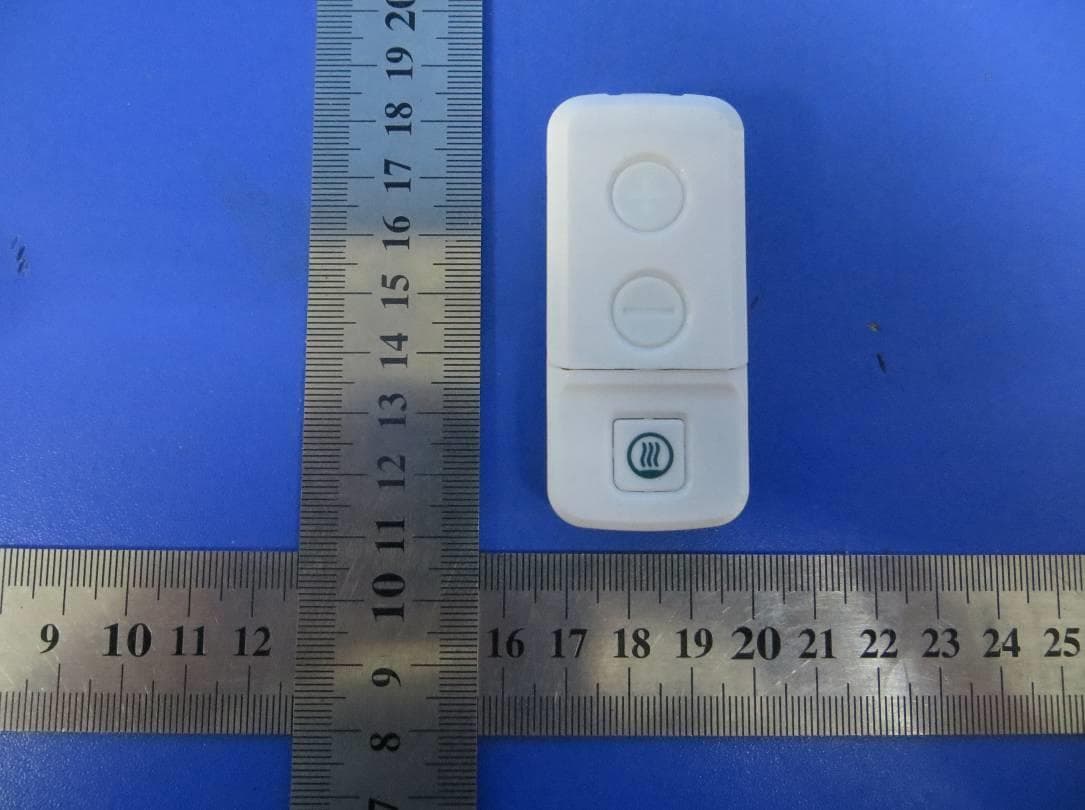
Click to zoom
Application Details
- Equipment Class
- DSC - Part 15 Security/Remote Control Transmitter
- Date of Grant
- Jun 07, 2015
- Application Purpose
- Original Equipment
- Date of Application
- Jun 07, 2015
- Equipment Note
- Remote Unit
- Frequency Range
- 433.92000000 - 433.92000000
- Company
- Unikia AS
- Country
- Norway
Documents & Files
Document Text
Text extracted from the exhibit documents filed with the FCC. Open a document above to read the original.
Users Manual
USER MANUAL Backup Relief Belt Unikia AS Sandakerveien 24c, Bygg C1 0473 Oslo, Norway Norway [email protected] www.unikia.com 2015 Unikia AS All rights reserved Manual version 001 Model No.: 001 2 Content 1. Parts & controls 2. Introduction 3. Before use 4. Support functionality 5. TENS functionality 6. HEAT functionality 7. Removing the Backup Relief Belt 8. Batteries & charging 9. Maintenance and storage 10. Technical Specifications 11. Safety information 12. Manufacturers Declarations Parts & Controls PA R T S 1. Belt a. Inner belts (right & left) b. Belt backplate c. Magnetic connectors d. Tensioning belts (right & left) 2. Remote 3. Main unit a. Electrode Area: Surface where the gel pads are placed b. Electronics housing 4. USB cable 5. Gel pads 6. Manual CONTROLS 7. Main unit On/Off 8. Main unit Indicator Light 9. Remote unit On/Off 10. TENS On/“+” button 11. TENS Off/“-“ button 12. HEAT On/Off button 13. TENS signal light 14. HEAT signal light English 3 1 4 5 3 2 1a 1a 1d 1d 1b 1c 3a 3b 10 11 12 9 1413 87 English 4 Introduction Congratulations on your purchase of the Backup Relief Belt. It is a unique wireless remote controlled pain relief device incorporating active heating, structural support and TENS technology to specifically target back pain. This innovative device is safe, drug-free, easy to use, discreet and comfortable to wear, and most importantly allows you to control your pain to maintain an active lifestyle. Before use Your Backup Relief Belt has been designed with the home user in mind. Please consult the safety precautions and contraindications in this manual prior to use. Before using the main unit the first time please charge the main unit. Insert the usb cable to the charger. Plug the charger into the mains making sure before that the charger is compatible to the mains in your current location. Then connect the main unit. The main unit indicator light will flash green every 5th second during charging. The unit is fully charged after 2 hrs (2000 mAh). English 5 Support functionality The support function of your Backup Relief Belt is completely analog and ready to use. Put on the belt like this: 1. Make sure the belt is facing the right way. The magnetic connectors should face towards your body and down. 2. The belt length can be adjusted by moving the inner right & left belt along the belt backplate, fastening by means of the velcro. 3. To insert the main unit insert the notch in the top of the main unit into the matching tab on the belt backplate. Then press main unit through the opening allowing the magnetic connectors on the main unit & belt backplate to connect. 4. Hold the backplate with main unit towards your lower back. If using the gel pads see next page for detailed instructions. Grab the inner fastening belt and wrap it around your body. Tighten comfortably and fasten with the Velcro. Right hand side goes over the left hand side. 5. To tighten the supporting belt grab both outer tensioning belts and pull them until you feel you have desired support. Fasten with the Velcro. Right hand side goes over the left hand side here too. 1 4 5 3 2 English 6 TENS functionality Before using the TENS functionality of your Backup Relief Belt you will need to apply the gel pads to the main unit, Insert the main unit in the belt and prepare the device for a treatment. APPLYING THE GEL PADS TO THE MAIN UNIT The gel pads are intended for single person use. They will last, depending on skin type, oils, and pH levels, approximately two to five applications. Replace the gel pads when they no longer adhere completely. Follow these steps to apply the gel pads: 1. Trim, not shave, excessive hair on the treatment area. 2. Wash the skin and dry completely 3. Separate the two gel pads. 4. Remove the film with print reading “ELECTRODE” from the side being applied to the electrode area. This film is the smallest of the two. Do not remove the protective liner on the “skin side” yet. 5. Align the shape of the first gel pad with the electrode area. Apply the gel pad onto the electrode area and firmly press across the entire surface to ensure good adhesion. 6. Repeat steps 3 – 5 for the second gel pad. HOW DOES IT WORK Tens treatment works in two ways. It stimulates nerves that normally carries pain signals thus “blocking” these (“closing the pain gate”). It also releases endorphins as if from exercise, endorphins is the body`s “natural pain killers”. TREATMENT RECOMMENDATIONS • You can leave the device in position for multiple treatments during the day. It will automatically turn Off after one (1) hour of treatment. If no treatment is active the unit will turn off completely after 15 minutes. • It is recommended you wait a minimum of 30 minutes between treatments. English 7 CONDUCTING A TENS TREATMENT Always read the safety warnings before conducting a treatment. Follow these steps to conduct a treatment: 1. Remove the protective liners from the “skin side” of the gel pads by slowly peeling the liner diagonally from an inside corner to the opposite outside corner. Important! Avoid contact of the gel pad with other objects. Contact with other objects may affect the pads adhesion properties. Save the liners for storage of the device. 2. Align the center of the device over the spine and place the device on your back in the area of pain. If you cannot place the device properly, ask another person for assistance. Important! Do not apply the gel pads/electrodes directly over the spine. 3. Press the On/Off button on the main unit. The LED will flash green for 10 seconds indicating the device is ready for use. 4. Press the ON/OFF button on the remote. Both signal lights will blink twice to signal remote is on. Then press the “+” button on the remote control to begin the treatment. The TENS signal light on the remote will blink once to indicate signal is sent from remote. Note: The LED on the main unit will flash blue for 10 seconds to indicate TENS treatment is activated. 5. Press the (+/-) button…
Text truncated - open the document above for the full version.
External Photos
SHENZHEN LCS COMPLIANCE TESTING LABORATORY LTD. FCC ID: 2AEUR20255001FCC Report No.: LCS1502020030E This report shall not be reproduced except in full, without the written approval of Shenzhen LCS Compliance Testing Laboratory Ltd.. Page 1 of 4 1. EXTERIOR PHOTOGRAPHS Fig.1 Fig.2 SHENZHEN LCS COMPLIANCE TESTING LABORATORY LTD. FCC ID: 2AEUR20255001FCC Report No.: LCS1502020030E This report shall not be reproduced except in full, without the written approval of Shenzhen LCS Compliance Testing Laboratory Ltd.. Page 2 of 4 Fig.3 Fig.4 SHENZHEN LCS COMPLIANCE TESTING LABORATORY LTD. FCC ID: 2AEUR20255001FCC Report No.: LCS1502020030E This report shall not be reproduced except in full, without the written approval of Shenzhen LCS Compliance Testing Laboratory Ltd.. Page 3 of 4 Fig.5 Fig.6 SHENZHEN LCS COMPLIANCE TESTING LABORATORY LTD. FCC ID: 2AEUR20255001FCC Report No.: LCS1502020030E This report shall not be reproduced except in full, without the written approval of Shenzhen LCS Compliance Testing Laboratory Ltd.. Page 4 of 4 Fig.7
ID Label/Location Info
SHENZHEN LCS COMPLIANCE TESTING LABORATORY LTD. FCC ID: 2AEUR20255001FCC Report No.: LCS1502020030E This report shall not be reproduced except in full, without the written approval of Shenzhen LCS Compliance Testing Laboratory Ltd.. Page 1 of 1 LABEL AND LOCATION Size: L2.5cm*W1.5cm Material: Tagboard Glue: adhesive sticker Font color: White Label color: Black Label Location Unikia AS Remote Unit Model No.: 001 FCC ID: 2AEUR20255001FCC
Internal Photos
SHENZHEN LCS COMPLIANCE TESTING LABORATORY LTD. FCC ID: 2AEUR20255001FCC Report No.: LCS1502020030E This report shall not be reproduced except in full, without the written approval of Shenzhen LCS Compliance Testing Laboratory Ltd.. Page 1 of 2 1. INTERIOR PHOTOGRAPHS Fig.1 Fig.2 SHENZHEN LCS COMPLIANCE TESTING LABORATORY LTD. FCC ID: 2AEUR20255001FCC Report No.: LCS1502020030E This report shall not be reproduced except in full, without the written approval of Shenzhen LCS Compliance Testing Laboratory Ltd.. Page 2 of 2 Fig.3 Fig.4 Antenna
Test Report
SHENZHEN LCS COMPLIANCE TESTING LABORATORY LTD. FCC ID: 2AEUR20255001FCC Report No.: LCS1502020030E This report shall not be reproduced except in full, without the written approval of Shenzhen LCS Compliance Testing Laboratory Ltd.. Page 1 of 24 FCC TEST REPORT For Unikia AS Remote Unit Test Model No.: 001 Prepared for : Unikia AS Address : Sandakerveien 24c, Bygg C1, 0473 Oslo, Norway Prepared by : Shenzhen LCS Compliance Testing Laboratory Ltd. Address : 1/F., Xingyuan Industrial Park, Tongda Road, Bao’an Avenue, Bao’an District, Shenzhen, Guangdong, China Tel : (+86)755-82591330 Fax : (+86)755-82591332 Web : www.LCS-cert.com Mail : [email protected] Date of receipt of test sample : February 02, 2015 Number of tested samples : 1 Serial number : 20150120 Date of Test : February 02, 2015 – May 13, 2015 Date of Report : May 13, 2015 SHENZHEN LCS COMPLIANCE TESTING LABORATORY LTD. FCC ID: 2AEUR20255001FCC Report No.: LCS1502020030E This report shall not be reproduced except in full, without the written approval of Shenzhen LCS Compliance Testing Laboratory Ltd.. Page 2 of 24 FCC TEST REPORT FCC CFR 47 PART 15C(15.231): 2015 / RSS-210 Issue 8 / RSS-Gen Issue 4 Report Reference No. .............. : LCS1502020030E Date of Issue ................................ : May 13, 2015 Testing Laboratory Name ......... : Shenzhen LCS Compliance Testing Laboratory Ltd. Address ........................................ : 1/F., Xingyuan Industrial Park, Tongda Road, Bao’an Avenue, Bao’an District, Shenzhen, Guangdong, China Testing Location/ Procedure ........ : Full application of Harmonised standards ■ Partial application of Harmonised standards □ Other standard testing method □ Applicant’s Name ....................... : Unikia AS Address ........................................ : Sandakerveien 24c, Bygg C1, 0473 Oslo, Norway Test Specification Standard ....................................... : FCC CFR 47 PART 15 Subpart C: 2015 RSS-210 Issue 8 / RSS-Gen Issue 4 Test Report Form No. ................ : LCSEMC-1.0 TRF Originator ............................ : Shenzhen LCS Compliance Testing Laboratory Ltd. Master TRF .................................. : Dated 2011-03 Shenzhen LCS Compliance Testing Laboratory Ltd. All rights reserved. This publication may be reproduced in whole or in part for non-commercial purposes as long as the Shenzhen LCS Compliance Testing Laboratory Ltd. is acknowledged as copyright owner and source of the material. Shenzhen LCS Compliance Testing Laboratory Ltd. takes no responsibility for and will not assume liability for damages resulting from the reader's interpretation of the reproduced material due to its placement and context. Test Item Description. ............... : Remote Unit Trade Mark .................................. : N/A Test Model ................................... : 001 Ratings ......................................... : DC 3.0V by CR2016 battery Result ......................................... : Positive Compiled by: Supervised by: Approved by: Leo Lee/ File administrators Glin Lu/ Technique principal Gavin Liang/ Manager SHENZHEN LCS COMPLIANCE TESTING LABORATORY LTD. FCC ID: 2AEUR20255001FCC Report No.: LCS1502020030E This report shall not be reproduced except in full, without the written approval of Shenzhen LCS Compliance Testing Laboratory Ltd.. Page 3 of 24 FCC/IC TEST REPORT Test Result Positive The test report merely corresponds to the test sample. It is not permitted to copy extracts of these test result without the written permission of the test laboratory. Test Report No. : LCS1502020030E May 13, 2015 Date of issue Test Mode............................... : 001 EUT......................................... : Remote Unit Applicant............................... : Unikia AS Address.................................. : Sandakerveien 24c, Bygg C1, 0473 Oslo, Norway Telephone............................... : / Fax.......................................... : / Manufacturer........................ : Unikia AS Address................................... : Sandakerveien 24c, Bygg C1, 0473 Oslo, Norway Telephone............................... : / Fax.......................................... : / Factory................................... : Unikia AS Address................................... : Sandakerveien 24c, Bygg C1, 0473 Oslo, Norway Telephone............................... : / Fax.......................................... : / SHENZHEN LCS COMPLIANCE TESTING LABORATORY LTD. FCC ID: 2AEUR20255001FCC Report No.: LCS1502020030E This report shall not be reproduced except in full, without the written approval of Shenzhen LCS Compliance Testing Laboratory Ltd.. Page 4 of 24 TABLE OF CONTENTS 1. GENERAL INFORMATION .............................................................................................................................. 5 1.1. DESCRIPTION OF DEVICE (EUT) ....................................................................................................................... 5 1.2. OBJECTIVE ........................................................................................................................................................ 5 1.3. ENVIRONMENTAL CONDITIONS ........................................................................................................................ 5 1.4. HOST SYSTEM CONFIGURATION LIST AND DETAILS ......................................................................................... 6 1.5. EXTERNAL I/O PORT ........................................................................................................................................ 6 1.6. DESCRIPTION OF TEST FACILITY ...................................................................................................................... 6 1.7. STATEMENT OF THE MEASUREMENT UNCERTAINTY ........................................................................................ 6 2. TEST METHODOLOGY ...................................................…
Text truncated - open the document above for the full version.
Test Setup Photos
SHENZHEN LCS COMPLIANCE TESTING LABORATORY LTD. FCC ID: 2AEUR20255001FCC Report No.: LCS1502020030E _______________________________________________________________________________________________ This report shall not be reproduced except in full, without the written approval of Shenzhen LCS Compliance Testing Laboratory Ltd.. Page 1 of 1 1. TEST SETUP PHOTOGRAPHS 1.1 Photo Of Radiated Emission Measurement (X Position) Fig.1 Fig.2
Contact Information
Applicant
Jorgen Solstad(CEO)
Test Firm
Shenzhen LCS Compliance Testing Laboratory Ltd.Gavin Liang
Technical Specifications
| # | Rule Parts | Frequency Range | Power Output |
|---|---|---|---|
| 1 | 15.231 | 433.92 MHz - 433.92 MHz | - |