2AFCYQC14012Wireless electronic basketball with LED screen
Gillyboo Corporation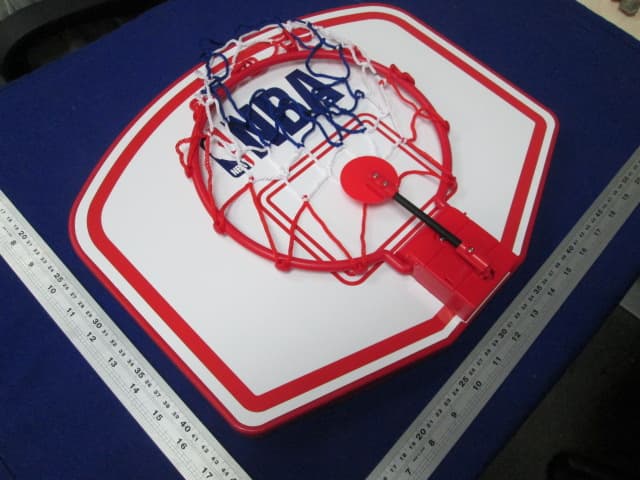
Click to zoom
Application Details
- Equipment Class
- DSC - Part 15 Security/Remote Control Transmitter
- Date of Grant
- Aug 09, 2015
- Application Purpose
- Original Equipment
- Date of Application
- Aug 09, 2015
- Equipment Note
- Wireless electronic basketball with LED screen
- Frequency Range
- 315.00000000 - 315.00000000
- Company
- Gillyboo Corporation
- Country
- Canada
Documents & Files
Document Text
Text extracted from the exhibit documents filed with the FCC. Open a document above to read the original.
Users Manual
BASKETBALL HOOP SET WITH WIRELESS SCORE CLOCK ENSEMBLE D’ANNEAU DE BASKET-BALL AVEC HORLOGE DE POINTAGE SANS FIL BASKETBALL HOOP SET WITH WIRELESS SCORE CLOCK ENSEMBLE D’ANNEAU DE BASKET-BALL AVEC HORLOGE DE POINTAGE SANS FIL Game Play Instructions 1. To start the game, press ON/OFF button on the Scoreboard. NOTE: If game was in sleep mode, you may need to push the button twice. 2. Each game consists of 4 periods lasting 2 minutes each. 3. When a ball enters a basket, 2 points are awarded for the player that scored. 4. Between each period (and “overtime”) there is a 30 seconds intermission. (The timer flashes during intermission.) At the end of the intermission, the timer will warn player and begin to countdown the new period. NOTE: If you want to skip intermission, press the Start/Reset button to begin the next period. 5. When scores are tied at the end of the game, players will play an “overtime” period. After the intermission, the timer will begin a 1-minute countdown. 6. Push and hold the “Start/Reset” button for 3 seconds at any time during the game and it will reset the scorer. 7. The scoreboard will automatically turn off after 20 minutes without use. Please press the Start/Reset button to restart the scorer. Instructions de jeu 1. Pour débuter le match, appuyez sur le bouton « ON/OFF » du tableau de pointage. REMARQUE : si le jeu était au mode veille, vous devrez peut-être appuyer sur le bouton deux fois. 2. Chaque jeu se compose de 4 périodes durant 2 minutes chacune. 3. Lorsque le ballon pénètre le panier, le joueur qui a marqué le panier obtient 2 points. 4. Entre chaque période (et les « prolongations »), il y a une intermission de 30 secondes. (La minuterie clignote durant l’intermission.) À la fin de l’in- termission, la minuterie avertira le joueur et débutera le compte à rebours de la nouvelle période. REMARQUE : si vous voulez sauter l’intermission, appuyez sur le bouton « Start/Reset » pour débuter la prochaine période. 5. Si les points sont à égalité à la fin du match, les joueurs joueront une période de « prolongation ». Après l’intermission, la minuterie débutera un compte à rebours de 1 minute. 6. Appuyez sur le bouton « Start/Reset » et maintenez-le enfoncé pendant 3 secondes en tout temps durant le match pour réinitialiser le marqueur. 7. Le tableau de pointage s’éteindra automatiquement après 20 minutes d’inactivité. Appuyez sur le bouton « Start/Reset » pour redémarrer le marqueur. BASKETBALL HOOP SET WITH WIRELESS SCORE CLOCK ENSEMBLE D’ANNEAU DE BASKET-BALL AVEC HORLOGE DE POINTAGE SANS FIL ASSEMBLY INSTRUCTIONS Method 1: 1. Remove all the parts from the packaging and verify that you have all of the listed parts as shown on the parts list. 2. Use Screws (#2b) to fix the Hangings (#10) on the back of backboards (#4&5) as shown in FIG. 0 3. Insert 2 AAA batteries (not included) into each basketball unit. Batteries must be installed according to the correct polarization as required. 4. Choose a suitable location to hang up installed basketball boards. INSTRUCTIONS D’ASSEMBLAGE Méthode 1 : 1. Retirez toutes les pièces de l’emballage et assurez-vous d’avoir toutes les pièces énumérées, tel que montré sur la liste des pièces. 2. Utilisez les vis (#2b) pour poser les supports (#10) au dos des panneaux (#4 et 5), tel que montré à la fig. 0. 3. Insérez 2 piles « AAA » (non incluses) dans chaque unité de basket-ball. Les piles doivent être insérées en respectant la polarité. 4. Sélectionnez un lieu convenable pour accrocher les panneaux de basket-ball assemblés. WIRELESS BASKETBALL BOARD INSTRUCTION INSTRUCTIONS DU PANNEAU DE BASKET-BALL SANS FIL Please retain this information for future reference / Gardez ces informations pour référence future Plastic Screw Anchor Ancrage à vis en plastique Backboard with Rim - Away Panneau avec anneau - Visiteur Basketball Ballon de basket-ball Round Head Screw Vis à tête ronde Long Paper Sheet Longue feuille de papier Plastic Hangings Supports en plastique Wireless LED Scoreboard ableau d’affichage à DEL sans fil Short Paper Sheet Courte feuille de papier Backboard with Rim – Home Panneau avec anneau – À domicile Inflating Pump Pompe de gonflage BASKETBALL HOOP SET WITH WIRELESS SCORE CLOCK ENSEMBLE D’ANNEAU DE BASKET-BALL AVEC HORLOGE DE POINTAGE SANS FIL Method 2: 1. Remove all the parts from the packaging and verify that you have all of the listed parts as shown on the parts list. 2. In the location where you will play, draw four marks on the wall using a pencil according to the holes on the Long Paper Sheet (#6) as shown in FIG.1. Méthode 2 : 1. Retirez toutes les pièces de l’emballage et assurez-vous d’avoir toutes les pièces énumérées, tel que montré sur la liste des pièces. 2. Au lieu sélectionné pour le jeu, dessinez quatre marques au mur avec un crayon, en vous servant des trous de la longue feuille de papier (#6) tel que montré à la fig.1. Wall Mur Wall Mur Wall Mur Rear view Vue arrière 3. Drilling holes on the marks, then insert the Plastic Screw Anchors (#1) into the holes as shown in FIG. 2 & 2A Note: Please do not drill holes on a cement wall or a wall made with metal studs. 4. Insert the Screws (#2a) into the Screw Anchors. 5. Place the Backboards (#4 & #5) onto the Screws as shown in Fig. 2 & 2A. Note: The Screws must partially stick out in order to hang the Backboards. 6. Insert 2 AAA batteries (not included) into each basketball board. Note: Batteries must be installed according to the correct polarization required as shown in Fig. 2B. 3. Percez des trous aux marques, puis insérez les ancrages à vis en plastique (#1) dans les trous, tel que montré aux fig. 2 et 2A. Remarque : ne percez pas de trous sur un mur en ciment ni sur un mur avec montants métalliques. 4. Insérez les vis (#2a) dans les pièces d’ancrage à vis. 5. Placez les panneaux (#4 & #5) sur les vis, tel que montré aux fig. 2 et 2A. Remarque : les vis doivent dépasser partiellement pour pouvoir accrocher les panneaux. 6. Insérez 2 vis « AAA » (non inclus…
Text truncated - open the document above for the full version.
External Photos
External Photos
ID Label/Location Info
Size: 40mm (W) x 20mm (H)
Internal Photos
Internal photos
Operational Description
Technical description: The equipment under test (EUT) is a transmitter for Wireless electronic basketball with LED screen operating at 315MHz which is operated by a crystal. The EUT is powered by two 1.5V Size AAA batteries. For more detailed features description, please refer to the user’s manual. Description Function Component Antenna Transmit modulated RF signal ANT Filter Suppression of spurious emissions C7, L4 RF power amplifier Modulate the carrier and amplify the IC1 and modulation modulated RF signal Crystal oscillator Generate clock signal to modulator CY1 MCU Data and Power arrangement U1 Type of the antenna: Integral Antenna Modulation Type: ASK Antenna Gain: 0dBi The nominal conducted output power specified: -26.00dBm (+/- 3dB) The nominal radiated output power (e.r.p) specified: -28.15dBm (+/- 3dB)
RF Exposure Info
1 Analysis Report The equipment under test (EUT) is a transmitter for Wireless electronic basketball with LED screen operating at 315MHz which is operated by a crystal. The EUT is powered by two 1.5V Size AAA batteries. For more detailed features description, please refer to the user’s manual. Type of the antenna: Integral Antenna Modulation Type: ASK Antenna Gain: 0dBi The nominal conducted output power specified: -26.00dBm (+/- 3dB) The nominal radiated output power (e.r.p) specified: -28.15dBm (+/- 3dB) According to the KDB 447498: The worst-case peak radiated emission for the EUT is 68.7dBμV/m at 3m in the frequency 315MHz The EIRP = [(FS*D) ^2 / 30] mW= -26.53dBm The ERP = EIRP – 2.15 = -28.68 dBm which is within the production variation. The maximun conducted output power specified is -23.0dBm = 0.005mW The source- based time-averaging conducted output power = 0.005 * Duty Cycle Mw < 0.005 mW The SAR Exclusion Threshold Level: = 3.0 * (min. test separation distance, mm) / sqrt(freq. in GHz) = 3.0 * 5 / sqrt (0.315) mW = 26.72 mW Since the source-based time-averaging conducted output power is well below the SAR low threshold level, so the EUT is considered to comply with SAR requirement without testing. The duty cycle is simply the on-time divided by the period: The duration of one cycle = 100ms Effective period of the cycle = 4.348 x 3 + 5.507 + 6.232 + 2.174 = 26.957ms DC = 26.957ms / 100ms = 0.26957 or 26.957% FCC ID: 2AFCYQC14012
Schematics
Main board circuit diagram 315MHz Module 9.84375MHz CY1
Test Report
Date: 5.AUG.2015 13:51:15 Date: 5.AUG.2015 13:52:05
Test Report
Each Press Anytime quick press twice
Test Report
• The test results reported in this test report shall refer only to the sample actually tested and shall not refer or be deemed to refer to bulk from which such a sample may be said to have been obtained. • This report is for the exclusive use of Intertek's Client and is provided pursuant to the agreement between Intertek and its Client. Intertek's responsibility and liability are limited to the terms and conditions of the agreement. Intertek assumes no liability to any party, other than to the Client in accordance with the agreement, for any loss, expense or damage occasioned by the use of this report. Only the Client is authorized to copy or distribute this report. Any use of the Intertek name or one of its marks for the sale or advertisement of the tested material, product or service must first be approved in writing by Intertek. The observations and test results referenced from this report are relevant only to the sample tested. This report by itself does not imply that the material, product, or service is or has ever been under an Intertek certification program. • For Terms And Conditions of the services, it can be provided upon request. • The evaluation data of the report will be kept for 3 years from the date of issuance. TRF no.: FCC 15C_TX_b FCC ID: 2AFCYQC14012 Intertek Testing Services Shenzhen Ltd. Kejiyuan Branch 6F, D Block, Huahan Building, Langshan Road, Nanshan District, Shenzhen, P. R. China Tel: (86 755) 8601 6288 Fax: (86 755) 8601 6751 Website: www.china.intertek-etlsemko.com Gillyboo Corporation Application For Certification FCC ID: 2AFCYQC14012 Transmitter Sample Description: Wireless electronic basketball with LED screen Model: NBA25 Additional Models: QC14012, FS25, RW25 Report No.: SZHH00965404-001 We hereby certify that the sample of the above item is considered to comply with the requirements of FCC Part 15, Subpart C for Intentional Radiator, mention 47 CFR [10-1-13] Prepared and Checked by: Approved by: Sign on file Jimmy Wen Senior Engineer Andy Yan Senior Project Engineer Date: July 17, 2015 TRF no.: FCC 15C_TX_b FCC ID: 2AFCYQC14012 i LIST OF EXHIBITS INTRODUCTION EXHIBIT 1: General Description EXHIBIT 2: System Test Configuration EXHIBIT 3: Emission Results EXHIBIT 4: Equipment Photographs EXHIBIT 5: Product Labelling EXHIBIT 6: Technical Specifications EXHIBIT 7: Instruction Manual EXHIBIT 8: Miscellaneous Information EXHIBIT 9: Test Equipment List TRF no.: FCC 15C_TX_b FCC ID: 2AFCYQC14012 ii MEASUREMENT/TECHNICAL REPORT Gillyboo Corporation FCC ID: 2AFCYQC14012 This report concerns (check one:) Original Grant X Class II Change Equipment Type: DSC - Part 15 Security/Remote Control Transmitter Deferred grant requested per 47 CFR 0.457(d)(1)(ii)? Yes No X If yes, defer until: date Company Name agrees to notify the Commission by: date of the intended date of announcement of the product so that the grant can be issued on that date. Transition Rules Request per 15.37? Yes No X If no, assumed Part 15, Subpart C for intentional radiator − the new 47 CFR [10-1-13 Edition] provision. Report prepared by: Jimmy Wen Intertek Testing Services Shenzhen Ltd. Kejiyuan Branch 6/F, Block D, HuaHan Building, Longshan Road, Nanshan District, Shenzhen, China. Development Zone, Guangzhou, P. R.China. Phone: (86 755) 8601 0713 Fax: (86 755) 8601 6751 TRF no.: FCC 15C_TX_b FCC ID: 2AFCYQC14012 iii Table of Contents 1.0 General Description ................................................................................................ 2 1.1 Product Description ............................................................................................. 2 1.2 Related Submittal(s) Grants ................................................................................. 2 1.3 Test Methodology ................................................................................................ 2 1.4 Test Facility ......................................................................................................... 2 2.0 System Test Configuration ..................................................................................... 4 2.1 Justification.......................................................................................................... 4 2.2 EUT Exercising Software ..................................................................................... 4 2.3 Special Accessories ............................................................................................ 4 2.4 Equipment Modification ....................................................................................... 4 2.5 Measurement Uncertainty .................................................................................... 5 2.6 Support Equipment List and Descripition ............................................................ 5 3.0 Emission Results .................................................................................................... 7 3.1 Field Strength Calculation .................................................................................... 8 3.1 Field Strength Calculation (cont’d) ....................................................................... 8 3.2 Radiated Emission Configuration Photograph .................................................... 10 3.3 Radiated Emission Data .................................................................................... 11 4.0 Equipment Photographs ....................................................................................... 15 5.0 Product Labelling .................................................................................................. 17 6.0 Technical Specifications ....................................................................................... 19 7.0 Instruction Manual ................................................................................................ 21 8.0 Miscellaneous Information .................................................................................. 23 8.1 Measured B…
Text truncated - open the document above for the full version.
Test Setup Photos
Radiated Photos
Contact Information
Applicant
Lenny Gelbard
Technical Contact
Intertek Testing Services Shenzhen Ltd. Kejiyuan BShawn Xing
[email protected](86-755) 8614 0603
6F, D Block, Huahan Building, Langshan Road · Shenzhen · China
Non-Technical Contact
Intertek Testing Services Shenzhen Ltd. Kejiyuan BShawn Xing
[email protected](86-755) 8614 0603
Test Firm
Intertek Testing Services Shenzhen Ltd.Shawn Xing
Technical Specifications
| # | Rule Parts | Frequency Range | Power Output |
|---|---|---|---|
| 1 | 15.231 | 315 MHz - 315 MHz | - |
Other Applications from Gillyboo Corporation
2AFCYNBA25
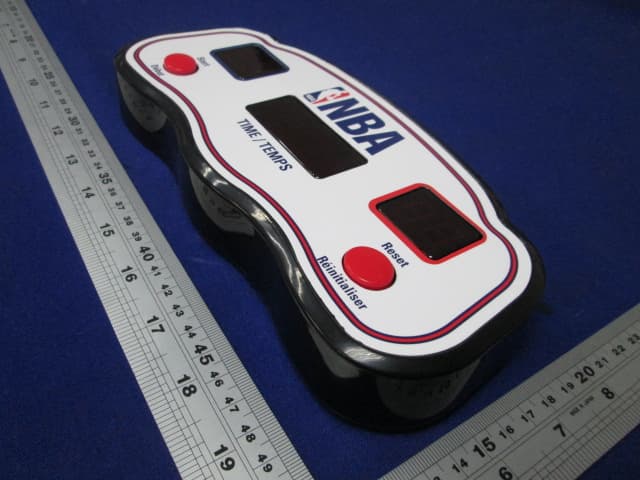
Aug 09, 2015Wireless electronic basketball with LED screen
Equipment Class
CYY - Communications Receiver used w/Pt 15 Transmitter