2AFF5W01Sensation 3.0
One Media Partners Inc.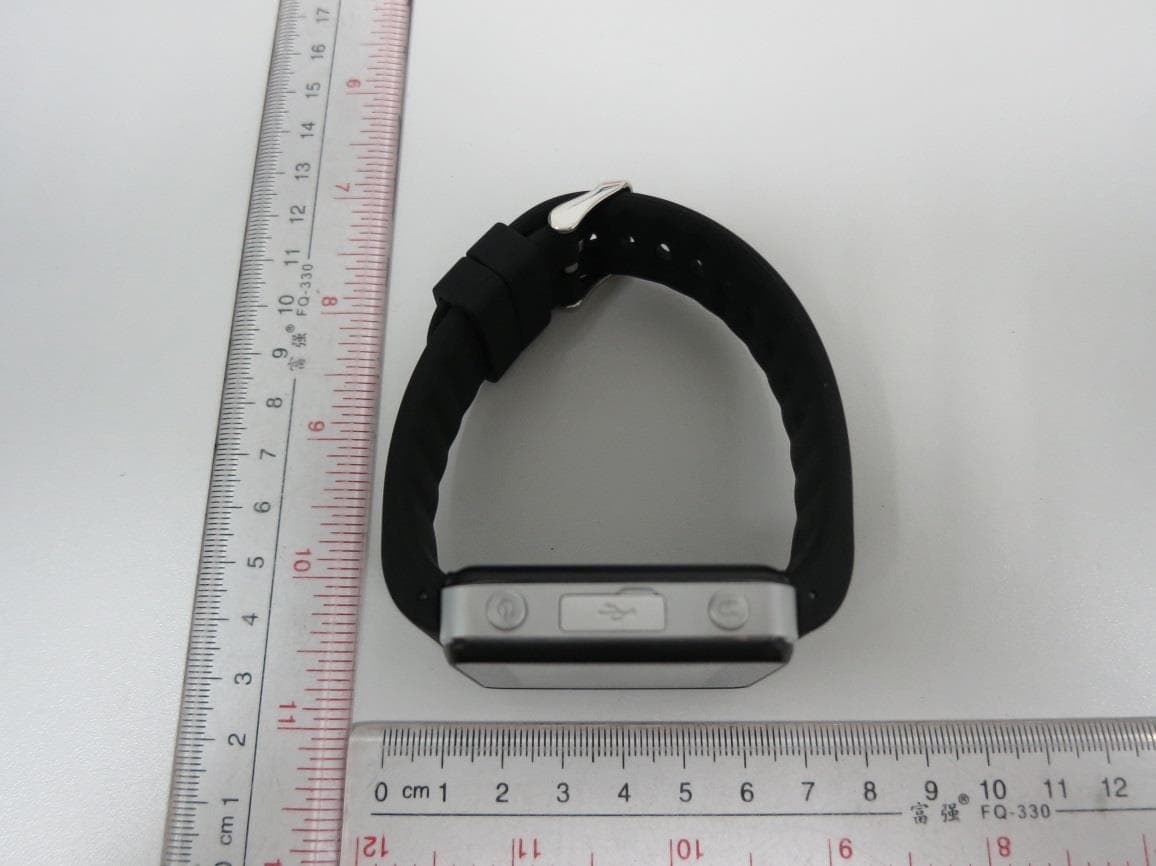
Click to zoom
Application Details
- Equipment Class
- PCT - PCS Licensed Transmitter worn on body
- Date of Grant
- Aug 23, 2015
- Application Purpose
- Original Equipment
- Date of Application
- Aug 23, 2015
- Equipment Note
- Sensation 3.0
- Frequency Range
- 1850.20000000 - 1909.80000000
- Company
- One Media Partners Inc.
- Country
- United States
Documents & Files
Document Text
Text extracted from the exhibit documents filed with the FCC. Open a document above to read the original.
Users Manual
Description:Sensation 3.0 Instruction Manual Model:W01 General Information Please read the Quick Start Manual for the Sensation 3.0 before using it for the best user experience and to ensure proper and safe use. Safety Precautions: Always follow the basic precautions listed below. These precautions include, but are not limited to the following: 1.Do not allow water to enter into the unit or allow the unit to become wet. Like any cellular device it can be damaged. Though it is unlikely, on rare occasions a fire or an electrical shock could occur. 2.Do not modify the unit. Doing so could result in a fire or an electrical shock. 3.Do not put any burning items, such as candles, on the unit. 4. The Sensation 3.0 is not a certified medical device. It should not be relied upon for diagnosis or prognosis. Consult your physician if necessary. The Sensation 3.0 uses a 2G Mini-SIM card. The Sensation 3.0 uses GPRS transmission and acquisition data connections. The Sensation 3.0 currently is only supported by a 2G network. In some regions a poor quality network operator may affect the performance of the device. An inferior network may result in service disruptions. The Company does not assume any responsibility in such an event. It don’t support the hot-spot mode. This product should only be used for daily monitoring references. It should not be used for self-diagnosis of a disease or as a basis for prescription. In the event of a long-term illness or in the case of abnormal measurements, visit your physician. A comprehensive physical examination may be necessary. Always follow your doctor's advice and instructions. Installing the SIM card: Open the SIM card flap. When the watch is powered OFF, insert the SIM card with the gold- colored chip facing up into the holder slot. Use only compatible 2G SIM cards (GSM) Charging the Battery: Plug the USB data cable into a wall electrical outlet. Next connect the micro-USB end of the cable to the watch. Charge your Sensation 3.0 Sensor watch. The silver insert on the power adapter cable should face “silver side up” when inserting into the watch. The efficiency of USB charging power varies significantly from country to country depending on the local voltage. SIM card slot Power/Home button Back/SOS button USB Port Power/Home button Press and hold the button for three seconds to power “On” or power “OFF.” Short press to return to the default clock page. When the Sensation 3.0 shows the clock page, short press the button to activate the voice time feature to tell you what the current time is. Back/SOS button Short Press the SOS button to exit a screen and to return to the previous menu. Long Press the button to call the pre set SOS emergency number you select. The emergency number needs to be pre set in advance in the Sensation 3.0 App or on the web site. Clock – Time feature Your clock face can be set to either a digital or analog clock interface. Slide the clock screen to switch to the desired screen. Connectivity applications The Sensation 3.0 “Health Day” application only connects to Android based mobile devices at this time. Download the “Health Day ” App to your Android based Smart Phone by scanning the QR code contained here on the cover page of this User Manual or on the web site. The App first needs to be installed and turned on in order to set the emergency phone number. The App will guide you through the scanning and the watch setting process. The App can add several users and multiple devices. One App can view and manage the health data of up to ten users. The main App features include: Heart rate monitoring, Pedometer, GPS positioning, Blood pressure, Blood Sugar (with a combination to a second device), Sleep Monitoring. Reminders and Electronic fences. Health Monitoring parameters. Heart Rate Measurement Place the heart rate sensor at the bottom of the watch flush against the skin. There must be no distance between the watch and the skin where outside light can enter for the most accurate data. Tighten the watch strap snuggly to prevent outside light from entering from the side. Click the App icon to see the User’s heart rate measurement history. Pedometer The pedometer measurement function automatically starts when the watch is turned on. You can record your number of steps taken, as well as measure the total amount of calories consumed performing various basic activities. Interval Step: Record the number of steps and your calories consumption over a certain time period. View your heart rate during exercise. Click the green button to start the time running or to pause the time. Press the "Reset" icon on the top of the window to reset the Clock and begin the Stop Watch counting of seconds all over again. The watch will display the results of the exercise. Skin Temperature Measurement Measure your skin temperature. The skin temperature measurement function automatically starts when the watch is turned on. Click the App icon to see the User’s temperature history. Make a Phone Call Enter the phone number and click. Sleep Monitoring Set the sleep time setting on the App and turn on the desired sleep monitoring features. You can set the times you want to go to sleep and when to wake up. The Sensation 3.0 monitors your sleep and heart rate. It measures the User's sleep time and their deep sleep ratio to determine the level and quality of their sleep. Click the App icon to see the User’s sleep measurement history. Reminders Set the reminder features on the App. You can set the time to remind the User to exercise, go to an appointment or to take medication. This Sensation 3.0 reminder feature can be set to vibrate or to ring. Blood Pressure Connect a separate blood pressure meter by Bluetooth to your Sensation 3.0 The data is automatically transmitted to the Smart Phone. Click the App icon to see the User’s blood pressure history. Speed Dial Tap the icon to make the call. The Sensation 3.0 allows the User to set up to 4 speed dial numbers. It can set three…
Text truncated - open the document above for the full version.
External Photos
A Test Lab Techno Corp. External Photos A Test Lab Techno Corp. A Test Lab Techno Corp. A Test Lab Techno Corp.
ID Label/Location Info
Lable Location
Internal Photos
A Test Lab Techno Corp. Internal Photos A Test Lab Techno Corp. A Test Lab Techno Corp. A Test Lab Techno Corp. A Test Lab Techno Corp. GSM Antenna BT Antenna
RF Exposure Info
A Test Lab Techno Corp. Changan Lab:No. 140 -1, Changan Street, Bade City, Taoyuan County, Taiwan R.O.C. Te l:886-3-271-0188 / Fax:886-3-271-0190 SAR EVALUATION REPORT Test Report No. : 1507FS17-03 Applicant : One Media Partners Inc. Applicant Address : 1701 E. Woodfield Road, Suite 315, Schaumburg, IL 60173,USA Manufacture : Yinuo Technologies, Ltd Manufacture Address : Rm 409-410, Building A, Pengnian University City Area Honghualing Industrial District 1213 Liuxian Avenue,Xili, Nanshan District, Shenzhen,China Product Type : Sensation 3.0 Trade Name : OneMedia Model Number : W01 Date of Received : Jul. 14, 2015 Test Period : Jul. 22 ~ Jul. 24, 2015 Date of Issued : Aug. 21, 2015 Test Environment : Ambient Temperature: 22 ± 2 ° C Relative Humidity:40 - 70 % Standard : ANSI/IEEE C95.1-1999/ IEEE Std. 1528-2003/ IEEE Std. 1528a-2005/47 CFR Part §2.1093; KDB 865664 D01 SAR measurement 100 MHz to 6 GHz v01r03 KDB 865664 D02 RF Exposure Reporting v01r01 KDB 447498 D01 General RF Exposure Guidance v05r02 Test Lab Location : Chang-an Lab 1. The test operations have to be performed with cautious behavior, the test results are as attached. 2. The test results are under chamber environment of A Test Lab Techno Corp. A Test Lab Techno Corp. does not assume responsibility for any conclusions and generalizations drawn from the test results with regard to other specimens or samples. 3. The measurement report has to be written approval of A Test Lab Techno Corp. It may only be reproduced or published in full. This report shall not be reproduced except in full, without the written approval of A Test Lab Techno Corp. The test results in the report only apply to the tested sample. Approved By : Tested By : (Bill Hu) (Sky Chou) Report Number: 1507FS-03Page 1 of 79 ©2015 A Test Lab Techno Corp. Contents 1. Summary of Maximum Reported SAR Value................................................................................................. 1 2. Description of Equipment under Test (EUT).................................................................................................. 1 3. Introduction..................................................................................................................................................... 2 3.1 SAR Definition ................................................................................................................................... 2 4. SAR Measurement Setup.............................................................................................................................. 3 4.1 DASY E-Field Probe System ............................................................................................................ 4 4.1.1 E-Field Probe Specification.............................................................................................................. 5 4.1.2 E-Field Probe Calibration process .................................................................................................. 6 4.2 Data Acquisition Electronic (DAE) System..................................................................................... 7 4.3 Robot .................................................................................................................................................. 7 4.4 Measurement Server ......................................................................................................................... 7 4.5 Device Holder .................................................................................................................................... 8 4.6 Phantom - SAM v4.0 .......................................................................................................................... 8 4.7 Data Storage and Evaluation............................................................................................................ 9 4.7.1 Data Storage ...................................................................................................................................... 9 4.7.2 Data Evaluation................................................................................................................................ 10 5. Tissue Simulating Liquids............................................................................................................................ 12 5.1 Ingredients ....................................................................................................................................... 13 5.2 Recipes............................................................................................................................................. 13 5.3 Liquid Depth .................................................................................................................................... 14 6. SAR Testing with RF Transmitters................................................................................................................ 15 6.1 SAR Testing with GSM/GPRS Transmitters.................................................................................. 15 6.2 Power reduction .............................................................................................................................. 15 6.3 Conducted Power............................................................................................................................ 15 6.4 Stand-alone SAR Evaluate ............................................................................................................. 17 6.5 Simultaneous Transmitting Evaluate ............................................................................................ 18 6.5.1 Estimated SAR................................................................................................................................. 18 6.5.2 Sum of 1-g SAR of all simultaneously transmitting..................................................................... 18 6.5.3 SAR to peak location separation ratio (SPLSR)...…
Text truncated - open the document above for the full version.
Test Report
A Test Lab Techno Corp. Report Number:1507FR28 - 1 - FCC 47 CFR PART 22H and 24E Test Report Product Type : Sensation 3.0 Applicant : One Media Partners Inc. Address : 1701 E. Woodfield Road, Suite 315, Schaumburg, IL 60173, USA Trade Name : OneMedia Model Number : W01 Test Specification : FCC 47 CFR PART 22H: Oct, 2012 FCC 47 CFR PART 24E: Oct, 2012 ANSI/TIA-603-C-2004 Application Purpose : Original Receive Date : July 08, 2015 Test Period : July 09, 2015 to July 29, 2015 Issue Date : July 30, 2015 Issue by A Test Lab Techno Corp. No. 140-1, Changan Street, Bade City, Taoyuan County 334, Taiwan R.O.C. Te l:+886-3-2710188 / Fax:+886-3-2710190 Taiwan Accreditation Foundation accreditation number: 1330 Note: This report shall not be reproduced except in full, without the written approval of A Test Lab Techno Corp. This document may be altered or revised by A Test Lab Techno Corp. personnel only, and shall be noted in the revision section of the document. The client should not use it to claim product endorsement by TAF, or any government agencies. The test results in the report only apply to the tested sample. A Test Lab Techno Corp. Report Number:1507FR28 - 2 - Revision History Rev. Issue Date Revisions Revised By 00 July 30, 2015 Initial Issue A Test Lab Techno Corp. Report Number:1507FR28 - 3 - Verification of Compliance Issued Date: 07/30/2015 Product Type : Sensation 3.0 Applicant : One Media Partners Inc. Address : 1701 E. Woodfield Road, Suite 315, Schaumburg, IL 60173, USA Trade Name : OneMedia Model Number : W01 FCC ID : 2AFF5W01 EUT Rated Voltage : 3.7V/360mAh Test Voltage : 120 Vac / 60 Hz Applicable Standard : FCC 47 CFR PART 22H: Oct, 2012 FCC 47 CFR PART 24E: Oct, 2012 ANSI/TIA-603-C-2004 Application Purpose : Original Test Result : Complied Performing Lab. : A Test Lab Techno Corp. No. 140-1, Changan Street, Bade City, Taoyuan County 334, Taiwan R.O.C. Te l:+886-3-2710188 / Fax:+886-3-2710190 Taiwan Accreditation Foundation accreditation number: 1330 http://www.atl-lab.com.tw/e-index.htm The above equipment was tested by A Test Lab Techno Corp. The test data, data evaluation, test procedures, and equipment configurations shown in this report were made in accordance with the procedures given in ANSI C63.4: 2009 and the energy emitted by the sample tested as described in this report is in compliance with the requirements of FCC Rules Part 22H, Part 24E. The test results of this report relate only to the tested sample identified in this report. Approved By : Reviewed By : (Manager) (Murphy Wang) (Testing Engineer) (Fly Lu) A Test Lab Techno Corp. Report Number:1507FR28 - 4 - TABLE OF CONTENTS 1 General Information ..................................................................................................... - 6 - 1.1. EUT Description ................................................................................................................... - 6 - 1.2. Mode of Operation ................................................................................................................ - 7 - 1.3. EUT Exercise Software ......................................................................................................... - 7 - 1.4. Configuration of Test System Details ................................................................................... - 8 - 1.5. Test Site Environment ........................................................................................................... - 8 - 1.6. Summary of Test Result ........................................................................................................ - 9 - 2 RF Output Power Test ................................................................................................ - 10 - 2.1. Limit .................................................................................................................................... - 10 - 2.2. Test Instruments .................................................................................................................. - 10 - 2.3. Test Setup ............................................................................................................................ - 10 - 2.4. Test Procedure ..................................................................................................................... - 11 - 2.5. Uncertainty .......................................................................................................................... - 11 - 2.6. Test Result ........................................................................................................................... - 11 - 3 CCDF Procedure for PAPR ........................................................................................ - 12 - 3.1. Limit:................................................................................................................................... - 12 - 3.2. Test Procedure: .................................................................................................................... - 12 - 3.3. Test result ............................................................................................................................ - 12 - 4 Effective Radiated Power / Equivalent Isotropic Radiated Power Test ................. - 13 - 4.1. Limit .................................................................................................................................... - 13 - 4.2. Test Instruments .................................................................................................................. - 13 - 4.3. Setup ................................................................................................................................... - 14 - 4.4. Test Procedure ..................................................................................................................... - 15 - 4.5. Uncertainty ...........................................................................................................…
Text truncated - open the document above for the full version.
Test Setup Photos
SAR Test Setup Photographs EUT Side Definition Mode Side 1 Front 2 Back n o Report Number: 1507FS17-01Page 1 of 3 ©2015 A Test Lab Techno Corp. Phantom Position: Flat EUT side:Front Spacing to phantom: 10 mm Accessory:N/A Liquid: head tissue liquid EUT Side 2 Report Number: 1507FS17-01Page 2 of 3 ©2015 A Test Lab Techno Corp. Phantom Position: Neck EUT side:Back Spacing to phantom: 0 mm Accessory:N/A Liquid: body tissue liquid EUT Side 2 Report Number: 1507FS17-01Page 3 of 3 ©2015 A Test Lab Techno Corp.
Test Setup Photos
A Test Lab Techno Corp. Setup Photograph Radiated Emissions Below 1 GHz A Test Lab Techno Corp. Setup Photograph Radiated Emissions Above 1 GHz
Contact Information
Applicant
Robert J. Wagner
Test Firm
Eurofins E&E Wireless Taiwan Co., LtdFly LU
Technical Specifications
| # | Rule Parts | Frequency Range | Power Output | Emission | Tolerance |
|---|---|---|---|---|---|
| 2 | 24E | 1.85 GHz - 1.91 GHz | 705.00 mW | 246KGXW | 0.02 ppm |