2AFSGF4Bluetooth speaker
Dongguan Jin wen hua digital technology Co., LTD.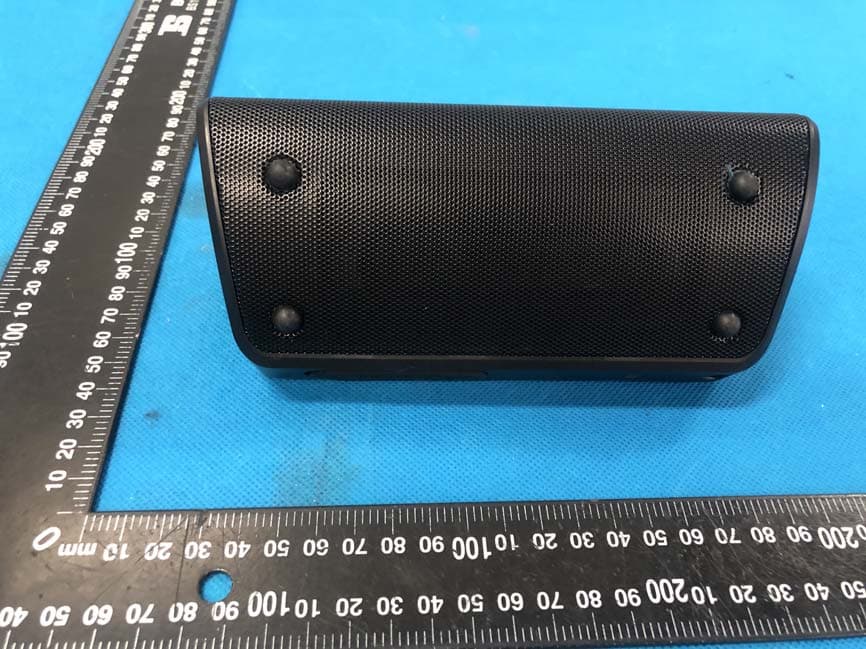
Click to zoom
Application Details
- Equipment Class
- DSS - Part 15 Spread Spectrum Transmitter
- Date of Grant
- Sep 02, 2020
- Application Purpose
- Original Equipment
- Date of Application
- Sep 02, 2020
- Equipment Note
- Bluetooth speaker
- Frequency Range
- 2402.00000000 - 2480.00000000
- Country
- China
Documents & Files
Document Text
Text extracted from the exhibit documents filed with the FCC. Open a document above to read the original.
Users Manual
Wireless Waterproof Speaker Model: AY-SPKF4 microUSB Charging Port AUX-in Port Play/Pause /Hands-free Microphone Power Vol - / Previous Track Vol+ / Next Track Model: AY-SPKF4 Size: 7” x 3” x 3” Weight: 18.8 oz BT Version: V5.0 Waterproof Level: IPX7 Power Supply: 3.7V 5000mAh Power(W): 2*15W BT distance: 48ft Max decibel: 80dB Charging Voltage: 5V/2A Charging Time: 4.5 hours Playtime: 24 hours 1*Waterproof Speaker 1*USB Charging Cable 1*3.5mm Audio Cable 1*User Manual1*W rist Strap Specifications Package Included 3.Play music after the BT is well paired. 4.When there is a phone call coming, answering and hanging it up via pressing the button of Pause once. Long press the button of Pause to reject the call if necessary . B:Aux-in mode 1.The speaker will be switched in Aux-in mode once the Aux-in cord is inserted. 2.The speaker can be connected with computer , MP3 player by Aux-in cord. 3.The BT of AY-SPKF4 can not be searched in Aux-in mode. 3.Low battery prompt When the battery power is lower than 10%, there will be a voice promot (Low Electric Alarm) every 15 minutes. 4.TWS function: A.T urn on the two speakers B.Press on the volume butten"+"and "-" at the same time . You will hear "ding ding ding". C.Please wait for about 2 minutes, and then you will hear “pairing”. D.Turn on your phone bluetooth , choose “AYSPK-F4”,you can hear “pairing” again. Then you can enjoy the TWS function. 5.How to connect 01 speaker to Alexa Echo 2nd Generation? Actually, first you must to open the speaker bluetooth , then from the Alexia app, ettings, Alexia Echo. Correction: From Alexia app, Settings, Device Settings, Echo, Bluetooth Devices, Add device. Worked just fine. Operations 1.Long Press the button"POWER", the indicator will turn to green. The speaker will be in BT mode automatically without Aux-in cable. 2.The speaker will be switched in Aux-in mode automatically once Aux-in cable is inserted. A:BT mode operation: 1.Speaker will be paired with the previous device in 30S automatically . The green indicator will turn to blue once it paired (The pairing time will be dif ferent for different devices.) 2.T urn on the BT in your device settings and select AY -SPKF4 until voice announced. The indicator will turn from green to blue once it is paired successfully. Notice FAQ The speaker will be powered off automatically after 2 minutes if there is neither connecting nor working and will be powered off automatically after 15 minutes if it is not working even though connected with BT. The speaker stops playing music if it is submerged in the water totally since the water pressure. After-sale Service This product is guaranteed for a period of 12 months from the date of purchase, if any problems, please contact us with Email [email protected] More information and promotions, please click: www.aylisten.com 1.Poor sound quality Please make sure the speaker and device is in effective transmission distance (48 feet) and there is no barrier between them. 2.BT can not be paired A Please ensure that both the cell phone and the speaker turn on the BT. The indicator for the speaker will show green when the BT turns on. B Please ensure that there is no Aux-in cord inserted,BT will be disconnected oncethe Aux-in cord in. C The speaker could only be paired with one device at one time.You need to clear the record from the previous device. 3.Can not charge the speaker Please change another USB Cable to try . 1, Power: Long press the button to turn ON/OFF the speaker . (The indicator will be green when the speaker turns on and turns to blue once paired. Press the button twice to disconnect the BT) 2, Volume- / Previous: Short press for volume down and long press to play previous song. (In BT condition) 3, Volume+ / Next: Short press for volume up and long press to play next song. (In BT condition) 4, Pause/Play/Hands-free: In play mode,short press the button to pause or play music. When there is a call coming,short press the button to answer or hang it up, long press it for about 2 seconds to reject 5, Line In PORT: Insert 3.5mm Aux-in cable, BT will be disconnected when change toline in mode. 6, USB charging port: Charging voltage 5V/2A.The indicator will be red when charging and turns off after fully charged. Altavoz inalámbrico resistente al agua Modelo: AY-SPKF4 Puerto de carga micro del USB Puerto AUX-in Reproducir/pausa /Hands-Free Micrófono Poder Vol-/Pista anterior Vol +/Siguiente pista Operaciones Modelo: AY-SPKF4 Tamaño de los productos: 7” x 3” x 3” Peso: 18.8 oz Versión de BT: V5.0 Nivel de agua: IPX7 Fuente de alimentación: 3.7V 5000mAh Potencia(W): 2*15W Distancia de BT: 48ft Decibeles máx: 80dB Voltaje de carga: 5V/2A Tiempo de carga: 4.5 horas Tiempo de juego: 24 horas 1 * Altavoz resistente al agua 1 * Cable de carga USB 1 * Cable de audio de 3.5 mm 1 * Manual de usuario 1 * Correa para la muñeca Especificaciones Paquete incluido anuncie la voz. El indicador cambiará de verde a azul una vez emparejado con éxito. 3. Reproduzca música después de que el BT esté bien sincronizado. 4. Cuando hay una llamada telefónica, contestar y colgar presionando el botón de Pausa una vez. Mantenga presionado el botón de Pausa para rechazar la llamada si es necesario. B: modo Aux-in 1.El altavoz se conectará en modo Aux-in una vez que se inserta el cable auxiliar. 2.El altavoz se puede conectar con la computadora, reproductor de MP3 por cable Aux-in. 3.El BT de AY-SPKF4 no se puede buscar en modo Aux-in. 3. Indicador de batería baja: Cuando la energía de la batería es inferior al 10%, habrá un mensaje de voz (Alarma eléctrica baja) cada 15 minutos. 4. Función de TWS: A.Encienda los dos altavoces. B. Presione el botón de volumen "+" y "-" al mismo tiempo. Escuchará "ding ding ding". C. Espere unos 2 minutos, y luego escuchará "emparejamiento". D. Encienda el teléfono Bluetooth, elija "AYSPK-F4", puede escuchar "emparejamiento" de nuevo. Entonces podrás disfrutar de la función TWS. 5. ¿Cómo conectar el altavoz 01 a la segunda ge…
Text truncated - open the document above for the full version.
Cover Letter(s)
Dongguan Jin wen hua digital technology Co., LTD. Agent Authorization Company: Dongguan Jin wen hua digital technology Co., LTD. Address: No.1 Hua Da Road, Long Bei Ling Village, Tangxia Town, Dongguan City Guanggong, China Product Name: Bluetooth speaker Model Number(s): AY-SPKF4 Product Description: Bluetooth speaker We authorize MiCOM Labs Inc., 575 Boulder Court, Pleasanton, California 94566, USA, to act on our behalf on all matters concerning the certification of above named equipment. We declare that MiCOM Labs Inc. is allowed to forward all information related to the approval and certification of equipment to the regulatory agencies as required and to discuss any issues concerning the approval application. Any and all acts carried out by MiCOM Labs on our behalf shall have the same effect as acts of our own. Signature: Date: Aug. 31, 2020 Name: Luo Peng Title: Manager Company: Dongguan Jin wen hua digital technology Co., LTD.
Cover Letter(s)
Dongguan Jin wen hua digital technology Co., LTD. Office of Engineering Technology Federal Communications Commission 7435 Oakland Mills Road Columbia, MD 21046 USA Date: Aug. 31, 2020 Subject; Request for Confidentiality FCC ID: 2AFSGF4 To Whom It May Concern, Pursuant to the provisions of the Commission’s rules Title 47 Sections §0.457 and §0.459, we are requesting the Commission to withhold the following attachment(s) as confidential documents from public disclosure indefinitely. These documents contain detailed system and equipment descriptions and are considered as proprietary information in operation of the equipment. The public disclosure of these documents might be harmful to our company and would give competitors an unfair advantage in the market. Schematic Diagram Block Diagram Parts List Operational Description Tune-up Procedure It is our understanding that all measurement test reports, FCC ID label format and correspondence during the certification review process cannot be granted as confidential documents and this information will be available for public review once the grant of equipment authorization is issued. Sincerely, Signature: Name: Luo Peng Title: Manager
External Photos
Annex A External Photos Report No.:HK2008172206-E Page 1 of 4 Report No.:HK2008172206-E Page 2 of 4 Report No.:HK2008172206-E Page 3 of 4 Report No.:HK2008172206-E Page 4 of 4
ID Label/Location Info
FCC ID LABEL: Ca. 27*30MM Label Location FCC ID: 2AFSGF4
Internal Photos
Annex B Internal Photo Report No.:HK2008172206-E Page 1 of 4 Report No.HK2008172206-E Page 2 of 4 Antenna Report No.HK2008172206-E Page 3 of 4 Report No.HK2008172206-E Page 4 of 4 Antenna
RF Exposure Info
FCC RF Exposure EUT Description: Bluetooth speaker Model No.: AY‐SPKF4 FCC ID: 2AFSGF4 1. Limits According to KDB 447498 D01 General RF Exposure Guidance v06 The 1‐g and 10‐g SAR test exclusion thresholds for 100 MHz to 6 GHz at test separation distances ≤50 mm are determined by: [(max power of channel, including tune‐up tolerance, mW)/(min. test separation distance, mm)]·[√ f(GHz)]≤3.0 for 1‐g SAR and ≤ 7.5 for 10‐g extremity SAR, Where: Result=P/D*√F F= the RF channel transmit frequency in GHz P=Maximum turn‐up power in mw D=Min. test separation distance in mm 2. Test Result of RF Exposure Evaluation 2.4G Output power (dBm) Tune Up Power (dBm) Max Tune Up power dBm/mW Min test separatio n distance mm Result Limit SAR Test Exclusion BT 2.963 2±1 3/1.9953 5 0.62844 3.0 Pass Note: PK Output power= conducted power. Conducted power see the test report HK2008172206‐E, antenna gain=0dBi Per KDB 447498 D01, when the minimum test separation distance is < 5 mm, a distance of 5 mm is applied to determine RF Exposure test exclusion. The test exclusion threshold is 0.62844 which is<= 3, RF Exposure testing is not required. Note: Exclusion Thresholds Results=[(max. power of channel, including tune-up tolerance, mW)/(min. test separation distance, mm)] ·[√f(GHz)] f(GHz) is the RF channel transmit frequency in GHz Distance=5mm
Test Report
Page 1 of 48 Report No.: HK2008172206-E TEST REPORT FCC PART 15 SUBPART C 15.247 Test report On Behalf of Dongguan Jin wen hua digital technology Co., LTD. For Bluetooth speaker Model No.: AY-SPKF4 FCC ID: 2AFSGF4 Prepared for : Dongguan Jin wen hua digital technology Co., LTD. No.1 Hua Da Road, Long Bei Ling Village, Tangxia Town, Dongguan City Guanggong, China Prepared By : Shenzhen HUAK Testing Technology Co., Ltd. 1F, B2 Building, Junfeng Zhongcheng Zhizao Innovation Park, Fuhai Street, Bao'an District, Shenzhen City, China Date of Test: Aug. 14, 2020 ~ Aug. 20, 2020 Date of Report: Aug. 20, 2020 Report Number: HK2008172206-E Page 2 of 48 Report No.: HK2008172206-E TEST RESULT CERTIFICATION Applicant’s name ................. : Dongguan Jin wen hua digital technology Co., LTD. Address ................................. : No.1 Hua Da Road, Long Bei Ling Village, Tangxia Town, Dongguan City Guanggong, China Manufacture's Name ............ : Dongguan Jin wen hua digital technology Co., LTD. Address ................................. : No.1 Hua Da Road, Long Bei Ling Village, Tangxia Town, Dongguan City Guanggong, China Product description Trade Mark: N/A Product name ........................... : Bluetooth speaker Model and/or type reference : AY-SPKF4 Standards ............................. : 47 CFR FCC Part 15 Subpart C 15.247 This publication may be reproduced in whole or in part for non-commercial purposes as long as the Shenzhen HUAK Testing Technology Co., Ltd. is acknowledged as copyright owner and source of the material. Shenzhen HUAK Testing Technology Co., Ltd. takes no responsibility for and will not assume liability for damages resulting from the reader's interpretation of the reproduced material due to its placement and context. Date of Test ............................................ : Date (s) of performance of tests ............. : Aug. 14, 2020 ~ Aug. 20, 2020 Date of Issue ........................................... : Aug. 20, 2020 Test Result ............................................... : Pass Prepared by: Project Engineer Reviewed by: Project Supervisor Approved by: Jasou Zhou Page 3 of 48 Report No.: HK2008172206-E Table of Contents Page 1. SUMMARY............................................................................................................................................................ 5 1.1. TEST STANDARDS ..................................................................................................................................................... 5 1.2. TEST DESCRIPTION ........................................................................................................................................................ 5 1.3. TEST FACILITY .............................................................................................................................................................. 6 1.4. STATEMENT OF THE MEASUREMENT UNCERTAINTY ............................................................................................................... 6 2. GENERAL INFORMATION ....................................................................................................................................... 7 2.1. ENVIRONMENTAL CONDITIONS ........................................................................................................................................ 7 2.2. GENERAL DESCRIPTION OF EUT ...................................................................................................................................... 7 2.3. DESCRIPTION OF TEST MODES AND TEST FREQUENCY .......................................................................................................... 8 2.4. EQUIPMENTS USED DURING THE TEST .............................................................................................................................. 9 2.5. RELATED SUBMITTAL(S) / GRANT (S) .............................................................................................................................. 10 2.6. MODIFICATIONS ......................................................................................................................................................... 10 2.7. DESCRIPTION OF TEST SETUP ................................................................................................................................ 10 3. TEST CONDITIONS AND RESULTS ......................................................................................................................... 11 3.1. CONDUCTED EMISSIONS TEST ....................................................................................................................................... 11 3.2. RADIATED EMISSIONS AND BAND EDGE .......................................................................................................................... 14 3.3. MAXIMUM PEAK CONDUCTED OUTPUT POWER ............................................................................................................... 25 3.4. 20DB BANDWIDTH ..................................................................................................................................................... 26 3.5 FREQUENCY SEPARATION ..................................................................................................................................................... 30 3.5. NUMBER OF HOPPING FREQUENCY ................................................................................................................................. 32 3.6. TIME OF OCCUPANCY (DWELL TIME) .............................................................................................................................. 34 3.7. OUT‐OF‐BAND EMISSIONS ............................................................................................................................................ 38 3.8. PSEUDORANDOM FREQUENCY HOPPING SEQUENCE ....................................................................…
Text truncated - open the document above for the full version.
Test Setup Photos
Test Model:AY-SPKF4 Radiated Emission Conducted Emission
Contact Information
Applicant
Luo Peng(Manager)
Technical Contact
Test Firm
Shenzhen HUAK Testing Technology Co., Ltd.Jason Zhou
[email protected]+86-755-23029901
Technical Specifications
| # | Rule Parts | Frequency Range | Power Output |
|---|---|---|---|
| 1 | 15C | 2.40 GHz - 2.48 GHz | 1.98 mW |
Other Applications from Dongguan Jin wen hua digital technology Co., LTD.

2AFSG-S335
Mar 09, 2026Remote Control
Equipment Class
DTS - Digital Transmission System
2AFSGHP-K32
Sep 17, 2024Wireless speaker
Equipment Class
DSS - Part 15 Spread Spectrum Transmitter
2AFSGHP-8003
Sep 03, 2024Wireless Headphone
Equipment Class
DSS - Part 15 Spread Spectrum Transmitter
2AFSG-G305
Aug 22, 2024wireless earbuds
Equipment Class
DSS - Part 15 Spread Spectrum Transmitter
2AFSG-S311
Aug 22, 2024Bluetooth Speaker
Equipment Class
DSS - Part 15 Spread Spectrum Transmitter